Notifications, APNs and Live Activities
|
This content was generated with the assistance of AI and should be verified against the official documentation before being relied on in production; see the section bibliography for the reference material consulted while preparing these pages. |
Notifications are how an app speaks while it isn’t open. They come in two kinds. A local notification is scheduled by the app itself: "remind me about this note at 9 tomorrow". A remote notification is sent by a server through the Apple Push Notification service (APNs): "Ana shared a note with you". A Live Activity goes one step further. It keeps a small, continuously updated view of one ongoing event on the Lock Screen and in the Dynamic Island, and the system forwards it to a paired Apple Watch, CarPlay and the Mac. This page adds all three to FieldNotes, using the 2026 baseline of this section: iOS, iPadOS, macOS, watchOS and visionOS 27, Xcode 27 and Swift 6.4, with a deployment minimum of 26. The FieldNotes pieces it introduces are:
-
NoteReminderScheduler, which asks for permission and schedules reminders in the categoryNOTE_REMINDER, with the actionsMARK_DONEandSNOOZE; -
the Notification Service Extension target
FieldNotesNotificationService, which decrypts shared notes and attaches their photos; -
FieldTripAttributesand theFieldTripLiveActivitywidget in theFieldNotesWidgetsextension, which show a field trip in progress.
Waking the app silently with a background push is covered on Background Execution. The provider server, the part that decides when to push and to whom, is ordinary back-end messaging work; see the Messaging Reference for queues, fan-out and delivery guarantees.
Asking Permission
Nothing reaches the screen until the person agrees. UNUserNotificationCenter.requestAuthorization(options:) shows
the system prompt once; after that, the answer lives in Settings and the call just returns it. Ask at a moment where
the value is obvious, such as when the person taps Remind Me for the first time, not at launch.
Provisional authorization avoids the prompt entirely. With .provisional, notifications are delivered quietly
to Notification Center, with buttons that let the person keep or turn off FieldNotes' notifications. It is a good
default for low-stakes content, and the app can still ask for full authorization later.
NoteReminderScheduler lives in FieldNotesServices, so the iOS, iPadOS, macOS, watchOS and visionOS targets share
it:
// Packages/FieldNotesKit/Sources/FieldNotesServices/Notifications/NoteReminderScheduler.swift
import Foundation
import UserNotifications
import FieldNotesModel

public struct NoteReminderScheduler: Sendable {
    public static let categoryIdentifier = "NOTE_REMINDER"
    public static let markDoneAction = "MARK_DONE"
    public static let snoozeAction = "SNOOZE"

    public init() {}

    private var center: UNUserNotificationCenter { .current() }

    /// Quiet, prompt-free delivery first; a full request when the person asks for a reminder.
    @discardableResult
    public func requestAuthorization(provisional: Bool) async throws -> Bool {
        var options: UNAuthorizationOptions = [.alert, .sound, .badge]
        if provisional { options.insert(.provisional) }
        return try await center.requestAuthorization(options: options)
    }

    /// True when reminders will actually be shown, loudly or quietly.
    public func canDeliver() async -> Bool {
        switch await center.notificationSettings().authorizationStatus {
        case .authorized, .provisional: true
        default: false
        }
    }
}At launch, FieldNotes calls requestAuthorization(provisional: true), which never shows a prompt. The first time the
person sets a reminder, the editor calls requestAuthorization(provisional: false), which shows the real prompt. If
the person declined earlier, canDeliver() returns false and the editor offers a button that opens Settings.
Local Notifications and Triggers
A local notification is a UNNotificationRequest: an identifier, the content (UNMutableNotificationContent) and a
trigger that says when to deliver it. Reusing an identifier replaces the pending request, which is exactly what a
"change the reminder time" edit needs. FieldNotes uses the note’s UUID as the identifier:
| Trigger | Fires | FieldNotes use |
|---|---|---|
|
After a number of seconds, optionally repeating (60 seconds minimum when repeating). |
Snooze for an hour. |
|
When the current date matches |
Remind me tomorrow at 9. |
|
When the device enters or leaves a circular region (iOS, iPadOS and watchOS only). |
Remind me when I’m back at this place, using the note’s |
// NoteReminderScheduler.swift (continued)
#if os(iOS) || os(watchOS)
import CoreLocation
#endif

extension NoteReminderScheduler {
    public func scheduleReminder(for note: Note, at date: Date) async throws {
        let components = Calendar.current.dateComponents([.year, .month, .day, .hour, .minute], from: date)
        let trigger = UNCalendarNotificationTrigger(dateMatching: components, repeats: false)
        try await center.add(request(for: note, trigger: trigger))
    }

    public func snooze(_ note: Note, for interval: TimeInterval = 60 * 60) async throws {
        let trigger = UNTimeIntervalNotificationTrigger(timeInterval: interval, repeats: false)
        try await center.add(request(for: note, trigger: trigger))
    }

    #if os(iOS) || os(watchOS)
    /// Fires when the person next arrives within 150 m of where the note was written.
    public func scheduleArrivalReminder(for note: Note) async throws {
        guard let location = note.location else { return }
        let region = CLCircularRegion(
            center: CLLocationCoordinate2D(latitude: location.latitude, longitude: location.longitude),
            radius: 150, identifier: note.id.uuidString)
        region.notifyOnEntry = true
        region.notifyOnExit = false
        let trigger = UNLocationNotificationTrigger(region: region, repeats: false)
        try await center.add(request(for: note, trigger: trigger))
    }
    #endif

    public func cancelReminder(for noteID: Note.ID) {
        center.removePendingNotificationRequests(withIdentifiers: [noteID.uuidString])
        center.removeDeliveredNotifications(withIdentifiers: [noteID.uuidString])
    }

    private func request(for note: Note, trigger: UNNotificationTrigger) -> UNNotificationRequest {
        let content = UNMutableNotificationContent()
        content.title = note.title
        content.body = String(note.body.prefix(120))
        content.sound = .default
        content.categoryIdentifier = Self.categoryIdentifier
        content.threadIdentifier = note.notebookID?.uuidString ?? "inbox"   // groups by notebook
        content.interruptionLevel = .timeSensitive
        content.userInfo = ["noteID": note.id.uuidString]
        return UNNotificationRequest(identifier: note.id.uuidString, content: content, trigger: trigger)
    }
}threadIdentifier groups reminders by notebook in Notification Center. The .timeSensitive interruption level lets
a reminder break through a Focus that allows time-sensitive notifications; it needs the Time Sensitive Notifications
capability. The location trigger takes a CLCircularRegion. Apple’s documentation marks that class for deprecation in the 27.2
SDKs, in favour of CLMonitor conditions for region monitoring, while UNLocationNotificationTrigger still takes it;
expect a deprecation warning from 27.2 on. Location triggers need When In Use location
authorization, covered on Location and Maps.
Categories and Actions
A category tells the system which buttons to show under a notification. It is registered once, at launch, and a
notification opts in by setting categoryIdentifier. Categories and actions superseded the pre-iOS-8 model where a
local or push notification was a fire-and-forget banner the person could only open or dismiss, and Live Activities
(below) go further still, keeping an event on screen and updating it instead of
posting one-off alerts. FieldNotes'
reminder category has two actions: Done, which runs in the background without opening the app, and Snooze 1
Hour:
// NoteReminderScheduler.swift (continued)
extension NoteReminderScheduler {
    public func registerCategories() {
        let markDone = UNNotificationAction(
            identifier: Self.markDoneAction,
            title: String(localized: "Done"),
            options: [.authenticationRequired],
            icon: UNNotificationActionIcon(systemImageName: "checkmark.circle"))
        let snooze = UNNotificationAction(
            identifier: Self.snoozeAction,
            title: String(localized: "Snooze 1 Hour"),
            options: [],
            icon: UNNotificationActionIcon(systemImageName: "clock.arrow.circlepath"))
        let reminders = UNNotificationCategory(
            identifier: Self.categoryIdentifier,
            actions: [markDone, snooze],
            intentIdentifiers: [],
            options: [.customDismissAction])
        center.setNotificationCategories([reminders])
    }
}.authenticationRequired makes the person unlock the device before Done runs, because it changes their data. An
action with .foreground would open the app instead. .customDismissAction asks the system to report the person
dismissing a reminder, too, so FieldNotes can clear its "reminder pending" badge. The button titles are localized as
described on Localization with String Catalogs.
Handling Notifications: UNUserNotificationCenterDelegate
The notification center’s delegate answers two questions: should this notification be shown while the app is in the foreground? and what did the person do with it? Set the delegate before the app finishes launching; otherwise a tap that launched the app is lost. FieldNotes sets it in the app delegate from App Structure and Life Cycle, using the async forms of both methods:
// FieldNotes/Notifications/NoteNotificationDelegate.swift
import UserNotifications
import FieldNotesServices

@MainActor
final class NoteNotificationDelegate: NSObject, UNUserNotificationCenterDelegate {
    private let reminders = NoteReminderScheduler()

    /// Foreground: show reminders as a banner instead of swallowing them.
    nonisolated func userNotificationCenter(
        _ center: UNUserNotificationCenter,
        willPresent notification: UNNotification
    ) async -> UNNotificationPresentationOptions {
        [.banner, .list, .sound]
    }

    /// The person tapped the notification or one of its actions.
    nonisolated func userNotificationCenter(
        _ center: UNUserNotificationCenter,
        didReceive response: UNNotificationResponse
    ) async {
        let action = response.actionIdentifier
        guard let idString = response.notification.request.content.userInfo["noteID"] as? String,
              let noteID = UUID(uuidString: idString) else { return }

        await handle(action, forNoteID: noteID)       // only Sendable values cross to the main actor
    }

    private func handle(_ action: String, forNoteID noteID: UUID) async {
        switch action {
        case NoteReminderScheduler.markDoneAction:
            reminders.cancelReminder(for: noteID)       // needs only the identifier
        case NoteReminderScheduler.snoozeAction:
            let store = AppServices.shared.store
            // An action can launch the app in the background, before any scene has loaded the store.
            if store.notes.isEmpty { await store.load() }
            guard let note = store.notes.first(where: { $0.id == noteID }) else { return }
            try? await reminders.snooze(note)
        case UNNotificationDefaultActionIdentifier:
            AppServices.shared.pendingNoteID = noteID    // ContentView navigates once its scene is up
        default:
            break
        }
    }
}AppServices is the small main-actor holder introduced on Background
Execution: it owns the one NoteStore that FieldNotesApp injects with .environment(store), so a delegate created
by the system reaches the same store even when no window exists. ContentView watches pendingNoteID with
.onChange(of:initial:), so a tap that cold-launched the app is handled as soon as the first scene appears, and runs
the same selection code as the fieldnotes://note/<uuid> deep link on
Navigation and Presentation. The delegate is installed at
launch together with the categories:
// FieldNotes/iOS/FieldNotesAppDelegate.swift (excerpt)
import UIKit
import UserNotifications
import FieldNotesServices

final class FieldNotesAppDelegate: NSObject, UIApplicationDelegate {
    private let notificationDelegate = NoteNotificationDelegate()

    func application(
        _ application: UIApplication,
        didFinishLaunchingWithOptions launchOptions: [UIApplication.LaunchOptionsKey: Any]? = nil
    ) -> Bool {
        UNUserNotificationCenter.current().delegate = notificationDelegate
        NoteReminderScheduler().registerCategories()
        Task { try? await NoteReminderScheduler().requestAuthorization(provisional: true) }
        application.registerForRemoteNotifications()
        return true
    }
}The macOS target does the same from its NSApplicationDelegate, and the watch app from its WKApplicationDelegate.
The center holds its delegate weakly, which is why the app delegate keeps a strong reference.
Remote Notifications and APNs
A remote notification travels from a provider (FieldNotes' server) to APNs, and from APNs to the device. The app’s part is small: register, send the resulting device token to the provider, and handle what arrives. The provider’s part is an authenticated HTTP/2 request per notification.
Figure: From provider to screen
JWT (.p8 key), apns-push-type: alert APNs->>Device: payload with mutable-content: 1 Device->>NSE: didReceive(_:withContentHandler:) NSE->>NSE: decrypt body, download photo NSE-->>Device: modified content (about 30 s budget) Device->>Device: show banner, Lock Screen, Notification Center Device-->>App: tap: userNotificationCenter(_:didReceive:)
Registering and the device token
Remote notifications need the Push Notifications capability, which adds the aps-environment entitlement
(development for Xcode builds, production for TestFlight and App Store builds). Registration does not need the
person’s permission; displaying alerts does. The token identifies this app on this device, can change at any time,
and must be sent to the provider every time it arrives. Part 1’s app delegate already forwards it to
PushRegistration, shown here:
// FieldNotes/Notifications/PushRegistration.swift
import Foundation

@MainActor
final class PushRegistration {
    static let shared = PushRegistration()
    private(set) var deviceToken: String?

    private init() {}

    /// Called from application(_:didRegisterForRemoteNotificationsWithDeviceToken:).
    func record(_ token: Data) {
        let hex = token.map { String(format: "%02x", $0) }.joined()
        guard hex != deviceToken else { return }
        deviceToken = hex
        Task { try? await upload(["deviceToken": hex], to: "devices") }
    }

    /// Live Activity tokens (below) go to the same provider, with the activity they belong to.
    func recordActivityToken(_ token: Data, activityID: String?) {
        let hex = token.map { String(format: "%02x", $0) }.joined()
        var body = ["activityToken": hex]
        if let activityID { body["activityID"] = activityID } else { body["kind"] = "push-to-start" }
        Task { try? await upload(body, to: "activity-tokens") }
    }

    private func upload(_ body: [String: String], to path: String) async throws {
        var request = URLRequest(url: URL(string: "https://api.fieldnotes.example.com/\(path)")!)
        request.httpMethod = "POST"
        request.setValue("application/json", forHTTPHeaderField: "Content-Type")
        request.httpBody = try JSONEncoder().encode(body)
        _ = try await URLSession.shared.data(for: request)
    }
}In the real app, the upload goes through NotesAPIClient with its authentication, as shown on
Networking: URLSession, Network Framework and ATS. application(_:didFailToRegisterForRemoteNotificationsWithError:) is
worth implementing too; in the Simulator, registration succeeds and the Simulator can receive pushes sent from Xcode or
the Push Notifications Console.
The payload
The payload is JSON of at most 4 KB (5 KB for VoIP). The aps dictionary holds keys the system understands; anything
else is custom data for the app. A shared reminder from a collaborator looks like this:
{
  "aps": {
    "alert": {
      "title": "Ana shared a reminder",
      "subtitle": "Coastal survey",
      "body": "Check the heron nest before 10:00"
    },
    "sound": "default",
    "badge": 3,
    "category": "NOTE_REMINDER",
    "thread-id": "notebook-2F6C1C9E",
    "interruption-level": "time-sensitive",
    "mutable-content": 1
  },
  "noteID": "9B1DEB4D-3B7D-4BAD-9BDD-2B0D7B3DCB6D",
  "photoURL": "https://api.fieldnotes.example.com/photos/5f1c.jpg",
  "sealedBody": "q8v3...base64..."
}category wires the push to the same Done and Snooze buttons as a local reminder. mutable-content: 1 routes it
through the service extension below. A background push instead carries only "content-available": 1, as described
on Background Execution.
Sending: token-based (.p8) provider authentication
The provider opens an HTTP/2 connection to api.sandbox.push.apple.com (development) or api.push.apple.com
(production) and posts to /3/device/<device token>. Token-based authentication is the modern choice: one .p8 signing
key from the developer account works for all of the team’s apps and never expires. For each connection the provider
signs a JSON Web Token with ES256, whose header carries the 10-character key ID (kid) and whose claims carry the team
ID (iss) and the issue time (iat). APNs rejects tokens older than one hour, and providers should not generate a new
one more than once every 20 minutes. Headers describe the notification:
# Development test from a terminal; the provider does the same over a persistent HTTP/2 connection.
# AUTHENTICATION_TOKEN is the ES256-signed JWT: header {"alg":"ES256","kid":"<KEY_ID>"},
# claims {"iss":"<TEAM_ID>","iat":<now>}.
curl --http2 \
  --header "authorization: bearer $AUTHENTICATION_TOKEN" \
  --header "apns-topic: com.example.fieldnotes" \
  --header "apns-push-type: alert" \
  --header "apns-priority: 10" \
  --header "apns-expiration: 0" \
  --header "apns-collapse-id: reminder-9B1DEB4D" \
  --data @shared-reminder.json \
https://api.sandbox.push.apple.com/3/device/$DEVICE_TOKENapns-topic is the bundle identifier (with a suffix for Live Activities, below). apns-push-type must match the
content: alert, background, liveactivity, voip and so on. apns-collapse-id replaces an earlier notification
with the same ID instead of stacking a new one. A 410 response means the token is no longer valid, and the provider
should delete it.
Everything behind that request, such as queueing notifications when a note is shared, fanning one event out to many devices, retrying on failure and deduplicating, is the provider’s problem, and it is the same problem as any other asynchronous delivery. The Messaging Reference covers those patterns, including delivery guarantees and idempotent consumers.
Notification Service Extension: FieldNotesNotificationService
A Notification Service Extension is a separate target that runs before an alert push is displayed, when the
payload has mutable-content: 1. It gets about 30 seconds to change the content and call the content handler; if it
runs out of time, serviceExtensionTimeWillExpire() must deliver whatever it has. Typical jobs are:
-
decrypting an end-to-end-encrypted body, so APNs and the provider never see plain text;
-
attaching media that is too big for the payload, by downloading it and adding a
UNNotificationAttachment; -
enriching the text from data the device has, such as the name of a notebook stored in the App Group.
FieldNotes' extension does the first two. It is added with File > New > Target > Notification Service Extension,
named FieldNotesNotificationService, and joins the App Group group.com.example.fieldnotes so it can read the shared
decryption key:
// FieldNotesNotificationService/NotificationService.swift
import UserNotifications
import CryptoKit

final class NotificationService: UNNotificationServiceExtension {
    private var contentHandler: ((UNNotificationContent) -> Void)?
    private var bestAttempt: UNMutableNotificationContent?

    override func didReceive(
        _ request: UNNotificationRequest,
        withContentHandler contentHandler: @escaping (UNNotificationContent) -> Void
    ) {
        guard let content = request.content.mutableCopy() as? UNMutableNotificationContent else {
            contentHandler(request.content)
            return
        }
        self.contentHandler = contentHandler
        bestAttempt = content

        // 1. Decrypt: the provider sealed the note text with a key shared through the App Group keychain.
        if let sealed = content.userInfo["sealedBody"] as? String,
           let combined = Data(base64Encoded: sealed),
           let key = SharedNotificationKey.load(),
           let box = try? ChaChaPoly.SealedBox(combined: combined),
           let plain = try? ChaChaPoly.open(box, using: key) {
            content.body = String(decoding: plain, as: UTF8.self)
        }

        // 2. Attach the photo, if there is one; otherwise deliver right away.
        guard let photo = (content.userInfo["photoURL"] as? String).flatMap(URL.init(string:)) else {
            contentHandler(content)
            return
        }
        nonisolated(unsafe) let deliver = contentHandler
        nonisolated(unsafe) let mutableContent = content
        Task {
            if let attachment = try? await Self.downloadAttachment(from: photo) {
                mutableContent.attachments = [attachment]
            }
            deliver(mutableContent)
        }
    }

    override func serviceExtensionTimeWillExpire() {
        // Out of time: show the decrypted text without the photo.
        if let contentHandler, let bestAttempt {
            contentHandler(bestAttempt)
        }
    }

    private static func downloadAttachment(from url: URL) async throws -> UNNotificationAttachment {
        let (downloaded, _) = try await URLSession.shared.download(from: url)
        let file = URL.temporaryDirectory.appending(path: "\(UUID().uuidString).jpg")
        try FileManager.default.moveItem(at: downloaded, to: file)
        return try UNNotificationAttachment(identifier: "photo", url: file, options: nil)
    }
}A few details matter:
-
The content handler is not
Sendable, so the example marks its copiesnonisolated(unsafe)before handing them to theTask. That is sound here because nothing else touches them concurrently; if the timer expires first, the system ignores the second call. -
The attachment file must be on disk when the handler is called; the system moves it into its own store.
-
The extension is a separate process with a small memory limit. It cannot see the app’s
NoteStore, only the App Group container and shared keychain items. -
SharedNotificationKeyis a small helper that reads aSymmetricKeyfrom the shared keychain group; the keychain itself is covered on Security and Privacy.
The service extension needs the App Groups capability on both the app and the extension, and it only runs for pushes that display an alert.
Notification Content Extension
A Notification Content Extension replaces or extends the expanded view of a notification, the one shown when the
person touches and holds it. FieldNotes adds FieldNotesNotificationContent, which shows the reminder’s note with its
photo and a map snippet. Its Info.plist says which categories it handles:
<!-- FieldNotesNotificationContent/Info.plist -->
<key>NSExtension</key>
<dict>
    <key>NSExtensionAttributes</key>
    <dict>
        <key>UNNotificationExtensionCategory</key>
        <array>
            <string>NOTE_REMINDER</string>
        </array>
        <key>UNNotificationExtensionInitialContentSizeRatio</key>
        <real>0.6</real>
        <key>UNNotificationExtensionDefaultContentHidden</key>
        <true/>
        <key>UNNotificationExtensionUserInteractionEnabled</key>
        <false/>
    </dict>
    <key>NSExtensionPointIdentifier</key>
    <string>com.apple.usernotifications.content-extension</string>
    <key>NSExtensionPrincipalClass</key>
    <string>$(PRODUCT_MODULE_NAME).NotificationViewController</string>
</dict>The principal class is a view controller. FieldNotes hosts a SwiftUI view in it:
// FieldNotesNotificationContent/NotificationViewController.swift
#if os(iOS)
import SwiftUI
import UIKit
import UserNotifications
import UserNotificationsUI

final class NotificationViewController: UIViewController, UNNotificationContentExtension {
    private let host = UIHostingController(rootView: ReminderPreview(title: "", text: "", photo: nil))

    override func viewDidLoad() {
        super.viewDidLoad()
        addChild(host)
        host.view.frame = view.bounds
        host.view.autoresizingMask = [.flexibleWidth, .flexibleHeight]
        view.addSubview(host.view)
        host.didMove(toParent: self)
    }

    func didReceive(_ notification: UNNotification) {
        let content = notification.request.content
        host.rootView = ReminderPreview(
            title: content.title,
            text: content.body,
            photo: content.attachments.first.flatMap { Self.loadImage(from: $0.url) })
    }

    /// The action buttons still work; let the app's delegate handle them.
    nonisolated func didReceive(_ response: UNNotificationResponse) async -> UNNotificationContentExtensionResponseOption {
        .dismissAndForwardAction
    }

    /// Attachments live in the system's store, so they are opened as security-scoped resources.
    private static func loadImage(from url: URL) -> UIImage? {
        guard url.startAccessingSecurityScopedResource() else { return nil }
        defer { url.stopAccessingSecurityScopedResource() }
        return (try? Data(contentsOf: url)).flatMap(UIImage.init(data:))
    }
}

struct ReminderPreview: View {
    let title: String
    let text: String
    let photo: UIImage?

    var body: some View {
        VStack(alignment: .leading, spacing: 8) {
            Text(title).font(.headline)
            Text(text).font(.body)
            if let photo {
                Image(uiImage: photo).resizable().scaledToFit()
            }
        }
        .padding()
    }
}
#endifEmbedding UIKit controllers in SwiftUI and the reverse is covered on UIKit and AppKit Essentials, and Mixing Them with SwiftUI. Content extensions exist on iOS, iPadOS, macOS and visionOS, but not on watchOS, where long-look notifications are built differently (watchOS: App Structure, Connectivity, Workouts and the Smart Stack).
Live Activities (ActivityKit)
A Live Activity shows one event in progress, updated in real time: a delivery, a match, a timer, or a FieldNotes field trip. It is not a notification and not a widget, though it borrows from both:
-
its data model and life cycle come from ActivityKit, in the app: request, update, end;
-
its views are SwiftUI, declared with an
ActivityConfigurationin the widget extension, next to the widgets on Widgets, Complications and Controls (WidgetKit); -
its updates arrive either from the app or through ActivityKit push notifications.
A Live Activity runs for at most eight hours, and then stays on the Lock Screen for up to four more. Its views run in a
sandbox without network access, and its combined static and dynamic data must stay under 4 KB. The app declares
NSSupportsLiveActivities (Supports Live Activities) as YES in its Info.plist.
The data model: FieldTripAttributes
ActivityAttributes splits the data into two parts. The static attributes are fixed for the activity’s life: the
trip’s name and notebook. The ContentState is the dynamic part that every update replaces: how many notes have
been captured and where the last one was. The type lives in FieldNotesModel, so the app and the widget extension
share it:
// Packages/FieldNotesKit/Sources/FieldNotesModel/FieldTripAttributes.swift
#if os(iOS)
import ActivityKit
import Foundation

public struct FieldTripAttributes: ActivityAttributes {
    public struct ContentState: Codable, Hashable {
        public var notesCaptured: Int
        public var lastPlaceName: String?

        public init(notesCaptured: Int = 0, lastPlaceName: String? = nil) {
            self.notesCaptured = notesCaptured
            self.lastPlaceName = lastPlaceName
        }
    }

    public var tripName: String
    public var notebookID: UUID
    public var startedAt: Date

    public init(tripName: String, notebookID: UUID, startedAt: Date = .now) {
        self.tripName = tripName
        self.notebookID = notebookID
        self.startedAt = startedAt
    }
}
#endifKeep ContentState small and use the default Codable encoding: push updates are decoded with the default JSON
strategies, so a custom date or key strategy breaks them. The elapsed-time display needs no updates at all, because
Text(_:style: .timer) counts on its own from startedAt.
The presentations: FieldTripLiveActivity
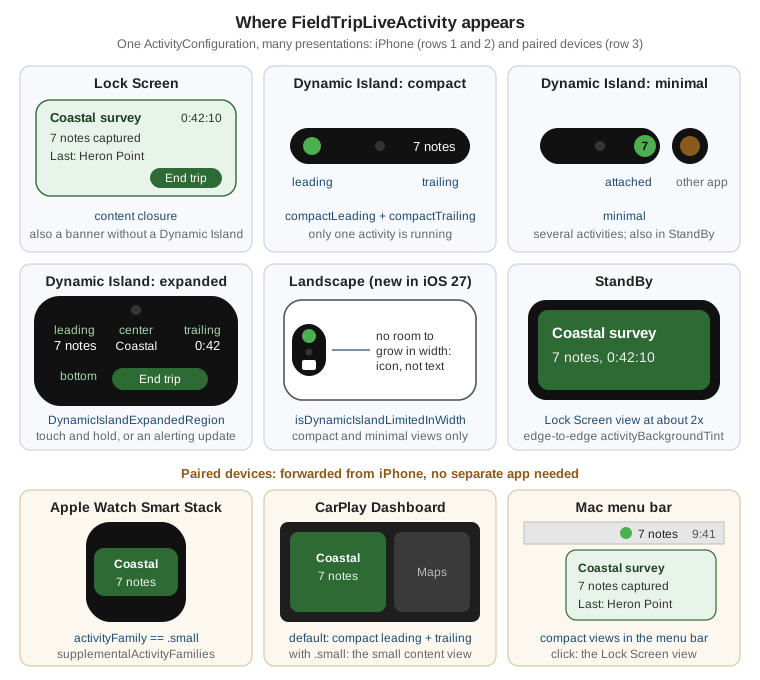
Every Live Activity must provide all of the iPhone presentations: the Lock Screen view (also used as a banner on devices without a Dynamic Island, and scaled up in StandBy), and the Dynamic Island views. The Dynamic Island has three: compact (leading and trailing halves around the camera, when FieldNotes has the only activity), minimal (a single bubble, when several apps have activities) and expanded (when the person touches and holds, or an update alerts). The expanded view is built from regions: leading, trailing, center and bottom.
// FieldNotesWidgets/FieldTripLiveActivity.swift
#if os(iOS)   // ActivityKit: iPhone and iPad only; the widget extension also builds for Mac and Apple Vision
import ActivityKit
import AppIntents
import SwiftUI
import WidgetKit
import FieldNotesModel

struct FieldTripLiveActivity: Widget {
    var body: some WidgetConfiguration {
        ActivityConfiguration(for: FieldTripAttributes.self) { context in
            FieldTripLockScreenView(context: context)
                .activityBackgroundTint(.green.opacity(0.25))
                .widgetURL(URL(string: "fieldnotes://notebook/\(context.attributes.notebookID)"))
        } dynamicIsland: { context in
            DynamicIsland {
                DynamicIslandExpandedRegion(.leading) {
                    Label("\(context.state.notesCaptured)", systemImage: "note.text")
                        .font(.title3)
                }
                DynamicIslandExpandedRegion(.trailing) {
                    Text(context.attributes.startedAt, style: .timer)
                        .monospacedDigit()
                        .multilineTextAlignment(.trailing)
                }
                DynamicIslandExpandedRegion(.center) {
                    Text(context.attributes.tripName).lineLimit(1)
                }
                DynamicIslandExpandedRegion(.bottom) {
                    HStack {
                        if let place = context.state.lastPlaceName {
                            Text("Last: \(place)").font(.caption)
                        }
                        Spacer()
                        Button(intent: EndFieldTripIntent(activityID: context.activityID)) {
                            Label("End Trip", systemImage: "flag.checkered")
                        }
                    }
                }
            } compactLeading: {
                Image(systemName: "binoculars.fill")
            } compactTrailing: {
                FieldTripCompactTrailing(notesCaptured: context.state.notesCaptured)
            } minimal: {
                Text("\(context.state.notesCaptured)")
            }
            .widgetURL(URL(string: "fieldnotes://notebook/\(context.attributes.notebookID)"))
            .keylineTint(.green)
        }
        .supplementalActivityFamilies([.small])
    }
}
#endifFieldTripLiveActivity is listed in FieldNotesWidgetBundle, next to the home screen widgets, as shown on
Widgets, Complications and Controls (WidgetKit). Its widgetURL reuses part 1’s
fieldnotes://notebook/<uuid> deep link.
The landscape Dynamic Island (new in iOS 27). In iOS 27 the Dynamic Island also appears when iPhone is in
landscape, where the compact and minimal views have no room to grow in width. The environment value
isDynamicIslandLimitedInWidth says when that is the case, and the view swaps text for an icon. Because FieldNotes'
minimum is 26, the 27-only view sits behind #available:
// FieldNotesWidgets/FieldTripCompactTrailing.swift
import SwiftUI

struct FieldTripCompactTrailing: View {
    let notesCaptured: Int

    var body: some View {
        if #available(iOS 27, *) {
            WidthAwareNoteCount(notesCaptured: notesCaptured)
        } else {
            Text("\(notesCaptured) notes")
        }
    }
}

@available(iOS 27, *)
private struct WidthAwareNoteCount: View {
    @Environment(\.isDynamicIslandLimitedInWidth) private var isLimitedInWidth
    let notesCaptured: Int

    var body: some View {
        if isLimitedInWidth {
            Image(systemName: "note.text")                 // landscape: an icon fits, text does not
                .accessibilityLabel("\(notesCaptured) notes")
        } else {
            Text("\(notesCaptured) notes")
        }
    }
}The .small family: Apple Watch, CarPlay and beyond. A Live Activity started on iPhone also appears in the Smart
Stack of a paired Apple Watch and on the CarPlay Dashboard, with no watch or CarPlay app. By default those places reuse
the compact leading and trailing views. .supplementalActivityFamilies([.small]) on the configuration declares that
the Lock Screen view can adapt, and the view reads activityFamily to switch to a denser layout:
// FieldNotesWidgets/FieldTripLockScreenView.swift
#if os(iOS)   // ActivityKit: iPhone and iPad only; the widget extension also builds for Mac and Apple Vision
import ActivityKit
import SwiftUI
import WidgetKit
import FieldNotesModel

struct FieldTripLockScreenView: View {
    @Environment(\.activityFamily) private var activityFamily
    let context: ActivityViewContext<FieldTripAttributes>

    var body: some View {
        switch activityFamily {
        case .small:
            // Apple Watch Smart Stack and CarPlay: two lines, large type.
            VStack(alignment: .leading) {
                Text(context.attributes.tripName).font(.headline).lineLimit(1)
                Text("\(context.state.notesCaptured) notes").font(.title3.bold())
            }
        default:
            VStack(alignment: .leading, spacing: 6) {
                HStack {
                    Text(context.attributes.tripName).font(.headline)
                    Spacer()
                    Text(context.attributes.startedAt, style: .timer).monospacedDigit()
                }
                Text("\(context.state.notesCaptured) notes captured")
                if let place = context.state.lastPlaceName {
                    Text("Last: \(place)").foregroundStyle(.secondary)
                }
                if context.isStale {
                    Text("Waiting for updates").font(.caption).foregroundStyle(.orange)
                }
            }
            .padding()
        }
    }
}
#endifOn the Mac (macOS 26 and later, with an iPhone on iOS 18 or later nearby), the Live Activity appears in the menu bar using the compact leading and trailing views; clicking it shows the Lock Screen view, and clicking that opens FieldNotes through iPhone Mirroring. No code change is needed.
Starting, updating and ending from the app
The app starts a Live Activity only while it is in the foreground, and only if the person allows Live Activities
(ActivityAuthorizationInfo().areActivitiesEnabled). FieldTripActivityController wraps the three calls. Asking for
pushType: .token makes the activity updatable from the server, too:
// FieldNotes/FieldTrip/FieldTripActivityController.swift
#if os(iOS)
import ActivityKit
import Foundation
import FieldNotesModel

@MainActor
final class FieldTripActivityController {
    private var activity: Activity<FieldTripAttributes>?

    func start(tripName: String, notebookID: UUID) throws {
        guard ActivityAuthorizationInfo().areActivitiesEnabled else { return }
        let attributes = FieldTripAttributes(tripName: tripName, notebookID: notebookID)
        let content = ActivityContent(state: FieldTripAttributes.ContentState(), staleDate: nil)
        let activity = try Activity.request(attributes: attributes, content: content, pushType: .token)
        self.activity = activity

        // The token arrives asynchronously and can change; forward every value to the provider.
        Task {
            for await token in activity.pushTokenUpdates {
                PushRegistration.shared.recordActivityToken(token, activityID: activity.id)
            }
        }
    }

    /// Called by NoteStore's capture path whenever a note is added during the trip.
    func noteCaptured(at placeName: String?) async {
        guard let activity else { return }
        var state = activity.content.state
        state.notesCaptured += 1
        state.lastPlaceName = placeName
        // Stale after 30 minutes without news, so the view can say "Waiting for updates".
        await activity.update(ActivityContent(state: state, staleDate: .now.addingTimeInterval(30 * 60)))
    }

    func end() async {
        guard let activity else { return }
        await activity.end(activity.content, dismissalPolicy: .after(.now.addingTimeInterval(15 * 60)))
        self.activity = nil
    }
}
#endifupdate(_:alertConfiguration:) can also light up the screen and show the expanded view, for example when the trip
reaches a planned stop; use alerts sparingly. The .after dismissal policy keeps the final state on the Lock Screen
for 15 minutes; .immediate removes it at once.
Scheduled starts (new in iOS 26). A Live Activity can be requested in advance for a start date, for example a field trip booked for 8:00 tomorrow. The system starts it at that time even if FieldNotes is not running; the request needs a style and an alert configuration:
// FieldTripActivityController.swift (continued)
#if os(iOS)
extension FieldTripActivityController {
    func schedule(tripName: String, notebookID: UUID, startingAt start: Date) throws {
        let attributes = FieldTripAttributes(tripName: tripName, notebookID: notebookID, startedAt: start)
        _ = try Activity.request(
            attributes: attributes,
            content: ActivityContent(state: FieldTripAttributes.ContentState(), staleDate: nil),
            pushType: .token,
            style: .standard,
            alertConfiguration: AlertConfiguration(
                title: "Field trip starting",
                body: "\(tripName) begins now. Captured notes will appear here.",
                sound: .default),
            start: start)
    }
}
#endifUpdating with ActivityKit push notifications
When the updates come from elsewhere, such as a teammate adding notes on another phone, the provider pushes new content-state directly to the activity. Live Activity pushes differ from alert pushes in three ways:
-
apns-push-typeisliveactivity, andapns-topicis the bundle ID with the suffix.push-type.liveactivity; -
the device token is the activity’s push token from
pushTokenUpdates, not the app’s device token; -
the payload’s
apshas anevent(update,endorstart), atimestampand acontent-statewhose keys matchContentStateexactly.
{
  "aps": {
    "timestamp": 1790000000,
    "event": "update",
    "content-state": {
      "notesCaptured": 8,
      "lastPlaceName": "Heron Point"
    },
    "stale-date": 1790001800,
    "alert": {
      "title": "New note from Ana",
      "body": "Heron Point: two chicks visible"
    }
  }
}Priority 5 updates don’t count against the hourly budget; priority 10 updates do, and are for changes the person
should see immediately. Apps that need very frequent updates, such as a sports score, add
NSSupportsLiveActivitiesFrequentUpdates to their Info.plist.
Push to start. The server can also start a Live Activity, for example when a trip leader opens a group trip. The app forwards a separate push-to-start token, available without starting anything:
// Started once at launch, for example from FieldNotesAppDelegate.
#if os(iOS)
import ActivityKit
import FieldNotesModel

@MainActor
func forwardPushToStartTokens() {
    Task {
        for await token in Activity<FieldTripAttributes>.pushToStartTokenUpdates {
            PushRegistration.shared.recordActivityToken(token, activityID: nil)
        }
    }
}
#endifA start payload uses "event": "start", includes an alert, and adds "attributes-type": "FieldTripAttributes" with
an attributes object holding tripName, notebookID and startedAt.
Broadcast channels
Token pushes address one activity at a time. When thousands of people follow the same event, broadcast is the
better fit: the provider creates a channel through APNs' channel management API, gives its ID to the app, and each
device subscribes by starting its Live Activity with pushType: .channel(_:). One request then updates every
subscriber. FieldNotes uses a channel for guided group trips, where the guide’s "next stop" reaches every participant:
// FieldTripActivityController.swift (continued)
#if os(iOS)
extension FieldTripActivityController {
    /// `channelID` comes from the FieldNotes server, which created the channel with APNs.
    func join(groupTrip tripName: String, notebookID: UUID, channelID: String) throws {
        _ = try Activity.request(
            attributes: FieldTripAttributes(tripName: tripName, notebookID: notebookID),
            content: ActivityContent(state: FieldTripAttributes.ContentState(), staleDate: nil),
            pushType: .channel(channelID))
    }
}
#endifThe provider then posts one payload per update to the broadcast endpoint instead of /3/device/:
curl --http2 \
  --header "authorization: bearer $AUTHENTICATION_TOKEN" \
  --header "apns-push-type: liveactivity" \
  --header "apns-channel-id: $CHANNEL_ID" \
  --header "apns-priority: 10" \
  --header "apns-expiration: 0" \
  --data '{"aps":{"timestamp":'$(date +%s)',"event":"update","content-state":{"notesCaptured":12,"lastPlaceName":"Dune crest"}}}' \
https://api-broadcast.sandbox.push.apple.com/4/broadcasts/apps/com.example.fieldnotesBroadcast requires enabling broadcast capability for the app in the developer account. A broadcast push cannot start a Live Activity, only update or end one.
Interactivity with LiveActivityIntent
Buttons and toggles in a Live Activity run App Intents. An intent that conforms to LiveActivityIntent runs in the
app’s process, so it can change the app’s data and the activity, even when the app is in the background. The End
Trip button above uses one. Its file belongs to both the app target and the FieldNotesWidgets target:
// Shared/EndFieldTripIntent.swift (member of FieldNotes and FieldNotesWidgets)
#if os(iOS)
import ActivityKit
import AppIntents
import FieldNotesModel

struct EndFieldTripIntent: LiveActivityIntent {
    static let title: LocalizedStringResource = "End Field Trip"

    @Parameter(title: "Activity ID")
    var activityID: String

    init() {}

    init(activityID: String) {
        self.activityID = activityID
    }

    func perform() async throws -> some IntentResult {
        for activity in Activity<FieldTripAttributes>.activities where activity.id == activityID {
            await activity.end(activity.content, dismissalPolicy: .immediate)
        }
        return .result()
    }
}
#endifApp Intents in general, including parameters, entities and Shortcuts, are covered on App Intents, Siri, Shortcuts, Spotlight, Deep Links and Extensions. The design side, such as what belongs in each presentation and how to keep a Live Activity glanceable, is in the Human Interface Guidelines, summarized on Human Interface Guidelines in Practice.
Availability and Requirements
Platform availability
| API or feature | iOS | iPadOS | macOS | watchOS | visionOS |
|---|---|---|---|---|---|
Local notifications, categories, |
Yes |
Yes |
Yes |
Yes |
Yes |
Provisional authorization |
Yes |
Yes |
Yes |
Yes |
Yes |
|
Yes |
Yes |
Not available |
Yes |
Not available |
Remote notifications (APNs) |
Yes |
Yes |
Yes |
Yes |
Yes |
Notification Service Extension |
Yes |
Yes |
Yes |
Yes |
Yes |
Notification Content Extension |
Yes |
Yes |
Yes |
Not available |
Yes |
ActivityKit (starting and updating Live Activities) |
Yes |
Yes |
Not available (Mac Catalyst only) |
Not available |
Not available |
Scheduled Live Activity start |
New in 26 |
New in 26 |
Not available |
Not available |
Not available |
Broadcast channels, push to start |
Yes |
Yes |
Not available |
Not available |
Not available |
|
New in 27 |
New in 27 |
Not available |
Not available |
Not available |
Live Activity display from a paired iPhone |
Not available |
Not available |
New in 26 (menu bar) |
Smart Stack ( |
Not available |
|
Yes |
Yes |
Not available (Mac Catalyst only) |
Not available |
Not available |
Requirements
-
Remote notifications, Live Activity pushes and broadcast need the Push Notifications capability and a paid developer account; real APNs delivery needs a physical device (the Simulator accepts simulated pushes and, on Apple silicon Macs, sandbox pushes).
-
.timeSensitivereminders need the Time Sensitive Notifications capability. -
The service extension needs the App Groups capability (
group.com.example.fieldnotes) on both targets. -
Location triggers need location authorization.
-
Live Activities need
NSSupportsLiveActivitiesin the app’sInfo.plist, and a Dynamic Island needs an iPhone that has one.
Learning More
The WWDC26 session Live Activities essentials builds a Live Activity from data model to push updates and covers the iOS 27 landscape Dynamic Island and the small family. The Emoji Rangers sample shows a complete Live Activity with interactivity and animation.
References
-
Apple Developer Documentation — Asking permission to use notifications
-
Apple Developer Documentation — UNCalendarNotificationTrigger
-
Apple Developer Documentation — UNLocationNotificationTrigger
-
Apple Developer Documentation — UNUserNotificationCenterDelegate
-
Apple Developer Documentation — Handling notifications and notification-related actions
-
Apple Developer Documentation — Registering your app with APNs
-
Apple Developer Documentation — Generating a remote notification
-
Apple Developer Documentation — Sending notification requests to APNs
-
Apple Developer Documentation — Establishing a token-based connection to APNs
-
Apple Developer Documentation — Modifying content in newly delivered notifications
-
Apple Developer Documentation — Customizing the appearance of notifications
-
Apple Developer Documentation — UNNotificationContentExtension
-
Apple Developer Documentation — Sending broadcast push notification requests to APNs
-
Apple Developer Documentation — Displaying live data with Live Activities
-
Apple Developer Documentation — request(attributes:content:pushType:style:alertConfiguration:start:)
-
Apple Developer Documentation — isDynamicIslandLimitedInWidth