Standard Scheduling vs Quartz
|
This content was generated with the assistance of AI and should be verified against the official documentation before being relied on in production. The reference material consulted while preparing these pages is listed in the section bibliography. |
Spring’s own scheduling, the @Scheduled annotation on a bean method, is the right answer to a surprising number of timed jobs, and Quartz is the right answer to the rest. This page is the place to decide between them: it summarises standard scheduling in one compact section (the details stay on Scheduling & ShedLock), lists what it cannot do, describes the model Quartz adds, compares the two feature by feature, puts the cron dialects side by side, contrasts ShedLock with Quartz clustering when a node dies, names the out-of-process alternatives, gives a decision flowchart, and walks one Bookshelf job through the migration from @Scheduled with ShedLock to Quartz. The pages it links to hold the depth: start from the section landing page if you are new to the section.
It was written against Quartz 2.5.2, Spring Boot 4.1.1, Spring Framework 7.0.9, ShedLock 7.10.1 and Java 21 and verified on 5 October 2026. The migration walkthrough was compiled and run in a test project (Boot 4.1.1, ShedLock 7.10.1 with the JDBC template lock provider, H2): the @Scheduled job with ShedLock fired four times in 4.5 seconds, the Quartz job five times in 3.5 seconds, and a second application context on the same database found the Quartz trigger still stored. The default-scheduler facts in the recap (a one-thread ThreadPoolTaskScheduler, a SimpleAsyncTaskScheduler with virtual threads) were measured in the same project. Everything else about Quartz is taken from the pages of this section, which measured it. Spring Boot 3.5.16 manages the same Quartz 2.5.2, so everything about Quartz here is identical; the differences are the package of the Boot Quartz types (org.springframework.boot.autoconfigure.quartz instead of org.springframework.boot.quartz.autoconfigure) and Spring Framework 6.2.19.
Standard scheduling in one page
Standard scheduling is what Spring Framework ships: no job store, no separate scheduler product, a timer that lives inside the JVM.
-
@EnableSchedulingregisters the processor that finds@Scheduledmethods. Without it nothing is scheduled, and in a test project Boot’s scheduler bean did not exist until it was present. -
@Scheduledtakes one offixedRate,fixedDelayorcron, plusinitialDelay,zoneandtimeUnit. A method has no arguments and returns nothing that matters (it may return a reactive type, or be a Kotlinsuspendfunction). -
A
TaskSchedulerruns them. Boot configures aThreadPoolTaskSchedulerwith one thread (spring.task.scheduling.pool.size), or, withspring.threads.virtual.enabled=trueon Java 21 or later, aSimpleAsyncTaskScheduleron virtual threads. Both were measured. -
The same
TaskSchedulercan be used directly (schedule(Runnable, Instant)and friends) for tasks created at run time; theScheduledFutureit returns can cancel them, and it is lost when the JVM stops. -
Every execution of an
@Scheduledmethod emits thetasks.scheduled.executionobservation, and/actuator/scheduledtaskslists the Spring tasks (it does not list Quartz jobs). -
With more than one instance of the service every instance runs every tick. ShedLock adds a lock row around the method so that only one instance runs it per tick; it is "not a distributed scheduler", its README says, "just a lock".
@Configuration(proxyBeanMethods = false)
@EnableScheduling
@EnableSchedulerLock(defaultLockAtMostFor = "PT10M")
class SchedulingConfig {

    @Bean
    LockProvider lockProvider(DataSource dataSource) {
        return new JdbcTemplateLockProvider(dataSource);
    }
}

@Component
class CacheRefresh {

    @Scheduled(fixedDelayString = "PT5M")
    void refreshCatalogue() { /* every node refreshes its own cache */ }

    @Scheduled(cron = "0 0 2 * * MON-FRI", zone = "Europe/Madrid")
    @SchedulerLock(name = "overdueLoanReminders", lockAtMostFor = "PT30M", lockAtLeastFor = "PT1M")
    void sendOverdueReminders() { /* one node per tick */ }
}
Source: Spring Framework: Task Execution and Scheduling and the ShedLock README. Every attribute, the lock providers and the multi-instance problem are explained on Scheduling & ShedLock.
For the Bookshelf service this is exactly right for the catalogue cache refresh (job 1 on the map on the landing page): cheap, idempotent, and every node needs its own refreshed cache. The comparison below is about the other four jobs.
What standard scheduling cannot do
Each limit follows from one fact: the schedule is code that runs in memory, and nothing outside the JVM knows about it.
-
Schedules live only in code and memory. Change the cron expression and you redeploy. A schedule created at run time exists until the process ends.
-
Nothing is persisted. There is no record of which tick ran, which is due, or which job is half way through.
-
Missed ticks are lost. If the service is down (or the single scheduler thread is busy) when a tick is due, nobody notices; the next tick is the next one on the clock. There is no misfire concept to configure.
-
No calendars. "Every weekday except public holidays" is a cron expression plus an
ifinside the method. -
No runtime job management. There is no catalogue of jobs to list, pause, resume, reschedule or trigger from outside, apart from what you build around
ScheduledFutureyourself. -
No job data. A run knows only what the bean’s fields and the closure contain; there is no per-schedule parameter that is stored and passed in.
-
ShedLock skips rather than fails over. The instance that loses the race silently skips the tick, and if the winner dies half way through, the run is not repeated by anyone (see When a node dies mid-run).
None of these matters for a cache refresh. All of them matter for per-member reminders that are created while the service runs, and for a weekly report that must finish even if a node dies.
The Quartz model
Quartz separates what to run from when and puts both into a store. A Scheduler owns a thread that looks for due triggers and a pool of worker threads; a JobDetail describes a job (its class, its JobDataMap, whether it is durable, whether it asks to be recovered); a Trigger describes when it fires (a cron expression, a repeat interval, a one-shot time) and may refer to a Calendar that excludes days. Jobs and triggers are data: they have keys, they sit in a job store, and a JDBC job store keeps them in the QRTZ_ tables, so they survive restarts, are shared by every node that uses the same tables, and can be created, paused, resumed, rescheduled and deleted while the service runs. The full picture is on Quartz Fundamentals.
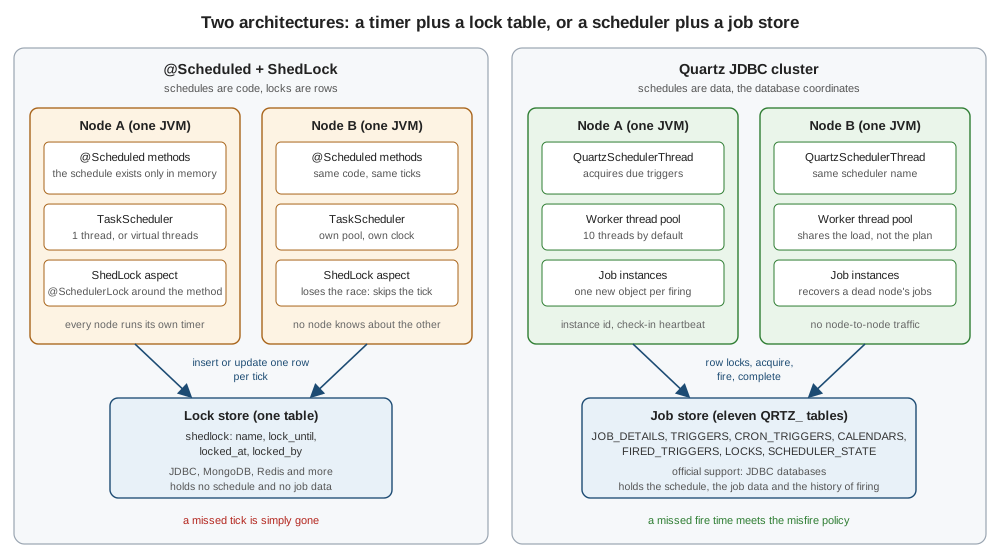
Source: Quartz Tutorial: Lesson 1, Using Quartz and Lesson 11, Advanced (Enterprise) Features. The drawing is an original figure for this site.
Quartz comes in two flavours that the table below keeps apart. With the RAM job store (Boot’s default) the schedule is data held in memory: you gain misfire policies, calendars, job data and runtime management, but nothing survives a restart and nodes do not coordinate. With a JDBC job store and isClustered=true you also gain persistence, one execution per fire time across nodes, load sharing and fail-over. See Job Stores & Persistence.
Feature by feature
The four columns are plain @Scheduled, @Scheduled with ShedLock, Quartz with the RAM job store and Quartz with a clustered JDBC job store. "partial" means it works with a limit stated in the note. The Quartz columns were measured on the other pages of this section; the standard columns were read from the Spring Framework 7.0.9 and ShedLock documentation and, where noted, measured in a test project.
| Feature | @Scheduled |
@Scheduled + ShedLock |
Quartz, RAM store | Quartz, JDBC cluster | Note |
|---|---|---|---|---|---|
Schedule types |
✔ fixed rate, fixed delay, cron; one-shot only through |
✔ the same |
✔ simple (one-shot, repeat count, forever), cron, calendar interval, daily time interval |
✔ the same |
Quartz has four trigger types (Triggers & Schedules). "Every 2 months" or "every day between 09:00 and 17:00" is a calendar-interval or daily-time-interval trigger, not a cron expression. |
Cron dialect |
✔ 6 fields, macros, |
✔ the same |
✔ 6 fields plus an optional year, |
✔ the same |
The dialects differ in day-of-week numbering and in what |
Time zones and DST |
✔ |
✔ the same |
✔ per trigger, fires once on the repeated hour |
✔ the same |
Measured on the Cron Expressions page. Avoid schedules inside the transition hours either way. |
Persistence across restarts |
✘ |
✘ the lock row persists, the schedule does not |
✘ lost with the JVM |
✔ jobs, triggers, calendars and their state |
The one difference that unlocks most of the others. |
Misfire handling |
✘ no concept |
✘ |
✔ policy per trigger, |
✔ policy per trigger, |
Defaults measured; see Misfires. |
Catch-up after downtime |
✘ missed ticks are lost |
✘ |
✘ nothing remains after a restart; partial for a busy thread pool |
✔ after a restart the misfire policy decides: fire once now, skip, or replay |
See the restart timeline in When a node dies mid-run. |
Exclusion calendars and holidays |
✘ code inside the method |
✘ |
✔ six |
✔ stored with the schedule |
|
Runtime create, pause, resume, reschedule, delete |
partial: |
partial: the same |
✔ the full |
✔ the full |
|
Per-job data |
✘ fields and closures |
✘ |
✔ |
✔ stored with the job; use primitives and Strings |
|
Concurrency control (non-overlap) |
✔ one JVM: a task is not re-entered by its own schedule (measured with a pool of 4 threads and a |
✔ across nodes, through the lock |
✔ |
✔ |
Quartz applies the annotation per job detail, not per class. |
Multi-instance coordination |
✘ every node runs every tick |
partial: lock-and-skip, the winner runs, the others skip |
✘ every node runs its own copy |
✔ exactly one node fires, work is shared, fail-over |
See ShedLock and Quartz clustering and Clustering. |
Crash recovery |
✘ |
✘ the lock stays until |
✘ |
✔ |
The re-run needs an idempotent job. |
Priorities |
✘ |
✘ |
✔ trigger priority, default 5 |
✔ the same |
Matters only among triggers due at the same moment and a busy pool. |
Listeners and history |
partial: error handler, the observation |
partial: the same |
✔ job, trigger and scheduler listeners, history plugins |
✔ the same |
Listeners and Plugins. Boot registers no listener beans for you. |
Thread model and virtual threads |
✔ one thread by default; |
✔ the same |
partial: its own |
partial: the same |
A Spring |
Reactive and Kotlin |
✔ reactive return types and |
✔ the same |
partial: |
partial: the same |
Quartz has no reactive API. |
Observability |
✔ |
✔ the same |
partial: |
partial: the same |
Neither Boot nor Micrometer ships Quartz meters; see Observability. |
On-demand triggering |
partial: call the method |
partial: the same |
✔ |
✔ the same |
The Actuator operation only starts a job; it cannot pause or delete. |
Supported storage |
n/a |
✔ ShedLock lock providers: JDBC, MongoDB, Redis and more |
n/a |
✔ JDBC databases officially; the MongoDB and Redis community stores did not work on 2.5.x |
|
Testing |
✔ call the method, Awaitility |
✔ plus a test with two instances |
✔ memory store, |
✔ plus Testcontainers and a two-scheduler cluster test |
|
Operational cost |
none |
one lock table |
none |
eleven tables, schema migration, clocks within about a second |
|
Dependency footprint |
none (Spring Framework) |
|
|
plus |
Quartz adds a scheduler thread, a pool and a store to the process. |
The table is a menu, not a score: a Quartz ✔ is worth having only for a row that one of your jobs actually needs.
Cron dialects
A schedule written for one engine is not valid in another. The same Bookshelf schedules in the three dialects follow; the full field-by-field comparison, with the measured error messages, is on Cron Expressions.
| Schedule | Spring @Scheduled |
Quartz | Unix crontab and Kubernetes |
|---|---|---|---|
Every 5 minutes |
|
|
|
Every day at 06:00 |
|
|
|
Weekdays at 02:00 |
|
|
|
Sundays at 08:00 |
|
|
|
Last day of the month at 03:30 |
|
|
not expressible |
-
Spring needs exactly six fields (second first); Quartz accepts six or seven (an optional year) and requires
?in one of the two day fields; Unix and Kubernetes have five fields and no seconds. -
Day-of-week numbers differ: Sunday is
0or7in Spring and Unix and1in Quartz. UseMON-SUNnames in anything you copy between dialects. -
Spring and Unix accept macros such as
@daily; Quartz rejects them. -
Spring requires both day fields to match when both are restricted; Unix runs when either matches; Quartz forbids restricting both.
Source: Spring Framework API: CronExpression, Quartz: Cron Trigger Tutorial and the crontab(5) manual page. A Kubernetes CronJob uses the five-field syntax with an optional timeZone; see Jobs and CronJobs.
ShedLock and Quartz clustering
Both answer "I run three copies of this service, how do I avoid three executions?", and they answer differently.
-
ShedLock: skip if locked. Every node still ticks. At each tick the nodes race to insert or update one row; the winner runs the method, the others return at once. The schedule is not coordinated, only the execution is, and a node that loses has no way to know whether the winner will finish.
-
Quartz: one fires. There is one schedule, stored in the tables, and one node acquires each trigger by a conditional update of its state (the row lock is taken when it fires). The others never see that fire time as theirs. The nodes share the work (whichever is free acquires the next trigger; nothing balances the load) and the cluster survives the loss of a node.
-
Duration. ShedLock’s
lockAtMostFormust exceed the longest run, or a second node may start while the first is still running;lockAtLeastForguards against clock skew between nodes. Quartz’s equivalent is@DisallowConcurrentExecutionplus clocks synchronised to about a second. -
Work that outlives the tick. ShedLock holds the lock for the duration of the method; Quartz knows from the stored fired-trigger row that the job is running and on which node.
The behaviours differ most when a node dies in the middle of a run, which is the next section. The mechanics of the Quartz side are on Clustering.
When a node dies mid-run
The Bookshelf weekly statistics report runs for minutes. Both nodes tick at Monday 06:00; node A wins and starts the report; node A is killed with kill -9 at 06:03.
Source: Quartz documentation: Configure Clustering with JDBC-JobStore. The measured fail-over times are on Clustering.
A restart, not a crash, shows the other big difference. The overdue-loan reminders are due at 02:00 and the service is redeployed from 01:55 to 02:10.
Source: Quartz Tutorial: Lesson 4, More About Triggers. Each instruction and its measured effect is on Misfires.
Out-of-process alternatives
Sometimes the right answer is not to schedule inside the service at all.
-
A Kubernetes
CronJobstarts a new pod on a schedule, with its own resources, its own retries and its own history, and the cluster is the scheduler. It suits work that is heavy, isolated or written in another language, and it costs a container start per run. See Jobs and CronJobs. -
Spring Batch is not a scheduler but a framework for the work itself: chunked processing, restartable job executions, skip and retry. A scheduler (
@Scheduled, Quartz or aCronJob) launches the job. The Quartz side of that, aQuartzJobBeancalling aJobOperator(Spring Batch 6;JobLauncheron Boot 3.5), is on Jobs and Job Data and Running a Job; the framework is in the Spring Batch Reference. -
Other distributed schedulers. ShedLock’s own README points readers who need a distributed scheduler to projects such as db-scheduler and JobRunr, which keep tasks in a database. They are named here and not covered: this section documents Quartz.
Source: Kubernetes: CronJob and the ShedLock README.
Which one to use
Source: derived from the comparison above; the options are documented on Spring Framework: Task Execution and Scheduling, the ShedLock README and Quartz Tutorial: Lesson 11.
For the five Bookshelf jobs: the cache refresh stays on @Scheduled; the overdue-loan reminders can start on @Scheduled with ShedLock and move to Quartz when holidays and misfire policy matter; the per-member reminders and the weekly report need Quartz; the retention cleanup is a Quartz cron with LW (0 30 3 LW * ?, 03:30 on the last weekday of the month) that launches a Spring Batch job. The two can coexist in one application, and the cheap in-process chores should stay where they are.
Migrating a @Scheduled job to Quartz: the weekly report
The weekly statistics report (job 4) is the job that outgrows @Scheduled with ShedLock: it takes minutes, it must never overlap itself and it must finish after a crash. This is the migration, in the order to do it. (The nightly reminders job is migrated in the same way on Migration and What’s Changed, with the line-by-line translation table.)
Step 1, the starting point. A @Scheduled method guarded by ShedLock:
@Component
class WeeklyStatisticsReport {

    @Scheduled(cron = "0 0 6 * * MON", zone = "Europe/Madrid")
    @SchedulerLock(name = "weeklyStatistics", lockAtMostFor = "PT2H", lockAtLeastFor = "PT5M")
    void run() {
        // compute the statistics and store the report
    }
}Step 2, the dependencies. Add spring-boot-starter-quartz and, for a persistent store, spring-boot-starter-jdbc and the driver; remove shedlock-spring, the provider and @EnableSchedulerLock when no other job uses them.
<dependency>
  <groupId>org.springframework.boot</groupId>
  <artifactId>spring-boot-starter-quartz</artifactId>
</dependency>
<dependency>
  <groupId>org.springframework.boot</groupId>
  <artifactId>spring-boot-starter-jdbc</artifactId>
</dependency>
Source: Spring Boot: Quartz Scheduler. The dependencies are explained on Getting Started with Spring Boot.
Step 3, the job. The method body moves into a QuartzJobBean. The two annotations and one builder call replace the lock: @DisallowConcurrentExecution for non-overlap, requestRecovery for the re-run after a crash.
@DisallowConcurrentExecution
public class WeeklyStatisticsJob extends QuartzJobBean {

    @Override
    protected void executeInternal(JobExecutionContext context) {
        // the same statistics code, now idempotent: it may run twice after a crash
    }
}

@Configuration(proxyBeanMethods = false)
class BookshelfSchedule {

    @Bean
    JobDetail weeklyStatisticsJobDetail() {
        return JobBuilder.newJob(WeeklyStatisticsJob.class)
                .withIdentity("weeklyStatistics", "bookshelf")
                .requestRecovery()
                .storeDurably()
                .build();
    }

    @Bean
    Trigger weeklyStatisticsTrigger(JobDetail weeklyStatisticsJobDetail) {
        return TriggerBuilder.newTrigger().forJob(weeklyStatisticsJobDetail)
                .withIdentity("weeklyStatisticsTrigger", "bookshelf")
                .withSchedule(CronScheduleBuilder.cronSchedule("0 0 6 ? * MON")
                        .inTimeZone(TimeZone.getTimeZone("Europe/Madrid"))
                        .withMisfireHandlingInstructionFireAndProceed())
                .build();
    }
}
Source: Quartz Tutorial: Lesson 3, More About Jobs and Job Details and Spring Boot: Quartz Scheduler. In the test project the cron was * * * * * ? to keep the run short; the job fired five times in 3.5 seconds, requestsRecovery and durability were stored, and the job detail and trigger were read back from the JDBC store.
Step 4, the store. Switch to the JDBC store and let a migration tool own the tables:
spring:
  quartz:
    job-store-type: jdbc
    jdbc:
      initialize-schema: never      # Flyway or Liquibase owns the QRTZ_ tables
    properties:
      org.quartz.jobStore.isClustered: "true"
      org.quartz.scheduler.instanceId: AUTO
Source: Spring Boot: Quartz Scheduler. The schema, the delegate for your database and the clustering properties are on Job Stores & Persistence, Quartz on PostgreSQL and Clustering.
Step 5, the cut-over. Deploy with the @Scheduled and @SchedulerLock annotations removed in the same release (running both double-runs the report), then check /actuator/quartz for the job and trigger.
What changed at run time:
| Aspect | Before: @Scheduled + ShedLock |
After: Quartz JDBC cluster |
|---|---|---|
Where the schedule lives |
In the annotation; changing it is a redeploy |
In the |
Overlap |
ShedLock lock for |
|
Node dies mid-run |
The run is lost until the next Monday |
Another node re-runs it with |
Service down at 06:00 |
The report is skipped for the week |
The misfire policy runs it once on start-up |
Visible in |
|
|
The walkthrough ran @Scheduled with ShedLock and Quartz as separate profiles on H2; it did not run a three-node cluster (that is on Clustering) or a real cut-over.
The same idea in other stacks
The choice between an in-process timer and a persistent scheduler is not specific to Spring. These pages show how the same Bookshelf jobs are scheduled elsewhere on this site.
| Stack | In-process timer | Persistent, clustered or queued |
|---|---|---|
Quarkus |
|
Quartz extension for clustered, persistent schedules; see Scheduling and Mail and Quarkus vs. Spring Boot |
NestJS |
|
BullMQ queues on Redis; see Events, Scheduling & Queues |
Python and Django |
none in the framework |
Celery beat as the scheduler and Celery workers as the queue; see Celery Integration |
ASP.NET Core |
|
a library on top of the host; see Hosting, Servers, and Environments |
Kubernetes |
n/a |
|
The Quarkus Quartz extension is the closest relative of what this section documents. The others differ in kind: Celery separates the clock (beat) from the workers, BullMQ turns a schedule into queued jobs, and a CronJob moves the clock out of the application.
Pitfalls
| Pitfall | What happens | What to do |
|---|---|---|
Quartz where |
A job store, tables, clock sync and a listener-based metric for a five-minute cache refresh. |
Keep standard scheduling for in-process chores; migrate only the jobs that need a feature from the Quartz columns of the table. |
|
The job runs twice per tick. |
Remove the annotation in the release that adds the Quartz job. |
ShedLock |
A second node starts while the first is still running. |
Set it above the longest run, or move to Quartz with |
Expecting ShedLock to recover a dead node’s run |
The report is skipped until the next scheduled time. |
Use Quartz with |
Copying a cron expression between dialects |
A Quartz expression with five fields fails, and Sunday is a different number. |
Translate with names ( |
Using the RAM store and expecting persistence |
Boot’s default store is memory: dynamic jobs vanish at restart, and nodes each run their own copy. |
Set |
Quartz jobs missing from |
The endpoint lists Spring tasks only. |
Look in |
Assuming virtual threads reach Quartz |
|
Configure Quartz’s executor explicitly; see Spring Boot Configuration. |
What changed
-
Quartz 2.4 and 2.5. Quartz 2.5.0 moved to Jakarta and Java 11; 2.4.0 removed
TerracottaJobStore(clustering is JDBC only) and declared pool librariesprovided; 2.5.1 allowsLcombined with other day-of-month values. See Migration and What’s Changed. -
Spring Boot 4. Quartz support moved to the
spring-boot-quartzmodule and the packageorg.springframework.boot.quartz.autoconfigure(it wasorg.springframework.boot.autoconfigure.quartzin Boot 3.5); there is aspring-boot-starter-quartz-teststarter. -
Spring Framework 7.
@Scheduledsupports reactive return types and Kotlinsuspendfunctions and emitstasks.scheduled.execution; with virtual threads enabled the auto-configured scheduler is aSimpleAsyncTaskScheduler. -
ShedLock 7. Version 7 needs Java 17 and supports Spring Boot 4.x, 3.5 and 3.4.
Where to go next
-
Quartz Fundamentals and Getting Started with Spring Boot to start using Quartz.
-
Clustering and Job Stores & Persistence for the part that standard scheduling cannot do.
-
Migration and What’s Changed for the full migration checklist.