Job Stores & Persistence
|
This content was generated with the assistance of AI and should be verified against the official documentation before being relied on in production. The reference material consulted while preparing these pages is listed in the section bibliography. |
A scheduler that forgets everything when the process stops is fine for a cache refresh and useless for a reminder that must fire
next Friday. What decides the difference is the job store: the Quartz component that keeps every JobDetail, Trigger and
Calendar, answers the scheduler thread’s question "what is due next?", and, when it is backed by a database, lets several
application instances share one schedule. This page is the generic part of that story, the one every database page of the section
builds on: what a job store has to provide, the built-in stores and how Spring Boot picks one, what the eleven QRTZ_ tables
contain, how the schema gets into the database (and why one of the three Boot modes deletes your schedule), how to give Quartz its
own database, how a code-defined JobDetail bean is reconciled with what is already stored, how a non-JDBC store plugs in, and
a matrix of which database works with which delegate and script. The database-specific details are on
PostgreSQL,
MySQL and MariaDB,
Oracle,
SQL Server,
embedded and other SQL databases,
MongoDB and
Redis; running several nodes is on
Clustering.
It was written against Quartz 2.5.2, Spring Boot 4.1.1, Spring Framework 7.0.9 and Java 21 and verified on 5 October 2026: every behaviour
below was run in a test project and every default, property and class was read from the 2.5.2 and 4.1.1 sources (the results are quoted,
not assumed). The new runs for this page used postgres:17 (PostgreSQL 17.11, pgJDBC 42.7.13), H2 2.4.240, Flyway 12.4.0, Liquibase 5.0.3
and Testcontainers 2.0.5 through Testcontainers modules, on a Mac with Docker 29.8. The support matrix reuses the runs of the other database
images made for this section (mysql:9 = 9.7.2, mariadb:11 = 11.8.9, gvenzl/oracle-free:slim-faststart,
mcr.microsoft.com/mssql/server:2022-latest under Rosetta emulation, mongo:8 = 8.3.11 and redis:8 = 8.10.2); each row of the matrix says which. Spring Boot 3.5.16
manages the same Quartz 2.5.2, so everything about Quartz is identical there; only the package of the Boot types differs
(org.springframework.boot.autoconfigure.quartz instead of org.springframework.boot.quartz.autoconfigure) and Spring Framework is 6.2.19.
The running scenario is Bookshelf: the cache refresh, the nightly overdue-loan reminders, the weekly statistics report, the monthly retention cleanup and the per-member reminders created at runtime. All of them have to survive a restart, which is the reason this page exists.
What a job store is
Quartz separates running a job from remembering it. The scheduler thread, the worker pool and the listeners are the same whatever you
choose; everything that has to be remembered goes through one interface, org.quartz.spi.JobStore, and the scheduler is created with exactly one
implementation of it. Reading the 2.5.2 interface, its methods fall into five groups.
| Group | Methods (abbreviated) | What the store must guarantee |
|---|---|---|
Lifecycle |
|
It is told the scheduler’s name and instance id before |
Capabilities |
|
What the scheduler may assume. |
Definitions |
|
Jobs and triggers are keyed by name and group; storing an existing key fails with |
State changes |
|
Pause and resume survive a restart in a persistent store; resuming evaluates misfires. |
The firing protocol |
|
The three obligations described next. |
Source: Quartz Tutorial: Lesson 9, Job Stores and the
2.5.2 JobStore source.
The three obligations
Whatever the technology behind it, a store that is correct for Quartz does three things.
Atomic trigger acquisition. The scheduler thread asks acquireNextTriggers for the triggers whose next fire time is within the next moments, in
order of fire time and priority. The store must hand each trigger to exactly one caller and mark it as reserved. The RAMJobStore does
this under a synchronized block around an in-memory sorted set of triggers (TreeSet<TriggerWrapper> in the source). The JDBC store has no
shared memory to lock, so it uses the database: it selects the due trigger keys (SELECT_NEXT_TRIGGER_TO_ACQUIRE), then flips the trigger row from
WAITING to ACQUIRED with an UPDATE … WHERE TRIGGER_STATE = 'WAITING' (updateTriggerStateFromOtherState) and inserts a row in
QRTZ_FIRED_TRIGGERS. If the update touches no row, another node got there first and the store moves on to the next candidate. By default this
runs without any lock (the code takes the TRIGGER_ACCESS lock only when org.quartz.jobStore.acquireTriggersWithinLock is true or the scheduler
acquires more than one trigger per call, org.quartz.scheduler.batchTriggerAcquisitionMaxCount greater than 1), and a validator re-reads
QRTZ_FIRED_TRIGGERS to confirm that the acquisition really was committed.
Misfire scan. A trigger whose fire time is far enough in the past must be handled according to its misfire instruction rather than fired
blindly. The RAM store applies this while it hands out triggers. The JDBC store runs a dedicated MisfireHandler thread that wakes up every
misfireThreshold milliseconds, selects waiting triggers older than the threshold (hasMisfiredTriggersInState), handles at most
maxMisfiresToHandleAtATime (20 by default) per pass, and signals the scheduler thread. The policies themselves are on
Misfires.
Cluster locking. A store that several scheduler instances share needs a mutual exclusion primitive and a way to notice that an instance died.
The JDBC store provides both with ordinary rows: the locks are rows of QRTZ_LOCKS taken with SELECT … FOR UPDATE
(TRIGGER_ACCESS and STATE_ACCESS), and each instance writes a heartbeat row into QRTZ_SCHEDULER_STATE; an instance whose heartbeat is
older than its check-in interval plus a grace period is declared dead and its QRTZ_FIRED_TRIGGERS rows are recovered by a surviving node.
The detail of that protocol, with the measured fail-over time, is on Clustering. The RAM store is
never clustered (RAMJobStore.isClustered() returns false).
The diagram shows where those calls sit in the life of one firing and which tables a JDBC store touches at each step.
Source: 2.5.2 JobStoreSupport source
(acquireNextTrigger, triggerFired, triggeredJobComplete, ClusterManager, MisfireHandler).
| Obligation | RAMJobStore | JDBC stores (JobStoreTX, JobStoreCMT, LocalDataSourceJobStore) |
|---|---|---|
Atomic acquisition |
|
Optimistic |
Misfire detection |
Evaluated lazily when a trigger comes up for acquisition ( |
|
Persistence |
None: |
Everything in the tables, survives restarts and deployments |
Clustering |
Never |
With |
Default |
5000 ms (field default |
60000 ms ( |
Source: Quartz documentation: Configure RAMJobStore (which still says 60000 for the RAM store; the source and the measurement above say 5000) and Configure JDBCJobStoreTX.
The built-in job stores
Quartz 2.5.2 ships org.quartz.simpl.RAMJobStore and three JDBC-based stores in org.quartz.impl.jdbcjobstore, of which one is Spring’s. (TerracottaJobStore
was removed in 2.4.0, the 2.5.2 jar contains no Terracotta class, and what the Quartz website still says about it is obsolete.)
| Store | Who manages the connection and the transaction | Locking and clustering | Typical use |
|---|---|---|---|
|
Nobody: there is no database |
|
Tests, caches, anything that is rebuilt from code on every start. Boot’s default ( |
|
Quartz itself: it obtains a connection from a Quartz-managed |
|
Plain Quartz outside Spring, with its own pool |
|
The container: API calls join an existing (JTA) transaction; the scheduler’s own housekeeping uses a second, non-XA data source ( |
Always database row locks ( |
Application servers with JTA |
|
Spring: it extends |
Database row locks, except that it switches to the in-JVM |
What Spring Boot installs when |
Source: Quartz documentation: Configure JDBCJobStoreCMT and the
Spring Framework 7.0.9 LocalDataSourceJobStore source.
Two details of LocalDataSourceJobStore explain behaviour you will otherwise find puzzling. First, it registers two connection providers with Quartz’s
DBConnectionManager, named springTxDataSource.<scheduler instance name> and springNonTxDataSource.<scheduler instance name>: the
transactional one hands out the connection bound to the current Spring transaction (so scheduler.scheduleJob(…) inside a @Transactional method commits
or rolls back with your business data), the non-transactional one always opens a fresh connection (used by the scheduler thread, the misfire handler and the cluster
manager, which manage their own commits). With an XA DataSource you pass a second, non-XA one through SchedulerFactoryBean.setNonTransactionalDataSource.
Second, it calls setDontSetAutoCommitFalse(true), so Quartz does not touch the auto-commit flag of the connections it borrows from your pool.
Choosing the store from Spring Boot
Spring Boot exposes the choice as one property, spring.quartz.job-store-type, an enum with two values, memory (the default) and jdbc.
spring:
  datasource:
    url: jdbc:postgresql://localhost:5432/bookshelf
    username: ${DB_USER}
    password: ${DB_PASSWORD}
  quartz:
    job-store-type: jdbc
    properties:
      org.quartz.jobStore.driverDelegateClass: org.quartz.impl.jdbcjobstore.PostgreSQLDelegate
Source: Spring Boot: Quartz Scheduler
What job-store-type=jdbc does, read from QuartzAutoConfiguration: the JDBC configuration class is active only when the property is jdbc and the context has a
single candidate DataSource (@ConditionalOnSingleCandidate, so one bean, or one marked @Primary); it then calls schedulerFactoryBean.setDataSource(…), and Spring’s
SchedulerFactoryBean responds by putting org.quartz.jobStore.class=org.springframework.scheduling.quartz.LocalDataSourceJobStore into the Quartz properties unless one is already there.
It also creates the schema initializer described below and imports DatabaseInitializationDependencyConfigurer. Three measured consequences:
| Configuration | Result | Evidence |
|---|---|---|
Nothing set ( |
|
Measured in a test run |
|
|
Measured on H2 and on every database of the support matrix |
|
No error: Boot silently builds a |
Measured in a test run |
|
Startup fails with |
Measured in a test run |
|
The custom class is used (third-party stores are plugged in this way, see Plugging in a store that is not JDBC) |
Measured in a test run |
Source: Spring Boot: Quartz Scheduler and the
4.1.1 QuartzAutoConfiguration source.
The delegate is not detected: Spring Boot does not set driverDelegateClass, and JobStoreSupport falls back to StdJDBCDelegate. That is right for MySQL, MariaDB, H2 and
Oracle, and wrong for PostgreSQL and SQL Server (see The driver delegates).
The selection of a store, for the Bookshelf services, comes down to the following questions.
The comparison with in-process scheduling that needs no store at all is on Standard Scheduling vs Quartz.
The QRTZ_ tables
The JDBC stores use eleven tables. All of them are prefixed with QRTZ_ (configurable), and every primary key starts with SCHED_NAME, the scheduler name
(spring.quartz.scheduler-name, bean name quartzScheduler when unset), which is what lets several logical schedulers share one set of tables.
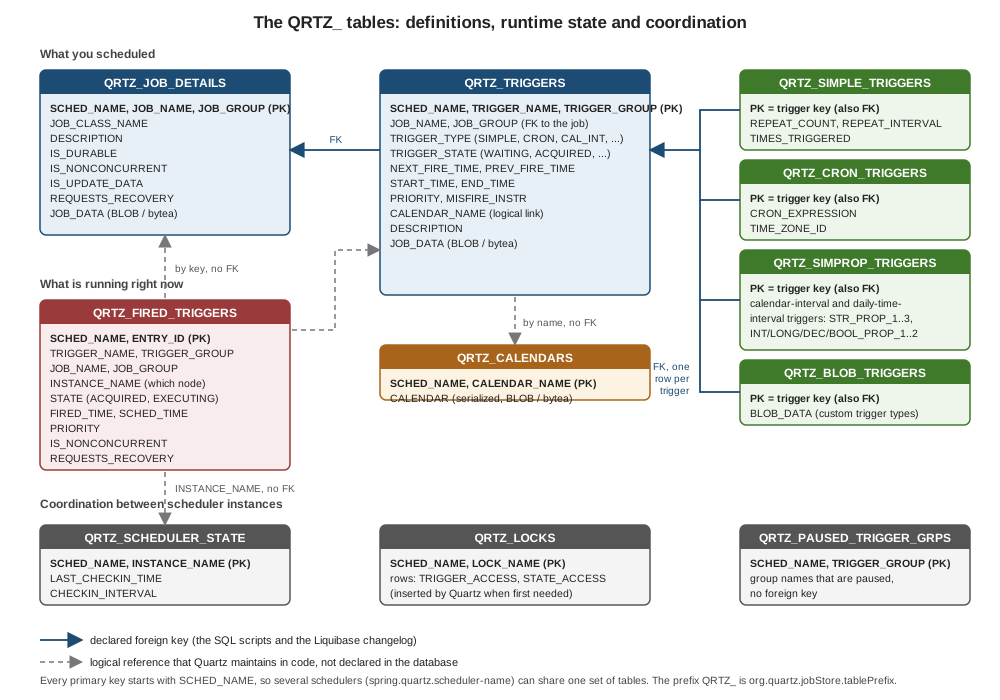
Source: the DDL scripts in the 2.5.2 jdbcjobstore resources (read from tables_postgres.sql, tables_h2.sql and liquibase.quartz.init.xml).
| Table | Purpose | Written when |
|---|---|---|
|
One row per |
|
|
One row per trigger of any type: key, owning job, type ( |
Whenever a trigger is scheduled, fires or changes state. This is the table the acquisition query reads. |
|
Repeat count, repeat interval and times triggered for `SimpleTrigger`s |
With the trigger row |
|
Cron expression and time zone id for `CronTrigger`s |
With the trigger row |
|
A generic bag of string, int, long, decimal and boolean columns used by the calendar-interval and daily-time-interval triggers (and by custom trigger types that use the property-based persistence delegates) |
With the trigger row |
|
A serialized trigger of a type Quartz has no table for |
Only for custom trigger classes |
|
One row per named |
|
|
The names of trigger groups that are paused (so that a trigger added later to a paused group starts paused) |
|
|
One row per trigger that is currently acquired or executing, with the instance that holds it and its |
Inserted at acquisition, updated to |
|
One heartbeat row per scheduler instance of a clustered scheduler: instance name, last check-in time and check-in interval |
Every |
|
The rows that act as locks: |
Locked with |
Source: Quartz Tutorial: Lesson 9, Job Stores and the 2.5.2 DDL scripts and StdJDBCConstants.
Seeing them is the best way to understand them. The query below was run on the PostgreSQL database of a Bookshelf service started with Flyway, a JDBC store, the
five Bookshelf triggers and one runtime reminder (reminders.loan-501, created with the reminder convention of the section).
SELECT trigger_group, trigger_name, job_name, trigger_type, trigger_state,
       to_char(to_timestamp(next_fire_time/1000) AT TIME ZONE 'UTC', 'YYYY-MM-DD HH24:MI') AS next_fire_utc,
       misfire_instr
FROM qrtz_triggers ORDER BY 1, 2;

SELECT trigger_name, cron_expression, time_zone_id FROM qrtz_cron_triggers ORDER BY 1;
SELECT trigger_name, repeat_count, repeat_interval, times_triggered FROM qrtz_simple_triggers ORDER BY 1;
SELECT sched_name, lock_name FROM qrtz_locks ORDER BY 2;| Trigger | Job | Type | State | Next fire (UTC, run on 5 October 2026) | Misfire instruction |
|---|---|---|---|---|---|
|
|
SIMPLE |
WAITING |
2026-10-05 10:11 (every 300000 ms, |
4 |
|
|
CRON |
WAITING |
2026-10-06 00:00 ( |
1 |
|
|
CRON |
WAITING |
2026-11-01 02:30 ( |
0 |
|
|
CRON |
WAITING |
2026-10-12 04:00 ( |
0 |
|
|
SIMPLE |
WAITING |
2026-10-12 10:06 ( |
0 |
Source: measured with the Bookshelf test project (QRTZ_TRIGGERS, QRTZ_CRON_TRIGGERS, QRTZ_SIMPLE_TRIGGERS).
Besides these rows the run showed QRTZ_LOCKS with exactly STATE_ACCESS and TRIGGER_ACCESS for scheduler name quartzScheduler (created on demand, clustering was on),
one QRTZ_SCHEDULER_STATE row with checkin_interval=7500 and an instance name of the form \{host name}\{epoch milliseconds}, no QRTZ_FIRED_TRIGGERS rows (nothing was
executing at that instant), five QRTZ_JOB_DETAILS rows and zero calendars. The JOB_DATA column held between 273 and 385 bytes per job: a serialized JobDataMap, which
is why the map must contain Serializable values (see Jobs & Job Data).
tablePrefix and SCHED_NAME
org.quartz.jobStore.tablePrefix (default QRTZ_) lets several applications keep separate Quartz tables in one database without separate schemas. The prefix is a Quartz property,
so under Boot it goes through spring.quartz.properties, and the DDL has to be edited to match, because the scripts and the Boot initializer know only QRTZ_. Both directions
were run on PostgreSQL 17:
| Configuration | Result |
|---|---|
|
Works: eleven tables named |
|
Startup fails with |
spring:
  quartz:
    job-store-type: jdbc
    jdbc:
      schema: classpath:custom/tables_bookshelf_prefix.sql
    properties:
      org.quartz.jobStore.tablePrefix: BKS_QRTZ_
      org.quartz.jobStore.driverDelegateClass: org.quartz.impl.jdbcjobstore.PostgreSQLDelegate
Source: Spring Boot: Quartz Scheduler
In practice a separate schema or database per application is cleaner than a prefix (the dedicated data source in A dedicated Quartz database does exactly that), and spring.quartz.scheduler-name
already separates the rows of schedulers that share tables.
useProperties
By default the JobDataMap of a job and of a trigger is stored as a serialized Java object. org.quartz.jobStore.useProperties=true switches the format: the map is stored
as the text of a java.util.Properties file, which makes the column readable and survives class changes, at the price that every key and value must be a String. Quartz enforces it:
with useProperties=true and the code-defined Integer value runs, the startup of the Bookshelf service failed with
IOException: JobDataMap values must be Strings when the 'useProperties' property is set. Key of offending value: runs
Source: Quartz documentation: Configure JDBCJobStoreTX and StdJDBCDelegate in the 2.5.2 source.
Use it when the map holds only strings and you want to evolve job classes freely; keep the default when jobs carry records or numbers (the Bookshelf MemberReminderJob stores memberId and
loanId as Long). The trade-offs of putting data in a JobDataMap at all are on Jobs & Job Data.
The driver delegates
Every statement the JDBC stores issue goes through a driver delegate, an implementation of org.quartz.impl.jdbcjobstore.DriverDelegate. The base class StdJDBCDelegate uses plain
JDBC and works wherever JDBC does what it is told; the subclasses exist to handle database-specific BLOB, boolean or locking behaviour. The delegate is chosen by
org.quartz.jobStore.driverDelegateClass, which Spring Boot leaves unset (so StdJDBCDelegate).
| Delegate | What it is for (from its Javadoc and the measured runs) | Used with |
|---|---|---|
|
The default. Measured to work on MySQL, MariaDB, H2 and (with the right script and driver) Oracle; measured to fail on PostgreSQL and SQL Server |
MySQL, MariaDB, H2, Oracle, Informix (the Informix script says to use it) |
|
PostgreSQL JDBC driver: reads and writes |
PostgreSQL |
|
SQL Server. With it, |
SQL Server |
|
Oracle 10 and 11 BLOB handling (note the |
Oracle |
|
BLOB handling for Oracle inside WebLogic 8.1, and the WebLogic JDBC driver |
WebLogic only |
|
HSQLDB |
HSQLDB |
|
DB2: v6 replaces |
DB2 (not run) |
|
Sybase ASE and Pointbase |
Sybase, Pointbase (not run) |
|
CUBRID, GaussDB (derived from |
CUBRID, GaussDB, Caché (not run) |
Source: Quartz documentation: Configure JDBCJobStoreTX and the 2.5.2 delegate sources. The list was read from the jar and the sources.
A discrepancy worth knowing about: the Quartz configuration page and some write-ups list CloudscapeDelegate, which does not exist in 2.5.2 (the comment at the top of the shipped tables_derby_previous.sql and the
tables_cloudscape.sql script still name it). The three DB2 delegates are in the 2.5.2 jar and sources.
The DDL scripts in the jar
The Quartz jar carries the DDL, under org/quartz/impl/jdbcjobstore/. Reading the 2.5.2 jar gives 25 scripts: tables_postgres, tables_mysql, tables_mysql_innodb, tables_oracle, tables_oracle23,
tables_sqlServer, tables_h2, tables_hsqldb, tables_hsqldb_old, tables_derby, tables_derby_previous, tables_db2, tables_db2_v72, tables_db2_v8, tables_db2_v95, tables_sybase,
tables_cubrid, tables_gauss_default_compatibility, tables_gauss_m_compatibility, tables_informix, tables_firebird, tables_cloudscape, tables_pointbase, tables_sapdb and
tables_solid (all .sql), plus liquibase.quartz.init.xml. The jars of 2.3.2 and 2.4.1 contain 22 scripts; tables_oracle23.sql and the two GaussDB
scripts are absent from them and present in 2.5.2, and only the 2.5.2 SQL Server script uses NVARCHAR (0 occurrences in 2.3.2 and 2.4.1, 55 in 2.5.2: measured by reading the jars).
Three facts about the scripts matter for everything that follows: the PostgreSQL, MySQL and HSQLDB scripts start with DROP TABLE IF EXISTS for every table (the H2 script has only CREATE statements, and the Derby script’s drops are commented out), the Oracle scripts start with
delete from and drop table statements without IF EXISTS, and the SQL Server script starts with USE [enter_db_name_here] and uses GO as a batch separator.
Managing the schema
The tables must exist before the scheduler starts. Spring Boot can create them for you, and a migration tool can create them better.
spring.quartz.jdbc.initialize-schema
spring.quartz.jdbc.initialize-schema takes the Spring DatabaseInitializationMode values embedded (the default), always and never. The initializer is the bean
QuartzDataSourceScriptDatabaseInitializer, created only when the property is not never; it runs the script selected by spring.quartz.jdbc.schema before the scheduler is created.
| Mode | Embedded database (H2) | Real database (PostgreSQL) |
|---|---|---|
|
The eleven tables are created ( |
Nothing is created. Startup fails with |
|
Script runs on every start |
The script runs on every start. Because it begins with |
|
Nothing runs; on an empty database |
Nothing runs; on an empty database the same |
Why always destroys triggers. The scripts are installers, not migrations: most of them (PostgreSQL, MySQL, HSQLDB, Oracle) start by dropping every QRTZ_ table so that they can create it afresh. Spring Boot does not
know that, it simply runs the script again at each startup. (H2’s script has no drops: with always its CREATE statements fail on "already exists" errors, which the default continue-on-error=true swallows, so the data is kept.) The result is a service that works perfectly in development (where an empty schedule at every start is what you
want) and silently loses every runtime-created reminder, every paused trigger and every @PersistJobDataAfterExecution counter in production. The code-defined jobs reappear because
the beans re-register them, which hides the problem until someone notices that the per-member reminders are gone. Use always for throwaway tests and demos, embedded (the default)
for an in-memory H2, and never with Flyway or Liquibase for anything that has data worth keeping. Note the opposite trap of the default: embedded on a real database is not
"create if missing", it is "do nothing", and the failure message is the missing table.
schema, platform, comment-prefix and continue-on-error
The other four properties of the spring.quartz.jdbc group, with the defaults read from QuartzJdbcProperties and DatabaseInitializationProperties:
| Property | Default | What it does |
|---|---|---|
|
|
The script (or comma-separated scripts) to run. |
|
auto-detected from the |
The value that replaces |
|
|
The prefixes that mark a whole line of the script as a comment. They are handed to Spring’s |
|
|
Whether a failing statement of the script is skipped. The default is the unusual one: errors in the script are swallowed. Spring Boot 4.x only: on 3.5.16 the property does not exist and the initializer hard-codes |
Source: Spring Boot: Common Application Properties (Quartz group) and the
4.1.1 QuartzJdbcProperties source.
continue-on-error=true is why a wrong platform or a script that cannot run through Spring does not fail where it happens. All of these were run:
| Situation | Result |
|---|---|
|
Every statement of |
|
Startup fails at the first statement with |
A script whose first statement fails ( |
The statement is skipped and the application starts with all eleven tables; with |
Oracle |
The leading |
SQL Server script as shipped, |
|
Source: measured with the Bookshelf test project (the schema-properties test of this page and the per-database runs behind the support matrix).
A good habit while developing a schema script or a new database page is to set continue-on-error: false so every error is visible, and to leave the default for the unavoidable case of the Oracle scripts
that Boot runs. In production none of this applies, because Boot should not run the script at all.
On Spring Boot 3.5.16 spring.quartz.jdbc.continue-on-error does not exist: the jdbc settings are a nested class with four properties (initialize-schema, schema, platform, comment-prefix) and the initializer hard-codes continue-on-error=true, so script errors are always skipped there and a continue-on-error: false line is not an error but has no effect. The property was added in Spring Boot 4.0.
The scheduler waits for the schema
Whatever creates the tables, it has to finish before the scheduler asks for a trigger. Spring Boot guarantees that with its database-initialization ordering:
QuartzAutoConfiguration imports DatabaseInitializationDependencyConfigurer, and the class SchedulerDependsOnDatabaseInitializationDetector declares that beans of type Scheduler and
SchedulerFactoryBean depend on database initialization. The initializers it recognizes include Boot’s own script initializers (Quartz’s, spring.sql.init), Flyway and Liquibase. The effect is
visible in the measured runs of the next two sections: with initialize-schema=never and an empty database, the Flyway or Liquibase migration ran first and the scheduler started on the
tables it had just created, with no @DependsOn anywhere.
Source: 4.1.1 SchedulerDependsOnDatabaseInitializationDetector source.
Flyway
For anything beyond a demo the schema is a versioned migration, like the rest of the database (the reasoning, and how to choose a tool, are on
Schema Evolution and Choosing a Migration Tool; Flyway has no page of its own there).
Take the Quartz script for your database from the jar, delete the DROP TABLE lines, and keep it as a migration.
<dependency>
    <groupId>org.springframework.boot</groupId>
    <artifactId>spring-boot-starter-flyway</artifactId>
</dependency>
<dependency>
    <groupId>org.flywaydb</groupId>
    <artifactId>flyway-database-postgresql</artifactId>
</dependency>unzip -p quartz-2.5.2.jar org/quartz/impl/jdbcjobstore/tables_postgres.sql \
| sed '/^DROP TABLE/d' > src/main/resources/db/migration/V1__quartz_tables.sqlspring:
flyway:
enabled: true # default; locations default to classpath:db/migration
quartz:
job-store-type: jdbc
jdbc:
initialize-schema: never
properties:
org.quartz.jobStore.driverDelegateClass: org.quartz.impl.jdbcjobstore.PostgreSQLDelegateMeasured on postgres:17 with Flyway 12.4.0 and the file above named V1__quartz_tables.sql: on an empty database the start created the eleven qrtz_* tables plus flyway_schema_history (one row, version 1, description
quartz tables, success true), the four Bookshelf jobs fired (cacheRefresh three times, overdueLoanReminders twice) and the job store was LocalDataSourceJobStore with PostgreSQLDelegate. A second start on the migrated database found
nothing to do (still one history row) and ran the jobs again. The control run, with nothing managing the schema and initialize-schema=never, failed with relation "qrtz_job_details" does not exist.
The Flyway starter appeared in Spring Boot 4.0 (the 4.0.0 milestone releases are the first versions of spring-boot-starter-flyway on Maven Central); on Spring Boot 3.5.16 add flyway-core and the database module directly. The property names
under spring.flyway.* are the same.
A Quartz upgrade that changes the DDL (2.5.2 changed the SQL Server script to NVARCHAR columns, see What changed) becomes a new V2__… migration written by you, which is the point of owning the schema: the Quartz jar changes
whenever Boot does, and you decide when the tables change.
Liquibase
The Quartz jar also contains a Liquibase changelog, org/quartz/impl/jdbcjobstore/liquibase.quartz.init.xml. It is inside the Quartz jar (org.quartz-scheduler:quartz, present in the 2.3.2, 2.4.1 and 2.5.2 jars: measured), not
in a Spring Boot jar; Boot does not reference it, you include it from your own changelog. It declares one change set (id="quartz-init", author="quartz") that creates the eleven tables with a table-prefix property table_prefix
(QRTZ_), their primary keys, indexes and foreign keys, and maps the BLOB columns to BYTEA on PostgreSQL and BLOB elsewhere through a blob_type property. It uses BOOLEAN for the flag columns and needs no
DROP TABLE. Two ways to use it were run on postgres:17 with Liquibase 5.0.3:
databaseChangeLog:
  - include:
      file: org/quartz/impl/jdbcjobstore/liquibase.quartz.init.xml
Source: Liquibase documentation
databaseChangeLog:
  - changeSet:
      id: quartz-tables-2.5.2
      author: bookshelf
      changes:
        - sqlFile:
            path: db/changelog/quartz/tables_postgres_nodrop.sql
            splitStatements: true
            endDelimiter: ;
Source: Liquibase documentation
spring:
  liquibase:
    change-log: classpath:db/changelog/quartz-bundled.yaml
  quartz:
    job-store-type: jdbc
    jdbc:
      initialize-schema: never
    properties:
org.quartz.jobStore.driverDelegateClass: org.quartz.impl.jdbcjobstore.PostgreSQLDelegateBoth variants created the eleven tables and databasechangelog and databasechangeloglock, the changelog table held one row (quartz-init from org/quartz/impl/jdbcjobstore/liquibase.quartz.init.xml, or
quartz-tables-2.5.2 from the YAML), and the Bookshelf jobs fired with PostgreSQLDelegate. (Without spring.liquibase.change-log Liquibase looks for classpath:/db/changelog/db.changelog-master.yaml and the
start fails with … does not exist if that file is missing, which is why the measured runs disable Liquibase when Flyway is the tool and the other way round.) Choose the bundled file when you want
Quartz’s own definition (it is database-neutral and tracks the Quartz release), and the sqlFile variant when you need the vendor script exactly as Quartz ships it, for example the Oracle or SQL Server script with edits. The
Liquibase concepts are on Liquibase: Getting Started and
Liquibase: Changelogs and Changesets. As with Flyway, the starter is a Boot 4 name; on 3.5 depend on liquibase-core.
| Situation | Recommendation |
|---|---|
Unit tests and demos on an in-memory H2 |
|
Integration tests with Testcontainers |
|
Development on a real database that you drop often |
|
Staging and production |
|
A dedicated Quartz database
Quartz does not have to share the application’s database. Two reasons are common: the business data lives in a database Quartz cannot use (MongoDB, Redis, Elasticsearch: none of them has a Quartz job store that works on the
Quartz 2.5.2 that Boot manages, see Plugging in a store that is not JDBC), or the team wants the high-churn trigger tables, their locking and their vacuuming out of the business database. Spring Boot supports this with two qualifier annotations
in org.springframework.boot.quartz.autoconfigure.
-
@QuartzDataSourcemarks theDataSourcebean Quartz must use. It is honoured in two places inQuartzAutoConfiguration: the data source passed toSchedulerFactoryBean.setDataSource, and the data source the schema initializer runs the script against. Without it Boot uses the single (or@Primary)DataSource. -
@QuartzTransactionManagermarks thePlatformTransactionManagerbean that Boot sets on theSchedulerFactoryBeanwithsetTransactionManager. It exists in Spring Boot 4.1.1 (the source carries@since 4.0.0for the new package; the 3.5.16 jar also contains it, in the old package: measured by listing the jar). Its Javadoc says it is meant for a secondary transaction manager when another one is marked@Primary. Without it Boot takes the one transaction manager it can find (ObjectProvider.getIfUnique(), so the@Primaryone if there are several), and none at all if there is no unique candidate.
What the transaction manager is used for: SchedulerFactoryBean registers the JobDetail, Calendar and Trigger beans in a single transaction when it starts. The transaction is only meaningful if the transaction manager
manages the Quartz data source. This was measured: the registration was made to fail halfway (two durable JobDetail`s and a `Trigger that names a calendar that does not exist, which makes scheduleJob throw
SchedulerException: Calendar not found: doesNotExist after both jobs were stored), with the business DataSource (H2) @Primary and Quartz on PostgreSQL 17.
| Configuration | Transactions begun | Rows left in QRTZ_JOB_DETAILS after the failed start |
|---|---|---|
|
Quartz manager 1, application manager 0 |
0: the registration was rolled back |
|
Application manager 1, Quartz manager 0 |
2: the manager used is for a different database, so nothing is rolled back |
Source: Spring Boot: Quartz Scheduler and the 4.1.1 QuartzTransactionManager and QuartzAutoConfiguration sources.
The second row is the pitfall: a half-registered schedule after a failed start is not catastrophic, but the same mismatch applies to every scheduler.scheduleJob(…) you call from a @Transactional service: the
application transaction does not include the Quartz tables, so a rollback of the business transaction leaves the trigger in place. If you want the two to commit together they must be in the same database (use one DataSource),
and if they cannot be, treat the scheduler call as a separate step (see the consistency discussion on the MongoDB page).
@Configuration(proxyBeanMethods = false)
class BookshelfDataSources {

    // business data
    @Bean @Primary
    @ConfigurationProperties("bookshelf.datasource")
    DataSourceProperties appDataSourceProperties() {
        return new DataSourceProperties();
    }

    @Bean @Primary
    @ConfigurationProperties("bookshelf.datasource.hikari")
    HikariDataSource appDataSource(@Qualifier("appDataSourceProperties") DataSourceProperties properties) {
        return properties.initializeDataSourceBuilder().type(HikariDataSource.class).build();
    }

    @Bean @Primary
    PlatformTransactionManager appTransactionManager(DataSource appDataSource) {
        return new DataSourceTransactionManager(appDataSource);
    }

    // Quartz tables
    @Bean
    @ConfigurationProperties("bookshelf.quartz.datasource")
    DataSourceProperties quartzDataSourceProperties() {
        return new DataSourceProperties();
    }

    @Bean @QuartzDataSource
    @ConfigurationProperties("bookshelf.quartz.datasource.hikari")
    HikariDataSource quartzDataSource(@Qualifier("quartzDataSourceProperties") DataSourceProperties properties) {
        return properties.initializeDataSourceBuilder().type(HikariDataSource.class).build();
    }

    @Bean @QuartzTransactionManager
    PlatformTransactionManager quartzTransactionManager(@QuartzDataSource DataSource quartzDataSource) {
        return new DataSourceTransactionManager(quartzDataSource);
    }
}
Source: Spring Boot: Quartz Scheduler and Spring Boot: Data Access How-to (configuring two data sources).
bookshelf:
  datasource:
    url: jdbc:postgresql://localhost:5432/bookshelf
    username: ${DB_USER}
    password: ${DB_PASSWORD}
  quartz:
    datasource:
      url: jdbc:postgresql://localhost:5432/bookshelf_quartz
      username: ${QUARTZ_DB_USER}
      password: ${QUARTZ_DB_PASSWORD}
      hikari:
        maximum-pool-size: 13       # threadCount 10 + 3, see the pool sizing section
spring:
  quartz:
    job-store-type: jdbc
    jdbc:
      initialize-schema: never
    properties:
      org.quartz.threadPool.threadCount: "10"
      org.quartz.jobStore.driverDelegateClass: org.quartz.impl.jdbcjobstore.PostgreSQLDelegate
Source: Spring Boot: Quartz Scheduler
Run with an in-memory H2 as the business database and postgres:17 as the Quartz database (with initialize-schema=always to keep the experiment short): the scheduler reported LocalDataSourceJobStore, ten
threads, the Quartz pool at 13 and the application pool at the Hikari default of 10, the cache-refresh job fired three times, the application H2 contained 0 QRTZ tables and the Quartz PostgreSQL contained 11 tables with the trigger row
in qrtz_triggers. This is also the pattern for keeping business data in a NoSQL database: the Bookshelf catalogue in MongoDB and Quartz on a small PostgreSQL, a full example of which is on
the MongoDB page (and on the Redis page); the SQL side of it is exactly the configuration above. On Spring Boot 3.5 the same two
annotations live in org.springframework.boot.autoconfigure.quartz.
Sizing the connection pool
Quartz needs more connections than people expect. The scheduler thread, the misfire handler and the cluster manager each use the database, and every worker thread uses a connection when its job completes
(triggeredJobComplete updates the trigger and deletes the fired row). The Quartz documentation states the rule on both the data sources page and the best-practices page: configure the data source’s maximum connections to at least the number
of worker threads in the pool plus three, more if the application calls the scheduler API often, and at least four for the non-managed data source of a JobStoreCMT. The extra three match the three housekeeping threads; the page you are reading verified the rule against the documentation, not by
exhausting a pool. (Some write-ups say threads plus two; the official text says plus three, which is what to use.)
The default makes it matter. Quartz’s thread pool defaults to 10 threads (measured 10 under Boot) and Hikari’s default pool is 10 connections, shared with the application, so a busy 10-thread scheduler on the application’s default pool is already under the recommendation. Raise the pool, or give Quartz its own, as in the previous section:
spring:
  datasource:
    hikari:
      maximum-pool-size: 20     # application traffic (about 7) plus Quartz (10 threads + 3)
  quartz:
    properties:
org.quartz.threadPool.threadCount: "10"When Quartz manages its own pool (plain Quartz, or a JobStoreTX set up by hand) the pool is configured with org.quartz.dataSource.NAME.*; the documented property that selects HikariCP is provider = hikaricp, not the
driver = hikaricp that an example on the same page uses, and since Quartz 2.4.0 HikariCP and c3p0 are provided dependencies you have to add yourself. The production consequences, including the one scheduler per database
connection budget of a cluster, are on Production & Best Practices.
Code-defined jobs and stored jobs: overwrite-existing-jobs
With a persistent store there are now two sources of truth for a job: the JobDetail and Trigger beans in the code and the rows the database already has. Spring’s SchedulerFactoryBean reconciles them when it
starts, in SchedulerAccessor.registerJobsAndTriggers, controlled by one switch, spring.quartz.overwrite-existing-jobs (default false). The flow, read from the source:
Registration happens in afterPropertiesSet, before start; a scheduler that registers the same beans on every node (a cluster) is protected by the store: a race on the same trigger key ends in an
ObjectAlreadyExistsException that Spring logs at debug level and ignores ("assumably due to cluster race condition"). What the flow does not do matters as much: it never deletes anything. A job whose bean you removed from the
code stays in the database and keeps firing; a job created at runtime is never touched.
The effect was measured with the Bookshelf overdue-loan reminders on PostgreSQL 17 and the JDBC store: a first deployment (version 1 of the beans), then the same kind of changes production makes by itself (the job incremented its persisted
counter to 7, an operator paused the trigger, a reminder reminders.loan-501 was scheduled at runtime), then a redeployment with version 2 of the beans (a different description, job data, cron expression and calendar, a new
newsletter job and the retiredJob bean removed), once with overwrite-existing-jobs=false and once with true.
| Item | After the changes made in production | Redeploy v2, overwrite false (default) | Redeploy v2, overwrite true |
|---|---|---|---|
Job |
|
unchanged: |
replaced by the bean: |
Trigger |
|
unchanged: |
replaced: |
Job and trigger |
absent |
added (not stored yet) |
added |
Job |
stored |
still stored |
still stored |
Job |
stored |
untouched |
untouched |
Calendar |
1 excluded day |
3 excluded days: calendars are replaced always |
3 excluded days |
Source: measured with the Bookshelf test project; behaviour read from SchedulerAccessor.registerJobsAndTriggers, addJobToScheduler and addTriggerToScheduler.
The practical rules that follow from the table:
-
With the default (
false) the code is only the initial definition: a changed cron expression, misfire instruction or job data in the code does not reach an already deployed environment. This is what you want when operators edit schedules at runtime (pause, reschedule) and a restart must not undo it; it is a trap when you change a cron in a pull request and nothing changes in production. The Boot reference says the same: a restart does not re-create or change jobs that already exist. -
With
trueevery start resets every code-defined job and trigger to the code’s version, including state: paused triggers resume, and@PersistJobDataAfterExecutioncounters go back to the bean’s value. It is the right setting for schedules that are code-only and where the code is the truth; it is wrong for any job whose data the job itself maintains. -
Neither setting removes a job. Remove obsolete jobs explicitly, through a one-off migration or an administrative call (
Scheduler.deleteJob), or accept that they keep firing. -
The calendar is always replaced, even with
false, andupdateTriggers=truemakes the stored triggers that use it recompute their next fire time. -
A middle road that keeps both properties is to leave
overwrite-existing-jobsfalse and update specific jobs from code at startup (aSchedulerFactoryBeanCustomizeror anApplicationRunnerthat callsrescheduleJobfor the triggers whose definition you changed, compare first, replace only on difference). The dynamic management of schedules is the subject of Dynamic Scheduling & Management.
Never write to the QRTZ tables yourself
The tables look like an ordinary schema, and a UPDATE QRTZ_TRIGGERS SET TRIGGER_STATE = 'PAUSED' is tempting during an incident. The Quartz best-practices page has a section titled "Never Write Directly To Quartz’s Tables", and warns
that doing so can corrupt data, make jobs vanish without running or appear stuck, and cause deadlocks. The reason is visible in the structure above: a trigger’s state, its next fire time, the fired-trigger
row of its current execution, the row locks and the in-memory view of the scheduler thread all have to agree, and Quartz maintains that agreement in code under locks, in several tables at once, with the serialized
JobDataMap and calendar blobs in binary form. Read the tables freely (the queries above are safe, a read-only reporting user is a good idea), and change them only through the Scheduler API, the Actuator
quartz endpoint (trigger-now only) or your own management endpoints. Everything you do through the API is also correct for every other node of a cluster at once, because it goes through the store.
Source: Quartz documentation: Best Practices
Plugging in a store that is not JDBC
Because Spring Boot passes spring.quartz.properties.* straight to Quartz’s StdSchedulerFactory, any class implementing org.quartz.spi.JobStore can be installed by name. The behaviour was measured against Boot 4.1.1:
| Configuration | Result |
|---|---|
|
Works, |
|
The custom class is honoured; its |
|
Fails with |
Source: Quartz documentation: Configure the scheduler and the 4.1.1 QuartzAutoConfiguration source.
spring:
  quartz:
    job-store-type: memory           # leave it: jdbc would add a DataSource and the Spring store
    properties:
      org.quartz.jobStore.class: com.example.quartz.MyJobStore
org.quartz.jobStore.someSetting: someValueWhether the existing community stores are usable is a different question, answered by running them. On the baseline of this section, Quartz 2.5.2, neither is: quartz-mongodb 2.2.0-rc2 starts, reports a started scheduler and
never fires a job (the scheduler thread dies with a NoSuchMethodError for JobDetail.isConcurrentExectionDisallowed(), a method removed in Quartz 2.5), and quartz-redis-jobstore 1.2.0 fails with a NoSuchMethodError on JedisCommands.del for every Jedis newer than 3.3.0 that was tried (4.4.8 to 7.4.1) and, even with Jedis 3.3.0,
does not work on Quartz 2.5.2 (no job fires, and the clustered start fails with a Jackson error). Both work on Quartz 2.4.1 with suitable driver versions (Jedis 3.3.0 for Redis; MongoDB driver 4.0.5 or 5.8.1). The full matrix, with the exact versions, is on
MongoDB and Redis; the recommendation there, and the one to follow here, is Quartz on a small SQL database
(A dedicated Quartz database) when you need Quartz features, and @Scheduled with ShedLock (see Scheduling & ShedLock) when you only need one execution per cluster.
Database support matrix
Which database works with which delegate and script, with what was actually run. "Measured" means the Bookshelf jobs fired, a runtime job with a serialized JobDataMap fired, and the state survived a restart with
initialize-schema=never, and for the clustering column that two schedulers of the same name shared the schedule with no duplicate execution and work spread across them. "Not run" rows are listed from the jar and the
sources only.
| Database | Status | Delegate or store class | DDL script (Quartz 2.5.2 jar) | Clustering | Page |
|---|---|---|---|---|---|
PostgreSQL 17.11 (pgJDBC 42.7.13) |
Official (JDBC) |
|
|
Measured: three schedulers in one JVM and a |
|
MySQL 9.7.2 (Connector/J 9.7.0) |
Official |
|
|
Measured with two nodes |
|
MariaDB 11.8.9 (Connector/J 3.5.10) |
Official |
|
|
Measured with two nodes |
|
Oracle Free ( |
Official |
|
|
Measured with two nodes ( |
|
SQL Server 2022 ( |
Official |
|
|
Measured with two nodes (edited script, |
|
H2 2.4.240 |
Official, for development and tests |
|
|
Measured for development only ( |
|
HSQLDB |
Official |
|
|
Not safe across processes. The store stays clustered ( |
|
Apache Derby |
Official script |
Not named by the script; |
|
Not run |
|
DB2, Sybase, CUBRID, GaussDB, InterSystems Caché |
Official scripts and delegates |
|
|
Not run |
|
MongoDB 8.3.11 |
Community, archived ( |
|
None; collections prefixed |
Measured: fails on Quartz 2.5.2 (no job ever fires, silently); passes single and clustered on Quartz 2.4.1 and 2.3.2 |
|
Redis 8.10.2 |
Community ( |
|
None; keys under a configurable prefix |
Measured: fails on Quartz 2.5.2 (with Jedis 3.3.0 and with Boot’s 7.4.1); works only on Quartz 2.4.1 with Jedis 3.3.0 (single and clustered) |
Source: the measured runs behind the database pages linked in the last column and the 2.5.2 DDL scripts; community stores: quartz-mongodb (archived) and quartz-redis-jobstore.
The two rows to remember are the ones that surprise people: PostgreSQL and SQL Server need their delegates, Oracle needs the 23 script on a modern driver, and the community NoSQL stores are not a Quartz 2.5 option.
Worked example: the Bookshelf schedule on PostgreSQL
Putting the page together for the Bookshelf service: PostgreSQL as the store, Flyway owning the schema, never for Boot, the PostgreSQL delegate, a pool that satisfies the sizing rule,
and overwrite-existing-jobs left false so that operators' pauses survive a deployment.
bookshelf-service/
  pom.xml                                   spring-boot-starter-quartz, -jdbc, -flyway, flyway-database-postgresql, postgresql
  src/main/java/bookshelf/
    BookshelfSchedule.java                  the JobDetail and Trigger beans (see Getting Started with Spring Boot)
  src/main/resources/
    application.yml                         the configuration below
    db/migration/V1__quartz_tables.sql      tables_postgres.sql from the Quartz jar, DROP TABLE lines removed
Source: Spring Boot: Quartz Scheduler
spring:
  datasource:
    url: jdbc:postgresql://${DB_HOST:localhost}:5432/bookshelf
    username: ${DB_USER}
    password: ${DB_PASSWORD}
    hikari:
      maximum-pool-size: 20
  flyway:
    enabled: true
  quartz:
    job-store-type: jdbc
    overwrite-existing-jobs: false
    jdbc:
      initialize-schema: never
    properties:
      org.quartz.threadPool.threadCount: "10"
      org.quartz.jobStore.driverDelegateClass: org.quartz.impl.jdbcjobstore.PostgreSQLDelegate
Source: Spring Boot: Quartz Scheduler
@Testcontainers
@SpringBootTest(classes = BookshelfApplication.class, properties = {
        "spring.quartz.job-store-type=jdbc",
        "spring.quartz.jdbc.initialize-schema=never",
        "spring.quartz.properties.org.quartz.jobStore.driverDelegateClass=org.quartz.impl.jdbcjobstore.PostgreSQLDelegate"})
class BookshelfJobStoreIT {

    @Container
    static PostgreSQLContainer postgres = new PostgreSQLContainer("postgres:17");

    @DynamicPropertySource
    static void datasource(DynamicPropertyRegistry registry) {
        registry.add("spring.datasource.url", postgres::getJdbcUrl);
        registry.add("spring.datasource.username", postgres::getUsername);
        registry.add("spring.datasource.password", postgres::getPassword);
    }

    @Autowired Scheduler scheduler;
    @Autowired JdbcTemplate jdbc;

    @Test
    void bookshelfScheduleIsStoredInPostgreSql() throws Exception {
        assertThat(scheduler.getMetaData().isJobStoreSupportsPersistence()).isTrue();
        assertThat(jdbc.queryForObject(
                "SELECT count(*) FROM information_schema.tables WHERE table_name LIKE 'qrtz\\_%'", Integer.class)).isEqualTo(11);
        assertThat(jdbc.queryForObject("SELECT count(*) FROM qrtz_job_details", Integer.class)).isEqualTo(4);
        assertThat(scheduler.checkExists(JobKey.jobKey("overdueLoanReminders", "bookshelf"))).isTrue();
        assertThat(scheduler.getTriggerState(TriggerKey.triggerKey("weeklyStatisticsTrigger", "bookshelf")))
                .isEqualTo(TriggerState.NORMAL);
    }
}The test passed (1 test, 0 failures, about ten seconds including the container start) with the V1 migration on the test classpath and the Flyway starter’s default locations. It uses the Testcontainers 2.x class
org.testcontainers.postgresql.PostgreSQLContainer and the artifacts testcontainers-postgresql and testcontainers-junit-jupiter. More on testing schedulers, including a three-node cluster test, is on
Testing and Clustering; the general Testcontainers set-up is on
Spring Boot Integration Tests with Testcontainers.
The Flyway migration, @Transactional services that call the scheduler and the isolation level of the lock queries all interact with the data layer of the rest of the service; see
Spring Data JPA and Transaction Isolation & Locking.
Pitfalls
| Pitfall | What happens | What to do |
|---|---|---|
|
The script drops every |
|
The default |
Nothing is created; startup fails with |
Let a migration tool create the schema, or use |
|
A wrong platform or an unrunnable script (SQL Server, a mismatched |
Set it to |
No |
|
Set |
Two |
No error: Boot silently uses |
Mark the application’s data source |
|
Registration runs in the wrong transaction (two job rows left after a failed start); API calls from |
Add |
Overriding |
|
Leave the class to Boot; custom stores need |
|
The deployed environment keeps the old cron and job data |
Redeploy with |
|
Every restart resets the counter, resumes paused triggers and resets the description |
Keep it |
Removing a job bean |
The stored job and trigger remain and keep firing |
Delete it explicitly with |
Writing to |
Corrupt state, vanished or stuck jobs, deadlocks (Quartz best practices) |
Use the |
Pool smaller than threads plus three |
Worker threads and the housekeeping threads wait for connections (the Quartz guidance; not exhausted in a test here) |
Size the pool for the thread count, or give Quartz its own pool |
|
Startup or |
Keep strings only, or leave the default |
A |
|
Edit the script and set |
A community NoSQL store on Quartz 2.5 |
MongoDB: scheduler "started", no job ever fires. Redis: startup failure |
Quartz on SQL plus MongoDB or Redis for data, or ShedLock |
Source: this page’s measured results and the Quartz Best Practices.
What changed
| Release | Change |
|---|---|
Quartz 2.4.0 |
|
Quartz 2.5.0 |
Jakarta namespace ( |
Quartz 2.5.x scripts |
The jar grows from 22 DDL scripts (2.3.2 and 2.4.1) to 25 in 2.5.2: |
After Quartz 2.5.2 (unreleased on |
Pull request 1515 binds the scheduler-state instance name as |
Spring Boot 3.5 to 4.x |
The Quartz auto-configuration moved to |
Spring Framework 6.2 to 7.0 |
|
Documentation versus code |
The Quartz configuration page says the RAM store’s |
Source: Quartz releases and the Spring Boot 4.0 Migration Guide. The jar comparisons were made by listing the 2.3.2, 2.4.1 and 2.5.2 jars.
Where to go next
-
A database to run it on: PostgreSQL (the reference page), then the page of the database you use.
-
Several nodes sharing the tables: Clustering.
-
All the
spring.quartz.*properties in one place: Spring Boot Configuration for Quartz. -
The production checklist (pool sizing, retention of
QRTZ_rows, monitoring): Production & Best Practices. -
Introducing the section’s concepts: Quartz Fundamentals and Getting Started with Spring Boot.