Deployment
|
This content was generated with the assistance of AI and should be verified against the official documentation of each tool before being relied on in production. This section’s bibliography lists the reference material consulted while preparing these pages. |
This page was written against Docusaurus 3.10.2 (the last release of the 3.x line) and checked on 2026-10-26. A
Docusaurus build produces a folder of static files, and deploying means putting that folder on a web server under the
right address. The page explains the three settings that describe that address, the two ways of publishing to GitHub
Pages, the short Netlify and Vercel recipes, and how to use environment variables in a build. The running example is the
documentation site of Pocket Units, the small units-conversion library with a C# and a Python implementation. The builds,
the serve command and the failure messages shown below were run with Docusaurus 3.10.2 in a scratch project. The
GitHub Actions workflows, Netlify and Vercel were not executed here: they need a GitHub repository or an account on those
services.
What a deployment is
docusaurus build writes the site to the build folder: HTML files, an assets folder with the bundled JavaScript and
CSS, a copy of everything in static/, and a sitemap.xml. Docusaurus does not host anything. Every host, from a
GitHub Pages repository to a plain web server, only has to serve those files. Because pages are rendered at build time,
the site is readable without JavaScript.
npm run build
npm run serve
Source: Docusaurus docs: Deployment
serve publishes the build folder on http://localhost:3000/ (more precisely, under the configured baseUrl) so that
you can check the result before it leaves your machine. It is a test server, not a production one. For a self-hosted
machine the same command accepts --build, --port and --host, for example
npm run serve -- --build --port 80 --host 0.0.0.0, which the official page presents as the simplest way to self-host,
while recommending a static host or a CDN for production. A real run of serve for the Pocket Units site printed this
line:
[SUCCESS] Serving "build" directory at: http://localhost:3917/pocket-units/The settings that describe the address
Three keys of docusaurus.config.ts decide where the site thinks it lives. If they disagree with the host, links and
assets break.
| Key | Meaning | Example for Pocket Units on GitHub Pages |
|---|---|---|
|
The origin of the site: scheme and host, no path. |
|
|
The path under which the site is served, always starting and ending with a slash. |
|
|
Whether page URLs and file names end with a slash. Accepts |
|
The final address of a page is url plus baseUrl plus the page path. url is also used to build absolute URLs: the
canonical links and the entries of sitemap.xml.
url and baseUrl slash pitfalls
The official documentation is not fully consistent about the trailing slash of url: the configuration reference writes
it without one in most examples, the deployment page’s Netlify section says explicitly that there is no trailing slash,
and one example on the deployment page shows one. The experiments below show what the build really does with each
variation.
| Setting tried | Result of docusaurus build in 3.10.2 |
|---|---|
|
Build succeeds and the sitemap entries have no doubled slash. |
|
Build fails: |
|
Build succeeds. The configuration validation adds the missing leading and trailing slash, so assets are served from
|
|
Build succeeds with the same normalized result. |
So write url without a trailing slash and without a path, and write baseUrl with both slashes: it is the documented
form and the one that stays correct if a later version stops normalizing. Putting a sub-path in url is the one mistake
that is rejected. The mistakes that are not rejected are the ones that hurt: a baseUrl that does not match the real
path of the host builds fine and then serves a page with no styles or scripts. For that case the client shows a banner on the
home page, "Your Docusaurus site did not load properly", that prints the configured baseUrl and suggests another one.
The banner can be turned off with baseUrlIssueBanner: false; it is on by default.
trailingSlash
trailingSlash changes both the URLs Docusaurus generates and the files it writes. The same Pocket Units page
docs/intro produced these results in three builds:
trailingSlash |
File written | Sitemap entry |
|---|---|---|
|
|
|
|
|
|
not set ( |
|
|
The third row is the awkward one: the file layout is the one of true, while the URLs written into the sitemap are the
ones of false. Hosts then answer the two spellings differently. Docusaurus does not decide this for you, because each
host behaves in its own way: some redirect from one spelling to the other, some serve both, and some return a 404 for
the spelling that has no file. The official page points to a third-party guide that tests the behaviour of many hosts
(slorber/trailing-slash-guide on GitHub), and the safe procedure is to choose true or false, then open both spellings
on the real host. A mismatch can produce redirects or 404 responses on some hosts, and duplicated URLs in search engines.
The serve command is tolerant: with the undefined build it returned status 200 for both /pocket-units/docs/intro
and /pocket-units/docs/intro/. A green local test therefore does not prove that your host behaves the same way.
GitHub Pages adds the trailing slash itself on direct access (not on in-page navigation), through a server redirect. The
official guidance is to set trailingSlash to true or false explicitly for GitHub Pages, and the deploy command warns
when it is not set. Running it on the undefined build printed this warning (the log level tag in front of the first line is left out):
When deploying to GitHub Pages, it is better to use an explicit "trailingSlash" site config.
Otherwise, GitHub Pages will add an extra trailing slash to your site urls only on direct-access (not when navigation) with a server redirect.
This behavior can have SEO impacts and create relative link issues.
Environment variables and customFields
Only docusaurus.config.ts is executed in Node.js. The code of pages and components runs in the browser, where
process.env does not exist, so reading process.env.SOMETHING in a component fails or is empty. The pattern is to read
the variable in the configuration file and hand it to components through customFields, which the components read with
useDocusaurusContext(). The configuration file is also the place to load a .env file with dotenv, as the official
page shows.
const config: Config = {
  // ... other keys
  url: 'https://pocket-units-org.github.io',
  baseUrl: '/pocket-units-docs/',
  customFields: {
    buildChannel: process.env.BUILD_CHANNEL ?? 'local',
  },
};import React from 'react';
import useDocusaurusContext from '@docusaurus/useDocusaurusContext';
export default function BuildChannel(): React.JSX.Element {
const {siteConfig} = useDocusaurusContext();
return <span>{String(siteConfig.customFields?.buildChannel)}</span>;
}Source: Docusaurus docs: Deployment
Running BUILD_CHANNEL=ci npm run build embedded the value in the JavaScript bundle (the search of build/assets/js
found the property buildChannel with the value ci). That is the point to remember: customFields values are written into files that every visitor
downloads, so they must never hold secrets. A deploy token or an API key stays in the CI secrets and is read by the
tools that run during the build, not copied into customFields.
The component above was written from the official description of useDocusaurusContext and was not rendered here; the
embedding of the value in the bundle is what was checked.
GitHub Pages
GitHub Pages serves static files from a repository. A project repository is published at
https://<owner>.github.io/<repository>/, so baseUrl is /<repository>/. A repository named
<owner>.github.io is published at the root of https://<owner>.github.io/, so baseUrl is /.
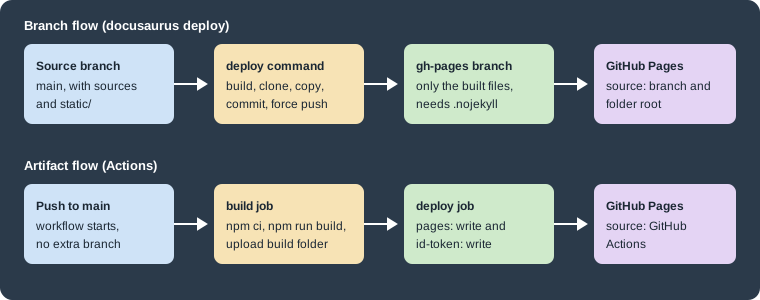
The figure shows the two supported flows. In the branch flow the docusaurus deploy command commits the built files to
a branch (by default gh-pages) and Pages serves that branch. In the artifact flow a workflow uploads the build
folder as a Pages artifact and a deploy job publishes it, with no deployment branch at all.
Configuration keys
| Key | Meaning |
|---|---|
|
The GitHub user or organization that owns the repository that receives the deployment. The environment variable
|
|
The name of that repository. |
|
The branch that receives the built files, |
|
For GitHub Enterprise, default |
The site configuration used for the scratch project of Pocket Units was:
const config: Config = {
  title: 'Pocket Units',
  url: 'https://pocket-units-org.github.io',
  baseUrl: '/pocket-units-docs/',
  organizationName: 'pocket-units-org',
  projectName: 'pocket-units-docs',
  deploymentBranch: 'gh-pages',
  trailingSlash: false,
  onBrokenLinks: 'throw',
  // presets, themeConfig and the rest of the site
};
Source: Docusaurus docs: Deployment
.nojekyll and CNAME
GitHub Pages runs a branch through Jekyll by default, and Jekyll ignores files and folders whose name starts with an
underscore. Docusaurus output can contain such names, so an empty .nojekyll file at the root of the published files
switches Jekyll off. The way to get it there is to place it in the static/ folder, whose content is copied to the root
of build. A site created with create-docusaurus 3.10.2 already contains static/.nojekyll, and the build output
confirms it:
ls -a build | head -5.
..
.nojekyll
404.html
assetsA custom domain follows the same pattern: a file named CNAME in static/ whose only content is the domain, for example
docs.pocket-units.example. With a custom domain the site is served from the root of the domain, so baseUrl becomes
/ and url becomes the domain (https://docs.pocket-units.example). Create the DNS records at your DNS provider as
GitHub documents; a change can take hours to propagate. This site, which is built with Antora and not Docusaurus, relies
on the same two mechanisms: a branch deployment and a .nojekyll file.
Branch flow with docusaurus deploy
The deploy command builds the site, clones the deployment repository into a temporary folder, empties the target folder, copies the build output there, commits and force-pushes the deployment branch. Credentials come from environment variables:
| Variable | Meaning |
|---|---|
|
The GitHub account with push access to the deployment repository. Required unless SSH is used. |
|
A personal access token for that account, for non-interactive use. GitHub no longer accepts account passwords for Git over HTTPS. |
|
|
|
The source branch. Defaults to the checked-out branch, and cannot be the deployment branch in a same-repository deploy. |
|
Values for |
|
Replaces the default message |
|
Override the configuration keys above. |
The command and its options (from the 3.10.2 command line):
GIT_USER=<GITHUB_USERNAME> GIT_PASS=<YOUR_PERSONAL_ACCESS_TOKEN> npm run deploy
npx docusaurus deploy --skip-build --out-dir build --target-dir .
Source: Docusaurus docs: Deployment
--skip-build pushes the existing output without building, --out-dir changes the folder that is pushed, --target-dir
changes the folder of the deployment repository that receives the files, and --locale deploys only some locales. In
GitHub, the repository setting Pages must then point to the gh-pages branch and the root folder.
The deploy command could not push to GitHub here, but its checks were run against a scratch Git repository whose origin
was the Pocket Units address. Without credentials it stops at once:
[ERROR] Error: Please set the GIT_USER environment variable, or explicitly specify USE_SSH instead!With GIT_USER and GIT_PASS set, and the host redirected to a closed local port so that nothing left the machine, it
printed the resolved values and then failed on the clone, which shows the sequence of the command:
[INFO] organizationName: pocket-units-org
[INFO] projectName: pocket-units-docs
[INFO] deploymentBranch: gh-pages
[INFO] Remote repo URL: https://octocat:GIT_PASS@127.0.0.1:9/pocket-units-org/pocket-units-docs.git
[ERROR] Error: Error while executing command `git clone --depth 1 --branch gh-pages https://octocat:GIT_PASS@127.0.0.1:9/...
  fatal: unable to access 'https://127.0.0.1:9/pocket-units-org/pocket-units-docs.git/': Failed to connect to 127.0.0.1 port 9
Two details are worth knowing. The Remote repo URL line and the first line of the error hide the token by printing the
words GIT_PASS, but the nested cause printed further down contained the token in clear text in this run (the fake value
used here), so treat the logs of a failed deploy as sensitive. And the command skips the deployment when the environment
variable CI_PULL_REQUEST or CIRCLE_PULL_REQUEST is set. A source branch equal to the deployment branch is refused:
You cannot deploy from this branch.
For an organization repository named <owner>.github.io, the command refuses to guess the branch and demands either the
DEPLOYMENT_BRANCH variable or deploymentBranch in the configuration.
Artifact flow with GitHub Actions
The second flow needs no deployment branch and no token: the workflow’s own identity publishes the artifact. In the
repository settings, Pages is set to use GitHub Actions as its source. The official page recommends two workflows: one that
deploys on pushes to main, and one that only builds on pull requests, so that pull request checks do not show a
permanently skipped deploy job.
.github/workflows/deploy.ymlname: Deploy to GitHub Pages
on:
push:
branches:
- main
jobs:
build:
name: Build Docusaurus
runs-on: ubuntu-latest
steps:
- uses: actions/checkout@v4
with:
fetch-depth: 0
- uses: actions/setup-node@v4
with:
node-version: 20
cache: npm
- name: Install dependencies
run: npm ci
- name: Build website
run: npm run build
- name: Upload Build Artifact
uses: actions/upload-pages-artifact@v3
with:
path: build
deploy:
name: Deploy to GitHub Pages
needs: build
permissions:
pages: write
id-token: write
environment:
name: github-pages
url: ${{ steps.deployment.outputs.page_url }}
runs-on: ubuntu-latest
steps:
- name: Deploy to GitHub Pages
id: deployment
uses: actions/deploy-pages@v4Source: Docusaurus docs: Deployment
.github/workflows/test-deploy.ymlname: Test deployment
on:
pull_request:
branches:
- main
jobs:
test-deploy:
name: Test deployment
runs-on: ubuntu-latest
steps:
- uses: actions/checkout@v4
with:
fetch-depth: 0
- uses: actions/setup-node@v4
with:
node-version: 20
cache: npm
- name: Install dependencies
run: npm ci
- name: Test build website
run: npm run buildSource: Docusaurus docs: Deployment
These two files use the action versions shown on the official page on the check date: actions/checkout@v4,
actions/setup-node@v4 with Node 20, actions/upload-pages-artifact@v3 and actions/deploy-pages@v4. Newer major
versions exist; the workflow that zensical new generates, for example, uses actions/checkout@v7,
actions/upload-pages-artifact@v5 and actions/deploy-pages@v5. Docusaurus 3.9 dropped Node 18, so use Node 20 or
newer in setup-node. The YAML syntax of both files was parsed successfully, but the workflows were not run here because
they need a GitHub repository. fetch-depth: 0 fetches the full history, which matters when showLastUpdateTime or
showLastUpdateAuthor read Git dates.
The deploy job needs pages: write and id-token: write, and its environment named github-pages carries the URL
of the published site. Workflows that must also work from a different repository than the one that holds the sources use
the branch flow with an SSH deploy key stored as a repository secret and loaded with an SSH agent action, then run
npm run deploy with USE_SSH: true. The official page gives that full workflow and also recipes for Travis CI, Buddy,
Azure Pipelines and Drone.
Netlify
Netlify builds from a Git repository. The official page asks for these values: the build command npm run build and
the publish directory build. In the configuration, url is the Netlify address or custom domain without a trailing
slash, and baseUrl is / because Netlify serves the site from the root. Netlify redeploys on every merge into the
deploy branch (by default main) and creates previews for pull requests.
Two Netlify details matter for Docusaurus. First, Netlify applies "Pretty URLs" by default, which adds trailing slashes. The
official page suggests either disabling the Pretty URLs asset-optimization option (and clearing the global
asset-optimization checkbox separately, because that checkbox does not disable it by itself) or keeping the option and
setting trailingSlash to match. Second, when the docs live outside the website/ folder, Netlify would not rebuild after
a change in them. The official page adds an ignore command in website/netlify.toml that compares the commits across both
folders:
[build]
  ignore = "git diff --quiet $CACHED_COMMIT_REF $COMMIT_REF . ../docs/"
Source: Docusaurus docs: Deployment
Netlify was not executed here: it needs an account. The git diff --quiet command exits with 0 when nothing changed in
the listed folders; the official page uses it so that changes under docs/ also trigger a build.
Vercel
For Vercel, push the project to a Git provider and import it with the Vercel import flow. The import flow comes
preconfigured, and the settings can be edited. Every push to a branch creates a preview deployment and a change
to the production branch (usually main) creates a production deployment. As with Netlify, baseUrl is / and url is
the address Vercel serves the site from. Vercel was not executed here: it needs an account.
Other hosts and self-hosting
The official page lists many other options without Docusaurus-specific configuration beyond the same build command and
build folder: Render, Koyeb, Qovery, Hostman, Surge, Stormkit, QuantCDN, Cloudflare (Workers and Pages), Azure Static
Web Apps, Kinsta and Flightcontrol. Surge is the simplest to try: npm run build, then surge build/. For any of them
the checklist is the same: set url, baseUrl and trailingSlash to match the host, run npm run build, upload the
build folder, and test both URL spellings of a page.
Pitfalls and version notes
-
urlhas no path (the build fails),baseUrlis written with both slashes, even though 3.10.2 normalizes a missing slash. -
Leaving
trailingSlashunset on GitHub Pages produces the mixed behaviour described above and a deploy warning. -
process.envworks only in the configuration file; usecustomFieldsfor client values and never put secrets in it. -
.nojekyllbelongs instatic/for branch deployments. A site created withcreate-docusaurus3.10.2 already has it. -
A deploy token in
GIT_PASScan appear in logs of a faileddocusaurus deploy; keep tokens in CI secrets. -
A wrong
baseUrlbuilds without error and shows the baseUrl banner in the browser instead. -
The Actions artifact flow needs no deployment branch and no personal access token, while
docusaurus deployneeds both a branch and credentials. -
Internationalized sites can set
urlandbaseUrlper locale since 3.9; see Internationalization. -
Ready-made
docusaurus.config.tskeys are described in Configuration, and the commands in CLI and TypeScript.