RecyclerView and Lists
|
This content was generated with the assistance of AI and should be verified against the official documentation of Android before being relied on in production. See the section bibliography for the reference material consulted while preparing these pages. |
RecyclerView, from androidx.recyclerview:recyclerview (1.4.0 in this section’s baseline), is the standard
way to display a scrolling collection of views in the classic View-based toolkit, and it is still the
Compose LazyColumn/LazyRow equivalent’s closest
relative — both recycle off-screen item views instead of keeping one view per data row alive forever. This page
covers RecyclerView's architecture, builds TrailMate’s trail list on top of ListAdapter and DiffUtil, and
covers grid/staggered layouts, ConcatAdapter, ItemTouchHelper swipe/drag gestures, and the performance
practices that keep a long list scrolling smoothly. It builds on
Fragments and the Fragment Lifecycle and
Views, XML Layouts, View Binding and Material Components, and TrailMate’s
legacy TrailListFragment (introduced there) is where the TrailAdapter built here is actually used. Compose’s
own list APIs are covered separately on
Compose Layouts, Modifiers and Lazy Lists; this page
is about the View-based toolkit only.
ListView: a Brief History
Before RecyclerView shipped in 2014, the View toolkit’s only scrolling-list widget was ListView (and its
grid cousin GridView), backed by an Adapter (BaseAdapter, ArrayAdapter, CursorAdapter) whose
getView(position, convertView, parent) method was responsible for both creating a row view and, when the
framework passed back a non-null convertView, manually reusing it. ListView had no layout abstraction — it only ever laid items out vertically — no built-in way to animate item insertion/removal, and the
view-recycling contract lived entirely in each app’s own getView() implementation, which is exactly the pattern
the ViewHolder pattern retrofitted on top of it to avoid a findViewById() call on every scroll frame.
RecyclerView generalizes all of this into first-class, separately swappable pieces — a layout strategy, a
recycling pool, decorations, animations — documented below, and is the only one of the two still recommended for
new code. ListView and GridView remain in the framework for legacy code but should not be used for anything
new; TrailMate’s own TrailListFragment uses RecyclerView from the start. See
Android Developers — Create Dynamic Lists
with RecyclerView.
RecyclerView Architecture
RecyclerView itself is a ViewGroup that delegates almost everything to four collaborating, independently
replaceable objects:
-
RecyclerView.Adaptersupplies item view types, creates aViewHolderfor each one, and binds a data item into an existingViewHolderwhen asked. It never touches layout or scrolling. -
RecyclerView.ViewHolderwraps one item’s root view and caches the child-view referencesfindViewById()(or view binding) would otherwise have to look up again on every bind. -
RecyclerView.LayoutManagerdecides where each visible item view is positioned and measured, and which off-screen views to recycle as the user scrolls —LinearLayoutManager,GridLayoutManagerandStaggeredGridLayoutManagerare the three the framework ships, covered below. -
RecyclerView.ItemDecorationdraws extra content around or between items — dividers, section headers, item spacing — without either the adapter or the layout manager knowing about it. -
RecyclerView.ItemAnimatoranimates the transition (an item appearing, disappearing, moving, or having its content changed) whenever the adapter reports that its data set changed;DefaultItemAnimatorruns unless it is replaced.
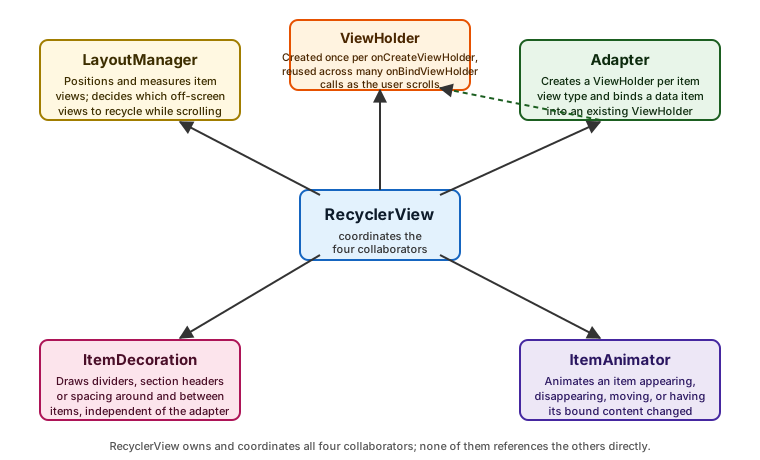
None of these four collaborators knows about the other three directly — RecyclerView itself is the only object
that talks to all of them, which is what makes it possible to swap a LinearLayoutManager for a
GridLayoutManager, or add a divider ItemDecoration, without touching the adapter at all. See
Android Developers — RecyclerView, and the four component references:
RecyclerView.Adapter,
RecyclerView.ViewHolder,
RecyclerView.LayoutManager,
RecyclerView.ItemDecoration
and
RecyclerView.ItemAnimator.
Wiring a Basic RecyclerView
TrailListFragment's layout declares the widget itself, then the fragment attaches a layout manager and an
adapter to it:
<!-- feature/trails/src/main/res/layout/fragment_trail_list.xml -->
<androidx.recyclerview.widget.RecyclerView xmlns:android="http://schemas.android.com/apk/res/android"
    android:id="@+id/trailRecyclerView"
    android:layout_width="match_parent"
    android:layout_height="match_parent"
    android:clipToPadding="false"
android:paddingBottom="16dp" />// feature/trails/src/main/kotlin/com/example/trailmate/feature/trails/TrailListFragment.kt
binding.trailRecyclerView.apply {
layoutManager = LinearLayoutManager(requireContext())
adapter = trailAdapter
setHasFixedSize(true)
}setHasFixedSize(true) tells RecyclerView that changes to the adapter’s content never change the RecyclerView
widget’s own size, letting it skip a layout pass it would otherwise have to run defensively — correct here
because fragment_trail_list.xml sizes the RecyclerView to match_parent, not to its content.
TrailAdapter: a ListAdapter with DiffUtil
Writing notifyDataSetChanged() (which discards every item’s animation and re-binds everything visible) or a
hand-rolled sequence of notifyItemInserted()/notifyItemRemoved()/notifyItemMoved() calls (which is correct
only if it exactly matches what actually changed) both fall on the adapter author to get right. ListAdapter<T,
VH> removes that burden: it holds the current list internally, and submitList(newList) computes the difference
between the old and new list on a background thread using DiffUtil, then dispatches the minimal set of
notifyItem*() calls — and their matching animations — automatically. TrailMate’s TrailAdapter is written
this way:
// feature/trails/src/main/kotlin/com/example/trailmate/feature/trails/TrailAdapter.kt
class TrailAdapter(
    private val onTrailClick: (Trail) -> Unit,
    private val onFavoriteClick: (Trail) -> Unit,
) : ListAdapter<Trail, TrailAdapter.TrailViewHolder>(TrailDiffCallback) {

    class TrailViewHolder(private val binding: ItemTrailBinding) : RecyclerView.ViewHolder(binding.root) {
        fun bind(trail: Trail, onTrailClick: (Trail) -> Unit, onFavoriteClick: (Trail) -> Unit) {
            binding.trailName.text = trail.name
            binding.trailRegion.text = trail.region
            binding.trailLength.text = "%.1f km".format(trail.lengthKm)
            binding.favoriteButton.isSelected = trail.isFavorite
            binding.root.setOnClickListener { onTrailClick(trail) }
            binding.favoriteButton.setOnClickListener { onFavoriteClick(trail) }
        }
    }

    override fun onCreateViewHolder(parent: ViewGroup, viewType: Int): TrailViewHolder {
        val binding = ItemTrailBinding.inflate(LayoutInflater.from(parent.context), parent, false)
        return TrailViewHolder(binding)
    }

    override fun onBindViewHolder(holder: TrailViewHolder, position: Int) {
        holder.bind(getItem(position), onTrailClick, onFavoriteClick)
    }
}

private object TrailDiffCallback : DiffUtil.ItemCallback<Trail>() {
    override fun areItemsTheSame(oldItem: Trail, newItem: Trail): Boolean = oldItem.id == newItem.id
    override fun areContentsTheSame(oldItem: Trail, newItem: Trail): Boolean = oldItem == newItem
}DiffUtil.ItemCallback<Trail> splits the comparison into two questions, deliberately kept separate:
-
areItemsTheSame()— do these two objects represent the same logical trail, typically compared by a stable identity such asid? This decides whetherDiffUtiltreats a pair as a move/change or as a genuine insertion plus removal. -
areContentsTheSame()— for two items already known to be the same trail, has any displayed field changed?Trailis adata class, so structural equality (==) is enough here as long as every field it compares is also a field the row actually renders.
Getting areItemsTheSame() wrong (comparing whole objects instead of a stable id) makes every update look like a
full replace, losing item-move animations and forcing an unnecessary re-bind of every row; getting
areContentsTheSame() wrong (returning true for objects that actually differ) leaves stale text on screen after
submitList(). ListAdapter calls getItem(position) internally to hand onBindViewHolder() the current, not
stale, item — never index into a separately held list from inside the adapter. See
Android Developers — ListAdapter and
Android Developers — DiffUtil.
Click Handling with Lambdas
TrailAdapter above takes its click callbacks as constructor lambdas (onTrailClick, onFavoriteClick) rather
than requiring the fragment to implement a listener interface, and attaches them once per bind() call inside the
ViewHolder — never inside onCreateViewHolder(), where the trail the click applies to is not yet known. This
keeps TrailAdapter fragment-agnostic (it can be constructed and tested with a fake lambda) and keeps the click
target current across rebinds without any extra bookkeeping, since each bind() call closes over that call’s own
trail.
Multiple View Types
A single RecyclerView list can mix different row layouts — TrailMate’s trail list shows a promoted "Featured
trail" card above the regular rows — by overriding getItemViewType() and branching in both
onCreateViewHolder() and onBindViewHolder():
// feature/trails/src/main/kotlin/com/example/trailmate/feature/trails/TrailListItem.kt
sealed interface TrailListItem {
    data class Featured(val trail: Trail) : TrailListItem
    data class Regular(val trail: Trail) : TrailListItem

    companion object {
        const val VIEW_TYPE_FEATURED = 0
        const val VIEW_TYPE_REGULAR = 1
    }
}

override fun getItemViewType(position: Int): Int = when (getItem(position)) {
    is TrailListItem.Featured -> TrailListItem.VIEW_TYPE_FEATURED
    is TrailListItem.Regular -> TrailListItem.VIEW_TYPE_REGULAR
}

override fun onCreateViewHolder(parent: ViewGroup, viewType: Int): RecyclerView.ViewHolder = when (viewType) {
    TrailListItem.VIEW_TYPE_FEATURED -> FeaturedTrailViewHolder.create(parent)
    else -> TrailViewHolder.create(parent)
}onBindViewHolder() then casts to the concrete ViewHolder subtype matching that position’s view type. A sealed
interface for the list-item model (as opposed to branching on Trail fields directly) keeps the "what kind of
row is this" decision in one place and gives the when above exhaustiveness checking at compile time — see
Sealed Classes and Enums for the language
feature itself. See
Android Developers — Create Dynamic Lists
with RecyclerView (Multiple view types section).
Grid and Staggered Layout Managers
LinearLayoutManager lays items out in a single scrolling row or column (RecyclerView.VERTICAL by default, or
RecyclerView.HORIZONTAL). Two more ship in the same artifact for grid-shaped content:
| Layout manager | Behavior |
|---|---|
|
A fixed number of equal-size columns (or rows, if horizontal); TrailMate’s |
|
A fixed number of columns, but each item keeps its own natural height and columns advance independently — the classic photo-wall layout. TrailMate’s |
binding.trailRecyclerView.layoutManager = GridLayoutManager(requireContext(), 2).apply {
    spanSizeLookup = object : GridLayoutManager.SpanSizeLookup() {
        override fun getSpanSize(position: Int): Int =
            if (trailAdapter.getItemViewType(position) == TrailListItem.VIEW_TYPE_FEATURED) 2 else 1
    }
}A staggered grid can shift an item slightly out of visual reading order as later columns settle at different
lengths; StaggeredGridLayoutManager.setGapStrategy() controls whether a small gap left by a removed item is
closed immediately or only on the next full re-layout. See
Android Developers — GridLayoutManager and
Android
Developers — StaggeredGridLayoutManager.
ConcatAdapter
ConcatAdapter presents several independent adapters to one RecyclerView as if they were a single, concatenated
list, without either adapter knowing about the other. TrailMate’s trail list shows a header adapter (an
"onboarding tip" card, dismissible independently of the trail data) above TrailAdapter's items:
// feature/trails/src/main/kotlin/com/example/trailmate/feature/trails/TrailListFragment.kt
val headerAdapter = TrailListHeaderAdapter(onDismiss = { viewModel.dismissOnboardingTip() })
binding.trailRecyclerView.adapter = ConcatAdapter(headerAdapter, trailAdapter)ConcatAdapter.Config.Builder().setIsolateViewTypes(true) (the default) keeps each child adapter’s view-type
numbering isolated from the others, so TrailListHeaderAdapter and TrailAdapter can both freely use view type
0 without colliding. ConcatAdapter is the standard way to build "sectioned" lists — a header, a footer, a
loading-state adapter appended by PagingDataAdapter (see below) — without merging unrelated concerns into one
adapter class. See
Android Developers — ConcatAdapter.
ItemTouchHelper: Swipe and Drag
ItemTouchHelper attaches swipe-to-dismiss and drag-to-reorder gestures to a RecyclerView without either
gesture’s touch handling living in the adapter. TrailMate lets a user swipe a trail row to remove it from a
custom "My Trails" list:
// feature/trails/src/main/kotlin/com/example/trailmate/feature/trails/TrailSwipeCallback.kt
class TrailSwipeCallback(
    private val onSwiped: (position: Int) -> Unit,
) : ItemTouchHelper.SimpleCallback(0, ItemTouchHelper.LEFT or ItemTouchHelper.RIGHT) {

    override fun onMove(
        recyclerView: RecyclerView,
        viewHolder: RecyclerView.ViewHolder,
        target: RecyclerView.ViewHolder,
    ): Boolean = false // dragging is not enabled for this list

    override fun onSwiped(viewHolder: RecyclerView.ViewHolder, direction: Int) {
        onSwiped(viewHolder.bindingAdapterPosition)
    }
}

ItemTouchHelper(TrailSwipeCallback { position ->
    val trail = trailAdapter.currentList[position]
    viewModel.removeFromMyTrails(trail.id)
}).attachToRecyclerView(binding.trailRecyclerView)The first SimpleCallback constructor argument is the drag-direction mask (0 disables dragging entirely;
ItemTouchHelper.UP or ItemTouchHelper.DOWN would enable vertical drag-to-reorder instead, implemented by
returning true from onMove() and calling notifyItemMoved()), and the second is the swipe-direction mask.
viewHolder.bindingAdapterPosition (not the deprecated adapterPosition) is the position to act on, because it
stays correct even when the ViewHolder belongs to one child adapter of a ConcatAdapter. onChildDraw() can be
overridden to draw a background (a delete icon, a colored strip) behind the row as it is dragged, which
TrailMate uses to show a red "Remove" background during the swipe. See
Android Developers — ItemTouchHelper.
Stable IDs and Payloads
Two further, easy-to-miss knobs make RecyclerView updates cheaper and its default animations more correct:
-
setHasStableIds(true)plus overridinggetItemId(position)to return a value derived from the item’s own identity (trail.id.hashCode().toLong(), not the position) tellsRecyclerViewit can tell twoViewHolders apart by identity rather than only by position, which improves the accuracy of item-move animations and letsRecyclerView.Adapter(a plain one, not necessarilyListAdapter) reuse aViewHolderacross a position change instead of rebinding it. It has no effect unless the adapter also overridesgetItemId()meaningfully. -
Payloads.
notifyItemChanged(position, payload)(or, forListAdapter,DiffUtil.ItemCallback.getChangePayload(oldItem, newItem)) lets a change carry a description of what changed instead of forcing a fullonBindViewHolder()rebind.TrailDiffCallbackcan report that onlyisFavoritetoggled:private const val FAVORITE_CHANGED = "favorite_changed" private object TrailDiffCallback : DiffUtil.ItemCallback<Trail>() { override fun areItemsTheSame(oldItem: Trail, newItem: Trail) = oldItem.id == newItem.id override fun areContentsTheSame(oldItem: Trail, newItem: Trail) = oldItem == newItem override fun getChangePayload(oldItem: Trail, newItem: Trail): Any? = if (oldItem.isFavorite != newItem.isFavorite) FAVORITE_CHANGED else null } // in TrailAdapter (an Adapter override, alongside the two-argument onBindViewHolder); // TrailViewHolder.bindFavoriteOnly() just sets binding.favoriteButton.isSelected override fun onBindViewHolder(holder: TrailViewHolder, position: Int, payloads: MutableList<Any>) { if (payloads.contains(FAVORITE_CHANGED)) { holder.bindFavoriteOnly(getItem(position).isFavorite) } else { super.onBindViewHolder(holder, position, payloads) } }This skips re-binding the trail name, region and length text views — and re-loading the trail photo, see below — for a change that only affects one small view, avoiding a visible flicker on the parts of the row that did not change. See Android Developers —
RecyclerView.Adapter.setHasStableIds().
Submitting a List from a Flow
TrailMate’s TrailListViewModel exposes the trail list as a StateFlow; TrailListFragment collects it and
feeds each emission straight into submitList(), scoped to repeatOnLifecycle so collection stops while the
fragment’s view is not started:
// feature/trails/src/main/kotlin/com/example/trailmate/feature/trails/TrailListFragment.kt
override fun onViewCreated(view: View, savedInstanceState: Bundle?) {
    super.onViewCreated(view, savedInstanceState)
    viewLifecycleOwner.lifecycleScope.launch {
        viewLifecycleOwner.repeatOnLifecycle(Lifecycle.State.STARTED) {
            viewModel.uiState.collect { uiState ->
                trailAdapter.submitList(uiState.trails)
                binding.emptyView.isVisible = uiState.trails.isEmpty() && !uiState.isLoading
            }
        }
    }
}repeatOnLifecycle(Lifecycle.State.STARTED) — covered in full on
ViewModel, Lifecycle-Aware Components, Coroutines and
Flow — cancels and restarts the collector as the fragment’s view moves in and out of the started state, which
matters here specifically because it stops submitList()'s background DiffUtil calculation from running (and
its result from being applied to a detached RecyclerView) while the fragment is stopped. Passing a plain
List<Trail> to submitList() each time is safe because Trail is an immutable data class and
TrailListUiState always builds a new list on each state update rather than mutating one in place — ListAdapter
compares the previous list it was given against the new one by reference first, so handing it the same mutated
list twice would make it think nothing changed. See
Flows for StateFlow/collect itself.
Looking Ahead: PagingDataAdapter and Image Loading
Two concerns deliberately stop at a pointer here rather than being covered in full:
-
Paged lists.
submitList()above assumes the whole trail list fits comfortably in memory. Once TrailMate’s trail catalog is paged from the network and Room together,TrailAdapteris replaced by aPagingDataAdapter<Trail, TrailViewHolder>from the Paging 3 library, which submits aPagingData<Trail>instead of a plain list and loads further pages automatically as the user scrolls near the end of what is already loaded. See Room Database and Paging for the full Paging 3 setup. -
Row images.
TrailViewHolder.bind()above only binds text; TrailMate’s actual row also loadstrail.photoUrlinto anImageViewwith Glide insideonBindViewHolder(), including how Glide’s own view-recycling-aware request cancellation interacts withRecyclerView's recycling. See Image Loading, Caching and Transformations with Coil and Glide.
Performance Tips
-
Keep
onBindViewHolder()cheap. It runs on the main thread on every scroll frame a new row becomes visible; do no network or disk I/O there, and avoid allocations that are easy to hoist intoonCreateViewHolder()or acompanion objectinstead (formatters, comparators, drawables shared across rows). -
Prefer
DiffUtil/ListAdapterovernotifyDataSetChanged(). A full-dataset notify discards every visible item’s ongoing animation and forces a rebind of everything on screen, even when only one row actually changed. -
Use
setHasFixedSize(true)whenever theRecyclerView's own size does not depend on its adapter’s content (the common case for aRecyclerViewfilling its parent), to skip an otherwise-defensive extra layout pass. -
Avoid nested
RecyclerViews inside a scrolling parent withoutsetRecycledViewPool()sharing a pool across the inner lists — otherwise each innerRecyclerViewbuilds and discards its own view pool independently as the outer list scrolls it in and out of view. -
Prefer flat, shallow item layouts. Deep view hierarchies inside
item_trail.xmlslow down both inflation (onCreateViewHolder()) and measurement on every layout pass;ConstraintLayout(covered on Views, XML Layouts, View Binding and Material Components) keeps a row flat even when its visual structure looks nested. -
Profile with the Layout Inspector and the CPU/Frame Rendering profilers in Android Studio before optimizing by guesswork — covered on Debugging, Code Quality and Performance.
ViewPager2
ViewPager2, from androidx.viewpager2:viewpager2, is a horizontally (or vertically) paging widget — one full
page visible at a time, swiped between — built directly on top of RecyclerView internally, which is why its
own adapter base class is RecyclerView.Adapter (commonly FragmentStateAdapter when each page is a whole
fragment, as TrailMate’s onboarding walkthrough uses it, or a plain RecyclerView.Adapter when each page is a
single view). The two solve different problems even though one is built on the other: RecyclerView scrolls a
list where any number of items can be partly visible at once, while ViewPager2 snaps to exactly one page at a
time and is the modern replacement for the older, non-RecyclerView-based ViewPager. TrailMate uses
ViewPager2 once, for a three-screen onboarding walkthrough shown on first launch, together with
TabLayoutMediator to drive a matching dot indicator — everything else in this section’s TrailMate example
(the trail list, the photo grid) is a genuine scrolling collection and stays on plain RecyclerView. See
Android Developers — Slide Between
Fragments Using ViewPager2 and
Android Developers — ViewPager2.