Store Setup and Launch
|
This content was generated with the assistance of AI and should be verified against the official documentation of each platform before being relied on in production. This section’s bibliography lists the reference material consulted while preparing these pages. |
A WooCommerce store is a WordPress site plus about a dozen decisions: where you sell and in which currency, whether prices include tax, which zones you ship to and what it costs, how customers pay, which e-mails they get, what the shop looks like and what you do every week to keep it safe. This page walks through those decisions in the order that avoids rework, for WooCommerce 11.2.1 on WordPress 7.1.3 (checked on 2026-10-27), using the Settings screens as the reference and WP-CLI to make the result repeatable. It covers the free plugin and the payment, tax and shipping features it ships with; paid extensions are named only to say what core cannot do. Where a step needs a WordPress.org, WordPress.com or Woo account, or a payment provider’s onboarding (WooPayments, PayPal, Stripe), the page says so and does not run it.
Everything shown with a command was run on a clean WordPress 7.1.3 site with WooCommerce 11.2.1 (see Installation and Local Environments for how the site was built), and the complete script of the Pocket Coffee shop was run end to end on a second clean site. Pocket Coffee is the running example of the section: single-origin beans in 18 variants, a starter kit, a Coffee Club discount, two shipping zones and euro prices that include Spanish VAT. The sibling pages go deeper into each area: Products and Product Types, Shipping Methods, Taxes, Coupons, Currencies and i18n, Payment Gateways, Emails and Themes: Block and Classic.
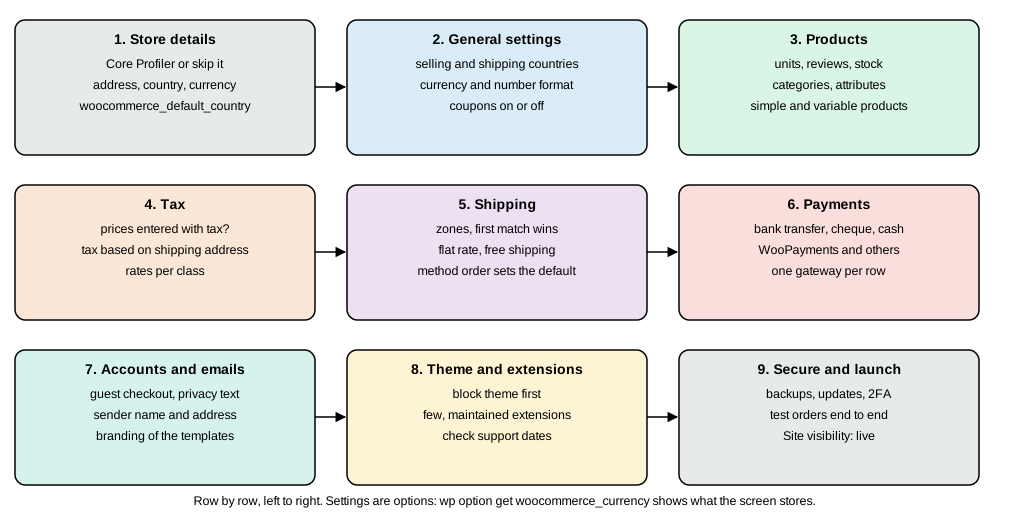
Decide before you click
The Settings screens ask for facts that are hard to change once orders exist, so settle these first. They are generic store-planning questions (the books about WooCommerce spend most of their pages on them) and the Pocket Coffee answers show what a decision looks like.
| Decision | Why it matters later | Pocket Coffee |
|---|---|---|
Selling and shipping countries |
Limits the address fields, the tax rules and the shipping zones; a country you do not sell to cannot check out |
Spain plus eight EU countries (ES, DE, FR, IT, PT, NL, BE, AT, IE) |
Currency |
One shop currency per site; orders store it, so changing it later does not convert old orders |
EUR; a second currency needs an extension (core has none) |
Prices with or without tax |
Decides how every price is entered and how tax is shown; changing it re-interprets the prices you typed |
Entered and shown with 21 % VAT, because Spanish consumers expect it |
What the catalogue looks like |
Simple versus variable products, SKU scheme, attributes and categories drive filters, stock and reports |
|
Shipping promise |
Zones, a free-shipping threshold and parcel limits must be supported by a method you can actually configure |
Spain 4.90 EUR flat, free from 40 EUR; other EU 9.90 EUR flat |
Payment methods |
The gateway decides fees, refunds, recurring payments and the PCI burden |
Bank transfer in the examples; a card gateway is a provider decision |
Who sees the store |
Guest checkout and account creation change conversion and what you must say about personal data |
Guest checkout on; accounts optional |
Legal pages and policies |
Terms, privacy policy and refund policy have to exist before the first order |
Pages created from drafts before launch |
None of this is legal or tax advice. The tax rates, the VAT scheme for sales to other EU countries (the One Stop Shop scheme) and the legal pages depend on where the business is established; the page uses the standard Spanish rate of 21 % as an illustration only.
Onboarding: the Core Profiler and the task list
Activating WooCommerce starts the Core Profiler in the browser (it replaced the Setup Wizard of the 3.x era). It
collects store details and offers recommended extensions and a theme; the answers are stored in the option
woocommerce_onboarding_profile, and the WooCommerce home screen then shows a task list. The tasks are classes under
src/Admin/Features/OnboardingTasks/Tasks/ in 11.2.1 with the ids store_details, products, payments, tax,
shipping, marketing, appearance (the theme step), extend-store, launch-your-store and get-mobile-app, plus
further ids (customize-store, review-shipping, woocommerce-payments, shipping-recommendation,
tour-in-app-marketplace) that the source defines for some configurations. A task is only a link to the
screens below, so skipping the Core Profiler loses nothing that cannot be set by hand.
The flow needs a browser, an administrator session and, for some of its offers, a connection to a WordPress.com or Woo
account; it was not run for this page. The scripted route below does not depend on it. The legacy class
WC_Admin_Setup_Wizard still ships in includes/admin/class-wc-admin-setup-wizard.php, and books that describe a
page-by-page wizard (location, currency, payments, shipping, recommended extras) describe that older flow.
The Settings tabs
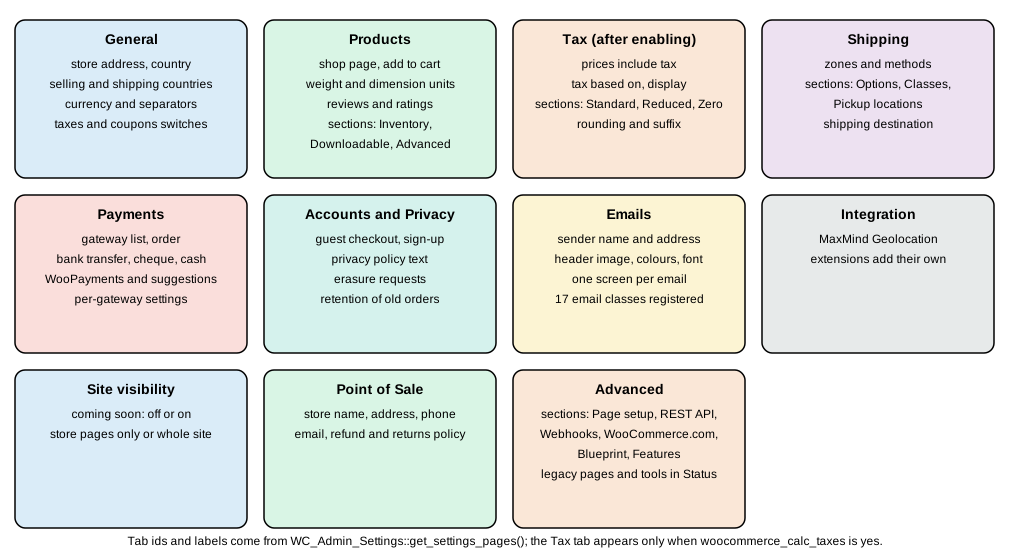
All store settings live under WooCommerce > Settings. In 11.2.1 the tab ids and labels, read from
WC_Admin_Settings::get_settings_pages(), are general (General), products (Products), tax (Tax), shipping
(Shipping), checkout (Payments), account (Accounts and Privacy), email (Emails), integration (Integration),
site-visibility (Site visibility), point-of-sale (Point of Sale) and advanced (Advanced). The Tax tab only exists
when tax calculation is on (woocommerce_calc_taxes is yes). The tab id is the value of the tab parameter in the URL:
/wp-admin/admin.php?page=wc-settings&tab=shipping§ion=options.
Every setting is a WordPress option whose name is the field id, so a value can be read and changed from WP-CLI with
wp option get and wp option update, and the same fields are exposed by the REST API under /wp-json/wc/v3/settings
(listing a group, then reading or updating one field; the REST settings route was not exercised for this page). Changing
an option directly skips the screen’s validation and, for a few settings, the side effects that run on save, so use
WP-CLI for the simple fields below and the screen when a setting has dependencies.
General
| Option id | What it controls | Pocket Coffee value |
|---|---|---|
|
The business address, used for the tax base, shipping origin and invoices |
Calle Ejemplo 1, Madrid, 28001 |
|
Base country and state in the form |
|
|
Selling location(s): all countries, all except some, or specific ones (a list stored as an array) |
|
|
Shipping location(s); empty means the same as selling locations |
empty |
|
Default customer location for visitors who have not entered an address (none, shop base, or geolocation) |
unchanged |
|
Address autocomplete at checkout |
unchanged |
|
Switches tax calculation on and adds the Tax tab |
|
|
Coupon support and whether coupons apply one after another |
coupons on |
|
Currency code and how prices are formatted |
|
wp option update woocommerce_store_address "Calle Ejemplo 1"
wp option update woocommerce_store_city Madrid
wp option update woocommerce_store_postcode 28001
wp option update woocommerce_default_country ES:M
wp option update woocommerce_currency EUR
wp option update woocommerce_allowed_countries specific
wp option update woocommerce_specific_allowed_countries '["ES","DE","FR","IT","PT","NL","BE","AT","IE"]' --format=json
wp option get woocommerce_specific_allowed_countries --format=json
Success: Updated 'woocommerce_store_address' option.
Success: Updated 'woocommerce_store_city' option.
Success: Updated 'woocommerce_store_postcode' option.
Success: Updated 'woocommerce_default_country' option.
Success: Updated 'woocommerce_currency' option.
Success: Updated 'woocommerce_allowed_countries' option.
Success: Updated 'woocommerce_specific_allowed_countries' option.
["ES","DE","FR","IT","PT","NL","BE","AT","IE"]Products, Inventory, Downloadable and Advanced
| Option id | What it controls | Default in 11.2.1 |
|---|---|---|
|
The Shop page (the product archive) |
set by the install |
|
Redirect to the cart after adding, and AJAX add-to-cart buttons on archives |
|
|
Units for product weight and size; shipping rules and parcel limits use them |
|
|
Customer reviews, star ratings, whether a rating is mandatory and whether only verified owners can review |
reviews, ratings and labels |
|
The image shown for products without a picture |
empty |
Section Inventory (§ion=inventory) holds woocommerce_manage_stock (yes), woocommerce_hold_stock_minutes
(60: how long an unpaid order reserves stock), woocommerce_notify_low_stock and woocommerce_notify_no_stock (yes),
woocommerce_notify_backorder (yes), woocommerce_stock_email_recipient (the store e-mail address),
woocommerce_notify_low_stock_amount (2), woocommerce_notify_no_stock_amount (0),
woocommerce_hide_out_of_stock_items (no) and woocommerce_stock_format. Section Downloadable products holds
woocommerce_file_download_method (force), woocommerce_downloads_require_login,
woocommerce_downloads_grant_access_after_payment (yes) and the options that control the hash added to file names. The
Advanced section of the Products tab has woocommerce_product_match_featured_image_by_sku (no). Pocket Coffee keeps
stock tracking on because every variant has its own stock (25 units each in the script below).
Tax
The Tax tab (woocommerce_calc_taxes must be yes) has these options on its first screen and one section per tax class:
woocommerce_prices_include_tax, woocommerce_tax_based_on (shipping, billing or base), woocommerce_shipping_tax_class
(inherit), woocommerce_tax_round_at_subtotal, woocommerce_tax_classes (additional classes, one per line),
woocommerce_tax_display_shop, woocommerce_tax_display_cart (incl or excl), woocommerce_price_display_suffix and
woocommerce_tax_total_display (itemized or single). The sections are Standard rates, Reduced rate rates and Zero
rate rates, the three classes that exist after the install. The shop and the cart display settings default to
excl (prices shown without tax), which is wrong for a shop that sells to consumers in the EU, so set both to incl.
Shipping
The first screen of the Shipping tab lists the shipping zones; the sections are Shipping options
(woocommerce_enable_shipping_calc, woocommerce_shipping_cost_requires_address, woocommerce_shipping_hide_rates_when_free,
woocommerce_ship_to_destination with billing as default, woocommerce_shipping_debug_mode), Classes (shipping
classes, for example "bulky") and Local pickup (pickup locations). Zones and methods are described in their own section
below.
Payments (tab id checkout)
The Payments tab lists the installed gateways in the order in which they are offered; in the core install the gateways are
bacs (Direct bank transfer), cheque (Check payments) and cod (Cash on delivery), none of which charges a fee. Gateway
suggestions, including WooPayments, are offered from this screen; their onboarding was not run. See the Payments section
below.
Accounts and Privacy
The options are woocommerce_enable_guest_checkout, woocommerce_enable_checkout_login_reminder,
woocommerce_enable_signup_and_login_from_checkout, woocommerce_enable_myaccount_registration,
woocommerce_registration_generate_password, woocommerce_enable_delayed_account_creation (create the account after the
order), the personal data options (woocommerce_erasure_request_removes_order_data, woocommerce_erasure_request_removes_download_data,
woocommerce_allow_bulk_remove_personal_data), the privacy policy text options
(woocommerce_registration_privacy_policy_text, woocommerce_checkout_privacy_policy_text) and the retention options
(woocommerce_delete_inactive_accounts, woocommerce_trash_pending_orders, woocommerce_trash_failed_orders,
woocommerce_trash_cancelled_orders, woocommerce_anonymize_refunded_orders, woocommerce_anonymize_completed_orders).
The retention options are the GDPR housekeeping that the books do not cover; decide the periods with the person
responsible for data protection and write the privacy policy page that the text options point to.
Integration, Site visibility, Point of Sale
Integration lists the integrations registered by core and extensions; the only one in 11.2.1 is MaxMind Geolocation
(maxmind_geolocation). Site visibility controls the coming-soon mode described in the launch section. Point of Sale
holds the store name, address, phone, e-mail and refund and returns policy that point-of-sale receipts print
(woocommerce_pos_store_name, woocommerce_pos_store_address, woocommerce_pos_store_phone, woocommerce_pos_store_email,
woocommerce_pos_refund_returns_policy); it matters only if you use the point-of-sale feature.
Advanced
The Advanced tab has the sections Page setup, REST API keys, Webhooks, WooCommerce.com (usage tracking
woocommerce_allow_tracking, default no, and marketplace suggestions woocommerce_show_marketplace_suggestions, default
yes), Blueprint (beta) and Features.
-
Page setup maps the Cart, Checkout, My account and Terms pages (
woocommerce_cart_page_id,woocommerce_checkout_page_id,woocommerce_myaccount_page_id,woocommerce_terms_page_id) and the endpoint slugs such asorder-pay,order-received,orders,view-order,downloads,edit-accountandedit-address. The option idswoocommerce_force_ssl_checkoutandwoocommerce_unforce_ssl_checkoutstill appear in the 11.2.1 field definitions; the books' "HTTPS only on checkout" advice is outdated, and a store should serve every page over HTTPS. -
REST API keys and Webhooks are covered on the REST API and Webhooks page.
-
Features lists the toggles of the features that can still be switched:
woocommerce_custom_orders_table_enabled(HPOS, off after a scripted install),woocommerce_custom_orders_table_data_sync_enabled,woocommerce_analytics_enabled(yes),woocommerce_feature_order_attribution_enabled(yes),woocommerce_feature_rate_limit_checkout_enabled(no),woocommerce_feature_block_email_editor_enabled(no),woocommerce_feature_email_improvements_enabled(no),woocommerce_feature_cost_of_goods_sold_enabled(no),woocommerce_feature_product_gallery_videos_enabled(no),woocommerce_hpos_datastore_caching_enabled(no),woocommerce_feature_remote_logging_enabled(yes) andwoocommerce_feature_blueprint_enabled(yes). Some of these exist for a release or two and then become permanent; treat the screen as the source of truth for the version you run.
Source: WooCommerce docs: HPOS
Tax
Tax is where a launch usually goes wrong, so the decisions are explicit. With woocommerce_prices_include_tax set to
yes the price you type is the price the customer pays and WooCommerce extracts the tax from it; with no tax is added
on top. woocommerce_tax_based_on decides which address selects the rate: shipping (the default), billing or base
(the shop address). Rates are rows of country, state, postcode, city, rate, name, priority, compound and shipping
(whether the rate also applies to shipping), grouped by tax class. A product’s Tax status (taxable, shipping only or
none) and Tax class choose the class; the classes after install are Standard rate, Reduced rate and Zero rate.
Pocket Coffee sells with tax included and one Spanish rate:
wp option update woocommerce_calc_taxes yes
wp option update woocommerce_prices_include_tax yes
wp option update woocommerce_tax_display_shop incl
wp option update woocommerce_tax_display_cart incl
wp --user=shopadmin wc tax create --country=ES --rate=21.0000 --name=IVA --priority=1 --shipping=true --class=standard --porcelain
wp --user=shopadmin wc tax list --fields=id,country,rate,name,shipping,class --format=table
wp --user=shopadmin wc tax_class list --fields=slug,name --format=table
1
id country rate name shipping class
1 ES 21.0000 IVA 1 standard
slug name
standard Standard rate
reduced-rate Reduced rate
zero-rate Zero rateThe same data goes through Settings > Tax > Standard rates > Insert row or the import CSV
(sample-data/sample_tax_rates.csv in the plugin shows the columns). Rates entered by hand are not a tax-compliance
system: they do not know about EU One Stop Shop thresholds, VAT numbers for business customers or changing rates. Extensions
or the automated tax calculation of the WooCommerce Shipping & Tax extension (it needs a connected account and was
not run here) cover that, and the
Taxes, Coupons, Currencies and i18n page goes through
the calculation.
Products and variations
Products live under Products. The classic product editor is the editor in 11.2.1: the block-based product editor was deprecated in 10.9.0 and removed in 11.0.0, and old guides that show its screens no longer match. The product types are simple, variable, grouped and external (affiliate); virtual and downloadable are checkboxes on a simple or variable product. A product has a name, description, price, SKU, stock, weight and dimensions, categories, tags, attributes, a tax class, a shipping class and images; the Products and Product Types page covers each tab. A variable product has attributes flagged "used for variations" and one variation per combination; each variation has its own SKU, price, weight and stock.
Pocket Coffee’s catalogue is one simple product and one variable product with three attributes (origin, grind, size), 18
variations, per-variant stock and the SKU pattern PC-<ORIGIN3>-<GRIND3>-<SIZE>. The prices are 8.90 EUR for 250 g and
29.90 EUR for 1 kg, with Ethiopia 1.00 EUR dearer per 250 g. Created from WP-CLI (the loop at the end of the script
below creates the variations):
wp --user=shopadmin wc product_cat create --name=Beans --porcelain
wp --user=shopadmin wc product_cat create --name=Equipment --porcelain
wp --user=shopadmin wc product create --name="Starter kit" --type=simple --regular_price=24.00 --sku=PC-KIT \
  --weight=1.2 --manage_stock=true --stock_quantity=30 --categories='[{"id":17}]' --porcelain
wp --user=shopadmin wc product_variation list 11 --per_page=30 --fields=id,sku,regular_price,weight,stock_quantity --format=table
16
17
10
id sku regular_price weight stock_quantity
29 PC-BRA-FIL-1KG 29.90 1 25
28 PC-BRA-FIL-250 8.90 0.25 25
...
17 PC-ETH-FIL-1KG 33.90 1 25
16 PC-ETH-FIL-250 9.90 0.25 25
15 PC-ETH-ESP-1KG 33.90 1 25
14 PC-ETH-ESP-250 9.90 0.25 25
13 PC-ETH-WHL-1KG 33.90 1 25
12 PC-ETH-WHL-250 9.90 0.25 25(The middle rows of the real 18-row table are omitted.) Three rules save trouble. Custom attributes (typed in the product)
are private to that product, while global attributes (Products > Attributes) create taxonomy terms that the shop can
filter on, so the "origin" attribute that Pocket Coffee wants to filter by should be global; the script uses product-level
attributes to stay short. A variation’s attributes must name the exact attribute and option strings of the parent, or
the variation is created but never matches a selection. And creating hundreds of variations through the editor is slow;
use the CSV importer (Products > Import, a Type of variation and a Parent SKU) or the batch REST endpoint for
large catalogues.
Source: WooCommerce: products
Shipping zones
A shipping zone is a set of locations (countries, states, postcodes) with shipping methods attached; a customer gets the methods of the first zone, in the zone order, that matches the address, and the built-in "Locations not covered by your other zones" zone is the fallback. Methods are Flat rate, Free shipping and Local pickup in core; carriers' methods come from extensions. The facts below were measured on the Pocket Coffee zones.
wp --user=shopadmin wc shipping_zone create --name="Spain" --porcelain
wp --user=shopadmin wc shipping_zone create --name="European Union (excluding Spain)" --porcelain
wp --user=shopadmin wc shipping_zone_method create 1 --method_id=free_shipping \
  --settings='{"requires":"min_amount","min_amount":"40"}' --porcelain
wp --user=shopadmin wc shipping_zone_method create 1 --method_id=flat_rate \
  --settings='{"cost":"4.90","tax_status":"taxable"}' --porcelain
wp --user=shopadmin wc shipping_zone_method create 2 --method_id=flat_rate \
  --settings='{"cost":"9.90","tax_status":"taxable"}' --porcelain
wp eval '
$es = new WC_Shipping_Zone( 1 ); $es->add_location( "ES", "country" ); $es->set_zone_order( 0 ); $es->save();
$eu = new WC_Shipping_Zone( 2 ); $eu->set_zone_order( 1 );
foreach ( array( "DE", "FR", "IT", "PT", "NL", "BE", "AT", "IE" ) as $c ) { $eu->add_location( $c, "country" ); }
$eu->save();
foreach ( WC_Shipping_Zones::get_zones() as $z ) {
	echo $z["zone_name"], ": ", $z["formatted_zone_location"], " -> ";
	foreach ( $z["shipping_methods"] as $m ) { echo $m->id, "(", $m->get_option( "cost" ) ?: $m->get_option( "min_amount" ), ") "; }
	echo "\n";
}'1
2
1
2
3
Spain: Spain -> free_shipping(40) flat_rate(4.90)
European Union (excluding Spain): Germany, France, Italy, Portugal, Netherlands, Belgium, Austria, Ireland -> flat_rate(9.90)The calls to WC_Shipping_Zone are needed because the wp wc shipping_zone_location group only has list
(there is no create or update command); the REST route PUT /wc/v3/shipping/zones/<id>/locations does the same with a
JSON array. Four behaviours are worth knowing before they surprise a customer.
-
The continent code
EUmeans Europe, not the European Union. A first attempt that added the location typecontinentwith codeEUlisted the zone as "Europe", which includes countries outside the EU. The zone above lists the member states one by one. -
A flat rate cost is entered without tax. With prices that include tax, a flat rate of 4.90 with Tax status: Taxable costs 4.90 plus 21 % VAT, which the cart showed as shipping 4.90 and shipping tax 1.03 (5.93 in total). To charge 4.90 all-in, enter the net amount (4.0496) or set the method untaxable. The cost field also takes formulas such as
10.00 * [qty],[cost]and[fee percent="10" min_fee="20"]. -
The free-shipping threshold follows the cart display setting. The minimum order amount is compared with the subtotal as it is displayed. With
woocommerce_tax_display_cartat its defaultexcl, a cart with two starter kits (48.00 with VAT, 39.67 without) did not get free shipping against a 40.00 minimum; after switching toinclit did. The method’s Coupons discounts checkbox (ignore_discounts) decides whether coupons reduce the amount that is compared. -
The first method in the zone is preselected. With free shipping created after the flat rate, a cart that qualified for free shipping showed both rates and selected the flat rate; reordering the methods so that free shipping comes first (the drag handles on the zone screen) made it the selected rate. In the REST and CLI route, create the free method first, as the script does.
wp wc shipping_zone_method list 1 --user=shopadmin --fields=instance_id,method_id,order --format=tableinstance_id method_id order
2 free_shipping 1
1 flat_rate 2The output is from the first test site after its two methods were reordered; the order is the method_order column of
wp_woocommerce_shipping_zone_methods. The setting Hide shipping rates when free shipping is available
(woocommerce_shipping_hide_rates_when_free) removes the other rates once the free one qualifies, which makes the
default question moot; Pocket Coffee leaves it off so that customers can still choose a faster method later.
Core has no per-parcel weight limit. The 5 kg limit of the Pocket Coffee spec is therefore expressed through the structure of the catalogue (a shipping class for bulky items, quantity-based cost formulas) or an extension; it cannot be set as a single number on the flat-rate method. Local pickup, shipping classes and the rate pipeline are covered on the Shipping Methods page.
Payments
A gateway is an object that decides which payment methods the checkout offers and what happens to the order afterwards. In the core install there are three, and none talks to a provider:
wp --user=shopadmin wc payment_gateway update bacs --enabled=true --porcelain
wp --user=shopadmin wc payment_gateway list --fields=id,title,enabled --format=table
Source: WooCommerce: payments
bacs
id	title	enabled
bacs	Direct bank transfer	1
cheque	Check payments
cod	Cash on delivery
Enabling a gateway sends the administrator an e-mail through the admin_payment_gateway_enabled message, so the command
printed sendmail: can't connect to remote host (127.0.0.1): Connection refused on a machine with no mail server; the
gateway was still enabled. bacs takes the account details shown to the customer on the order confirmation and in the
e-mail, and an order paid by bank transfer is created as On hold until you mark it paid. cheque behaves the same way.
cod needs a shipping method that supports it: a checkout with cod before any shipping zone existed returned
woocommerce_rest_checkout_payment_method_disabled. For card payments, the choices are the WooPayments plugin (the
official one, with an in-context onboarding since 9.9.0 that needs a WooPayments account), other provider plugins from the WordPress.org directory or the Woo Marketplace, and a hosted payment
page. Their onboarding was not run for this page. Prefer a provider whose card fields are hosted by the provider
(hosted fields or a redirect): then card numbers never reach your server, which keeps the PCI DSS burden at the lightest
self-assessment. A gateway must also support the Checkout block; the
Payment Gateways page explains how, and why an old gateway that only
registers a classic payment method does not appear in the block checkout.
The setup is tested with a real order. The Store API request below uses the same endpoints as the block checkout, with a guest cart, the coupon and bank transfer; the shipping and totals are computed by WooCommerce, not by the script:
B="http://localhost:8095/?rest_route="
H=$(curl -s -D - -o /dev/null "${B}/wc/store/v1/cart")
TOKEN=$(echo "$H" | grep -i '^cart-token' | awk '{print $2}' | tr -d '\r')
NONCE=$(echo "$H" | grep -i '^nonce:' | awk '{print $2}' | tr -d '\r')
curl -s -X POST -H "Cart-Token: $TOKEN" -H 'Content-Type: application/json' \
  -d '{"id":11,"quantity":2,"variation":[{"attribute":"Origin","value":"Colombia Huila"},{"attribute":"Grind","value":"Espresso"},{"attribute":"Size","value":"1 kg"}]}' \
  "${B}/wc/store/v1/cart/add-item" > /dev/null
curl -s -X POST -H "Cart-Token: $TOKEN" -H 'Content-Type: application/json' -d '{"id":10,"quantity":1}' \
  "${B}/wc/store/v1/cart/add-item" > /dev/null
curl -s -X POST -H "Cart-Token: $TOKEN" -H 'Content-Type: application/json' \
  -d '{"billing_address":{"email":"ada@example.test","country":"ES","first_name":"Ada","last_name":"Lovelace","address_1":"Calle Ejemplo 1","city":"Madrid","state":"M","postcode":"28001","phone":"600000000"}}' \
  "${B}/wc/store/v1/cart/update-customer" > /dev/null
curl -s -X POST -H "Cart-Token: $TOKEN" -H 'Content-Type: application/json' -d '{"code":"COFFEECLUB"}' \
"${B}/wc/store/v1/cart/apply-coupon" > /dev/nullThe order is then placed with a POST to /wc/store/v1/checkout carrying the Cart-Token and Nonce headers and a body
with billing_address, shipping_address and payment_method set to bacs. The order that came out:
wp --user=shopadmin wc shop_order list --fields=id,status,total,discount_total,total_tax,shipping_total,payment_method --format=tableid status total discount_total total_tax shipping_total payment_method
36 on-hold 77.82 4.94 13.51 0.00 bacs
35 on-hold 83.80 0.00 14.55 0.00 bacsOrder 35 is the same cart without the coupon (83.80, shipping 0.00 because the cart qualifies for free shipping); order 36
has the Coffee Club coupon (see the next section) and a total of 77.82. Both are on-hold because bank transfer waits
for the payment.
Source: WooCommerce: payments
The Coffee Club discount
Pocket Coffee wants "10 % off beans for Coffee Club members, applied automatically". WooCommerce core has no customer groups and no automatic role-based discounts. What it offers:
-
A coupon (Marketing > Coupons, or
wp wc shop_coupon create) with a discount type (percent,fixed_cart,fixed_product), an amount, product and category restrictions, an Allowed emails list (email_restrictions), usage limits and an expiry. It is applied by code, not automatically. -
A user role to tag members (
wp role create coffee_club "Coffee Club"andwp user add-role <user> coffee_club), which gives you a list of members and something for extensions and code to test, but a role alone changes no price. -
An extension or custom code for an automatic discount keyed to the role, such as a membership extension (see Subscriptions, Memberships and Bookings) or a filter on the cart.
wp role create coffee_club "Coffee Club"
wp user add-role 2 coffee_club
wp --user=shopadmin wc shop_coupon create --code=COFFEECLUB --discount_type=percent --amount=10 \
  --product_categories='[16]' --email_restrictions='["ada@example.test"]' --porcelain
wp --user=shopadmin wc shop_coupon get 30 --fields=id,code,discount_type,amount,product_categories,email_restrictions --format=json
Success: Role with key 'coffee_club' created.
Success: Added 'coffee_club' role for ada (2).
30
{"id":30,"code":"coffeeclub","amount":"10.00","discount_type":"percent","usage_limit_per_user":null,"product_categories":[16],"email_restrictions":["ada@example.test"]}WooCommerce stores coupon codes in lower case (coffeeclub), whatever case you typed. Two behaviours of the e-mail
restriction came out of the tests: applying the coupon to a guest cart whose customer has no e-mail returned
Please enter a valid email at checkout to use coupon code "coffeeclub", and applying it after update-customer had set
the billing e-mail to ada@example.test worked. The restriction is therefore checked against the e-mail the customer has
entered, not against a login. A coupon restricted to the Beans category did nothing to a cart with only the starter kit
(coupon is not applicable to selected products).
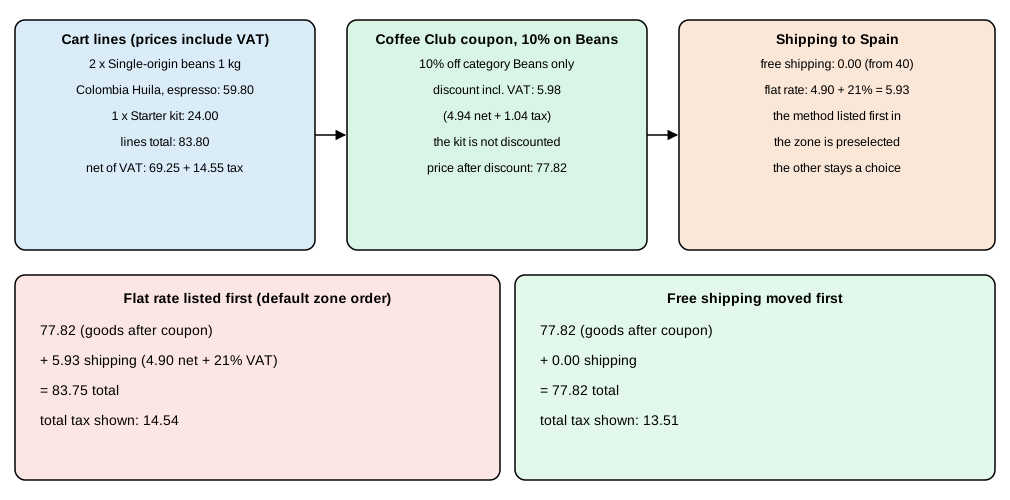
The figure shows the verified cart: 59.80 of beans plus the 24.00 kit is 83.80; the coupon takes 5.98 from the beans only (4.94 plus 1.04 VAT); that leaves 77.82. With the flat rate preselected the customer would have paid 77.82 plus 5.93 = 83.75 although free shipping was available, which is why the order of the methods matters.
Source: WooCommerce: coupon management
E-mails
WooCommerce sends transactional e-mails from classes registered in WC()->mailer(). In 11.2.1 the registered classes are:
| E-mail id | Class | Goes to |
|---|---|---|
|
|
admin |
|
|
admin |
|
|
admin |
|
|
admin |
|
|
customer |
|
|
customer |
|
|
customer |
|
|
customer |
|
|
customer |
|
|
customer |
|
|
customer |
|
|
customer |
|
|
customer |
|
|
customer |
|
a class in |
customer |
|
point-of-sale receipts |
customer |
Settings > Emails sets the sender (woocommerce_email_from_name, woocommerce_email_from_address), an optional
reply-to (woocommerce_email_reply_to_enabled, woocommerce_email_reply_to_name, woocommerce_email_reply_to_address),
the header image and its width and alignment (woocommerce_email_header_image, woocommerce_email_header_image_width,
woocommerce_email_header_alignment), the font and footer text (woocommerce_email_font_family,
woocommerce_email_footer_text) and the colours (woocommerce_email_base_color, woocommerce_email_background_color,
woocommerce_email_body_background_color, woocommerce_email_text_color, woocommerce_email_footer_text_color, with
woocommerce_email_auto_sync_with_theme to take them from the theme). Each e-mail then has its own screen under the same
tab with an enable switch, the subject, the heading, additional content and the e-mail type (plain or HTML). The new
e-mail templates and the block e-mail editor sit behind the feature options woocommerce_feature_email_improvements_enabled
and woocommerce_feature_block_email_editor_enabled, both no in 11.2.1.
wp option update woocommerce_email_from_name "Pocket Coffee"
wp option update woocommerce_email_from_address "shop@example.test"
wp eval 'foreach ( WC()->mailer()->get_emails() as $e ) { printf( "%-36s %s\n", $e->id, $e->is_customer_email() ? "customer" : "admin" ); }'
Success: Updated 'woocommerce_email_from_name' option.
Success: Updated 'woocommerce_email_from_address' option.
new_order admin
cancelled_order admin
customer_cancelled_order customer
failed_order admin
customer_failed_order customer
customer_on_hold_order customer
customer_processing_order customer
customer_completed_order customer
customer_refunded_order customer
customer_invoice customer
customer_note customer
customer_reset_password customer
customer_new_account customer
admin_payment_gateway_enabled admin
customer_pos_completed_order customer
customer_pos_refunded_order customer
customer_verify_email customerThe sender address must belong to a domain whose mail you control (SPF, DKIM and DMARC records for that domain), or
providers flag the order e-mails as spam; WordPress’s default wp_mail() uses PHP mail() and often fails on
containers and cheap hosts. Delivery is a hosting decision (an SMTP or transactional-mail plugin); in the test stack there
was no mail server, so no e-mail left the machine (sendmail: can't connect to remote host), and the e-mail bodies were
read from the templates, not from an inbox. A mail catcher (a local SMTP server with a web inbox) is the way to read
them in development. The Emails page covers templates and WC_Email.
Source: WooCommerce: e-mail settings
Choosing a theme and extensions
A theme decides the look and the templates; extensions add behaviour. Both are choices you live with, so the checks below matter more than the demo.
Theme. A new WordPress 7.1.3 site comes with the default block themes (Twenty Twenty-Five 1.5, Twenty Twenty-Four 1.6,
Twenty Twenty-Three 1.7) and the first one was active in the test site. WooCommerce works with block themes through
theme.json and the Woo block templates, with classic themes through PHP templates, and the Cart and Checkout blocks work
in both. Storefront 4.6.2 (2025-12-09) is the long-standing classic theme from the WooCommerce team; Purple (version
1.0.3, updated 2026-10-09) is the block theme and needs WordPress 7.1 or newer. Prefer a block theme for a new store, keep
customisations in a child theme or in the Site Editor, and expect a classic theme’s yourtheme/woocommerce/ template
overrides to break when WooCommerce bumps a template version (WooCommerce > Status lists outdated overrides). The theme
section of the Themes: Block and Classic page covers this in
detail; the books' advice to design around a Customizer and widget areas describes the classic era.
Extensions. WooCommerce core is deliberately small, so most stores add a few extensions. Before installing one, check:
| Check | What to look for |
|---|---|
Maintenance |
Last update date, |
Compatibility declarations |
HPOS and Cart and Checkout block compatibility ( |
Source |
The WordPress.org directory or the Woo Marketplace; never "nulled" copies of paid plugins, which are a common malware route |
Marketplace vetting |
Woo Marketplace extensions pass the Quality Insights Toolkit tests (activation, API, end-to-end, security, PHP compatibility); that is a floor, not a guarantee |
Overlap |
Does it duplicate a core feature, the theme, or another extension? Every extra plugin is code that runs on each request and an update to track |
Exit cost |
Where its data lives (custom tables, post meta) and what happens to it on uninstall |
wp wc hpos compatibility-info is the quick HPOS check; a plugin that has not declared compatibility makes WooCommerce warn
before HPOS is enabled. Keep the number of extensions small, remove the ones you stop using instead of deactivating them,
and test updates on a copy of the store first. Advice that named specific plugins in the books (SEO, security, backup,
caching) is dated; evaluate current options with the checks above.
Source: WooCommerce docs: extensions
The complete Pocket Coffee script
The script below assembles the commands of this page into one file that creates the settings, tax rate, shipping zones,
payments, catalogue and coupon. It was run on a clean WordPress 7.1.3 and WooCommerce 11.2.1 site, finished in about 45
seconds and produced the zones, the 18 variations (with the IDs, SKUs and prices of the table above), the tax rate and the
coupon listed in this page. It uses an administrator called shopadmin and WP-CLI as $WP.
#!/usr/bin/env bash
# pocket-coffee-setup.sh: settings, tax, shipping, catalogue and coupon of Pocket Coffee.
# WP-CLI is called through $WP (default: wp) inside the WordPress directory.
set -euo pipefail
WP=${WP:-wp}
ADMIN=${ADMIN:-shopadmin}
wcli() { "$WP" --user="$ADMIN" wc "$@"; }
opt()  { "$WP" option update "$@" > /dev/null; }

# 1. Store details, selling countries, currency, units
opt woocommerce_store_address "Calle Ejemplo 1"
opt woocommerce_store_city Madrid
opt woocommerce_store_postcode 28001
opt woocommerce_default_country ES:M
opt woocommerce_currency EUR
opt woocommerce_weight_unit kg
opt woocommerce_dimension_unit cm
opt woocommerce_allowed_countries specific
opt woocommerce_specific_allowed_countries '["ES","DE","FR","IT","PT","NL","BE","AT","IE"]' --format=json

# 2. Tax: prices include VAT, shown with VAT in the shop and the cart, one rate for Spain
opt woocommerce_calc_taxes yes
opt woocommerce_prices_include_tax yes
opt woocommerce_tax_display_shop incl
opt woocommerce_tax_display_cart incl
wcli tax create --country=ES --rate=21.0000 --name=IVA --priority=1 --shipping=true --class=standard --porcelain

# 3. Shipping: free shipping is created first so that it is the preselected method
ES=$(wcli shipping_zone create --name="Spain" --porcelain)
EU=$(wcli shipping_zone create --name="European Union (excluding Spain)" --porcelain)
"$WP" eval '
$es = new WC_Shipping_Zone( '"$ES"' ); $es->add_location( "ES", "country" ); $es->set_zone_order( 0 ); $es->save();
$eu = new WC_Shipping_Zone( '"$EU"' ); $eu->set_zone_order( 1 );
foreach ( array( "DE", "FR", "IT", "PT", "NL", "BE", "AT", "IE" ) as $c ) { $eu->add_location( $c, "country" ); }
$eu->save();'
wcli shipping_zone_method create "$ES" --method_id=free_shipping --settings='{"requires":"min_amount","min_amount":"40"}' --porcelain
wcli shipping_zone_method create "$ES" --method_id=flat_rate --settings='{"cost":"4.90","tax_status":"taxable"}' --porcelain
wcli shipping_zone_method create "$EU" --method_id=flat_rate --settings='{"cost":"9.90","tax_status":"taxable"}' --porcelain

# 4. Payments
wcli payment_gateway update bacs --enabled=true --porcelain

# 5. Categories and products
BEANS=$(wcli product_cat create --name=Beans --porcelain)
EQUIP=$(wcli product_cat create --name=Equipment --porcelain)
wcli product create --name="Starter kit" --type=simple --regular_price=24.00 --sku=PC-KIT --weight=1.2 \
  --manage_stock=true --stock_quantity=30 --categories="[{\"id\":$EQUIP}]" --porcelain

PID=$(wcli product create --name="Single-origin beans" --type=variable --categories="[{\"id\":$BEANS}]" \
  --attributes='[{"name":"Origin","position":0,"visible":true,"variation":true,"options":["Ethiopia Yirgacheffe","Colombia Huila","Brazil Cerrado"]},{"name":"Grind","position":1,"visible":true,"variation":true,"options":["Whole bean","Espresso","Filter"]},{"name":"Size","position":2,"visible":true,"variation":true,"options":["250 g","1 kg"]}]' --porcelain)
for o in "Ethiopia Yirgacheffe:ETH:1" "Colombia Huila:COL:0" "Brazil Cerrado:BRA:0"; do
  IFS=: read -r oname ocode extra <<< "$o"
  for g in "Whole bean:WHL" "Espresso:ESP" "Filter:FIL"; do
    IFS=: read -r gname gcode <<< "$g"
    for s in "250 g:250:8.90:0.25:1" "1 kg:1KG:29.90:1:4"; do
      IFS=: read -r sname scode price weight mult <<< "$s"
      total=$(awk -v p="$price" -v e="$extra" -v m="$mult" 'BEGIN { printf "%.2f", p + e * m }')
      wcli product_variation create "$PID" --regular_price="$total" --sku="PC-$ocode-$gcode-$scode" \
        --weight="$weight" --manage_stock=true --stock_quantity=25 \
        --attributes="[{\"name\":\"Origin\",\"option\":\"$oname\"},{\"name\":\"Grind\",\"option\":\"$gname\"},{\"name\":\"Size\",\"option\":\"$sname\"}]" \
        --porcelain > /dev/null
    done
  done
done

# 6. Coffee Club: a role to tag members and a coupon restricted to Beans and to one member e-mail
"$WP" role create coffee_club "Coffee Club"
wcli shop_coupon create --code=COFFEECLUB --discount_type=percent --amount=10 \
--product_categories="[$BEANS]" --email_restrictions='["ada@example.test"]' --porcelainThe script is not idempotent: run twice, it creates a second tax rate, second zones and a second catalogue. For repeatable
environments, create the site from scratch (a fresh container or wp db reset --yes) each time, as the local-environment
page describes. The coupon code is taken by the first run, and a second shop_coupon create for the same code fails with a
duplicate-code error.
Security, backups and maintenance
Most store compromises come from outdated or untrusted plugins and weak administrator accounts, not from WooCommerce core; Patchstack’s 2026 report counts 91 % of the new WordPress vulnerabilities of 2025 in plugins and 9 % in themes (a third-party source). The routine below is what a small store can sustain. The commands were run on the test site.
| When | Task | How |
|---|---|---|
Every week |
Apply WordPress, WooCommerce, theme and plugin updates, after testing on a copy; remove unused plugins |
|
Every week |
Check scheduled actions and failed jobs (WooCommerce > Status > Scheduled Actions) and the log |
The Action Scheduler page |
Every day |
Back up the database; back up uploads and code after every change |
|
Every month |
Restore a backup into a throw-away site and place a test order |
The restore is the test; an untested backup is a hope |
After each update |
Verify the files of core and plugins against the published checksums |
|
Every quarter |
Review administrator and shop-manager accounts, API keys (Advanced > REST API), webhooks and application passwords |
|
Always |
HTTPS on every page, strong passwords and two-factor authentication for every administrator |
WordPress 7.1.3 core contains no two-factor code; use a maintained plugin |
wp plugin verify-checksums --all
wp core check-update
wp plugin auto-updates enable woocommerce
wp plugin list --fields=name,status,version,update,auto_update
wp db export /backups/pocket-coffee-2026-10-27.sql
wp config set DISALLOW_FILE_EDIT true --raw
wp config set WP_ENVIRONMENT_TYPE production
wp cron event run --due-now
Success: Verified 3 of 3 plugins.
Success: WordPress is at the latest version.
Success: Enabled 1 of 1 plugin auto-updates.
name status version update auto_update
akismet inactive 5.7.2 none off
hello inactive 1.7.2 none off
woocommerce active 11.2.1 none on
Success: Exported to '/backups/pocket-coffee-2026-10-27.sql'.
Success: Added the constant 'DISALLOW_FILE_EDIT' to the 'wp-config.php' file with the raw value 'true'.
Success: Added the constant 'WP_ENVIRONMENT_TYPE' to the 'wp-config.php' file with the value 'production'.
Executed the cron event 'wc_admin_process_orders_milestone' in 0.001s.
Success: Executed a total of 8 cron events.Automatic updates for WooCommerce are a trade-off: security releases arrive fast (the July 2021 SQL injection was patched
in a forced update within a day), but an automatic update can break a customised checkout, so many stores enable them for
core and security releases and test major updates by hand. DISALLOW_FILE_EDIT removes the theme and plugin editors from
wp-admin, which stops an attacker with an administrator session from writing PHP there. WordPress’s cron runs on page
visits; a store with low traffic or a caching layer should call wp-cron.php or wp cron event run --due-now from the
system cron and set DISABLE_WP_CRON, because Action Scheduler (orders, e-mails, subscriptions) rides on it.
WooCommerce > Status > Tools offers maintenance actions that are safe to run when a symptom matches. The ids in 11.2.1
(shown by wp wc tool list --user=<administrator>) include clear_transients, clear_expired_transients,
delete_orphaned_variations, clear_expired_download_permissions, regenerate_product_lookup_tables,
repair_coupons_lookup_table, recount_terms, reset_roles, clear_sessions, clear_template_cache, install_pages,
db_update_routine, verify_db_tables, regenerate_product_attributes_lookup_table,
clear_woocommerce_analytics_cache, hpos_legacy_cleanup and, destructive, delete_taxes and
delete_custom_orders_table. A tool runs with wp wc tool run <id> --user=<administrator>; read the description before you
run the destructive ones. The Status > System status report is what support asks for first: it lists versions, active
plugins, database tables, outdated template overrides and the HPOS state.
Payment security. A store that never sees card numbers (hosted fields or redirect) completes the lightest PCI DSS self-assessment; a store that handles card data itself takes on the full burden. Keep API keys and gateway secrets out of the code and rotate them after any suspected compromise. The incident history, the 21-release security backport window and hardening beyond this routine are on the Performance and Security page, and the developer-side checklist is in the official security best practices (PHPCS and Semgrep clean code, WordPress hardening, 2FA, data protection).
Launching
WooCommerce can hide the store until you are ready. Settings > Site visibility (the option names are
woocommerce_coming_soon and woocommerce_store_pages_only) has two modes: coming soon for the whole site, or for
the store pages only, so that a blog or marketing site stays public while the shop is private. In the 11.2.1 source,
woocommerce_coming_soon set to yes with woocommerce_store_pages_only not yes puts the whole site in coming-soon
mode, and both set to yes limits it to the store pages; administrators and shop managers (manage_woocommerce) always
see the real site. A scripted install leaves woocommerce_coming_soon unset, so the store is live from the moment it is
installed; check the setting before you point a domain at the site.
On a test site, with the whole site in coming-soon mode, an anonymous request to the home page returned HTTP 200 with the
header Cache-Control: max-age=60, and the page head contained <meta name='woo-coming-soon-page' content='yes'> and a
robots meta of max-image-preview:large. The coming-soon page is therefore a normal 200 response, not a 503, and it
carried no noindex directive; search engines can index it if they find it. WordPress’s own Discourage search engines
from indexing this site switch (Settings > Reading, option blog_public) is a separate control. A page cache in front of
the site keeps serving the page for as long as its own lifetime, so purge it when you switch the mode.
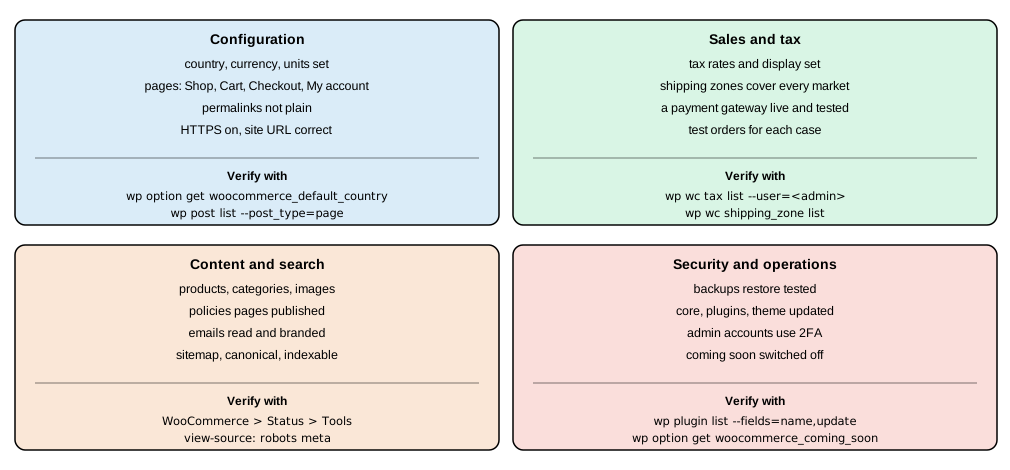
| Check | What to verify | Command or screen |
|---|---|---|
Settings |
Country, currency, units, selling countries, store address |
|
Permalinks |
Pretty permalinks on (Post name), so that |
|
Pages |
Shop, Cart, Checkout, My account exist and are published; the terms, privacy and refund pages are written and linked |
|
Tax |
The rate for each country you sell to; prices and display consistent; a test order for each customer type |
|
Shipping |
A zone for every selling country; the method preselected is the one you want; the free-shipping threshold behaves with and without tax display |
|
Payments |
One live gateway, tested with a real small payment and a refund; bank transfer details correct |
Payments tab, Orders |
E-mails |
Sender, branding, one test of each customer e-mail, delivery from the real domain |
Emails tab, a mail catcher in staging |
Content |
Product titles, descriptions, images with alt text, categories; no demo products left |
Products |
Search |
A single canonical URL per product (WordPress handles |
view-source of the home page and a product |
Security |
Updates applied, administrators with 2FA, backup restored once, |
|
Monitoring |
Uptime check, log review, order e-mail alert, a plan for rollbacks |
Host tools, Status > Logs |
Search and marketing are launch topics in every book: use readable permalinks (the default product base is /product/ and
the product category base /product-category/, both editable in Settings > Permalinks), give each product a unique
title and description, keep one URL per product (variations use query parameters on the same URL), and let WooCommerce
emit its product structured data. Analytics and advertising pixels must respect consent rules in the countries you sell
to, so add them through a consent-aware plugin and mention them in the privacy policy. The order of the final steps is:
finish the content, run the test orders, switch the site visibility to live, purge caches, place a real order yourself,
and watch the first days of orders and e-mails.
Legacy and book notes
The books on this subject describe an older WooCommerce and are background only. Sims (2018, WooCommerce 3.x and
WordPress 4.9) walks the Setup Wizard, the Customizer and widget areas of Storefront, shortcode-based Cart and Checkout
pages and PHP 5-era hosting; today the Core Profiler and the task list replace the wizard, block themes replace the
Customizer for new stores, the Cart and Checkout blocks are the default and PHP 7.4 is the floor (PHP 8.3 is
recommended). Rauland (2015, WooCommerce 2.2 and 2.3) edits the checkout with woocommerce_checkout_fields and enforces
HTTPS on the checkout only; those filters do not affect the Checkout block and HTTPS now belongs on every page.
Ravensbergen (2015, WooCommerce 2.4 and 2.5) builds a Storefront child theme with storefront_* hooks and shortcodes and
refers to WooThemes and Simplify Commerce, which no longer exist as described. The store-planning, launch, security,
backup and maintenance advice survives, which is why it is rewritten above for the current screens, options and commands.
References
-
WooCommerce: setting up shipping zones, flat rate shipping and free shipping
-
Books (background only, outdated for current versions): Lisa Sims, Building Your Online Store With WordPress and WooCommerce (Apress, 2018), for planning, launch, security, backup and maintenance; Patrick Rauland, WooCommerce Cookbook (Packt, 2015); Robbert Ravensbergen, Building E-Commerce Solutions with WooCommerce, 2nd ed. (Packt, 2015).