Documents, BSON & data types
|
This section documents the current MongoDB 8.x server line as published at the MongoDB Server Manual, which is the reference these pages are written and verified against. No specific patch version is pinned. Some capabilities (Atlas Search, Atlas Vector Search, and parts of encryption and backup) are Atlas-only — they are linked, not documented in depth. This content was generated with the assistance of AI and should be verified against the official manual before being relied on in production, since MongoDB iterates quickly. This section’s bibliography lists the reference material consulted while preparing these pages. |
A MongoDB record is a document: an ordered set of field/value pairs, stored on disk and on the wire in a
binary format called BSON. This page covers what a document may contain, the type system BSON provides, how
_id and ObjectId work, how to reach into nested structure, and how values of different types compare.
The document and the BSON format
A document is an ordered list of fields; each field has a name (a string) and a value (one of the BSON types below). Field order is preserved as written and is significant for equality of embedded documents.
{
  "_id": 1,
  "title": "BSON basics",
  "tags": ["bson", "types"],
  "meta": { "views": 5, "draft": false }
}
BSON ("Binary JSON") is a length-prefixed binary encoding. It exists to add what
plain JSON lacks for a database: distinct numeric types (32-bit vs 64-bit integers vs Decimal128), a
native date type, a binary type, and an ObjectId type, plus fast traversal because every value is
length-prefixed. It also drops JSON’s whitespace and repeats field names as raw bytes. See
Documents in the manual for the model and
Limits for the two hard constraints:
-
A single BSON document may be at most 16 MB. Larger blobs belong in GridFS or object storage.
-
Documents may nest at most 100 levels deep (embedded documents and arrays combined).
The BSON type set
Each type has a canonical name and a numeric alias usable with the
$type query operator.
| Type | Alias | Notes |
|---|---|---|
Double |
|
64-bit IEEE 754 float; the default for a shell literal like |
String |
|
UTF-8. |
Object |
|
An embedded document. |
Array |
|
An ordered list; stored as a document with numeric string keys. |
Binary data |
|
Bytes plus a subtype (e.g. |
ObjectId |
|
12-byte identifier; see below. |
Boolean |
|
|
Date |
|
Milliseconds since the Unix epoch, signed (dates before 1970 are negative). |
Null |
|
An explicit null value. |
Regular expression |
|
A pattern plus option flags. |
32-bit integer |
|
|
64-bit integer |
|
|
Decimal128 |
|
128-bit IEEE 754-2008 decimal float; exact base-10, for money. |
Timestamp |
|
Internal replication timestamp; not for application dates. |
MinKey / MaxKey |
|
Sort below / above every other value. |
The full list, including deprecated types, is at
BSON Types. In mongosh the non-JSON types have
constructors:
db.samples.insertOne({
  _id: 1,
  amount:   Decimal128("19.99"),      // exact decimal, not 19.99 as a Double
  count:    Long("9007199254790000"), // 64-bit integer beyond Double's safe range
  when:     ISODate("2026-01-15T00:00:00Z"),
  blob:     BinData(0, "SGVsbG8="),   // subtype 0, base64 payload
  pattern:  /^bson/i
})
Extended JSON
JSON has no syntax for a date or a Decimal128, so MongoDB tools exchange those types using
Extended JSON: wrapper objects with $-prefixed keys. The "canonical" mode is type-preserving; "relaxed"
mode emits plain JSON numbers and ISO date strings where it can.
{
  "_id": { "$oid": "64f0a1c3e13b1f00a8d9e4b2" },
  "amount": { "$numberDecimal": "19.99" },
  "count": { "$numberLong": "9007199254790000" },
  "when": { "$date": "2026-01-15T00:00:00Z" }
}mongoexport, mongoimport, and EJSON in mongosh all speak this format; see
MongoDB Extended JSON (v2). Tooling
that reads and writes these files is covered in Backup &
data tools.
_id and ObjectId
Every document has an _id field whose value is unique within its collection and immutable once written. It
is always the first field on disk and is automatically backed by a unique index. If you do not supply _id
on insert, the driver or server generates an ObjectId.
An ObjectId is 12 bytes:
-
a 4-byte value: seconds since the Unix epoch (the creation time, readable via
ObjectId.prototype.getTimestamp()); -
a 5-byte per-process random value;
-
a 3-byte counter that increments per process, starting from a random value.
Because the leading bytes are a timestamp, ObjectId values generated over time are roughly monotonic — they sort close to insertion order, though not strictly so under concurrency or clock skew. See
ObjectId() in the manual.
// Server-generated _id.
db.events.insertOne({ kind: "login" })
// { acknowledged: true, insertedId: ObjectId('64f0a1c3e13b1f00a8d9e4b2') }

// Supply your own _id -- any unique, non-array BSON value is allowed.
db.events.insertOne({ _id: "2026-01-15#login", kind: "login" })

// Recover the creation time embedded in an ObjectId.
ObjectId("64f0a1c3e13b1f00a8d9e4b2").getTimestamp()  // ISODate(...)
Embedded documents, arrays, and dot notation
Values can be embedded documents, arrays of scalars, or arrays of documents, nested within the 100-level
limit. Dot notation addresses a nested field as a single string: field names joined by ., with a
non-negative integer segment selecting an array position.
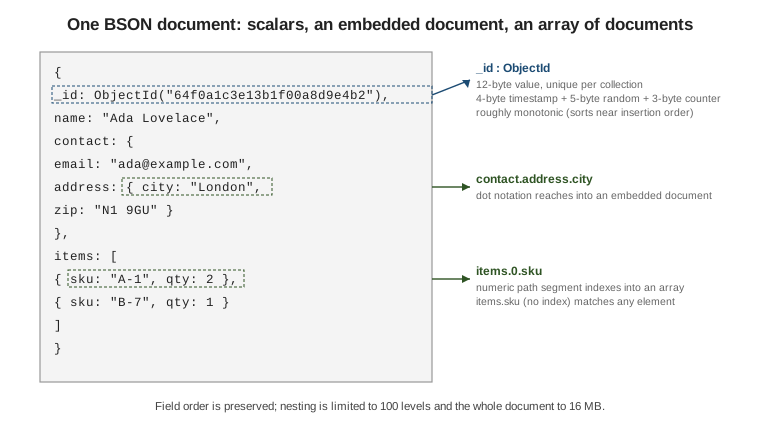
db.people.insertOne({
  _id: 1,
  name: "Ada Lovelace",
  contact: { email: "ada@example.com", address: { city: "London", zip: "N1 9GU" } },
  items: [ { sku: "A-1", qty: 2 }, { sku: "B-7", qty: 1 } ]
})

// Reach into an embedded document.
db.people.find({ "contact.address.city": "London" })

// Match a specific array position, then any array element.
db.people.find({ "items.0.sku": "A-1" })   // first element only
db.people.find({ "items.sku": "B-7" })     // any element of items
Quote any dotted key in the shell. Dot-notation matching semantics — especially how a query on items.sku
matches across array elements, and how $elemMatch differs — are covered in
Querying documents. See
Dot notation in the manual.
Comparison and sort order across types
When queried values (or values in a sort) have different BSON types, MongoDB orders them by type first, using this fixed order (lowest to highest):
-
MinKey
-
Null
-
Numbers (Int32, Int64, Double, Decimal128 — compared by numeric value, across the four types)
-
String
-
Object (embedded document)
-
Array
-
BinData
-
ObjectId
-
Boolean
-
Date
-
Timestamp
-
Regular expression
-
MaxKey
The authoritative table is at Comparison/Sort Order. Two consequences worth remembering:
-
Null versus missing. A query
{ field: null }matches both documents wherefieldholdsnulland documents wherefieldis absent. To match only an explicitnull, combine with a type check:{ field: { $type: "null" } }. To match only "present", use{ field: { $exists: true } }. -
Numeric-type conflation. The numeric types sort and compare by value, so
1,1.0, andNumberLong(1)are equal for query matching and indexing. They are still stored as distinct BSON types, and$typedistinguishes them —{ n: { $type: "int" } }will not match a value stored as a Double. Choose one numeric type per field, and useDecimal128for money to avoid binary-float rounding.
db.t.insertMany([ { n: 1 }, { n: 1.0 }, { n: NumberLong(1) }, { n: "1" } ])

db.t.find({ n: 1 }).count()                 // 3 -- the three numeric values, not the string
db.t.find({ n: { $type: "int" } }).count()  // 1 -- only the value stored as Int32
db.t.find({ n: { $lt: "2" } })              // the string "1": strings sort after all numbers
Continue with Databases & collections or go back to What MongoDB is & how to run it.