Views, Fragments and Activities vs. Compose: Architecture Comparison
|
This content was generated with the assistance of AI and should be verified against the official documentation of Android before being relied on in production. See the section bibliography for the reference material consulted while preparing these pages. |
By 2026, Jetpack Compose is Google’s recommended toolkit for new Android UI, and the Views/Fragments/Activities
stack that preceded it is now consistently described as the classic, still-supported alternative rather than the
default. Both toolkits remain fully maintained — Compose is built on top of the same Activity, Lifecycle and
ViewModel foundations Views uses, not a replacement for them — and most non-trivial apps, including large
existing codebases, run a mix of both for years. This page puts the two stacks side by side, feature by feature,
so a team can reason concretely about where they differ, where a mixed codebase is a reasonable long-term state
rather than a waypoint, and where Compose is a clear win. It targets Android 17 (API level 37), Compose BOM
2026.09.00, Fragment 1.9.1, Lifecycle 2.11.0 and Navigation 2.10.2 / Navigation 3 1.2.0, and
uses the same TrailMate hiking-trail app used throughout this section, built once in each stack.
This page assumes the individual building blocks of each stack are already familiar from earlier pages: Activities and the Activity Lifecycle, Fragments and the Fragment Lifecycle, Views, XML Layouts, View Binding and Material Components and RecyclerView and Lists for the classic stack; Jetpack Compose Fundamentals, Compose Layouts, Modifiers and Lazy Lists and State, Recomposition and Side Effects in Compose for Compose; and Recommended App Architecture (UI, Domain and Data Layers) and ViewModel, Lifecycle-Aware Components, Coroutines and Flow for the shared architecture underneath both. Two closely related pages complete the trio this page belongs to: Saving UI State: Views vs. Compose gives the full, dedicated comparison of what survives a configuration change, process death or user dismissal in each stack — this page only summarizes that topic — and Migrating from Views to Compose gives the phased, before/after migration path for a codebase that wants to move from one stack to the other.
How to Read This Comparison
Each section below states what a concept means in each stack, gives a short table, and calls out the one or two
things teams most often get wrong when moving between them. TrailMate names are consistent with the rest of the
section: Trail, Difficulty, TrailListUiState, TrailListViewModel, TrailRepository, and the two parallel
UI entry points, MainActivity : AppCompatActivity (Views, hosting NavHostFragment) and
MainActivity : ComponentActivity (Compose, hosting TrailMateApp()). Both versions of TrailMate share the same
TrailListViewModel, exposing StateFlow<TrailListUiState> and an onToggleFavorite(id: String) method — the architecture layer underneath the UI does not change based on which toolkit renders it, which is exactly why
a mixed-stack app is viable: the UI layer is the only layer that differs.
UI Definition
| Views / Fragments / Activities | Compose | |
|---|---|---|
Where the UI lives |
XML layout resource ( |
A tree of |
Composition unit |
A |
A composable function invocation, which may or may not correspond to a retained object — the Compose runtime
decides whether to keep, move or discard the underlying |
Reuse |
Custom |
Ordinary function composition and default parameters — a shared row is just a function called from several screens, with no XML inheritance model to reason about. |
Tooling to author it |
The Layout Editor’s WYSIWYG canvas and Blueprint view, or hand-written XML. |
|
TrailMate’s trail row illustrates the difference directly. The Views version is a resource plus a binding class generated from it:
<!-- feature/trails/src/main/res/layout/item_trail.xml -->
<androidx.constraintlayout.widget.ConstraintLayout xmlns:android="http://schemas.android.com/apk/res/android"
    xmlns:app="http://schemas.android.com/apk/res-auto"
    android:layout_width="match_parent"
    android:layout_height="wrap_content"
    android:padding="16dp">

    <ImageView
        android:id="@+id/trailPhoto"
        android:layout_width="64dp"
        android:layout_height="64dp"
        app:layout_constraintStart_toStartOf="parent"
        app:layout_constraintTop_toTopOf="parent" />

    <TextView
        android:id="@+id/trailName"
        android:layout_width="0dp"
        android:layout_height="wrap_content"
        android:textAppearance="?attr/textAppearanceTitleMedium"
        app:layout_constraintStart_toEndOf="@id/trailPhoto"
        app:layout_constraintEnd_toStartOf="@id/favoriteButton"
        app:layout_constraintTop_toTopOf="@id/trailPhoto" />

    <ImageButton
        android:id="@+id/favoriteButton"
        android:layout_width="48dp"
        android:layout_height="48dp"
        android:background="?attr/selectableItemBackgroundBorderless"
        app:layout_constraintEnd_toEndOf="parent"
        app:layout_constraintTop_toTopOf="parent" />
</androidx.constraintlayout.widget.ConstraintLayout>The Compose version is a function, with no separate resource file at all:
// feature/trails/src/main/kotlin/com/example/trailmate/feature/trails/TrailCard.kt
@Composable
fun TrailCard(
    trail: Trail,
    onToggleFavorite: (String) -> Unit,
    modifier: Modifier = Modifier,
) {
    Row(
        modifier = modifier
            .fillMaxWidth()
            .padding(16.dp),
        verticalAlignment = Alignment.CenterVertically,
    ) {
        AsyncImage(
            model = trail.photoUrl,
            contentDescription = null,
            modifier = Modifier.size(64.dp),
        )
        Text(
            text = trail.name,
            style = MaterialTheme.typography.titleMedium,
            modifier = Modifier.weight(1f).padding(start = 16.dp),
        )
        IconButton(onClick = { onToggleFavorite(trail.id) }) {
            Icon(
                imageVector = if (trail.isFavorite) Icons.Filled.Favorite else Icons.Outlined.FavoriteBorder,
                contentDescription = if (trail.isFavorite) "Remove from favorites" else "Add to favorites",
            )
        }
    }
}Update Model: Imperative Mutation vs. Recomposition
| Views / Fragments / Activities | Compose | |
|---|---|---|
How the screen changes |
Code imperatively finds a |
A composable re-reads the state it depends on and re-executes ("recomposes"); the runtime diffs what changed and only touches the underlying layout nodes that actually differ. |
Who tracks "what changed" |
The programmer, by hand, one property at a time. Forgetting to update a |
The Compose runtime’s snapshot system, via |
Granularity |
Whatever the programmer chose to touch: a single property, or an entire subtree via |
Individual composables, addressed by position and, for lists, by |
Failure mode when done carelessly |
Stale UI (state changed, view was not touched) or excessive redraws ( |
Excessive recomposition from unstable parameter types, unnecessarily broad state reads, or lambdas that are recreated every recomposition; see State, Recomposition and Side Effects in Compose for the stability rules that prevent this. |
The favorite toggle makes the contrast concrete. In the Views version, toggling a favorite means calling
notifyItemChanged(position) (or, with ListAdapter, submitting a new list so DiffUtil computes a payload) so
TrailViewHolder.bind() re-runs and imperatively flips the icon:
// feature/trails/src/main/kotlin/com/example/trailmate/feature/trails/TrailViewHolder.kt
class TrailViewHolder(private val binding: ItemTrailBinding) : RecyclerView.ViewHolder(binding.root) {
    fun bind(trail: Trail, onToggleFavorite: (String) -> Unit) {
        binding.trailName.text = trail.name
        binding.favoriteButton.setImageResource(
            if (trail.isFavorite) R.drawable.ic_favorite_filled else R.drawable.ic_favorite_border,
        )
        binding.favoriteButton.setOnClickListener { onToggleFavorite(trail.id) }
    }
}In Compose, TrailCard above already reads trail.isFavorite directly; there is no separate "update" step to
write, because the whole function is re-run with the new Trail value and the icon swap follows automatically
from the if expression. See
Android Developers — Thinking in Compose.
Lifecycles
| Views / Fragments / Activities | Compose | |
|---|---|---|
Lifecycle owners in play |
Three separate, nested lifecycles: the |
Only the |
What "leaves the screen" means |
A |
A composable "leaves composition" when its call site is no longer reached (e.g. because a condition became
false, or a list item scrolled out of a lazy list without being kept alive), which triggers |
Common lifecycle bug |
Setting |
Collecting a |
Where it is covered in depth |
Activities and the Activity Lifecycle, Fragments and the Fragment Lifecycle |
Jetpack Compose Fundamentals (composition/recomposition),
ViewModel, Lifecycle-Aware Components, Coroutines and
Flow ( |
State Persistence (Summary)
Both stacks lose in-memory state on the same three events — a configuration change, system-initiated process
death, and the user dismissing the screen — and both rely on the same underlying mechanisms (ViewModel for
configuration changes, a Bundle for the other two) underneath a different API surface. The table below is a
short pointer, not the full comparison:
| State kind | Views mechanism | Compose mechanism |
|---|---|---|
Scroll position |
|
|
Text input |
|
|
Screen UI state (filters, search query) |
|
|
Navigation back stack |
The `FragmentManager’s own saved state, restored automatically with the activity |
Navigation Compose/ |
Business data (trail list contents) |
Persistent storage (Room), not instance state, since a |
Persistent storage (Room), for the same reason — identical to Views |
The full comparison — the state-loss events table, BaseSavedState for custom Views, Saver/listSaver/
mapSaver, Bundle size limits, testing process death, and worked TrailMate examples in both stacks — lives on
Saving UI State: Views vs. Compose; this page does not
repeat it.
Navigation and the Back Stack
| Views (Navigation Component) | Compose (Navigation Compose / Navigation 3) | |
|---|---|---|
Graph definition |
|
Kotlin code: |
Destinations |
|
Composable functions, hosted inside the same |
Type safety of arguments |
Safe Args generates typed |
|
Who owns the back stack |
The |
Navigation Compose: still |
Cross-links |
Navigation with Fragments (Navigation Component, Drawer, Bottom Nav, Tabs) |
Lists
| RecyclerView | LazyColumn / LazyRow / LazyVerticalGrid | |
|---|---|---|
Core pieces |
|
A single composable call with a lambda content block; layout, recycling and item animation are built in. |
Diffing changed items |
|
Structural equality plus a |
View recycling |
Explicit |
Recycling of the underlying `LayoutNode`s happens automatically inside the lazy layout; the programmer never manages it directly. |
Mixed item types |
Multiple |
A |
Paging |
|
|
Cross-links |
Theming and Animation
| Views | Compose | |
|---|---|---|
Theme definition |
XML style resources ( |
A Kotlin |
Design system |
Material Components for Android (MDC): |
Material 3 for Compose: |
Dynamic/dark theme |
|
|
Animation APIs |
|
|
Cross-links |
Views, XML Layouts, View Binding and Material Components, Custom Views, Touch, Drawing and View Animation |
Material 3 and Theming in Compose, Compose Animation and Gestures |
Dependency on Context
| Views | Compose | |
|---|---|---|
How pervasive is |
Nearly every constructor — every |
Composables generally do not take a |
Getting a |
Already in scope: |
|
Common mistake |
Holding an |
Reading |
Testing
| Views | Compose | |
|---|---|---|
Instrumented UI tests |
Espresso: |
Compose testing APIs: |
JVM-only (no device/emulator) UI tests |
Robolectric, running real |
|
Fragment-scoped testing |
|
Not applicable in a fragment-free Compose screen; |
ViewModel/unit tests |
Identical in both stacks: |
Identical in both stacks (see previous cell). |
Cross-links |
Unit Testing with JUnit, Mockito, MockK and Robolectric, Instrumented and UI Testing (Espresso, Compose Testing, UI Automator) |
Same two pages |
Tooling
| Views | Compose | |
|---|---|---|
Visual editing |
The Layout Editor: a WYSIWYG canvas plus a Blueprint/constraint view, driving the same XML a text editor would. |
|
Runtime inspection |
Layout Inspector shows the live |
The same Layout Inspector understands the Compose semantics tree too, showing composable names, parameters and recomposition counts alongside any Views in a mixed screen. |
Compile-time checking of the UI itself |
None — a typo in an XML attribute or a dangling |
Full Kotlin compiler checking, since the UI description is itself Kotlin code. |
Multi-configuration preview |
Manually switching the Layout Editor’s device/orientation/locale/night-mode dropdowns one at a time. |
|
Performance: Inflation, Recomposition and Baseline Profiles
| Views | Compose | |
|---|---|---|
Cost of creating a screen the first time |
XML inflation: parsing and reflectively instantiating a |
No inflation step; the first composition builds `LayoutNode`s directly from already-compiled Kotlin bytecode. Deep composable nesting is generally cheaper than the equivalent View nesting, but very large single composables can still be slow to skip if they are unstable. |
Cost of updating the screen |
Whatever the programmer chose to touch, which can be as cheap as one property write or as expensive as a full
|
Recomposition of just the composables whose state inputs changed, provided those composables are skippable (stable parameter types) — see State, Recomposition and Side Effects in Compose for what breaks skippability. |
Startup optimization |
Baseline Profiles pre-compile hot XML-inflation and layout code paths ahead of time via Macrobenchmark-recorded profiles. |
The same Baseline Profiles mechanism applies to Compose’s composition/layout/draw code paths; Compose benefits at least as much from a profile as Views does, since more of its work happens through generic runtime code paths that the JIT would otherwise need to warm up on every fresh install. |
Common performance pitfall |
Overdraw from deeply nested |
Reading unstable state too high in the tree, causing large subtrees to recompose; unremembered lambdas recreated on every recomposition, defeating skipping in child composables. |
How to measure |
Layout Inspector, GPU rendering profile, |
Layout Inspector’s recomposition counts, the Compose compiler’s stability reports, Macrobenchmark — the same benchmarking tool works for both stacks. |
Startup Time and APK Size
| Views | Compose | |
|---|---|---|
App startup contribution |
No extra runtime library beyond AppCompat/AndroidX; startup cost is dominated by |
Adds the Compose runtime and UI libraries to the classpath and to cold-start class loading; in practice the difference is small next to app-specific initialization (DI graph construction, first network/DB calls) and is further reduced by R8/Baseline Profiles. |
APK/AAB size contribution |
Smaller Compose-related footprint (none), but XML layout resources and any Data Binding-generated classes add their own size. |
The Compose runtime, UI, foundation and Material 3 artifacts add several megabytes before R8 shrinking; R8 with resource shrinking (default in AGP 9) removes the large majority of unused code from either stack. |
Practical takeaway |
Neither difference is normally the dominant factor in a real app’s startup time or install size; both are measured with Macrobenchmark and the Play Console’s app size report rather than assumed from first principles. |
|
Interop
Views and Compose can render inside one another in the same screen, which is what makes gradual, screen-by-screen migration realistic rather than an all-or-nothing rewrite:
| Direction | Mechanism |
|---|---|
Compose inside a View hierarchy |
|
A View inside a composable |
|
Shared ViewModel across the boundary |
The same |
See Android Developers — Compose and View interoperability APIs. The full phased path, including exact ViewCompositionStrategy choices
and worked TrailMate examples, is on
Migrating from Views to Compose.
Learning Curve and Maturity
| Views | Compose | |
|---|---|---|
Age and API stability |
Present since Android 1.0; the API surface is large, accreted over 15+ years, and includes many now-legacy layers (see below) alongside current best practice. |
First stable release in 2021; the core APIs (layout, state, navigation) are stable, while some areas — Material 3 Expressive, some adaptive-layout APIs — are still marked experimental at this baseline. |
What a newcomer must learn first |
The View/ViewGroup measure-layout-draw model, XML resource system, |
A declarative, functional mental model (state in, UI out), composition/recomposition, and enough Kotlin to be comfortable with trailing lambdas and property delegates — see Kotlin for Android. |
Ecosystem maturity (third-party libraries, Stack Overflow answers, existing production code) |
Very mature; almost every Android app older than a few years is built this way, at least in part. |
Rapidly maturing; the great majority of new Google guidance, samples and codelabs assume Compose, and most actively developed libraries now ship a Compose-first API (Coil, Navigation, CameraX previews, Paging). |
Where legacy techniques from older material fit in |
Books and tutorials predating roughly 2020 teach |
Not applicable — everything Compose-related in this section postdates its 2021 stable release. |
When Views Are Still the Right Choice
Compose being the recommended default for new UI does not make Views the wrong choice in every situation. Two cases come up repeatedly in practice:
Large existing codebases. A mature app with millions of lines of View-based UI, an established design
system built on MDC, and a team fluent in that stack gains little from a wholesale rewrite, and a rewrite carries
real risk: regressions in screens that already work, a long stretch where two UI systems must be kept visually
consistent, and a large QA surface to re-cover. The pragmatic default for such a codebase is exactly what
Migrating from Views to Compose describes: build new
screens and new features in Compose, embed them into the existing View hierarchy with ComposeView, and migrate
existing screens only when there is a concrete reason to touch them anyway (a redesign, a bug that is easier to
fix after conversion, a screen that is about to gain complex animation). There is no deadline by which an app
"must" finish migrating; Views remain a first-class, fully supported toolkit indefinitely.
Surface-based and SDK-provided View`s — check for a Compose wrapper first. Some Android APIs hand the
caller an `android.view.Surface or a SurfaceHolder to draw into directly, rather than expecting
onDraw(Canvas) calls, and some SDKs ship only a View. Several of the common cases now have first-party
Compose APIs, so an AndroidView wrapper is only needed where none exists:
| View type | Compose option |
|---|---|
|
Google’s |
|
|
|
|
|
A custom |
A View with no Compose wrapper is embedded with AndroidView, with lifecycle callbacks forwarded manually
since Compose has no lifecycle hooks of its own that map onto Surface creation/destruction:
// feature/trails/src/main/kotlin/com/example/trailmate/feature/trails/HikeGlPreview.kt
@Composable
fun HikeGlPreview(modifier: Modifier = Modifier) {
    AndroidView(
        modifier = modifier.fillMaxWidth().height(240.dp),
        factory = { context ->
            GLTextureView(context).apply {
                setEGLContextClientVersion(2)
                setRenderer(HikeTrackRenderer())
            }
        },
        onRelease = { view -> view.onPause() },
    )
}
See Android Developers — Compose and View interoperability APIs and
GitHub — irurueta-android-glutils. For a map or a
plain SurfaceView/TextureView, prefer maps-compose and AndroidExternalSurface/
AndroidEmbeddedExternalSurface; for a View like GLTextureView that has no wrapper, AndroidView is the
documented approach — not a workaround to be migrated away from later. See
Google for Developers — Maps Compose
library and
Android Developers — androidx.compose.foundation (AndroidExternalSurface, AndroidEmbeddedExternalSurface).
Side-by-Side: The Same Feature in Both Stacks
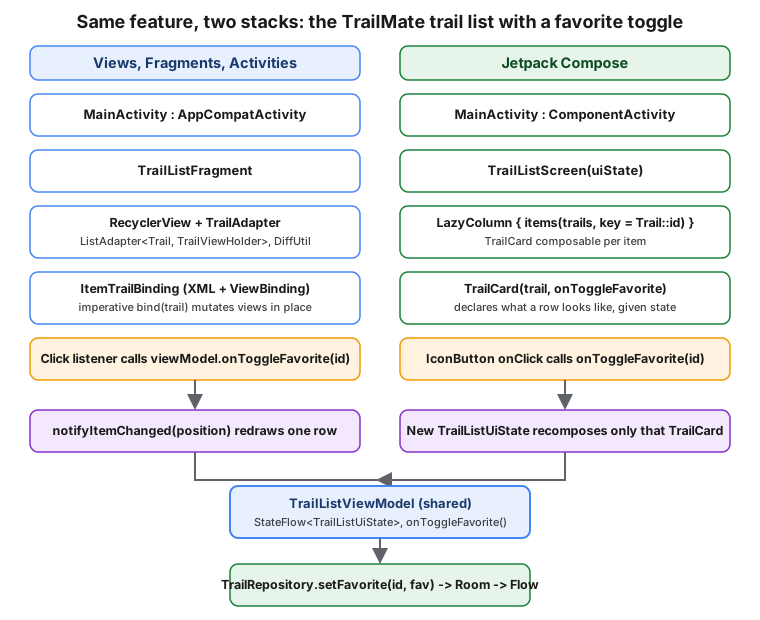
To make every row of the tables above concrete at once, this section implements one complete feature — a trail
list where tapping a heart icon toggles that trail’s favorite status — fully in both stacks. Both versions share
the same TrailListViewModel and TrailRepository; only the UI layer differs, which is the point.
Shared: TrailListViewModel and the Repository Call
Neither UI layer talks to Room or the network directly; both call the same ViewModel method, which delegates to
the same repository, exactly as Recommended App Architecture (UI, Domain
and Data Layers) describes:
// feature/trails/src/main/kotlin/com/example/trailmate/feature/trails/TrailListViewModel.kt
@HiltViewModel
class TrailListViewModel @Inject constructor(
    private val repository: TrailRepository,
) : ViewModel() {

    // TrailListUiState is the sealed interface defined on the App Architecture page.
    val uiState: StateFlow<TrailListUiState> = repository.trails
        .map<List<Trail>, TrailListUiState> { TrailListUiState.Success(trails = it, onlyFavorites = false) }
        .catch { emit(TrailListUiState.Error(it.message.orEmpty())) }
        .stateIn(viewModelScope, SharingStarted.WhileSubscribed(5_000), TrailListUiState.Loading)

    fun onToggleFavorite(trailId: String) {
        val trail = (uiState.value as? TrailListUiState.Success)?.trails?.firstOrNull { it.id == trailId } ?: return
        viewModelScope.launch { repository.setFavorite(trailId, isFavorite = !trail.isFavorite) }
    }
}Views Version: TrailListFragment + RecyclerView
<!-- feature/trails/src/main/res/layout/fragment_trail_list.xml -->
<FrameLayout xmlns:android="http://schemas.android.com/apk/res/android"
    xmlns:tools="http://schemas.android.com/tools"
    android:layout_width="match_parent"
    android:layout_height="match_parent">

    <androidx.recyclerview.widget.RecyclerView
        android:id="@+id/trailRecyclerView"
        android:layout_width="match_parent"
        android:layout_height="match_parent"
        tools:listitem="@layout/item_trail" />
</FrameLayout>// feature/trails/src/main/kotlin/com/example/trailmate/feature/trails/TrailAdapter.kt
class TrailAdapter(
private val onToggleFavorite: (String) -> Unit,
) : ListAdapter<Trail, TrailViewHolder>(TrailDiffCallback) {
override fun onCreateViewHolder(parent: ViewGroup, viewType: Int): TrailViewHolder {
val binding = ItemTrailBinding.inflate(LayoutInflater.from(parent.context), parent, false)
return TrailViewHolder(binding)
}
override fun onBindViewHolder(holder: TrailViewHolder, position: Int) {
holder.bind(getItem(position), onToggleFavorite)
}
}
object TrailDiffCallback : DiffUtil.ItemCallback<Trail>() {
override fun areItemsTheSame(oldItem: Trail, newItem: Trail) = oldItem.id == newItem.id
override fun areContentsTheSame(oldItem: Trail, newItem: Trail) = oldItem == newItem
}// feature/trails/src/main/kotlin/com/example/trailmate/feature/trails/TrailListFragment.kt
@AndroidEntryPoint
class TrailListFragment : Fragment(R.layout.fragment_trail_list) {
private val viewModel: TrailListViewModel by viewModels()
private var binding: FragmentTrailListBinding? = null
private lateinit var adapter: TrailAdapter
override fun onViewCreated(view: View, savedInstanceState: Bundle?) {
binding = FragmentTrailListBinding.bind(view)
adapter = TrailAdapter(onToggleFavorite = viewModel::onToggleFavorite)
binding?.trailRecyclerView?.apply {
layoutManager = LinearLayoutManager(requireContext())
adapter = this@TrailListFragment.adapter
}
viewLifecycleOwner.lifecycleScope.launch {
viewLifecycleOwner.repeatOnLifecycle(Lifecycle.State.STARTED) {
viewModel.uiState.collect { state ->
if (state is TrailListUiState.Success) {
adapter.submitList(state.trails)
}
}
}
}
}
override fun onDestroyView() {
super.onDestroyView()
binding = null
}
}See Android Developers — Lifecycle-aware
coroutine APIs for repeatOnLifecycle, and
Android Developers — Create dynamic lists
with RecyclerView for ListAdapter/DiffUtil.
Ten collaborating pieces are visible here: an XML layout, an item XML layout, a generated ItemTrailBinding, a
TrailViewHolder, a DiffUtil.ItemCallback, a ListAdapter, a LinearLayoutManager, a Fragment, its view
lifecycle handling, and the nullable binding field’s teardown in onDestroyView. None of them is optional — skipping the binding = null step leaks the fragment’s view; skipping viewLifecycleOwner in favor of this
collects the Flow for longer than the view exists. The @AndroidEntryPoint annotation is not optional
either: TrailListViewModel is a @HiltViewModel, and by viewModels() only receives Hilt’s ViewModel
factory from a fragment annotated with @AndroidEntryPoint (hosted by an activity that is also
@AndroidEntryPoint). Without it the default factory tries to call a no-argument constructor that does not
exist, and the fragment crashes at runtime the first time viewModel is read. See
Android Developers — Hilt
and Jetpack, ViewModel with Hilt.
Compose Version: TrailListScreen + LazyColumn
// feature/trails/src/main/kotlin/com/example/trailmate/feature/trails/TrailListScreen.kt
@Composable
fun TrailListRoute(
    viewModel: TrailListViewModel = hiltViewModel(),
) {
    val uiState by viewModel.uiState.collectAsStateWithLifecycle()
    TrailListScreen(uiState = uiState, onToggleFavorite = viewModel::onToggleFavorite)
}

@Composable
fun TrailListScreen(
    uiState: TrailListUiState,
    onToggleFavorite: (String) -> Unit,
    modifier: Modifier = Modifier,
) {
    when (uiState) {
        is TrailListUiState.Loading -> CircularProgressIndicator(modifier = modifier)
        is TrailListUiState.Error -> Text(uiState.message, modifier = modifier)
        is TrailListUiState.Success -> {
            LazyColumn(modifier = modifier.fillMaxSize()) {
                items(items = uiState.trails, key = { it.id }) { trail ->
                    TrailCard(
                        trail = trail,
                        onToggleFavorite = onToggleFavorite,
                        modifier = Modifier.animateItem(),
                    )
                }
            }
        }
    }
}
See Android Developers — Lists and grids and
Android Developers — Lifecycle of composables for
collectAsStateWithLifecycle.
The same feature is three collaborating pieces here: one ViewModel (shared with the Views version, unchanged),
TrailCard (shown under UI Definition above), and TrailListScreen itself. There is no generated binding
class, no separate item layout resource, no ViewHolder, no DiffUtil.ItemCallback to write by hand (structural
equality of the Trail data class plus the key lambda does the equivalent job), and no fragment lifecycle to
manage — collectAsStateWithLifecycle() already stops collecting when the screen is stopped, the Compose
equivalent of the Views version’s explicit repeatOnLifecycle block.
What Stayed the Same, and What Did Not
Both versions: use the same Trail domain type, the same TrailListViewModel and TrailRepository, the same
onToggleFavorite(id: String) call, the same Room-backed persistence underneath, and the same Hilt injection
(@HiltViewModel/hiltViewModel() vs. @HiltViewModel/by viewModels()). Both versions differ in: how many
files and classes exist (six across two resource files and four Kotlin files for Views, versus two Kotlin files
for Compose, not counting the shared TrailCard), how updates propagate (imperative notifyItemChanged vs.
automatic recomposition), and how much of the correctness burden falls on hand-written code (DiffUtil, nulling
binding, wiring a LayoutManager) versus the framework (structural equality, automatic recycling, automatic
lifecycle-aware collection). Neither version is "wrong" — an app already built the first way loses nothing by
staying that way for existing screens, which is exactly the argument made under [When Views Are Still the Right
Choice] above.