Server-Side Rendering
|
This content was generated with the assistance of AI and should be verified against the official documentation before being relied on in production. The reference material consulted while preparing these pages is listed in the section bibliography. |
This page is written against Next.js 16.3.8 (the latest release on 2026-10-03, when the facts and examples below were
checked; the official documentation reports @doc-version 16.3.8), React 19.3.0 and Node.js 20.9.0 or later. It
covers the App Router in depth and the Pages Router (getServerSideProps) side by side, because the two routers
solve the same problem with very different machinery. Caching matters here, so every example says which model it uses:
the previous model (the default: nothing is cached unless you ask) or Cache Components (the opt-in
cacheComponents: true model, in which everything is dynamic unless you cache it and a static shell is prerendered).
Every example was built with next build and served with next start (Node.js 24.16, macOS) in a scratch copy of the
Bookshelf — the catalogue of books, authors and reviews that this section grows — and the results quoted below are
what curl returned.
Server-side rendering (SSR) means that the HTML of a page is produced on the server for each request, after the request has arrived, so the output can depend on who is asking and on what the data is right now. This page explains how Next.js decides that a route needs it, what the server sends back, how the response is streamed, and what it costs. It builds on Routing Fundamentals and Layouts, Templates and Special Files; the rendering spectrum (SSR next to SSG, ISR, PPR and CSR) is compared on the Rendering Fundamentals page, and Server Components, streaming and Suspense have their own pages (Server and Client Components, Streaming and Suspense), which are only summarised here. For the React ideas underneath, see Server Rendering, SSG and React Server Components.
What SSR Is and Why You Use It
By default Next.js renders a route once, ahead of time, and serves the result as many times as it is asked for. That is prerendering, and it is the default for any component that does not use a Request-time API. SSR is the opposite decision: render when the request arrives. The official glossary calls it dynamic rendering (also "runtime rendering"): "when a component is rendered at request time rather than build time", which happens when it uses a Request-time API or, in the previous model, uncached data.
| Term | Meaning | Where it appears |
|---|---|---|
Server-side rendering (SSR) |
HTML is generated on the server for each request. |
Everyday name; the Pages Router docs title it "Server-side Rendering" and say it is also referred to as "Dynamic Rendering". |
Dynamic rendering |
An App Router route (or the dynamic part of one) is rendered at request time. |
App Router glossary; the build route table marks it |
Prerendering |
HTML and RSC payload produced at build time, or in the background on revalidation. |
Default for components that read no request data; the opposite of SSR. |
Request-time APIs |
Functions and props that read request-specific data and therefore opt the component into dynamic rendering. |
|
Server Component |
A component that runs only on the server, can be |
The unit that does the rendering in the App Router. |
Source: Next.js glossary and Pages Router: Server-side Rendering
Use SSR when the output depends on information that exists only when the request arrives or that changes faster than you can rebuild:
-
Per-user content: a shelf, a cart or an account page that reads a session cookie.
-
Per-request context: the
Accept-Languageor geolocation headers, the query string of a search page, anAuthorizationheader. -
Data that must be fresh on every view: stock levels, prices, a live score.
Prefer prerendering when the same HTML is right for everyone; it is cheaper, can be served from a CDN and has no
server work on the hot path. The practical modern answer is rarely "SSR for the whole page": put the personalised or
fast-changing part under a <Suspense> boundary so the rest of the page can be served immediately (see the
Streaming and Suspense page).
How a Route Becomes Dynamic
Next.js does not ask you to declare "this page is SSR". It renders the route tree and notices what it touches. The route becomes dynamic when something in the tree needs request data or data that must not be reused.
| Trigger | Effect | Verified result in the scratch app |
|---|---|---|
|
Reading request cookies or headers needs a real request. |
Route shown as |
|
The query string exists only per request. |
|
|
Unknown values are resolved at request time. |
|
|
Waits for a real request before continuing; the way to ask for per-request output when nothing else is request-dependent ( |
|
|
The previous model: an uncached |
|
|
Forces dynamic rendering for the segment (previous model only). |
|
|
Documented as "always dynamically rendered" in the previous model. |
Not run here; stated by the official guide. |
|
Documented as a Request-time API; it reports whether the bypass cookie of Draft Mode is present. |
The page stayed |
|
Legacy: declaratively opts a component out of prerendering. |
Deprecated in 15 in favour of |
Source: Glossary: Request-time APIs, connection, Caching and Revalidating (previous model) and draftMode
The build output tells you what you got. This is the route table for the experiments on this page (previous model);
the ƒ rows are the server-rendered ones, and the Route (pages) block is the Pages Router.
next build route table (previous model, trimmed)Route (app)
├ ƒ /ssr/after
├ ƒ /ssr/api/shelf
├ ƒ /ssr/books/[id]
├ ƒ /ssr/client
├ ƒ /ssr/clock
├ ○ /ssr/draft
├ ƒ /ssr/draft/enable
├ ƒ /ssr/fd
├ ƒ /ssr/nostore
└ ƒ /ssr/shelf
Route (pages)
├ ƒ /legacy/books/[id]
└ ƒ /legacy/shelf
ƒ Proxy (Middleware)
○ (Static) prerendered as static content
● (SSG) prerendered as static HTML (uses generateStaticParams)
ƒ (Dynamic) server-rendered on demandSource: next build
The decision, as a flowchart:
cookies, headers, searchParams
or await connection or io?"} B -->|yes| C["Dynamic: this work waits for the request"] B -->|no| D{"Uncached data?
fetch with no-store, database call"} D -->|"previous model: yes, after a Request-time API"| C D -->|"Cache Components: yes"| C D -->|no| E["Prerendered at build time
or on revalidation"] C --> F{"Which model?"} F -->|"previous model"| G["The whole route renders per request
unless the data is cached"] F -->|"Cache Components"| H["Static shell prerendered,
this subtree streams per request
inside its Suspense boundary"]
The Request-time APIs and Why They Are Async
In Next.js 14 cookies(), headers() and draftMode() returned their values synchronously, and params and
searchParams were plain objects. In Next.js 15 they became promises (cookies, headers and draftMode are
async functions; params and searchParams are Promise props), and in Next.js 16 the temporary synchronous access
was removed. The reason is architectural: a promise lets the renderer start work that does not need the request (the
layout, the static markup, a cached query) and only wait where the request is actually needed. A synchronous
cookies() call would have forced the whole route to wait for the request before rendering anything. The same
mechanism is what lets Cache Components prerender a static shell and stream the dynamic holes.
| API | Read it with | Notes |
|---|---|---|
|
|
Read-only while rendering; |
|
|
Read-only; the standard Web |
|
|
Only pages receive it (not layouts). Values are |
|
|
Dynamic only when the segment is not covered by |
|
|
|
|
|
Returns |
|
|
Like |
Source: cookies, headers, page: searchParams, draftMode, connection and io
connection() and io() exist for output that varies without reading any request data. Without them, a page that
calls new Date() is rendered once at build time and the timestamp is frozen into the HTML.
// app/ssr/clock/page.tsx
import { connection } from "next/server";

export default async function ClockPage() {
  await connection(); // prerendering stops here; the next lines run per request
  const now = new Date().toISOString();
  const token = Math.random().toString(36).slice(2, 8);
  return (
    <p>
      Rendered at {now} (render id {token})
    </p>
  );
}
Two requests a few milliseconds apart returned different timestamps and render ids, and the route is ƒ in the build
table. Source: connection
Worked Example: the Bookshelf "My Shelf" Page
The Bookshelf keeps each reader’s shelf (the books they saved) in a shelf cookie, a comma separated list of book
ids. The "My shelf" page must show that reader’s books, in the reader’s language, sorted by a query parameter. All
three inputs exist only per request, so the page is server-rendered. The catalogue comes from lib/books.ts
(marked server-only, from the earlier pages).
app/ssr/shelf/page.tsx (previous model)import { cookies, headers } from "next/headers";
import { listBooks } from "@/lib/books";
export default async function ShelfPage({ searchParams }: PageProps<"/ssr/shelf">) {
const { sort } = await searchParams; // Request-time API (async since 15)
const jar = await cookies(); // Request-time API
const hdrs = await headers(); // Request-time API
const language = hdrs.get("accept-language")?.slice(0, 2) ?? "en";
const ids = (jar.get("shelf")?.value ?? "").split(",").filter(Boolean);
const books = (await listBooks()).filter((b) => ids.includes(b.id));
if (sort === "title") books.sort((a, b) => a.title.localeCompare(b.title));
return (
<main lang={language}>
<h1>My shelf ({books.length})</h1>
<ul>
{books.map((b) => (
<li key={b.id}>{b.title}</li>
))}
</ul>
</main>
);
}PageProps<"/ssr/shelf"> is the globally available typed helper that Next.js generates for the route (its
searchParams is Promise<Record<string, string | string[] | undefined>>). Source:
page and
cookies
Run against next start:
curl -si -H 'cookie: shelf=1,3' -H 'accept-language: es-ES' 'http://localhost:3000/ssr/shelf?sort=title'HTTP/1.1 200 OK
Vary: rsc, next-router-state-tree, next-router-prefetch, next-router-segment-prefetch, Accept-Encoding
Cache-Control: private, no-cache, no-store, max-age=0, must-revalidate
...
<main lang="es"><h1>My shelf (<!-- -->2<!-- -->)</h1><ul><li>Dune</li><li>Solaris</li></ul></main>Without the cookie the same URL returned My shelf (0). Two things are worth reading in that response. First,
Next.js itself sets Cache-Control: private, no-cache, no-store, max-age=0, must-revalidate on a dynamically rendered
page, so no shared cache will keep one reader’s shelf for another. Second, the Vary header lists the request headers
that distinguish an HTML request from an RSC request for the same URL, which matters when a CDN sits in front.
Dynamic Rendering in Both Caching Models
The same page needs a different shape when cacheComponents: true is on. The previous model renders the whole route
per request as soon as one component reads request data. Cache Components inverts the default: everything is dynamic
unless cached, Next.js prerenders a static shell, and it insists that request data is read inside a <Suspense>
boundary so that the shell can be sent without waiting for it.
| Previous model (default) | Cache Components (cacheComponents: true) |
|
|---|---|---|
Request data ( |
Reading it makes the whole route dynamic ( |
Must be read under |
Uncached data |
|
Dynamic by default; cache with |
Synchronous per-request values ( |
|
|
|
Works. |
Rejected at build time; "all pages are dynamic by default", so remove it. |
What the user receives first |
Nothing until the whole route has rendered (unless you add |
The static shell with the fallbacks, then the dynamic chunks. |
Source: Caching and Revalidating (previous model), cacheComponents and Migrating to Cache Components
Here is the same shelf under Cache Components. The page itself is synchronous and renders the heading as part of the
static shell; the data-reading component sits under <Suspense>, and it receives the searchParams promise without
awaiting it.
app/ssr/shelf/page.tsx (Cache Components)import { Suspense } from "react";
import { cookies, headers } from "next/headers";
import { listBooks } from "@/lib/books";
export default function ShelfPage({ searchParams }: PageProps<"/ssr/shelf">) {
return (
<main>
<h1>My shelf</h1> {/* part of the static shell */}
<Suspense fallback={<p>Loading your shelf...</p>}>
<Shelf searchParams={searchParams} />
</Suspense>
</main>
);
}
async function Shelf({ searchParams }: { searchParams: PageProps<"/ssr/shelf">["searchParams"] }) {
const { sort } = await searchParams; // runtime data: only this subtree is dynamic
const jar = await cookies();
const language = (await headers()).get("accept-language")?.slice(0, 2) ?? "en";
const ids = (jar.get("shelf")?.value ?? "").split(",").filter(Boolean);
const books = (await listBooks()).filter((b) => ids.includes(b.id));
if (sort === "title") books.sort((a, b) => a.title.localeCompare(b.title));
return (
<ul lang={language}>
{books.map((b) => (
<li key={b.id}>{b.title}</li>
))}
</ul>
);
}Source: Caching and cacheComponents
The build marks the route ◐ /ssr/shelf (Partial Prerender). The response is chunked: the first part contains the
prerendered shell with the fallback, and the dynamic result arrives as a second chunk.
cookie: shelf=1,3 and accept-language: es<main><h1>My shelf</h1> <!--$?--><template id="B:0"></template><p>Loading your shelf...</p><!--/$--></main>
...
<div hidden id="S:0"><ul lang="es"><li>Dune</li><li>Solaris</li></ul></div>If you read the request data outside <Suspense>, the build stops. Removing the boundary from the after() example
below produced exactly this message:
Error: Route "/ssr/after": Next.js encountered uncached or runtime data during prerendering.
`fetch(...)`, `cookies()`, `headers()`, `params`, `searchParams`, or `connection()` accessed outside of `<Suspense>` prevents the route from being prerendered, blocking the page load and leading to a slower user experience.
Ways to fix this:
  - [stream] Provide a placeholder with `<Suspense fallback={...}>` around the data access
  - [cache] For uncached data (`fetch`, database calls): cache the access with `"use cache"` (does not apply to `connection()`)
  - [block] Set `export const instant = false` to allow a blocking route
Learn more: https://nextjs.org/docs/messages/blocking-prerender-dynamic
Source: blocking-prerender-dynamic
For values that are not request data, io() is the Cache Components counterpart of connection():
import { Suspense } from "react";
import { io } from "next/cache";

export default function ClockPage() {
  return (
    <Suspense fallback={<p>Reading the clock...</p>}>
      <Clock />
    </Suspense>
  );
}

async function Clock() {
  await io(); // keep this out of the static shell; resolves immediately at request time
  return <p>Rendered at {new Date().toISOString()}</p>;
}
The shell contains the fallback Reading the clock…, and two requests one second apart showed timestamps one second
apart. Source: io
force-dynamic in the previous model, and its removal
// app/ssr/fd/page.tsx
export const dynamic = "force-dynamic";

export default function Page() {
  return <p>Always rendered per request</p>;
}
The build table shows ƒ /ssr/fd. With cacheComponents: true, the same file fails the build with
Route segment config "dynamic" is not compatible with nextConfig.cacheComponents. Please remove it. Prefer the
granular triggers above to a blanket force-dynamic. Source:
Caching and Revalidating (previous model)
The Response: HTML plus the RSC Payload
A server-rendered App Router response is one document that contains two encodings of the same render. React renders
the Server Component tree on the server into the RSC payload (a compact, line-based description of the React tree:
elements, text, and references to Client Components with their chunk files). From that, React renders the HTML, and
Next.js appends the payload to the document in <script> tags that call self.__next_f.push(…). The browser paints
the HTML immediately, then React downloads the Client Component code, reads the inline payload and hydrates the
page, attaching event handlers to the existing markup instead of rebuilding it.
Look at both encodings of the shelf response. The HTML carries the visible markup; the payload carries the same elements as data, which is what React uses to hydrate and what a client-side navigation downloads instead of HTML.
<li>Dune</li><li>Solaris</li>                                   <- HTML

self.__next_f.push([1,"...4:[\"$\",\"main\",null,{\"lang\":\"es\",\"children\":[[\"$\",\"h1\",null,
{\"children\":[\"My shelf (\",2,\")\"]}],[\"$\",\"ul\",null,{\"children\":[[\"$\",\"li\",\"1\",
{\"children\":\"Dune\"}],[\"$\",\"li\",\"3\",{\"children\":\"Solaris\"}]]}]]}]..."])    <- payload
When the user later navigates with next/link, the browser sends the request with an RSC: 1 header and receives
only the payload, with content type text/x-component. Next.js adds a cache-busting _rsc query parameter and
redirects a request that lacks the right one, so curl needs -L:
curl -siL -H 'RSC: 1' -H 'cookie: shelf=1,2' 'http://localhost:3000/ssr/shelf?sort=title'HTTP/1.1 307 Temporary Redirect
location: /ssr/shelf?sort=title&_rsc
HTTP/1.1 200 OK
Cache-Control: private, no-cache, no-store, max-age=0, must-revalidate
Content-Type: text/x-component
...
4:["$","main",null,{"lang":"en","children":[["$","h1",null,{"children":["My shelf (",2,")"]}], ...The format is an implementation detail; this is for understanding, not for parsing. The mechanics of the payload and of
'use client' boundaries belong to the Server and Client Components page, and next/link navigation to
Linking and Navigation. Source:
Server and Client Components
Client Components are server-rendered too
A 'use client' component is not skipped on the server. On the first load the server renders it to HTML like
everything else (that is the "SSR" in "SSR and hydrate"), and the browser then hydrates it. Only on later navigations
is it rendered purely on the client. The shelf can hand a server-read value to a Client Component as a serialisable
prop:
// app/ssr/client/page.tsx (Server Component)
import { cookies } from "next/headers";
import { Counter } from "./counter";

export default async function Page() {
  const jar = await cookies();
  return <Counter initial={Number(jar.get("count")?.value ?? 0)} />;
}

// app/ssr/client/counter.tsx
"use client";

import { useState } from "react";

export function Counter({ initial }: { initial: number }) {
  const [count, setCount] = useState(initial);
  return <button onClick={() => setCount(count + 1)}>Count: {count}</button>;
}
With cookie: count=5 the HTML already contained <button>Count: <!-- -→5<!-- -→</button> before any JavaScript
ran. Because the same component runs on the server and then again during hydration, its first render must produce the
same markup in both places; branching on typeof window or on Date.now() during render makes the two differ and
causes a hydration mismatch (see the pitfalls). Source:
Server and Client Components and
hydrateRoot
React’s Streaming APIs, and Node Streams in 16.3
Underneath, Next.js uses React’s server rendering functions, which stream: React emits the HTML for everything that
is ready, leaves a placeholder for each suspended <Suspense> boundary, and sends the missing HTML later together
with a tiny inline script that swaps it in. React ships two entry points for this:
-
renderToPipeableStream(reactNode, options)for Node.js, which returns{ pipe, abort }and callsonShellReady,onAllReady,onShellErrorandonErroras the render progresses. -
renderToReadableStream(reactNode, options)for runtimes with Web Streams (Edge, Deno, Bun), which returns a promise of aReadableStream.
You do not call either one in an App Router application; Next.js does. They matter because they explain the behaviour
you observe: a shell that arrives first, chunks that arrive later, and a status code that cannot change after the first
byte. This script (outside Next.js, using only react and react-dom/server) makes it visible by rendering a page
whose Reviews component suspends for 200 ms:
node streams.mjs)import { Writable } from "node:stream";
import { createElement as h, Suspense } from "react";
import { renderToPipeableStream, renderToReadableStream } from "react-dom/server";
// A component that suspends for 200 ms, like a Server Component awaiting data.
function makeApp() {
let state = "new";
let value;
const promise = new Promise((r) => setTimeout(r, 200)).then(() => {
state = "done";
value = "3 reviews";
});
function Reviews() {
if (state !== "done") throw promise;
return h("p", null, value);
}
return h(
"main",
null,
h("h1", null, "Dune"),
h(Suspense, { fallback: h("p", null, "loading reviews") }, h(Reviews)),
);
}
// 1. Node.js streams (what Next.js 16.3 now uses for App Router SSR).
const t0 = Date.now();
await new Promise((done) => {
const { pipe } = renderToPipeableStream(makeApp(), {
onShellReady() {
console.log(`[pipeable] onShellReady after ${Date.now() - t0} ms`);
pipe(
new Writable({
write(chunk, _enc, cb) {
console.log(`[pipeable] ${Date.now() - t0} ms: ${String(chunk).slice(0, 70)}`);
cb();
},
final(cb) {
cb();
done();
},
}),
);
},
onAllReady() {
console.log(`[pipeable] onAllReady after ${Date.now() - t0} ms`);
},
});
});
// 2. Web streams (Edge, Deno, Bun, and what Next.js used before 16.3).
const t1 = Date.now();
const stream = await renderToReadableStream(makeApp());
console.log(`[readable] shell promise resolved after ${Date.now() - t1} ms`);
const reader = stream.getReader();
const decoder = new TextDecoder();
for (;;) {
const { done, value } = await reader.read();
if (done) break;
console.log(`[readable] ${Date.now() - t1} ms: ${decoder.decode(value).slice(0, 70)}`);
}[pipeable] onShellReady after 2 ms
[pipeable] 3 ms: <main><h1>Dune</h1><!--$?--><template id="B:0"></template><p>loading r
[pipeable] onAllReady after 202 ms
[pipeable] 202 ms: <div hidden id="S:0"><p>3 reviews</p></div><script>$RB=[];$RV=function
[readable] shell promise resolved after 2 ms
[readable] 3 ms: <main><h1>Dune</h1><!--$?--><template id="B:0"></template><p>loading r
[readable] 201 ms: <div hidden id="S:0"><p>3 reviews</p></div><script>$RB=[];$RV=functionThe shell (heading plus fallback) is ready after about 2 ms; the real content follows at about 200 ms in a second
chunk. onShellReady is the moment a server may start sending and must already know the status code (set a 200, or a
500 from onShellError); onAllReady fires when every boundary has resolved, which is what you would wait for when
serving a crawler or generating static output. Source:
renderToPipeableStream,
renderToReadableStream and
Suspense
What changed in 16.3: the 16.3 release notes say the App Router rendering layer now uses native Node.js streams instead of converting Web Streams during server-side rendering. The Next.js team reports up to 22 percent more requests handled under load in its own benchmark, with no application change. Treat that as a vendor benchmark for SSR throughput on Node.js, not a promise for your workload. Source: Next.js 16.3
Status Codes and Headers
In the Pages Router you call res.statusCode = … and res.setHeader(…). A Server Component has no res object;
the App Router gives you one tool per concern, and the stream sets one rule: the status line and headers are sent
with the first byte.
| You want | Use | Result (verified with curl -i) |
|---|---|---|
404 |
|
|
307 redirect |
|
|
308 redirect |
|
|
Any status, any headers, any body |
A Route Handler ( |
|
Static headers for a path pattern |
|
|
Headers, redirects or rewrites before rendering |
|
Runs before the route, so real status codes remain available. |
A cookie |
|
Calling it while rendering a page throws. |
Source: not-found, redirect, permanentRedirect, Route Handlers, headers config and cookies
// app/ssr/books/[id]/page.tsx
import { notFound, permanentRedirect, redirect } from "next/navigation";
import { getBook, listReviews } from "@/lib/books";

export default async function BookPage({ params }: PageProps<"/ssr/books/[id]">) {
  const { id } = await params;
  if (id === "dune") redirect("/ssr/books/1"); // 307, sent before any HTML
  if (id === "old-dune") permanentRedirect("/ssr/books/1"); // 308
  const book = await getBook(id);
  if (!book) notFound(); // 404 because nothing has been streamed yet
  const reviews = await listReviews(id);
  return (
    <article>
      <h1>{book.title}</h1>
      <p>{(book.priceCents / 100).toFixed(2)} EUR, {reviews.length} reviews</p>
    </article>
  );
}/ssr/books/1 -> 200
/ssr/books/99 -> 404
/ssr/books/dune -> 307 /ssr/books/1
/ssr/books/old-dune -> 308 /ssr/books/1The status code is only honest when it is decided before streaming starts. Under Cache Components the same page has to
read params under <Suspense>, and notFound() is then thrown inside an already-streaming boundary. The test
showed exactly what the streaming guide warns about: /ssr/books/99 returned 200 with
<meta name="robots" content="noindex"> in the body. If a real 404 matters (crawlers, link checkers), decide it before
the boundary, for example in proxy.ts or with generateStaticParams plus a bounded dynamicParams, and see the
Streaming and Suspense page for the full HTTP contract. A redirect() thrown mid-stream likewise becomes a client-side
redirect rather than an HTTP one. Source: Streaming
Cache-Control on dynamic pages. Next.js sends Cache-Control: private, no-cache, no-store, max-age=0,
must-revalidate for a dynamically rendered page, which is the safe default. You can override it with the
headers() config, and the override wins; verified:
// next.config.ts
import type { NextConfig } from "next";
const nextConfig: NextConfig = {
async headers() {
return [
{
source: "/ssr/books/:id",
headers: [{ key: "Cache-Control", value: "public, s-maxage=10, stale-while-revalidate=59" }],
},
];
},
};
export default nextConfig;/ssr/books/1 then answered Cache-Control: public, s-maxage=10, stale-while-revalidate=59, while /ssr/shelf kept
the private default. Only do this for output that is identical for every visitor; never for a page that reads
cookies. For pages that are really "the same HTML for everyone, refreshed often", prefer prerendering with
revalidation (see the Static Site Generation and Incremental Static Regeneration pages) over hand-written
s-maxage. Source: headers
Work After the Response: after()
Logging, analytics and cache warming should not delay the HTML. after() from next/server schedules a callback that
runs after the response (or prerender) has finished. It is stable since 15.1 (unstable_after in 15.0 RC), works
in Server Components (including generateMetadata), Server Functions, Route Handlers and Proxy, and runs even if the
response failed, or notFound() or redirect() was called. It is not a Request-time API: calling it does not make a
route dynamic.
The one rule that catches people: in a Server Component, request data cannot be read inside the callback (Next.js must know which part of the tree reads request data), so read it first and let the callback close over the values.
after() in a page (previous model)import { after } from "next/server";
import { headers } from "next/headers";
export default async function AfterPage() {
// Read request data BEFORE after(): Request-time APIs are not allowed inside its callback here.
const userAgent = (await headers()).get("user-agent") ?? "unknown";
const started = Date.now();
after(() => {
// Runs after the response has been sent; does not delay it.
console.log(`[after] page rendered for ${userAgent} in ${Date.now() - started} ms`);
});
return <p>Thanks for visiting</p>;
}curl -A curl-test /ssr/after returned 200 and the server log then printed
[after] page rendered for curl-test in 1 ms. Under Cache Components the headers() read moves into a component
under <Suspense> (otherwise the build fails with the error shown earlier):
after() under Cache Componentsimport { Suspense } from "react";
import { after } from "next/server";
import { headers } from "next/headers";
export default function AfterPage() {
return (
<Suspense fallback={<p>...</p>}>
<Visit />
</Suspense>
);
}
async function Visit() {
const userAgent = (await headers()).get("user-agent") ?? "unknown"; // read before after()
after(() => {
console.log(`[after] visit by ${userAgent}`);
});
return <p>Thanks for visiting</p>;
}The log printed [after] visit by cc-test. The callback runs for the platform’s default or configured maximum
duration (maxDuration route segment config); on a self-hosted Node.js server, shut down with SIGINT or SIGTERM
and give the process a drain period so pending after() work finishes. after is not available with a static export.
Source: after and
Self-hosting: after
Draft Mode
Draft Mode lets an editor see unpublished content on routes that are otherwise prerendered. A Route Handler enables it and a page reads it:
// app/ssr/draft/enable/route.ts
import { draftMode } from "next/headers";
export async function GET() {
const draft = await draftMode();
draft.enable(); // sets the __prerender_bypass cookie
return new Response("Draft mode is enabled");
}
// app/ssr/draft/page.tsx
import { draftMode } from "next/headers";
export default async function DraftPage() {
const { isEnabled } = await draftMode(); // Request-time API
return <p>{isEnabled ? "Showing unpublished reviews" : "Showing published reviews"}</p>;
}Without the cookie the page answered from the prerender (Showing published reviews, route ○); with the
__prerender_bypass cookie it rendered for that request, returned Showing unpublished reviews and sent
Cache-Control: private, no-cache, no-store, max-age=0, must-revalidate. Over plain HTTP in local testing, browsers
may need to allow third-party cookies for it to work. Source:
draftMode and
Draft Mode
The Pages Router: getServerSideProps Side by Side
In the Pages Router a page opts into SSR by exporting an async function named getServerSideProps. Next.js calls it
on the server for every request, passes its returned props to the page component, renders the page to HTML, and
serialises the props into a NEXT_DATA JSON block so the browser can hydrate. The page below is the Pages Router
version of the shelf, in pages/legacy/shelf.tsx (the Bookshelf scratch app had no pages/ directory, so one was
added; the two routers coexist in one project as long as no URL is claimed by both).
pages/legacy/shelf.tsx (Pages Router)import type { GetServerSideProps, InferGetServerSidePropsType } from "next";
type Props = { titles: string[]; language: string };
const catalogue: Record<string, string> = { "1": "Dune", "2": "Neuromancer", "3": "Solaris" };
export const getServerSideProps = (async ({ req, query }) => {
const ids = (req.cookies.shelf ?? "").split(",").filter(Boolean); // cookies are parsed for you
const language = req.headers["accept-language"]?.slice(0, 2) ?? "en";
const titles = ids.map((id) => catalogue[id]).filter(Boolean);
if (query.sort === "title") titles.sort();
return { props: { titles, language } };
}) satisfies GetServerSideProps<Props>;
export default function Page({ titles, language }: InferGetServerSidePropsType<typeof getServerSideProps>) {
return (
<main lang={language}>
<h1>My shelf ({titles.length})</h1>
<ul>
{titles.map((t) => (
<li key={t}>{t}</li>
))}
</ul>
</main>
);
}curl -si -H 'cookie: shelf=3,1' '/legacy/shelf?sort=title' returned 200, the same private Cache-Control, and
<main lang="en"><h1>My shelf (2)</h1><ul><li>Dune</li><li>Solaris</li></ul></main>. Source:
getServerSideProps
The context object
getServerSideProps receives one context argument:
| Key | Meaning |
|---|---|
|
Route parameters of a dynamic route ( |
|
The Node.js |
|
The Node.js |
|
The query string including dynamic route parameters. |
|
The normalised URL, with the |
|
|
|
Present when Pages Router i18n is configured. |
Source: getServerSideProps API reference
Return values: props, redirect, notFound
The function returns exactly one of props, redirect or notFound:
import type { GetServerSideProps, InferGetServerSidePropsType } from "next";

type Props = { title: string; price: string };

export const getServerSideProps = (async ({ params, res, query, resolvedUrl }) => {
  const id = String(params?.id);
  if (id === "dune") return { redirect: { destination: "/legacy/books/1", permanent: false } };
  const data = { "1": ["Dune", 999], "2": ["Neuromancer", 899], "3": ["Solaris", 799] }[id];
  if (!data) return { notFound: true };

  // Per-response headers are set on the Node response object.
  res.setHeader("Cache-Control", "public, s-maxage=10, stale-while-revalidate=59");

  console.log("[gSSP]", resolvedUrl, JSON.stringify(query));
  return {
    props: {
      title: String(data[0]),
      price: (Number(data[1]) / 100).toFixed(2),
    },
  };
}) satisfies GetServerSideProps<Props>;

export default function Page({ title, price }: InferGetServerSidePropsType<typeof getServerSideProps>) {
  return (
    <main>
      <h1>{title}</h1>
      <p>{price} EUR</p>
    </main>
  );
}next start)/legacy/books/1?x=1 -> 200 Cache-Control: public, s-maxage=10, stale-while-revalidate=59
/legacy/books/99 -> 404
/legacy/books/dune -> 307 location: /legacy/books/1
[gSSP] /legacy/books/1?x=1 {"x":"1","id":"1"}permanent: true gives a 308; the rare statusCode property is for old clients and cannot be combined with
permanent. A thrown error renders pages/500.js. The s-maxage=10, stale-while-revalidate=59 header is the
documented caching pattern for SSR output that is not personalised: a shared cache treats the response as fresh for
10 seconds, serves it stale for up to 59 more while it revalidates in the background, and the docs add that
getStaticProps with ISR is usually a better fit. Source:
getServerSideProps API reference and
Caching with SSR
What goes over the wire
Two details differ from the App Router, and both are visible with curl. The initial HTML carries the props in
NEXT_DATA, so everything you return in props is readable in the page source:
<script id="__NEXT_DATA__" type="application/json">{"props":{"pageProps":{"title":"Neuromancer","price":"8.99"},"__N_SSP":true},"page":"/legacy/books/[id]", ...}</script>
<main><h1>Neuromancer</h1><p>8.99<!-- --> EUR</p></main>
And a client-side navigation to the page does not fetch HTML; it asks the server to run getServerSideProps again and
return JSON:
BUILD_ID is the value in .next/BUILD_ID)curl -si -H 'x-nextjs-data: 1' 'http://localhost:3000/_next/data/BUILD_ID/legacy/books/2.json?id=2'{"pageProps":{"title":"Neuromancer","price":"8.99"},"__N_SSP":true}The HTTP response also carried Cache-Control: public, s-maxage=10, stale-while-revalidate=59, which is what the
function set. Source: getServerSideProps: behavior
App Router and Pages Router compared
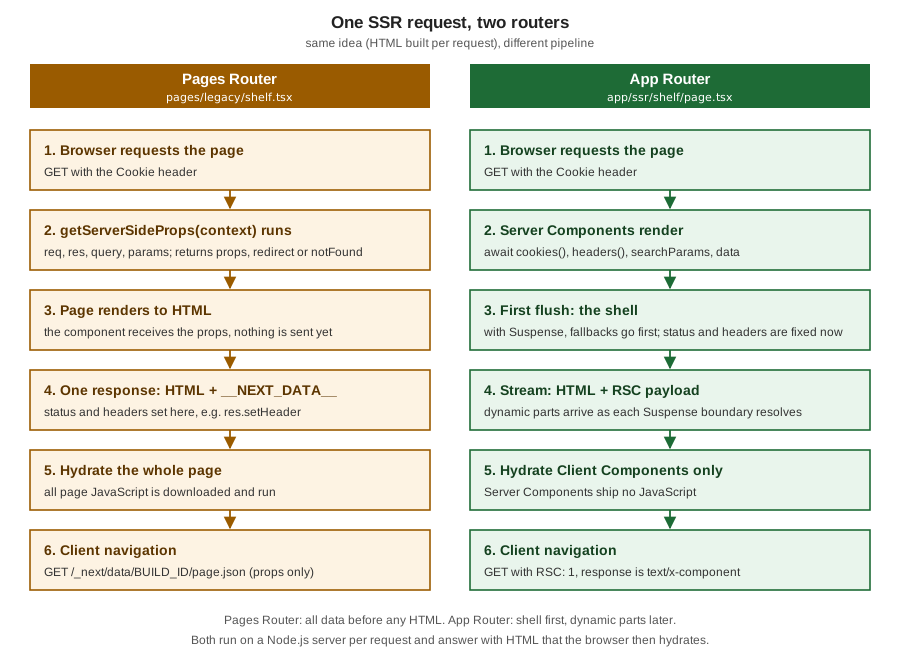
| Concern | Pages Router | App Router |
|---|---|---|
Where the request-time code lives |
|
In the async Server Component itself (or a function it awaits); no special export. |
Data to the UI |
Returned |
Direct rendering; only serialisable props to Client Components cross the boundary; Server Components ship no JavaScript. |
Cookies and headers |
|
|
Query string and route params |
|
|
Redirect and 404 |
Return |
Call |
Response headers |
|
Route Handler, |
Caching |
|
Dynamic pages answer |
Streaming and partial results |
None per component: all of |
|
Errors |
A thrown error shows |
|
Client navigation |
Fetches |
Fetches the RSC payload with the |
Source: App Router migration guide and getServerSideProps
The Pages Router is still supported in 16.3 and is the right place for an existing application you are not migrating;
for new work, the App Router is where the new features land (Cache Components, after, the streaming model, Server
Components). Migration is incremental: the two routers can run in one project, and the official guide maps
getServerSideProps to an async Server Component that reads Request-time APIs and fetches with cache: "no-store".
The app equivalent of reading req is cookies() and headers(); of res is a Route Handler or proxy.ts.
The Books' SSR Examples, Rewritten for the App Router
The two reference books were written for the Pages Router (Next.js 12 and 13.2). Their SSR material falls into three patterns; each is restated here with current APIs rather than copied. The books are consulted references only (see the section bibliography); where they are outdated, the table says how.
| Book pattern (Pages Router) | Current App Router form | What changed |
|---|---|---|
A page fetching an external API in |
An |
No props plumbing; no |
A catalogue listing served with |
If the listing is the same for everyone, prerender it and revalidate (ISR, or |
|
Server-only logic hidden by a |
Keep the logic in a Server Component or a |
|
The corrected form of the first pattern, with the Bookshelf catalogue under the previous model and a deliberately
explicit fetch:
export default async function Page() {
  // the previous model: fetch is not cached by default; this makes the intent explicit
  const res = await fetch("http://localhost:3000/api/books?q=dune", { cache: "no-store" });
  const books: { title: string }[] = await res.json();
  return <p>{books.map((b) => b.title).join(", ")}</p>;
}
The route is ƒ /ssr/nostore and rendered <p>Dune</p>. In a real application call the data layer (lib/books.ts)
directly instead of fetching your own Route Handler from a Server Component; a round trip to yourself adds latency and
a second server render. Source: App Router migration guide: getServerSideProps
SSR Cost and Scaling
SSR moves rendering from build time to request time, so the cost scales with traffic instead of with deployments. Three effects matter.
-
Latency on the critical path. The browser waits for the server to render before it receives the first byte of HTML (time to first byte, TTFB). A slow query in an un-boundaried page delays everything. Streaming shortens this: the shell leaves as soon as it is ready.
-
CPU and memory per request. Rendering React, serialising the RSC payload and running your data layer is CPU work on a Node.js process. Throughput is bounded by cores, and a slow dependency holds a request open and ties up memory.
-
Hosting requirements. A static export needs only a file server; SSR needs a running Node.js server (or an adapter for a platform that provides one), and
after()and streaming need the platform to support them.
| Lever | How it helps |
|---|---|
Prerender what you can |
A route (or the shell of one) that reads no request data costs no server work per request. With Cache Components the shell is static and only the holes render. |
Cache the data, not the page |
|
Push request-time access down the tree |
Read |
Avoid waterfalls |
Start independent fetches together ( |
Use a CDN for public SSR |
Only for output identical for every visitor, with an explicit |
Move non-essential work to |
Logging and analytics stop contributing to response time. |
Scale out, and keep instances stateless |
Run several Node.js processes or containers behind a load balancer; do not keep per-user state in process memory; share the cache handler if you run several instances. |
Make sure streaming survives the proxy |
Disable buffering in nginx ( |
Upgrade |
16.3 moves App Router SSR to native Node.js streams, which the team measured at up to about 22 percent more requests handled under load. |
Source: Self-hosting: streaming and Suspense, Caching and Next.js 16.3
No number on this page should be read as a capacity plan. Measure your own routes (a load test against next start
with realistic data and cookies) before deciding between "SSR the page", "stream the page" and "prerender the page".
What Changed Since Next.js 13 and 14
Most existing material describes the 13/14 world. These are the changes that alter how SSR code is written or behaves.
| Version | Change | Effect on this page’s code |
|---|---|---|
9.3 / 10 |
|
The Pages Router model, unchanged and still supported. |
13.4 |
The App Router became stable. |
Async Server Components replace |
15.0 |
|
|
15.1 |
|
Post-response work without a custom server. |
16.0 |
Synchronous access to the async APIs removed; |
|
16.3 |
|
|
Source: Upgrading to 15, connection, after, io and Next.js 16.3
Pitfalls
| Mistake | Symptom | Fix |
|---|---|---|
|
A type error, or a runtime error: synchronous access was removed in 16. |
|
Reading request data outside |
Build error |
Move the read into a component under |
|
Build error: segment config "dynamic" is not compatible with |
Remove it; the route is dynamic by default. |
Setting a cookie while rendering a page |
|
Set it in a Server Function or Route Handler (or in |
Reading |
A runtime error. |
Read the values before calling |
|
The response is |
Decide before streaming starts: before the boundary, or in |
Branching on |
A hydration mismatch warning; the server markup and the first client render differ. |
Keep render pure; move browser-only values to |
|
One reader’s page is served to another by a shared cache. |
Keep the private default for personalised pages; set |
Putting a secret into |
The value is readable in |
Keep secrets on the server; pass only what the browser may see, and check permissions on the server. |
Awaiting independent fetches one after another |
Latency is the sum of the calls; TTFB grows. |
|
A proxy or load balancer that buffers the response |
No streaming; the user sees nothing until the whole render has finished. |
Disable buffering ( |
Fetching your own Route Handler from a Server Component |
An extra network hop, a second render and an extra cold path. |
Call the shared function in |
Assuming |
The timestamp is frozen at build time (previous model) or fails the build (Cache Components). |
|
Starting |
500 errors with the digest |
Build and start with the same configuration. |
Source: blocking-prerender-dynamic, after, Streaming and Self-hosting
Where the Books Are Outdated
| Book statement or practice | Current approach |
|---|---|
SSR is |
In the App Router, SSR is an async Server Component reading Request-time APIs; |
|
In the App Router these are |
The whole page waits for |
Suspense streams a shell first; with Cache Components the shell is prerendered. |
|
Route Handler, |
Dynamic output marked with |
|
|
|
References
-
Real-World Next.js (Packt, 2022), the publisher page, consulted for the SSR concepts only
-
Practical Next.js for E-Commerce (Apress, 2023), the publisher page, consulted for the SSR concepts only