Plans and Shopify Plus
|
This content was generated with the assistance of AI and should be verified against the official documentation of each platform before being relied on in production. This section’s bibliography lists the reference material consulted while preparing these pages. |
This page was written against the Shopify Admin GraphQL API 2026-10, Shopify CLI 5.0.0 and the public pricing page as served to a Spanish visitor in euros, and checked on 2026-10-27. It explains which plans exist, what each costs, which transaction fees apply, and which developer-facing capabilities depend on the plan, with special attention to Shopify Plus. The gates it describes decide whether an app, a checkout extension or a Function can be installed on a given store, so they are worth knowing before an architecture is chosen.
The running example is Pocket Coffee, a small specialty-coffee shop that sells single-origin beans and a starter kit in Spain and the rest of the European Union. Pocket Coffee starts on a low plan, and this page follows the questions it would ask on the way: when does a higher plan pay for itself, and which customisations would force a move to Plus.
Prices, rates and limits on Shopify’s pricing and help pages change without a version number. Every figure below is
dated 2026-10-27 and comes from the page named in the Source: line under it; re-read the page before committing to a
plan or quoting a price to a client.
Why the plan matters to a developer
A Shopify store has exactly one plan, and the plan is a property of the store, not of the app or of the theme. Most of the platform behaves identically on every plan, but a small set of capabilities is gated, and some of the gates are surprising because they sit inside APIs that otherwise look the same everywhere:
-
Checkout customisation: checkout UI extensions that render on the information, shipping and payment steps, and the checkout styling (branding) API, are Plus-only. Extensions on the Thank you and Order status pages are available on every plan.
-
Shopify Functions: public apps from the Shopify App Store that contain Functions work on every plan, but a custom app that contains Functions can be installed only on a Plus store.
-
Flow: Flow is an optional app available on any paid plan, but Flow app extensions shipped in a custom app are available only to a Plus store that has the app installed.
-
B2B: B2B is available on all plans, with a limit of three catalogs, while unlimited catalogs, direct catalog assignment to company locations and some payment features need Plus.
-
Scale limits: 10 inventory locations against 200, one headless storefront against 25, and API restore rates that grow from 100 to 1,000 points per second.
-
Money: card rates and third-party gateway fees fall with every step up the ladder.
The two figures on this page summarise the commercial side. The first lists the four self-serve tiers side by side.
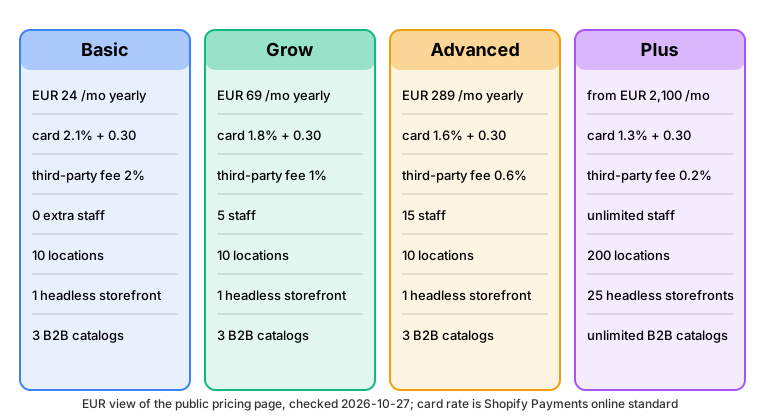
The plan catalogue
The Help Center lists these plans in its plan-features section. Basic, Grow, Advanced and Plus are the four tiers that a merchant normally compares. The others serve specific situations.
| Plan | What it is |
|---|---|
Basic |
Entry tier "for solo entrepreneurs": online store, in-person sales and AI channels, up to 10 inventory locations, up to three B2B catalogs, limited checkout customisation and custom apps with limited data access. |
Grow |
"For small teams": everything in Basic, lower card rates and up to five additional staff accounts. Custom apps get full data access from this tier. |
Advanced |
"For global reach": everything in Grow, lower card rates, up to 15 additional staff accounts, live third-party shipping rates and theme editor customisation by market. |
Plus |
"For complex businesses": everything in Advanced, unlimited staff accounts, fully customisable checkout, up to 200 locations, unlimited B2B catalogs, priority phone support and the developer capabilities described below. Sold on a 1-year or 3-year term. |
Shopify for enterprise (Commerce Components) |
The enterprise offering listed after Plus. Its GraphQL restore rate is 2,000 points per second, and the Functions fetch target (network access) is available to custom apps on Enterprise stores on request. |
Agentic |
A EUR 0 per month plan "for selling in AI channels": products are added to Shopify’s Catalog, the merchant chooses AI channels and pays only when a sale is made, with online card rates from 2.1% plus EUR 0.30. Oxygen is not available on Agentic plans. |
Starter, Lite, Retail |
Additional plans named in the Help Center plan list. Their limits are not covered here. |
Pause and build |
The plan for paused stores. Stores on it have their Thank you and Order status pages upgraded automatically and can host Oxygen deployments. |
Development |
The plan of a dev store. A dev store is created on a chosen plan (Basic, Grow, Advanced or Plus) so that features of that plan can be tested without paying for it; see Developing and testing for Plus. |
The Admin GraphQL API exposes the plan name as Shop.plan.publicDisplayName. The possible values documented for the
2026-10 schema are Advanced, Agentic, Agentic Enterprise, Basic, Development, Grow, Inactive, Lite, Other, Paused, Plus,
Plus Trial, Retail, Shop Component, Staff Business, Starter and Trial. Code should not branch on these strings to decide
what a store can do; see Detecting the plan from code for the safer approach.
Prices
The pricing page is localised by the visitor’s IP address. The figures below are the euro view, fetched from Spain on 2026-10-27. Paying yearly gives the lower monthly figure.
| Plan | Basic | Grow | Advanced | Plus |
|---|---|---|---|---|
Monthly price, billed yearly |
EUR 24 |
EUR 69 |
EUR 289 |
from EUR 2,100 |
Monthly price, billed monthly |
EUR 32 |
EUR 92 |
EUR 384 |
from EUR 2,100 (term based) |
Additional staff accounts |
0 |
5 |
15 |
unlimited |
Inventory locations |
10 |
10 |
10 |
200 |
The trial is "3 days free, then EUR 1/month for 3 months" on the plans that offer it. The POS Pro add-on costs EUR 79 per month per location. There are no setup fees on any plan.
Plus is sold on terms instead of a month-to-month subscription. The Help Center publishes the price per month for a 1-year and a 3-year term in each billing currency.
| Currency | Applies to | 1-year term per month | 3-year term per month |
|---|---|---|---|
USD |
United States and countries without a supported local currency |
2,500 |
2,300 |
CAD |
Canada |
3,650 |
3,400 |
EUR |
European Union and the greater European Economic Area |
2,250 |
2,100 |
GBP |
United Kingdom, Falkland Islands and Jersey |
1,950 |
1,800 |
JPY |
Japan |
398,000 |
368,000 |
AUD |
Australia |
4,000 |
3,700 |
INR |
India |
190,000 |
175,000 |
Those figures are for standard setups and integrations. For more complex, higher-volume businesses the Help Center says there might be a variable platform fee based on revenue and business model, and that it differs for B2B and direct-to-consumer companies. Shopify does not publish a percentage, so none is quoted here. A Plus contract also does not include custom development, theme purchases or third-party apps.
The pricing page could not be fetched in US dollars. Secondary sources report the US list prices of Basic, Grow and Advanced as USD 39, 105 and 399 per month, or about USD 29, 79 and 299 with yearly billing. Treat those as reported figures and confirm them on the pricing page before quoting them.
Source: Shopify pricing and Help Center, Shopify Plus plan
Transaction fees
Three separate charges can apply to an order, and mixing them up is the most common mistake when comparing plans.
-
The payment processor fee, paid to Shopify when the merchant uses Shopify Payments. It depends on the plan and on the payment method.
-
The third-party transaction fee, paid to Shopify when the merchant uses a payment provider other than Shopify Payments. It is a percentage of the order total and depends on the plan. The provider’s own fees are charged by the provider in addition to it.
-
The marketplace order sync charge: 50 synced marketplace orders per month are free on every plan, then 1% up to USD 99 per month.
Shopify Payments card rates
The online and in-person rates below are the euro view of the pricing page on 2026-10-27. Each online rate is a percentage plus a fixed amount per order; the fixed amount is EUR 0.30 for cards, EUR 0.35 for Klarna, EUR 0.25 for Bancontact and iDEAL, EUR 0.20 for Bizum and none for in-person cards.
| Payment method | Basic | Grow | Advanced | Plus |
|---|---|---|---|---|
Online standard card |
2.1% |
1.8% |
1.6% |
1.3% |
Online Amex card and international cards |
3.2% |
2.9% |
2.7% |
2.3% |
In-person card |
1.7% |
1.5% |
1.4% |
1.3% |
Klarna |
4.99% |
4.99% |
4.99% |
3.99% |
Bancontact and iDEAL |
2.4% |
2.1% |
1.8% |
1.5% |
TWINT, MB WAY and USDC |
2.1% |
1.8% |
1.6% |
1.3% |
Bizum |
0.9% |
0.9% |
0.9% |
0.8% |
The Agentic plan charges online card rates from 2.1% plus EUR 0.30 and no monthly fee. Shopify Payments availability, local payment methods and presentment in local currencies depend on the store’s country, and the pricing page marks local currency prices and local payment methods as requiring Shopify Payments.
Third-party gateway fees
When a merchant uses a gateway other than Shopify Payments, Shopify charges a fee on every order. The figure on the pricing page is global, not per country.
| Plan | Basic | Grow | Advanced | Plus |
|---|---|---|---|---|
Third-party transaction fee |
2% |
1% |
0.6% |
0.2% |
The Help Center describes this fee on Plus as "a small percentage fee to Shopify for security and compliance". The built-in fraud analysis also requires Shopify Payments, which is a second reason many merchants prefer it.
When does the next plan pay for itself?
For a given monthly revenue and order count, the monthly cost of a plan is the subscription plus the percentage rate times the revenue plus the fixed amount times the number of orders. The script below applies that formula to the euro prices above, assumes an average Pocket Coffee order of EUR 28 and computes both the monthly cost and the revenue at which the next plan becomes cheaper. It ignores everything but fees: it does not value staff accounts, locations or features, and it does not model the unpublished Plus variable platform fee.
// plan-costs.mjs: monthly cost of each plan for a given monthly revenue (EUR view, yearly billing).
const plans = [
  {name: 'Basic',    monthly: 24,   cardRate: 0.021, thirdParty: 0.02},
  {name: 'Grow',     monthly: 69,   cardRate: 0.018, thirdParty: 0.01},
  {name: 'Advanced', monthly: 289,  cardRate: 0.016, thirdParty: 0.006},
  {name: 'Plus',     monthly: 2100, cardRate: 0.013, thirdParty: 0.002},
];
const fixedPerOrder = 0.30; // Shopify Payments online standard card rate: percentage plus EUR 0.30
const aov = 28;             // Pocket Coffee average order value in EUR (assumption)

const fmt = (n) => n.toFixed(2).padStart(10);
console.log('revenue/month  orders  ' + plans.map((p) => p.name.padStart(10)).join(' ') + '   (Shopify Payments)');
for (const revenue of [2000, 10000, 15000, 50000, 110000, 600000]) {
  const orders = revenue / aov;
  console.log(String(revenue).padStart(13) + String(Math.round(orders)).padStart(8) + '  ' +
    plans.map((p) => fmt(p.monthly + p.cardRate * revenue + fixedPerOrder * orders)).join(' '));
}
console.log('\nrevenue/month at which the next plan becomes cheaper');
for (let i = 0; i < plans.length - 1; i++) {
  const [a, b] = [plans[i], plans[i + 1]];
  const sp = (b.monthly - a.monthly) / (a.cardRate - b.cardRate);
  const tp = (b.monthly - a.monthly) / (a.thirdParty - b.thirdParty);
  console.log(`${a.name} to ${b.name}: Shopify Payments ${sp.toFixed(0)} EUR, third-party gateway fee only ${tp.toFixed(0)} EUR`);
}
Running it with Node.js 24 prints:
revenue/month  orders       Basic       Grow   Advanced       Plus   (Shopify Payments)
         2000      71       87.43     126.43     342.43    2147.43
        10000     357      341.14     356.14     556.14    2337.14
        15000     536      499.71     499.71     689.71    2455.71
        50000    1786     1609.71    1504.71    1624.71    3285.71
       110000    3929     3512.57    3227.57    3227.57    4708.57
       600000   21429   19052.57   17297.57   16317.57   16328.57

revenue/month at which the next plan becomes cheaper
Basic to Grow: Shopify Payments 15000 EUR, third-party gateway fee only 4500 EUR
Grow to Advanced: Shopify Payments 110000 EUR, third-party gateway fee only 55000 EUR
Advanced to Plus: Shopify Payments 603667 EUR, third-party gateway fee only 452750 EUR
Source: Shopify pricing
The result for Pocket Coffee: below about EUR 15,000 of monthly revenue paid with Shopify Payments, Basic is the cheapest plan on fees alone, and Grow takes over above that and stays ahead until about EUR 110,000. If Pocket Coffee paid through a third-party gateway instead, the same crossovers move down to EUR 4,500 and EUR 55,000 because the third-party percentages differ more between plans than the card rates do. The second figure plots the gap in monthly cost relative to Grow.
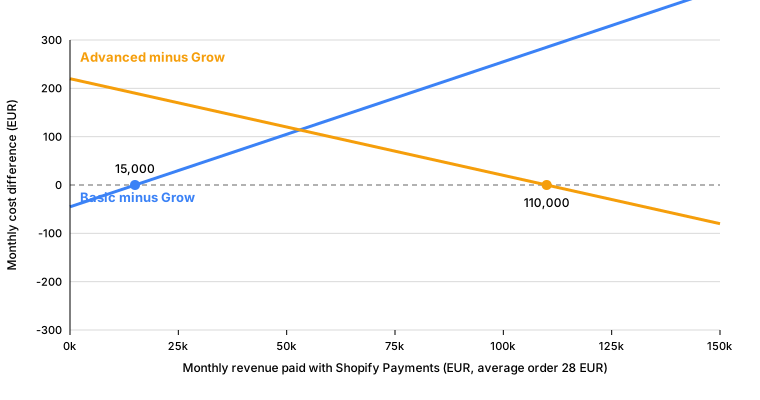
Plus is not a fee-saving move for a shop of this size: on fees alone it needs roughly EUR 600,000 of monthly revenue to beat Advanced. Merchants move to Plus for the capabilities in the next sections, not for the rates.
Limits and entitlements by plan
The comparison table on the pricing page, together with the Plus page of the Help Center, gives the following picture on 2026-10-27.
| Capability | Basic | Grow | Advanced | Plus |
|---|---|---|---|---|
Additional staff accounts |
0 |
5 |
15 |
unlimited |
Inventory locations |
10 |
10 |
10 |
200 |
B2B catalogs |
up to 3 |
up to 3 |
up to 3 |
unlimited |
Checkout customisation |
limited |
limited |
limited |
full |
Custom apps built with Shopify APIs |
limited data access |
full data access |
full data access |
full data access |
API rate limits |
standard |
standard |
up to 2x on select APIs |
up to 10x on select APIs |
Headless storefronts |
1 |
1 |
1 |
25 |
Support |
live chat |
live chat |
enhanced live chat |
priority 24/7 support |
Shopify Balance earnings rate |
2.52% |
2.52% |
2.52% |
3.54% |
Capabilities that appear only on Plus, listed under "Just for Plus" on the pricing page or on the Plus page of the Help Center:
-
High volume checkout, bot protection (advanced bot protection during flash sales and product launches) and "up to 500% higher API call limits".
-
Shopify Combined Listings for merchandising variants of related products as one listing.
-
Free expansion stores (up to 9, each needing its own theme licence), up to 100 themes per account and unlimited staging stores.
-
Custom user groups for bulk-assigning staff to a set of permissions, and unlimited staff accounts.
-
Email suppression: suppressing selected Shopify notification emails.
-
Launchpad for scheduled and automated promotions, and Plus Certified apps.
-
Test new features before launch, through early-access environments and feature previews.
-
1 TB of file storage per store.
-
Extended payment authorisation: Visa, Mastercard and American Express up to 30 days, Discover and JCB up to 10 days, with a 1.75% additional charge when capturing after the standard 7-day period.
-
Shopify Audiences and the Shopify Plus Partner Program.
-
Level 1 PCI DSS and SOC2 certification statements, and, as the Help Center words it, a plan that "might" include unlimited bandwidth, a CDN, DDoS protection and a 99.99% uptime SLA.
-
Up to 200 POS Pro locations, 20 of them included, with the POS Pro charge waived for the first 200 retail locations when Shopify Payments is the primary provider.
Source: Shopify pricing and Help Center, Shopify Plus plan
Plus-only capabilities for developers
The remaining sections concern what a developer cannot do on a lower plan. Each subsection names the exact boundary, so that an app can state its requirements honestly in its listing and so that a quote for a client can say whether Plus is needed.
Checkout UI extensions on the information, shipping and payment steps
Checkout UI extensions add components to the checkout, written with Preact and Polaris web components and compiled to a bundle of at most 64 KB. Which targets a store can use depends on the plan:
| Where the extension renders | Availability |
|---|---|
Information step, for example |
Plus only |
Shipping step, for example |
Plus only |
Payment step, for example |
Plus only |
Thank you and Order status pages |
all plans |
Checkout styling through the branding API |
Plus only |
The branding API is the checkoutBrandingUpsert mutation, which styles a checkout profile, or the newer Checkout and
Accounts Configuration API (checkoutAndAccountsConfigurationUpdate), which also covers customer accounts. The Help
Center adds that a Plus store can create separate checkout flows for B2B and direct-to-consumer customers in the same
store. The mutation below gives the Pocket Coffee checkout a coffee-brown brand colour and an accent. Its two operations
were validated against the downloaded 2026-10 Admin schema, but they were not sent to a store.
query CheckoutProfiles {
  checkoutProfiles(first: 5, query: "is_published:true") {
    nodes {
      id
      name
      isPublished
    }
  }
}

mutation PocketCoffeeBranding($profileId: ID!) {
  checkoutBrandingUpsert(
    checkoutProfileId: $profileId
    checkoutBrandingInput: {
      designSystem: {
        colors: { global: { brand: "#6F4E37", accent: "#C8A27A" } }
      }
    }
  ) {
    checkoutBranding {
      designSystem {
        colors {
          global {
            brand
            accent
          }
        }
      }
    }
    userErrors {
      code
      field
      message
    }
  }
}
Source: Shopify developer documentation, About checkout styling and Admin GraphQL API, checkoutBrandingUpsert
History explains why this gate exists. checkout.liquid is unsupported for the information, shipping and payment steps
(it was a Plus-only feature on those steps; Shopify’s own pages state only that it is unsupported, without a day). For
the Thank you and Order status pages, checkout.liquid and additional scripts were sunset on 2025-08-28, and script
tags on those pages were sunset on 2025-08-28 for Plus stores and 2026-08-26 for stores on other plans. Stores on the
Pause and build plan are upgraded automatically, and the additional scripts section has been view-only since
2025-08-28. Shopify Scripts themselves stopped running on 2026-06-30, which is why checkout logic now lives in Functions
and checkout UI extensions. The checkout extensibility page of this subsection covers the targets and the migration in
detail.
Shopify Functions in custom apps
Functions are small WebAssembly modules that Shopify runs in the middle of key flows: discounts, cart transforms, delivery and payment customisation, validation, fulfilment constraints and order routing. The plan gate depends on how the app is distributed:
-
A public app distributed through the Shopify App Store can contain Functions and be installed on a store on any plan, except for capabilities that an individual Function API page marks as Plus-only.
-
A custom app that contains Function APIs can be used only by a store on the Plus plan. This covers an app built for one merchant, and also an app installed on several stores that belong to the same Plus organisation, because those are custom distribution installs.
-
The fetch target of Functions (network access from inside a Function) is available only to custom apps on Enterprise stores and needs a request to Shopify.
A merchant that wants a Function on a non-Plus plan therefore has two options: install a public app that provides it, or move to Plus and have a custom app built. The Pocket Coffee Coffee Club rule (10% off for members) is the classic example; the sample below builds the simplest possible version of it as a Discount Function that gives 10% off the order subtotal.
The app descriptor of a custom-distribution app uses placeholders for the client id and the URLs. Nothing in it is specific to Plus: the plan is checked when the app with a Function is installed or used on a store.
# shopify.app.toml
client_id = "00000000000000000000000000000000"
name = "pocket-coffee-app"
application_url = "https://example.invalid"
embedded = true

[access_scopes]
scopes = "read_products,write_products"

[auth]
redirect_urls = ["https://example.invalid/api/auth"]

[webhooks]
api_version = "2026-10"

  [[webhooks.subscriptions]]
  uri = "/webhooks/app/uninstalled"
  topics = ["app/uninstalled"]

  [[webhooks.subscriptions]]
  uri = "/webhooks/customers/data_request"
  compliance_topics = ["customers/data_request"]

  [[webhooks.subscriptions]]
  uri = "/webhooks/customers/redact"
  compliance_topics = ["customers/redact"]

  [[webhooks.subscriptions]]
  uri = "/webhooks/shop/redact"
  compliance_topics = ["shop/redact"]
The Function itself is an extension of type function. The file below targets the unified Discount API with the
cart.lines.discounts.generate.run target; command = "" selects the built-in JavaScript builder and the compiled
module is written to dist/function.wasm.
# extensions/pocket-coffee-discount/shopify.extension.toml
api_version = "2026-07"

[[extensions]]
name = "Pocket Coffee discount"
handle = "pocket-coffee-discount"
type = "function"
description = "10 percent off the order subtotal"

  [[extensions.targeting]]
  target = "cart.lines.discounts.generate.run"
  input_query = "src/run.graphql"
  export = "run"

  [extensions.build]
  command = ""
  path = "dist/function.wasm"
Source: Shopify Functions overview
The input query asks for the cart lines and the discount classes the merchant enabled. Its cost must stay under the Functions limits (3,000 bytes of query text and a calculated cost of at most 30).
query CartInput {
  cart { lines { id cost { subtotalAmount { amount } } } }
  discount { discountClasses }
}
The module exports run, which returns an orderDiscountsAdd operation with one candidate. In the build that was
executed, src/index.js re-exports the function from src/run_impl.js.
// src/index.js
export * from './run_impl.js';

// src/run_impl.js
// @ts-check
export function run(input) {
  if (!input.cart.lines.length) return {operations: []};
  return {
    operations: [
      {
        orderDiscountsAdd: {
          candidates: [
            {
              message: '10% OFF ORDER',
              targets: [{orderSubtotal: {excludedCartLineIds: []}}],
              value: {percentage: {value: 10}},
            },
          ],
          selectionStrategy: 'FIRST',
        },
      },
    ],
  };
}
Source: Shopify Functions overview
The extension package.json carries the GraphQL code generation settings and the runtime package. The schema file
schema.graphql is the Discount API schema from the public Shopify/extensions-templates repository.
{
  "name": "pocket-coffee-discount",
  "version": "0.0.1",
  "private": true,
  "type": "module",
  "scripts": {
    "typegen": "shopify app function typegen",
    "build": "shopify app function build"
  },
  "codegen": {
    "schema": "schema.graphql",
    "documents": "src/*.graphql",
    "generates": {
      "./generated/api.ts": {
        "plugins": ["typescript", "typescript-operations"]
      }
    },
    "config": { "omitOperationSuffix": true }
  },
  "dependencies": { "@shopify/shopify_function": "^2.0.1" }
}
Building and running the Function does not need a store or a login. The commands below were executed with Shopify CLI
5.0.0 on 2026-10-27 in a project made of the files above; --no-input avoids interactive prompts.
export SHOPIFY_CLI_NO_ANALYTICS=1
shopify app build --no-input
shopify app function run --no-input --path extensions/pocket-coffee-discount \
  --input "$PWD/extensions/pocket-coffee-discount/input.json" --export run
The build prints Building GraphQL types, Bundling JS function, Running javy and pocket-coffee-app built!, and
produces dist/function.wasm of 1,561 bytes. The run uses the bundled function runner and, for an input with one cart
line, prints the orderDiscountsAdd output above together with the benchmark: 184.462 thousand instructions against the
11 million limit, 1,280 KB of linear memory and a 164-byte output. The --input path has to be absolute, because it is
resolved relative to the extension directory.
Deploying this app, installing it on a store and activating the discount in the admin need a Shopify account and a Plus
store, so they were not executed. What was not verified is therefore the exact behaviour of the installation or of
shopify app deploy when the target store is not on Plus.
Functions have fixed and dynamic limits that apply on every plan. The fixed limits are a compiled binary of 256 kB, 10,000 kB of linear memory, a 512 kB stack, four tables with 10,000 elements in total and 1 kB of logs. The dynamic limits for carts of up to 200 lines are 11 million instructions, 128 kB of input and 20 kB of output, scaling proportionally above 200 lines.
Flow extensions in custom apps
Shopify Flow is an optional app, available to merchants on any paid plan, that automates tasks with triggers, conditions
and actions. Flow features differ by plan. For developers the difference is narrow and precise: an app can ship Flow
app extensions (triggers, actions and templates; the CLI templates are flow_trigger, flow_action, flow_template
and flow_trigger_lifecycle_callback), and if that app is a custom app, its Flow extensions are available only to a
Shopify Plus store that has the app installed. A public app that ships the same extensions works for any paid-plan
store that has Flow.
Recent changes to Flow extensions include relative paths for action endpoint URLs (2026-06-18), automatic updates of action runtime URLs and changes that make action extension edits less likely to break existing workflows (both 2026-07-07), and relative paths for trigger lifecycle callback URLs (2026-10-08).
B2B
Shopify B2B is available on Basic, Grow, Advanced and Plus. A merchant creates companies with contacts and locations, assigns catalogs and payment terms, and company contacts check out with company accounts. The plan changes how far it can go:
-
Catalogs: up to three on Basic, Grow and Advanced, unlimited on Plus.
-
Direct catalog assignment to companies and company locations, deposit requirements, partial payments and payment requests per fulfilment are Plus capabilities.
-
B2B markets for selling wholesale to different regions exist on Basic, Grow and Advanced (up to three catalogs across them) and on Plus (unlimited); Plus stores can also customise Checkout Blocks for each market.
-
The platform fee on Plus differs for B2B and direct-to-consumer orders.
For developers, the Admin API restricts who may call the B2B resources. Apps with B2B features need a plan that supports them, and only dev stores, Shopify Plus Partners and Shopify affiliates can access the GraphQL Admin API’s B2B resources; Plus Partners must test on a dev store created on the Plus plan. B2B also does not support purchase options such as subscriptions, pre-orders or try before you buy.
The query in the next section reads directConnectionCatalogAssignmentEnabled, the feature flag that tells an app
whether direct catalog assignment is enabled on the shop.
200 locations
Inventory locations are the places where stock is held and orders are fulfilled: warehouses, shops, popup stands and suppliers that dropship. Every plan except Plus allows 10 locations, and Plus allows up to 200. Pocket Coffee needs two: a Madrid roastery and a returns shelf. A company with a large retail footprint is the case the limit exists for: POS Pro locations are tied to locations, with 20 included in Plus and up to 200 covered when Shopify Payments is the primary retail provider.
The Admin API reports the number with the locationsCount query, which is limited to a maximum of 10,000 by default and
returns a precision (EXACT or AT_LEAST).
API limits and Plus-only API resources
The GraphQL Admin API uses a cost-based leaky bucket per app and store. The published restore rates grow with the plan:
| Plan | Restore rate (points per second) | Ratio to Standard |
|---|---|---|
Standard (Basic and Grow) |
100 |
1x |
Advanced |
200 |
2x |
Plus |
1,000 |
10x |
Shopify for enterprise (Commerce Components) |
2,000 |
20x |
The ratios match the "up to 2x" and "up to 10x on select APIs" wording of the pricing page. The bucket sizes are not
documented, so a job can only be bounded from below: it cannot finish faster than its total cost divided by the restore
rate. A single query is capped at 1,000 points on every plan, and input arrays are capped at 250 items. The script below
computes that lower bound for a Pocket Coffee catalogue sync of 2,000 productUpdate mutations at the default mutation
cost of 10 points.
// api-restore.mjs: lower bound for a sustained GraphQL Admin API job (the initial burst is ignored).
const restoreRate = {'Standard (Basic, Grow)': 100, 'Advanced': 200, 'Plus': 1000, 'Enterprise (Commerce Components)': 2000};
const mutationCost = 10; // default cost of a mutation
const products = 2000;   // a catalogue sync of 2000 productUpdate mutations
const points = products * mutationCost;
for (const [plan, rate] of Object.entries(restoreRate)) {
  console.log(`${plan.padEnd(34)} ${String(rate).padStart(5)} points/s, at least ${(points / rate).toFixed(0).padStart(4)} s for ${points} points`);
}
Output with Node.js 24:
Standard (Basic, Grow)               100 points/s, at least  200 s for 20000 points
Advanced                             200 points/s, at least  100 s for 20000 points
Plus                                1000 points/s, at least   20 s for 20000 points
Enterprise (Commerce Components)    2000 points/s, at least   10 s for 20000 points
Other API-level differences by plan:
-
Variant creation throttle: from 500,000 product variants, a store may add no more than 10,000 new variants per day through
productCreate,productUpdateandproductVariantCreate, and a throttled request returns429. Plus stores are exempt. -
Some API resources can be used only on Plus: the REST
GiftCard,MultipassandUserresources and the GraphQL mutationspublishablePublishandpublishableUnpublish. -
The
read_usersaccess scope, which exposesStaffMember, is limited to finance embedded apps and to apps installed on a Plus or Advanced store, and needs Shopify Support to enable it for the app. -
Custom apps created in the admin get limited data access on Basic and full data access from Grow, and Plus has unlimited access to custom Level 2 PII apps.
-
The Storefront API does not rate limit buyer traffic on any plan. The number of headless storefronts that a store can create with Hydrogen and Oxygen is one on Basic to Advanced and 25 on Plus. Oxygen hosting is free on paid plans.
Detecting the plan from code
An app that behaves differently on Plus has two options: ask the store what plan it has, or try the capability and handle the error. The first is simpler for messaging, the second is more reliable for gating.
The Admin API exposes the plan as Shop.plan, with publicDisplayName, shopifyPlus (whether the shop has a Plus
subscription) and partnerDevelopment (whether it is a partner development shop used for testing). ShopPlan.displayName
is deprecated in favour of publicDisplayName, and ShopFeatures.shopifyPlus is deprecated in favour of
Shop.plan.shopifyPlus. Feature flags such as storefront, giftCards and directConnectionCatalogAssignmentEnabled
live on Shop.features.
query ShopPlanAndLocations {
  shop {
    name
    currencyCode
    plan {
      publicDisplayName
      shopifyPlus
      partnerDevelopment
    }
    features {
      storefront
      giftCards
      directConnectionCatalogAssignmentEnabled
    }
  }
  locationsCount {
    count
    precision
  }
}
The query was validated against the 2026-10 Admin schema, which was downloaded anonymously, with graphql 16.14.2: the
validator reported it as valid. A misspelt variant, plan { isPlus }, was rejected with Cannot query field "isPlus" on
type "ShopPlan". A walk of the document with the schema type information reported no deprecated fields for this query,
while the older form plan { displayName } features { shopifyPlus } validated but produced two deprecation messages:
ShopPlan.displayName is deprecated: Use `publicDisplayName` instead.
ShopFeatures.shopifyPlus is deprecated: Use Shop.plan.shopifyPlus instead.
The query was not sent to a store.
Guidelines for plan-aware code:
-
Use
shopifyPlusfor a binary Plus check, for example to decide whether to show a setup guide for Plus-only features. -
Do not compare
publicDisplayNameto a hard-coded list: the list includes Development, Trial, Paused, Plus Trial, Staff Business and Agentic Enterprise, and Shopify adds plans over time. UsepartnerDevelopmentto tell a test store from a live one, for example before showing a billing prompt. -
For capabilities that depend on more than the plan (a custom app with Functions, a B2B catalog), try the operation and surface the
userErrorsor the access error in the interface. -
Document the requirement in the App Store listing. An app that needs Plus should say so in its description instead of failing silently on other plans.
Developing and testing for Plus
A developer does not need a Plus subscription to build for Plus. A dev store is created in the Dev Dashboard (Stores, Create store, Dev) or with the CLI, and the creator chooses a plan for it:
-
Basic, Grow and Advanced behave like their paid counterparts.
-
Plus "includes enterprise-level features like Shopify Flow, LaunchPad, and dedicated support", which makes it the store on which to test checkout UI extensions on the information, shipping and payment steps, custom apps with Functions and Flow extensions.
The CLI command accepts --name, --plan (basic, grow, advanced or plus), --demo-data, --feature-preview,
--country and --organization-id. Dev stores are password protected, cannot be transferred and are limited to 250 per
organisation.
shopify store create dev --name "Pocket Coffee Plus test" --plan plus --demo-data --country ESCreating the store needs a Shopify account and a login, so this command was not executed. Checkout and Customer Account UI extensions are available by default in new dev stores. When a checkout UI extension that targets the information, shipping or payment steps is published, the Plus merchants who install the app see it; the testing guide explains how to preview it on the dev store.
Choosing a plan for Pocket Coffee
Putting the pieces together for the running example:
-
Launch on Basic. Pocket Coffee has one owner, two locations, a handful of Spanish and EU shipping zones and no custom-app needs. Below about EUR 15,000 of monthly revenue paid with Shopify Payments the fees favour Basic, and the Thank you page extensions that report orders work on every plan.
-
Move to Grow when revenue passes that crossover or when the team needs staff accounts. A Pocket Coffee employee who packs parcels and a part-time bookkeeper are two of the five additional accounts Grow adds.
-
Consider Advanced when Pocket Coffee sells in several countries and wants live third-party carrier rates and theme editor customisation by market, or when the revenue passes about EUR 110,000 a month.
-
Move to Plus only for a capability that cannot be had otherwise: a Coffee Club checkout step that must render on the information or shipping step, a custom Function that applies Coffee Club rules a public app cannot express, a custom Flow extension for the warehouse, more than 10 locations, or more than three B2B catalogs for wholesale cafes. For a rule as simple as the Coffee Club 10% discount, installing a public discount app from the App Store on Grow is cheaper than moving to Plus and commissioning a custom app.
The rule of thumb for an agency is to price Plus into a project only when one of the gates in this page applies, and to state the gate in the proposal.
What was run and what was not
The cost script, the restore-rate script, the GraphQL validation (including the deliberately misspelt query and the
deprecation walk), the JavaScript Function build and the local Function run were executed on 2026-10-27 on a Mac with
Node.js 24, Shopify CLI 5.0.0 and the Admin schema 2026-10. The app descriptor used a placeholder client id of zeros and
example.invalid URLs. No Shopify account was created and no credentials were used. The following were not
executed because they need a store or an account: creating a dev store, deploying and installing the app, running the
GraphQL queries against a shop, and enabling a Function discount in the admin. Prices and limits were read from the
public pages named in the Source: lines.