Package Layout and Multi-Targeting
|
This section documents MSBuild 18.9, the .NET SDK 10.0.402 (with its This content was generated with the assistance of AI and should be verified against the official documentation before being relied on in production. The C# Reference bibliography lists the reference material consulted while preparing these pages. |
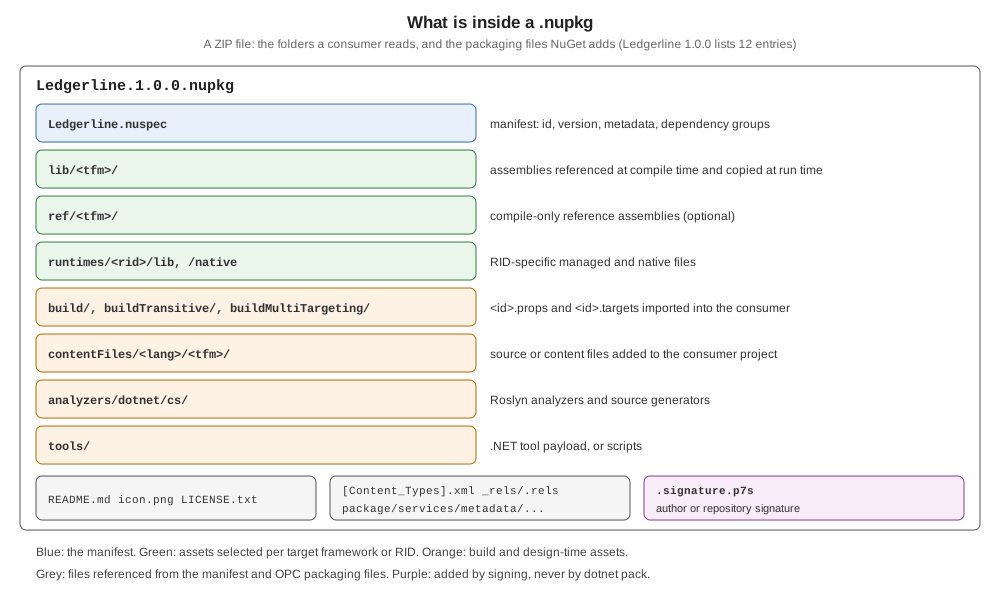
A consumer never opens a package; NuGet reads its folders and decides which files the consuming project compiles
against, copies to its output, imports into its build or runs as analyzers. Choosing the right folder is therefore
part of a library’s design. This page lists the conventions, packs Ledgerline for three target frameworks and
consumes it from net8.0 and net48, and shows native, localized and typed packages, with .NET SDK 10.0.402
(NuGet 7.9.0). P/Invoke itself is covered in Native Interop.
The folder conventions
| Folder | Meaning to a consumer |
|---|---|
|
Assemblies used at compile time and copied at run time; |
|
Compile-time-only reference assemblies; when present, |
|
RID-specific managed assemblies, used at run time only. |
|
Native libraries ( |
|
|
|
The same, imported once into the outer build of a multi-targeted project (NuGet 4.0+). |
|
The same, imported into every project that gets the package transitively (NuGet 5.0+). |
|
Files added to the consuming project as content or compile items (PackageReference). |
|
The legacy equivalent for |
|
Roslyn analyzers and source generators. |
|
.NET tool payloads; for |
Multi-targeted packages
A project with TargetFrameworks gets one lib/<tfm>/ folder and one dependency group per framework, each listing
only the dependencies of that build. Ledgerline targets net10.0;net8.0;netstandard2.0, with two polyfill
dependencies only on netstandard2.0
(Designing a Library for NuGet).
When a consumer’s framework is not in the package, NuGet picks the nearest compatible one: the same framework
family at the highest version not above the consumer’s, then .NET Standard, then nothing (NU1202). Two consumers,
restored from a folder feed holding the packed Ledgerline.1.0.0.nupkg:
<!-- App.net80/App.net80.csproj; App.net48 is the same with net48 -->
<PropertyGroup>
  <OutputType>Exe</OutputType>
  <TargetFramework>net8.0</TargetFramework>
</PropertyGroup>
<ItemGroup>
  <PackageReference Include="Ledgerline" Version="1.0.0" />
</ItemGroup>
The compile asset chosen for each, read from obj/project.assets.json, and the packages each got:
net8.0 ['lib/net8.0/Ledgerline.dll'] []
net48 ['lib/netstandard2.0/Ledgerline.dll'] ['Microsoft.Bcl.AsyncInterfaces/10.0.13', 'Microsoft.Bcl.HashCode/6.0.0', 'System.Text.Json/10.0.13', 'System.Text.Encodings.Web/10.0.13']
net8.0 got its exact folder and no extra packages; net48, with no net4x folder in the package, fell back to
netstandard2.0 and pulled the polyfills and their own dependencies. The net48 project built on Linux because the SDK
adds Microsoft.NETFramework.ReferenceAssemblies (1.0.3 here) implicitly when the .NET Framework targeting pack is not
installed; it compiles but can only run on Windows or Mono. Adding a net462 target to the package would give .NET
Framework consumers their own assembly, as the library guidance suggests.
Mismatched folders and groups: NU5128 and NU5131
A package’s lib//ref/ folders and its dependency groups should list the same frameworks; otherwise a consumer may
match a group but not a folder, or the reverse. A hand-placed ref/net8.0/C.dll in a net10.0 project gave:
warning NU5128: Some target frameworks declared in the dependencies group of the nuspec and the lib/ref folder do not have exact matches in the other location. Consult the list of actions below:
warning NU5128: - Add a dependency group for net8.0 to the nuspec
warning NU5131: - Add C.dll to the net8.0 reference group in the nuspec
NU5131 concerns the <references> groups that limit which lib/ assemblies are compile-time references.
Duplicate frameworks and NU5051
Since NuGet 7.6 / SDK 10.0.300 a project may list several TargetFrameworks aliases that resolve to the same
framework — for example builds for two host applications. A package can contain only one lib/net10.0/, so pack
refuses to choose:
<PropertyGroup>
  <TargetFrameworks>apple;banana</TargetFrameworks>
</PropertyGroup>
<PropertyGroup Condition="'$(TargetFramework)' != ''">
  <TargetFrameworkIdentifier>.NETCoreApp</TargetFrameworkIdentifier>
  <TargetFrameworkVersion>v10.0</TargetFrameworkVersion>
  <TargetFrameworkMoniker>.NETCoreApp,Version=v10.0</TargetFrameworkMoniker>
</PropertyGroup>
error NU5051: This project is using aliased frameworks, the following TargetFramework properties map to the same effective frameworks 'apple, banana => net10.0' and pack is unable to disambiguate and create a single package. Ambiguous package dependencies. The following target frameworks are both declaring package dependencies for packing: apple, bananaThe NU5051 page’s sample sets the three properties unconditionally; on 10.0.402 that failed earlier, in evaluation
(MSB4184: The expression "[MSBuild]::VersionGreaterThanOrEquals('', 8.0)" cannot be evaluated), until the group was
limited to the inner builds with the '$(TargetFramework)' != '' condition shown. The fix the page gives: set
IncludeBuildOutput=false and SuppressDependenciesWhenPacking=true on all but one alias per framework.
Native and RID-specific packages
A wrapper around a native library ships its managed assembly in lib/ and the native binary per RID:
<ItemGroup>
  <None Include="native/libledgerhash.so" Pack="true" PackagePath="runtimes/linux-x64/native/" />
  <None Include="native/ledgerhash.dll" Pack="true" PackagePath="runtimes/win-x64/native/" />
</ItemGroup>
A net10.0 application built without a RID copied the whole runtimes/ tree into its output, for the host to pick at
run time; built with -r linux-x64, it got only the Linux file, next to the assemblies:
$ find bin/Debug/net10.0 -path '*runtimes*' -type f
./runtimes/linux-x64/native/libledgerhash.so
./runtimes/win-x64/native/ledgerhash.dll
$ ls bin/Debug/net10.0/linux-x64 | grep -i ledger
Ledgerline.Native.dll
libledgerhash.so
(The "native" files here are placeholders; the point is where they land.) The native-files guide recommends putting the
managed assembly in ref/<tfm>/ and runtimes/any/lib/<tfm>/ rather than lib/, because a lib/ folder makes
NuGet believe that packages.config projects are supported — and those never copy native assets. .NET Framework
projects need a separate .targets-based approach, described on the same page.
Localized resources
Satellite resource assemblies go either in the main package, under lib/<tfm>/<culture>/<Id>.resources.dll, or in
satellite packages named <Id>.<culture> (for example Ledgerline.de) that depend on the exact primary version
([1.0.0]) and contain only the <culture> folder. The SDK packs satellite assemblies built from .resx files into
the main package automatically: a project with Strings.resx and Strings.de.resx produced
lib/net10.0/Loc.dll and lib/net10.0/de/Loc.resources.dll.
Package types
PackageType tells clients what a package is for:
| Type | Use |
|---|---|
|
The default: a library. Leave |
|
A .NET tool, installed with |
|
|
|
An MSBuild project SDK, referenced as |
|
A Model Context Protocol server; always together with |
custom |
Any other name, for an application’s own extension packages; Visual Studio and |
Several types are separated by ;. Package types were added in NuGet 3.5.
Common mistakes
-
Only
netstandard2.0inlib/— every modern consumer gets the fallback, with its polyfill dependencies. -
A dependency group that doesn’t match a
lib/folder — NU5128; consumers on that framework may get assemblies without their dependencies. -
Native binaries in
lib/— they are referenced as managed assemblies and fail to load. -
.propsor.targetsnot named after the package ID — they are never imported (NU5129, see MSBuild Props, Targets, Tasks and Analyzers in Packages).