Introduction & Architecture
|
This content was generated with the assistance of AI and should be verified against the official documentation before being relied on in production. The reference material consulted while preparing these pages is listed in the section bibliography. |
This page is written against Next.js 16.3 (16.3.8 was the latest release on 2026-10-03, when every fact and example
below was checked, and the official documentation reported @doc-version 16.3.8), React 19.3, Node.js 20.9 or later
and TypeScript 5.1 or later. It describes the App Router (the app/ directory) as the primary model and compares
it throughout with the Pages Router (the pages/ directory). Where caching matters it names the previous
model (the defaults of Next.js 15 and 16 with cacheComponents off) and the Cache Components model
(cacheComponents: true), because Cache Components is still opt-in. The examples were built and run on Next.js 16.3.8
with Node.js 24 in a scratch project; each one is followed by the official page it derives from. The rest of the
section builds Bookshelf — a catalogue of books, authors and reviews, the same scenario used in the FastAPI,
NestJS and Django sections of this site — one concept at a time.
What a React Framework Adds to React
React is a library for describing user interfaces as a tree of components. It deliberately stops there: it has no router, no way to get a page to the browser before its JavaScript has run, no build pipeline and no opinion about where data comes from. The React documentation says so in its page on building a React app from scratch: after you pick a build tool you still have to assemble routing, data fetching, code splitting and performance work yourself. It therefore recommends starting with a framework, and lists Next.js (App Router) first among the full-stack frameworks that "take advantage of React’s architecture".
The official documentation defines Next.js as "a React framework for building full-stack web applications": you write components with React, and Next.js supplies the features and optimizations around them and configures the bundler and compiler for you.
Source: Next.js documentation home
| Concern | React alone | Next.js adds |
|---|---|---|
Routing |
Nothing; you bring a router library. |
File-system routing: folders and special files ( |
Rendering location |
Client-side rendering by default; |
Server Components rendered on the server, HTML prerendered at build time or per request, streaming with Suspense, and hydration of Client Components. |
Data fetching |
Components fetch in effects, or you adopt a data library. |
|
Code splitting |
Manual |
Automatic per route, plus a server/client split: Server Components ship no component JavaScript to the browser. |
Build and compile |
You choose and configure a bundler and compiler. |
A Rust compiler (SWC) and bundler (Turbopack) preconfigured for TypeScript, JSX, CSS, code splitting and production minification. |
Asset optimization |
None. |
|
Request pipeline |
None. |
A Proxy ( |
Deployment |
Static files from any host. |
A Node.js server ( |
The smallest possible App Router application is a root layout and one page. Both are Server Components by default: they run on the server, and only their rendered output reaches the browser.
// app/layout.tsx
import type { Metadata } from "next";

export const metadata: Metadata = { title: "Bookshelf" };

export default function RootLayout({
  children,
}: {
  children: React.ReactNode;
}) {
  return (
    <html lang="en">
      <body>{children}</body>
    </html>
  );
}
// app/page.tsx
import Link from "next/link";
import { listBooks } from "@/lib/books";
import { LikeButton } from "./books/like-button";
export default async function Home() {
const books = await listBooks(); // runs on the server; never shipped to the browser
return (
<main>
<h1>Bookshelf</h1>
<p>{books.length} books on the shelf.</p>
<LikeButton />
<Link href="/books">Browse the catalogue</Link>
</main>
);
}Source: Layouts and Pages
The page import`s a Client Component, which is the only part that needs JavaScript in the browser. It opts in with
the ’use client' directive.
// app/books/like-button.tsx
"use client";

import { useState } from "react";

export function LikeButton() {
  const [likes, setLikes] = useState(0);
  return <button onClick={() => setLikes(likes + 1)}>Likes: {likes}</button>;
}
Source: 'use client' (react.dev)
next build on this project (plus the other routes of the scratch project, which the rest of the page introduces)
prints one line per route. The symbol says how the route is rendered: ○ is prerendered as static content and
ƒ is rendered on demand.
$ npx next build
▲ Next.js 16.3.8 (Turbopack)
...
Route (app)
┌ ○ /
├ ○ /_not-found
├ ƒ /api/books
├ ƒ /books
└ ƒ /shelf

Route (pages)
┌ ƒ /api/health
└ ƒ /catalogue

ƒ Proxy (Middleware)

○  (Static)   prerendered as static content
ƒ  (Dynamic)  server-rendered on demand
Source: next CLI
Two things in these examples are React features rather than Next.js features: Server Components and Suspense. The React documentation says so, and adds that adopting them at the framework level takes bundler integration, which is why a framework is the supported way to use them. Next.js is maintained by Vercel and runs on any host that supports Node.js or Docker, and it can also produce a static export that needs no server.
For the React concepts used here — components, props, Hooks, Suspense and Actions — see the
React Reference on this site. The React server rendering
page covers the underlying react-dom/server APIs that Next.js drives for you.
App Router and Pages Router
Next.js has two routers, and the official documentation describes them in one sentence each: the App Router is
"the newer router that supports new React features like Server Components", and the Pages Router is "the
original router, still supported and being improved". Both ship in the same next package, and one project can use
both.
| Aspect | App Router (app/) |
Pages Router (pages/) |
|---|---|---|
Introduced and status |
Introduced in Next.js 13, marked stable in 13.4 (May 2023). The recommended router for new work. |
The original router (Next.js 1 to 12 only had this one). Still supported and maintained. |
Component model |
React Server Components by default; Client Components opt in with |
Every page component is a Client Component that is also rendered to HTML on the server and then hydrated. |
Routes |
A folder per segment with a |
One file per route ( |
Layouts |
Nested |
A single |
Data fetching |
|
|
Loading and error states |
|
|
Documentation |
https://nextjs.org/docs/app (the default documentation tree). |
https://nextjs.org/docs/pages, with its own index. |
Metadata |
The Metadata API ( |
|
React version |
Uses the React canary release built into Next.js, which includes the stable React 19 changes and newer features being validated in frameworks. |
Uses the React version in your |
Navigation hooks |
|
|
Source: Next.js documentation home (the "App Router and Pages Router" and "React version handling" sections)
The two routers answer the same questions with different primitives. The Pages Router decides server or static rendering with a function exported from the page file, and the page component receives props from it.
// pages/catalogue.tsx  (Pages Router)
import type { GetServerSideProps } from "next";
import { listBooks, type Book } from "@/lib/books-data";

type Props = { books: Book[] };

export const getServerSideProps: GetServerSideProps<Props> = async ({
  query,
}) => {
  const q = typeof query.q === "string" ? query.q : "";
  return { props: { books: await listBooks(q) } };
};

export default function Catalogue({ books }: Props) {
  return (
    <ul>
      {books.map((b) => (
        <li key={b.id}>
          {b.title} by {b.author}
        </li>
      ))}
    </ul>
  );
}The App Router version is an async Server Component that reads the same data directly. Since Next.js 15 the
searchParams prop is a Promise and must be awaited; reading it makes the route dynamic, and it is wrapped in
<Suspense> so the page also builds under Cache Components (more on that in
Rendering Philosophy).
// app/books/page.tsx  (App Router)
import { Suspense } from "react";
import { listBooks } from "@/lib/books";

async function Results({
  searchParams,
}: {
  searchParams: Promise<{ q?: string }>;
}) {
  const { q } = await searchParams;
  const books = await listBooks(q);
  return (
    <ul>
      {books.map((b) => (
        <li key={b.id}>
          {b.title} by {b.author}
        </li>
      ))}
    </ul>
  );
}

export default function BooksPage({
  searchParams,
}: {
  searchParams: Promise<{ q?: string }>;
}) {
  return (
    <main>
      <h1>Catalogue</h1>
      <Suspense fallback={<p>Loading books...</p>}>
        <Results searchParams={searchParams} />
      </Suspense>
    </main>
  );
}
Source: page.js
Both routes answer GET /…?q=sol with the same list. Requesting them from the running scratch project:
$ curl -s 'localhost:3201/catalogue?q=sol' | grep -o '<ul>.*</ul>'
<ul><li>Solaris<!-- --> by <!-- -->Stanislaw Lem</li></ul>
$ curl -s 'localhost:3201/books?q=sol' | grep -o '<ul>.*</ul>'
<ul><li>Solaris<!-- --> by <!-- -->Stanislaw Lem</li></ul>| Pages Router | App Router |
|---|---|
|
An |
|
An |
|
|
|
The root |
|
|
|
|
|
The Metadata API. |
|
|
Which router should you choose?
The decision rarely requires deliberation:
-
New project: App Router.
create-next-appmarks the App Router as "(recommended)" in its prompts and includes it in its recommended defaults, and every feature added in the last several major versions — Server Components, Cache Components, Server Functions,proxy.tsintegration, Instant Navigations — targets it. -
Existing Pages Router application that works: keep it, and adopt the App Router when a feature justifies it. The Pages Router is described by the official documentation as "still supported and being improved", and Next.js 16 still ships it. There is no deadline in the support policy forcing a migration.
-
Existing application that needs Server Components, nested layouts that keep their state, streaming or Server Functions: migrate page by page.
persistent layouts or
Server Functions?"} need -- no --> keep["Keep the Pages Router;
upgrade Next.js and React"] need -- yes --> incremental["Add app/ next to pages/
and move routes one by one"] keep --> later["Revisit when a feature
requires the App Router"]
Incremental adoption
The official migration guide says the app directory "is intentionally designed to work simultaneously with the
pages directory to allow for incremental page-by-page migration". The steps are: update to Next.js 13.4 or later,
create app/, add a root layout (which replaces _app and _document), then move pages one at a time, migrating
next/head to the Metadata API, routing hooks to next/navigation, and data functions to Server Components. The
scratch project above is exactly such a hybrid: app/ serves /books and pages/ serves /catalogue, and the
build lists them in two tables.
Three rules govern the coexistence:
-
A URL can belong to only one router. If both an
app/books/page.tsxand apages/books/index.tsxexist, the build fails:Error: App Router and Pages Router both match path: /books Next.js does not support having both App Router and Pages Router routes matching the same path. Please remove one of the conflicting routes. -
Moving between routes served by different routers is a hard navigation, and automatic prefetching with
next/linkdoes not cross routers. -
Components that must work in both routers can import
useRouterfromnext/compat/router, which does not throw when the Pages Router is not mounted and returnsnullinstead, until the migration is finished.
The same next package serves both routers, so the codemods and next upgrade described under
Release Cadence and Support Policy work on hybrid projects.
The Compiler Pipeline: SWC and Turbopack
Two Rust components turn your source files into what the server and the browser run.
-
SWC, the Next.js Compiler, transforms individual files: it strips TypeScript types, compiles JSX, handles the
'use client'and'use server'directives, applies the options undercompilerinnext.config.tsand minifies the production output. It replaced Babel for individual files and Terser for minification and has been enabled by default since Next.js 12. -
Turbopack, an incremental bundler, joins the transformed modules into chunks. It keeps one unified graph for every output environment (server and client) instead of stitching the results of separate compilers, bundles in development as well (rather than serving native ES modules), caches results down to the function level and persists them to disk (file-system caching was stable for
next devin 16.1), and only bundles what the dev server is asked for. It is the default bundler fornext devandnext buildsince Next.js 16.
app/, pages/, lib/"] --> swc["SWC per-file transforms
types, JSX, directives,
compiler options"] swc --> bundle["Turbopack unified module graph"] bundle --> server["Server chunks
.next/server"] bundle --> client["Client chunks
.next/static/chunks"] tsc["Type check
next build runs TypeScript"] -.-> bundle
The build output confirms which bundler ran in its first line. Turbopack does not type-check; next build runs the
TypeScript check as a separate step, which is why the log shows Running TypeScript ….
$ npx next build
▲ Next.js 16.3.8 (Turbopack)
✓ Running next.config.ts took 21ms

  Creating an optimized production build ...
✓ Compiled successfully in 1219ms
  Running TypeScript ...
  Finished TypeScript in 492ms ...
$ npx next build --webpack
▲ Next.js 16.3.8 (webpack)
✓ Running next.config.ts took 28ms
Creating an optimized production build ...
✓ Compiled successfully in 2.9sSource: Turbopack
The --webpack flag is the way to keep a project that still has a custom webpack configuration working: since
Next.js 16, next dev and next build use Turbopack by default, and next build fails if it finds a custom
webpack configuration unless you choose a bundler explicitly with --turbopack or --webpack. Platforms without
native Turbopack bindings (for example FreeBSD) fall back to WebAssembly bindings that do not support Turbopack and
need --webpack. Turbopack picks up an existing Babel configuration file automatically (new in 16); SWC still does
Next.js’s internal transforms, whereas the webpack bundler disables SWC when a Babel configuration file is present.
SWC options live under the compiler key. This configuration removes console.* calls from application code in
production builds but keeps console.error; it was loaded by the scratch project’s build without warnings.
// next.config.ts
import type { NextConfig } from "next";

const nextConfig: NextConfig = {
  compiler: {
    // Strip console.* calls from application code, except console.error.
    removeConsole: { exclude: ["error"] },
  },
};

export default nextConfig;
Source: Next.js Compiler
The transform works on statements. In a client component with console.log("ping-debug-marker") and
console.error("ping-error-marker") as plain statements, searching the client chunks in .next/static after a build
on 16.3.8 found both markers without the option, and only the console.error marker with removeConsole. A
console.log written as the shorthand body of an arrow function survived the same build, so do not rely on the
transform to strip every possible call.
Other built-in transforms in the same page cover styled-components, Emotion, Relay, Jest (next/jest), removing
React properties and legacy decorators. The SWC minifier became the default in Next.js 13 and, from 15, cannot be customised.
The React Compiler is a separate, opt-in transform (reactCompiler: true, a top-level option since 16, which also needs
babel-plugin-react-compiler); Next.js applies it only to files that contain JSX or Hooks, and builds can be slower
because it runs through a Babel plugin. The 16.3 release also lists a Rust-based React Compiler as experimental
(turbopackRustReactCompiler). The build writes its results to .next/: server code under
.next/server and browser chunks under .next/static.
Source: reactCompiler
The two bundlers are both supported by the Pages Router and the App Router. The configuration page of this section
(configuration, TypeScript and environment variables) covers the turbopack options in detail.
Server, Client and Edge Runtimes
An App Router page is not "a server file" or "a client file": the same source tree runs in several places, and knowing which place matters for every API you call.
| Code | Where it runs | Notes |
|---|---|---|
Server Components (default) |
On the Node.js server, at build time for static output and at request time for dynamic output. |
Their rendered result is serialized into the RSC payload; their code is not sent to the browser. |
Client Components ( |
Prerendered to HTML on the server, then hydrated in the browser; they re-run in the browser. |
They are the only components that can use state, effects and browser APIs. |
Route Handlers ( |
Node.js server, per request. |
Web |
Server Functions ( |
Node.js server, called from the client as |
Always verify authentication and authorization inside the function. |
Proxy ( |
Node.js runtime, before routing, for every matching request. |
The |
Edge Runtime |
A restricted Web-API runtime. Deprecated. |
|
Source: Edge Runtime and proxy.js
Next.js documents two server runtimes: the Node.js runtime (the default, used to render the application) and the
Edge Runtime, a smaller set of Web APIs. In Next.js 16 the Edge Runtime is deprecated: the runtime route
segment option accepts 'nodejs' (default) and 'edge' (deprecated), the build prints a warning when a route
exports runtime = 'edge', and the documented fix is to delete the export. The Edge Runtime does not support all
Node.js APIs and does not support Incremental Static Regeneration. Proxy itself moved to the Node.js runtime in 16
(Node.js Middleware had been stable since 15.5), so the old reason to reach for the edge — running Middleware close to
the user — is now a hosting decision rather than a Next.js runtime choice.
// app/edge-demo/route.ts  (deprecated; shown only to reproduce the warning)
export const runtime = "edge";

export function GET() {
  return new Response("hi");
}
⚠ The Edge Runtime is deprecated. You can use the "nodejs" runtime instead. Learn more: https://nextjs.org/docs/messages/edge-runtime-deprecated
⚠ Using edge runtime on a page currently disables static generation for that pageSource: runtime
The official pages are not fully consistent here. The Edge Runtime reference still says the Edge Runtime is "used in
Proxy", while the Proxy reference says Proxy defaults to the Node.js runtime and rejects the runtime option. Follow
the Proxy page, which matches the 16.0 release. Everything that runs "at the edge" in front of a self-hosted
application is therefore a CDN or platform feature, not a separate Next.js runtime.
Source: Edge Runtime
The client side of the boundary is protected from server-only code. A module that must never reach the browser (it
holds database credentials, for example) imports the server-only package; importing it from a Client Component
fails the build instead of leaking the code.
// lib/books.ts
import "server-only";

export * from "./books-data";
Error: Turbopack build failed with 2 errors:
./lib/books.ts:1:1
Error: You're importing a module that depends on "server-only". ...
Import traces:
Client Component Browser:
./lib/books.ts [Client Component Browser]
./app/books/like-button.tsx [Client Component Browser]
./app/books/like-button.tsx [Server Component]
./app/page.tsx [Server Component]The message came from adding import { listBooks } from "@/lib/books" to the like-button.tsx Client Component above;
the import trace is the part to read. The same package cannot be used from files that the Pages Router bundles, which
is why the Pages Router example earlier imports books-data and not books. The rendering and data-security pages of
this section go deeper on the boundary.
Source: The Server and Client Boundary and Data Security
One Request, End to End
The figure shows what happens to a request in a self-hosted application. A CDN (or any cache in front of Next.js) can answer prerendered HTML and static assets itself. Everything else reaches the Proxy, then the Next.js server, which matches a route and renders it with React.
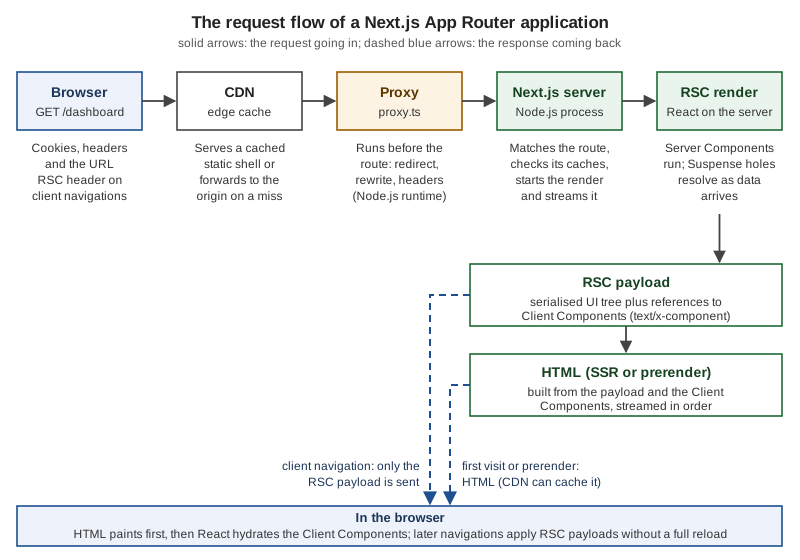
The Proxy is ordinary code. This one, from the scratch project, adds a header so that the effect is visible with curl:
// proxy.ts (project root, next to app/ and pages/)
import { NextResponse, type NextRequest } from "next/server";

export function proxy(request: NextRequest) {
  const response = NextResponse.next();
  response.headers.set("x-bookshelf-path", request.nextUrl.pathname);
  return response;
}

export const config = { matcher: ["/((?!_next).*)"] };
Source: proxy.js
The first visit to a page returns HTML. In it, the Server Components have already been rendered into markup (the
<main> element below) and the same result is repeated inside self.__next_f.push(…) scripts as the
React Server Component (RSC) payload. The payload also contains a reference to the Client Component’s chunk
("$Ld" points at the LikeButton entry), which tells the browser what to hydrate.
$ curl -si localhost:3201/ | head -4
HTTP/1.1 200 OK
x-bookshelf-path: /
Vary: rsc, next-router-state-tree, next-router-prefetch, next-router-segment-prefetch, Accept-Encoding
x-nextjs-cache: HIT

$ curl -s localhost:3201/ | grep -o '<main>.*</main>'
<main><h1>Bookshelf</h1><p>3<!-- --> books on the shelf.</p><button>Likes: <!-- -->0</button><a href="/books">Browse the catalogue</a></main>
The payload lines that matter, decoded from those scripts:
d:I[81706,["/_next/static/chunks/3fntmmi971322.js","/_next/static/chunks/0t-ncsnp7ysxs.js"],"LikeButton"]
4:["$","main",null,{"children":[["$","h1",null,{"children":"Bookshelf"}],["$","p",null,{"children":[3," books on the shelf."]}],["$","$Ld",null,{}],["$","$Le",null,{"href":"/books","children":"Browse the catalogue"}]]}]
The x-bookshelf-path header is present even though / is prerendered and served from the cache
(x-nextjs-cache: HIT), which shows that the Proxy runs ahead of the cache lookup. The Vary header lists the request
headers that select between the HTML and the RSC payload, and the Cache-Control: s-maxage=31536000 header that
Next.js sets on a static page is what lets a CDN keep it; on-demand revalidation does not purge a CDN by itself.
Source: CDN Caching
When the user then clicks a link, the browser does not request a document. It asks for the payload alone, using the
RSC: 1 request header, and React reconciles it with the tree already on screen. Requesting the payload by hand
(the first response is a redirect to a URL with a cache-busting _rsc query parameter, so curl needs -L):
$ curl -sL -i -H 'RSC: 1' 'http://localhost:3201/books?q=sol' | grep -i -E '^HTTP|content-type'
HTTP/1.1 307 Temporary Redirect
HTTP/1.1 200 OK
Content-Type: text/x-component

$ curl -sL -H 'RSC: 1' 'http://localhost:3201/books?q=sol' | grep Solaris
5:["$","ul",null,{"children":[["$","li","2",{"children":["Solaris"," by ","Stanislaw Lem"]}]]}]
Source: Server and Client Components
The documentation defines the RSC payload as "a compact, serialized representation of the rendered React Server
Components tree", used by the client to update the DOM, and summarizes the first load in three steps: HTML for a fast
non-interactive preview, the RSC payload to reconcile the Client and Server Component trees, and JavaScript to
hydrate the Client Components. Hydration is React attaching event handlers to server-rendered HTML; see
hydrateRoot. The Pages Router follows a similar flow
without RSC payloads: it sends HTML plus the page’s props as JSON (NEXT_DATA) and hydrates the whole page.
Server Components themselves are specified by React: Server Components.
Rendering Philosophy
Most web frameworks draw the line between static and dynamic at the route: a page is either prerendered at build
time or rendered per request. The official Rendering
Philosophy guide states that Next.js draws it at the component: "the boundary between static and dynamic is at
the component level, not the route level". One page can have a static shell that loads instantly and dynamic
sections that stream in when they resolve, a cached function can live inside a dynamic route, and a static page can be
updated without a redeploy. Partial Prerendering, Cache Components (the 'use cache' directive) and on-demand
revalidation are described as expressions of this model rather than as separate features.
| Boundary | How it works | Trade-off |
|---|---|---|
Build-time prerendering |
Every page is generated at build time and served from a CDN or file server; dynamic content is fetched on the client after load. |
Simplest to deploy; every content change needs a rebuild and redeploy. |
Route-level |
Each route is static or dynamic. Static files go to a CDN, dynamic routes to a server. |
Easy to reason about, but all-or-nothing per route: one live element makes the whole page dynamic or forces a client fetch. |
Component-level (Next.js) |
Static and dynamic content share one streaming response; cached functions revalidate independently. |
Moves complexity from application code into the hosting platform. |
Source: Rendering Philosophy
The guide lists the infrastructure consequences of that choice: streaming (so a static shell and dynamic parts can
share a response), cache coordination across instances (because revalidateTag() and revalidatePath() can
invalidate any cached content), consistency between the HTML and the RSC payload when they are regenerated, and, for
the best Partial Prerendering performance, a platform that can store the static shell separately and resume dynamic
rendering. A single Node.js process handles every feature correctly; additional infrastructure improves performance.
The documentation calls the first level functional fidelity and the second performance fidelity.
Both caching models are in use today, and the same page behaves differently under each. This Server Component reads a cookie, which makes it request-time data, but only a small part of the page depends on it:
// app/shelf/page.tsx
import { Suspense } from "react";
import { cookies } from "next/headers";

async function Greeting() {
  const name = (await cookies()).get("reader")?.value ?? "guest";
  return <p>Welcome back, {name}.</p>;
}

export default function Shelf() {
  return (
    <main>
      <h1>My shelf</h1>
      <Suspense fallback={<p>Loading your profile...</p>}>
        <Greeting />
      </Suspense>
    </main>
  );
}
Source: cookies
Previous model (cacheComponents unset or false): the route is dynamic as a whole. It is rendered per request,
and the build marks it ƒ.
Cache Components (cacheComponents: true in next.config.ts): the build prerenders the shell, up to the
Suspense boundary, and streams the rest per request. The build marks it ◐ (Partial Prerender).
// next.config.ts
import type { NextConfig } from "next";

const nextConfig: NextConfig = {
  cacheComponents: true,
};

export default nextConfig;
$ CACHE_COMPONENTS=1 npx next build # Cache Components
Route (app)
┌ ○ /
├ ○ /_not-found
├ ƒ /api/books
├ ◐ /books
└ ◐ /shelf
...
◐ (Partial Prerender) prerendered as static HTML with dynamic server-streamed content
$ npx next build # previous model
Route (app)
┌ ○ /
├ ○ /_not-found
├ ƒ /api/books
├ ƒ /books
└ ƒ /shelfSource: Caching
The scratch project switches the setting with an environment variable read in next.config.ts; the config page of
this section shows the plain form. Under Cache Components the response shows the split: the shell is sent immediately
with a fallback, and x-nextjs-postponed: 1 marks a prerendered response whose remaining work resumes per request.
$ curl -s -H 'Cookie: reader=ana' localhost:3201/shelf | grep -o '<main>.*</main>'
<main><h1>My shelf</h1><!--$?--><template id="B:0"></template><p>Loading your profile...</p><!--/$--></main>
The same project, built as Cache Components, refuses a page that reads request data outside a Suspense boundary.
Before the Suspense wrapper was added to /books, the build failed with:
Error: Route "/books": Next.js encountered uncached or runtime data during prerendering.

`fetch(...)`, `cookies()`, `headers()`, `params`, `searchParams`, or `connection()` accessed outside of
`<Suspense>` prevents the route from being prerendered, blocking the page load and leading to a slower user
experience.

Ways to fix this:
  - [stream] Provide a placeholder with `<Suspense fallback={...}>` around the data access
  - [cache] For uncached data (`fetch`, database calls): cache the access with `"use cache"` ...
  - [block] Set `export const instant = false` to allow a blocking route

Learn more: https://nextjs.org/docs/messages/blocking-prerender-dynamic
Source: blocking-prerender-dynamic
cacheComponents and partialPrefetching are opt-in in Next.js 16.3; the release notes state that these behaviours
"will become the default in a future major version", which is why this section teaches both models and labels every
example. The caching and rendering pages go through 'use cache', cacheLife, cacheTag and updateTag.
Release Cadence and Support Policy
Next.js ships continuously. New builds are published to the canary channel daily; they are tested internally before being promoted to a stable release, and the documentation does not recommend serving production traffic from canary. On 2026-10-03 the npm dist-tags were:
$ npm view next dist-tags --json
{
  "latest": "16.3.8",
  "backport": "15.5.27",
  "canary": "16.4.0-canary.58",
  "preview": "16.3.0-preview.10",
  ...
}
Source: Next.js Support Policy
The cadence has three levels:
-
One major version a year, in October: 14 on 2023-10-26, 15 on 2024-10-21, 16 on 2025-10-21.
-
Several minor releases per major: the 16 line has had 16.0 (2025-10-21), 16.1 (2025-12-18), 16.2 (2026-03-18) and 16.3 (2026-08-03), a few months apart, each with a blog post of new features.
-
Frequent patch releases, including security releases (July, August and September 2026 each had one; 16.3.8 on 2026-09-30 was a security release).
The support policy gives each major version a long-term support (LTS) life cycle.
| Major | Released | Status |
|---|---|---|
16.x |
2025-10-21 |
Active LTS: new features, regular bug fixes, performance improvements and security patches, until 17 is released. |
15.x |
2024-10-21 |
Maintenance LTS: only critical bug fixes and essential security updates, for two years from the initial release. Updates land as semver-minor releases, even if they are breaking changes. Latest backport: 15.5.27. |
14.x and older |
2023-10-26 and earlier |
Unsupported. |
Source: Next.js Support Policy
The installation page requires Node.js 20.9 or later and lists the supported browsers: Chrome, Edge and Firefox 111 or later, and Safari 16.4 or later.
Source: Installation
In practice: use the latest version, and serve production applications from the latest Active or Maintenance LTS release. Because Maintenance LTS releases can contain breaking changes in a minor, pin an exact version and read the release notes before updating a 15.x application.
The upgrade tooling is part of the framework. next upgrade (new in 16.1) updates next, react and react-dom, and
the official codemods automate renames such as middleware.ts to proxy.ts:
npx next upgrade
npx @next/codemod@canary middleware-to-proxy .
Source: Codemods and Upgrading to Version 16
Next.js Compared with Other Frameworks
The table compares Next.js with the frameworks that most often appear in the same decision. Each row was checked
against the project’s official site on 2026-10-03, and the versions are the latest tags on npm that day. It is a
map of design choices, not a ranking.
Framework (npm latest) |
UI layer and build tool | Rendering and data model | Choose it over Next.js when |
|---|---|---|---|
Next.js 16.3.8 |
React; Turbopack (default), webpack optional. |
Server Components, streaming, static and dynamic at the component level, Server Functions, Route Handlers, caching with Cache Components; App Router and Pages Router. |
(Reference point.) |
React; a Vite plugin around React Router’s data mode. React Router v7 was the next major version after Remix v2, so this is the former Remix. |
SPA, SSR and static rendering strategies; route modules with |
You want the web-standards, loader/action model and the smaller surface of a router-centred framework, or you are upgrading a Remix v2 application. |
|
TanStack Start 1.168.60 |
React or Solid; Vite or Rsbuild, on top of TanStack Router. |
Full-document SSR, streaming, server functions and server routes; per-route SSR choice; type-safe routing and URL state from TanStack Router. The site labels it RC; react.dev lists it as Beta. |
End-to-end type safety of routes, search parameters and server functions matters most, and you accept a younger framework. |
Astro 7.3.5 |
Its own |
"Server-first": renders on the server and sends lightweight HTML with islands of JavaScript only where needed; content collections; on-demand rendering with an adapter. |
The site is mostly content (blog, docs, marketing) and you want the least client JavaScript, or you want to mix UI libraries. |
Gatsby 5.16.1 |
React; its own build with a GraphQL data layer. |
Static generation first, with SSR, Deferred Static Generation and cloud functions as options. |
You maintain an existing Gatsby site. Its release pace has slowed: the last npm release, 5.16.1, is dated 2026-02-10, so new React work is usually better placed in a framework with frequent feature releases. |
Nuxt 4.5.2 |
Vue; Vite and Nitro. |
Server-side rendering out of the box, file-based routing, auto-imports, deploy to many targets including the edge. The Vue counterpart of Next.js; see Vue server-side rendering. |
Your team writes Vue, not React. |
Angular SSR ( |
Angular; the Angular CLI. |
Client-side rendering by default; |
Your organization standardizes on Angular and TypeScript with dependency injection. |
SvelteKit 3.0.0 |
Svelte; Vite. |
Configurable rendering per page (server, client or build-time prerender), form actions, adapters for many hosts. |
You want Svelte’s compiler-based components and smaller runtime. |
Vite single-page app 8.3.2 |
Any UI library, React included; Vite (Rolldown for production builds). |
A client-rendered SPA served as static files; no server rendering unless you add it yourself. |
The application sits behind a login, SEO and first paint are not goals, and static hosting is the requirement. Next.js can also produce this (see below). |
NestJS 12.1.2 |
None: a Node.js back-end framework. |
Modules, controllers, providers and dependency injection for APIs and microservices; it does not render React. |
You need a structured back end, not a front end. It pairs with Next.js rather than replacing it; see NestJS versus Next.js. |
Source: the official sites linked in the first column; React Router’s Upgrading from Remix v2 and react.dev’s Creating a React App
Four notes on reading the table.
-
Remix. The name has moved. React Router’s site describes v7 as the next major version of Remix after v2, and its framework mode continues that React framework. The remix.run site today presents a different, web-API-based toolkit, so when a book or article says "Remix", check which of the two it means.
-
Gatsby. The official site and documentation are online, but the last stable npm release (5.16.1) dates from 2026-02-10. "Maintenance mode" is an inference from that release cadence, not an official statement; weigh it against your own risk tolerance.
-
Vite. A plain Vite SPA is a legitimate choice, not a strawman: Vite is also the build tool behind React Router framework mode and one of the two behind TanStack Start (the other is Rsbuild).
-
Other UI libraries. Nuxt, SvelteKit and Angular SSR solve the same problems with the same vocabulary (SSR, prerendering, hydration), so the concepts of this section transfer.
Choosing Vite for a single-page app does not exclude Next.js: Next.js can be configured to produce the same output.
With output: 'export', next build writes a folder of static files. A page that renders only on the client behaves as
in any Vite SPA:
// next.config.ts
import type { NextConfig } from "next";

const nextConfig: NextConfig = {
  output: "export",
};

export default nextConfig;
// app/page.tsx
"use client";
import { useEffect, useState } from "react";
export default function Page() {
const [books, setBooks] = useState<string[]>([]);
useEffect(() => {
fetch("https://api.example.com/books")
.then((r) => r.json())
.then((data: { title: string }[]) => setBooks(data.map((b) => b.title)))
.catch(() => setBooks([]));
}, []);
return <ul>{books.map((t) => <li key={t}>{t}</li>)}</ul>;
}$ npx next build
...
Route (app)
┌ ○ /
└ ○ /_not-found
$ ls out
404.html _next _not-found _not-found.html index.html index.txt ...Source: Static Exports and SPAs
A static export has no server, so features that need one — the Proxy (the Proxy documentation lists "Static export" as not supported), Route Handlers that read the request, and Server Functions — are unavailable. The advantage of starting in Next.js is that the application can grow server features later without a rewrite; the official guide for moving a Vite application, How to migrate from Vite to Next.js, lists the problems that motivate the move: slow first load, no automatic code splitting, client-server request waterfalls and no per-route loading states. The react.dev note on full-stack frameworks makes the same point from the other side: frameworks do not require a server, and let you "opt-in to using server features on individual routes without rewriting your app".
How the SSR, CSR, SSG and hydration of Next.js relate to the lower-level React APIs, and how Next.js sits in a layered backend and front end architecture, are covered in Layering backend and frontend.
What Changed Recently
| Version | Change |
|---|---|
12.0 (2021-10) |
The Rust-based Next.js Compiler (SWC) replaces Babel for individual files. |
13.4 (2023-05) |
The App Router is marked stable. |
14.0 (2023-10) |
Server Actions are stable. |
15.0 (2024-10) |
React 19 support; Turbopack for |
15.5 (2025-08) |
Turbopack for |
16.0 (2025-10) |
Turbopack is the default bundler for dev and build; Cache Components ( |
16.1 (2025-12) |
The Turbopack file-system cache for |
16.2 (2026-03) |
The Adapters API is stable; faster |
16.3 (2026-08) |
Instant Navigations ( |
Source: Next.js 13.4, Next.js 14, Next.js 15, Next.js 16, Next.js 16.3 and the Version 16 upgrade guide
Where the Books Are Outdated
Two books on this topic are in the section’s bibliography: Real-World Next.js (Packt, 2022), which targets Next.js 12 and the Pages Router, and Practical Next.js for E-Commerce (Apress, 2023), which targets Next.js 13.2 and the Pages Router and explicitly skips the App Router. They are good for concepts, and their Next.js versions are no longer supported. Where they touch the material on this page, the current practice differs as follows. On any discrepancy, the official documentation wins.
| Topic | Outdated in the books, current approach |
|---|---|
Router |
Only the Pages Router is taught. The App Router has been stable since 13.4 and is the default for new projects; the Pages Router remains supported for existing applications. |
Compiler and bundler |
Custom |
Rendering vocabulary |
|
Request APIs |
Synchronous |
Middleware |
|
Runtime requirements |
Node.js 14 or 16 and React 17 or 18. Next.js 16 requires Node.js 20.9 or later and TypeScript 5.1 or later; the App
Router uses the React canary built into Next.js (React 19 features), while the Pages Router uses the React in your
|
Support |
Versions 12 and 13 are described as current. Both are now unsupported; 16 is Active LTS and 15 is Maintenance LTS. |
Comparison with Gatsby, Razzle, Nuxt and Angular Universal |
Razzle and Angular Universal are no longer the reference points. Angular’s server rendering is now |
Common Pitfalls
| Symptom | Cause | Fix |
|---|---|---|
Build error "App Router and Pages Router both match path" |
|
Delete or rename one of the two routes. |
Build error "Next.js encountered uncached or runtime data during prerendering" under Cache Components |
|
Wrap the access in |
Build error "You’re importing a module that depends on server-only" |
A Client Component, or a Pages Router file, imports a module that imports |
Keep the server-only module out of the client import graph; pass data as props or call a Server Function. |
Warning "The Edge Runtime is deprecated" |
A route exports |
Remove the export; Node.js is the default. See edge-runtime-deprecated. |
|
Middleware is deprecated in 16. |
Run the |
|
Turbopack is the default in 16. |
Run |
Full page reload when moving between |
The two routes belong to different routers, so the navigation is a hard one and is not prefetched. |
Finish migrating the related routes, or accept the reload during the transition. |
A page reading |
Reading request data opts a route into dynamic rendering (previous model) or into streaming (Cache Components). |
Expected; move the dynamic part under |
Source: prerender-error and the pages cited above
Related Material on This Site
-
React Reference: the React fundamentals that Next.js builds on, including getting started with React, routing and build and deployment.
-
React server rendering:
react-dom/server, hydration and streaming at the React level. -
Vue server-side rendering (Nuxt) and Angular production and performance (
@angular/ssr): the same ideas in other stacks. -
NestJS versus Next.js: when to put a NestJS API behind a Next.js front end.
-
Layering backend and frontend and Starting a new project: architecture-level context.
The next pages of this section cover installing and running a project with create-next-app, the project structure
and file conventions, and configuration, TypeScript and environment variables.