Streams & Exit Codes
|
This content was generated with the assistance of AI and should be verified against the official documentation of each tool and framework before being relied on in production. This section’s bibliography lists the reference material consulted while preparing these pages. |
This page was written against POSIX.1-2024 (shell exit status), Bash 5, Python 3.12 and the docsctl running example of this
sub-section, as checked on 2026-09-30. Exit codes and error envelopes shown for docsctl are illustrative; the
fictional tool exists only on these pages.
Every process starts with three open channels: standard input (0), standard output (1) and standard error (2), and it ends with a single small integer, its exit status. Together those four things are the whole contract between a command and whoever launched it. A person reads the streams in one window and glances at the prompt; a script routes each stream somewhere different and branches on the number; an agent reads the streams as text in a tool result and decides its next action from the number. If the tool mixes data with messages, or exits zero on failure, all three callers misread it, and the agent is the one least able to notice.
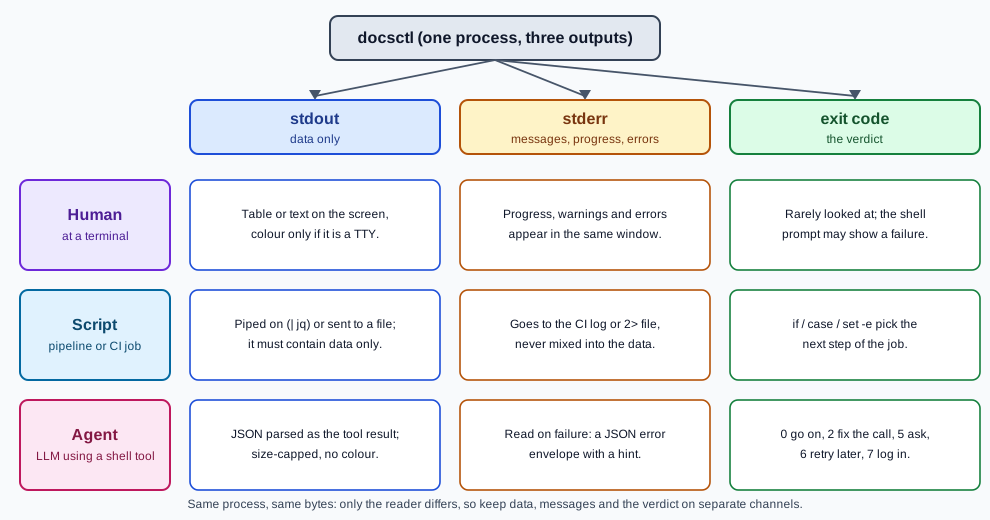
stdout for data, stderr for messages
The rule, as written in clig.dev and the 12 Factor CLI Apps article: primary output goes to stdout; everything else goes to stderr. "Everything else" covers log lines, progress and spinners, warnings, prompts, hints and error messages. The test is simple: if the caller redirects stdout to a file, the file must contain exactly the data and nothing a person would want to read but a program would choke on.
-
stdout carries the result of the command: the table a person asked for, or the JSON document (
--json) that a script or agent will parse.--helpand--versionare results too, so they go to stdout and exit zero. -
stderr carries the running commentary:
Fetching index…,warning: 2 components are on an old version, and the error message when the command fails. In JSON mode the error is itself a JSON document, the error envelope, still written to stderr so that a partially written result on stdout is never confused with it. -
Prompts go to stderr too (or to the terminal device), so
docsctl publish … | jqdoes not swallow the question. -
Never print a decorative banner, a "Done!" line or a colour reset on stdout in machine modes.
# Data to a file, messages still visible on the terminal
docsctl search kalman --json > results.json

# Data to a file, messages to a log: both are clean
docsctl search kalman --json > results.json 2> docsctl.log

# Silence the noise entirely; the exit code still reports failure
docsctl validate . --quiet > /dev/null 2>&1

# Merge the streams only when a person wants a transcript (never when parsing)
docsctl validate . > transcript.txt 2>&1
In docsctl, --quiet suppresses informational messages on stderr but never errors, --verbose adds diagnostic
messages there, and --log-format json makes those stderr lines JSON so a supervising program can parse them.
Neither flag changes what is written to stdout.
import json
import sys


def emit_result(result: dict) -> None:
    """The answer: stdout only, one JSON document, keys sorted for stable diffs."""
    json.dump(result, sys.stdout, sort_keys=True)
    sys.stdout.write("\n")


def note(message: str) -> None:
    """Commentary: stderr only."""
    print(f"docsctl: {message}", file=sys.stderr)
References: clig.dev — Output and Errors, the POSIX definition of standard streams in Shell Command Language.
Piping and composition
The reason for the stream discipline is composition. A shell connects the stdout of one process to the stdin of the
next, and leaves stderr attached to the terminal (or wherever it is redirected). That is what makes a tool that prints
clean data useful inside jq, grep, xargs and, for an agent, inside any pipeline it can improvise.
# Titles of the top five hits, one per line
docsctl search kalman --json --limit 5 | jq -r '.results[].title'

# The components that have more than one published version
docsctl list-components --include-versions --json \
  | jq -r '.components[] | select(.versions | length > 1) | .name'

# Feed page ids to another docsctl call; one id per line, so xargs splits them safely
docsctl search kalman --json --limit 3 | jq -r '.results[].id' \
  | xargs -n 1 docsctl show --max-chars 500 --
Three details of pipelines matter to a tool author:
-
A pipeline’s exit status is the last command’s, unless you ask otherwise. In
docsctl … | jq …a failure ofdocsctlis hidden by a successfuljq. Bash’sset -o pipefailmakes the pipeline fail if any stage fails, and thePIPESTATUSarray holds each stage’s status. POSIX addedpipefailto the shell standard in the 2024 edition, but check your target shells before relying on it in a portable script. -
A reader may stop early. In
docsctl search … | head -n 3,headexits after three lines and the next write bydocsctlfails: the kernel sendsSIGPIPE(or the write returnsEPIPE). A well-behaved tool exits quietly and quickly; it does not print a stack trace to stderr. By convention the shell then reports 141 (128 + 13) for the killed writer. -
Data must be flushed and complete, or clearly marked incomplete. A tool that dies half-way should not leave a truncated JSON document that parses as a valid but shorter one; either write atomically (temporary file then rename) or use JSON Lines, where every line is a complete record and a final
summaryline signals a clean finish.
import os
import sys


def main() -> int:
    for line in produce_lines():
        print(line)
    return 0


if __name__ == "__main__":
    try:
        code = main()
        sys.stdout.flush()
    except BrokenPipeError:
        # Python flushes stdout again at exit; point it at /dev/null to avoid a second error
        devnull = os.open(os.devnull, os.O_WRONLY)
        os.dup2(devnull, sys.stdout.fileno())
        code = 1
    sys.exit(code)
The Python documentation advises against setting the SIGPIPE disposition to SIG_DFL to avoid
BrokenPipeError, because doing so makes the program die abruptly whenever any socket is closed on it; handle the
exception instead, as above. Reference: Python — signal, note on SIGPIPE.
Crash-only design
Crash-only software, described by Candea and Fox, is the idea that the only way to stop a program is to crash it and the only way to start it is to recover. For a command-line tool the practical reading is more modest, and it fits agents well because their runs are interrupted often: timeouts, cancelled sessions, killed sandboxes and closed terminals.
-
Assume you will be killed at any point. Keep no state that needs an orderly shutdown to be valid. Write files to a temporary path and rename them into place; never leave a half-written credential or config file.
-
Make retries safe. If a command was interrupted, running it again with the same arguments must be safe and must finish the job or report that it already has. For destructive commands that means idempotency keys and dry-run plans, covered in the page on safety and idempotency.
-
Do the minimum on the way out. On
SIGINTorSIGTERM, stop, remove temporary files, print one line to stderr and exit with the signal’s conventional code (below). Do not try to finish the work first, and do not prompt. -
Prefer resumable steps to long transactions. Cursors (
--cursor) and idempotency keys (--idempotency-key) let the caller resume instead of restarting.
The twelve-factor app makes the same argument for services as disposability: fast startup and graceful shutdown on
SIGTERM. Reference: Candea and Fox — Crash-Only Software (HotOS IX, 2003).
The exit-code taxonomy
An exit status is one byte, 0 to 255, and zero means success. Beyond that, the operating system defines almost nothing except the shell’s own conventions. A tool that gives failures distinct, documented codes lets a script or an agent choose the right reaction (fix the arguments, log in, ask a person, wait and retry) without parsing prose.
The vocabulary comes from three places. The POSIX shell reserves a few values, described in the
Shell Command Language: 127 when a command is
not found, 126 when it is found but cannot be executed, and a value greater than 128 when a command is terminated by a
signal. BSD’s sysexits.h is a table of named codes (64 to 78) such as EX_USAGE (64) and EX_TEMPFAIL (75); its
manual page marks it deprecated, and few tools use it, so treat
it as a vocabulary for naming the categories, not as the numbers to emit. Everything else is up to you. Keep custom
codes in a small range (docsctl uses 3 to 7), document each one, and never renumber them, because scripts depend on
the numbers.
| Code | Name | Meaning and the caller’s reaction | Nearest standard name |
|---|---|---|---|
0 |
|
Success, including an idempotent no-op and a |
(none) |
1 |
|
Unexpected failure (a bug). Report it; do not retry blindly. |
|
2 |
|
Bad flag or argument. Fix the command line using the message. |
|
3 |
|
Well-formed input that was rejected, or |
|
4 |
|
The component or page does not exist. Check the name ( |
|
5 |
|
A destructive action needs confirmation. The error envelope carries the exact command to confirm. Ask a person or use |
(none) |
6 |
|
Transient failure: rate limit, server error, timeout. The envelope says |
|
7 |
|
Missing or invalid credentials. The |
|
126 |
(the shell) |
The file was found but is not executable. Not emitted by |
(POSIX shell) |
127 |
(the shell) |
Command not found. Not emitted by |
(POSIX shell) |
128+N |
(a signal) |
Terminated by signal N: 130 for |
(POSIX shell) |
The design choices behind this table are the ones an agent benefits from most:
-
One code per reaction, not per cause. Five distinct reactions (fix it, look it up, ask, wait, log in) get five codes; the finer detail lives in the JSON envelope’s
codeanddetails. -
The retryable code is separate from the ordinary failure code, so a driver can retry only when it is safe and never retry a validation error forever.
-
The confirmation-required code is separate from every failure code: it is not a failure, it is a question. The page on safety and idempotency builds the confirmation envelope on it.
-
Usage errors are 2 because that is what most argument-parsing libraries already return (
argparse, Click and picocli’s default), so the tool inherits the convention for free.
{"schemaVersion":1,"error":{"code":"AUTH_REQUIRED","exitCode":7,"message":"No credentials found.","hint":"Run `docsctl login` or set DOCSCTL_TOKEN.","retryable":false,"details":{}}}#!/usr/bin/env bash
set -uo pipefail
docsctl search kalman --json --limit 5 > results.json 2> error.json
status=$? # capture it immediately: the next command overwrites $?
case "$status" in
0) jq -r '.results[].id' results.json ;;
2) echo "bad command line: $(jq -r '.error.message' error.json)" >&2; exit 2 ;;
6) echo "transient failure, retrying later" >&2; exit 6 ;; # pass the retryable status on to the scheduler
7) echo "not logged in: $(jq -r '.error.hint' error.json)" >&2; exit 7 ;;
127) echo "docsctl is not installed" >&2; exit 127 ;;
*) echo "docsctl failed with status $status" >&2; cat error.json >&2; exit "$status" ;;
esacimport json
import sys
EXIT_OK, EXIT_INTERNAL, EXIT_USAGE, EXIT_VALIDATION = 0, 1, 2, 3
EXIT_NOT_FOUND, EXIT_CONFIRM, EXIT_RETRYABLE, EXIT_AUTH = 4, 5, 6, 7
class CliError(Exception):
def __init__(self, code: str, exit_code: int, message: str, hint: str = "", retryable: bool = False):
super().__init__(message)
self.code, self.exit_code, self.hint, self.retryable = code, exit_code, hint, retryable
def report(err: CliError, json_mode: bool) -> int:
if json_mode:
envelope = {
"schemaVersion": 1,
"error": {
"code": err.code,
"exitCode": err.exit_code,
"message": str(err),
"hint": err.hint,
"retryable": err.retryable,
"details": {},
},
}
print(json.dumps(envelope, sort_keys=True), file=sys.stderr)
else:
print(f"docsctl: {err}", file=sys.stderr)
if err.hint:
print(f"hint: {err.hint}", file=sys.stderr)
return err.exit_code
def main(argv: list[str]) -> int:
json_mode = "--json" in argv
try:
run(argv) # writes the result to stdout
return EXIT_OK
except CliError as err:
return report(err, json_mode)
except Exception as exc: # a bug: say so, keep the traceback on stderr, use the generic code
print(f"docsctl: internal error: {exc}", file=sys.stderr)
return EXIT_INTERNAL
if __name__ == "__main__":
sys.exit(main(sys.argv[1:]))A calling program should read the code, not the text. The caller’s own language may report signals differently from the shell, as the next snippet shows.
import subprocess

proc = subprocess.run(
    ["docsctl", "search", "--json", "--limit", "5", "--", "kalman"],  # argv list, never a shell string
    capture_output=True,
    text=True,
    timeout=30,
    check=False,
)

code = proc.returncode
if code < 0:
    # Python reports "killed by signal N" as -N; a shell would show 128 + N
    code = 128 + (-code)

if code == 0:
    ...  # parse proc.stdout
elif code == 6:
    ...  # retryable: wait and try again
elif code == 7:
    ...  # not logged in: proc.stderr holds the JSON error envelope with the hint
References: sysexits(3), the POSIX
Shell Command Language (exit status for
commands), and Python — subprocess (returncode).
Signals and 128+N
When a process is ended by a signal rather than by exiting, there is no exit status of its own to report. POSIX shells
therefore report a value greater than 128 that identifies the signal; in practice it is 128 plus the signal number, and
$? after a killed foreground command shows it. The numbers below are the same on Linux and macOS for these signals;
for the others they differ between systems, so look them up in signal(7) on the target platform.
| Signal | Number | Shell status | When it arrives |
|---|---|---|---|
|
1 |
129 |
The terminal or SSH session closed. |
|
2 |
130 |
The person pressed |
|
9 |
137 |
Forced kill; cannot be caught. The out-of-memory killer and a timeout’s last resort both use it. |
|
13 |
141 |
Wrote to a pipe whose reader has gone away. |
|
15 |
143 |
A polite request to stop: |
A tool should install handlers for SIGINT and SIGTERM, clean up quickly and then exit with 128+N, so that the
caller can tell an interruption from an ordinary failure. It cannot handle SIGKILL, which is one more reason for the
crash-only habits above. clig.dev also asks that a second Ctrl-C during cleanup exit immediately, and that a hanging
network call never blocks Ctrl-C.
import signal
import sys
import tempfile
from pathlib import Path


def install_signal_handlers() -> None:
    def stop(signum, _frame):
        # Raising SystemExit runs the finally blocks below, then exits with the conventional code
        raise SystemExit(128 + signum)

    signal.signal(signal.SIGINT, stop)   # Ctrl-C  -> 130
    signal.signal(signal.SIGTERM, stop)  # kill    -> 143


def main() -> int:
    install_signal_handlers()
    workdir = Path(tempfile.mkdtemp(prefix="docsctl-"))
    try:
        ...  # long-running work that writes to workdir
        return 0
    finally:
        for child in workdir.iterdir():
            child.unlink()
        workdir.rmdir()  # one quiet cleanup, then exit


if __name__ == "__main__":
    sys.exit(main())
Combine this with a --timeout flag (docsctl defaults to 30 seconds) so that the tool ends itself with the retryable
code before an agent’s own supervisor has to send SIGKILL. Reference: signal(7),
Python — signal.