Authentication Methods: Passwordless and 2FA
|
This section documents OAuth 2.0 (RFC 6749) as amended by the OAuth 2.0 Security Best Current Practice (RFC 9700 / BCP 240), the OAuth 1.0 Protocol (RFC 5849) for historical context, and OpenID Connect Core 1.0, as published at the IETF Datatracker and the OpenID Foundation specifications — and, on the Spring pages, Spring Boot 4.1.x and Spring Security 7.1.x as published at the Spring Security reference documentation — which are the references these pages are written and verified against. OAuth 2.1 is still an Internet-Draft ( This content was generated with the assistance of AI and should be verified against those official specifications before being relied on in production. This section’s bibliography lists the reference material consulted while preparing these pages. |
This page answers a question that is easy to get wrong: what actually authenticates the resource owner, and
where does an additional factor fit? Authentication happens entirely inside the authorization server,
invisible to the client — the client only ever sees an authorization response and a token response. That is
precisely why an authorization server can roll out a new primary method, add a second factor, or force a
step-up re-authentication for a sensitive operation without the client changing a single line of code: the
client asks for an outcome (acr_values, prompt=login, max_age) and reads an outcome (acr, amr,
auth_time); it never implements the method itself. See
Getting Started for the four OAuth roles this depends on.
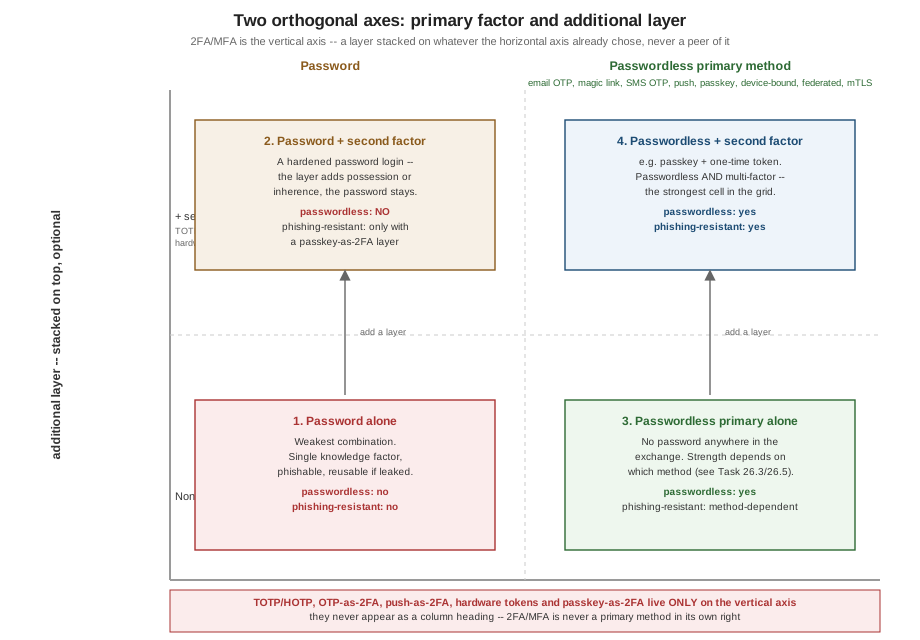
The rest of this page is organised around two orthogonal axes, because the single most common mistake in this space is treating "2FA" as if it were a primary authentication method, or as if it made a login "passwordless". It does neither.
Two axes, one rule
-
Axis 1 — the primary factor. This is what identifies the user in the first place: a password, or one of the passwordless primary methods covered in Passwordless primary authentication methods.
-
Axis 2 — the additional layer. This is an optional second factor stacked on top of whatever Axis 1 already chose, covered in [2fa-mfa-as-an-additional-security-layer].
|
2FA/MFA is an additional security layer stacked on top of a primary factor. It is never a primary authentication method in its own right, and it is never "passwordless" by itself. Adding a TOTP code, a push approval, or a hardware token to a password login does not remove the password from the exchange — it only adds a second, independent check on top of it. |
Because the two axes are independent, there are exactly four combinations, and they must never be confused with each other:
| # | Combination | Passwordless? | Relative strength |
|---|---|---|---|
1 |
Password alone |
No |
Weakest — one knowledge factor, phishable, reusable if leaked |
2 |
Password + second factor (any Task 2FA layer) |
No — still a password login, just a hardened one |
Better than #1, but the password remains the weak link |
3 |
A passwordless primary method alone |
Yes |
Depends on the method — see Comparing the primary methods |
4 |
A passwordless primary method + second factor |
Yes |
Strongest — e.g. a passkey plus a one-time token; passwordless and multi-factor |
Row 2 is the one people get wrong. "Password + authenticator app" is a very good login, and it is worth having — but it is not passwordless, because the client (or the authorization server’s login form) still collects a password. Only rows 3 and 4 are passwordless, because in both the primary factor itself is not a password.
Passwords as the baseline primary factor
A password is a knowledge factor: something the user knows. NIST SP 800-63B groups every authenticator into one of three factor categories, and every method on this page falls into one or more of them:
| Category | What it proves |
|---|---|
Knowledge |
Something only the user should know — a password, a PIN, a security question (the last is explicitly discouraged by SP 800-63B). |
Possession |
Something only the user should have — a phone that receives an SMS or push, an authenticator app holding a shared secret, a hardware security key, a device holding a private key. |
Inherence |
Something the user physically is — a fingerprint or face, used locally to unlock a possession factor (a passkey, a phone) rather than transmitted anywhere. |
When an authorization server handles passwords itself, the non-negotiable baseline is:
-
Hashing with a slow, salted, memory-hard algorithm (
bcrypt,scrypt, orargon2id) — never a fast general-purpose hash (MD5,SHA-256alone) and never reversible encryption. -
Breach-list checking at registration and change time, rejecting passwords that appear in known-compromised password corpora (SP 800-63B §5.1.1.2 recommends this over composition rules).
-
No forced periodic rotation and no arbitrary composition rules ("must contain a symbol") — SP 800-63B explicitly deprecates both; they push users toward predictable patterns and do not improve security.
-
Rate limiting and lockout on the verification endpoint, tuned to slow down credential stuffing without making denial-of-service against a single account trivial.
|
In an OAuth deployment, the client must never see the password. The user types it into a form served by the authorization server — its own hosted login page, or, for a native app, the system browser that the AS controls, never a form embedded in the client. See Legacy: Implicit and Password Grants for exactly what breaks when a client collects the password itself (the now-removed resource owner password credentials grant), and Native and Mobile Apps for why the system browser is what makes everything on this page possible for a native app in the first place. |
Passwordless primary authentication methods
These methods replace the password as the primary factor — after one of them succeeds, the user is authenticated and no password was ever collected. Each subsection below states how the method works on the wire, its single-use/TTL rules where relevant, whether it is phishing-resistant, its failure modes, and when to choose it. Several of these mechanisms are also commonly used as a second factor ([2fa-mfa-as-an-additional-security-layer]) — where that is true, this section says so explicitly, and the rule is repeated: using the mechanism in that second role does not make the login passwordless, because a password is still the primary factor underneath it.
E-mail one-time code (OTP)
A 6-8 digit numeric code, generated server-side, sent to the address on file, and typed back into the login form.
| Property | Detail |
|---|---|
Wire shape |
The AS’s login form posts the identifier (email address); the AS emails a code out of band and renders a second form for the code; the code is submitted as a normal form field or, in an OAuth-fronted deployment, as part of the resource-owner interaction that precedes the authorization response. |
Single-use / TTL |
Single-use, invalidated on first successful check; TTL of 5-15 minutes is typical. |
Phishing-resistant |
No — a phished user can read the code aloud or paste it into an attacker-controlled relay page just as easily as into the real one. Nothing binds the code to the origin the user is talking to. |
Failure modes |
Delivery delay or loss (spam filtering, provider outage); code reuse or brute-force if rate limiting is weak; account-enumeration if the "send" endpoint reveals whether the address is registered. |
When to choose it |
Low-friction sign-up and login for consumer apps with verified emails already on file; a reasonable default when passkeys are not yet supported by the client’s audience. |
This is also commonly used as a second factor on top of a password login — see [email-or-sms-otp-as-a-second-factor]. Using it that way does not make the login passwordless.
E-mail magic link / single-use token
A signed, single-use URL emailed to the user; clicking it completes authentication without typing anything.
| Property | Detail |
|---|---|
Wire shape |
The AS emails a link such as |
Single-use / TTL |
Single-use, invalidated on first redemption; TTL similar to an OTP, 5-15 minutes. |
Phishing-resistant |
No, for the same reason as email OTP — there is nothing binding the link to a specific origin or session; a copied link works from anywhere. |
Failure modes |
Opened in a different browser or device than the one that requested it, which can break session continuity if the flow assumed same-browser continuation; and the link-scanner / pre-fetch hazard: corporate mail gateways and some mail clients pre-fetch every URL in an email body to scan it for malware, which silently redeems a single-use token before the real user ever clicks it. Mitigate by requiring a same-device confirmation step, or a scanner-safe intermediate landing page that requires an explicit click before redemption. |
When to choose it |
Login flows that favour "click one thing" over "type six digits"; internal tools where the corporate mail gateway’s pre-fetch behaviour is known and can be worked around. |
SMS one-time code (OTP)
Same shape as the email OTP, delivered by SMS instead.
| Property | Detail |
|---|---|
Wire shape |
Same as email OTP: a numeric code sent out of band, typed back into a second form. |
Single-use / TTL |
Single-use, 5-10 minute TTL is typical (shorter than email, since SMS delivery is usually faster). |
Phishing-resistant |
No, and additionally NIST SP 800-63B classifies SMS as a restricted authenticator: the phone network is vulnerable to SIM-swap attacks (a social-engineered port of the victim’s number to an attacker-controlled SIM) and SS7 interception (exploiting weaknesses in the telecom signalling protocol to intercept the message in transit). SP 800-63B still permits it, with warnings and required additional risk mitigations, but it is explicitly not recommended as a first choice. |
Failure modes |
Everything email OTP has, plus deliverability variance across carriers and countries, per-message cost, and the SIM-swap/SS7 exposure above. |
When to choose it |
A fallback for users without a smartphone app or email access at the moment of login — not a default. Prefer email OTP, push, or passkeys where the audience supports them. |
Also commonly used as a second factor — see [email-or-sms-otp-as-a-second-factor], where the same restricted-authenticator rating applies.
Push approval as a primary factor
"Log in with your phone": the AS sends an out-of-band approval request to an already-enrolled device, and the user taps Approve or Deny on that device.
| Property | Detail |
|---|---|
Wire shape |
The login form collects only an identifier; the AS pushes a request to the device previously enrolled for that account (via a mobile-push channel such as APNs/FCM, or an in-app long-poll); the device app displays context (application name, location, timestamp) and posts the user’s decision back to the AS. |
Single-use / TTL |
Each push challenge is single-use and time-boxed, typically 30-90 seconds, after which it expires and the login form must issue a new one. |
Phishing-resistant |
Only partially. It resists credential phishing (there is no credential to type into a fake page), but it is vulnerable to approval by mistake if the user cannot tell a legitimate request from an attacker-triggered one — which is the same weakness discussed for the second-factor role in [push-approval-as-a-second-factor]. |
Failure modes |
The enrolled device is lost, offline, or has no network connectivity; the user approves a request they did not intend to (see MFA fatigue below); an attacker who has already compromised the enrolment step can approve their own future pushes. |
When to choose it |
The enrolment binding is what makes this a primary factor rather than a second one: the device was bound to the account through a separate, already-authenticated enrolment ceremony, so the push itself stands in for a full authentication event rather than confirming one. Good for internal workforce apps where every user already carries a managed device. |
Also used as a second factor, where its failure modes differ — see [push-approval-as-a-second-factor].
Passkeys (WebAuthn / FIDO2)
The recommended default wherever the platform supports it. A passkey is a public/private key pair created and verified through the W3C Web Authentication (WebAuthn) API, backed by a FIDO2 authenticator.
Registration ceremony: the relying party (the AS) sends a challenge and relying-party ID; the browser or platform asks the authenticator to generate a key pair scoped to that relying-party ID; the authenticator returns the public key and an attestation; the AS stores the public key against the account.
Authentication ceremony: the AS sends a fresh challenge; the authenticator signs it with the private key (after a local user-verification step — a device PIN, fingerprint, or face unlock that never leaves the device); the AS verifies the signature against the stored public key.
| Property | Detail |
|---|---|
Authenticator types |
Platform authenticators (built into the device — Touch ID, Windows Hello, Android’s built-in authenticator) versus roaming authenticators (external, portable — a USB/NFC/BLE security key) that can move between devices. |
Synced vs. device-bound |
Synced passkeys are backed up and shared across a user’s devices through a platform account (Apple Keychain, Google Password Manager); device-bound credentials never leave the single authenticator they were created on. Synced passkeys trade a small amount of key-isolation for much better recoverability if a device is lost. |
Discoverable credentials |
A discoverable ("resident") credential lets the authenticator itself present a list of accounts it can log into, enabling username-less login — the user picks an account instead of typing one. |
Phishing-resistant |
Yes, and this is the actual differentiator. WebAuthn binds every signed assertion to the exact origin
that requested it (origin binding): the browser embeds the requesting origin in the signed payload, so a
signature produced for |
Failure modes |
Loss of the only enrolled authenticator with no synced backup and no recovery codes (see Enrolment and account recovery: the weakest link); platform/browser support gaps on older devices; user confusion between "this device" and "this account" when multiple passkeys exist. |
When to choose it |
The recommended default primary method wherever the client platform supports WebAuthn. Present it as the first option in the login UI, with a fallback (email OTP, magic link) for platforms or users that cannot use it yet. |
Passkeys are also usable as a second factor — see [hardware-otp-tokens-and-passkeys-used-as-a-second-factor], which explains why that is usually the wrong trade given how strong they already are as a primary method.
Device-bound credentials and "trusted device" tokens
A long-lived credential that lets a previously-recognised device skip part of the login flow on return visits. Two shapes exist, and they are not equivalent:
-
A bearer device cookie — an opaque, long-lived cookie the browser presents automatically. Anyone who steals the cookie (via XSS, a shared machine, or a backup file) can replay it; it proves only "this browser saw this cookie before", not "this device holds a private key".
-
A device-bound key pair — a private key generated and stored in the device’s secure enclave / keystore, used to sign a challenge on each return visit, the same origin-bound proof-of-possession model as a passkey. This is the stronger of the two, because the credential cannot be exfiltrated and replayed elsewhere.
|
"Remember this device" usually suppresses the second factor, not the primary one — the user still supplies their primary factor (password or passwordless method) on every login, and the device-trust decision only governs whether the additional-layer challenge in [2fa-mfa-as-an-additional-security-layer] is asked again. That is a Task 26.4 concern, not a primary-factor one; treat "trusted device" as a modifier on the second-factor step, and prefer binding it to a device key rather than a bearer cookie. |
Federated / social login as passwordless by delegation
"Sign in with Google / Microsoft / Apple / GitHub" is passwordless from the client’s account’s point of view: the account on this system holds no password at all, because an upstream identity provider performs the actual authentication and this system only consumes the resulting ID token. Full coverage — account linking, the verified-email trap, provider-specific quirks — lives on Social Login and Federation.
|
Delegating authentication also delegates its assurance. If the upstream IdP lets a user log in with a bare
password and no second factor, that is the actual strength of every "federated login" session on this system,
regardless of how this system’s own policy is configured. The |
Certificate / smart-card (mTLS) authentication
In enterprise deployments with an existing PKI, the user (or their device) holds an X.509 client certificate — often on a physical smart card — and TLS’s mutual-authentication handshake itself proves possession of the corresponding private key before any application-level exchange happens. This is a possession factor (the card) sometimes combined with a PIN unlocking it (a knowledge factor), making it multi-factor by construction. It is out of scope to detail the TLS handshake here; the OAuth-specific side of binding a token to the client’s certificate is covered on Sender-Constrained Tokens: DPoP and mTLS.
[[2fa-mfa-as-an-additional-security-layer]] == 2FA / MFA as an additional security layer
Restating the rule from [two-axes-one-rule]: nothing in this section is a primary method, and adding any of it to a password login does not make that login passwordless. Each layer below composes with either axis-1 choice — a password, or a passwordless primary method — as the combination matrix in The combination matrix makes explicit.
TOTP / HOTP authenticator apps
The canonical second factor, and the one place this page draws a hard line: TOTP/HOTP never appears in Passwordless primary authentication methods, because it proves possession of a shared secret, not the user’s identity — anyone who has the shared secret (through a leaked provisioning QR code, a compromised backup, or a malicious app with clipboard access) can generate valid codes with no idea who the real user even is. It is a second, independent check, never a substitute for establishing who is logging in.
-
RFC 4226 (HOTP) defines an HMAC-based one-time password from a shared secret and a counter; RFC 6238 (TOTP) is the time-based variant most authenticator apps implement, deriving the counter from the current Unix time divided into fixed steps (typically 30 seconds).
-
Provisioning happens once, out of band from the login flow: the AS generates a random shared secret and encodes it as an
otpauth://URI, rendered as a QR code for the authenticator app to scan:otpauth://totp/Example%20Service:alice@example.com?secret=JBSWY3DPEHPK3PXP&issuer=Example%20Service&algorithm=SHA1&digits=6&period=30The
secretis the shared key (base32-encoded);issuerand the label before:identify the account in the app’s list;algorithm,digitsandperiodare usually left at their RFC 6238 defaults (SHA1, 6 digits, 30 seconds) for maximum app compatibility. -
Drift windows: because the client’s and server’s clocks are never perfectly synchronised, verifiers accept codes from one step before and after the current step (a window of +/-30 seconds is typical), and some implementations track the last-used step to resync a device whose clock has drifted further.
-
Recovery codes are issued at enrolment time (see [recovery-codes-and-step-up]) precisely because a lost or wiped phone otherwise locks the user out of the second factor with no way back in.
E-mail or SMS OTP as a second factor
The identical mechanism described in [e-mail-one-time-code-otp] and [sms-one-time-code-otp], used here in a different role: instead of establishing identity on its own, the code confirms an identity already established by a password. The single-use/TTL rules are the same, and the SP 800-63B restricted-authenticator rating for SMS carries over unchanged — a SIM-swapped attacker who already has the victim’s password defeats this second factor exactly as easily as they would defeat it as a primary method.
Push approval as a second factor
The same out-of-band approval described in [push-approval-as-a-primary-factor], triggered here immediately after a correct password, asking the user to confirm "someone is logging in with your password right now".
This role introduced a well-known attack: MFA fatigue, also called push-bombing — an attacker who already has the password sends repeated push challenges (often at inconvenient times) until an annoyed or confused user taps Approve just to make the notifications stop. The mitigation is number matching: instead of a bare Approve/Deny button, the login screen displays a short number, and the user must enter that same number into the push notification on their device before it approves. This forces the user to actively look at what they are logging into and removes the "just tap it" failure mode.
Hardware OTP tokens, and passkeys used as a second factor
A dedicated hardware token (a key-fob generating rotating codes, or a FIDO2 security key used only to confirm a password login) is a strong possession factor and a reasonable second-factor choice.
Passkeys can technically be used the same way — registered and challenged only after a password succeeds — but doing so is usually the wrong trade: a passkey is already strong enough to be a full primary factor on its own ([passkeys-webauthn-fido2]), phishing-resistant by origin binding, with no shared secret to leak. Demoting it to "the thing that confirms a password" keeps the weakest link — the phishable password — in the critical path, while giving up the chance to remove that password entirely. If a passkey is available, prefer row 3 or row 4 of the combination table (The combination matrix) over using it merely as a second factor alongside a password.
Recovery codes and step-up
Recovery codes are a set of single-use backup codes issued at second-factor enrolment time, to be stored offline, and redeemed instead of the usual second factor when it is unavailable (lost phone, wiped authenticator app). Each code is invalidated on use, and the whole set should be reissued once exhausted or suspected exposed. Recovery codes bound to a weaker delivery channel than the factor they replace are exactly the concern raised in Enrolment and account recovery: the weakest link.
The other place a second factor gets demanded outside of login is step-up: rather than requiring it on
every session, the client or resource server requests it only for a sensitive operation (a large funds
transfer, changing account recovery details), mid-session, on top of an already-authenticated session that used
a weaker method. The wire mechanics — the RFC 9470 challenge and the acr_values/max_age request — are
covered in How any of this reaches the client.
The combination matrix
This is the table that makes the whole rule concrete: rows are the primary method, columns are the additional layer. Every cell answers two questions — is this passwordless? and is this phishing-resistant?
| Primary \ layer | None | + TOTP/HOTP | + OTP (email/SMS) | + push | + passkey-as-2FA |
|---|---|---|---|---|---|
Password |
passwordless: no |
passwordless: no |
passwordless: no |
passwordless: no |
passwordless: no |
Email OTP |
passwordless: yes |
passwordless: yes |
passwordless: yes |
passwordless: yes |
passwordless: yes |
Email magic link |
passwordless: yes |
passwordless: yes |
passwordless: yes |
passwordless: yes |
passwordless: yes |
SMS OTP |
passwordless: yes |
passwordless: yes |
passwordless: yes |
passwordless: yes |
passwordless: yes |
Push approval |
passwordless: yes |
passwordless: yes |
passwordless: yes |
passwordless: yes |
passwordless: yes |
Passkey (WebAuthn) |
passwordless: yes |
passwordless: yes |
passwordless: yes |
passwordless: yes |
passwordless: yes |
Device-bound credential |
passwordless: yes |
passwordless: yes |
passwordless: yes |
passwordless: yes |
passwordless: yes |
Federated / social login |
passwordless: yes (delegated) |
passwordless: yes |
passwordless: yes |
passwordless: yes |
passwordless: yes |
Certificate / smart-card (mTLS) |
passwordless: yes |
passwordless: yes |
passwordless: yes |
passwordless: yes |
passwordless: yes |
The pattern to take away: the "passwordless?" column never changes within a row — moving right across a row only adds a layer, it never turns a password row into a passwordless one and never turns a passwordless row back into a password one. The "phishing-resistant?" answer is capped by the weakest link in the pairing — a phishing-resistant layer stacked on a phishable password (row "Password", column "+ passkey-as-2FA") is only partially phishing-resistant, because the password step is still there to be phished before the layer is ever reached.
Comparing the primary methods
This table covers primary methods only — the password plus every method from Passwordless primary authentication methods. TOTP/HOTP and the other pure second-factor layers are deliberately absent: they cannot authenticate anyone on their own, so a standalone AAL/phishing-resistance rating for them in isolation would be misleading.
| Method | Factor category | Phishing-resistant | Device dependence | Recovery story | Max AAL alone (SP 800-63B) | Typical use |
|---|---|---|---|---|---|---|
Password |
Knowledge |
No |
None |
Password reset via email |
AAL1 |
Legacy / low-assurance login; should be paired with a layer or replaced |
Email OTP |
Possession (of the inbox) |
No |
None (any device with mail access) |
Re-send to the same inbox |
AAL1 |
Consumer sign-up/login with low friction |
Email magic link |
Possession (of the inbox) |
No |
None |
Re-send to the same inbox |
AAL1 |
"Click one thing" login flows |
SMS OTP |
Possession (of the phone number) — restricted authenticator |
No |
Tied to a phone number |
Carrier support / number recovery |
AAL1 |
Fallback only, not a default |
Push approval |
Possession (of the enrolled device) |
Partial |
Tied to the enrolled device |
Re-enrol a new device (needs a separate identity check) |
AAL2 |
Workforce apps with managed devices |
Passkey (WebAuthn) |
Possession + inherence (local unlock) |
Yes (origin binding) |
Tied to platform/roaming authenticator, mitigated by sync |
Synced backup, or a second registered passkey |
AAL3-capable (device-bound, hardware-backed) |
Recommended default primary method |
Device-bound credential |
Possession |
Yes if key-bound |
Tied to the specific device |
Re-enrol from a stronger method |
AAL2-AAL3 depending on key storage |
Return-visit convenience, session continuity |
Federated / social login |
Whatever the upstream IdP uses |
Inherited from the upstream IdP |
None locally — delegated |
Delegated to the upstream IdP |
Inherited from the upstream IdP |
Consumer apps that want to avoid owning credentials |
Certificate / smart-card (mTLS) |
Possession (+ knowledge if PIN-locked) |
Yes |
Tied to the physical card/certificate |
Re-issue through the enterprise PKI |
AAL3 |
Enterprise/regulated environments with an existing PKI |
Single-use token hygiene
This is the concern shared by every out-of-band code or link on this page, in both roles — primary ([e-mail-one-time-code-otp], [e-mail-magic-link-single-use-token], [sms-one-time-code-otp]) and second factor ([email-or-sms-otp-as-a-second-factor]):
-
Single-use enforcement: invalidate the code or token the instant it is successfully redeemed, and reject every subsequent attempt to reuse it, even if it has not yet expired.
-
Short TTL: minutes, not hours — long enough for a real user to receive and act on the delivery, short enough that a delayed or intercepted message is worthless by the time an attacker could use it.
-
Rate limiting and lockout: cap how many codes can be requested per identifier per time window (stopping SMS-bombing and cost abuse) and how many verification attempts are allowed per code (stopping brute force of a 6-digit space).
-
Enumeration-safe responses: "if that address exists, we sent a code" rather than "no account with that address" — an attacker must not be able to distinguish a registered identifier from an unregistered one purely from the response to a send request.
-
Replay and race conditions on concurrent redemption: two redemption requests for the same code arriving near-simultaneously (a double form submission, or an attacker racing a legitimate attempt) must be resolved atomically — typically with a single conditional database update as the redemption gate — so exactly one of them can ever succeed.
-
What to log on out-of-band delivery: the delivery attempt, timestamp, destination (email/phone, masked for storage), and outcome (delivered, redeemed, expired) — never the code or token value itself in plaintext logs.
Enrolment and account recovery: the weakest link
Every method on this page has a moment before it exists: enrolment — bootstrapping the first passkey, generating the first set of recovery codes, binding the first trusted device. Enrolment necessarily happens with some existing, weaker method (an already-logged-in session, a password, an email confirmation), which means the strength of everything built afterwards is capped by how carefully that first step was gated.
The same problem recurs at recovery: when a user loses their passkey, their authenticator app, or their enrolled device, the fallback is almost always to fall back to email OTP or a support-driven identity check.
|
Falling back to email OTP caps the assurance of every stronger method above it, whichever axis it sits on. A user protected by a passkey and a hardware key is, in practice, only as strong as the account-recovery flow that can be used to bypass both. An attacker who compromises the recovery email account can reset or re-enrol everything else. Treat account recovery as a first-class authentication method in its own right, subject to the same rate-limiting, enumeration-safety and logging discipline as [single-use-token-hygiene], and prefer recovery paths that require possession of another already-enrolled factor over a pure email-based reset wherever the user population allows it. |
How any of this reaches the client
The client never implements any method on this page. It only requests an authentication outcome and reads the outcome the authorization server actually achieved.
Requesting an outcome
Three authorization-request parameters, defined by OpenID Connect Core and consumed by the AS’s login logic:
| Parameter | Effect |
|---|---|
|
A space-separated, preference-ordered list of Authentication Context Class Reference values the client is
asking the AS to satisfy, e.g. |
|
Forces the AS to re-authenticate the user even if there is an active session, instead of silently reusing it.
Combine with |
|
The maximum acceptable number of seconds since the user last actively authenticated. If the existing
session’s |
Reading the outcome
The ID token (see ID Tokens vs. Access Tokens) carries the answer back:
| Claim | Meaning |
|---|---|
|
The Authentication Context Class Reference the AS actually achieved for this session — a single value,
usually drawn from the values the client asked for in |
|
Authentication Method Reference (RFC 8176) — an array of short strings naming which methods were used,
e.g. |
|
The Unix timestamp of the moment the user actually, actively authenticated — distinct from when the token
was issued, which matters for |
RFC 8176 amr values for every method on this page
RFC 8176 registers a fixed vocabulary of short strings for the amr array. These are the values that apply to
the methods covered in Passwordless primary authentication methods and
[2fa-mfa-as-an-additional-security-layer]:
| Method | amr value(s) |
Note |
|---|---|---|
Password |
|
The RFC 8176 value for knowledge-based password authentication. |
Email OTP / SMS OTP / magic link (primary or second factor) |
|
RFC 8176 registers |
Push approval (primary or second factor) |
|
"Multiple-channel authentication" — RFC 8176’s value for an out-of-band approval delivered over a separate channel from the one being authenticated. |
Passkey / WebAuthn (platform or roaming, primary or second factor) |
|
|
Device-bound credential / trusted device |
|
Same rationale as passkeys — the distinguishing factor is whether the key is hardware-isolated. |
Federated / social login |
Whatever the upstream IdP reports |
RFC 8176 has no dedicated "federated" value; the AS should surface the upstream IdP’s own |
Certificate / smart-card (mTLS) |
|
RFC 8176 registers |
TOTP / HOTP authenticator app |
|
Same value as other one-time codes — |
Hardware OTP token |
|
Depends on whether the deployment models the token primarily as a hardware key or as an OTP generator. |
Recovery code |
|
A recovery code is, mechanically, a pre-generated one-time secret. |
Two or more factors used together |
|
RFC 8176’s value meaning "multiple-factor authentication… when different factors are used" — it is added
in addition to the individual method values, not instead of them, e.g. |
|
|
Step-up mid-session: RFC 9470
When a resource server decides that the access token backing a request was issued for too weak an
authentication event — the resource owner is trying to authorise a sensitive operation and the token’s acr
is not strong enough, or auth_time is too old for the operation’s own freshness requirement — it challenges
the client with a WWW-Authenticate header carrying the RFC 9470 insufficient_user_authentication error:
HTTP/1.1 401 Unauthorized
WWW-Authenticate: Bearer error="insufficient_user_authentication",
  error_description="A stronger authentication level is required to authorize this operation",
  acr_values="urn:mace:incommon:iap:gold",
  max_age=60
The client reads acr_values and max_age straight out of that header and reuses them, unchanged, as the
authorization-request parameters described above:
GET /authorize?response_type=code
  &client_id=example-client
  &redirect_uri=https%3A%2F%2Fclient.example.com%2Fcallback
  &scope=payments.transfer
  &state=af0ifjsldkj
  &code_challenge=E9Melhoa2OwvFrEMTJguCHaoeK1t8URWbuGJSstw-cM
  &code_challenge_method=S256
  &acr_values=urn%3Amace%3Aincommon%3Aiap%3Agold
  &max_age=60
  &prompt=login HTTP/1.1
Host: as.example.com
The authorization server re-authenticates the user with whatever method satisfies urn:mace:incommon:iap:gold — typically a step up from a passwordless-but-single-factor session to one that also demands a passkey or a
TOTP code — and mints a fresh token whose acr/amr/auth_time reflect the stronger event. The client never
needed to know which method the AS actually asked for.
Spring Boot implementation, and why none of this is reachable when a client collects the password itself
Everything on this page assumes the authorization server owns the login form. The Spring Security 7 mechanics
for each method — form login, oneTimeTokenLogin() for email/SMS magic links, webAuthn() for passkeys, and
the mfa() / @EnableMultiFactorAuthentication support for stacking a second factor — are covered on
Spring Boot Authentication Methods, including how
to surface the result as amr/acr/auth_time claims through an OAuth2TokenCustomizer so downstream
resource servers can enforce the step-up described above.
None of this page is reachable at all once a client collects the password itself, because there is no authorization server login form for any of these methods to live in. That is exactly the failure mode the now- removed resource owner password credentials grant had — Legacy: Implicit and Password Grants spells out why it could support none of this: no MFA, no step-up, no CAPTCHA or risk engine, no passwordless option, and it was unusable for any account that had no password to begin with. The same argument, from the native-app angle, is why RFC 8252 mandates the system browser over an embedded WebView: Native and Mobile Apps makes the payoff explicit — because the login happens in a real browser owned by the authorization server, the AS (not the app) can add or change any method on this page, at any time, without an app release.