Slots
|
This section documents the current Vue 3.x release line as published at
the official Vue.js documentation, which is the reference these pages are written and
verified against. No specific patch version is pinned. The Composition API with This content was generated with the assistance of AI and should be verified against the official documentation before being relied on in production, since Vue and its ecosystem iterate quickly. This section’s bibliography lists the reference material consulted while preparing these pages. |
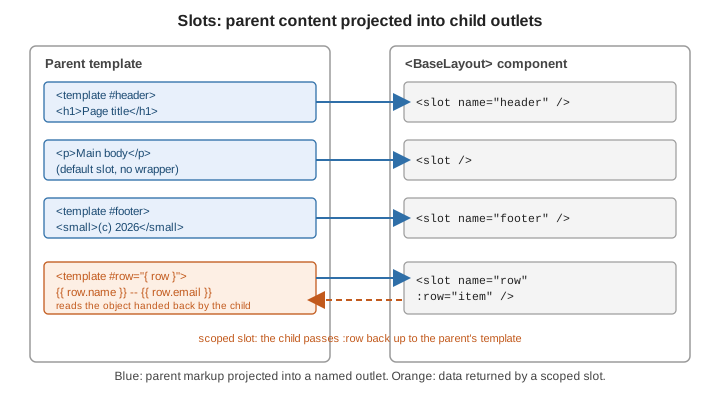
Props pass data into a component; slots pass template content. The parent writes markup between the component’s tags and the child decides where — and whether — to render it. Scoped slots add a return channel, letting the child hand data back out to that markup.
The default slot and fallback content
<slot> in the child marks where the parent’s content goes:
<!-- FancyButton.vue -->
<template>
  <button class="fancy-btn">
    <slot>Click me</slot>   <!-- fallback: shown only when the parent passes nothing -->
  </button>
</template>
<!-- Parent -->
<FancyButton>Save changes</FancyButton>
<FancyButton /> <!-- renders "Click me" -->Slot content compiles in the parent’s scope: it can read the parent’s state but not the child’s. See Slots.
Named slots
A component can expose several outlets. Give each <slot> a name (the unnamed one is implicitly
default) and target it from the parent with <template #name>:
<!-- BaseLayout.vue -->
<template>
  <div class="layout">
    <header><slot name="header" /></header>
    <main><slot /></main>
    <footer><slot name="footer" /></footer>
  </div>
</template>
<!-- Parent -->
<BaseLayout>
<template #header><h1>Page title</h1></template>
<p>Main body content goes in the default slot.</p>
<template #footer><small>Footer text</small></template>
</BaseLayout>#header is shorthand for v-slot:header. See
Named Slots.
Conditional slots
$slots is an object keyed by the names of the slots the parent actually provided. Use it to drop wrapper
markup when a slot is empty:
<template>
  <div class="card">
    <header v-if="$slots.header" class="card-header">
      <slot name="header" />
    </header>
    <div class="card-body"><slot /></div>
  </div>
</template>
See Conditional Slots.
Dynamic slot names
A name in v-slot can be an expression in square brackets:
<template>
  <BaseLayout>
    <template #[dynamicSlot]>Goes wherever dynamicSlot names</template>
  </BaseLayout>
</template>
See Dynamic Slot Names.
Scoped slots
To let slot content use data only the child has, the child passes it as attributes on <slot>, and the
parent receives a slot props object:
<!-- TodoList.vue -->
<script setup>
defineProps({ items: Array })
</script>

<template>
  <ul>
    <li v-for="item in items" :key="item.id">
      <slot :item="item" :index="item.id">{{ item.text }}</slot>
    </li>
  </ul>
</template>
<!-- Parent: destructure the slot props -->
<TodoList :items="todos">
<template #default="{ item, index }">
<strong>{{ index }}.</strong> {{ item.text }}
</template>
</TodoList>When only the default slot is scoped, v-slot can go straight on the component tag — <TodoList v-slot="\{ item }">. See
Scoped Slots.
Named and scoped together
Every named slot can carry its own slot props; each <template> destructures the object for that slot:
<DataTable :rows="rows">
  <template #row="{ row }">
    <td>{{ row.name }}</td>
    <td>{{ row.email }}</td>
  </template>

  <template #empty>
    <td colspan="2">No results</td>
  </template>
</DataTable>
See Scoped Slots for the mixed case.
The renderless component pattern
A component with no markup of its own — its template is a single scoped <slot> passing computed values
out — packages behaviour while leaving all rendering to the parent:
<!-- MouseTracker.vue -->
<script setup>
import { ref, onMounted, onUnmounted } from 'vue'

const x = ref(0)
const y = ref(0)
const update = (e) => { x.value = e.pageX; y.value = e.pageY }

onMounted(() => window.addEventListener('mousemove', update))
onUnmounted(() => window.removeEventListener('mousemove', update))
</script>

<template>
  <slot :x="x" :y="y" />
</template>
<MouseTracker v-slot="{ x, y }">
<p>Pointer at {{ x }}, {{ y }}</p>
</MouseTracker>The Vue docs note that a composable usually does this job with less overhead; the renderless pattern earns its keep when the logic is inseparable from a slot-shaped API. See Renderless Components.
Typing slots
defineSlots() is a <script setup> macro that emits no runtime code and only attaches types: each key is a
slot name and its function type describes the slot props the child will pass.
defineSlots<{
  default(props: { item: Todo; index: number }): any
  empty(): any
}>()
See defineSlots().
See also
-
Registration and Props — the data channel that slots complement.
-
Component Events and v-model —
$attrs, which behaves for attributes much as$slotsdoes for content. -
Composables — the usual alternative to a renderless component.