Rendering Fundamentals
|
This content was generated with the assistance of AI and should be verified against the official documentation before being relied on in production. The reference material consulted while preparing these pages is listed in the section bibliography. |
This page is written against Next.js 16.3.8 (the latest release on 2026-10-03, when the facts and examples below were
checked; the official documentation reports @doc-version 16.3.8), React 19.3.0 and Node.js 20.9.0 or later. It
covers the App Router and shows the Pages Router equivalents in one section. Rendering is the topic where the two
caching models matter most, so every example is labelled: the previous model is the default (nothing is cached
unless you ask, and a route becomes dynamic as soon as it uses request data), and Cache Components is the opt-in
model (cacheComponents: true, with the 'use cache' directive and Partial Prerendering as the default behaviour).
Every example was built and run with Next.js 16.3.8, Node.js 24.16 and npm 11.13 on macOS in a scratch copy of the
Bookshelf — the catalogue of books, authors and reviews that the rest of this section grows, here reduced to six
routes so that the rendering behaviour is the only thing that varies — and each one is followed by the official page
it derives from.
This is the overview page of the rendering part of the section. It answers four questions: what are the rendering
strategies, when does each part of a page get rendered, how does Next.js choose, and which strategy should a given
page use. Each strategy has its own deeper page: the
rendering philosophy and the request flow are in the introduction, and the pages on Server and Client Components,
server-side rendering and streaming and Suspense (written next to this one) go further into the individual
mechanisms; the caching pages, which are written later in the section, cover 'use cache', revalidation and
Partial Prerendering in depth. The React-only background is in
Server Rendering, SSG and React Server Components.
The Rendering Spectrum
A web page is the result of three kinds of work: computing what the page contains (running components, querying data), delivering it (HTML over the network, then JavaScript) and activating it in the browser (hydration, after which event handlers work). The rendering strategies differ in where and when each of them happens.
Some vocabulary used throughout, taken from the official glossary:
-
Prerendering is rendering a route at build time, or in the background during revalidation. The result is HTML plus an RSC payload (the serialised React Server Components tree used for client-side navigations), which can be cached and served from a CDN. The glossary lists static rendering as a synonym.
-
Dynamic rendering (also runtime rendering) is rendering a component at request time instead of build time. A component becomes dynamic when it uses a Request-time API (
cookies(),headers(),searchParams,draftMode()) or, as the next section shows, uncached data. -
Hydration is React attaching event handlers to server-rendered HTML so that it becomes interactive.
-
The static shell is the prerendered HTML that is sent immediately: everything that could be rendered ahead of time, plus the
<Suspense>fallbacks of the parts that could not. When the dynamic params of a route are not known at build time, the reusable, URL-independent version of the shell is the App Shell (16.3).
| Strategy | Where and when the HTML is produced | Where the data comes from |
|---|---|---|
CSR — client-side rendering |
The browser, after the JavaScript has loaded. The server (or a CDN) only sends a shell. |
|
SSR — server-side rendering |
The server, on every request. Called dynamic rendering in the App Router. |
Components that read request data or uncached data. |
SSG — static site generation |
The build ( |
Data that is the same for every visitor and known at build time. |
ISR — incremental static regeneration |
The build, then again in the background after a time or on demand. Stale HTML is served while a new copy is made. |
Shared data that changes, with a lifetime or an invalidation event. |
Streaming |
The server, in several chunks of one response, one chunk per |
Slow data behind a boundary; the fast part of the page is not blocked. |
PPR — Partial Prerendering |
The build for the static shell; the server, per request, for the dynamic holes, in the same response. |
Both: shared and cached data in the shell, request data in the holes. |
Source: Next.js glossary and Rendering Philosophy
The older frameworks (and the Pages Router) make the choice per page: a page is static or server-rendered. The official Rendering Philosophy guide describes the App Router model as a spectrum at the component level: one route can contain static content, cached content and request-time content, and one response can carry all three. The strategies above are the poles of that spectrum. The figure shows what happens after the browser asks for a page.
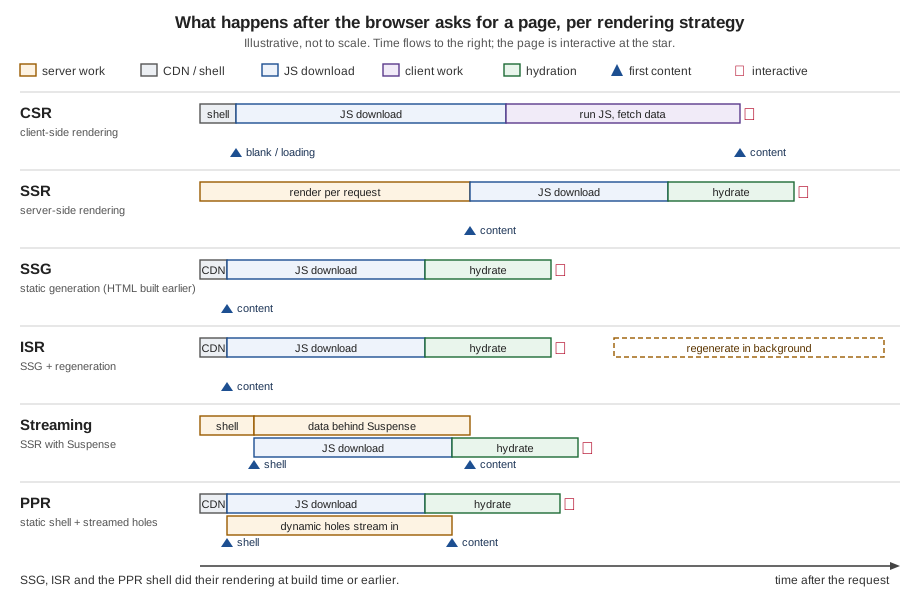
The sections below take the strategies in turn. Each shows a Bookshelf route, the code that produces the behaviour
and what was observed with next start.
CSR: the browser does the rendering
With client-side rendering the component that shows the data runs in the browser. In the App Router that means a
Client Component (a file that starts with the 'use client' directive) that fetches in an effect. The Bookshelf
seller dashboard is behind a login and has no SEO value, so it is a reasonable candidate.
// app/dashboard/page.tsx
"use client";

import { useEffect, useState } from "react";

type Book = { id: string; title: string };

export default function DashboardPage() {
  const [books, setBooks] = useState<Book[] | null>(null);

  useEffect(() => {
    const controller = new AbortController();
    fetch("/api/books", { signal: controller.signal })
      .then((r) => r.json())
      .then(setBooks)
      .catch(() => {}); // an aborted request lands here when the component unmounts
    return () => controller.abort();
  }, []);

  if (!books) return <p>Loading...</p>;
  return (
    <ul>
      {books.map((b) => (
        <li key={b.id}>{b.title}</li>
      ))}
    </ul>
  );
}Building it prints ○ /dashboard in the route table: the route is static. This surprises people who expect "CSR"
to mean "no server rendering": Next.js still renders the Client Component once, at build time, with its initial state,
so the file that is served contains the loading UI:
$ curl -s http://localhost:3401/dashboard | grep -o '<p>Loading[^<]*</p>'
<p>Loading...</p>
$ curl -sI http://localhost:3401/dashboard | grep -i cache-control
Cache-Control: s-maxage=31536000
(The scratch page printed an ellipsis character after Loading; the output is shortened here.) The books arrive
only after the JavaScript has downloaded, hydrated and run the effect, and after the second round trip to
/api/books. That is the cost of CSR: the data is never in the HTML, so a crawler that does not run JavaScript sees
only the loading state, and the largest content appears last. Google documents that it can render JavaScript, but
describes the rendering as a separate, deferred step, so content that matters for search belongs in the HTML (see the
SEO column of the comparison table).
Use a data-fetching library (SWR or TanStack Query) instead of a hand-written effect in real code: they add caching,
deduplication, revalidation on focus and retries. A component that must never render on the server at all (it reads
window, or wraps a browser-only widget) can be loaded with next/dynamic and ssr: false, which must be called
from a Client Component; see the lazy-loading guide.
SSG: render once, at build time
A route is statically generated when everything it needs is available at build time and nothing in it depends on the
request. The About page of the Bookshelf is the simplest case, and the book detail page is the dynamic-route case: the
known books are listed in generateStaticParams, and one HTML file is produced for each.
// app/about/page.tsx
export default function AboutPage() {
  return (
    <main>
      <h1>About Bookshelf</h1>
      <p>Rendered at: {new Date().toISOString()}</p>
    </main>
  );
}
// app/books/[id]/page.tsx
import { notFound } from "next/navigation";
import { getBook, listBooks } from "@/lib/books";
// one HTML file per known book is produced by `next build`
export async function generateStaticParams() {
return (await listBooks()).map((b) => ({ id: b.id }));
}
export default async function BookPage({ params }: PageProps<"/books/[id]">) {
const { id } = await params;
const book = await getBook(id);
if (!book) notFound();
return (
<main>
<h1>{book.title}</h1>
<p>{book.author}</p>
<p>Rendered at: {new Date().toISOString()}</p>
</main>
);
}The About page prints a timestamp so that you can see when it was rendered. (Under Cache Components the timestamp
would be a build error, for the reason explained in the next section; the Cache Components version of the page leaves
it out.) The result, from next build, and requests made two seconds apart:
Route (app)      Revalidate  Expire
┌ ○ /                    1m      1y
├ ○ /about
├   /books/[id]
│ ├ ● /books/1
│ ├ ● /books/2
│ └ ● /books/3
...
○  (Static)   prerendered as static content
●  (SSG)      prerendered as static HTML (uses generateStaticParams)

$ curl -sD - http://localhost:3401/about -o /dev/null | grep -i "cache-control\|x-nextjs-cache"
x-nextjs-cache: HIT
Cache-Control: s-maxage=31536000
# two requests, two seconds apart, return the same text: Rendered at: 2026-10-03T14:00:46.193Z
Cache-Control: s-maxage=31536000 tells shared caches (a CDN) that the response may be reused for a year, and the
Rendered at text is the build time, not the request time. The ● /books/[id] rows are the generateStaticParams
paths. What about an id that was not listed? By default (dynamicParams = true) the page is rendered on demand the
first time it is requested and cached afterwards; with export const dynamicParams = false it is a 404. Requesting
/books/99, an id that does not exist in the catalogue, ran notFound() and returned 404 with the page cached
(s-maxage=31536000) in the previous model. dynamicParams is not available under Cache Components, where unknown
params are handled by the App Shell and, from 16.3, ISR with an App Shell (see the PPR subsection). The mechanics of
generateStaticParams are in Dynamic Routes and
Route Groups.
Source: generateStaticParams, dynamicParams and Public pages
A statically generated site can be hosted by anything that serves files. With output: 'export' Next.js writes plain
HTML, RSC payload and JavaScript files to the out folder and needs no Node.js server at all. The same routes built
that way (without the routes that read request data) produced out/index.html, out/about.html,
out/books/1.html and out/dashboard.html:
import type { NextConfig } from "next";

const nextConfig: NextConfig = {
  output: "export",
};

export default nextConfig;
The static-exports guide lists what a static export cannot do, among them cookies, rewrites, redirects, headers,
Proxy, Server Actions, Draft Mode, ISR, the default image loader and Route Handlers that rely on the request; a
dynamic route needs generateStaticParams and dynamicParams = false.
Source: Static Exports
ISR: static, but not frozen
SSG has one weakness: a change in the data needs a new build. Incremental static regeneration removes it. Next.js
serves the prerendered page; once the page is older than its revalidation time, the next request still gets the old
copy, but it triggers a regeneration in the background, and requests after the new copy is ready get the new copy. This
is called stale-while-revalidate. In the previous model it takes one line, the revalidate route segment config.
// app/page.tsx
import Link from "next/link";
import { listBooks } from "@/lib/books";

// Prerender at build time, regenerate at most once per 60 seconds
export const revalidate = 60;

export default async function CataloguePage() {
  const books = await listBooks();
  return (
    <main>
      <h1>Catalogue</h1>
      <p>Rendered at: {new Date().toISOString()}</p>
      <ul>
        {books.map((b) => (
          <li key={b.id}>
            <Link href={`/books/${b.id}`}>{b.title}</Link>
          </li>
        ))}
      </ul>
    </main>
  );
}
The build table shows 1m under Revalidate and 1y under Expire for /. To watch the cycle without waiting a
minute, the same page was built with revalidate = 5:
$ curl -sD - http://localhost:3401/ -o /dev/null | grep -i "x-nextjs-cache\|cache-control"
x-nextjs-cache: HIT
Cache-Control: s-maxage=5, stale-while-revalidate=31535995
# (text: Rendered at 14:01:25.552Z); wait six seconds, request again
x-nextjs-cache: STALE        # the old copy is served and regeneration starts
# (text: still 14:01:25.552Z); wait two more seconds, request again
x-nextjs-cache: HIT          # the new copy
# (text: Rendered at 14:01:36.159Z)
The x-nextjs-cache header is what a self-hosted next start server reports on 16.3.8; treat it as a diagnostic, not
as an API. The Cache-Control value is the contract with a CDN: for 60 seconds the CDN may serve the page without
asking, and afterwards it may serve it stale while it asks for a fresh copy. ISR is also on-demand: revalidatePath
and revalidateTag called from a Server Action or Route Handler mark the page stale immediately, which is how the
catalogue should react when a price changes.
Under Cache Components the revalidate segment config is not allowed. The build fails with:
Error: Route segment config "revalidate" is not compatible with `nextConfig.cacheComponents`. Please remove it.and the same message appears for dynamic. The lifetime moves to the cached function or component, as the next
example shows. The same catalogue, written for Cache Components:
// app/page.tsx
import Link from "next/link";
import { cacheLife, cacheTag } from "next/cache";
import { listBooks } from "@/lib/books";

async function Catalogue() {
  "use cache";
  cacheLife("hours"); // also: seconds, minutes, days, weeks, max, or a custom profile
  cacheTag("books"); // revalidateTag or updateTag can invalidate it on demand
  const books = await listBooks();
  return (
    <>
      <p>Rendered at: {new Date().toISOString()}</p>
      <ul>
        {books.map((b) => (
          <li key={b.id}>
            <Link href={`/books/${b.id}`}>{b.title}</Link>
          </li>
        ))}
      </ul>
    </>
  );
}

export default function CataloguePage() {
  return (
    <main>
      <h1>Catalogue</h1>
      <Catalogue />
    </main>
  );
}
The route table row is ○ / 1h 1d: static, revalidated after an hour, expired after a day, and the timestamp
inside the cached component stays the same across requests (two requests one second apart returned
2026-10-03T14:02:34.084Z twice). Date is allowed inside 'use cache' because the result is cached on purpose.
SSR: render on every request
Some pages are different for every request: the account page shows the signed-in reader, the search page depends on the query. Their HTML cannot be made ahead of time, so the server renders them when the request arrives. In the App Router you do not "choose SSR": you use request data, and the route becomes dynamic.
// app/account/page.tsx
import { cookies } from "next/headers";

export default async function AccountPage() {
  const session = (await cookies()).get("session")?.value;
  return (
    <main>
      <h1>{session ? "Your account" : "Please sign in"}</h1>
      <p>Rendered at: {new Date().toISOString()}</p>
    </main>
  );
}
// app/search/page.tsx -- searchParams is a Request-time API too
import { listBooks } from "@/lib/books";
export default async function SearchPage({ searchParams }: PageProps<"/search">) {
const { q } = await searchParams;
const books = await listBooks(typeof q === "string" ? q : "");
return (
<main>
<h1>Search</h1>
<p>Rendered at: {new Date().toISOString()}</p>
<ul>{books.map((b) => <li key={b.id}>{b.title}</li>)}</ul>
</main>
);
}Both routes print ƒ in the route table. Their responses are not cacheable by shared caches, and each request
produced a new timestamp (14:01:10.060Z, then 14:01:12.133Z, two seconds later):
$ curl -sD - http://localhost:3401/account -o /dev/null | grep -i "cache-control\|transfer-encoding"
Cache-Control: private, no-cache, no-store, max-age=0, must-revalidate
Transfer-Encoding: chunked
The cost is on the server: every visit runs React, and the visitor waits for the whole render before the first byte
of HTML (the SSR row of the timeline). SSR is the right tool when the content really is per-request; the page on
server-side rendering covers the request-time APIs, status codes, headers, after() and the Pages Router
getServerSideProps.
Source: cookies, page and Glossary: dynamic rendering
Streaming: do not wait for the slowest part
With plain SSR the HTML is sent only when all of it is ready. Streaming sends the response in chunks using HTTP
chunked transfer encoding. React’s server renderer produces HTML aligned with <Suspense> boundaries: everything
outside the boundaries (the layouts, the navigation and the fallbacks) goes first, and when a boundary’s content
resolves its HTML follows, with a small inline script that swaps the fallback for the content. Two streams travel
together on the first load, the HTML stream and the component (RSC) payload that React uses to hydrate.
// app/live/page.tsx
import { Suspense } from "react";
import { cookies } from "next/headers";

async function Recommendations() {
  await cookies();
  await new Promise((r) => setTimeout(r, 1500)); // stands in for a slow query
  return <p>Recommended for you</p>;
}

export default function LivePage() {
  return (
    <main>
      <h1>Live</h1>
      <Suspense fallback={<p>Loading recommendations...</p>}>
        <Recommendations />
      </Suspense>
    </main>
  );
}
On the same machine, with no network in between, the first byte of /live arrived after 2.6 ms and the response
finished after 1.5 s; a static page took under a millisecond for both. The fallback arrives first, the content later.
loading.js is the same mechanism applied to a whole page: Next.js wraps page.js in a <Suspense> boundary whose
fallback is loading.js (see layouts, templates and
special files). The status code is fixed when the first chunk is sent, which is why notFound() inside a
streamed boundary cannot change it into a 404; the streaming page covers that and the other consequences.
In the previous model this route is still dynamic: the shell is not prerendered, it is rendered per request and streamed. Under Cache Components the same code becomes Partial Prerendering, below.
Source: Streaming and React: Suspense
PPR: a static shell with dynamic holes
Partial Prerendering combines the static and the streamed. At build time Next.js renders the route as far as it
can: static content, cached content ('use cache') and, for everything that needs request data, the <Suspense>
fallback. That prerendered static shell can be served from a CDN immediately; the dynamic parts are rendered by the
server when the request arrives and are streamed into the same response. With Cache Components this is the default
behaviour, with no segment config and no per-route switch. (PPR started as an experimental flag in Next.js 14; the
experimental.ppr and dynamicIO flags were removed in 16 in favour of cacheComponents.)
// app/account/page.tsx
import { Suspense } from "react";
import { cookies } from "next/headers";

async function Greeting() {
  const session = (await cookies()).get("session")?.value;
  return (
    <p>
      {session ? "Your account" : "Please sign in"} - rendered at {new Date().toISOString()}
    </p>
  );
}

export default function AccountPage() {
  return (
    <main>
      <h1>Account</h1>
      <Suspense fallback={<p>Loading your account...</p>}>
        <Greeting />
      </Suspense>
    </main>
  );
}
The only change from the previous-model page is that the part that reads cookies() moved into its own component and
got a <Suspense> boundary. The route table marks it ◐ /account, "Partial Prerender: prerendered as static HTML
with dynamic server-streamed content". The raw response contains both the fallback (Loading your account…, from the
shell) and the resolved greeting, and next start marked the response as resumed from a postponed prerender
(x-nextjs-postponed: 1, an internal header seen on 16.3.8). The book page uses the same pattern: the book and its
author are in the shell for the three known ids, and a basket counter that reads a cookie streams in
(Basket: … in the shell; Basket: 3 items for a request with cookie: basket=3).
Source: Caching: Prerendering and cacheComponents
Build Time versus Request Time
Every rendering question is a question about when code runs. next build runs your components for every prerenderable
route and stores the result; next start (or a serverless platform) runs the rest on demand; the browser runs the
Client Components. Anything evaluated during the build is frozen into the static output until the next build or
revalidation.
| When | What runs | Output and consequence |
|---|---|---|
Build ( |
Server and Client Components of static, SSG and ISR routes and of the shell of PPR routes; |
HTML and RSC payload files in |
Revalidation (background) |
The same rendering, started by the first request after the lifetime expired or by |
A replacement HTML and RSC payload; the old copy is served until it is ready (ISR). |
Request (server) |
Dynamic routes, the dynamic holes of PPR routes, Route Handlers that read the request, Server Actions, Proxy. |
HTML streamed to the browser; on client navigations only the RSC payload. |
Browser |
Hydration of Client Components, effects, event handlers, client-side navigation, CSR data fetching. |
Interactivity; the cost is JavaScript bytes and main-thread time. |
On disk, a production build contains the prerendered artefacts. These are implementation details that can change between versions, but they make the model concrete. In the previous-model scratch app:
$ ls .next/server/app
about.html  about.meta  about.rsc  about.segments
dashboard.html  dashboard.meta  dashboard.rsc  dashboard.segments
index.html  index.meta  index.rsc  index.segments
...
# no files at all for /account: it has no prerendered output
With Cache Components, account.html, account.meta and account.segments exist (the shell), but there is no
account.rsc: the complete payload cannot exist before the request.
Three practical consequences follow.
-
Values read while rendering a static route are frozen. The timestamp on the About page never changes until the next build. The same applies to environment variables read in a Server Component without
NEXT_PUBLIC_: they are read when the route is rendered, which for a static route is the build. See environment variables at build time and at runtime for how to read runtime values (use a dynamic route orconnection()). -
Per-user data must never reach a prerendered route. A static page, an ISR page and a
'use cache'result are shared by every visitor. Personal data belongs in dynamic parts that read request data. -
next devis not a rendering test. The development server renders pages on demand and does not cache them, so a route that is static in production still looks dynamic in development. Judge the strategy bynext buildand by requests tonext start; the docs say pages are always rendered on demand in development.
How Next.js Decides for Each Route
You never write "this route is static". Next.js decides during next build, by rendering the route and watching what
it touches. The rules differ between the two caching models, so they are listed separately.
The previous model: a route is static until something makes it dynamic
By default Next.js prerenders a route. It switches the route to dynamic rendering when it finds:
-
a Request-time API:
cookies(),headers(),searchParams,draftMode()(the glossary list); and, in practice,connection(), which exists to wait for an incoming request; -
uncached data: a
fetchwithcache: 'no-store'ornext: { revalidate: 0 }, or, as the experiment below shows, a request that is discovered after a Request-time API; -
the segment config
export const dynamic = 'force-dynamic'orexport const revalidate = 0; -
a dynamic segment that
generateStaticParamsdoes not cover, rendered on demand and then cached (the SSG case).
These routes were built and measured. Each row is one route from the scratch app:
| Route | What it does | Symbol | Observed at request time |
|---|---|---|---|
|
No data, no request APIs |
|
Same timestamp on every request, |
|
Reads shared data, has a lifetime |
|
|
|
|
|
Static for the three ids; a missing id renders on demand and returns 404 |
|
|
|
New timestamp every request, private and no-store |
|
|
|
Same |
|
|
|
Same |
|
|
|
Same |
|
|
|
Same |
|
|
|
Static HTML with the loading state |
The surprising row is the one the official previous-model guide describes: a fetch that sets no cache option is
fetched once during next build if it is reachable before any Request-time API in the route, because the route is
prerendered up to that point, while a request discovered after a Request-time API runs on every request. A mock
upstream served the current time; two routes made the identical fetch("http://localhost:3401/time"):
// app/pf-before/page.tsx  (○ static: the fetch ran during the build)
export default async function Page() {
  const res = await fetch("http://localhost:3401/time"); // no cache option
  const { now } = await res.json();
  return <p>upstream said {now}</p>;
}

// app/pf-after/page.tsx   (ƒ dynamic: the fetch runs on each request)
import { cookies } from "next/headers";

export default async function Page() {
  await cookies(); // Request-time API first
  const res = await fetch("http://localhost:3401/time"); // the same fetch, discovered later
  const { now } = await res.json();
  return <p>upstream said {now}</p>;
}
The first route returned 2026-10-03T14:04:56.296Z on every request, the time of the build; the second returned a
new value on each request. To make the intent explicit and independent of the order of statements, set cache or
next.revalidate on the fetch yourself, or use connection(). Next.js 15 changed the default of fetch itself
(see "What changed recently"): a fetch without options is not stored in the Data Cache, but a route can still be
prerendered when the fetch happens at build time, which is what the experiment shows.
Cache Components: every route is prerendered, and you say where the holes are
With cacheComponents: true the question changes. Next.js always produces a static shell for the route, and it
requires you to be explicit about everything that cannot complete during prerendering. A component is handled by what
it uses:
-
'use cache'— its result is cached and joins the shell, as long as its lifetime (cacheLife) is not too short; -
<Suspense>— its fallback joins the shell and the content streams at request time; -
predictable values — imports, synchronous file reads, pure computation — complete during prerendering and join the shell automatically;
-
random values and timestamps (
Math.random(),Date.now(),crypto.randomUUID()) — either defer them withconnection()inside a<Suspense>, or cache the result with'use cache'.
If a component touches request data or uncached data and is not behind a <Suspense> boundary or a cache, the build
fails (and the dev overlay reports it) instead of silently making the route dynamic. This was reproduced:
// app/bad/page.tsx
import { cookies } from "next/headers";

export default async function BadPage() {
  const session = (await cookies()).get("session")?.value;
  return <p>{session ?? "anonymous"}</p>;
}
Error: Route "/bad": Next.js encountered uncached or runtime data during prerendering.
`fetch(...)`, `cookies()`, `headers()`, `params`, `searchParams`, or `connection()` accessed outside of `<Suspense>`
prevents the route from being prerendered, blocking the page load and leading to a slower user experience.
Ways to fix this:
- [stream] Provide a placeholder with `<Suspense fallback={...}>` around the data access
- [cache] For uncached data (`fetch`, database calls): cache the access with `"use cache"` (does not apply to `connection()`)
- [block] Set `export const instant = false` to allow a blocking route
Learn more: https://nextjs.org/docs/messages/blocking-prerender-dynamicA bare new Date() in a static page fails the same way, with its own message (Next.js "encountered the unstable value
new Date() while prerendering") and its own fixes: await connection() first, 'use cache', render it on the
client, or use a timing API such as performance.now() for telemetry. The errors are documented at
blocking-prerender-dynamic and
blocking-prerender-current-time.
The /live, /search, /account, /conn and /fresh routes, written with a boundary around the dynamic part, all
print ◐ in the route table, / and /about print ○, and /books/[id] prints ◐ for the three known ids and for
the App Shell route. Note how deep the dynamic access sits: the official guidance is to push await params,
await cookies() and data reads down the tree, because everything above the boundary can be part of the shell.
Route (app)        Revalidate  Expire
┌ ○ /                      1h      1d
├ ○ /about
├ ◐ /account
├ ƒ /api/books
├   /books/[id]
│ ├ ◐ /books/[id]
│ ├ ◐ /books/1
│ ├ ◐ /books/2
│ └ ◐ /books/3
├ ◐ /conn
├ ○ /dashboard
├ ◐ /fresh
├ ◐ /live
└ ◐ /search

○  (Static)             prerendered as static content
◐  (Partial Prerender)  prerendered as static HTML with dynamic server-streamed content
ƒ  (Dynamic)            server-rendered on demand
/api/books stays ƒ because the Route Handler reads the request URL.
Source: Caching (Cache Components) and Rendering Philosophy
The decision in one picture:
| Symbol | Meaning (from next build) |
Typical cause |
|---|---|---|
|
Static: prerendered as static content |
No request data, no uncached data. In the Pages Router, a page with no data function (Automatic Static Optimization). |
|
SSG: prerendered as static HTML (uses |
A dynamic route with known params. Children are listed below it. |
|
Dynamic: server-rendered on demand |
Request-time API, uncached data, |
|
Partial Prerender: static HTML with dynamic, server-streamed content |
Cache Components with a |
|
Shown as |
|
The table printed by next build no longer shows page sizes or First Load JS (removed in 16); measure bundle size with
the analyzer or the browser instead. The ƒ Proxy (Middleware) row that appears in the table when a proxy.ts exists
is Proxy, not a page: see Redirects, Rewrites and Proxy.
Source: next CLI and Upgrading to version 16
Both models side by side
The same intentions are written differently. This table is a translation guide for the rest of the section, including the code of pages that were written for the previous model.
| I want… | Previous model | Cache Components |
|---|---|---|
A page rendered once at build time |
Do nothing; avoid request data |
Do nothing; avoid request data and unstable values |
A page regenerated every N seconds |
|
|
On-demand invalidation |
|
|
A page rendered on every request |
Read request data, or |
Read request data, or |
Prerender some params, render the rest on demand |
|
|
A static shell around a dynamic part |
Not available as a default; stream a dynamic route with |
The default: |
Segment config |
Supported |
Rejected at build time; use |
Source: Migrating to Cache Components
Which Strategy for Which Page
The books that accompany this section reason page by page: the catalogue "should be static", the cart "needs the client", the order page "needs the server". That reasoning generalises into questions you can ask of any page.
-
Is the content the same for every visitor? If not, it is request data (SSR, or a PPR hole), or private client data (CSR).
-
Does it matter for search or for the first paint? If yes, the HTML must contain it (SSG, ISR, SSR, PPR); if the page is behind a login and is an application rather than a document, CSR is acceptable.
-
Is it known before the request, and how often does it change? Never: SSG. On a clock or an event: ISR or a cached component. On every request: SSR.
-
Is only a small part personal or live? Keep the rest static and stream the part: PPR under Cache Components, or a streamed dynamic route in the previous model.
Applied to the pages of the Bookshelf:
| Page | Reasoning | Strategy (previous model / Cache Components) |
|---|---|---|
|
Same for everyone, changes only with a deployment. |
SSG / static shell ( |
|
Same for everyone, changes when stock or prices change, must be fast and indexable. |
ISR with |
|
The book is shared and indexable; a basket count or "in your library" badge is per-user. |
SSG with |
Reviews under a book |
Shared, changes often, can be slow. |
ISR or streaming behind |
|
Depends on the query, which is request data; a shared cache by query is optional. |
SSR ( |
|
Per-user and private; must never be shared by a cache. |
SSR ( |
|
Per-user, depends on cookies and Server Actions, prices re-read on the server. |
SSR / dynamic part behind |
|
Behind a login, no SEO value, interactive and refreshed often. |
CSR with SWR or TanStack Query, or SSR with streaming |
Two rules of thumb. First, the rendering strategy of a page is the strategy of its least cacheable part, unless you
isolate that part: in the previous model one cookies() call turns the whole route into ƒ; under Cache Components
you isolate it with <Suspense> and the rest stays in the shell. Second, prefer the most static strategy that is
still correct: it is the cheapest to run and the fastest to deliver, and it fails the least.
Source: Public pages, Rendering Philosophy and Caching (Cache Components)
Comparing the Strategies
"Faster" depends on what you measure. The table uses the standard Core Web Vitals vocabulary: TTFB (time to first byte), FCP (first contentful paint), LCP (largest contentful paint) and INP (interaction to next paint, the metric that replaced FID in 2024). The entries are qualitative and describe the usual case: real numbers depend on the network, the CDN, the data and the JavaScript.
| TTFB | FCP / LCP | Interactivity (INP) | SEO | Freshness | Server cost | Hosting needs | |
|---|---|---|---|---|---|---|---|
CSR |
Very low: a small file from a CDN. |
Late: the content waits for JavaScript and a data request. |
After download and hydration; a heavy client bundle hurts INP. |
Weak: data is not in the HTML. |
As fresh as the last fetch. |
Low for the page, and one API call per visitor. |
Static hosting plus an API. |
SSR |
High: the first byte waits for the whole render. |
Early once the HTML arrives; LCP depends on the slowest data. |
After JavaScript and hydration. |
Strong: complete HTML. |
Exact at the time of the request. |
High: React runs on every request. |
A Node.js server (or serverless functions). |
SSG |
Very low: static file from a CDN. |
Earliest: complete HTML immediately. |
After JavaScript and hydration. |
Strong. |
Frozen until the next build. |
Very low: rendered once. |
Any file host or CDN. |
ISR |
Very low while the cache is warm; stale-while-revalidate hides regeneration. |
Same as SSG. |
Same as SSG. |
Strong. |
Within the lifetime; immediate with on-demand revalidation. |
Low: one render per lifetime, plus the regeneration work. |
A server and a persistent (and, for several instances, shared) cache. |
Streaming |
Low: the shell is sent before the slow data is ready. |
Shell paints early; LCP is the streamed element if it is the largest. |
Sooner for parts whose code and data have arrived; hydrates boundary by boundary. |
Strong for content in the HTML, with caveats for bots (see the streaming page). |
Exact for the streamed parts. |
High, like SSR, but perceived latency is lower. |
A server and a proxy or CDN that does not buffer responses. |
PPR |
Very low: the shell comes from a CDN or the origin cache. |
Early: the shell paints at once. |
As streaming. |
Strong for the shell; the holes behave as streaming. |
Shell as fresh as its |
Low for the shell, SSR cost only for the holes. |
A server with streaming support; CDN-level shell delivery needs platform integration (see the PPR platform guide). |
The hosting column deserves its own sentence. The documentation states that a single Node.js process handles every feature correctly (functional fidelity), while performance features such as the shell delivered at CDN latency, or instant stale-while-revalidate propagation, depend on the platform (performance fidelity). Running several instances needs a shared cache so that an invalidation reaches every one of them; this is the cache coordination and consistency described in the guides on revalidation and CDN caching. A static export is the only option that needs no server at all, and with it you give up everything that needs one.
Hydration: Where Rendering Ends and Interactivity Begins
Except for pure CSR, the browser receives finished HTML. It is not interactive yet: React must download the
JavaScript, run the components again in the browser and attach event handlers to the existing DOM. This is hydration,
done with hydrateRoot in React. Three things follow.
-
Server and client must render the same markup. If a Client Component renders
new Date(),Math.random()or readswindowduring rendering, the server HTML and the first client render disagree and React reports a hydration mismatch. Move such values into an effect, a state initialised after mount, or (in a Server Component) behindconnection(). Since 16.2 the dev overlay shows a diff of the server and client output. -
In the App Router only Client Components ship JavaScript and hydrate. Server Components render to the RSC payload and are never sent as code. A page that is mostly Server Components hydrates far less than the same page in the Pages Router, where every page component is also a client component and the whole tree hydrates. That reduction is a large part of why the App Router is described as lighter.
-
Suspense boundaries hydrate independently. Streamed content and the code for it arrive in pieces, and React can hydrate the parts that are ready first, and prioritise the one the user is interacting with. That is why the streaming timeline ends interactive at the same moment as its content, not after it.
The time between "content visible" and "interactive" is where INP problems start: a large Client Component bundle
or a heavy first render delays the first interaction that works. Keep 'use client' at the leaves, and see the
page on Server and Client Components.
The Pages Router Equivalents
In the Pages Router rendering is chosen per page and by a data function in the page file, not by what the components use. The same strategies exist under other names.
| Strategy | Pages Router (pages/) |
App Router (app/) |
|---|---|---|
SSG, nothing to fetch |
A page without a data function: Automatic Static Optimization ( |
A route without request or uncached data ( |
SSG with data |
|
Async Server Component and |
ISR |
|
|
SSR |
|
Request-time APIs or uncached data; |
CSR |
Effect or SWR in the page; no data function |
Client Component with an effect or SWR |
Streaming / PPR |
Not available; the HTML is produced in one piece |
|
These three pages build in the same scratch app next to the App Router routes (the pages folder with an app
folder is allowed; a path cannot exist in both):
// pages/pr/ssg.tsx
import type { GetStaticProps } from "next";

export const getStaticProps: GetStaticProps<{ builtAt: string }> = async () => ({
  props: { builtAt: new Date().toISOString() },
  revalidate: 60, // ISR in the Pages Router
});

export default function PagesSsg({ builtAt }: { builtAt: string }) {
  return <p>Built at: {builtAt}</p>;
}
// pages/pr/ssr.tsx
import type { GetServerSideProps } from "next";
export const getServerSideProps: GetServerSideProps<{ renderedAt: string }> = async () => ({
props: { renderedAt: new Date().toISOString() },
});
export default function PagesSsr({ renderedAt }: { renderedAt: string }) {
return <p>Rendered at: {renderedAt}</p>;
}// pages/pr/static.tsx -- no data function: statically optimised
export default function PagesStatic() {
return <p>Static page, no data functions</p>;
}Route (pages) Revalidate Expire
┌ ● /pr/ssg 1m 1y
├ ƒ /pr/ssr
└ ○ /pr/staticThe responses matched: /pr/ssg returned Cache-Control: s-maxage=60, stale-while-revalidate=31535940, /pr/ssr
returned the private no-store header with a new timestamp on every request, and /pr/static had no cache header from
the data layer. The Pages Router also hydrates the whole page and sends the page props as JSON. The page on
server-side rendering puts getServerSideProps next to its App Router equivalent.
What Changed Recently
| Version | Change |
|---|---|
13.4 |
The App Router became stable: components render on the server by default, layouts stream, |
14 |
Partial Prerendering was introduced as an experimental preview (the |
15 |
|
16.0 (2025-10-21) |
Cache Components ( |
16.2 (2026-03-18) |
The dev overlay shows a diff of the server and client output for hydration mismatches. |
16.3 (2026-08-03) |
ISR with an App Shell for unknown params under Cache Components, Instant Navigations with
|
Opt-in today |
|
Source: Next.js 15, Next.js 16, Next.js 16.2, Next.js 16.3 and Upgrading to version 16
Where the Books Are Outdated
The two books consulted for this section (Real-World Next.js, Packt 2022, and Practical Next.js for E-Commerce, Apress 2023) were written for the Pages Router, in which the per-page choice between SSR, SSG and ISR was the whole of rendering. Their rendering ideas — decide per page by how fresh the data must be and whether the page is personal — still hold, and the questions in the previous section are their generalisation. What has changed:
| In the books | Today |
|---|---|
Rendering is chosen per page with |
In the App Router rendering follows what components use; the data functions exist only in the Pages Router (still supported, now the legacy choice for new work) |
ISR with |
|
|
|
|
Not cached by default since 15; opt in with |
The whole page is hydrated |
Only Client Components hydrate; Server Components are not shipped as code |
One response per page, produced at once |
Streaming with |
FID as the interactivity metric |
INP replaced FID as a Core Web Vital in 2024 |
|
|
Common Pitfalls
| Pitfall | What to do |
|---|---|
A timestamp, a random value or an environment variable on a static page is frozen at build time. |
Move it to a dynamic part ( |
Reading |
Read request data in the leaf component that needs it and wrap it in |
An ISR or |
It is served to every visitor. Cache only shared data; keep personal data in dynamic parts. |
Using |
The build fails with "Route segment config … is not compatible". Replace them with |
Surprised that a |
Before a Request-time API in the previous model it is part of prerendering. Set |
Judging the rendering from |
Run |
CSR for content that must be indexed, or a |
Fetch in a Server Component and pass props down, or keep CSR to logged-in screens. |
A CDN or proxy buffers the response, so streaming and PPR show no benefit. |
Disable response buffering for the Next.js origin; see the streaming page and the self-hosting guide. |
Several instances serve different versions of an ISR page. |
Configure a shared cache handler, so that revalidation reaches every instance; see the revalidation guide. |
ISR or |
They do not apply: a static export has no server. Use |
Hydration mismatch warnings from dates, |
Render such values after mount, or on the server behind |
Related Material on This Site
-
Introduction and Architecture: Rendering Philosophy and the end-to-end request flow.
-
Linking and Navigation: prefetch modes, which explains how the static shell and App Shell are used by the router.
-
React: Server Rendering, SSG and React Server Components and React Getting Started.
The pages on Server and Client Components, server-side rendering and streaming and Suspense, and later the caching pages, continue from here.