Getting Started
|
This content was generated with the assistance of AI and should be verified against the official documentation before being relied on in production. The reference material consulted while preparing these pages is listed in the section bibliography. |
This page is written against Go 1.27 (go1.27.2, released 2026-10-08) and was checked on 2026-10-18. It gets a working
toolchain onto your machine, compiles a first program in several ways, builds a small multi-package module around the
shelf library-catalogue scenario used throughout this section, calls a package from a second module, and shows how to
read what the compiler and go vet tell you. The next page,
Toolchain Versions and Compatibility, explains the
release cycle, the compatibility promise and how the go command chooses a toolchain.
Every program on this page was compiled and run with go1.27.2 on darwin/arm64; outputs that mention the platform (a
binary size, a file description) differ on other systems, and the program text is the same everywhere.
What Go is for
Go is a compiled, statically typed, garbage-collected language. It was designed to make large software projects and their build systems less painful: fast builds, a small language that is quick to read, first-class support for concurrency on multicore machines, and tooling (formatting, documentation, testing, dependency management) that ships with the language and works the same way for everyone. The Go FAQ describes the motivation as frustration with the complexity of building big systems in the languages of 2007, together with the need for safe, simple concurrency and automatic memory management.
| Domain | Typical uses |
|---|---|
Cloud services and APIs |
HTTP and gRPC back ends, microservices and proxies built with |
Infrastructure and DevOps tooling |
container runtimes, orchestrators, infrastructure-as-code tools and CI helpers |
Command-line tools |
single static binaries that are easy to copy and cross-compile (see Command-Line Programs and CLI frameworks in Go and Rust) |
Networking and concurrent systems |
servers that hold many connections, pipelines, crawlers, message brokers (see Goroutines and the Scheduler) |
Data and text processing |
log processors, ETL jobs, template-driven generators (see Text and HTML Templates) |
Go is a deliberately small language. If you know Rust, compare this page with Getting Started in the Rust Reference: both ship one tool that builds, tests, formats and manages dependencies, but Go trades Rust’s compile-time ownership checking for a garbage collector and a much shorter list of features. Readers coming from C will find the same "compile to a native binary" workflow as in Getting Started in the C Reference, with a module system instead of Makefiles and header files.
The project and how Go evolves
The language started as a whiteboard sketch by Robert Griesemer, Rob Pike and Ken Thompson on 2007-09-21 and became a public open source project on 2009-11-10. Go 1, the version the compatibility promise is anchored to, defines the language specification and the core standard library; every release since then adds features without breaking Go 1 programs. Releases ship every six months (February and August), each major release is supported until two newer ones exist, and the schedule is described in Toolchain Versions and Compatibility.
Changes to the language, the libraries and the tools go through the proposal process: anyone files an issue in the
golang/go repository, the proposal review group discusses it, and accepted proposals are implemented and listed in the
release notes. The FAQ is blunt that very few language changes are accepted, because the compatibility promise rules out
anything that would break existing programs. Long-debated features do land eventually: type parameters arrived in Go 1.18,
range-over-func iterators in Go 1.23 and generic methods in Go 1.27.
The sources you will use again and again are the language specification, the release notes, the standard-library
documentation on pkg.go.dev, the blog and the wiki; they are collected under == References on every page of this
section.
Source: Go FAQ: Origins
Installing Go
Download the archive or installer for your platform from the official download page. A Go installation is a single
directory tree (GOROOT) containing the go command, the compiler, linker and other tools under pkg/tool, and the
standard library sources. There is no separate runtime to install: compiled programs carry their own.
Linux
Remove any previous installation, then extract the archive into /usr/local, which creates a fresh /usr/local/go.
Never extract over an existing tree.
rm -rf /usr/local/go && tar -C /usr/local -xzf go1.27.2.linux-amd64.tar.gz
export PATH=$PATH:/usr/local/go/bin
go version
Add the export line to $HOME/.profile (or /etc/profile for all users) so that it survives new sessions. This
procedure needs root, so run each command with sudo if you are not root.
macOS
Open the .pkg file and follow the prompts. It installs the tree into /usr/local/go and adds /usr/local/go/bin to
PATH through a file in /etc/paths.d. Open a new terminal afterwards so the change takes effect.
Windows
Open the .msi file and follow the prompts. The default location is under Program Files, and the installer updates the
PATH that new Command Prompt and PowerShell windows inherit, so close and reopen any open window before testing.
Check the installation and add the install directory to PATH
$ go version
go version go1.27.2 darwin/arm64
Source: Download and install
Programs installed with go install land in $(go env GOPATH)/bin ($HOME/go/bin by default), so add that directory
to PATH too:
export PATH="$PATH:$(go env GOPATH)/bin"Package-manager builds of Go (Homebrew, apt and others) exist, but they can lag behind the official release; the official
archive is the reference. To run several Go versions side by side you do not install them by hand any more: put the
version you want in the go or toolchain line of go.mod and the go command fetches and caches it
(see Toolchain Versions and Compatibility).
The go command and its environment
go is the single entry point for everything: building, running, testing, formatting, documentation, dependency
management and diagnostics. go help prints the command list; these are the commands in go1.27.2:
| Command | What it does |
|---|---|
|
compile packages and their dependencies; for a |
|
compile and run a |
|
compile and install packages or commands; executables go to |
|
run tests, benchmarks, fuzz targets and examples (see Testing) |
|
report likely mistakes in packages (see Formatting, vet, fix and Static Analysis) |
|
run |
|
apply fixes suggested by static analyzers, including the modernizers |
|
show documentation for a package or symbol |
|
list packages or modules, with a template language for scripting |
|
module maintenance: |
|
add or upgrade dependencies of the current module |
|
workspace maintenance |
|
process |
|
remove object files and cached files |
|
print or change Go environment information |
|
print the toolchain version, or the Go version a binary was built with |
|
run a specific tool such as |
|
manage Go telemetry settings |
|
start a bug report |
go help <command> documents one command; go help also has topic pages such as buildconstraint, buildmode, cache,
environment, modules, module-auth, packages and testflag.
Source: cmd/go
go env: reading and changing the environment
Go keeps configuration in environment variables, but with a twist: go env -w stores a value in a per-user file so you do
not have to export it in every shell. The lookup order is the process environment first, then the user file, then
$GOROOT/go.env, which carries the defaults GOPROXY=https://proxy.golang.org,direct, GOSUMDB=sum.golang.org and
GOTOOLCHAIN=auto.
$ go env GOROOT GOPATH GOMODCACHE GOBIN GOOS GOARCH CGO_ENABLED GOFLAGS
~/sdk/go1.27.2
~/go
~/go/pkg/mod
~/go/bin
darwin
arm64
1


$ go env -json GOOS GOARCH
{
	"GOARCH": "arm64",
	"GOOS": "darwin"
}
(The home directory is shortened to ~; the empty last line is GOFLAGS, which is unset.) go env with no arguments prints
every setting as KEY='value'; -json prints JSON; -changed prints only the settings whose values differ from the defaults; -w and
-u write and remove entries in the user file. A sandboxed demonstration, with GOENV pointing at a scratch file so
nothing real is touched:
$ go env -w GOTOOLCHAIN=go1.27.2+auto GOFLAGS=-mod=readonly
$ cat "$GOENV"
GOFLAGS=-mod=readonly
GOTOOLCHAIN=go1.27.2+auto
$ go env -changed | grep -E 'GOFLAGS|GOTOOLCHAIN'
GOFLAGS='-mod=readonly'
GOTOOLCHAIN='go1.27.2+auto'
$ go env -u GOFLAGS
$ go env -changed | grep -E 'GOFLAGS|GOTOOLCHAIN'
GOTOOLCHAIN='go1.27.2+auto'
The location of the user file comes from go env GOENV (os.UserConfigDir() plus go/env, for example
~/.config/go/env on Linux). A value in the process environment always wins over the file, and go env -w warns when
it would be overridden.
The variables you will meet first:
| Variable | Meaning |
|---|---|
|
root of the Go installation; the |
|
user workspace for downloaded module cache and installed tools; default |
|
where downloaded modules are stored, default |
|
build and test cache, default under the user cache directory |
|
install directory for |
|
default flags for every |
|
module download and checksum settings (see Modules and Dependency Management) |
|
which toolchain the |
|
target platform; default to the host (see The go Command, Builds and Cross-Compilation) |
|
|
|
path to the active |
|
runtime and compatibility switches; see the toolchain page |
|
read-only: the telemetry mode, |
Editor setup
See Go IDEs & Tools for a list of IDEs and editors.
You can write Go in any text editor, but the experience is much better with the official language server, gopls, which
the Go team maintains. It gives diagnostics as you type, completion, go-to-definition, find references, rename, code
actions (including go fix modernizers) and organizing imports, in any editor that speaks the Language Server Protocol.
Install it once; most editor plugins do this for you:
go install golang.org/x/tools/gopls@latestThis command downloads from the network, so it is not run in the sandbox that produced the outputs on this page;
gopls@v0.24.0 is the release current on 2026-10-18.
| Editor | Setup |
|---|---|
Visual Studio Code |
install the Go extension; it installs and updates gopls and the Delve debugger |
GoLand and IntelliJ IDEA Ultimate |
Go support is built in or a plugin; the JetBrains IDE uses its own analysis rather than gopls |
Vim and Neovim |
the |
Emacs, Helix, Sublime Text and others |
any LSP client works; the gopls documentation lists configuration for each |
Two conventions are worth setting up on day one: format on save (the editor runs gofmt, or gopls does it for you, so
formatting never shows up in code review) and organize imports on save (gopls adds and removes import lines). The
debugger of choice is Delve (dlv), which understands goroutines and is what the editor integrations drive.
Source: Editor plugins and IDEs and gopls documentation
Hello, world!
A Go program lives in a module: a directory tree with a go.mod file at its root that names the module and records the
Go version and dependencies. The code inside is organized in packages, one per directory. A package named main that
declares a function main builds into an executable.
$ mkdir shelf && cd shelf
$ go mod init example.com/shelf
go: creating new go.mod: module example.com/shelf
go mod init takes the module path, which should be the place the module will be downloadable from (a repository URL
without the scheme). The go line it writes is the toolchain’s own version: with go1.27.2 the file says go 1.27.2.
The Go 1.26 release notes announced that go mod init would write the version of the previous release, so check what your
toolchain writes. Either way, you set the minimum Go version explicitly with go mod edit -go=1.27 or, when the
toolchain can be downloaded, go get go@1.27. The go.mod file for the rest of this page:
module example.com/shelf

go 1.27
Now the program, in main.go:
package main

import "fmt"

func main() {
	fmt.Println("shelf: a library catalogue")
}
Source: Tutorial: Get started with Go
Three commands turn it into something you can run:
$ go run .
shelf: a library catalogue

$ go build
$ ls -l shelf | awk '{print $5, $9}'
2429714 shelf
$ ./shelf
shelf: a library catalogue

$ go install .
$ ls "$(go env GOBIN)"
shelf| Command | Behaviour |
|---|---|
|
builds the package in the current directory into a temporary location, runs it and removes it; arguments after the package go to the program |
|
compiles and links; for a |
|
same, but with the output name and location you choose ( |
|
builds and copies the executable to |
|
downloads, builds and installs a command from a module version, ignoring any |
(GOBIN is set explicitly in the sandbox that produced this output; by default go install writes to $GOPATH/bin.)
go run accepts several forms of the package argument:
$ go run main.go            # a list of .go files, even without a go.mod
shelf: a library catalogue
$ go run .                  # the package in the current directory
shelf: a library catalogue
$ go run example.com/shelf  # an import path inside the main module
shelf: a library catalogue
Exit status, arguments and the environment
go run is a build tool, so it reports the exit status of your program in its own words, and exits with status 1. When you
need the real status, build and run the binary yourself.
package main

import (
	"fmt"
	"os"
	"runtime"
)

func main() {
	fmt.Println(runtime.Version(), runtime.GOOS, runtime.GOARCH)
	fmt.Println("args:", os.Args[1:])
	if len(os.Args) < 2 {
		fmt.Fprintln(os.Stderr, "usage: exitdemo <isbn>")
		os.Exit(2)
	}
}
$ go run . a b
go1.27.2 darwin arm64
args: [a b]
$ echo $?
0
$ go run .
go1.27.2 darwin arm64
args: []
usage: exitdemo <isbn>
exit status 2
$ echo $?
1
$ go build -o exitdemo && ./exitdemo
go1.27.2 darwin arm64
args: []
usage: exitdemo <isbn>
$ echo $?
2Source: os: Exit and runtime: Version
What is a module, and what happens without one
Outside a module the commands that need module information refuse to run, while go run file.go still compiles a
standalone file:
$ go run main.go
no module here
$ go build
go: go.mod file not found in current directory or any parent directory; see 'go help modules'
Old tutorials describe a different world, the GOPATH workspace, where source lived under $GOPATH/src and there was no
go.mod. That mode is still reachable through GO111MODULE=off (the build above succeeds with it in go1.27.2), but it
is a legacy compatibility switch: new code always uses modules. See the end of this page for what changed since the books
were written.
A module with several packages
Real programs are more than one file. The shelf module used throughout this section has this layout:
shelf/
    go.mod
    catalog/            package catalog: Book, Author, ISBN, Loan, LoanState, Store
        catalog.go
    internal/textutil/  helpers that only this module may import
        textutil.go
    cmd/shelf/          a command-line program
        main.go
    cmd/shelfd/         an HTTP service
        main.go
Conventions visible here: a package lives in one directory and its name is the last element of its import path; a cmd/
directory holds one subdirectory per executable; and an internal/ directory makes its packages importable only from
within the parent of internal (enforced by the compiler). Exported names begin with a capital letter, and that is the
entire visibility mechanism. The program in cmd/shelf/main.go uses the other two packages:
package main

import (
	"fmt"

	"example.com/shelf/catalog"
	"example.com/shelf/internal/textutil"
)

func main() {
	s := catalog.NewMemStore()
	isbn, _ := catalog.ParseISBN("978-0-13-419044-0")
	s.Put(catalog.Book{ISBN: isbn, Title: textutil.Normalize(" The Go Programming Language ")})
	fmt.Println(len(s.All()), catalog.OnLoan)
}
$ go list ./...
example.com/shelf/catalog
example.com/shelf/cmd/shelf
example.com/shelf/cmd/shelfd
example.com/shelf/internal/textutil
$ go build ./... && go vet ./... && go run ./cmd/shelf
1 on loan
$ gofmt -l ../... is a package pattern: the current directory and every directory below it that contains Go files. go build ./... compiles everything but writes no executables when several packages are named; go install ./cmd/shelf installs
one command. gofmt -l . lists files whose formatting differs and, printing nothing here, confirms every file is
formatted. The packages themselves are covered in
Packages, Imports and Initialization.
Source: How to Write Go Code and Organizing a Go module
Calling a package from another module
The official create a module tutorial builds a library in one module and uses it from another. Here is the same idea,
condensed, with a welcome library for the shelf front desk. Two sibling directories, each its own module:
module example.com/welcome

go 1.27
// Package welcome builds greeting messages for library members.
package welcome
import (
"errors"
"fmt"
)
// Message returns a greeting for the named member.
func Message(member string) (string, error) {
if member == "" {
return "", errors.New("welcome: empty member name")
}
return fmt.Sprintf("Welcome to the shelf, %s!", member), nil
}Source: Tutorial: Create a Go module
The caller lives in desk/, a second module that imports example.com/welcome:
package main

import (
	"fmt"
	"log"

	"example.com/welcome"
)

func main() {
	log.SetFlags(0)
	log.SetPrefix("desk: ")

	msg, err := welcome.Message("Ada")
	if err != nil {
		log.Fatal(err)
	}
	fmt.Println(msg)

	if _, err := welcome.Message(""); err != nil {
		log.Fatal(err)
	}
}
Building straight away fails, because nothing tells the go command where example.com/welcome comes from. For a
published module go get or go mod tidy would fetch it. For a module on your own disk, a replace directive points to
the directory:
$ cd desk
$ go build
desk.go:7:2: no required module provides package example.com/welcome; to add it:
	go get example.com/welcome

$ go mod edit -replace example.com/welcome=../welcome
$ go mod tidy
go: found example.com/welcome in example.com/welcome v0.0.0-00010101000000-000000000000

$ cat go.mod
module example.com/desk

go 1.27

replace example.com/welcome => ../welcome

require example.com/welcome v0.0.0-00010101000000-000000000000

$ go run .
Welcome to the shelf, Ada!
desk: welcome: empty member name
exit status 1
The second call deliberately passes an empty name: log.Fatal prints the error with the desk: ` prefix and exits with
status 1, which `go run reports as exit status 1. The placeholder version v0.0.0-00010101000000-000000000000 is what
the go command invents for a directory replacement.
A replace is part of go.mod, so it travels with the repository, which is rarely what you want for a local-only
arrangement. The alternative is a workspace: a go.work file next to both modules that use`s them, with no changes to
either `go.mod:
go 1.27

use (
	./desk
	./welcome
)
$ go work init ./welcome ./desk
$ go work edit -go=1.27
$ cd desk && go run .
Welcome to the shelf, Ada!
desk: welcome: empty member name
exit status 1Workspaces, go.work and publishing a module with proper version tags are the subject of
Workspaces, Versioning and Publishing.
Testing the library
go test is the same tool again. A test is a function named TestXxx(t *testing.T) in a _test.go file of the same
package:
package welcome

import "testing"

func TestMessage(t *testing.T) {
	got, err := Message("Ada")
	if err != nil {
		t.Fatalf("Message(%q) returned error: %v", "Ada", err)
	}
	if want := "Welcome to the shelf, Ada!"; got != want {
		t.Errorf("Message(%q) = %q, want %q", "Ada", got, want)
	}
}

func TestMessageEmpty(t *testing.T) {
	if _, err := Message(""); err == nil {
		t.Error(`Message("") returned no error`)
	}
}
$ go test -v
=== RUN TestMessage
--- PASS: TestMessage (0.00s)
=== RUN TestMessageEmpty
--- PASS: TestMessageEmpty (0.00s)
PASS
ok example.com/welcome 0.068s
$ go test -cover
PASS
coverage: 100.0% of statements
ok example.com/welcome 0.199s(The elapsed times in the ok lines change from run to run.) Testing in depth is in
Testing.
Source: testing and cmd/go: Test packages
Reading documentation from the terminal
go doc shows the doc comments of any package or symbol, including your own and the standard library’s, without leaving
the terminal:
$ go doc example.com/welcome
package welcome // import "example.com/welcome"

Package welcome builds greeting messages for library members.

func Message(member string) (string, error)

$ go doc welcome.Message
package welcome // import "example.com/welcome"

func Message(member string) (string, error)
    Message returns a greeting for the named member.

$ go doc -short fmt | head -4
func Append(b []byte, a ...any) []byte
func Appendf(b []byte, format string, a ...any) []byte
func Appendln(b []byte, a ...any) []byte
func Errorf(format string, a ...any) (err error)
Go 1.27 adds go doc package@version (documentation of a module version, without adding it to your module) and go doc
-ex to list the executable examples of a package or symbol. The comment conventions, which go doc and pkg.go.dev both
render, are in Documentation and Doc Comments.
Formatting: gofmt and the semicolon rule
Go has one canonical layout, produced by the gofmt tool. It indents with tabs, aligns comments and struct fields, and
leaves line breaks where you put them. Because there is exactly one result, formatting arguments do not happen. go fmt
runs gofmt -l -w over a package; gofmt -d shows a diff instead of rewriting; gofmt -s also simplifies code.
package main

import "fmt"

func main() {
        titles := []string{"Dune",
                "Emma"}
	for  _,t := range titles{
	fmt.Println(t)
	}
}
Source: cmd/gofmt
(This sample is deliberately badly formatted; every other example in this section is gofmt-clean.)
$ gofmt -l .
main.go
$ gofmt -d main.go
diff main.go.orig main.go
--- main.go.orig
+++ main.go
@@ -3,9 +3,9 @@
 import "fmt"

 func main() {
-        titles := []string{"Dune",
-                "Emma"}
-	for  _,t := range titles{
-	fmt.Println(t)
+	titles := []string{"Dune",
+		"Emma"}
+	for _, t := range titles {
+		fmt.Println(t)
 	}
 }
$ go fmt ./...
main.go
Formatting never changes meaning, with one exception that comes from the language itself: semicolon insertion. The
grammar uses semicolons, but the lexer inserts one automatically at the end of a line that ends in an identifier, a
literal, one of break, continue, fallthrough, return, one of the operators ++ or --, or a closing ), ] or }.
The practical consequence is that the opening brace must stay on the line of the statement it opens:
package main

import "fmt"

func main()
{
	fmt.Println("hi")
}
$ go build
# example.com/fmtdemo
./main.go:6:1: syntax error: unexpected semicolon or newline before {The line func main() ended in ), so a semicolon was inserted and the { on the next line no longer belongs to
anything. The same rule is why a multi-line call or composite literal needs a trailing comma after its last element.
The full lexical rules are in
Program Structure and Lexical Elements.
How go build compiles a program
go build hides a long pipeline behind one command. The figure shows the stages from source to executable and where the
neighbouring tools (gofmt, go vet and the build cache) fit.
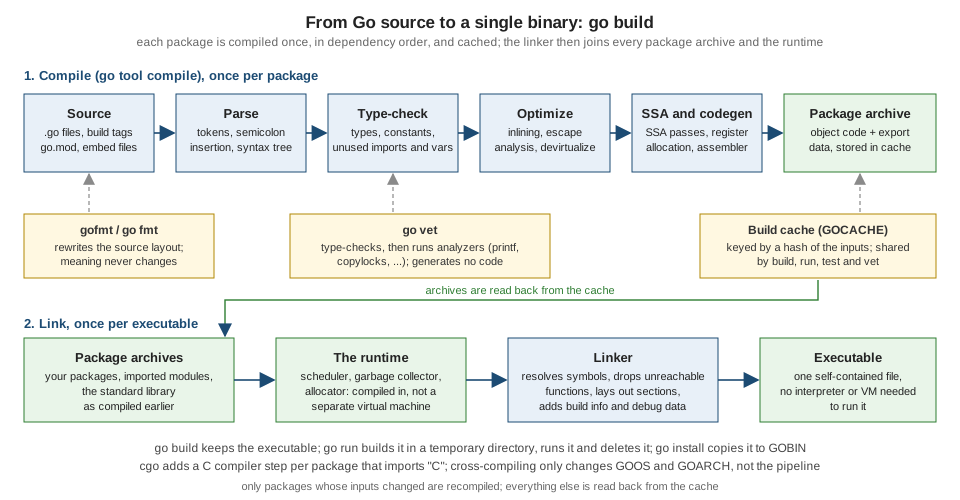
The compiler (go tool compile) works one package at a time, in dependency order. It parses source into a syntax tree
(inserting semicolons as described above), type-checks it, optimizes it (inlining small functions, deciding which values
may stay on the stack), turns it into an SSA form where most optimizations run, and emits machine code. The result for a
package is an archive: object code plus the exported type information that importers need. The build cache stores each
archive under a hash of everything that influenced it, so unchanged packages, including the standard library, are not
recompiled. The linker (go tool link) then reads the archives of the program and all its dependencies together with
the runtime package (scheduler, garbage collector, memory allocator), discards unreachable functions and writes one
executable. Nothing else needs to be present on the machine that runs it.
You can watch the tool invocations. -n prints the commands without running them (-x prints and runs them); with -a to
ignore the cache and a filter to keep only the compile of the program and the link, with the path to the toolchain
shortened:
$ go build -a -n -o shelf . 2>&1 | grep -E 'tool/darwin_arm64/(compile|link) ' | grep -E ' -p (main|example.com/shelf) |/link '
$GOROOT/pkg/tool/darwin_arm64/compile -o $WORK/b001/_pkg_.a -trimpath "$WORK/b001=>" -p main -lang=go1.27 -complete -buildid ID -goversion go1.27.2 -c=10 -shared -nolocalimports -importcfg $WORK/b001/importcfg -pack ./main.go
$GOROOT/pkg/tool/darwin_arm64/link -o $WORK/b001/exe/a.out -importcfg $WORK/b001/importcfg.link -buildmode=pie -buildid=ID -extld=clang $WORK/b001/_pkg_.a
Two things stand out. The compiler is told -lang=go1.27, which comes straight from the go line of go.mod: that line
chooses the language version a package is compiled with (see the toolchain page). And the link step takes only the
archive of the program plus an import configuration naming every dependency’s archive.
Source: cmd/compile, cmd/link and cmd/go: Build and test caching
Looking inside a build
The compiler can explain its decisions. This program has a function small enough to inline and a constructor whose result escapes to the heap:
package main

import "fmt"

type Book struct {
	Title string
	Pages int
}

// totalPages is small enough for the compiler to inline.
func totalPages(books []Book) int {
	n := 0
	for _, b := range books {
		n += b.Pages
	}
	return n
}

func newBook(title string, pages int) *Book {
	return &Book{Title: title, Pages: pages} // escapes: returned to the caller
}

func main() {
	books := []Book{*newBook("Dune", 412), *newBook("Emma", 474)}
	fmt.Println(totalPages(books))
}
$ go run .
886
$ go build -gcflags=-m
# example.com/shelf
./main.go:11:6: can inline totalPages
./main.go:19:6: can inline newBook
./main.go:24:26: inlining call to newBook
./main.go:24:49: inlining call to newBook
./main.go:25:24: inlining call to totalPages
./main.go:25:13: inlining call to fmt.Println
./main.go:11:17: books does not escape
./main.go:19:14: leaking param: title
./main.go:20:9: &Book{...} escapes to heap
./main.go:24:17: []Book{...} does not escape
./main.go:24:26: &Book{...} does not escape
./main.go:24:49: &Book{...} does not escape
./main.go:25:13: ... argument does not escape
./main.go:25:24: ~r0 escapes to heapSource: cmd/compile
Notice that newBook is inlined into main, so after inlining its &Book{...} no longer escapes. -gcflags=-m is the
first tool for understanding allocations; the full story, with -m -m, GC traces and benchmarks, is in
Memory Management and Garbage Collection and
Performance and PGO. GOSSAFUNC=totalPages go build writes an
ssa.html file showing the function after each SSA pass; the build prints dumped SSA for totalPages,1 to ./ssa.html.
Every binary records how it was built. go version -m reads that information back, without needing the source:
$ go version ./shelf
./shelf: go1.27.2

$ go version -m ./shelf
./shelf: go1.27.2
	path	example.com/shelf
	mod	example.com/shelf	(devel)
	build	-buildmode=exe
	build	-compiler=gc
	build	CGO_ENABLED=1
	build	CGO_CFLAGS=
	build	CGO_CPPFLAGS=
	build	CGO_CXXFLAGS=
	build	CGO_LDFLAGS=
	build	GOARCH=arm64
	build	GOOS=darwin
	build	GOARM64=v8.0
Binaries are self-contained and easy to ship. A few linker and build flags change them; the sizes below are for this tiny
program on darwin/arm64, where -s -w strips the symbol table and DWARF debug information:
$ go build -o shelf .
$ go build -ldflags='-s -w' -o shelf-small .
$ ls -l shelf shelf-small | awk '{print $5, $9}'
2429698 shelf
1587714 shelf-small
$ file shelf
shelf: Mach-O 64-bit executable arm64| Flag | Effect |
|---|---|
|
name or directory of the output |
|
print the names of packages as they are compiled |
|
print the commands ( |
|
keep the temporary work directory and print its name |
|
rebuild everything, ignoring the cache |
|
build with the data race detector (see Memory Model and Data Races) |
|
remove file system paths from the binary, for reproducible builds |
|
flags for the linker, such as |
|
flags for the compiler, such as |
|
additional build tags (see The go Command, Builds and Cross-Compilation) |
|
how module files may be updated |
|
embed version-control information in the binary (default |
|
machine-readable build output |
|
change to a directory before running |
|
number of programs, such as compiles, that may run in parallel |
Cross-compiling is a pair of variables
Because the toolchain is the same for every target, building for another operating system or architecture only needs
GOOS and GOARCH, with no extra toolchain to install:
$ GOOS=linux GOARCH=amd64 go build -o shelf-linux .
$ file shelf-linux
shelf-linux: ELF 64-bit LSB executable, x86-64, version 1 (SYSV), statically linked, with debug_info, not stripped

$ GOOS=windows GOARCH=amd64 go build -o shelf.exe .
$ file shelf.exe
shelf.exe: PE32+ executable (console) x86-64, for MS Windows

$ go tool dist list | wc -l
      47
(The file output for the Linux binary also contains Go build and GNU build IDs, left out here.) go tool dist list
prints every supported GOOS/GOARCH pair; cgo, which links C code, complicates cross-compiling and is covered in
cgo and C Interoperability.
Experimenting without installing
The Go Playground at https://go.dev/play/ compiles and runs a single program on Google’s servers and gives you a link to share it. It is perfect for small experiments, bug reports and snippets in a chat. It runs in a sandbox: limited CPU and memory, no real network, a fake file system, and a fake clock that starts on 2009-11-10 and advances only when programs sleep, so that goroutine demos behave sensibly without waiting. Programs that need the network, real time or several files need a real toolchain.
A Tour of Go at https://go.dev/tour/ is an interactive introduction in four parts: basic syntax and data structures,
methods and interfaces, generics, and concurrency, with exercises. It runs in the browser on the Playground, or locally
with go install golang.org/x/website/tour@latest (network access required; not run here). Read it together with this
section.
Source: The Go Blog: Inside the Go Playground and A Tour of Go
Reading compiler errors and vet reports
Compiler errors have the form file:line:column: message and come in the order of the lines they refer to. The compiler
reports at most ten errors and then prints too many errors; -gcflags=-e removes that limit. One broken file shows
several of the most common ones at once (the program is deliberately wrong and does not compile):
package main

import (
	"fmt"
	"os"
)

func title(isbn string) string {
	if isbn == "" {
		return "unknown"
	}
}

func main() {
	count := 3
	var name string = 42
	fmt.Println(undefinedHelper(name))
}
$ go build
# example.com/errs
./main.go:5:2: "os" imported and not used
./main.go:12:1: missing return
./main.go:15:2: declared and not used: count
./main.go:16:20: cannot use 42 (untyped int constant) as string value in variable declaration
./main.go:17:14: undefined: undefinedHelper| Message | Cause | Fix |
|---|---|---|
|
an |
delete the import (editors with gopls do it on save) |
|
a local variable is declared but never read; Go treats it as an error, not a warning |
use it, or assign to |
|
a function with results can reach its closing brace |
return on every path, or end with |
|
an assignability error; Go has no implicit conversions between different types |
convert explicitly or fix the type |
|
a name that is not in scope or not exported from its package |
check the spelling, the import and the capitalization |
The ten-error limit in action, with twelve unused variables in one function:
$ go build
# example.com/errs
./many.go:4:2: declared and not used: a1
./many.go:5:2: declared and not used: a2
./many.go:6:2: declared and not used: a3
./many.go:7:2: declared and not used: a4
./many.go:8:2: declared and not used: a5
./many.go:9:2: declared and not used: a6
./many.go:10:2: declared and not used: a7
./many.go:11:2: declared and not used: a8
./many.go:12:2: declared and not used: a9
./many.go:13:2: declared and not used: a10
./many.go:13:2: too many errors
$ go build -gcflags=-e 2>&1 | tail -3
./many.go:13:2: declared and not used: a10
./many.go:14:2: declared and not used: a11
./many.go:15:2: declared and not used: a12go vet: mistakes that compile
The compiler accepts any program that is well formed according to the spec. go vet goes further and flags code that is
legal but almost certainly wrong. Here a format verb does not match its argument, a struct holding a mutex is copied, a
variable is assigned to itself, and a message ends with a redundant newline:
package main

import (
	"fmt"
	"sync"
)

type Shelf struct {
	mu    sync.Mutex
	books []string
}

func report(s Shelf) int { return len(s.books) }

func main() {
	title := "Dune"
	count := 3
	fmt.Printf("%d copies of %s\n", title, count)
	fmt.Println("done\n")
	s := Shelf{books: []string{title}}
	fmt.Println(report(s))
	count = count
}
$ go build && echo build-ok
build-ok
$ go vet
main.go:22:2: self-assignment of count
main.go:13:15: report passes lock by value: example.com/vetdemo.Shelf contains sync.Mutex
main.go:21:21: call of report copies lock value: example.com/vetdemo.Shelf contains sync.Mutex
main.go:18:14: fmt.Printf format %d has arg title of wrong type string
main.go:19:2: fmt.Println arg list ends with redundant newline
$ echo $?
1
$ ./vetdemo
%!d(string=Dune) copies of %!s(int=3)
done
1go vet ran analyzers in parallel here, so the order of the lines can differ between runs; the set of reports does not. The
program builds and runs, printing the telltale %!d(string=Dune) instead of failing, which is exactly why vet matters.
If a file does not compile, vet cannot analyze it and reports the compile error as its own:
$ go vet
# example.com/errs
# [example.com/errs]
vet: ./main.go:12:1: missing return
go vet -json prints diagnostics (with suggested fixes where an analyzer has one) as JSON, and each analyzer has a flag to
turn it on or off, as in go vet -printf=false. go test runs a high-confidence subset of vet automatically
(atomic, bools, buildtag, directive, errorsas, ifaceassert, nilfunc, printf, stdversion, stringintconv
and tests) before running the tests and refuses to run them if it finds a problem; -vet=off disables this and
-vet=all runs everything. The analyzers that ship in go1.27.2 are:
| Analyzer | Reports |
|---|---|
|
|
|
mismatches between assembly files and Go declarations |
|
useless assignments, such as |
|
common mistakes with |
|
redundant or suspect boolean expressions |
|
malformed |
|
violations of the cgo pointer-passing rules |
|
unkeyed fields in composite literals of imported struct types |
|
locks copied by value |
|
mistakes in |
|
misplaced Go toolchain directives such as |
|
non-pointer second arguments to |
|
assembly that clobbers the frame pointer |
|
malformed addresses passed to |
|
using an HTTP response before checking the error |
|
impossible interface-to-interface assertions |
|
references to loop variables from nested functions (relevant only for modules older than |
|
a |
|
useless comparisons between functions and |
|
wrong format strings or arguments in |
|
shifts that equal or exceed the width of the integer |
|
unbuffered channels passed to |
|
invalid key-value argument lists for |
|
wrong signatures of well-known methods such as |
|
use of standard-library symbols too new for the module’s |
|
|
|
malformed struct tags |
|
calls to |
|
malformed test, benchmark, fuzz and example declarations |
|
the day-month swap in the layout |
|
passing non-pointers to |
|
unreachable code |
|
invalid conversions of |
|
unused results of calls to functions such as |
|
misuse of |
The stdversion analyzer, run by go test by default since Go 1.27, is a good illustration of how the go line in
go.mod controls what you may use: calling a function that is too new for the module is reported as a vet error and
not as a compile error. The next page shows it in action. go vet and the wider static-analysis toolbox (go fix
modernizers, gopls analyzers, staticcheck) are covered in
Formatting, vet, fix and Static Analysis.
Source: cmd/vet and Go 1.27 release notes: go test
Common pitfalls when starting out
-
Working outside a module.
go buildandgo testneed ago.mod. Rungo mod init <path>first; the error message tells you what to do. -
Forgetting
go mod tidy. After adding an import,go mod tidyadds the missing requirement and removes unused ones. -
Expecting
go runto preserve the exit status. It printsexit status Nand returns 1. -
Putting the opening brace on its own line. The inserted semicolon turns it into a syntax error.
-
Leaving unused variables and imports. They are compile errors, not warnings. Let the editor remove them.
-
Treating
go vetoutput as optional. Printf-style mismatches and copied locks compile and fail at run time. -
Installing tools into the module. Use
go install tool@version;go getno longer installs binaries. -
Editing
GOPATHandGOROOTby hand. You almost never need to.GOROOTis inferred andGOPATHis only a cache and install location. -
Setting
GOOSandGOARCHwithgo env -w. That changes every build you make afterwards; set them per command as shown above. -
Reading old tutorials. Anything that mentions
$GOPATH/src,godoc,golint,io/ioutilorgo getto build a program predates modules. The next section lists what changed.
Where the books are outdated
Both books used for this section were written before modules, the module proxy, the toolchain line and go fix
modernizers existed in their current form; the facts they teach about the language are largely still right, but the
set-up chapters are not.
| Topic | Book says | Current approach |
|---|---|---|
Workspace |
Vivien ch. 1 and 6 and Bodner ch. 1 set up a |
modules (introduced in 1.11, the default since 1.16): a |
Installing programs |
Vivien ch. 1 and 6 use |
|
Installing several versions |
Bodner ch. 1 installs secondary toolchains with |
the |
Windows PATH |
Bodner ch. 1 shows a manual command for editing |
the MSI installer sets |
Lint tool |
both books recommend |
|
Documentation tool |
Vivien ch. 1 documents |
the |
Editors |
Vivien ch. 1 lists the editor plugins of 2016, and the books mention analysis tools such as |
gopls is the single language server behind VS Code, GoLand, Vim, Emacs and others; Delve remains the debugger |
Imports |
Bodner ch. 1 treats |
gopls organizes imports on save; |
Playground |
Vivien ch. 1 presents the Playground as it worked in 2016 |
it now has a fake network stack and file system; a fake clock still starts on 2009-11-10 |
Build |
Bodner ch. 1 drives builds with Makefiles and Vivien ch. 1 and 6 build inside a |
module-aware |
Version cadence |
Bodner ch. 1 describes the six-month cadence and the compatibility promise |
both still hold; since Go 1.21 the |
The books also show tool output captured with Go 1.6 to 1.16; compiler messages have been reworded since (for example
declared and not used: count, which now names the variable), so do not match them literally.