GWT (Google Web Toolkit)
|
This content was generated with the assistance of AI and should be verified against the official documentation before being relied on in production. The reference material consulted while preparing these pages is listed in the section bibliography. |
This section is written against GWT 2.13.1 (released 2026-06-19), the version managed by the org.gwtproject:gwt BOM,
together with gwt-maven-plugin 1.3.0 (net.ltgt.gwt.maven), the modular-webapp archetype 2026.6.22, JDK 21 running
the tools with -sourceLevel 17, Jakarta Servlet 6 on Jetty 12 and Elemental2 1.3.2 (versions verified on 2026-10-08).
GWT is a community-run open-source project: Google created and released it in 2006, a steering committee has governed it
since 2012, and volunteers publish the releases at a slow but steady pace of roughly one or two a year. The 2.13 line is
the current one, and the roadmap says that 2.13.0 is likely the last release whose compiler and tools run on Java 11. There is no GWT 3 release: Google’s own successor to the GWT compiler is J2CL, a separate
Java-to-JavaScript transpiler used inside Google, and the org.gwtproject.* libraries are being prepared to work with both
compilers. Where the book listed in the bibliography or older tutorials describe different behaviour, the pages say so,
and What’s Changed & Migration collects every difference in one place.
What GWT is
GWT is a Java-to-JavaScript compiler together with a toolkit. You write the browser side of a web application in Java, with an IDE, a type checker and JUnit, and the compiler turns it into optimised, obfuscated JavaScript that runs in every current browser. It is not a server-side UI framework: nothing of the Java code you compile runs on the server, and the server is any ordinary Java (or non-Java) backend that exposes services.
A single toolchain provides:
-
the compiler, with whole-program optimisation, dead-code elimination, one compiled permutation per combination of locale and browser flavour, deferred binding to pick implementations at compile time and code splitting to download the application in parts
-
a JRE emulation library, so that a subset of
java.langandjava.utiland your own shared classes behave in the browser as they do on the JVM -
Super Dev Mode, which recompiles in seconds and lets you debug the Java source in the browser’s developer tools
-
widgets, panels and layout panels, the event and handler system, UiBinder templates, cell widgets and data providers, the Editor framework,
ClientBundleresources with CSS and GSS, internationalization, history, Activities and Places, Bean Validation and logging -
client-server communication: GWT-RPC,
RequestBuilderwith JSON and XML, RequestFactory and the hooks that REST libraries use -
interoperability with JavaScript through JsInterop and Elemental2, and the legacy JSNI and overlay types
-
unit testing with
GWTTestCaseand plain JUnit, and the security classesSafeHtmland the XSRF tokens
This section is for developers who:
-
know Java and want to build rich single-page browser applications without writing the client in JavaScript or TypeScript, sharing classes and validation rules with a Java server
-
maintain an existing GWT application, often one written for GWT 2.0 to 2.8, and need the current idioms for
org.gwtproject, Jakarta servlets, JsInterop and thenet.ltgtMaven plugin -
learned GWT from the 2007 book or from older tutorials (hosted mode, listeners,
ImageBundle,webAppCreator) and need to know what still applies -
are choosing between GWT and a server-rendered Java framework or a TypeScript framework, and want the trade-offs
The Bookshelf scenario
Every example builds one small original application, Bookshelf, in the same domain as the
Thymeleaf, Django, PHP and Laravel
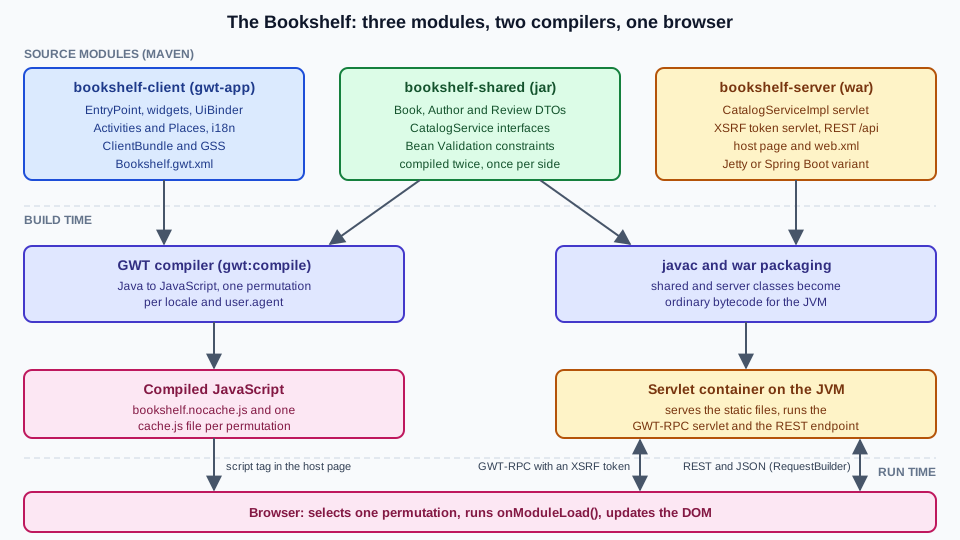
and Next.js sections, so that the stacks can be compared page by page. Here it is a three-module
GWT 2.13 application generated from the modular-webapp archetype:
-
bookshelf-shared: plain Java used on both sides, such as theBook,AuthorandReviewclasses, the RPC service interfaces and the Bean Validation constraints -
bookshelf-client: the code compiled to JavaScript, with theEntryPoint, a UiBinder shell, aDataGridcatalogue, Activities and Places, an Editor-based book form, English and Spanish messages, aClientBundlewith GSS, a JsInterop binding to a chart library andGWT.runAsyncsplit points -
bookshelf-server: a Jakarta servlet backend (Jetty for development, plus a Spring Boot variant) with a GWT-RPCCatalogServiceprotected by XSRF tokens and a small REST/JSON endpoint called withRequestBuilderand a REST library -
tests:
GWTTestCasewith HtmlUnit, plain JUnit tests of presenters with mocked views, server-side RPC tests and a Playwright end-to-end test
The final project layout (bookshelf-client/src/main/java packages for client/{ui,activity,place,resources,i18n}, the
Bookshelf.gwt.xml module file, bookshelf-shared/src/main/java with the shared package, and
bookshelf-server/src/main/java with the server package plus src/main/webapp/index.html and WEB-INF/web.xml) is
assembled on Getting Started.
Reading path
The pages are ordered so that each one builds on the previous ones. Read them in this order the first time, then use them as a reference. Before starting, be comfortable with the language and the build underneath: the Java Reference for generics, annotations, lambdas and the Maven basics, and, for the backend variant of the Bookshelf, the SpringBoot Reference.
-
Foundations: what GWT is, a first project, the module XML, the build, the compiler, development mode and the JRE emulation.
-
Java and JavaScript: JsInterop, the legacy JSNI, the DOM and Elemental2, deferred binding and the scheduler.
-
Building user interfaces: widgets, panels, events, custom widgets, UiBinder, cell widgets, Editors, styling,
ClientBundle, HTML5, accessibility and internationalization. -
Application architecture: history, Activities and Places, validation and logging.
-
Client-server communication: the overview, GWT-RPC,
RequestBuilder, REST libraries, RequestFactory and the server integration and deployment. -
Security:
SafeHtmland XSS, then XSRF and server-side security. -
Performance and optimisation: code splitting, compile reports and linkers.
-
Testing, then the ecosystem, the future and migration, and finally the cheat sheet.
What’s covered
Each page builds on the Bookshelf scenario, links every example to the official page it derives from, and ends with the sources it uses.
Foundations
-
Introduction & Architecture: what GWT is, permutations and deferred binding, the client, shared and server split, the history from 2006 to 2.13, governance, and a comparison with J2CL, Vaadin Flow, JSF, Thymeleaf, Angular, React and Vue
-
Getting Started: prerequisites, the
modular-webapparchetype, the development loop and the full Bookshelf project -
Project Structure & Modules: every module XML element, inheritance, the host page and packaging libraries
-
Build Tools: Maven & Gradle: the
gwt-maven-plugingoals, the BOM, reactor builds, the legacy plugin and the state of Gradle -
Compiler & Compilation: every compiler flag, source levels, output styles, permutations and the output directory
-
Development Mode & Debugging: Super Dev Mode, source maps,
DevModetoday and the code server caveats -
JRE Emulation & Shared Code: what the emulation provides, Java language levels, numeric semantics,
super-sourceand theGWTclass
Java and JavaScript
-
JsInterop: native and exported types, the annotations,
jsinterop-baseand a chart-library binding -
JSNI & Overlay Types: the legacy mechanisms and their migration to JsInterop
-
DOM & Elemental2: the DOM overlays, Elemental2,
fetch, web storage and memory leaks -
Deferred Binding & Generators:
GWT.create(),replace-with,generate-with, properties and writing a generator -
Delayed Logic & Scheduler:
Timer, everySchedulermethod and breaking up long work
Building user interfaces
-
Widgets: the widget model, the class hierarchy, the attach lifecycle and the widget gallery
-
Panels & Layout: basic panels, the layout panels, resizing and CSS versus table layout
-
Events & Handlers: DOM handlers,
HandlerRegistration, preview handlers and the event bus -
Custom Widgets & Composites:
Composite, the interfaces to implement and new panels -
UiBinder: the owner class and
ui.xmlpair, fields, handlers, styles and UiBinder i18n -
Cell Widgets: cells,
CellTable,DataGrid, data providers, pagers, selection and custom cells -
Editors: binding a bean graph to editors, drivers, adapters and RequestFactory integration
-
Styling: CSS & GSS: style names, themes,
CssResource, GSS and the migration -
ClientBundle & Images: every resource type, sprites, inlining, caching and
ImageBundlemigration -
HTML5 Features: storage, canvas, audio and video, geolocation and feature detection
-
Accessibility & ARIA: the ARIA library, focus management and keyboard navigation
-
Internationalization:
Constants,Messages, plurals, locales,Dictionaryand formatting
Application architecture
-
History & Navigation: tokens,
History,Hyperlinkand bookmarkable state -
MVP, Activities & Places: the MVP pattern,
Place,ActivityManager,PlaceControllerand dependency injection -
Validation: Bean Validation on the client, sharing constraints with the server
-
Logging:
java.util.loggingemulation, handlers, remote logging and stack-trace deobfuscation
Client-server communication
-
Client–Server Communication: the options compared,
AsyncCallback, the same-origin policy and CORS -
GWT-RPC: services, servlets, serialisation, policy files, exceptions and the Java 17 pitfall
-
RequestBuilder, JSON & XML: plain HTTP, JSON parsing, JSONP and XML
-
REST & JSON Libraries: Elemental2
fetch, Domino REST, RestyGWT, AutoREST and a Spring Boot REST backend -
RequestFactory & AutoBeans: entity proxies, request contexts and the AutoBean framework
-
Server Integration & Deployment: the WAR, the Spring Boot jar, dynamic host pages, caching, Docker and uploads
Security
-
SafeHtml & XSS: the DOM sinks, the
SafeHtmlfamily, sanitizers, Content Security Policy and the 2012 and 2013 CVEs -
XSRF, RPC & Server Security: XSRF tokens, JSON hijacking, deserialisation risks and the code server
Performance and optimisation
-
Code Splitting:
GWT.runAsync, split points, fragments and prefetching -
Compile Reports & Optimization: the compile report, code-size levers and lightweight metrics
-
Linkers & Bootstrap: the
nocache.jsbootstrap sequence, the linkers and Content Security Policy
Testing
-
Testing:
GWTTestCase, run styles, plain JUnit tests, coverage and Playwright
Ecosystem, the future and migration
-
Ecosystem & Libraries: UI libraries, frameworks, REST libraries and their verified status
-
J2CL & the Future: J2CL compared with GWT, the
org.gwtproject.*modules and the roadmap -
Tooling & IDE Support: IntelliJ IDEA, Eclipse and Visual Studio Code
-
What’s Changed & Migration: the version-to-version migration map and every outdated statement of older material
-
Cheat Sheet: a one-page summary with a downloadable PDF
Where related material lives elsewhere on this site
The GWT pages link to existing material instead of repeating it, and cover only what GWT adds.
| Topic | Where it lives | How the GWT section relates |
|---|---|---|
The Java language and build basics |
Java Reference, including Generics, Annotations and Reflection, Lambdas and Method References, Records and Sealed Classes, Build and Tooling and Testing |
The JRE-emulation page explains which of these language features GWT supports and what the emulation library lacks. |
The Spring Boot backend of the Bookshelf |
SpringBoot Reference, including Getting Started with Spring Boot, REST APIs with Spring MVC and WebFlux, Spring Security and Unit and Integration Testing |
The server-integration and security pages show only the GWT-specific wiring of a Spring Boot jar, its REST API and its CSRF tokens. |
Choosing a web UI technology |
Server-Side Web UI Frameworks, Vaadin Reference, JSF (Jakarta Faces), Thymeleaf, Angular Reference, React Reference and Vue.js Reference |
The introduction compares GWT with these technologies. Vaadin Framework 6 to 8 used GWT for its client-side engine. |
The same ideas in other stacks |
Thymeleaf Internationalization, ASP.NET Core Globalization and Localization and Next.js Internationalization |
The internationalization page points to these pages for the same idea elsewhere. |
Web security and cross-origin requests |
The security pages and the communication overview link here for XSS, the same-origin policy and cross-origin RPC and JSON. |
|
Front end: HTML and CSS, Sass, accessibility |
The styling, ClientBundle and accessibility pages link here for the CSS and accessibility theory. |
|
Browser testing |
The testing page links this page for Selenium, Playwright and Cypress, next to the GWT-specific |
|
Media |
The ClientBundle page covers GWT’s own image bundling, sprites and data URLs; this page covers images and video in general. |
|
Containers, orchestration and cloud |
Docker, Kubernetes and Cloud |
The server-integration-and-deployment page shows only the GWT-specific parts. |
Some related topics are tracked as separate issues and are only mentioned here: a comparison of backend and web frameworks (#263), chat, videoconference and WebSockets (#264), Playwright, Cypress and Selenium (#258) and IDE links (#116). JSF (#239) and Thymeleaf (#238) are documented in their own sections, linked in the table above, and Struts and JSP (#241) in the JSP & Struts section.
Bibliography
Every source used to prepare this section is listed here, each linked to its official site. Individual pages list the
subset they derive from under their own == References heading.
Books
The book below was consulted for concept coverage, narrative and structure only. It targets GWT 1.3 and 1.4 (2007), which
predate handlers, UiBinder, ClientBundle, cell widgets, RequestFactory, Super Dev Mode and JsInterop. No text, code
listing, figure or sample project is taken from it: every example in this section is written against the current
official documentation, and the pages point out where the book is outdated.
-
Hanson, R. and Tacy, A. GWT in Action: Easy Ajax with the Google Web Toolkit. Manning Publications, 1st edition, 2007. ISBN 1-933988-23-1. Publisher page: manning.com/books/gwt-in-action.
-
Further reading only, not consulted: the second edition of the same book, by Adam Tacy, Robert Hanson, Jason Essington and Anna Tökke (Manning, 2013), described on its Manning page.
Official GWT documentation and resources
Published at gwtproject.org.
-
The Developer Guide, with its command-line tools, JRE emulation reference pages, the FAQ and the glossary
-
The tutorials, starting from the tutorial index: StockWatcher, managing events, client-server communication, GWT-RPC, JSON, cross-site requests, internationalization, JUnit, debugging, App Engine and the Polymer tutorial
-
The articles: MVP architecture, part 1, part 2, Super Dev Mode, security for GWT applications, testing methodologies, GSS migration, fragment merging, Elemental, the dynamic host page, DOM events and memory leaks, GWT with Hibernate, JSON mash-ups and the iPhone article
-
The site pages: overview, getting started, download, release notes, versions, roadmap, steering committee, community and making GWT better, plus the IDE pages for Eclipse and IntelliJ IDEA
-
The Javadoc (2.13.1)
-
The gwtproject/gwt repository on GitHub: the milestones, the issues (for example 9709 and #9793), the source (
UserAgent.gwt.xml,SourceLevel), the gwt-site sources of the documentation and the gwtproject organisation'sorg.gwtproject.*modules, with the GWT Project collective and the Gitter room
Official documentation of related projects
-
gwt-maven-plugin (
net.ltgt.gwt.maven) with its repository and the gwt-maven-archetypes (modular-webapp); the legacy Codehaus gwt-maven-plugin site; and Apache Maven -
JsInterop annotations, jsinterop-base, Elemental2 and J2CL (with its README and getting-started guide)
-
IDEs: IntelliJ IDEA GWT support, the GWT Eclipse plugin, Eclipse and Visual Studio Code for Java
-
Jakarta Servlet, Eclipse Jetty, Spring Boot, Spring Security and Jakarta Bean Validation with beanvalidation.org and Hibernate Validator
-
Testing: HtmlUnit, JUnit, Playwright for Java and GwtMockito
-
The ecosystem, each at its official site or repository: Domino UI, domino-rest and domino-jackson (domino-ui, domino-rest, domino-jackson), Sencha GXT, GWT Material (with its demo), GWT Bootstrap 3, Errai, Nalu, GWTP, RestyGWT, gwt-jackson, AutoREST, Dagger and GIN
-
Vaadin Framework and Vaadin Flow, for the history of GWT inside Vaadin
Specifications, standards and security sources
-
HTML Living Standard and DOM Living Standard (WHATWG), ECMAScript (ECMA-262), Content Security Policy Level 3 (W3C), WAI-ARIA 1.2 (W3C), CORS in the Fetch Standard, RFC 9110: HTTP Semantics and RFC 8259: JSON
-
OWASP Cross Site Scripting Prevention Cheat Sheet, OWASP Cross-Site Request Forgery Prevention Cheat Sheet, OWASP Deserialization Cheat Sheet and the OWASP Java HTML Sanitizer
-
Security entries for GWT in the National Vulnerability Database: CVE-2013-4204, CVE-2012-5920, CVE-2012-4563, CVE-2007-2378 and CVE-2007-6452
The book is a consulted reference for concept coverage, narrative and structure; it is not reproduced here. The official documentation linked above is authoritative, and where the two differ, the documentation of the version you run prevails.