Partial Prerendering & Cache Components
|
This content was generated with the assistance of AI and should be verified against the official documentation before being relied on in production. The reference material consulted while preparing these pages is listed in the section bibliography. |
This page is written against Next.js 16.3.8 (the latest release on 2026-10-03, when the facts and examples below were
checked; the official documentation reports @doc-version 16.3.8), React 19.3.0 and Node.js 20.9.0 or later. Partial
Prerendering and Cache Components are App Router features; the Pages Router has neither, and the last sections say
what to do there. Everything on this page is about the opt-in Cache Components model (cacheComponents: true),
because that is where Partial Prerendering lives. Wherever the behaviour differs from the default previous model
(nothing is cached unless you ask, and a single cookies() call makes the whole route dynamic), the page says so, and
the migration section maps one model onto the other. Every example was built with next build and observed over HTTP
after next start with Next.js 16.3.8 and Node.js 24.16 on macOS, in a scratch copy of the Bookshelf that the rest
of this section grows, with cacheComponents enabled; the error messages and route tables quoted below are the real
output of those builds. Each example is followed by the official page it derives from.
The page answers one question: how can a single route be mostly static and still show per-user data, without choosing
between "static page" and "dynamic page"? The answer is a static shell that is built once and sent immediately, plus
dynamic holes that are filled in by the same response a moment later. The pages on Rendering Fundamentals,
Server-Side Rendering and Streaming & Suspense
introduce the vocabulary used here (static rendering, request-time rendering, chunked HTML, fallbacks); the
sibling pages on static site generation, incremental static regeneration and hydration cover the neighbouring parts of
the spectrum, and the caching and data-fetching pages of this section go deeper into use cache itself.
What Partial Prerendering Is
Before Next.js 16 a route had to be one of two things. Reading cookies(), headers() or searchParams, or using an
uncached fetch, turned the whole route into server-rendered-on-demand; otherwise the whole route was prerendered.
A mostly static product page with one personalised greeting had to be fully dynamic, or to fetch that greeting on the
client after load.
Partial Prerendering (PPR) removes that choice. At build time Next.js renders the route’s component tree as far as
it can. Where the tree needs something that is only known at request time, React stops, leaves the
<Suspense> fallback in place, and records where it stopped. The result is:
-
the static shell: the HTML of everything that could be prerendered, with the fallbacks of the unfinished boundaries
-
a serialised postponed state that says where rendering has to resume
-
the RSC payload of the static parts, used for client-side navigation
At request time the shell is sent at once, then React resumes only the unfinished boundaries and streams each one as a chunk that replaces its fallback. The vocabulary of the official glossary is:
| Term | Meaning |
|---|---|
Static shell |
The prerendered HTML served first: all statically renderable content plus the |
Dynamic hole |
A |
Postponed state |
An opaque, serialised value produced by the prerender that tells React where to resume. Treat it as opaque. |
App Shell |
The reusable, URL-independent shell of a route that has dynamic params: the same shell with the param-specific parts left behind their fallbacks. It is also the default prefetch payload when |
Cache Components |
The programming model ( |
PPR is not a separate switch any more. cacheComponents "implements Partial Prerendering as the default behavior in
the App Router", and the experimental experimental.ppr flag and experimental_ppr route segment config of the 15
canaries were removed in 16.0.
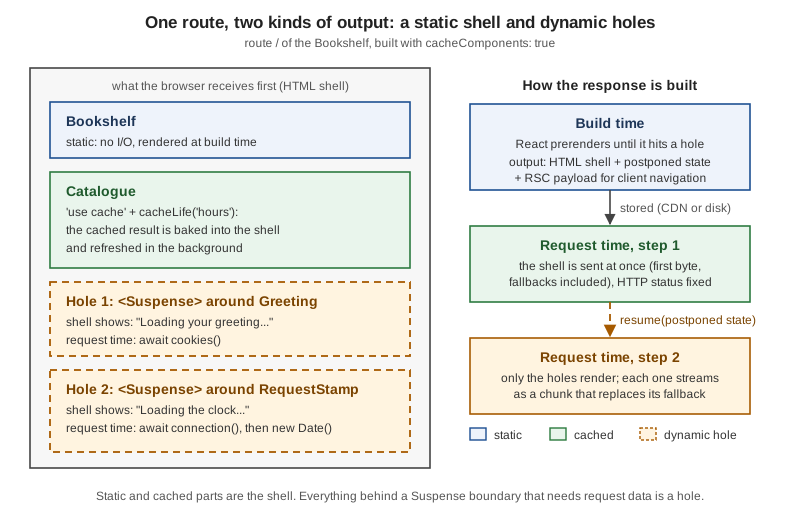
Source: Caching: Prerendering, Glossary, Rendering Philosophy.
Enabling cacheComponents
One option in next.config.ts turns the model on for the whole application:
// next.config.ts
import type { NextConfig } from "next";

const nextConfig: NextConfig = {
  cacheComponents: true,
};

export default nextConfig;
The next build banner confirms it with the line - Cache Components enabled. The effects are application-wide and
worth knowing before you flip the flag:
-
Data is dynamic by default. Nothing is cached unless you opt in with
use cache. ThefetchData Cache defaults and thedynamic,revalidateandfetchCacheroute segment configs no longer apply; the three segment configs anddynamicParamsfail the build (see Migrating to Cache Components). -
Uncached or request-bound access has to be bounded. Anything that needs the request must sit under a
<Suspense>boundary (or be cached), or the build fails (see The Prerender Rules and The Blocking-Route Error). -
The cache directives are available: the
use cachedirective,cacheLifeandcacheTag. Without the flag, a file containing"use cache"does not compile (see the message below). -
The Node.js runtime is required. Routes that export
runtime = 'edge'must be migrated; the build rejects the export (see The Segment Configs That Now Fail the Build). Other server-side JavaScript runtimes are not guaranteed to work. -
Navigation preserves state with
<Activity>. Instead of unmounting the previous route, Next.js keeps a few recently visited routes mounted in"hidden"mode (effects are cleaned up and recreated, state is kept; older routes are evicted), so form inputs and expanded sections survive back and forward navigation. UI that relied on unmounting needs explicit resets.
Under Cache Components GET Route Handlers also follow the prerendering model of pages. The flag is still opt-in in
Next.js 16.3 (the announcement says the behaviours will become the default in a future major version), so a project can
stay on the previous model for as long as it wants.
| Previous model (default) | Cache Components (cacheComponents: true) |
|
|---|---|---|
Reading |
The whole route becomes dynamic (route table |
Allowed only under |
Uncached |
Runs at request time (dynamic) unless you opt in with |
Must be under |
Caching a result |
|
The |
Random values and timestamps |
Evaluated at build time when the route is static (the value is frozen into the HTML). |
A build error until you choose: |
Navigation |
The previous route unmounts. |
Recent routes are kept hidden with |
Trying the directive with the flag off produces this build error:
Error: To use "use cache", please enable the feature flag `cacheComponents` in your Next.js config.

Read more: https://nextjs.org/docs/app/api-reference/directives/use-cache#usageA Complete Example: Static, Cached and Streaming on One Page
The Bookshelf home page below has all four kinds of content on one route: a static heading, a cached catalogue, a
greeting that reads a cookie, and a per-request timestamp. It uses the data helper lib/books.ts of the scratch app
(an in-memory list that stands in for a database).
// app/page.tsx
import { Suspense } from "react";
import { cookies } from "next/headers";
import { connection } from "next/server";
import { cacheLife, cacheTag } from "next/cache";
import { listBooks } from "@/lib/books";

export default function Home() {
  return (
    <main>
      {/* 1. Static: no I/O, prerendered into the shell */}
      <h1>Bookshelf</h1>

      {/* 2. Cached: the 'use cache' result joins the shell */}
      <Catalogue />

      {/* 3. Runtime data: fallback in the shell, content streamed */}
      <Suspense fallback={<p>Loading your greeting…</p>}>
        <Greeting />
      </Suspense>

      {/* 4. Per-request value: connection() keeps it out of the shell */}
      <Suspense fallback={<p>Loading the clock…</p>}>
        <RequestStamp />
      </Suspense>
    </main>
  );
}

async function Catalogue() {
  "use cache";
  cacheLife("hours");
  cacheTag("books");
  const books = await listBooks();
  return (
    <ul>
      {books.map((b) => (
        <li key={b.id}>{b.title}</li>
      ))}
    </ul>
  );
}

async function Greeting() {
  const name = (await cookies()).get("reader")?.value ?? "guest";
  return <p>Welcome back, {name}.</p>;
}

async function RequestStamp() {
  await connection();
  return <p>Rendered at {new Date().toISOString()}</p>;
}
Home is synchronous and awaits nothing, so it never blocks. Catalogue is async, but a use cache function is
resolved during the prerender and its output goes into the shell. Greeting and RequestStamp are the holes. The
build reports the route as partially prerendered, and the Revalidate and Expire columns come from cacheLife("hours"):
Route (app)      Revalidate  Expire
┌ ◐ /                    1h      1d
└ ○ /_not-found


○  (Static)             prerendered as static content
◐  (Partial Prerender)  prerendered as static HTML with dynamic server-streamed content
The shell is a real file, .next/server/app/index.html. Its body is exactly the static and cached content plus the
two fallbacks (the <template id="B:0"> elements are the placeholders React replaces):
<main><h1>Bookshelf</h1><ul><li>Dune</li><li>Neuromancer</li><li>Solaris</li></ul>
<!--$?--><template id="B:0"></template><p>Loading your greeting…</p><!--/$-->
<!--$?--><template id="B:1"></template><p>Loading the clock…</p><!--/$--></main>
A request with a cookie (curl -s localhost:3000/ -H 'cookie: reader=Ana') returns that shell followed by two
streamed chunks, which are the resumed holes (shortened here; the real response also contains React’s inline swap
script):
<div hidden id="S:0"><p>Welcome back, <!-- -->Ana<!-- -->.</p></div><script>$RC("B:0","S:0")</script>
<div hidden id="S:1"><p>Rendered at <!-- -->2026-10-03T14:18:06.059Z</p></div><script>$RC("B:1","S:1")</script></body></html>
The response headers tell the same story: x-nextjs-prerender: 1 and x-nextjs-postponed: 1 (internal headers) are
present when a stored shell was sent and the postponed holes were resumed, and, because the response contains
request-specific content, Cache-Control: private, no-cache, no-store, max-age=0, must-revalidate keeps a downstream CDN from storing
the whole response. The shell itself is cached by Next.js, not by the CDN’s HTTP cache, which is the reason the
platform guide in Self-Hosting and the PPR Platform Guide exists.
To see the ordering with real numbers, the /dashboard route of the same scratch app wraps one slow component (a
cookie read followed by an 800 ms delay standing in for a query) in a boundary. Reading the socket with timestamps
shows the shell leaving immediately and the hole arriving when its data is ready:
  34 ms    414 bytes  []                              status line and headers
  38 ms   1055 bytes  ['Loading orders']              the shell starts, with the fallback
  58 ms   4427 bytes  ['Loading orders']              rest of the shell and the RSC payload
 852 ms    119 bytes  []                              the hole is resumed ...
 852 ms   1011 bytes  []                              ... and streamed
 853 ms     24 bytes  ['</html>']                      end of the document
The page could paint with its fallback within about 60 ms and was complete at about 850 ms, instead of showing nothing for 850 ms. The first 34 ms include the cold start of the process. As with any streaming response, measure behind the real infrastructure: a proxy that buffers turns the stream back into one response (see Streaming & Suspense).
The Prerender Rules
At build time Next.js renders the route and classifies every component by what it touches. The rule behind the whole model is: a component either completes during the prerender, or it must be marked as waiting for a request. Nothing is silently frozen at build time any more.
| The component does | Result | What you do |
|---|---|---|
Pure computation, module imports, |
Completes in the prerender; its output is in the static shell. |
Nothing. If a synchronous source must be per-request, call |
Calls a |
The cached result is in the shell, as long as its lifetime is not too short (see below). |
Pair every directive with |
Awaits |
Cannot complete: build error unless under |
Put the access in a component under |
Awaits an uncached |
Cannot complete: build error unless under |
Put it under |
Reads |
Build error: the value would be frozen into the shell. |
|
Calls |
Prerendering stops here; the rest runs at request time. |
Wrap the component in |
Client hook |
Cannot complete: build error unless under |
Wrap the component that reads the hook in |
Two clarifications from the official guide are easy to miss. First, <Suspense> does not itself make a component
dynamic: a component that only does synchronous work finishes in the prerender whether or not it is wrapped.
Suspense is the place where a fallback goes when something else suspends. Second, performance.now() is deliberately
not guarded, because it is meant for telemetry; time things with it and log the result, but do not render it.
Suspense Around Dynamic Access
The first rule is the one that the next section’s error enforces: runtime data and uncached I/O belong under a boundary, and the boundary decides what the shell shows.
// app/shop/page.tsx
import { Suspense } from "react";
import { cookies } from "next/headers";
import { cacheLife, cacheTag } from "next/cache";
import { listBooks } from "@/lib/books";

export default function ShopPage() {
  return (
    <main>
      <h1>Shop</h1>
      <Suspense fallback={<p>Loading prices…</p>}>
        <PriceList />
      </Suspense>
    </main>
  );
}

// Request-time part: only this component reads the cookie
async function PriceList() {
  const currency = (await cookies()).get("currency")?.value ?? "EUR";
  return <BookPrices currency={currency} />;
}

// Cached part: the cookie value is an argument, so it is part of the cache key
async function BookPrices({ currency }: { currency: string }) {
  "use cache";
  cacheLife("hours");
  cacheTag("books");
  const books = await listBooks();
  return (
    <ul>
      {books.map((b) => (
        <li key={b.id}>
          {b.title}: {(b.priceCents / 100).toFixed(2)} {currency}
        </li>
      ))}
    </ul>
  );
}
The build reports ◐ /shop. The shell contains only <h1>Shop</h1> and the "Loading prices…" fallback, and a request
with cookie: currency=GBP resumes the hole and returns the three prices in pounds. The pattern is the one the
official guide calls "passing runtime values to cached functions": a cached function cannot read cookies() itself,
but it can receive the value as an argument, which becomes part of its cache key. Because the component is gated
behind request data, it is not added to the shell; at runtime it is cached in memory by default, which does not persist
across serverless invocations (see use cache: remote and cache handlers in the caching page of this section).
Random Values and Timestamps
An unguarded Math.random(), new Date(), Date.now() or crypto.randomUUID() used to be harmless in a static
route: it ran once at build time and the value stayed in the HTML forever, which was almost never what the author
meant. With Cache Components the build refuses and asks you to choose. A page that only renders Math.random()
produces this build error (the three calls share the same shape; the Learn more page differs):
Error: Route "/blocking": Next.js encountered the unstable value `Math.random()` while prerendering.

This value can change between renders, so it must be either prerendered or computed later.

Ways to fix this:
  - [dynamic] Render at request time by adding a dynamic data access (e.g. `await connection()`) before this call
  - [cache] Prerender and cache the value with `"use cache"`
  - [client] Render the value on the client with `"use client"`

Learn more: https://nextjs.org/docs/messages/blocking-prerender-random
new Date() links to messages/blocking-prerender-current-time and adds a fourth line, [measure] If the value is for
telemetry, use a timing API such as performance.now(); crypto.randomUUID() links to
messages/blocking-prerender-crypto. The three choices mean three different things:
// app/ids/page.tsx
import { Suspense } from "react";
import { connection } from "next/server";

export default function IdsPage() {
  return (
    <Suspense fallback={<p>Loading…</p>}>
      <PerRequestId />
      <SharedId />
    </Suspense>
  );
}

// [dynamic] a new value for every request: connection() ends the prerender
async function PerRequestId() {
  await connection();
  return <p>Request id: {crypto.randomUUID()}</p>;
}

// [cache] one value, shared by everybody until the cache entry is revalidated
async function SharedId() {
  "use cache";
  return <p>Build id: {crypto.randomUUID()}</p>;
}
connection() (from next/server) resolves only when a real user request is being handled, so everything after it is
excluded from the shell, and the component needs a <Suspense> ancestor. The build reports ◐ /ids (with the default
cache profile’s 15m and 1y in the Revalidate and Expire columns, because SharedId has no cacheLife).
Two requests returned a different Request id each time and the same Build id both times
(c19a947b-d2b5-4fa0-a886-12bfa289a8c7). Both components sit under one boundary here, so both streamed in the hole; the
cached value would be in the shell if it had a boundary of its own or none. The third option, a Client Component, renders the value in the browser (a hydration page of this section
explains why such values must be read in an effect or with a two-pass render to avoid mismatches).
io(): the 16.3 Alternative to connection()
Version 16.3.0 added io() (from next/cache) for the same job. It also suspends during the prerender, but unlike
connection() it does not wait for a real user request, which matters for prefetching: connection() "stays
suspended until a full user navigation reaches the server, so it also blocks prefetches", whereas the code after an
io() call can itself be wrapped in use cache and be prefetched and cached on the client. The official guidance is
to prefer io() and to reach for connection() only when rendering must wait for a real request. Inside a cached scope,
in the browser, in real requests and in apps without Cache Components io() resolves immediately.
// app/clock/page.tsx
import { Suspense } from "react";
import { io } from "next/cache";

export default function ClockPage() {
  return (
    <Suspense fallback={<p>Loading the clock…</p>}>
      <Clock />
    </Suspense>
  );
}

async function Clock() {
  await io();
  return <p>{new Date().toISOString()}</p>;
}
The build reports ◐ /clock; two requests one second apart return the fallback in the shell and then different
timestamps (2026-10-03T14:22:54.583Z and 2026-10-03T14:22:55.616Z). In a Client Component the call is wrapped in
React’s use hook (use(io())) before reading a synchronous source such as Date.now(), because Client Components
are also prerendered on the server.
Cache Lifetimes That Are Too Short
use cache gives a result a lifetime, and the lifetime decides where the result may appear. The official reference
lists the thresholds: a revalidate of 0 or an expire under 5 minutes is excluded from prerenders and becomes a
dynamic hole; a stale under 30 seconds is excluded too (a prefetch would expire before the click); a stale of at
least 30 seconds but under 5 minutes is included in the prerender but excluded from the App Shell. Of the built-in
profiles only seconds falls under a threshold, so a component cached with cacheLife("seconds") outside <Suspense>
fails the build with the same "uncached or runtime data" error as an uncached read. The fix is a boundary around it
(or a longer lifetime). The hours profile used above has revalidate 1 h and expire 1 d, which is exactly what
the route table printed.
Source: cacheLife: Prerendering behavior.
The Blocking-Route Error
The error everybody meets first is this one. Here is the smallest page that triggers it: it reads a cookie and calls the data layer at the top of an async page, with no boundary anywhere above:
// app/blocking/page.tsx  (fails the build)
import { cookies } from "next/headers";
import { listBooks } from "@/lib/books";

export default async function BlockingPage() {
  const reader = (await cookies()).get("reader")?.value ?? "guest";
  const books = await listBooks();
  return (
    <main>
      <h1>Hello, {reader}</h1>
      <p>{books.length} books</p>
    </main>
  );
}
next build stops with this message (verbatim, from 16.3.8):
Error: Route "/blocking": Next.js encountered uncached or runtime data during prerendering.

`fetch(...)`, `cookies()`, `headers()`, `params`, `searchParams`, or `connection()` accessed outside of `<Suspense>` prevents the route from being prerendered, blocking the page load and leading to a slower user experience.

Ways to fix this:
  - [stream] Provide a placeholder with `<Suspense fallback={...}>` around the data access
  - [cache] For uncached data (`fetch`, database calls): cache the access with `"use cache"` (does not apply to `connection()`)
  - [block] Set `export const instant = false` to allow a blocking route

Learn more: https://nextjs.org/docs/messages/blocking-prerender-dynamic
    at body (<anonymous>)
    at html (<anonymous>)
To get a more detailed stack trace and pinpoint the issue, try one of the following:
  - Start the app in development mode by running `next dev`, then open "/blocking" in your browser to investigate the error.
  - Rerun the production build with `next build --debug-prerender` to generate better stack traces.
Error occurred prerendering page "/blocking". Read more: https://nextjs.org/docs/messages/prerender-error
Export encountered an error on /blocking/page: /blocking, exiting the build.
⨯ Next.js build worker exited with code: 1 and signal: null
The names need untangling, because the documentation uses several for the same failure. The overlay in next dev
labels the insight blocking-route (the messages/blocking-route page, "Uncached data was accessed outside of
<Suspense>`", describes the `fetch, cookies(), headers(), params, searchParams and connection() cases),
while the next build message above links to messages/blocking-prerender-dynamic; there are sibling pages
for runtime data (blocking-prerender-runtime), for random values (blocking-prerender-random), for timestamps
(blocking-prerender-current-time), for crypto (blocking-prerender-crypto) and for client hooks
(blocking-prerender-client-hook). All of them are the same rule seen from different calls.
The generic stack trace points at body and html, which is useless in a real application. As the message says,
re-run with next build --debug-prerender; the same build then names the file and line:
    at BlockingPage (app/blocking/page.tsx:5:32)
  3 |
  4 | export default async function BlockingPage() {
> 5 |   const reader = (await cookies()).get("reader")?.value ?? "guest";
    |                                ^
The three fixes in the message are the three legitimate answers, and choosing is a product decision, not a syntax one:
-
[stream] Put a
<Suspense>boundary between the page and the access, with a fallback that looks like the final content. This is the default answer for per-user data. Where the boundary goes decides how much of the page is in the shell: as high as the root layout works but gives a skeleton-only shell, directly above the reading component keeps the rest of the page. -
[cache] If the data is not really per-request, cache it with
use cacheand a lifetime, and it joins the shell. This does not apply toconnection(), and not tocookies()andheaders(), which stay request-bound. -
[block]
export const instant = falseon the page or layout declares that this segment is allowed to block. The build then succeeds: in the scratch app the same cookie-reading page built, and the route table listed it asƒ /blocking(dynamic) while/stayed◐. It is an opt-out of validation, not a fix: the route is rendered per request with no shell, which is the previous model’s behaviour for that route.
// app/blocking/page.tsx  (builds; the route is rendered on every request)
import { cookies } from "next/headers";

export const instant = false;

export default async function BlockingPage() {
  const reader = (await cookies()).get("reader")?.value ?? "guest";
  return <h1>Hello, {reader}</h1>;
}
The instant segment config is the 16.3 control for "instant navigation" validation (see Instant Navigations and Prefetching (16.3)); false marks
a segment as allowed to block, and the highest instant = false in a route’s tree also disables the static-shell
check for that route. It does not clear the synchronous-IO errors of the previous section: new Date(),
Math.random() and crypto.randomUUID() still fail the build, with or without it. Setting it on the root layout
disables the check for the whole app, so keep it as low in the tree as the routes you are exempting.
Three more places produce the same error and are worth recognising:
-
A
"use client"component that callsuseSearchParams()outside a boundary. The build message starts withRoute "/find": Next.js encountered URL data useSearchParams() in a Client Component outside of Suspenseand links tomessages/blocking-prerender-client-hook, offering[stream](wrap the component in<Suspense>) and[block](instant = false) as fixes. Wrapping the component in<Suspense>made the route build (○ /find).usePathname(),useParams()and the segment hooks only suspend when the pathname depends on dynamic params not yet known;useSearchParams()always needs the boundary. -
An uncached
fetchinsidegenerateMetadataorgenerateViewportwhile the page is otherwise prerenderable: cache the data withuse cache, or add a dynamic marker component to the page (see the official migration guide). -
A layout that awaits
paramsorcookies()at its top: everything below the layout is then dynamic. See Pushing Dynamic Access Down the Tree.
In next dev the same problems appear as insights in the dev overlay and in the dev-server console, and as the
get_errors tool of the Next.js DevTools MCP server; they do not change the HTTP response (an offending route still
returns 200 with HTML in development). Use next build for the authoritative answer, because only the build runs
the full prerender.
Pushing Dynamic Access Down the Tree
The deeper an await sits, the more of the page is in the shell. The classic mistake is reading request data in a
layout or page component, because everything below that component then waits for it. The official guide shows the
fix: do not await params or searchParams where they arrive, pass the promise down and await it inside a boundary.
// app/books/[id]/page.tsx
import { Suspense } from "react";
import { notFound } from "next/navigation";
import { cacheLife } from "next/cache";
import { getBook, listBooks } from "@/lib/books";

// Prerender the first book at build time; every other id gets the App Shell
export async function generateStaticParams() {
  const books = await listBooks();
  return books.slice(0, 1).map((b) => ({ id: b.id }));
}

export default function BookPage({ params }: PageProps<"/books/[id]">) {
  return (
    <main>
      <p>
        <a href="/">All books</a>
      </p>
      <Suspense fallback={<h1>Loading book…</h1>}>
        <BookDetail params={params} />
      </Suspense>
    </main>
  );
}

async function BookDetail({ params }: Pick<PageProps<"/books/[id]">, "params">) {
  const { id } = await params;
  const book = await loadBook(id);
  if (!book) notFound();
  return (
    <article>
      <h1>{book.title}</h1>
      <p>by {book.author}</p>
    </article>
  );
}

async function loadBook(id: string) {
  "use cache";
  cacheLife("hours");
  return getBook(id);
}
BookPage is synchronous and only forwards the params promise (PageProps<"/books/[id]"> is the globally
available route-typed helper that Next.js generates). The route table shows both outputs of
this one file:
Route (app)        Revalidate  Expire
┌ ◐ /                      1h      1d
├ ○ /_not-found
├   /books/[id]
│ ├ ◐ /books/[id]
│ └ ○ /books/1             1h      1d
├ ◐ /clock
├ ◐ /dashboard
└ ◐ /shop
/books/1 is listed by generateStaticParams and is entirely static (○: the whole page, including the cached book,
is the shell; curl returns x-nextjs-cache: HIT and Cache-Control: s-maxage=3600, stale-while-revalidate=82800,
which a CDN may store). /books/[id] is the App Shell, the reusable shell for every other id: its file contains the
<main>, the link and the "Loading book…" fallback. A request for /books/2 returns that shell with x-nextjs-postponed: 1
and then streams Neuromancer into the hole. In the scratch run, two further requests for /books/2 still resumed
from the App Shell; how and when an unknown path is upgraded to its own prerender is the subject of the incremental
static regeneration page of this section and of the official ISR with Cache Components guide.
Two details from that run belong in the mental model:
-
notFound()mid-stream./books/99returned200with the fallback, because the missing-book check runs inside the boundary after the shell and status were sent. This is the streaming HTTP contract described in Streaming & Suspense. If a real404matters, check existence before the first boundary. -
An empty App Shell can build without error. A page that does
const { slug } = await paramsat the top and exportsgenerateStaticParamsbuilt in the scratch app (◐ /authors/[slug]plus○ /authors/herbert), but the[slug].htmlshell is a zero-byte file: nothing could be prerendered for an unknown slug, so every such request renders from scratch with no instant fallback. WithoutgenerateStaticParamsthe same page fails the build with the blocking error above. Theinstantreference says Cache Components validates that each page produces a non-empty static shell, butnext builddid not fail on this case, so do not rely on the build to catch it: inspect the shell, and treat an empty one as a defect.
Under Cache Components generateStaticParams must return at least one param (an empty array raises the
empty-generate-static-params error), and the dynamicParams export is not supported: unknown params are rendered on
request, and a notFound() call replaces dynamicParams = false.
Under the Hood: React prerender and resume
Next.js does not implement PPR itself; it drives React’s static and server APIs. prerender (from
react-dom/static) renders a tree to static HTML and, if the render is aborted before everything finished, also
returns a postponed object, "a JSON-serializable, opaque object that can be passed to resume`". `resume (from
react-dom/server) takes the same root element and that postponed state and "streams a pre-rendered React tree",
re-rendering from the root until it reaches a component that was not fully prerendered; only fully prerendered
components are skipped. resumeAndPrerender continues a prerender into another static result instead of a stream
(used when a shell is itself refreshed), and each API has a Node.js stream variant (prerenderToNodeStream,
resumeToPipeableStream, resumeAndPrerenderToNodeStream).
This standalone script, with no Next.js at all, performs the two phases by hand. The promise only settles after the prerender has been aborted, which plays the part of "this data needs a request":
// prerender-resume.mjs  (node prerender-resume.mjs)
import { createElement as h, Suspense, use } from "react";
import { prerender } from "react-dom/static";
import { resume } from "react-dom/server";

// A promise that only settles once the request arrives (here: after prerender)
const request = Promise.withResolvers();

function Greeting() {
  const user = use(request.promise);          // suspends during prerender
  return h("p", null, `Hello, ${user.name}`);
}

function App() {
  return h(
    "html",
    null,
    h("body", null,
      h("h1", null, "Bookshelf"),               // static
      h(Suspense, { fallback: h("p", null, "Loading…") }, h(Greeting)),
    ),
  );
}

async function toText(stream) {
  return new Response(stream).text();
}

// 1. Build time: prerender, then abort once the static part is done
const controller = new AbortController();
const pending = prerender(h(App), { signal: controller.signal, onError() {} });
setTimeout(() => controller.abort(), 50);
const { prelude, postponed } = await pending;
console.log("SHELL    :", await toText(prelude));
console.log("POSTPONED:", postponed === null ? "null" : typeof postponed);

// 2. Request time: the data arrives, resume only the postponed boundary
request.resolve({ name: "Ana" });
const stream = await resume(h(App), postponed);
console.log("RESUMED  :", await toText(stream));
Running it prints (the resumed chunk is cut after the swap function):
SHELL    : <!DOCTYPE html><html><head></head><body><h1>Bookshelf</h1><!--$?--><template id="B:0"></template><p>Loading…</p><!--/$--><script id="_R_">requestAnimationFrame(function(){$RT=performance.now()});</script></body></html>
POSTPONED: object
RESUMED  : <div hidden id="S:0"><p>Hello, Ana</p></div><script>$RB=[];$RV=function(a){ ...
The shell has the heading and the fallback; the resumed stream has only the boundary’s content and the script that
swaps it in ($RC("B:0","S:0")). That is the entire mechanism: next build runs the first phase for every route and
stores the shell, the postponed state and the RSC payload (the postponed string is in .next/server/app/index.meta);
next start runs the second phase on each request. Three constraints of the React API explain Next.js behaviour:
-
resumedoes not acceptbootstrapScriptsoridentifierPrefix: they must be passed toprerender, which is why the shell already contains the script tags that will hydrate the page. -
A CSP
noncecannot be given toprerender(it must be unique per request, and baking one into a shell would be insecure), only toresume. -
React stops where a component suspends; if the suspension is high in the tree, little is in the shell. This is the technical reason for pushing the access down.
A hydration page of this section covers what the browser does with the shell and the resumed chunks (selective hydration of the boundaries, in the order the user interacts with them).
Where Each Part Runs
| Stage | Runs | Effect on the response |
|---|---|---|
|
The Node.js build process. Static content, |
The shell HTML, the postponed state, the RSC payload and one entry per cached function are written under |
Request: Proxy |
|
Redirects and rewrites are decided before the shell is chosen, so they can still return any status. |
Request: the shell |
The Next.js server (or a CDN, see Self-Hosting and the PPR Platform Guide) sends the stored shell immediately. |
First byte after the shell; status and headers are fixed here. Fallbacks are visible. |
Request: the resume |
The Next.js server resumes the postponed boundaries on the Node.js runtime. |
Chunks, then the end of the document; the inline RSC payload of the dynamic parts arrives with them. |
Browser |
React hydrates the shell, then each resumed boundary as its chunk arrives. |
Client Components in the shell are interactive before the holes are filled. |
Client navigation |
The router uses the RSC payload and prefetching (see Linking and Navigation). |
The static part of the next route can be there before the click; with |
Bots and crawlers are handled differently: they need a complete document, so Next.js skips the shell for a detected
bot and renders the whole page at request time, sending the finished HTML once. Anything in your shell that depends on
inputs which only exist while prerendering (build-time data, files that are not present at runtime) can therefore
work for people and fail for crawlers; make sure the data is available at request time too. The streaming page covers
htmlLimitedBots and metadata.
The effect on the bundle is nil: the shell is HTML, and Client Components cost what they always cost. The effect on
the route table is the symbol: ◐ (Partial Prerender) for a route with holes, ○ (Static) for a route that finished
completely (it has no holes at all, which is also what a fully cached page looks like), and ƒ (Dynamic) for a
route that opted out of validation with instant = false and blocks. There is no size or First Load JS column
in 16.x output.
Instant Navigations and Prefetching (16.3)
The shell makes direct visits instant. 16.3 extends the same discipline to client navigations. With
cacheComponents on, Next.js validates in development that navigating into each route renders something at once;
code that would block shows up as an error or insight in the dev overlay. export const instant = true opts a
segment in explicitly (the default validates every page and default segment at warning level, in development only),
instant = false opts it out, and instant = { level: 'warning' } sets the severity. Two tools help: the Navigation
Inspector in the Next.js DevTools (with Pause on navigations, it freezes the initial static UI on refresh and the
prefetched UI on link click), and the instant() helper of @next/playwright for end-to-end tests.
A second opt-in, partialPrefetching: true, makes <Link> prefetch each route’s App Shell by default, instead of the
whole page; prefetch={true} on a link additionally prefetches cached content that depends on that link’s URL data
(searchParams, dynamic params) at the cost of a server invocation per link. Both flags are opt-in in 16.3. They
are covered in detail by the instant-navigation guide; this page only needs the consequence: the shell is also the
unit of prefetching, which is another reason to keep it large.
Source: Instant navigation, instant, partialPrefetching.
Self-Hosting and the PPR Platform Guide
PPR needs one thing from a host: streaming. The official feature matrix lists Partial Prerendering and Cache
Components as "Streaming: Required, Shared Cache: Recommended", with edge stitching optional. A single next start
process (a plain Node.js server, or a Docker container) runs every Next.js feature correctly, PPR and Cache Components
included; "if your platform supports streaming HTTP responses, it supports PPR". Without streaming (a buffering reverse
proxy, an unsuitable function runtime) the page still works but arrives as one response after the slowest hole, which
removes the point. A static export (output: 'export') has no server to resume anything, so it cannot carry holes: building the
/dashboard route of the scratch app with output: 'export' stopped with the message below, so the application has to
stay on a Node.js server for PPR.
Error: Route /dashboard with `dynamic = "error"` couldn't be rendered statically because it used `cookies()`.
See more info here: https://nextjs.org/docs/app/building-your-application/rendering/static-and-dynamic#dynamic-rendering
Behind the origin there are two levels of sophistication, described by the platform guide for people who build hosting platforms and adapters:
-
Origin only (what
next startdoes). Every request goes to the Next.js server, which reads the shell from its local cache, sends it, then renders and streams the holes. No extra infrastructure. -
CDN shell plus origin compute. The CDN serves the cached shell at edge latency, sends a resume request to the origin (ideally in parallel with streaming the shell), and stitches the shell and the streamed holes into a single response. Time to first byte for the shell drops to edge latency while dynamic content still streams from origin.
A route’s stored artifacts are the HTML shell and the postponedState, and they "must be stored and updated
atomically": when time-based or on-demand revalidation regenerates the route, both are regenerated together, and
serving a new shell with an old postponed state (or the reverse) produces wrong dynamic content. Treat the
postponedState as opaque: it has to be passed through unparsed and unmodified.
The resume protocol of the guide has two forms. For a CDN in front of a separate Next.js origin, send a POST to the
route with the header next-resume: 1 and the postponedState as the request body; the server renders only the
deferred boundaries and streams them. (When a Server Action is combined with a resume, the body holds the postponed
state followed by the action body, and x-next-resume-state-length carries the length of the postponed prefix.)
For an adapter that invokes the handler in process, call the entry point with POST, the next-resume: 1 header and
the postponed state as body, or pass requestMeta: { postponed: postponedState } as the third argument. The adapter
output marks PPR routes with renderingMode: 'PARTIALLY_STATIC' in outputs.prerenders, with the state under
fallback.postponedState and the resume headers in pprChain.headers; requestMeta.onCacheEntryV2 reports new
shell and state pairs after revalidation. The guide’s checklist is: read the PPR outputs at build time, serve the shell
and begin streaming, resume the dynamic render, update the cache atomically, and degrade gracefully to a full server
render if the state is missing or stale.
A practical observation from the scratch app: posting the postponed string from .next/server/app/index.meta to a
plain next start with next-resume: 1 returned 405 Method Not Allowed. That is consistent with the guide, where
the protocol is for platform integrations (a build-time adapter and its runtime), not something an application calls
on its own server. Do not build application features on it.
For a self-hosted fleet three more points matter. use cache entries live in the memory of each instance unless a
cache handler (cacheHandlers) shares them, and they are scoped to one deployment, because the cache key contains the
build id: a new deploy starts with empty use cache entries even with a durable handler. Nginx and other proxies must
not buffer streamed responses (the streaming page shows the header and directive). And with several instances
revalidateTag needs shared tag state (refreshTags() in a custom cache handler); the caching page of this section
covers handlers in detail.
Migrating to Cache Components
The official guide gives a procedure and an optional agent skill (next-cache-components-adoption, installed with
npx skills add vercel/next.js --skill next-cache-components-adoption). By hand:
-
Upgrade to Next.js 16 first; Cache Components needs it. Replace
experimental.dynamicIO,experimental.useCacheandexperimental.pprwithcacheComponents(a project on 15 canaries with PPR should read the version 16 upgrade guide: PPR in 16 works differently from the 15 canaries). -
Enable
cacheComponents: trueinnext.config.ts. -
Replace every route segment config; the build names them one by one (next section).
-
Decide: convert every route now, or adopt incrementally (below).
-
Follow the validation errors and insights, replacing each with its Cache Components equivalent, until none is left.
Existing fetch options and unstable_cache keep working as a separate layer, so let the errors lead.
The Segment Configs That Now Fail the Build
Each of the following exports, placed in a page, fails the build under Cache Components. The message is the same each
time with the name changed (verbatim, from 16.3.8, for dynamic):
./app/legacy/page.tsx:1:14
Error: Route segment config "dynamic" is not compatible with `nextConfig.cacheComponents`. Please remove it.
> 1 | export const dynamic = 'force-dynamic';
    |              ^^^^^^^
The same error was produced for revalidate, fetchCache, experimental_ppr, runtime = 'edge' and
dynamicParams. What replaces them:
| Previous model | Cache Components |
|---|---|
|
Delete it: everything is dynamic by default. |
|
Delete it. Add |
|
|
|
Delete it; every |
|
A |
|
A |
|
Delete it (uncached is the default). If a component must run per request, use |
|
|
|
Delete it; call |
|
Return at least one real param. |
|
Delete them: |
|
Delete it; Cache Components needs Node.js. For edge behaviour on specific paths use Proxy. |
Awaiting |
Pass the promise down and await inside |
|
Usually no change; each cached function has its own React cache scope, so calls from separate cached functions do not share a result. |
A Worked Migration
The previous-model shop below mixes three things Cache Components takes apart: a route-level revalidate, a
unstable_cache for the books and a cookie read at the top of the page.
// app/shop/page.tsx  (BEFORE, previous model)
import { cookies } from "next/headers";
import { unstable_cache } from "next/cache";
import { listBooks } from "@/lib/books";

export const revalidate = 3600;

const getBooks = unstable_cache(async () => listBooks(), ["books"], {
  tags: ["books"],
  revalidate: 3600,
});

export default async function ShopPage() {
  const books = await getBooks();
  const currency = (await cookies()).get("currency")?.value ?? "EUR";
  return (
    <main>
      <h1>Shop ({currency})</h1>
      <ul>
        {books.map((b) => (
          <li key={b.id}>
            {b.title}: {(b.priceCents / 100).toFixed(2)} {currency}
          </li>
        ))}
      </ul>
    </main>
  );
}
Built with the previous model, the route table reads ƒ /shop: the cookie made the entire route dynamic, so
every request re-rendered it (Cache-Control: private, no-cache, no-store, max-age=0, must-revalidate) whatever the
revalidate line said. Enabling cacheComponents and only deleting revalidate is not enough. The
build then stops with the blocking error of The Blocking-Route Error, because await cookies() still sits at the top of the page.
The migrated version is the page of Suspense Around Dynamic Access: the page itself is static, the cookie is read in a leaf under
<Suspense>, and the cached part takes the currency as an argument.
Route (app)        Revalidate  Expire
┌ ○ /_not-found
└ ◐ /shop
Three outcomes of the same file, side by side: the previous model rendered the whole page per request and showed no
HTML until the cookie and data were ready; the half-migrated page failed the build; the migrated page sends
<h1>Shop</h1> and "Loading prices…" immediately and streams the prices. The data layer does not change, only where
the boundaries and the cache directives sit.
Adopting Incrementally
A big application does not have to convert every route at once. The guide’s incremental flow is: enable the flag and
replace the segment configs; opt every route that is not ready out with export const instant = false (the
cache-components-instant-false codemod, npx @next/codemod@canary cache-components-instant-false ./app, adds it to
every page, layout and default that does not declare instant; pass ./src/app for a src/ project, because a
wrong path reports 0 ok instead of failing); fix the synchronous-IO errors (new Date(), Math.random(),
crypto.randomUUID()), which instant = false cannot defer; then remove instant = false from one route at a time and
resolve each insight with use cache or <Suspense>.
Also plan for the behavioural change, not only the build errors: routes now stay mounted with <Activity>, so state
that used to reset on navigation (open dropdowns, dialogs with initialisation effects, form results) persists and may
need explicit reset logic.
The Pages Router
The Pages Router has no Partial Prerendering and no Cache Components: use cache, cacheLife and the
blocking-prerender-* errors belong to the App Router. A Pages Router page is one of getStaticProps (SSG, with
revalidate for ISR), getServerSideProps (SSR) or neither (client-side data fetching), chosen for the whole page;
io() simply resolves immediately there. The mix of static and dynamic on one page is therefore reachable only by
moving data fetching to the client, or by migrating the route to the App Router, where the data call becomes an async
Server Component under <Suspense>. Both routers can live in the same project during a migration, but a route cannot
exist in both.
What Changed Recently
| Version | Change |
|---|---|
14 (2023-10) |
Partial Prerendering announced as a preview of a compiler optimisation: "a fast initial static response + streaming dynamic content". |
15 canaries |
|
16.0 (2025-10-21) |
|
16.2 (2026-03-18) |
The Adapters API became stable ( |
16.3 (2026-08-03) |
Instant Navigations (the |
Next.js releases patch versions often (16.3.8 was a security release on 2026-09-30); check the @doc-version of the
guides before relying on a detail.
Where the Books Are Outdated
Both requester-provided books are written for the Pages Router and predate Partial Prerendering and Cache Components.
In them the rendering mode is a per-page choice made with getStaticProps, getServerSideProps and revalidate, and
a page that needs one personalised element has to become fully server-rendered or fetch that element in an effect. Today
that page is a static shell with a <Suspense> hole, and the cache is a directive on the function that needs it. They
also predate the experimental.ppr flag and its 16.0 removal, so a snippet or a tutorial that enables PPR with
experimental: { ppr: true } or exports experimental_ppr is from the 15 canary era and fails the build today. Read the
books for the concepts of static versus request-time rendering only, and use this page for the current model.
Common Pitfalls
-
Enabling the flag and expecting nothing to change. Dynamic-by-default, the blocking errors, the removed segment configs and
<Activity>navigation all change behaviour. Budget time for the migration. -
Awaiting at the top.
await cookies()orawait paramsin a page or layout makes everything below it wait. Push it down and pass promises (Pushing Dynamic Access Down the Tree). -
One boundary around the whole page. It satisfies the build and produces a skeleton-only shell: PPR with nothing in the shell. Put boundaries around the smallest dynamic unit.
-
instant = falseas a fix. It silences validation and gives back the previous model’sƒroute. Use it as a temporary marker in an incremental migration, then remove it. -
Reading a cookie inside
use cache. A cached function cannot read request data directly; extract the value outside and pass it as an argument, or use theuse cache: privatevariant described in the caching page. -
A very short
cacheLife.seconds(orrevalidate: 0) makes the result a hole, so it needs a boundary. -
An empty App Shell. Awaiting
paramsat the top of a dynamic page leaves the unknown-param shell empty (a zero-byte file in the scratch build) even though the build succeeds. -
Expecting
404after the shell.notFound()below a boundary returns200; check before the boundary if the status matters. -
Expecting a CDN to cache the response. A PPR response that contains holes is
Cache-Control: private; only fully static routes (such as/books/1) are public. CDN stitching needs the platform integration in Self-Hosting and the PPR Platform Guide. -
Per-request values that look static. Anything rendered from
Math.random(),Date.now()and friends needsconnection(),io()or a cache;performance.now()is the only one that is exempt, and only for telemetry. -
Edge runtime exports.
runtime = 'edge'fails the build under Cache Components; use Node.js and Proxy. -
Assuming the shell reaches bots. Crawlers get the whole page rendered at request time, so shell content must also be producible at request time.
-
Judging with
next dev. Insights appear only in the overlay and the console, the dev server does not prefetch and does not use the stored shell; measure withnext buildandnext start. -
Unreproducible builds. A cache entry or a prerender that depends on a build-time-only input (a file that is not deployed, an unreachable API) fails or differs when the same code runs at request time (for bots, or on revalidation).
Related Material on This Site
-
Introduction and Architecture: the rendering spectrum and the request flow.
-
Rendering Fundamentals: static, dynamic and the vocabulary of the rendering pages.
-
Server-Side Rendering: the request-time end of the spectrum.
-
Streaming & Suspense: chunks, boundaries, the HTTP contract and buffering.
-
Server and Client Components: where
use clientand the server-only tree meet the shell. -
Linking and Navigation: prefetching,
<Link>and the router cache that the shell feeds. -
Dynamic Routes and Route Groups:
generateStaticParamsand asyncparams. -
Redirects, Rewrites and Proxy: what runs before the shell.
-
React: Server Rendering and React: Code Splitting and Suspense: the React primitives underneath.
The sibling pages on static site generation, incremental static regeneration and hydration, and the later pages on caching, data fetching and deployment of this section, continue from here.