App Components, the Manifest and Intents
|
This content was generated with the assistance of AI and should be verified against the official documentation of Android before being relied on in production. See the section bibliography for the reference material consulted while preparing these pages. |
Every Android app is a loose federation of components that the system, not the app’s own main() function,
decides when to create and destroy. The manifest is where an app declares which components exist and what they
are allowed to do; intents are the messages that connect them, whether inside one app or across apps. This page
covers both, targeting Android 17 (API level 37) and AGP 9.4.1. It builds on
Getting Started with Android and
Project Structure, Gradle and Build Variants, and is a
prerequisite for Activities and the Activity Lifecycle,
Fragments and the Fragment Lifecycle,
Background Work: WorkManager, Services and Alarms and
Navigation in Compose. The running example is TrailMate, a
hiking-trail companion app with package com.example.trailmate.
The Kotlin language features used in the examples below (classes, companion objects, Parcelize, coroutines)
are covered in the Kotlin reference, not repeated here; see
Kotlin for Android and
Coroutines Basics.
The Manifest
AndroidManifest.xml, at the root of the main source set (app/src/main/AndroidManifest.xml), describes an
app to the Android build tools, to the operating system and to the Play Store: what components it has, what
permissions and hardware it needs, and how it integrates with the rest of the system. AGP merges the manifests
of the app module, its library modules and its dependencies into one final manifest per build variant. See
Android Developers — App Manifest Overview.
<application> and Component Elements
The single <application> element wraps every component declaration and a handful of app-wide attributes:
<!-- app/src/main/AndroidManifest.xml -->
<manifest xmlns:android="http://schemas.android.com/apk/res/android"
    xmlns:tools="http://schemas.android.com/tools">

    <uses-permission android:name="android.permission.INTERNET" />
    <uses-permission android:name="android.permission.ACCESS_FINE_LOCATION" />
    <uses-permission android:name="android.permission.POST_NOTIFICATIONS" />
    <uses-permission android:name="android.permission.FOREGROUND_SERVICE" />
    <uses-permission android:name="android.permission.FOREGROUND_SERVICE_LOCATION" />

    <application
        android:name=".TrailMateApplication"
        android:label="@string/app_name"
        android:icon="@mipmap/ic_launcher"
        android:theme="@style/Theme.TrailMate"
        android:allowBackup="true"
        android:dataExtractionRules="@xml/data_extraction_rules"
        android:networkSecurityConfig="@xml/network_security_config">

        <activity
            android:name=".MainActivity"
            android:exported="true"
            android:theme="@style/Theme.TrailMate.Starting">
            <intent-filter>
                <action android:name="android.intent.action.MAIN" />
                <category android:name="android.intent.category.LAUNCHER" />
            </intent-filter>
        </activity>

        <service
            android:name=".sync.RecordHikeService"
            android:foregroundServiceType="location"
            android:exported="false" />

        <receiver
            android:name=".sync.ConnectivityChangedReceiver"
            android:exported="false" />

        <provider
            android:name="androidx.core.content.FileProvider"
            android:authorities="com.example.trailmate.fileprovider"
            android:exported="false"
            android:grantUriPermissions="true">
            <meta-data
                android:name="android.support.FILE_PROVIDER_PATHS"
                android:resource="@xml/file_paths" />
        </provider>

    </application>
</manifest>Because RecordHikeService is a foreground service of type location, the manifest also requests
FOREGROUND_SERVICE (required on API 28+) and the type-specific FOREGROUND_SERVICE_LOCATION (required when
targeting API 34+); without them startForeground() throws a SecurityException. See
Android Developers — Foreground service types.
android:name on <application> points at a custom Application subclass (see below). Each component element
(<activity>, <service>, <receiver>, <provider>) names one class and carries its own attributes — android:exported, android:permission, android:process, android:enabled — documented per element at
Android Developers — <activity>
element, Android Developers — <service>
element, Android Developers — <receiver>
element and Android Developers — <provider> element.
Permissions
An app declares the permissions it needs with <uses-permission>. Normal permissions (INTERNET,
ACCESS_NETWORK_STATE) are granted automatically at install time. Dangerous permissions (ACCESS_FINE_LOCATION,
POST_NOTIFICATIONS, CAMERA) must additionally be requested at runtime with the
androidx.activity.result.contract.ActivityResultContracts.RequestPermission contract, because the user can
revoke them at any time from Settings. A <permission> element lets an app define its own custom permission that
other apps must hold to interact with its exported components. See
Android Developers — Permissions on Android.
<uses-feature>
<uses-feature> declares hardware or software features TrailMate depends on, mainly so the Play Store can hide
the app from devices that cannot run it:
<uses-feature android:name="android.hardware.camera" android:required="false" />
<uses-feature android:name="android.hardware.location.gps" android:required="false" />android:required="false" (the default is true) tells Play the app degrades gracefully without that
feature — TrailMate’s photo capture and elevation tracking are optional, not core functionality. Some features
are also inferred implicitly from the permissions requested (declaring ACCESS_FINE_LOCATION implies
android.hardware.location.gps unless the app explicitly marks it required="false"). See
Android Developers — <uses-feature>
element.
<queries> and Package Visibility
Starting with apps targeting Android 11 (API level 30), the system hides most details of the other apps
installed on the device from PackageManager queries (queryIntentActivities(), getInstalledApplications())
unless the querying app declares what it needs to see. TrailMate needs to see whether a maps app can handle a
geo intent and whether a camera app exists, so it declares both in a <queries> block:
<queries>
    <intent>
        <action android:name="android.intent.action.VIEW" />
        <data android:scheme="geo" />
    </intent>
    <intent>
        <action android:name="android.media.action.IMAGE_CAPTURE" />
    </intent>
    <package android:name="com.google.android.apps.maps" />
</queries>A <package> child names one app by package name; an <intent> child matches every app whose manifest declares
a matching intent filter; a <provider> child matches apps that expose a given content provider authority. A
handful of packages (the app’s own installer, packages it has an active connection to) stay visible without any
declaration. QUERY_ALL_PACKAGES restores full visibility but is tightly restricted on the Play Store and rarely
justified. See Android Developers — Package
Visibility Filtering on Android and
Android Developers — <queries> element.
exported
android:exported controls whether a component can be reached by other apps or only by TrailMate’s own code
(and the system). Since apps targeting Android 12 (API level 31), every activity, service and receiver with an
<intent-filter> must explicitly set android:exported, one way or the other — there is no longer an
implicit default in that case. The launcher activity above is exported="true" because the launcher and other
apps must be able to start it; RecordHikeService, ConnectivityChangedReceiver and the FileProvider are
exported="false" because nothing outside the app (or, for the provider, nothing without an explicit
grantUriPermissions grant) should reach them directly. An exported component with a loosely written intent
filter is the most common way apps accidentally let another app trigger privileged behavior, so the rule of
thumb is: export only what genuinely needs to be reachable from outside, and protect the rest with
android:permission when "not exported" is too strict.
The Four App Components and the Application Class
Android defines four kinds of app component, each with its own lifecycle managed by the system rather than by application code. See Android Developers — App Components.
Activities
An Activity is a single, focused screen with a user interface. TrailMate’s MainActivity hosts the Compose UI
(covered on Jetpack Compose Fundamentals) or, in the legacy Views
build, a NavHostFragment:
// app/src/main/kotlin/com/example/trailmate/MainActivity.kt
class MainActivity : ComponentActivity() {
    override fun onCreate(savedInstanceState: Bundle?) {
        super.onCreate(savedInstanceState)
        setContent {
            TrailMateTheme {
                TrailMateApp()
            }
        }
    }
}The activity lifecycle (onCreate/onStart/onResume/onPause/onStop/onDestroy) is covered in full on
Activities and the Activity Lifecycle. See
Android Developers — Introduction to
Activities.
Services
A Service runs work with no user interface, even while none of the app’s activities is visible. TrailMate’s RecordHikeService
is a foreground service that keeps recording an in-progress hike alive while the app is backgrounded:
// app/src/main/kotlin/com/example/trailmate/sync/RecordHikeService.kt
class RecordHikeService : Service() {
    private val binder = LocalBinder()

    inner class LocalBinder : Binder() {
        fun service(): RecordHikeService = this@RecordHikeService
    }

    override fun onBind(intent: Intent): IBinder = binder

    override fun onStartCommand(intent: Intent?, flags: Int, startId: Int): Int {
        startForeground(NOTIFICATION_ID, buildNotification())
        // begin collecting location updates for the active hike
        return START_STICKY
    }

    private companion object {
        const val NOTIFICATION_ID = 42
    }
}Foreground, background and bound services, WorkManager and alarms are covered in depth on
Background Work: WorkManager, Services and Alarms. See
Android Developers — Services Overview.
Broadcast Receivers
A BroadcastReceiver reacts to system-wide or app-wide announcements — connectivity changes, boot completion,
a custom broadcast one part of the app sends to another. TrailMate’s ConnectivityChangedReceiver re-enqueues a
sync when the network comes back:
// app/src/main/kotlin/com/example/trailmate/sync/ConnectivityChangedReceiver.kt
class ConnectivityChangedReceiver : BroadcastReceiver() {
    override fun onReceive(context: Context, intent: Intent) {
        TrailSyncWorker.enqueue(context)
    }
}Manifest-declared versus runtime-registered receivers, and the RECEIVER_EXPORTED/RECEIVER_NOT_EXPORTED flags
required for runtime registration, are covered in their own section below. See
Android Developers — Broadcasts Overview.
Content Providers
A ContentProvider manages a structured set of app data and exposes it to other components, and optionally to
other apps, behind a stable content:// URI rather than a raw file path or database handle. Content providers
and FileProvider are covered in depth further down this page. See
Android Developers — Content Providers.
The Application Class
Exactly one Application instance is created per process, before any component, and lives for the process’s
entire lifetime. It is the natural place to wire up dependency injection, logging and other process-wide setup.
TrailMate uses it as the Hilt entry point:
// app/src/main/kotlin/com/example/trailmate/TrailMateApplication.kt
@HiltAndroidApp
class TrailMateApplication : Application() {
    override fun onCreate() {
        super.onCreate()
        TrailSyncWorker.schedulePeriodic(this)
    }
}It must be registered with android:name=".TrailMateApplication" on <application>, as shown above. Because it
outlives every activity and fragment, an Application subclass should hold only process-wide singletons
(dependency graphs, analytics clients) and never a reference to a View, Activity or Fragment, which would
leak them for the life of the process. See
Android Developers — Application. Hilt’s
@HiltAndroidApp annotation is covered on
Dependency Injection with Hilt, Dagger and Koin.
Intents
An Intent is a message object that requests an action from another app component: start this activity, bind
to this service, deliver this broadcast. See
Android Developers — Intent.
Explicit vs. Implicit Intents, and Intent Filters
An explicit intent names the target component’s class directly and is resolved without ambiguity — the common case for navigating within one app:
val intent = Intent(this, TrailDetailActivity::class.java).apply {
    putExtra(EXTRA_TRAIL_ID, trail.id)
}
startActivity(intent)An implicit intent instead describes the action to perform and lets the system find a component — in
TrailMate’s own manifest or in another installed app — whose <intent-filter> matches:
val intent = Intent(Intent.ACTION_VIEW, "geo:0,0?q=${trail.latitude},${trail.longitude}".toUri())
startActivity(intent)An <intent-filter> declares which implicit intents a component accepts, by action, category and data
(scheme/host/path/MIME type):
<activity android:name=".TrailShareActivity" android:exported="true">
    <intent-filter>
        <action android:name="android.intent.action.SEND" />
        <category android:name="android.intent.category.DEFAULT" />
        <data android:mimeType="text/plain" />
    </intent-filter>
</activity>When more than one app can handle the same implicit intent, the system shows a disambiguation chooser unless one app has been set as the default. See Android Developers — Intents and Intent Filters.
PendingIntent and Mutability Flags
A PendingIntent wraps an Intent together with the permission to execute it as if from the app that created
it, so it can be handed to another process — typically the system, to fire later from a notification action or
an alarm. TrailMate uses one to open the right trail when the user taps a hike-completed notification:
// app/src/main/kotlin/com/example/trailmate/sync/HikeNotifications.kt
val contentIntent = Intent(context, MainActivity::class.java).apply {
    putExtra(EXTRA_TRAIL_ID, trailId)
}
val pendingIntent = PendingIntent.getActivity(
    context,
    trailId.hashCode(),
    contentIntent,
    PendingIntent.FLAG_IMMUTABLE or PendingIntent.FLAG_UPDATE_CURRENT,
)
val notification = NotificationCompat.Builder(context, CHANNEL_TRAIL_UPDATES)
    .setContentTitle(context.getString(R.string.hike_completed_title))
    .setContentIntent(pendingIntent)
    .setAutoCancel(true)
.build()Every PendingIntent created since apps target Android 12 (API level 31) must specify either
FLAG_MUTABLE or FLAG_IMMUTABLE, and FLAG_IMMUTABLE should be the default choice: it stops the receiving
process (the system, in most cases) from filling in or altering the wrapped intent’s extras before firing it,
which closed off a class of intent-redirection vulnerabilities. FLAG_MUTABLE is only needed when the platform
itself must fill in data the app cannot know in advance — for example an Intent delivered to a remote-input
notification action, or an alarm intent that the system augments before delivery. FLAG_UPDATE_CURRENT replaces
the extras of an existing pending intent with the same request code instead of creating a duplicate. See
Android Developers — PendingIntent.
Common Intents
Rather than writing a custom <intent-filter> for every possible action, most apps request an already-standard
capability with a well-known implicit intent action — dialing a number, composing an email, opening a web page,
sharing text, capturing a photo, picking a contact. TrailMate uses a handful of these instead of reinventing
them:
| Action | Use in TrailMate |
|---|---|
|
Open a trail’s location in whichever maps app the user has installed. |
|
Share a trail summary as plain text from |
|
Delegate photo capture to the camera app when the in-app |
|
Deep-link into the system Settings screen for TrailMate when a permission was permanently denied. |
Deep Links and Verified App Links
A deep link is a URI, custom-scheme (trailmate://trail/42) or http/https, that an <intent-filter>
matches to open a specific screen directly instead of the launcher activity:
<activity android:name=".MainActivity" android:exported="true">
    <intent-filter>
        <action android:name="android.intent.action.VIEW" />
        <category android:name="android.intent.category.DEFAULT" />
        <category android:name="android.intent.category.BROWSABLE" />
        <data android:scheme="https" android:host="trailmate.example.com" android:pathPrefix="/trail" />
    </intent-filter>
</activity>With Navigation Compose or Navigation 3 (Navigation in Compose), the same URI can be declared once and matched straight to a destination without the app parsing it by hand. See Android Developers — Create Deep Links to App Content.
An https deep link is ambiguous by default — other apps or the browser could claim the same host — so the
system falls back to a disambiguation dialog unless the link is a verified App Link. Adding
android:autoVerify="true" to the intent filter tells the system to check, at install time, that the app is
authorized to handle that host; authorization comes from a assetlinks.json file the domain owner publishes at
https://trailmate.example.com/.well-known/assetlinks.json:
[{
  "relation": ["delegate_permission/common.handle_all_urls"],
  "target": {
    "namespace": "android_app",
    "package_name": "com.example.trailmate",
    "sha256_cert_fingerprints": ["14:6D:E9:83:C5:73:06:50:D8:EE:B9:95:2F:34:FC:64:16:A0:83:42:E6:1D:BE:A8:8A:04:96:B2:3F:CF:44:E5"]
  }
}]The fingerprint is the app signing certificate’s SHA-256 digest (keytool -list -v or the Play App Signing
console). Once verified, a matching link opens TrailMate directly, with no disambiguation dialog, whether the
user taps it in a browser, a chat app or another app entirely. See
Android Developers — App Links and
Android Developers — Verify App
Links.
Tasks, the Back Stack and Launch Modes
A task is the stack of activities the user navigates through to accomplish one goal, regardless of which app each activity belongs to — tapping a trail’s share sheet and landing in a maps app’s activity does not create a new task by itself; pressing Back returns to TrailMate because both activities are in the same task’s back stack, by default. The Recents screen shows one entry per task, not per activity or per app. See Android Developers — Tasks and the Back Stack.
android:launchMode on <activity> (or the matching Intent flags at call time, such as
FLAG_ACTIVITY_SINGLE_TOP) changes how a new request for that activity is resolved against the existing back
stack:
| Launch mode | Behavior |
|---|---|
|
A new instance is always created and pushed on top of the back stack, even if one already exists there. |
|
A new instance is created and pushed, unless an instance is already at the very top of the stack, in which
case that instance’s |
|
At most one instance exists in the whole task. If it already exists (anywhere in the stack, not just on top),
every activity above it is finished and the intent is delivered to it via |
|
Like |
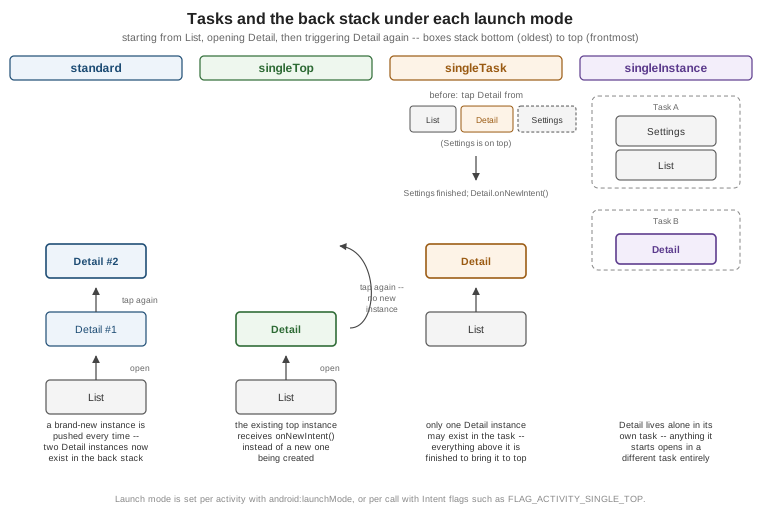
taskAffinity groups activities from different apps into the same task on request (relevant to deep links);
FLAG_ACTIVITY_NEW_TASK, FLAG_ACTIVITY_CLEAR_TOP and FLAG_ACTIVITY_NO_HISTORY are the most common
Intent flags for adjusting this per call instead of per activity declaration. Predictive back and the
Compose-specific back stack (NavBackStack) are covered on
Navigation in Compose.
Content Providers and FileProvider
A content provider sits behind a content:// URI and exposes rows of structured data through a small, uniform
CRUD interface (query(), insert(), update(), delete(), plus getType() for the MIME type), regardless of
whether the data actually lives in SQLite, a flat file or a remote service. ContentResolver is the only way
another app — or another process of the same app — can reach it. TrailMate’s own trail and photo data lives in
Room (Room Database and Paging) and is not exposed through a
provider, but the pattern matters for two reasons: several system data sets (contacts, the media library,
calendar) are only reachable this way, and TrailMate has to expose files — captured hike photos — to other
apps safely.
androidx.core.content.FileProvider is a ready-made ContentProvider for exactly that: it turns a file the app
owns into a short-lived, permission-scoped content:// URI, instead of a raw file:// path that other apps
have not been allowed to read since Android 7.0 (API level 24). PhotoCaptureScreen uses it to hand a
CameraX-captured photo file to the system share sheet:
<!-- app/src/main/res/xml/file_paths.xml -->
<paths xmlns:android="http://schemas.android.com/apk/res/android">
    <cache-path name="hike_photos" path="photos/" />
</paths>// feature/trails/src/main/kotlin/com/example/trailmate/feature/trails/PhotoSharing.kt
fun sharePhoto(context: Context, photoFile: File) {
val uri = FileProvider.getUriForFile(
context,
"com.example.trailmate.fileprovider",
photoFile,
)
val intent = Intent(Intent.ACTION_SEND).apply {
putExtra(Intent.EXTRA_STREAM, uri)
type = "image/jpeg"
addFlags(Intent.FLAG_GRANT_READ_URI_PERMISSION)
}
context.startActivity(Intent.createChooser(intent, null))
}The <provider> declaration and file_paths.xml resource shown earlier in <application> register the
authority (com.example.trailmate.fileprovider, matched exactly in code) and the directories it is allowed to
expose; FLAG_GRANT_READ_URI_PERMISSION grants the receiving app temporary read access to that one URI without
making the provider itself exported. See
Android Developers — Content
Provider Basics and
Android Developers — FileProvider.
Bound Services and AIDL
Where a started service (as RecordHikeService is above) runs independently of any caller, a bound service
offers a client-server interface that other components call directly for as long as they stay bound, and that
the system stops once the last client unbinds. Binding within one app’s own process, as RecordHikeService
also supports through its LocalBinder, is the common case and needs nothing more than an IBinder subclass
and a ServiceConnection.
Binding across process boundaries — a rare need, mainly for a small number of system-facing components or
multi-process apps — requires the interface to be marshalled between processes, which Android generates from an
AIDL (.aidl) file describing the interface’s methods:
// app/src/main/aidl/com/example/trailmate/IHikeTracker.aidl
interface IHikeTracker {
    double currentDistanceKm();
    void stopTracking();
}The build tools generate a Stub base class from this file; the service implements it in onBind(), and a
remote client calls it through IHikeTracker.Stub.asInterface(binder). TrailMate itself has no cross-process
need for this and keeps RecordHikeService bound in-process only; AIDL is worth knowing mainly to recognize it
in system APIs and multi-process apps. See
Android Developers — Bound
Services and Android Developers — Android
Interface Definition Language (AIDL).
Broadcast Receivers: Manifest vs. Runtime Registration, and RECEIVER_EXPORTED
A receiver can be wired up in two ways. Manifest-registered, as ConnectivityChangedReceiver is declared
under <application> earlier on this page, lets the system deliver a matching broadcast even while the app has
no running process — but since Android 8.0 (API level 26), this is only honored for a short, explicitly
allow-listed set of implicit broadcasts (BOOT_COMPLETED among them); most implicit broadcasts are delivered
only to receivers registered at runtime while the app is alive, to limit how many processes the system has to
wake up for a single broadcast.
Runtime-registered receivers are created and torn down in code, typically scoped to a component’s own lifecycle:
// app/src/main/kotlin/com/example/trailmate/MainActivity.kt
private val hikeCompletedReceiver = HikeCompletedReceiver()

override fun onStart() {
    super.onStart()
    val filter = IntentFilter(ACTION_HIKE_COMPLETED)
    ContextCompat.registerReceiver(
        this,
        hikeCompletedReceiver,
        filter,
        ContextCompat.RECEIVER_NOT_EXPORTED,
    )
}

override fun onStop() {
    unregisterReceiver(hikeCompletedReceiver)
    super.onStop()
}Since apps target Android 14 (API level 34), every call that registers a receiver at runtime must specify
either ContextCompat.RECEIVER_EXPORTED (other apps on the device may send matching broadcasts to it) or
ContextCompat.RECEIVER_NOT_EXPORTED (only broadcasts from TrailMate’s own app, or the system, are delivered).
ACTION_HIKE_COMPLETED above is a broadcast TrailMate sends to itself, so RECEIVER_NOT_EXPORTED is the correct
and safer choice; a receiver that genuinely needs to hear from other apps sets RECEIVER_EXPORTED and should
usually also require a signature-level android:permission. See
Android Developers — Broadcasts Overview.
Process Priority
Every app runs in its own Linux process (by default one process per app, android:process on a component can
opt it into a different one), and the system decides which processes to keep alive under memory pressure purely
by importance, from highest to lowest: a foreground process hosting a visible or interacting activity or a
running foreground service; a visible process the user can partially see but not interact with; a service
process running a started (non-foreground) service; a cached process holding no active component, kept around
only in case it is needed again soon. TrailMate keeps RecordHikeService a foreground service (with a
persistent notification and the location foreground-service type declared in the manifest) specifically to
stay in the highest-priority band while a hike is being recorded — without that, the system would be free to
kill the process mid-hike the moment the user switches to another app. See
Android Developers — Processes and
the Application Life Cycle.