Classes and Objects
|
This section documents C# 14 on .NET 10 (LTS), as published at learn.microsoft.com/dotnet/csharp, which is the reference these pages are written and verified against. Features introduced by C# 15 / .NET 11 are still in preview and are always flagged as such — never presented as baseline. This content was generated with the assistance of AI and should be verified against learn.microsoft.com before being relied on in production. This section’s bibliography lists the reference material consulted while preparing these pages. |
Declaring a Class
namespace Sample.Ordering;

public class Order
{
    // Fields -- private by default, `_camelCase` by convention.
    private readonly List<OrderLine> _lines = [];
    private decimal _discount;

    // Constants -- implicitly static, compile-time values.
    public const decimal MaxDiscount = 0.5m;

    // Static field -- shared by every instance, `s_` prefix by convention.
    private static int s_created;

    // Constructor
    public Order(string customer)
    {
        Customer = customer;
        s_created++;
    }

    // Properties
    public string Customer { get; }
    public IReadOnlyList<OrderLine> Lines => _lines;
    public decimal Total => _lines.Sum(line => line.Amount) * (1 - _discount);

    // Methods
    public void Add(OrderLine line) => _lines.Add(line);

    public static int CreatedCount => s_created;
}

public sealed class OrderLine
{
    public OrderLine(string sku, decimal amount) => (Sku, Amount) = (sku, amount);

    public string Sku { get; }
    public decimal Amount { get; }
}
Instance and Static Members
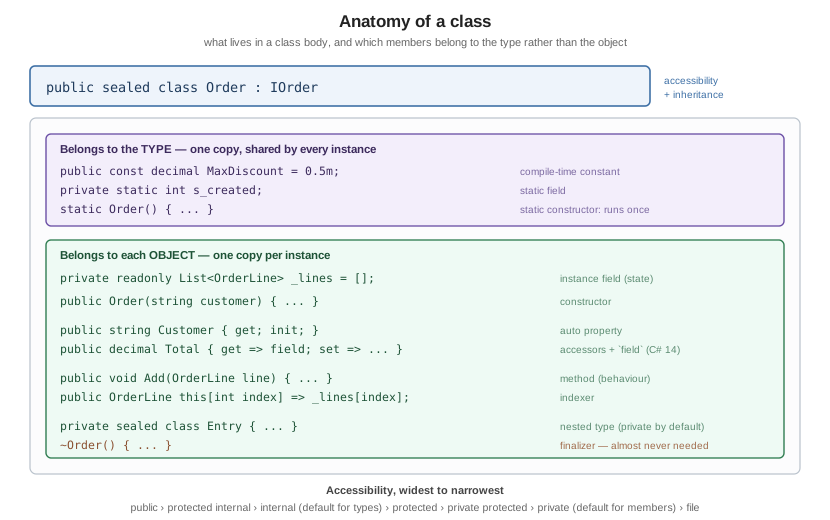
An instance member belongs to each object; a static member belongs to the type itself.
public class Counter
{
    private int _instanceCount;          // one per object
    private static int s_totalCount;     // one for the whole type

    public void Increment()
    {
        _instanceCount++;
        s_totalCount++;
    }

    public int InstanceCount => _instanceCount;
    public static int TotalCount => s_totalCount;
}

// A static class: no instances, no constructor, implicitly sealed and abstract.
public static class Geometry
{
    public const double Tau = Math.PI * 2;

    public static double CircleArea(double radius) => Math.PI * radius * radius;
}
A static class may contain only static members and is the usual home for extension methods and stateless helpers.
Constructors
public class Connection
{
    private static readonly TimeSpan s_defaultTimeout;

    // Static constructor: runs once, before first use of the type. No access modifier,
    // no parameters, and you cannot call it.
    static Connection() => s_defaultTimeout = TimeSpan.FromSeconds(30);

    // Instance constructors, chained with `this(...)`.
    public Connection() : this("localhost", 5432) { }

    public Connection(string host) : this(host, 5432) { }

    public Connection(string host, int port)
    {
        Host = host;
        Port = port;
        Timeout = s_defaultTimeout;
    }

    // A private constructor plus a factory method controls how instances are made.
    private Connection(Connection template, TimeSpan timeout)
    {
        Host = template.Host;
        Port = template.Port;
        Timeout = timeout;
    }

    public Connection WithTimeout(TimeSpan timeout) => new(this, timeout);

    public string Host { get; }
    public int Port { get; }
    public TimeSpan Timeout { get; }
}
If you declare no constructor at all, the compiler supplies a public parameterless one. Declaring any constructor removes it.
Base-class constructors are chained with base(…); see
Inheritance and Polymorphism.
Primary Constructors
C# 12 lets a class or struct declare constructor parameters on the declaration line. They are in scope throughout the body:
public class Repository(IReadOnlyList<string> items, ILoggerLike logger)
{
    // The parameters are captured into hidden fields when used in a member body.
    public int Count => items.Count;

    public string Get(int index)
    {
        logger.Log($"reading {index}");
        return items[index];
    }

    // Other constructors must chain to the primary one.
    public Repository(IReadOnlyList<string> items) : this(items, NullLogger.Instance) { }
}

public interface ILoggerLike { void Log(string message); }

public sealed class NullLogger : ILoggerLike
{
    public static readonly NullLogger Instance = new();
    public void Log(string message) { }
}
The parameters are not properties on a class (unlike on a record, where positional parameters become public
properties). They are mutable captured state, so if you want them exposed, declare a property explicitly:
public class Point3D(double x, double y, double z)
{
    public double X { get; } = x;        // initialised from the primary constructor parameter
    public double Y { get; } = y;
    public double Z { get; } = z;
}
Partial Constructors (C# 14)
C# 14 extends partial to constructors (and events), so a source generator can supply the body of a
constructor whose signature you declare:
public partial class Generated
{
    // The defining declaration -- signature only, no body.
    public partial Generated(string name);

    public string Name { get; private set; } = "";
}

public partial class Generated
{
    // The implementing declaration -- exactly one, with the body.
    public partial Generated(string name) => Name = name;
}
As with partial methods and properties, exactly one declaration has the body, and the two must agree on signature and accessibility.
Object and Collection Initializers
public class Customer
{
    public string Name { get; set; } = "";
    public string? Email { get; set; }
    public Address? Address { get; set; }
    public List<string> Tags { get; } = [];
}

public class Address
{
    public string City { get; set; } = "";
    public string Country { get; set; } = "";
}

public static class InitializerDemo
{
    public static void Run()
    {
        // Object initializer: runs after the constructor.
        var customer = new Customer
        {
            Name = "Ada",
            Email = "ada@example.com",
            Address = new Address { City = "London", Country = "UK" },

            // Collection initializer on a read-only property -- calls Add, does not assign.
            Tags = { "vip", "beta" },
        };

        // Collection initializers and collection expressions.
        List<int> numbers = [1, 2, 3];
        var lookup = new Dictionary<string, int> { ["a"] = 1, ["b"] = 2 };

        Console.WriteLine($"{customer.Name} {customer.Tags.Count} {numbers.Count} {lookup.Count}");
    }
}
required Members
required forces the caller to set a member in an object initializer — initialisation guarantees without a
constructor parameter for every property:
public class Person
{
    public required string FirstName { get; init; }
    public required string LastName { get; init; }
    public int Age { get; init; }
}

public static class RequiredDemo
{
    public static void Run()
    {
        var person = new Person { FirstName = "Ada", LastName = "Lovelace", Age = 36 };
        Console.WriteLine($"{person.FirstName} {person.LastName}");

        // var incomplete = new Person { FirstName = "Ada" };
        // error CS9035: Required member 'Person.LastName' must be set
    }
}
A constructor that does set every required member can opt out with [SetsRequiredMembers].
Properties
public class Product
{
    // Auto-implemented: the compiler supplies the backing field.
    public string Name { get; set; } = "";

    // Read-only: settable in the constructor or an initialiser only.
    public Guid Id { get; } = Guid.NewGuid();

    // init-only: settable in an object initializer, then frozen.
    public decimal ListPrice { get; init; }

    // Different accessibility per accessor.
    public int StockLevel { get; private set; }

    // Computed, expression-bodied.
    public bool InStock => StockLevel > 0;

    // Full property with an explicit backing field.
    private string _sku = "";
    public string Sku
    {
        get => _sku;
        set => _sku = value.Trim().ToUpperInvariant();
    }

    // static property
    public static int TotalProducts { get; private set; }

    public void Restock(int quantity) => StockLevel += quantity;
}
The field Keyword (C# 14)
C# 14 makes field a contextual keyword inside an accessor, referring to the compiler-synthesised backing
field. A property that needs logic in just one accessor no longer needs a hand-written field:
public class Temperature
{
    // C# 14: validation in the setter, no explicit backing field needed.
    public double Celsius
    {
        get => field;
        set => field = value < -273.15
            ? throw new ArgumentOutOfRangeException(nameof(value), "Below absolute zero.")
            : value;
    }

    // Only one accessor needs a body; the other stays auto-implemented.
    public string Name
    {
        get;
        set => field = value?.Trim() ?? "";
    } = "unnamed";

    // Lazy initialisation reads very cleanly now.
    public IReadOnlyList<string> History => field ??= new List<string>();
}|
Because |
Property Patterns
Properties integrate with pattern matching:
public static class PropertyPatterns
{
    public static string Describe(Product product) => product switch
    {
        { StockLevel: 0 } => "out of stock",
        { ListPrice: > 1000, InStock: true } => "premium, available",
        { Name.Length: > 50 } => "long name",       // extended property pattern
        _ => "ordinary",
    };
}
Indexers
An indexer lets an instance be used with []:
public class Matrix
{
    private readonly double[,] _cells;

    public Matrix(int rows, int columns) => _cells = new double[rows, columns];

    public double this[int row, int column]
    {
        get => _cells[row, column];
        set => _cells[row, column] = value;
    }

    // Indexers overload, including on Index and Range.
    public double this[string cell]
    {
        get
        {
            int row = cell[0] - 'A';
            int column = int.Parse(cell[1..], CultureInfo.InvariantCulture) - 1;
            return _cells[row, column];
        }
    }

    public int Rows => _cells.GetLength(0);
}

public static class IndexerDemo
{
    public static void Run()
    {
        var m = new Matrix(3, 3);
        m[0, 0] = 1.5;
        Console.WriteLine(m[0, 0]);    // 1.5
        Console.WriteLine(m["A1"]);    // 1.5
    }
}
this
public class Builder
{
    private readonly StringBuilder _text = new();

    public Builder Append(string value)
    {
        _text.Append(value);
        return this;                  // fluent chaining
    }

    public Builder Append(string value, bool condition) =>
        condition ? this.Append(value) : this;    // explicit `this` for clarity

    public override string ToString() => _text.ToString();
}
this is also how a constructor chains (: this(…)), how an extension method declares its receiver, and how
you disambiguate a field from a parameter of the same name.
Nested Types
public class Cache
{
    private readonly Dictionary<string, Entry> _entries = [];

    public void Put(string key, string value)
        => _entries[key] = new Entry(value, DateTimeOffset.UtcNow);

    public string? Get(string key)
        => _entries.TryGetValue(key, out Entry? entry) ? entry.Value : null;

    // A nested type can see the outer type's private members; the reverse is not true,
    // and a nested type has no implicit reference to an outer instance.
    private sealed class Entry(string value, DateTimeOffset storedAt)
    {
        public string Value { get; } = value;
        public DateTimeOffset StoredAt { get; } = storedAt;
    }

    // A public nested type is part of your API: Cache.Options.
    public sealed class Options
    {
        public TimeSpan Ttl { get; init; } = TimeSpan.FromMinutes(5);
    }
}
Nested types default to private. Keep them private unless they are genuinely part of the outer type’s
contract.
partial Classes and Members
partial splits a declaration across files — essential for designer- and generator-produced code:
// Written by hand
public partial class ViewModel
{
    public string Title => BuildTitle();
}

// Generated
public partial class ViewModel
{
    private string BuildTitle() => "generated";
}
Methods, properties, indexers, events and (from C# 14) constructors may also be partial: a defining
declaration with no body and exactly one implementing declaration with one. A partial method with no
implementation is simply erased along with its call sites — provided it returns void, has no out
parameters and is not accessible outside the type.
Access Modifiers
| Modifier | Visible from |
|---|---|
|
Anywhere. |
|
The containing type only. The default for members. |
|
The containing type and types derived from it. |
|
The containing assembly. The default for top-level types. |
|
The containing assembly, or derived types in any assembly (the union). |
|
Derived types within the containing assembly (the intersection). |
|
The containing file only (C# 11) — for source-generated types that must not collide. |
internal class Service            // internal: the default for a top-level type
{
    private int _state;                          // private: the default for a member
    protected virtual void OnChanged() { }
    internal void UsedByTests() { }
    private protected void ForDerivedTypesHere() { }
}

file sealed class GeneratorHelper  // invisible outside this file
{
    public static int Value => 42;
}
[assembly: InternalsVisibleTo("MyProject.Tests")] opens internal members to a named assembly — the usual
way to unit-test internals. See
Namespaces, Assemblies and Projects.
Finalizers
public class NativeBuffer : IDisposable
{
    private IntPtr _handle = Marshal.AllocHGlobal(1024);
    private bool _disposed;

    // A finalizer runs on the GC's finalizer thread, at an unpredictable time.
    ~NativeBuffer() => Release();

    public void Dispose()
    {
        Release();
        GC.SuppressFinalize(this);      // no need to finalize; we cleaned up already
    }

    private void Release()
    {
        if (_disposed)
        {
            return;
        }

        if (_handle != IntPtr.Zero)
        {
            Marshal.FreeHGlobal(_handle);
            _handle = IntPtr.Zero;
        }

        _disposed = true;
    }
}
Almost no type should have a finalizer. Wrap the native resource in a SafeHandle and implement only
IDisposable; see
Memory Management and Disposal.
The object Base Type
Every type derives from System.Object, directly or not, and therefore has:
public sealed class Money
{
    public Money(decimal amount, string currency) => (Amount, Currency) = (amount, currency);

    public decimal Amount { get; }
    public string Currency { get; }

    public override string ToString() => $"{Amount:N2} {Currency}";

    public override bool Equals(object? obj)
        => obj is Money other && other.Amount == Amount && other.Currency == Currency;

    public override int GetHashCode() => HashCode.Combine(Amount, Currency);
}ToString, Equals, GetHashCode and GetType are the four you will meet constantly. Overriding Equals
without GetHashCode is a bug the compiler warns about; see
Equality and Operator Overloading.
See Also
-
Structs and Value Types — the value-type alternative.
-
Records — classes optimised for data.
-
Inheritance and Polymorphism —
base,virtualandabstract. -
Interfaces — the contracts classes implement.
-
Memory Management and Disposal —
IDisposableand finalizers.