Inference Optimization
|
This content was generated with the assistance of AI and should be verified against the official documentation of each tool and framework before being relied on in production. This section’s bibliography lists the reference material consulted while preparing these pages. |
This page was written against Ollama 0.34.4, llama.cpp v0.5.0 and vLLM 0.30.0, with Python 3.12 and openai
3.20.0 for the measuring script, as checked on 2026-09-28 (see the Running LLMs
Locally baseline). TTFT, TPOT and their effect on cost from the caller’s side — including hosted-API pricing — are on Cost, Latency & Throughput; this page looks at the
same metrics from the side of the machine that runs the model.
Prefill vs. decode
Every request runs in two phases with opposite bottlenecks:
-
Prefill processes the whole prompt in one forward pass, computing the KV cache for every input token. The work is large matrix-matrix multiplications over many tokens at once, so prefill is compute-bound and its duration grows with prompt length. It determines the time to the first token.
-
Decode then generates one token per forward pass, each pass reading all active weights and the KV cache from memory to produce a single token. The arithmetic per byte read is tiny, so decode is memory-bandwidth-bound (see Memory bandwidth and MBU). It determines the time per output token.
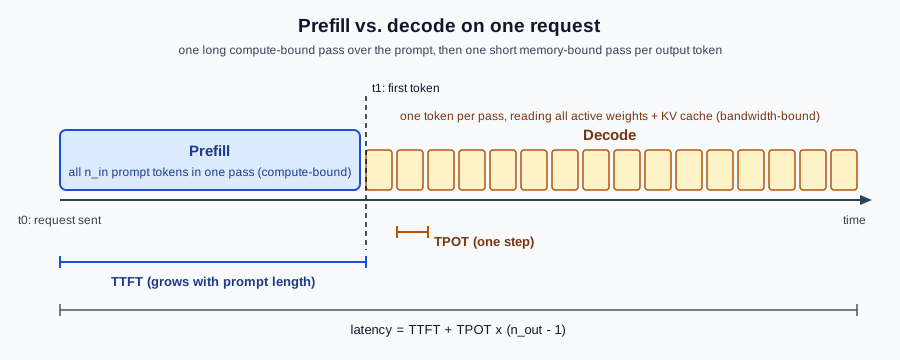
Almost every optimization below targets one of the two phases: caching and chunking target prefill; batching, quantization, speculative decoding and GQA target decode.
TTFT, TPOT, throughput and goodput
For a request with prompt tokens that generates tokens, sent at , with the first token at and the last at :
TPOT is also called inter-token latency (vLLM’s metric is vllm:inter_token_latency_seconds). Two throughput
figures matter for a server running many requests in a window of seconds:
Throughput counts every token; goodput counts only requests that met the service-level objectives and (Zhong et al., DistServe). Batching more requests always raises throughput, but past some load it pushes TTFT and TPOT beyond what users tolerate and goodput falls. For an interactive assistant such as DocsAssistant, goodput is the number to optimise.
Batching
On a GPU, decoding one sequence leaves most of the compute idle, because the weights read for one token can serve many sequences at the same cost. Batching decodes several sequences in the same forward pass, so throughput rises almost linearly until compute or KV-cache memory runs out, while each sequence’s TPOT grows only slowly.
-
llama.cpp:
-np Nslots with continuous batching (default on);-cis shared by the slots. -
Ollama:
OLLAMA_NUM_PARALLELrequests per model (memory scales with it times the context). -
vLLM / SGLang: continuous batching is always on;
--max-num-seqscaps concurrent sequences.
llama serve -hf bartowski/Meta-Llama-3.1-8B-Instruct-GGUF:Q4_K_M -np 4 -c 32768
OLLAMA_NUM_PARALLEL=4 OLLAMA_CONTEXT_LENGTH=8192 ollama serve
See the llama.cpp server README, Ollama — FAQ and vLLM & SGLang. On a laptop with one user, batching buys nothing; on a shared server it is the main lever.
Prompt and prefix caching
If two requests start with the same tokens — the same system prompt, tool definitions or document — the KV cache for that prefix can be reused instead of recomputed, turning part of the prefill into a lookup:
-
llama.cpp reuses a slot’s cache for a following request with the same prefix (
cache_prompt, on by default on/completion), and can save and restore slot caches (/slots/{id}?action=save). -
vLLM’s automatic prefix caching and SGLang’s RadixAttention share cached blocks across all requests.
To benefit, put the stable parts first (system prompt, tools, retrieved documents in a fixed order) and the variable part last. Anything that changes the beginning of the prompt on every request — a timestamp, a random ID — defeats the cache: the vLLM documentation notes that Claude Code’s per-request attribution header did exactly that until vLLM worked around it. See vLLM — Automatic prefix caching and the llama.cpp server README.
Speculative decoding
A cheap draft proposes tokens; the target model checks them all in one forward pass and keeps the longest accepted prefix plus one token of its own. If each draft token is accepted with probability , the expected number of tokens produced per target forward pass is
(Leviathan et al.). The output distribution is exactly the target model’s, so quality is unchanged. It pays off when is high — code edits, structured output, RAG answers that quote their sources — and when the draft is much cheaper than the target; on a busy batched server the spare compute it needs may not exist. Engine flags are on llama.cpp and vLLM & SGLang:
llama serve -m Qwen3-4B.gguf --spec-type ngram-simple --spec-draft-n-max 64FlashAttention
Standard attention materialises the score matrix in GPU memory. FlashAttention computes the same result in tiles that stay in on-chip SRAM, never writing the full matrix, which cuts memory traffic and makes long-context prefill much faster and leaner (Dao et al.). It is an exact algorithm, not an approximation. Engines enable it automatically where the backend supports it:
llama serve -hf bartowski/Meta-Llama-3.1-8B-Instruct-GGUF:Q4_K_M -fa on -c 65536
OLLAMA_FLASH_ATTENTION=1 ollama serve
llama.cpp’s -fa defaults to auto, and Ollama requires Flash Attention for a quantized KV cache. See the
llama.cpp server README and
Ollama — FAQ.
Grouped-query attention
Multi-head attention caches keys and values for every head. Multi-query attention (MQA) shares one K/V head across all query heads; grouped-query attention (GQA) shares each K/V head across a group (Ainslie et al.). With query heads and KV heads, the KV cache shrinks by
so a model with 32 query heads and 8 KV heads caches a quarter as much per token — which is why the
KV-cache formula uses , not the number of
attention heads. GQA is a property of the model, chosen at training time; you benefit from it by choosing GQA
models (virtually all current ones), not by a flag. You can read a model’s ratio from its config.json
(num_attention_heads vs. num_key_value_heads):
import json

cfg = json.load(open("config.json"))
print(cfg["num_attention_heads"], cfg["num_key_value_heads"])
Ollama’s FAQ notes that models with a high GQA ratio are more sensitive to KV-cache quantization, because each cached head serves more query heads. See Ollama — FAQ.
Tuning context length and parallel slots
Context length and concurrency compete for the same KV-cache memory ( ). A practical order of operations:
-
Size the context to the workload, not to the model’s maximum: RAG with five 500-token chunks needs about 8k; coding agents need 64k or more.
-
Fit the weights plus that context entirely on the GPU (
100% GPUinollama ps, all layers with-ngl); an offloaded layer costs more than a smaller context. -
Only then add parallel slots, and remember that in llama.cpp
-cis shared by the slots. -
Quantize the KV cache (
q8_0) if memory is the limit before the GPU’s compute is. -
Measure TTFT and TPOT at each step with the script below.
# DocsAssistant on a 16 GB GPU: 16k context per user, 2 users
llama serve -hf bartowski/Meta-Llama-3.1-8B-Instruct-GGUF:Q4_K_M -c 32768 -np 2 -ngl all -ctk q8_0 -ctv q8_0
See the llama.cpp server README and Ollama — Context length.
Measuring locally
This script streams one request at a time against any OpenAI-compatible endpoint and reports TTFT and TPOT with
the definitions above. It measures stream chunks, which most local servers send one token at a time; when the
server reports usage at the end of the stream, the script uses the exact token count instead.
"""Measure TTFT and TPOT against any OpenAI-compatible endpoint (Ollama, llama.cpp, vLLM, SGLang, NIM, ...)."""
import os
import statistics
import time

from openai import OpenAI

client = OpenAI(base_url=os.environ.get("BASE_URL", "http://localhost:11434/v1"),
                api_key=os.environ.get("API_KEY", "not-needed"))
MODEL = os.environ.get("MODEL", "llama3.1:8b")
PROMPT = "Explain, in about 200 words, how a vector database answers a nearest-neighbour query."


def measure() -> tuple[float, float, int]:
    t0 = time.perf_counter()
    first = last = None
    chunks, usage_tokens = 0, None
    stream = client.chat.completions.create(
        model=MODEL,
        messages=[{"role": "user", "content": PROMPT}],
        max_tokens=300,
        stream=True,
        stream_options={"include_usage": True},
    )
    for chunk in stream:
        if chunk.usage is not None:
            usage_tokens = chunk.usage.completion_tokens
        if chunk.choices and chunk.choices[0].delta.content:
            now = time.perf_counter()
            first = first or now
            last = now
            chunks += 1
    n_out = usage_tokens or chunks
    ttft = first - t0
    tpot = (last - first) / max(n_out - 1, 1)
    return ttft, tpot, n_out


measure()  # warm-up: loads the model, fills caches
runs = [measure() for _ in range(5)]
print(f"TTFT median {statistics.median(r[0] for r in runs):.3f} s")
print(f"TPOT median {statistics.median(r[1] for r in runs) * 1000:.1f} ms  "
      f"(~{1 / statistics.median(r[1] for r in runs):.1f} tokens/s per stream)")
print(f"output tokens per run: {[r[2] for r in runs]}")
The warm-up call matters: the first request after a model is loaded (or after Ollama unloads it, see
keep_alive) includes load time in its TTFT. Vary
PROMPT length to see prefill cost grow and TPOT stay flat; for concurrent load, use the harness on
vLLM & SGLang. See
openai-python.
Serving at scale — autoscaling on these metrics, capacity planning, SLO dashboards and cost attribution across many models — is the subject of LLMOps: Serving at Scale.