Triggers & Schedules
|
This content was generated with the assistance of AI and should be verified against the official documentation before being relied on in production. The reference material consulted while preparing these pages is listed in the section bibliography. |
A trigger answers one question: when does a job run? A JobDetail says what to run, a Trigger says when, and the two are
independent — one job can have many triggers, and a trigger fires exactly one job. This page covers everything a trigger is made of:
the attributes all triggers share, the four schedule types Quartz ships (SimpleTrigger, CronTrigger, CalendarIntervalTrigger,
DailyTimeIntervalTrigger) with their builders, how to pick one, the classic cookbook recipes rewritten with the builders, and the
dynamic one-shot reminder the Bookshelf creates for a member when a loan is made. The cron grammar itself is on
Cron Expressions, what happens when a trigger misses its time is on
Misfires, excluding days with a Calendar is on
Calendars, and the job side is on
Jobs & Job Data.
It was written against Quartz 2.5.2, Spring Boot 4.1.1, Spring Framework 7.0.9 and Java 21 and verified on 5 October 2026: every fire time
below was computed or observed by running the trigger in a test project (the results are quoted, not assumed). Nothing on this page
depends on Spring Boot types except the @Bean registration of triggers, which is identical on Spring Boot 3.5.16 (same Quartz 2.5.2,
Spring Framework 6.2.19; only the Boot package names of QuartzProperties and friends differ, see
Spring Boot Configuration).
The trigger model
Every trigger is built with the fluent TriggerBuilder; the type-specific part comes from a schedule builder handed to
withSchedule(…). The builder produces an immutable-looking trigger of the matching interface. The implementation classes below were
read from the objects the builders returned.
| Builder | Interface / implementation | Stored in the JDBC job store | Fires according to |
|---|---|---|---|
|
|
|
A start time, then every fixed number of milliseconds, a fixed number of times or forever. |
|
|
|
A cron expression evaluated in a time zone. |
|
|
|
Every N seconds, minutes, hours, days, weeks, months or years of the calendar, so months and daylight saving are respected. |
|
|
|
Every N seconds, minutes or hours inside a daily time window, on chosen days of the week. |
The Spring Boot quartz Actuator endpoint groups triggers by exactly these four types (simple, cron, calendarInterval,
dailyTimeInterval) plus custom, see Observability. A trigger also has a state, one of
NONE, NORMAL, PAUSED, COMPLETE, ERROR or BLOCKED (the Trigger.TriggerState enum).
The TriggerBuilder is also the way to modify a trigger: trigger.getTriggerBuilder() returns a builder pre-filled with the trigger’s
key, schedule, calendar and data, which is what Scheduler.rescheduleJob expects you to build on (run: the round trip kept the cron
expression and returned a CronScheduleBuilder).
Attributes every trigger has
All four types share the Trigger attributes. The defaults come from TriggerBuilder and were read back from a trigger built with
nothing but newTrigger().build().
| Attribute | Builder method | Default | Meaning |
|---|---|---|---|
key |
|
generated unique name in group |
Unique per scheduler. Trigger keys and job keys are separate namespaces, so a job and a trigger can share a name (run: both existed at once). |
description |
|
none |
Free text, shown by tooling. |
job |
|
none |
The job to fire. Required when the trigger is scheduled on its own, implied when |
job data |
|
empty |
Data only this trigger passes to the job; see the merge rule below. |
priority |
|
|
Tiebreaker: when triggers are due at the same instant and worker threads are short, the higher priority is served first. It is only compared between equal fire times; a trigger due at 10:59 always goes before one due at 11:00. |
calendar |
|
none |
Name of a |
start time |
|
now |
First moment the trigger may fire. It is not necessarily a fire time: a cron trigger starts at the first match after it. |
end time |
|
none |
Moment after which the trigger never fires, whatever repeats remain. |
schedule |
|
|
The type-specific part. With none, |
misfire instruction |
set on the schedule builder |
|
What to do when the fire time was missed; per type in the misfire table. |
A trigger also exposes read-only timing: getNextFireTime(), getPreviousFireTime(), getFireTimeAfter(Date), getFinalFireTime()
(null while repeating forever or without an end) and mayFireAgain().
HolidayCalendar holidays = new HolidayCalendar();
holidays.setTimeZone(TimeZone.getTimeZone("Europe/Madrid"));
holidays.addExcludedDate(Date.from(LocalDate.of(2026, 12, 25)
        .atStartOfDay(ZoneId.of("Europe/Madrid")).toInstant()));

Trigger trigger = TriggerBuilder.newTrigger()
        .withIdentity("overdueLoanRemindersTrigger", "bookshelf")
        .withDescription("Overdue-loan reminders, business days at 02:00")
        .forJob("overdueLoanReminders", "bookshelf")
        .usingJobData("channel", "email")
        .withPriority(7)
        .modifiedByCalendar("holidays")
        .startAt(Date.from(LocalDate.of(2026, 12, 21).atStartOfDay(ZoneId.of("Europe/Madrid")).toInstant()))
        .endAt(Date.from(LocalDate.of(2027, 12, 21).atStartOfDay(ZoneId.of("Europe/Madrid")).toInstant()))
        .withSchedule(CronScheduleBuilder.cronSchedule("0 0 2 ? * MON-FRI")
                .inTimeZone(TimeZone.getTimeZone("Europe/Madrid")))
        .build();

// the next six fire times, honouring the calendar (no scheduler needed)
List<Date> next = TriggerUtils.computeFireTimes((OperableTrigger) trigger, holidays, 6);
Source: Quartz Tutorial — Lesson 4: More About Triggers, TriggerBuilder Javadoc and TriggerUtils Javadoc. Run on Quartz 2.5.2: the six dates were Mon 21, Tue 22, Wed 23 and Thu 24 December, then Mon 28 and Tue 29 (Friday 25 December is the excluded holiday and the weekend has no match), all at 02:00 +01:00; getPriority() returned 7 and getCalendarName() returned holidays.
Four rules from the source and the runs are worth keeping in mind:
-
Trigger data wins. The job receives a merged map: the
JobDetail’s `JobDataMapfirst, then the trigger’s on top. A job that storedchannel=smsand a trigger that carriedchannel=emailsawemail(run:getMergedJobDataMap()returnedemail). The details of the merge are on Jobs & Job Data. -
A calendar must exist first. Scheduling a trigger that names an unregistered calendar fails with
SchedulerException: Calendar not found: holidays. With Spring Boot, everyCalendarbean is registered under its bean name before the triggers, which is why the Bookshelf example below works (run: calendars[holidays]). -
Dateis an instant.startAt(Date)andendAt(Date)carry no time zone; build them from aZonedDateTime, as above, not from a hand-typed UTC time. -
Priority is not a queue. It never delays a trigger and has no effect while threads are free; see Production & Best Practices for sizing the pool before reaching for priorities.
SimpleTrigger
SimpleTrigger fires at its start time and then every repeatInterval milliseconds, repeatCount more times, or forever. It is pure
elapsed time: fire time number n is start + n * interval, measured from the schedule and not from when the previous run finished (the
fixedRate model of @Scheduled; there is no fixedDelay equivalent). It is the right type for "every 5 minutes", "every 90 minutes"
and "once, at this instant".
| Method | Effect |
|---|---|
|
Starts a builder: interval 0 and repeat count 0, i.e. one shot. |
|
Sets the repeat interval. |
|
Number of repeats after the first fire: |
|
Repeat count |
|
Shortcuts that include |
|
Shortcuts where the argument is the total number of fires: |
|
Six instructions, see the misfire table. |
import static org.quartz.SimpleScheduleBuilder.simpleSchedule;
import static org.quartz.TriggerBuilder.newTrigger;

// the Bookshelf catalogue cache, every 5 minutes, starting now
Trigger cache = newTrigger().startNow()
        .withSchedule(simpleSchedule().withIntervalInMinutes(5).repeatForever())
        .build();

// the same thing with a helper
Trigger cache2 = newTrigger().startNow()
        .withSchedule(SimpleScheduleBuilder.repeatMinutelyForever(5))
        .build();

// a warm-up burst: 10 runs, 30 seconds apart (nine repeats after the first fire)
Trigger burst = newTrigger().startNow()
        .withSchedule(simpleSchedule().withIntervalInSeconds(30).withRepeatCount(9))
        .build();

// one shot: no schedule at all, fires once at its start time
Trigger once = newTrigger().startAt(Date.from(Instant.now().plus(Duration.ofHours(1)))).build();
Source: Quartz Tutorial — Lesson 5: SimpleTrigger and SimpleScheduleBuilder Javadoc. Run on Quartz 2.5.2: cache and cache2 both had getRepeatInterval() 300000; burst produced 10 fire times; once is a SimpleTriggerImpl with repeat count 0.
Two details matter when building these in production code:
-
build()does not validate everything. A repeating trigger with a zero interval builds fine and is rejected only when it is scheduled:SchedulerException: Repeat Interval cannot be zero.(run). The one-shot case, with count 0, needs no interval. -
The trigger counts executions in
getTimesTriggered(). A one-shot trigger that has fired is complete and removed by the scheduler; a non-durable job whose last trigger completed is removed with it (run: after the reminder fired, neither the job nor the trigger existed). Make the jobstoreDurably()if it must outlive its triggers.
Because SimpleTrigger counts elapsed milliseconds, it ignores the calendar. "Every 24 hours" is not "every day at 02:30": it drifts by an hour
at each daylight-saving change, as the next sections measure.
CronTrigger
CronTrigger fires whenever its cron expression matches, evaluated in a time zone. It is the right type for anything expressed in the
clock and the calendar: "weekdays at 02:00", "Mondays at 06:00", "the last business day of the month at 03:30". The grammar (seconds first,
the ? rule, L, W, #) is on Cron Expressions; here is the builder.
| Method | Cron expression it generates (run) | Notes |
|---|---|---|
|
the string you pass |
Validates it; an invalid expression throws an unchecked |
|
the expression you pass |
Use it to keep the |
|
the string you pass |
Same, but declares a checked |
|
|
Every day. |
|
|
Days are the |
|
|
Same constants. |
|
|
A fixed day of the month; for "last day" write the expression. |
|
- |
The zone the expression is evaluated in. Default: the JVM default zone (run: with the JVM default set to UTC, the trigger reported UTC). |
|
- |
See the misfire table. |
import static org.quartz.CronScheduleBuilder.*;

TimeZone madrid = TimeZone.getTimeZone("Europe/Madrid");

// nightly overdue-loan reminders on business days, 02:00 Madrid time
Trigger overdue = newTrigger()
        .withSchedule(cronSchedule("0 0 2 ? * MON-FRI").inTimeZone(madrid))
        .build();

// every Monday 06:00 (the weekly statistics report), with a helper
Trigger weekly = newTrigger()
        .withSchedule(weeklyOnDayAndHourAndMinute(DateBuilder.MONDAY, 6, 0).inTimeZone(madrid))
        .build();

// the same 02:00 on weekdays, with a helper
Trigger overdue2 = newTrigger()
        .withSchedule(atHourAndMinuteOnGivenDaysOfWeek(2, 0,
                DateBuilder.MONDAY, DateBuilder.TUESDAY, DateBuilder.WEDNESDAY,
                DateBuilder.THURSDAY, DateBuilder.FRIDAY).inTimeZone(madrid))
        .build();

// the last business day of every month, 03:30 (the monthly retention cleanup)
Trigger retention = newTrigger()
        .withSchedule(cronSchedule("0 30 3 LW * ?").inTimeZone(madrid))
        .build();
Source: Quartz Tutorial — Lesson 6: CronTrigger, Quartz Cron Trigger Tutorial and CronScheduleBuilder Javadoc. Run on Quartz 2.5.2: overdue2 generated 0 0 2 ? * 2,3,4,5,6; from 5 October 2026 retention fired next on Fri 30 October, Mon 30 November, Thu 31 December 2026 and Fri 29 January 2027 — the last weekday of each month, 03:30 Madrid time — and weekly on 12, 19 and 26 October (06:00 +02:00, then +01:00 once the clocks went back) and 2 November.
LW knows about weekends, not about holidays: when the last weekday is a public holiday the trigger still fires on it unless a holiday
calendar excludes the day, in which case the run is skipped, not moved to the previous day (see Calendars).
CalendarIntervalTrigger
CalendarIntervalTrigger repeats every N calendar units from its start time: seconds, minutes, hours, days, weeks, months or years
(DateBuilder.IntervalUnit). It exists for what neither of the other two does well: "every 2 weeks" and "every month from the 12th" have no
fixed number of milliseconds and no cron expression that stays aligned across month ends.
| Method | Effect |
|---|---|
|
Starts a builder. The interval must be set; a non-positive interval throws |
|
Sets the interval and its unit. |
|
The zone in which days, weeks and months are counted. Default: the JVM default zone (run). |
|
For intervals of a day or more: keep the start’s hour of day after a daylight-saving change. Default |
|
Only with the previous flag: if the preserved hour does not exist that day (the spring-forward gap), skip the day instead of firing an hour off. Default |
|
|
import static org.quartz.CalendarIntervalScheduleBuilder.calendarIntervalSchedule;

TimeZone madrid = TimeZone.getTimeZone("Europe/Madrid");

// every second Monday at 06:00, anchored on the start date, hour preserved across DST
Trigger fortnightly = newTrigger()
        .startAt(Date.from(LocalDateTime.of(2026, 10, 5, 6, 0).atZone(ZoneId.of("Europe/Madrid")).toInstant()))
        .withSchedule(calendarIntervalSchedule()
                .withIntervalInWeeks(2)
                .inTimeZone(madrid)
                .preserveHourOfDayAcrossDaylightSavings(true))
        .build();

// every day from the start time; the hour is kept, and a day without that hour is skipped
Trigger daily = newTrigger()
        .startAt(Date.from(LocalDateTime.of(2026, 3, 25, 2, 30).atZone(ZoneId.of("Europe/Madrid")).toInstant()))
        .withSchedule(calendarIntervalSchedule()
                .withIntervalInDays(1)
                .inTimeZone(madrid)
                .preserveHourOfDayAcrossDaylightSavings(true)
                .skipDayIfHourDoesNotExist(true))
        .build();
Source: CalendarIntervalScheduleBuilder Javadoc, Quartz Cookbook — Bi-weekly trigger and the CalendarIntervalTriggerImpl source at v2.5.2. Run on Quartz 2.5.2: fortnightly fired on 5 and 19 October (06:00 +02:00), then 2 and 16 November (06:00 +01:00) — the wall-clock hour held across the clock change on 25 October. daily is analysed in the DST week below.
Two traps are specific to this type:
-
Month ends clamp, and the clamp sticks. A monthly trigger started on 31 January fired on 31 January, then 28 February, 28 March, 28 April and 28 May at 03:30 (run, one month added to the previous fire time each time). If the aim is "the 31st or the last day", use cron
LorLW. -
Hour changes at a clock change. See the next section: this flag exists for that reason, and without it the hour is not stable.
DailyTimeIntervalTrigger
DailyTimeIntervalTrigger (since Quartz 2.1.0) repeats every N seconds, minutes or hours inside a daily window, on the days of the week
you choose, and restarts the window each day. "Every 15 minutes between 09:00 and 17:00, Monday to Friday" is one trigger instead of a
cron expression per hour range. The end time of day is inclusive: an hourly trigger ending at 18:00 fires at 18:00 (run).
| Method | Effect and default |
|---|---|
|
Starts a builder. Unset values default to a window of |
|
The interval. Only seconds, minutes and hours are legal; |
|
The window. |
|
Computes the end of the window from the start, the interval and a count. The start and the interval must be set first: with a 30-minute interval from 09:00 and count 4, the end became 10:30 (run). |
|
Days as the |
|
Shortcuts (Monday to Friday is |
|
Total repeats across all days, not per day: |
|
|
import static org.quartz.DailyTimeIntervalScheduleBuilder.dailyTimeIntervalSchedule;

// poll the loan desk every 15 minutes from 09:00 to 17:00, Monday to Friday
Trigger desk = newTrigger()
        .withSchedule(dailyTimeIntervalSchedule()
                .withIntervalInMinutes(15)
                .startingDailyAt(TimeOfDay.hourAndMinuteOfDay(9, 0))
                .endingDailyAt(TimeOfDay.hourAndMinuteOfDay(17, 0))
                .onMondayThroughFriday())
        .build();
Source: DailyTimeIntervalScheduleBuilder Javadoc, TimeOfDay Javadoc and the DailyTimeIntervalTriggerImpl source at v2.5.2. Run on Quartz 2.5.2: the trigger reported window 9:0:0 to 17:0:0 and days [2, 3, 4, 5, 6]; the same shape with a 2-hour interval from 08:00 to 18:00 gave 08, 10, 12, 14, 16 and 18 o’clock each weekday and nothing on Saturday 28 or Sunday 29 March 2026.
It has no time zone of its own. DailyTimeIntervalScheduleBuilder has no inTimeZone, and the implementation computes the window in the JVM’s
default zone (TimeOfDay is a bare hour, minute and second). Run in the same JVM with the default zone set to Europe/Madrid and to UTC, an hourly 01:00-04:00
trigger fired at 01:00-04:00 Madrid time in the first case and at 02:00-05:00 (winter) and 03:00-06:00 (summer) Madrid time in the second: the window followed
the JVM zone and did not move with the clocks of Madrid. If the service’s default zone is not the business zone, use a CronTrigger or a
CalendarIntervalTrigger, both of which take inTimeZone.
One week in daylight-saving time
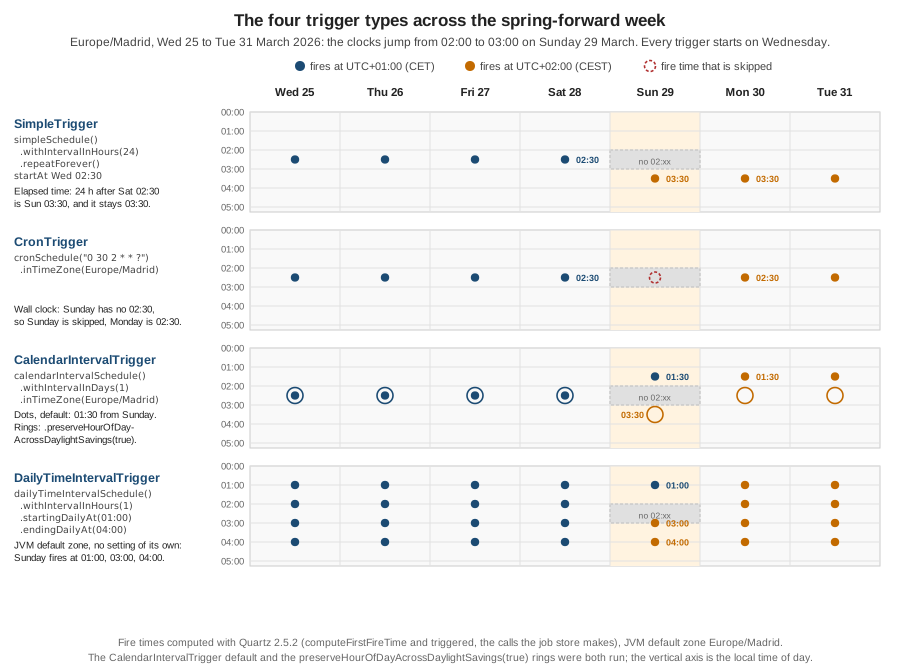
Daylight-saving transitions are where the four types disagree, so the figure at the top of the page shows the same week for all of them. In
Europe/Madrid the clocks jumped forward on Sunday 29 March 2026: 02:00 became 03:00, so no local time from 02:00 to 02:59 exists that day. Each
trigger was started on Wednesday 25 March and its fire times were computed with the same calls the job store makes (computeFirstFireTime, then
triggered for each next time); the JVM default zone was Europe/Madrid.
| Trigger | Fire times around the change | What it means |
|---|---|---|
|
Sat 28: 02:30 +01:00; Sun 29: 03:30 +02:00; Mon 30: 03:30 +02:00; Tue 31: 03:30 +02:00 |
Exactly 24 elapsed hours apart, so the local time moves to 03:30. It fires at 01:30 UTC every day: 02:30 in winter, 03:30 in summer. In the autumn the same trigger returned to 02:30 (24 October 03:30 +02:00, then 25 October 02:30 +01:00). |
|
Sat 28: 02:30 +01:00; Sun 29: no fire; Mon 30: 02:30 +02:00 |
The wall-clock time 02:30 does not exist on 29 March, so that day is skipped entirely and the cron neither fires late nor catches up. An expression that matches a time after the gap ( |
|
Sat 28: 02:30 +01:00; Sun 29: 01:30 +01:00; Mon 30: 01:30 +02:00; Tue 31: 01:30 +02:00 |
Without the flags the hour is not stable. On Sunday the fire time was 23 hours after Saturday’s, and the trigger then kept firing at 01:30. In a continuous run from 25 March it fired at 01:30 and at 02:30 on 16 April, then continued at 02:30: Quartz recalculates from the start time once more than 20 intervals have elapsed. Never rely on the default. |
The same with |
Sat 28: 02:30 +01:00; Sun 29: 03:30 +02:00; Mon 30: 02:30 +02:00; Tue 31: 02:30 +02:00 |
The Sunday run is one hour off (the only time that exists after 02:30), every other day is at 02:30. |
|
Sat 28: 02:30 +01:00; Sun 29: no fire; Mon 30: 02:30 +02:00 |
Same result as the cron trigger: the day without a 02:30 is skipped. |
|
Sat 28: 01:00, 02:00, 03:00, 04:00 (all +01:00); Sun 29: 01:00 +01:00, 03:00 +02:00, 04:00 +02:00; Mon 30: 01:00, 02:00, 03:00, 04:00 (+02:00) |
The fire time inside the gap is gone and not replaced: three runs instead of four on that Sunday. |
The autumn change is different in kind. On Sunday 25 October 2026 the clocks went back from 03:00 to 02:00, so local times from 02:00 to 02:59 occur twice. Measured over 23 to 27 October:
| Trigger | Observed |
|---|---|
|
Fri 23 and Sat 24: 02:30 +02:00; Sun 25: 02:30 +02:00; Mon 26: 01:30 +01:00. Elapsed time, so the local hour moves back. |
|
Sun 25 fires once, at 02:30 +01:00 (the second occurrence). |
|
Sun 25: 02:30 +02:00; Mon 26: 02:30 +01:00. Wall-clock hour kept. |
|
Sun 25: 01:00 +02:00, 02:00 +02:00, 02:00 +01:00, 03:00 +01:00, 04:00 +01:00: five runs, with the repeated hour run twice. |
These are the results of Quartz 2.5.2. The unreleased main branch has a fix to the cron fall-back handling, so a later release may differ; re-run your own
expressions around the two changes of your zone before relying on them (see Testing).
Choosing a trigger type
Start from what the schedule is written in: elapsed time, the clock, the calendar, or a daily window.
| Schedule | Trigger | Why |
|---|---|---|
One reminder at a computed instant |
|
No repeat, no zone, the instant is explicit. |
Every 5 minutes, every 90 minutes, every 10 seconds |
|
A fixed number of milliseconds is what is wanted; daylight saving does not matter at that scale. |
Every day at 02:00, weekdays only, on the 1st, last business day |
|
Written in the clock and the calendar; the zone is explicit; |
Every 2 days, every 2 weeks, every month from the start date, yearly |
|
Cron cannot count "every second day" across month ends; a millisecond interval drifts with daylight saving. |
Every 15 minutes between 09:00 and 17:00 on weekdays |
|
The trigger includes 17:00 and counts by interval; the cron hour range is whole hours, so a 17:00 run needs a second expression. Choose cron when the zone must be explicit. |
Same wall-clock time every day without surprises at a clock change |
|
|
Misfire instructions per type
A misfire is a fire time that passed while the scheduler could not run it; the instruction on the schedule builder says what to do next. The policy
itself, the misfireThreshold and what the smart policy resolves to are on Misfires. The constants below were read
from the builders (run: each method produced the listed value on a built trigger); the default is 0, MISFIRE_INSTRUCTION_SMART_POLICY.
| Trigger | Builder method | Constant |
|---|---|---|
|
|
|
|
|
|
|
|
|
|
|
|
|
|
|
|
|
|
|
|
|
|
|
|
|
|
Cookbook recipes with builders
The Quartz cookbook shows seven classic schedules. Here they are with the 2.5 builders, using the Bookshelf time zone where a clock matters. The first fire times were computed with Quartz 2.5.2 starting on Monday 5 October 2026 at 09:00 Madrid time (for the bi-daily and bi-weekly rows, from the stated start).
| Recipe | Builder | First fire times (Madrid) |
|---|---|---|
Every 10 seconds |
|
09:00:00, 09:00:10, 09:00:20, 09:00:30 |
Every 90 minutes |
|
09:00, 10:30, 12:00, 13:30, 15:00 |
Daily at 10:30 |
|
Mon 5, Tue 6, Wed 7 October at 10:30 |
Every 2 days (bi-daily) |
|
Mon 5, Wed 7, Fri 9, Sun 11 October at 10:30 |
Weekly, Monday 06:00 |
|
Mon 12, 19, 26 October (06:00 +02:00, then +01:00 from the 26th), Mon 2 November |
Every 2 weeks (bi-weekly) |
|
5, 19 October, 2, 16, 30 November at 06:00 |
Monthly, the 1st at 03:30 |
|
1 November, 1 December, 1 January, 1 February at 03:30 +01:00 |
The bi-daily recipe cannot be a cron expression, and the official cookbook explains why: 1/2 in the day-of-month field restarts its count each month. Measured
with 0 30 10 1/2 * ? in Madrid: 27, 29 and 31 January, then 1 February and 3 February 2027 — the run on 31 January and the one on 1 February are one day apart, not two.
Trigger digest = TriggerBuilder.newTrigger()
        .withIdentity("biweeklyDigestTrigger", "bookshelf")
        .forJob("weeklyStatistics", "bookshelf")
        .startAt(Date.from(LocalDateTime.of(2026, 10, 12, 6, 0).atZone(ZoneId.of("Europe/Madrid")).toInstant()))
        .withSchedule(calendarIntervalSchedule()
                .withIntervalInWeeks(2)
                .inTimeZone(TimeZone.getTimeZone("Europe/Madrid"))
                .preserveHourOfDayAcrossDaylightSavings(true))
        .build();
Source: Cookbook — every 10 seconds, every 90 minutes, daily, bi-daily, weekly, bi-weekly and monthly.
Triggers as Spring beans in the Bookshelf
With spring-boot-starter-quartz, every Trigger bean is scheduled for you at startup, every JobDetail bean is stored, and every Calendar bean is
registered under its bean name. The Bookshelf triggers for its recurring work are therefore plain @Bean methods; the jobs they fire are declared on
Getting Started with Spring Boot, and the choice of trigger types follows the table above.
@Configuration(proxyBeanMethods = false)
class BookshelfTriggers {

    private static final TimeZone MADRID = TimeZone.getTimeZone("Europe/Madrid");

    @Bean
    HolidayCalendar holidays() {                  // the bean name is the calendar name
        HolidayCalendar calendar = new HolidayCalendar();
        calendar.setTimeZone(MADRID);
        calendar.addExcludedDate(Date.from(LocalDate.of(2026, 12, 25)
                .atStartOfDay(ZoneId.of("Europe/Madrid")).toInstant()));
        return calendar;
    }

    @Bean
    Trigger cacheRefreshTrigger(JobDetail cacheRefreshJob) {
        return TriggerBuilder.newTrigger()
                .forJob(cacheRefreshJob)
                .withIdentity("cacheRefreshTrigger", "bookshelf")
                .withSchedule(SimpleScheduleBuilder.repeatMinutelyForever(5))
                .build();
    }

    @Bean
    Trigger overdueLoanRemindersTrigger(JobDetail overdueLoanRemindersJob) {
        return TriggerBuilder.newTrigger()
                .forJob(overdueLoanRemindersJob)
                .withIdentity("overdueLoanRemindersTrigger", "bookshelf")
                .modifiedByCalendar("holidays")
                .withSchedule(CronScheduleBuilder.cronSchedule("0 0 2 ? * MON-FRI")
                        .inTimeZone(MADRID)
                        .withMisfireHandlingInstructionFireAndProceed())
                .build();
    }

    @Bean
    Trigger weeklyStatisticsTrigger(JobDetail weeklyStatisticsJob) {
        return TriggerBuilder.newTrigger()
                .forJob(weeklyStatisticsJob)
                .withIdentity("weeklyStatisticsTrigger", "bookshelf")
                .withSchedule(CronScheduleBuilder
                        .weeklyOnDayAndHourAndMinute(DateBuilder.MONDAY, 6, 0)
                        .inTimeZone(MADRID))
                .build();
    }

    @Bean
    Trigger retentionCleanupTrigger(JobDetail retentionCleanupJob) {
        return TriggerBuilder.newTrigger()
                .forJob(retentionCleanupJob)
                .withIdentity("retentionCleanupTrigger", "bookshelf")
                .withSchedule(CronScheduleBuilder.cronSchedule("0 30 3 LW * ?")
                        .inTimeZone(MADRID))
                .build();
    }
}
Source: Spring Boot: Quartz Scheduler and Quartz Tutorial — Lesson 4: More About Triggers. Run on Spring Boot 4.1.1 with four durable job beans standing in for the jobs: the scheduler held the four triggers and the holidays calendar, the next fire times were Tue 6 October 02:00 +02:00 (overdue reminders), Mon 12 October 06:00 +02:00 (weekly report) and Fri 30 October 03:30 +01:00 (retention), the overdue trigger reported calendar holidays and misfire instruction 1 (FIRE_ONCE_NOW), and the cache trigger fired immediately because a trigger without startAt starts now.
Spring Framework’s SimpleTriggerFactoryBean and CronTriggerFactoryBean build the same objects from XML-style or @Bean property setters, which is
handy when a job’s trigger is configured entirely from properties; the TriggerBuilder form above is shorter and exposes every schedule type, including the two
the factory beans do not cover.
The per-member one-shot reminder
The Bookshelf promises each member a "return your book" reminder two days before a loan is due, created when the loan is made and cancelled when the book comes
back. That schedule is not known at startup, it is a different instant per loan, and it must survive a restart: a one-shot SimpleTrigger (the default schedule)
on a non-durable JobDetail, created through the injected Scheduler. The reminder job receives the member and loan identifiers as job data.
public class MemberReminderJob extends QuartzJobBean {

    private long memberId;
    private long loanId;

    public void setMemberId(long memberId) { this.memberId = memberId; }

    public void setLoanId(long loanId) { this.loanId = loanId; }

    @Override
    protected void executeInternal(JobExecutionContext context) {
        // load the loan, check it is still open, send the e-mail
    }
}
Source: Spring Boot: Quartz Scheduler and Spring Framework: Task Execution and Scheduling. Run on Spring Boot 4.1.1: QuartzJobBean set memberId 42 and loanId 1001 from the job data before executeInternal.
@Service
class ReturnReminderService {

    private static final ZoneId MADRID = ZoneId.of("Europe/Madrid");

    private final Scheduler scheduler;

    ReturnReminderService(Scheduler scheduler) {
        this.scheduler = scheduler;
    }

    void remindTwoDaysBeforeDue(long memberId, long loanId, Instant due) throws SchedulerException {
        // calendar days in the library's zone, not 48 elapsed hours
        Instant remindAt = due.atZone(MADRID).minusDays(2).toInstant();

        JobDetail job = JobBuilder.newJob(MemberReminderJob.class)
                .withIdentity("loan-" + loanId, "reminders")
                .usingJobData("memberId", memberId)
                .usingJobData("loanId", loanId)
                .build();                                   // not durable: removed with its last trigger

        Trigger trigger = TriggerBuilder.newTrigger()
                .withIdentity("loan-" + loanId, "reminders")
                .startAt(Date.from(remindAt))               // no schedule: a one-shot SimpleTrigger
                .build();

        scheduler.scheduleJob(job, trigger);
    }

    void loanExtended(long loanId, Instant newReminderAt) throws SchedulerException {
        Trigger moved = TriggerBuilder.newTrigger()
                .withIdentity("loan-" + loanId, "reminders")
                .forJob("loan-" + loanId, "reminders")
                .startAt(Date.from(newReminderAt))
                .build();
        scheduler.rescheduleJob(TriggerKey.triggerKey("loan-" + loanId, "reminders"), moved);
    }

    boolean bookReturned(long loanId) throws SchedulerException {
        return scheduler.deleteJob(JobKey.jobKey("loan-" + loanId, "reminders"));
    }
}
Source: Quartz Cookbook — Scheduling a job, Unscheduling a job and Scheduler Javadoc. Run on Spring Boot 4.1.1 with the memory store, a reminder due two seconds from now: scheduleJob stored a NORMAL trigger, the job ran once with memberId 42 and loanId 1001, and afterwards neither the job nor the trigger existed. deleteJob returned true for a pending reminder and false when called again; rescheduleJob replaced the trigger and left the job in place.
What the runs showed about the edges of this recipe:
-
Past times fire immediately. A reminder whose
startAtwas already in the past (a loan made one day before it is due, so "two days before" is gone) fired once at once (run: a trigger 5 hours in the past fired once). That follows from the smart misfire policy for a one-shot trigger; if an immediate reminder is wrong, checkremindAtbefore scheduling. The policy is on Misfires. -
Duplicate keys are an error. Scheduling a job whose key exists throws
ObjectAlreadyExistsException: Unable to store Job : 'reminders.loan-1001', because one already exists with this identification.(run, scheduling loan 1001 twice). For a create-or-replace, usescheduler.scheduleJob(job, Set.of(trigger), true): it replaced the job and left one trigger (run). -
Use calendar days, not 48 hours. For a loan due on Monday 30 March 2026 at 09:00 in Madrid,
minusDays(2)in the library’s zone gives Saturday 28 March at 09:00, while subtracting 48 elapsed hours gives 08:00, because the clocks changed in between (run). -
Cancelling something that is gone is harmless.
deleteJobandunscheduleJobreturnfalsefor an unknown key instead of throwing (run). -
Persistence needs a JDBC store. With the default memory store the reminder is lost when the application stops; use a JDBC store, see Job Stores & Persistence, for reminders that must outlive a deploy. The runtime API, a REST wrapper and securing it are on Dynamic Scheduling & Management.
Testing a trigger definition
A trigger can be checked without a running scheduler: clone it into an OperableTrigger and ask TriggerUtils for its next fire times, optionally through a Calendar.
The first example on this page does exactly that. Asserting the dates in a unit test catches daylight-saving surprises before production; more recipes, including the
Spring Boot integration test, are on Testing.
List<Date> next = TriggerUtils.computeFireTimes((OperableTrigger) trigger, null, 3);

assertThat(next).hasSize(3);
assertThat(next.get(0).toInstant().atZone(ZoneId.of("Europe/Madrid")).toLocalTime())
        .isEqualTo(LocalTime.of(2, 0));
Source: TriggerUtils Javadoc. computeFireTimes clones the trigger first, so the original is unchanged; passing null as the calendar means no calendar. Run on Quartz 2.5.2 with the overdue trigger of the cron recipes.
Pitfalls
| Pitfall | What happens and the fix |
|---|---|
Using a 24-hour |
The local time moves by an hour at each clock change (03:30 in summer in the measured week). Use |
Cron |
The run is skipped, not delayed. Pick a time outside the gap (the gap is 02:00-02:59 in Europe/Madrid), or accept the skipped day. |
|
The hour changed on Sunday (to 01:30) and a double run happened on 16 April. Always set the flag for intervals of a day or more. |
Monthly interval from the 29th, 30th or 31st |
The day clamps to the end of the shorter month and stays there (31 January, 28 February, 28 March…). Use cron with |
|
Restarts each month (31 January then 1 February). Use |
|
The window follows the JVM zone, not the library’s. Use cron or calendar-interval triggers, which take |
|
The JVM default zone is used silently, so a container on UTC fires at different local times than a laptop. Always pass the zone. |
|
It is n repeats after the first fire: |
Zero interval on a repeating |
|
Day-of-week numbers |
|
Scheduling a job that already exists |
|
Expecting a one-shot job to remain |
A non-durable job is deleted when its last trigger completes. Call |
Naming a calendar that is not registered |
|