Components and Props
|
This section documents React 19.x for the web, using function components and Hooks throughout (class components appear only where React still requires them, such as error boundaries). React Native is out of scope and gets only a pointer. The React 19 additions follow the current official React documentation. This content was generated with the assistance of AI and should be verified against react.dev before being relied on in production, since React APIs continue to evolve between releases. This section’s bibliography lists the reference material consulted while preparing these pages. |
A component is a JavaScript function that returns JSX. Components are the unit of reuse in React: you build a screen by composing small components into a tree.
Function components
-
A component name must start with a capital letter —
Sidebar, notsidebar. JSX treats a lowercase tag as a DOM element and a capitalized tag as a component. -
Return JSX, or
nullto render nothing. -
One component per file is the common convention; the file’s default export is the component.
// Profile.jsx
export default function Profile() {
  return <img src="https://i.pravatar.cc/80" alt="" />;
}

// Gallery.jsx
import Profile from './Profile.jsx';

export function Gallery() {          // named export
  return (
    <section>
      <Profile />
      <Profile />
    </section>
  );
}
Use a default export for the one main component of a file and named exports for additional helpers. See Your First Component and Importing and Exporting Components.
Props
Props are the single argument object a component receives from its parent. Read them by destructuring in the parameter list; provide default values there too.
function Avatar({ user, size = 40, rounded = true }) {
  return (
    <img
      src={user.avatarUrl}
      alt={user.name}
      width={size}
      height={size}
      className={rounded ? 'rounded' : undefined}
    />
  );
}

// parent
<Avatar user={currentUser} size={64} />-
children— whatever JSX a component wraps is passed as thechildrenprop:function Panel({ title, children }) { return ( <section className="panel"> <h3>{title}</h3> {children} </section> ); } <Panel title="Settings"><Form /></Panel> // <Form /> is children -
Spreading / forwarding props — pass a whole object through, usually to a wrapped DOM element:
function TextInput({ label, ...rest }) { return ( <label> {label} <input {...rest} /> </label> ); } -
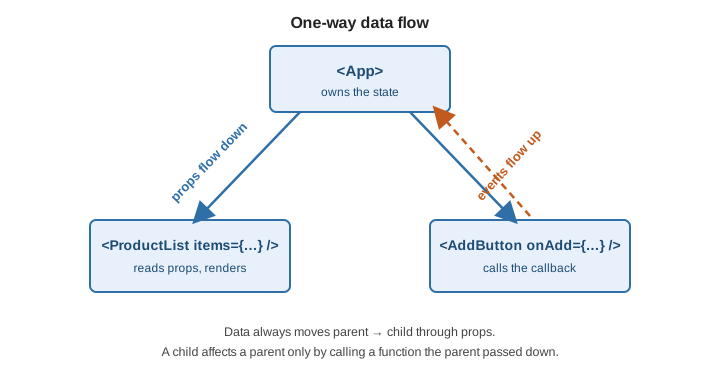
Props are read-only. A component must never modify its props; to change what it sees, the parent re-renders it with new values. This is one-way data flow: data goes down as props, and a child influences an ancestor only by calling a function that ancestor passed down.
Composition over inheritance
React has no component inheritance. Reuse and customize by composing: pass elements as children or as
props, and split UI into a container (owns state, fetches data) and presentational components (take props,
render markup).
function Dialog({ header, children, footer }) {   // "slots" as props
  return (
    <div className="dialog">
      <header>{header}</header>
      <div className="body">{children}</div>
      <footer>{footer}</footer>
    </div>
  );
}
A render prop — a prop whose value is a function returning JSX — is an older sharing pattern. Today
children and custom Hooks usually replace it.
Keeping components pure
A component must be pure: given the same props and state it returns the same JSX, and it does not change anything outside itself while rendering (no mutating variables created before it ran, no writing to the DOM, no network calls). Side effects belong in event handlers or in Effects.
let count = 0;

function Broken() {
  count += 1;             // impure: mutates an external variable during render
  return <p>{count}</p>;
}

function Ok({ items }) {
  const total = items.length;   // pure: derived from props during render
  return <p>{total}</p>;
}
<StrictMode> double-invokes components in development precisely to make impurity visible. Think of your UI as
two trees: the render tree (which component rendered which) and the module dependency tree (which file
imports which). See Keeping Components Pure and
Understanding Your UI as a Tree.