Room Database and Paging
|
This content was generated with the assistance of AI and should be verified against the official documentation of Android before being relied on in production. See the section bibliography for the reference material consulted while preparing these pages. |
This page covers Room, Android’s SQLite persistence library, and Paging 3, the library that loads large
or network-backed lists a page at a time. Both are used throughout TrailMate, the hiking-trail companion used
across this section: Room is the single source of truth for the trail catalog and its photos, and Paging loads
the trail list a page at a time from Room, backed by a network RemoteMediator. This page assumes the offline-first
repository pattern introduced in Recommended App Architecture; it goes
into the implementation detail that page only sketches. Coroutines and Flow, which every Room DAO and Paging
API in this page returns or consumes, are covered in Coroutines Basics
and Flows and are not re-explained here. Networking with
TrailApi is covered in Networking with Retrofit, OkHttp and Ktor,
DataStore and file storage in Local Storage: DataStore, Files, Scoped Storage and MediaStore,
Hilt in Dependency Injection with Hilt, Dagger and Koin,
and DAO/repository unit testing in more depth in Unit Testing with JUnit, Mockito, MockK and Robolectric.
The baseline for this page is Room 2.8.5 (with a look at Room 3.0.3, androidx.room3) and Paging 3.5.1.
Why Room Instead of Raw SQLite
Room is a persistence layer on top of SQLite that removes the two biggest sources of database bugs: hand-written
SQL that only fails at run time, and boilerplate that maps Cursor rows to objects by hand. Room verifies every
@Query against the schema at compile time — a typo in a column name or a query that does not match its return
type fails the build, not a user’s device. It generates the mapping code itself, and it integrates directly with
coroutines and Flow so a query can be observed reactively instead of polled.
In TrailMate, Room is the layer OfflineFirstTrailRepository treats as the single source of truth: the UI
never reads the network response directly, it reads Room, and a background refresh (a periodic sync worker, a
pull-to-refresh, or a RemoteMediator, covered later on this page) is the only thing allowed to write into it.
Gradle Setup: KSP and the Room Gradle Plugin
Room’s annotation processor runs through KSP (Kotlin Symbol Processing), not kapt; KSP analyzes Kotlin
symbols directly instead of going through a Java stub, which builds noticeably faster. The Room Gradle plugin
adds one more piece: it copies each version of the generated JSON schema into a folder in the module (schemaDirectory),
which both documents every schema change over the app’s lifetime and is required for testing migrations.
// gradle/libs.versions.toml
[versions]
room = "2.8.5"
ksp = "2.3.12"

[libraries]
room-runtime = { module = "androidx.room:room-runtime", version.ref = "room" }
room-ktx = { module = "androidx.room:room-ktx", version.ref = "room" }
room-paging = { module = "androidx.room:room-paging", version.ref = "room" }
room-compiler = { module = "androidx.room:room-compiler", version.ref = "room" }
room-testing = { module = "androidx.room:room-testing", version.ref = "room" }

[plugins]
ksp = { id = "com.google.devtools.ksp", version.ref = "ksp" }
room = { id = "androidx.room", version.ref = "room" }// core/database/build.gradle.kts
plugins {
alias(libs.plugins.android.library) // AGP 9: Kotlin is built in, no org.jetbrains.kotlin.android
alias(libs.plugins.ksp)
alias(libs.plugins.room)
}
room {
// Every schema version is exported here as a JSON file, one per version,
// e.g. schemas/com.example.trailmate.core.database.TrailMateDatabase/3.json.
// MigrationTestHelper (see below) reads these files to build past versions of the database.
schemaDirectory("$projectDir/schemas")
}
dependencies {
implementation(libs.room.runtime)
implementation(libs.room.ktx)
implementation(libs.room.paging)
ksp(libs.room.compiler)
testImplementation(libs.room.testing)
}See Android Developers — Save data in a local database using Room and Android Developers — Migrate to KSP from kapt.
KSP 2.3.12 is a KSP2 release, versioned independently of Kotlin (the old <kotlin>-<ksp> scheme such as
2.2.20-2.0.4 is gone), and because AGP 9 compiles Kotlin itself the module applies no
org.jetbrains.kotlin.android plugin — the same baseline as
Project Structure, Gradle and Build Variants.
The old alternative — adding room-compiler to kapt { } and passing room.schemaLocation as an
annotation-processor argument — still works but is legacy; new modules should use the Room Gradle plugin and KSP
as shown above.
Entities
An @Entity class maps one Kotlin class to one SQLite table. TrailMate stores two entities: TrailEntity for
the trail catalog and PhotoEntity for the user’s photos of each trail.
// core/database/src/main/kotlin/com/example/trailmate/core/database/entity/TrailEntity.kt
package com.example.trailmate.core.database.entity

import androidx.room.ColumnInfo
import androidx.room.Entity
import androidx.room.Index
import androidx.room.PrimaryKey

@Entity(
    tableName = "trails",
    indices = [Index(value = ["region"]), Index(value = ["difficulty"])],
)
data class TrailEntity(
    @PrimaryKey val id: String,
    val name: String,
    val region: String,
    @ColumnInfo(name = "length_km") val lengthKm: Double,
    val difficulty: Difficulty,
    @ColumnInfo(name = "photo_url") val photoUrl: String,
    @ColumnInfo(name = "is_favorite", defaultValue = "0") val isFavorite: Boolean,
)// core/database/src/main/kotlin/com/example/trailmate/core/database/entity/PhotoEntity.kt
package com.example.trailmate.core.database.entity
import androidx.room.Entity
import androidx.room.ForeignKey
import androidx.room.Index
import androidx.room.PrimaryKey
@Entity(
tableName = "photos",
foreignKeys = [
ForeignKey(
entity = TrailEntity::class,
parentColumns = ["id"],
childColumns = ["trail_id"],
onDelete = ForeignKey.CASCADE,
),
],
indices = [Index(value = ["trail_id"])],
)
data class PhotoEntity(
@PrimaryKey(autoGenerate = true) val id: Long = 0,
@androidx.room.ColumnInfo(name = "trail_id") val trailId: String,
val uri: String,
@androidx.room.ColumnInfo(name = "taken_at") val takenAt: Long,
)@ColumnInfo(name = …) decouples the Kotlin property name from the SQL column name (snake_case in the table,
camelCase in Kotlin, a common convention). defaultValue on a column matters for auto-migrations: it lets Room
add the column to existing rows without a manual migration, covered below.
Indices
An index speeds up lookups and joins on a column at the cost of extra storage and slightly slower writes. Add one
with indices on @Entity (as above) whenever a column is filtered or joined on often: region and difficulty
because TrailListScreen filters by both, and trail_id on photos because every relation query below joins on
it and because it backs the foreign key’s cascading delete. A column that is only ever read as part of a full
table scan, such as name in a screen with no search field, does not need one — indices are not free, so add
them where a query plan shows they help rather than on every column defensively.
Type Converters
SQLite has no native enum or date column, so TrailEntity.difficulty (Difficulty, a Kotlin enum) needs a
TypeConverter that tells Room how to store and read it back.
// core/database/src/main/kotlin/com/example/trailmate/core/database/Converters.kt
package com.example.trailmate.core.database

import androidx.room.TypeConverter
import com.example.trailmate.core.model.Difficulty
import java.time.Instant

class Converters {
    @TypeConverter
    fun fromDifficulty(value: Difficulty): String = value.name

    @TypeConverter
    fun toDifficulty(value: String): Difficulty = Difficulty.valueOf(value)

    @TypeConverter
    fun fromInstant(value: Instant?): Long? = value?.toEpochMilli()

    @TypeConverter
    fun toInstant(value: Long?): Instant? = value?.let(Instant::ofEpochMilli)
}The converter class is registered once, on the database (@TypeConverters(Converters::class), shown below), and
applies to every entity and DAO query in it. Keep converters pure and cheap — they run on every row of every
query that touches that column, on whatever thread the query runs on.
Relations: @Relation and @Embedded
A trail and its photos are stored in two tables but are almost always read together. @Relation tells Room to
run a second query and assemble the result into a single Kotlin object, so the repository never has to join
manually.
// core/database/src/main/kotlin/com/example/trailmate/core/database/entity/TrailWithPhotos.kt
package com.example.trailmate.core.database.entity

import androidx.room.Embedded
import androidx.room.Relation

data class TrailWithPhotos(
    @Embedded val trail: TrailEntity,
    @Relation(parentColumn = "id", entityColumn = "trail_id")
    val photos: List<PhotoEntity>,
)@Embedded flattens TrailEntity’s own columns directly into the result (no `trail_ prefix needed here because
the outer holder class is not itself a table); @Relation tells Room which parent and child column join the two
tables. Room issues one query for the parent rows and one follow-up query per relation, not a SQL JOIN, which
avoids duplicating trail columns once per photo. The same @Embedded annotation is also used the other way, to
group a handful of columns of one entity into a nested value class (a Coordinates(lat: Double, lon: Double)
field embedded inside TrailEntity, for example) without a separate table.
Data Access Objects (DAOs)
A @Dao interface declares the queries Room generates an implementation for. Returning Flow<T> from a query
makes it reactive: Room re-runs the query and re-emits automatically whenever a write touches a table the query
reads from, so TrailListViewModel never needs to refresh anything manually after an insert.
// core/database/src/main/kotlin/com/example/trailmate/core/database/dao/TrailDao.kt
package com.example.trailmate.core.database.dao

import androidx.paging.PagingSource
import androidx.room.Dao
import androidx.room.Query
import androidx.room.Transaction
import androidx.room.Upsert
import com.example.trailmate.core.database.entity.PhotoEntity
import com.example.trailmate.core.database.entity.TrailEntity
import com.example.trailmate.core.database.entity.TrailWithPhotos
import kotlinx.coroutines.flow.Flow

@Dao
interface TrailDao {

    @Query("SELECT * FROM trails WHERE region = :region ORDER BY name")
    fun observeTrails(region: String): Flow<List<TrailEntity>>

    @Transaction
    @Query("SELECT * FROM trails WHERE id = :trailId")
    fun observeTrailWithPhotos(trailId: String): Flow<TrailWithPhotos?>

    @Transaction
    @Query("SELECT * FROM trails ORDER BY name")
    fun pagingSource(): PagingSource<Int, TrailEntity>

    @Upsert
    suspend fun upsertAll(trails: List<TrailEntity>)

    @Upsert
    suspend fun upsertPhoto(photo: PhotoEntity)

    @Transaction
    suspend fun replaceRegion(region: String, trails: List<TrailEntity>) {
        deleteRegion(region)
        upsertAll(trails)
    }

    @Query("DELETE FROM trails WHERE region = :region")
    suspend fun deleteRegion(region: String)
}Three things worth calling out:
-
@Upsert(added in Room 2.5) inserts a row if its primary key is new and updates it otherwise, in one call — the common case for syncing server data, which used to need a manual@Insert(onConflict = REPLACE)plus a separate@Updatefallback. -
@Transactionon a multi-step suspend function (replaceRegion) makes the delete-then-upsert atomic, so a reader never observes a moment with zero trails for that region.@Transactionon a@Querythat returns a@Relation(observeTrailWithPhotos,pagingSource) makes the parent query and each relation’s follow-up query run inside one transaction, so the result is a consistent snapshot even if a write lands between them. -
fun pagingSource(): PagingSource<Int, TrailEntity>needs no method body and no@Transaction-generated SQL beyond the@Queryitself — Room generates aPagingSourceimplementation that loads pages of rows directly from SQLite, keyed by row offset. This is the DAO methodPageruses in the Paging section below.
The Database Class
@Database ties the entities, the DAOs and the type converters together and is the class the rest of the app
depends on.
// core/database/src/main/kotlin/com/example/trailmate/core/database/TrailMateDatabase.kt
package com.example.trailmate.core.database

import androidx.room.AutoMigration
import androidx.room.Database
import androidx.room.RenameColumn
import androidx.room.RoomDatabase
import androidx.room.TypeConverters
import androidx.room.migration.AutoMigrationSpec
import com.example.trailmate.core.database.dao.PhotoDao
import com.example.trailmate.core.database.dao.RemoteKeyDao
import com.example.trailmate.core.database.dao.TrailDao
import com.example.trailmate.core.database.entity.PhotoEntity
import com.example.trailmate.core.database.entity.RemoteKeyEntity
import com.example.trailmate.core.database.entity.TrailEntity

@Database(
    entities = [TrailEntity::class, PhotoEntity::class, RemoteKeyEntity::class],
    version = 3,
    autoMigrations = [
        AutoMigration(from = 1, to = 2),
        AutoMigration(from = 2, to = 3, spec = TrailMateDatabase.AddFavoriteColumnSpec::class),
    ],
    exportSchema = true,
)
@TypeConverters(Converters::class)
abstract class TrailMateDatabase : RoomDatabase() {
    abstract fun trailDao(): TrailDao
    abstract fun photoDao(): PhotoDao
    abstract fun remoteKeyDao(): RemoteKeyDao

    @RenameColumn(tableName = "trails", fromColumnName = "favorite", toColumnName = "is_favorite")
    class AddFavoriteColumnSpec : AutoMigrationSpec
}abstract fun trailDao(): TrailDao is all a DAO accessor needs — Room implements it. exportSchema = true
(the default) is what makes the Room Gradle plugin write a JSON snapshot of the schema into schemaDirectory on
every build; that file is what both auto-migrations and MigrationTestHelper validate against, so it must be
checked into version control alongside the entity change that produced it.
Migrations
Every schema change bumps version on @Database and needs a migration path, or Room throws
IllegalStateException the first time the app opens an updated database it does not know how to read.
Auto-migrations
An auto-migration covers changes Room can infer purely from the two exported schemas: adding a table, adding
a column with a defaultValue, or (with an AutoMigrationSpec, as above) renaming a table or column, which
Room cannot tell apart from a drop-and-add without a hint. Declaring AutoMigration(from = 1, to = 2) with no
spec is enough when the change is simple, as it is from version 1 to 2 above.
Manual migrations
A migration Room cannot infer — splitting a column into two, backfilling data with a computed value, changing a
column’s type — needs a hand-written Migration that runs raw SQL against the old schema.
// core/database/src/main/kotlin/com/example/trailmate/core/database/migrations.kt
package com.example.trailmate.core.database

import androidx.room.migration.Migration
import androidx.sqlite.db.SupportSQLiteDatabase

val MIGRATION_3_4 = object : Migration(3, 4) {
    override fun migrate(db: SupportSQLiteDatabase) {
        db.execSQL("ALTER TABLE trails ADD COLUMN length_miles REAL NOT NULL DEFAULT 0")
        db.execSQL("UPDATE trails SET length_miles = length_km * 0.621371")
    }
}A manual Migration is passed to the database builder alongside any auto-migrations:
Room.databaseBuilder(context, TrailMateDatabase::class.java, "trailmate.db")
    .addMigrations(MIGRATION_3_4)
.build()Testing migrations with MigrationTestHelper
MigrationTestHelper builds a real SQLite database at a past exported schema version, runs a migration against
it, and asserts the result matches the next exported schema — catching a migration bug long before it reaches a
device with real user data.
// core/database/src/androidTest/kotlin/com/example/trailmate/core/database/MigrationTest.kt
package com.example.trailmate.core.database

import androidx.room.testing.MigrationTestHelper
import androidx.sqlite.db.framework.FrameworkSQLiteOpenHelperFactory
import androidx.test.platform.app.InstrumentationRegistry
import org.junit.Rule
import org.junit.Test

class MigrationTest {

    @get:Rule
    val helper = MigrationTestHelper(
        InstrumentationRegistry.getInstrumentation(),
        TrailMateDatabase::class.java,
        emptyList(),
        FrameworkSQLiteOpenHelperFactory(),
    )

    @Test
    fun migrate3To4_addsLengthMilesColumn() {
        helper.createDatabase("trailmate-test.db", 3).apply {
            execSQL(
                "INSERT INTO trails (id, name, region, length_km, difficulty, photo_url, is_favorite) " +
                    "VALUES ('t1', 'Ridge Loop', 'alps', 12.0, 'MODERATE', 'https://example.com/p.jpg', 0)",
            )
            close()
        }

        val migrated = helper.runMigrationsAndValidate("trailmate-test.db", 4, true, MIGRATION_3_4)

        migrated.query("SELECT length_miles FROM trails WHERE id = 't1'").use { cursor ->
            check(cursor.moveToFirst())
            check(cursor.getDouble(0) > 7.4 && cursor.getDouble(0) < 7.5)
        }
    }
}`runMigrationsAndValidate’s last argument runs Room’s own schema validation, which fails the test if the migrated schema does not exactly match the exported JSON for that version — so a manual migration that forgets a column or an index is caught here, not in production. See Android Developers — Migrate your Room database and Android Developers — MigrationTestHelper.
Prepopulating the Database
An app that ships with a starter dataset — TrailMate could ship a handful of well-known trails so the list is not empty on first launch, offline, before the first sync — can prepopulate the database from a bundled asset instead of inserting rows in code on first run.
Room.databaseBuilder(context, TrailMateDatabase::class.java, "trailmate.db")
    .createFromAsset("database/trailmate_seed.db")
.build()The asset is a real SQLite file matching version 1’s schema exactly (built once, offline, from the same entities);
Room copies it in on first open and then runs the usual migrations up to the current version. createFromFile
and createFromInputStream cover the same idea for a file outside assets or a stream produced at run time (for
example downloaded once and cached).
A Hilt-Provided Singleton
Exactly one RoomDatabase instance per file should exist for the life of the process — creating a second one
against the same file wastes memory and risks lock contention. Hilt enforces this by scoping the provider to
SingletonComponent.
// app/src/main/kotlin/com/example/trailmate/di/DatabaseModule.kt
package com.example.trailmate.di

import android.content.Context
import androidx.room.Room
import com.example.trailmate.core.database.MIGRATION_3_4
import com.example.trailmate.core.database.TrailMateDatabase
import com.example.trailmate.core.database.dao.TrailDao
import dagger.Module
import dagger.Provides
import dagger.hilt.InstallIn
import dagger.hilt.android.qualifiers.ApplicationContext
import dagger.hilt.components.SingletonComponent
import javax.inject.Singleton

@Module
@InstallIn(SingletonComponent::class)
object DatabaseModule {

    @Provides
    @Singleton
    fun provideTrailMateDatabase(@ApplicationContext context: Context): TrailMateDatabase =
        Room.databaseBuilder(context, TrailMateDatabase::class.java, "trailmate.db")
            .addMigrations(MIGRATION_3_4)
            .build()

    @Provides
    fun provideTrailDao(database: TrailMateDatabase): TrailDao = database.trailDao()
}provideTrailDao is intentionally un-scoped: it is cheap to call and Hilt already guarantees the TrailMateDatabase
it reads from is a singleton, so every caller ends up sharing the same DAO backed by the same connection pool
regardless.
Main-Safety
Every Room query that touches disk must run off the main thread. Suspend DAO functions and Flow-returning
queries are main-safe automatically — Room dispatches them to its own internal executor — which is why every DAO
method above is either suspend or returns Flow. Room additionally throws at run time if a non-suspend,
non-Flow query is called from the main thread, unless allowMainThreadQueries() is explicitly opted into on
the builder. The check is not limited to debug builds — a release build throws the same
IllegalStateException — and allowMainThreadQueries() is a test-only escape hatch that should never ship. This mirrors the dispatcher-injection
discipline covered in ViewModel, Lifecycle-Aware Components, Coroutines and Flow — a repository built on Room-only DAOs needs no explicit withContext(Dispatchers.IO) around a query, because Room
already guarantees it never blocks the caller’s thread.
Full-Text Search (FTS)
For a column that needs substring or token search rather than an exact match — searching trail names and descriptions by keyword, for example — Room can back a table with SQLite’s FTS4 virtual table module instead of an ordinary table.
@Fts4(contentEntity = TrailEntity::class)
@Entity(tableName = "trails_fts")
data class TrailFts(val name: String, val region: String)

@Dao
interface TrailSearchDao {
    @Query("SELECT trails.* FROM trails JOIN trails_fts ON trails.rowid = trails_fts.rowid WHERE trails_fts MATCH :query")
    fun search(query: String): Flow<List<TrailEntity>>
}contentEntity keeps the FTS index in sync with TrailEntity automatically instead of duplicating the data by
hand. FTS is worth reaching for only once a plain LIKE '%query%' query becomes a measured bottleneck or the
search needs token-aware matching (prefix search, ranking); for a short list like TrailMate’s own catalog a plain
indexed LIKE query is usually enough.
Room 3.0 (androidx.room3) Migration Notes
Room 3.0 (stable since mid-2026) ships as a new Maven group and package, androidx.room3, side by side with the
2.x androidx.room artifacts rather than as an in-place upgrade — so migrating is a deliberate, versioned step,
not a patch update. The changes that matter when planning that migration:
| Change | What it means for TrailMate |
|---|---|
KSP-only |
|
Kotlin codegen only |
The generated DAO/database implementations are Kotlin, not Java, changing nothing about how |
Full Kotlin Multiplatform support |
|
Package rename |
Every import moves from |
Because the two live in different Maven groups, a large codebase can migrate module by module rather than in one
sweep; TrailMate’s :core:database module is a natural first candidate precisely because Paging’s RemoteMediator
and DAOs already isolate every other module from Room-specific types behind the repository interface. See
Android Developers — Room 3.0 release notes.
See also Local Storage: SQLDelight, Room, SQLite Drivers, DataStore and Settings in the Kotlin Multiplatform section for Room 3 in shared code.
Testing DAOs with an In-Memory Database
A DAO test does not need a real file on disk or an emulator’s SQLite build — an in-memory database is faster to create and tear down, and disappears automatically at the end of the test.
// core/database/src/androidTest/kotlin/com/example/trailmate/core/database/TrailDaoTest.kt
package com.example.trailmate.core.database

import androidx.room.Room
import androidx.test.platform.app.InstrumentationRegistry
import com.example.trailmate.core.database.entity.Difficulty
import com.example.trailmate.core.database.entity.TrailEntity
import kotlinx.coroutines.flow.first
import kotlinx.coroutines.test.runTest
import org.junit.After
import org.junit.Before
import org.junit.Test
import kotlin.test.assertEquals

class TrailDaoTest {

    private lateinit var database: TrailMateDatabase

    @Before
    fun createDatabase() {
        database = Room.inMemoryDatabaseBuilder(
            InstrumentationRegistry.getInstrumentation().targetContext,
            TrailMateDatabase::class.java,
        ).allowMainThreadQueries().build()
    }

    @After
    fun closeDatabase() {
        database.close()
    }

    @Test
    fun upsertAll_thenObserveTrails_emitsInsertedRows() = runTest {
        val trail = TrailEntity(
            id = "t1", name = "Ridge Loop", region = "alps", lengthKm = 12.0,
            difficulty = Difficulty.MODERATE, photoUrl = "https://example.com/p.jpg", isFavorite = false,
        )

        database.trailDao().upsertAll(listOf(trail))
        val result = database.trailDao().observeTrails("alps").first()

        assertEquals(listOf(trail), result)
    }
}inMemoryDatabaseBuilder (rather than databaseBuilder) is the only difference from production setup;
allowMainThreadQueries() is acceptable here because the test itself controls the thread the query runs on and
values immediate, synchronous failures over the small realism gap. This test needs an Android runtime (a device,
emulator, or Robolectric) because Room delegates to the platform’s SQLite implementation; a pure JVM unit test
without one of those cannot open a Room database at all. See
Android Developers — Test your Room database.
Paging 3
Loading TrailMate’s entire trail catalog into memory at once does not scale once the catalog grows past a few
hundred trails, and re-querying "give me the next 20" by hand means hand-rolling offset tracking, duplicate-row
edge cases and loading-state bookkeeping. Paging 3 does that work once, correctly, and integrates with both
Compose and RecyclerView.
PagingSource, Pager, PagingData and cachedIn
A PagingSource<Key, Value> loads one page at a time, given a key (the previous page’s next key, or null for
the first page) and a load size. Room already generates one from @Query fun pagingSource(): PagingSource<Int, TrailEntity>
(shown earlier), so OfflineFirstTrailRepository only has to wrap it in a Pager:
// core/data/src/main/kotlin/com/example/trailmate/core/data/OfflineFirstTrailRepository.kt
package com.example.trailmate.core.data

import androidx.paging.Pager
import androidx.paging.PagingConfig
import androidx.paging.PagingData
import com.example.trailmate.core.database.dao.TrailDao
import com.example.trailmate.core.model.Trail
import kotlinx.coroutines.flow.Flow
import kotlinx.coroutines.flow.map
import javax.inject.Inject

class OfflineFirstTrailRepository @Inject constructor(
    private val trailDao: TrailDao,
) : TrailRepository {

    override fun observeTrailsPaged(): Flow<PagingData<Trail>> =
        Pager(
            config = PagingConfig(pageSize = 20, prefetchDistance = 5, enablePlaceholders = false),
        ) {
            trailDao.pagingSource()
        }.flow.map { pagingData -> pagingData.map(TrailEntity::toDomain) }
}PagingData<T> is a Flow-friendly, immutable snapshot of loaded pages plus their LoadState; it is not a
List and cannot be collected into one, by design, because the whole point of paging is that the full list is
never materialized at once. .map on PagingData (Paging’s own operator, not Flow.map) transforms each item,
here from TrailEntity to the domain Trail model, without touching how paging itself works.
The ViewModel exposes that Flow<PagingData<Trail>> with .cachedIn(viewModelScope):
// feature/trails/src/main/kotlin/com/example/trailmate/feature/trails/TrailListViewModel.kt
package com.example.trailmate.feature.trails

import androidx.lifecycle.ViewModel
import androidx.lifecycle.viewModelScope
import androidx.paging.PagingData
import androidx.paging.cachedIn
import com.example.trailmate.core.data.TrailRepository
import com.example.trailmate.core.model.Trail
import kotlinx.coroutines.flow.Flow
import javax.inject.Inject
import dagger.hilt.android.lifecycle.HiltViewModel

@HiltViewModel
class TrailListViewModel @Inject constructor(
    trailRepository: TrailRepository,
) : ViewModel() {

    val pagedTrails: Flow<PagingData<Trail>> =
        trailRepository.observeTrailsPaged().cachedIn(viewModelScope)
}cachedIn multicasts the paged stream and keeps already-loaded pages alive across configuration changes and
multiple collectors, so rotating the device does not re-run every page load from scratch. Without it, each new
collector (each recomposition that resubscribes, or a fresh Fragment view after rotation) would restart paging
from page one.
Consuming PagingData in Compose: collectAsLazyPagingItems
// feature/trails/src/main/kotlin/com/example/trailmate/feature/trails/TrailListScreen.kt
package com.example.trailmate.feature.trails

import androidx.compose.foundation.lazy.LazyColumn
import androidx.compose.foundation.lazy.items
import androidx.compose.material3.CircularProgressIndicator
import androidx.compose.material3.Text
import androidx.compose.runtime.Composable
import androidx.paging.LoadState
import androidx.paging.compose.collectAsLazyPagingItems
import androidx.paging.compose.itemKey

@Composable
fun TrailListScreen(viewModel: TrailListViewModel = hiltViewModel()) {
    val trails = viewModel.pagedTrails.collectAsLazyPagingItems()

    LazyColumn {
        items(count = trails.itemCount, key = trails.itemKey { it.id }) { index ->
            trails[index]?.let { trail -> TrailRow(trail) }
        }

        when (val append = trails.loadState.append) {
            is LoadState.Loading -> item { CircularProgressIndicator() }
            is LoadState.Error -> item { Text("Couldn't load more trails: ${append.error.message}") }
            is LoadState.NotLoading -> Unit
        }
    }
}trails[index] returns null for a not-yet-loaded item when placeholders are enabled, or triggers a load when
placeholders are disabled (as configured above); either way the lambda must tolerate a null item. itemKey
gives LazyColumn a stable key per trail so Compose can diff insertions correctly instead of by position.
Consuming PagingData with Views: PagingDataAdapter
// feature/trails/src/main/kotlin/com/example/trailmate/feature/trails/TrailPagingAdapter.kt
package com.example.trailmate.feature.trails

import androidx.paging.PagingDataAdapter
import androidx.recyclerview.widget.DiffUtil
import com.example.trailmate.core.model.Trail

class TrailPagingAdapter : PagingDataAdapter<Trail, TrailViewHolder>(TRAIL_DIFF) {

    override fun onCreateViewHolder(parent: ViewGroup, viewType: Int) =
        TrailViewHolder.create(parent)

    override fun onBindViewHolder(holder: TrailViewHolder, position: Int) {
        getItem(position)?.let(holder::bind)
    }

    companion object {
        private val TRAIL_DIFF = object : DiffUtil.ItemCallback<Trail>() {
            override fun areItemsTheSame(old: Trail, new: Trail) = old.id == new.id
            override fun areContentsTheSame(old: Trail, new: Trail) = old == new
        }
    }
}// feature/trails/src/main/kotlin/com/example/trailmate/feature/trails/TrailListFragment.kt
viewLifecycleOwner.lifecycleScope.launch {
viewModel.pagedTrails.collectLatest { pagingData -> adapter.submitData(pagingData) }
}PagingDataAdapter is a ListAdapter variant that already knows how to diff two PagingData snapshots using
the supplied DiffUtil.ItemCallback; submitData (a suspend function) replaces submitList and must be called
from a lifecycle-aware coroutine (collectLatest inside repeatOnLifecycle/viewLifecycleOwner.lifecycleScope,
as covered in ViewModel, Lifecycle-Aware Components, Coroutines and Flow)
so paging stops collecting while the view is stopped.
RemoteMediator: Offline-First Paging with Remote Keys
A Pager built directly over trailDao.pagingSource() (as shown above) only ever pages through rows already in
Room — it never itself calls the network. A RemoteMediator plugs into the same Pager and is invoked whenever
Paging runs out of locally cached rows in a given direction, so the whole pipeline stays offline-first: the UI
always reads Room, and the mediator’s only job is keeping Room’s cache one network page ahead of what has been
displayed.
// core/data/src/main/kotlin/com/example/trailmate/core/data/TrailRemoteMediator.kt
package com.example.trailmate.core.data

import androidx.paging.ExperimentalPagingApi
import androidx.paging.LoadType
import androidx.paging.PagingState
import androidx.paging.RemoteMediator
import androidx.room.withTransaction
import com.example.trailmate.core.database.TrailMateDatabase
import com.example.trailmate.core.database.entity.RemoteKeyEntity
import com.example.trailmate.core.database.entity.TrailEntity
import com.example.trailmate.core.network.TrailApi

@OptIn(ExperimentalPagingApi::class)
class TrailRemoteMediator(
    private val region: String,
    private val trailApi: TrailApi,
    private val database: TrailMateDatabase,
) : RemoteMediator<Int, TrailEntity>() {

    override suspend fun load(loadType: LoadType, state: PagingState<Int, TrailEntity>): MediatorResult {
        val page = when (loadType) {
            LoadType.REFRESH -> 1
            LoadType.PREPEND -> return MediatorResult.Success(endOfPaginationReached = true)
            LoadType.APPEND -> {
                val remoteKey = database.remoteKeyDao().remoteKeyForRegion(region)
                    ?: return MediatorResult.Success(endOfPaginationReached = true)
                remoteKey.nextPage ?: return MediatorResult.Success(endOfPaginationReached = true)
            }
        }

        return try {
            val response = trailApi.getTrails(page = page, region = region)
            database.withTransaction {
                if (loadType == LoadType.REFRESH) {
                    database.trailDao().deleteRegion(region)
                }
                database.remoteKeyDao().upsert(
                    RemoteKeyEntity(region = region, nextPage = if (response.isLast) null else page + 1),
                )
                database.trailDao().upsertAll(response.trails.map { it.toEntity() })
            }
            MediatorResult.Success(endOfPaginationReached = response.isLast)
        } catch (e: Exception) {
            MediatorResult.Error(e)
        }
    }
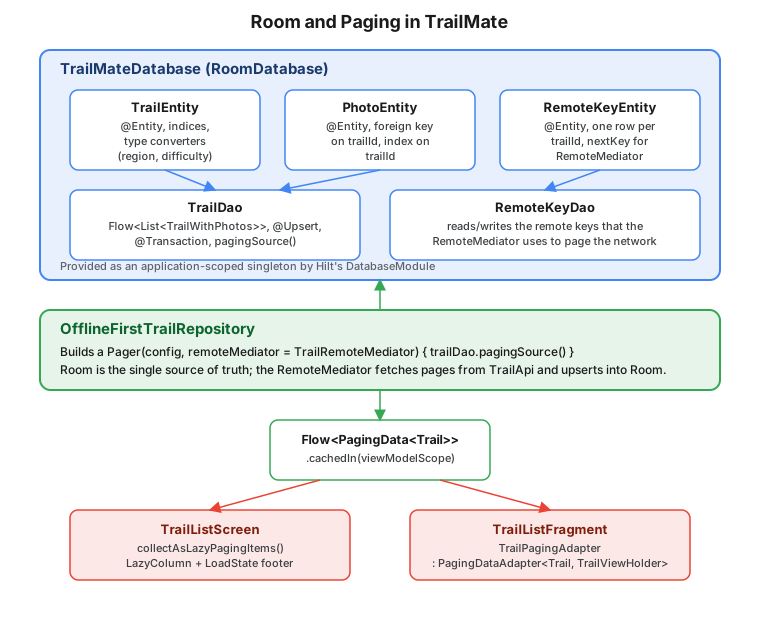
}The RemoteKeyEntity table (see the figure below) is what makes this resumable and consistent: it is the only
place the "next page to fetch" number lives, so an APPEND load after process death picks up exactly where the
last one left off instead of guessing from row counts. LoadType.PREPEND returns immediately because TrailMate’s
API is not reverse-paginated — there is nothing "before" page one. The whole database write runs inside
withTransaction, so a reader observing Room mid-load never sees the old page deleted without the new page in
place yet.
RemoteMediator is wired into the same Pager as before:
Pager(
    config = PagingConfig(pageSize = 20, prefetchDistance = 5),
    remoteMediator = TrailRemoteMediator(region, trailApi, database),
) {
    database.trailDao().pagingSource()
}.flowLoadState
Every PagingData snapshot carries a LoadState for three load directions — refresh (the initial load or a
retry), prepend and append — each one of NotLoading, Loading or Error. Both consumers shown above read
loadState.append to show a footer spinner or error row; a full-screen loading or error state (for the very
first page, before anything is on screen) reads loadState.refresh instead:
when (val refresh = trails.loadState.refresh) {
    is LoadState.Loading -> FullScreenLoading()
    is LoadState.Error -> FullScreenError(message = refresh.error.message, onRetry = trails::retry)
    is LoadState.NotLoading -> Unit
}trails.retry() re-issues the load that last failed (the RemoteMediator’s `load call included), which is
usually all a "Retry" button needs to call.
Testing Paging with asSnapshot
asSnapshot (from androidx.paging:paging-testing) drives a Flow<PagingData<T>> to completion in a test and
returns a plain List<T>, without needing a RecyclerView, a Compose UI, or a running RemoteMediator loop to
observe.
// core/data/src/test/kotlin/com/example/trailmate/core/data/OfflineFirstTrailRepositoryTest.kt
package com.example.trailmate.core.data

import androidx.paging.testing.asSnapshot
import kotlinx.coroutines.test.runTest
import kotlin.test.assertEquals

class OfflineFirstTrailRepositoryTest {

    @Test
    fun observeTrailsPaged_returnsAllSeededTrails() = runTest {
        val repository = OfflineFirstTrailRepository(fakeTrailDao)

        val snapshot = repository.observeTrailsPaged().asSnapshot()

        assertEquals(listOf("Ridge Loop", "Coastal Path"), snapshot.map { it.name })
    }
}asSnapshot accepts an optional lambda to drive scroll-triggered loads (onListen/appendScrollWhile) when the
test needs to exercise pagination past the first page; for a small fake dataset like the one above the default
behavior — load everything the source produces — is enough. See
Android Developers — Test Paging.
Room and Paging Together
The figure below shows how the pieces on this page fit into OfflineFirstTrailRepository: Room’s entities and
DAOs (including the RemoteKeyEntity/RemoteKeyDao pair a RemoteMediator needs), the Pager built on top of
them, and the two ways PagingData is consumed depending on whether the screen is built with Compose or Views.
Common Mistakes
-
Running a blocking Room query on the main thread. Only suspend functions and
Flow-returning queries are main-safe; a plain, non-suspendList<TrailEntity>-returning query called directly from a click handler throwsIllegalStateExceptionat run time, in release builds as well as debug ones (unless the builder calledallowMainThreadQueries(), which should be reserved for tests). -
Forgetting to bump
versionor export a schema. A schema change with no version bump crashes every existing install on the next open;exportSchema = truewith noschemaDirectoryconfigured only produces a build warning, not test coverage — both need to be present together for migrations to be testable at all. -
Collecting
PagingDatawithoutcachedIn. Every new collector re-triggersPager’s initial load from page one; on a screen that recomposes often, or a `Fragmentview recreated on every rotation, this reloads the whole first page repeatedly with no benefit. -
A
RemoteMediatorthat does not persist a remote key. Without aRemoteKeyEntity-style table, there is no way to resumeAPPENDafter process death except re-deriving the next page from row counts, which breaks the moment a row is deleted locally (a favorite removed, a stale trail purged) and shifts the count. -
Treating
PagingDatalike aList. It cannot be collected into aList, filtered, or measured for size outside ofPagingData.filter/.mapand the adapter’s ownitemCount; code that needs a plain, complete list (an export feature, a "select all" action) should query the DAO directly instead of going through Paging.