Best Practices
|
This section documents schema/database evolution using version-controlled migration tools — Liquibase (relational/SQL), Mongock (MongoDB, Java-native) and Flamingock (Mongock’s successor, generalized to any external system) — as described by each tool’s own official documentation: liquibase.org and docs.liquibase.com for Liquibase, docs.mongock.io for Mongock, and docs.flamingock.io for Flamingock — which are the references these pages are written and verified against. This content was generated with the assistance of AI and should be verified against those official docs before being relied on in production. Mongock is now maintained under the Flamingock GitHub organization (github.com/flamingock/mongock), and Flamingock is positioned as its successor — see Coming from Mongock. Readers starting a new project should default to Flamingock unless they have a specific reason to stay on Mongock. This section’s bibliography lists the reference material consulted while preparing these pages. |
The tool-specific pages in this guide cover how Liquibase, Mongock and Flamingock each execute a change. This page covers practices that apply regardless of which tool you use — the habits that keep a migration safe in production rather than just correct in isolation.
Backward-Compatible Changes: Expand/Contract
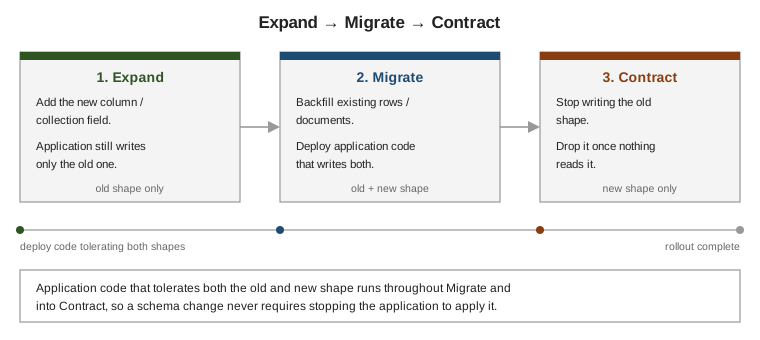
The single most important practice is never breaking the currently-deployed application version with a schema change. Since a rolling deploy runs old and new application code side by side for some period, and a migration can run before, during or after that deploy depending on the tool and pipeline, every intermediate state has to work for both code versions. The pattern that guarantees this is expand/contract, run as three phases:
-
Expand — add the new column/field alongside the old one. Nothing reads or writes it yet; the schema is additive, so the currently-running old application code is completely unaffected.
-
Migrate — backfill existing rows/documents into the new shape, and deploy application code that writes both the old and new shape (and reads from whichever is authoritative). This is the only phase where old and new application code, and old and new data shape, must all coexist safely.
-
Contract — once every consumer has been confirmed to use only the new shape, stop writing the old one, then drop it in a later change unit. This step is intentionally the last one, and often held for a separate release, so there is a rollback path (redeploy the previous application version) all the way up until the old shape is actually dropped.
One Logical Change per Change Unit
Keep each changeset/changeunit/change scoped to one logical change — the same recommendation Liquibase makes explicitly for changesets (Liquibase: Changelogs & Changesets), and good practice for Mongock and Flamingock too. A change unit that bundles several unrelated changes is harder to review, harder to roll back cleanly (undoing one part without the others), and makes the audit trail less meaningful — one row per logical change is what makes "what changed and when" a useful answer.
Never Edit an Already-Applied Change
Once a change unit has been recorded as applied anywhere — even just in a developer’s local database — treat it as immutable. Editing it instead of appending a new one breaks the checksum assumption every tool relies on (Core Concepts's checksum section): Liquibase will flag the mismatch and refuse to proceed by default (Liquibase: Tracking & Locking), while Mongock and Flamingock have no checksum concept for code changes at all, so an edited class simply never re-runs anywhere it already ran — silently, with no error. If a change unit turns out to be wrong, add a new one that corrects it; the audit trail should show the mistake and the fix as two entries, not a rewritten history.
Testing Migrations in CI
Run every change unit against production-like data in CI before it reaches production — not just against an
empty schema. An empty-database test catches syntax errors but misses the failure modes that actually matter:
a backfill that times out against realistic row/document counts, a unique constraint that conflicts with real
duplicate data, or a lock that’s held long enough to matter under load. Flamingock’s BDD-style testing API
(Flamingock: Testing) and ordinary integration tests
against a disposable database (a Testcontainers instance, for example) are both suited to this; Liquibase’s
updateSQL (Liquibase: Getting Started) is a
useful pre-CI sanity check for what a changeset would actually execute.
Coordinating Rollout With the Application Deploy
A migration and the application deploy that depends on it are two separate events, and the order between them matters. The expand/contract pattern above is what makes this coordination possible: deploy application code that tolerates both the old and new schema before running the migration that removes the old shape, so a migration failure or a rollback of the application deploy never leaves the system in a state neither application version can handle. Flamingock’s stages (Flamingock: Stages & Pipelines) give this an explicit mechanism — a "pre-deploy" stage that must complete before the new application code starts, and a "post-deploy" stage for cleanup once it’s confirmed healthy.
Zero-Downtime Strategies, in General
Beyond expand/contract itself:
-
Avoid long-held locks on large tables. An
ALTER TABLEthat locks a hot table for the duration of a large rewrite blocks production traffic; prefer online-migration techniques (adding a nullable column instead of aNOT NULLcolumn with a default that rewrites every row, for example) and check the target database’s own guidance on which DDL operations are online versus blocking. -
Backfill in batches, not one giant
UPDATE/bulk write, so a backfill doesn’t hold locks or blow up transaction/oplog size for the whole migration at once. -
Make the migration idempotent and resumable (Core Concepts), so a batched backfill interrupted partway through can safely restart from where it left off rather than needing to be re-run from scratch.
-
Feature-flag the cutover from the old shape to the new one in application code, so the read-path switch is a fast, reversible toggle rather than tied to a deploy.
-
Monitor lock wait time and replication lag during the migration, not just its own success/failure, since a migration that "succeeds" while stalling replicas or blocking other queries has still caused an incident.