Spring Boot and Quarkus Media Pipeline
|
This content was generated with the assistance of AI and should be verified against the official documentation before being relied on in production. See the section bibliography for the reference material consulted while preparing these pages. |
Baseline date: 2026-10-07. This page assembles the pieces from the Java libraries page into the reference flow of upload pipelines. The running example is the Bookshelf cover upload: a book cover goes to object storage, and the service produces AVIF, WebP and JPEG variants, a BlurHash, and, for the video trailer, a few renditions and a poster.
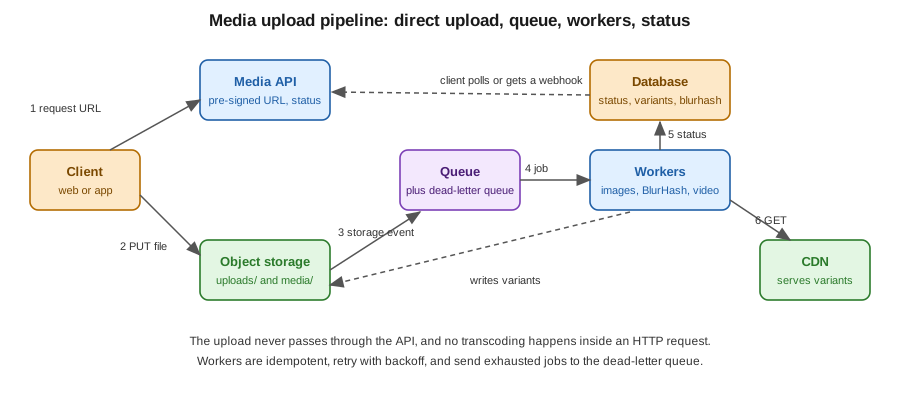
Spring Boot
Entity and API
@Entity
public class Media {
    @Id private UUID id;
    private String originalKey;          // uploads/<id>/original
    private String contentType;
    @Enumerated(EnumType.STRING) private MediaStatus status;   // UPLOADING, QUEUED, PROCESSING, READY, FAILED
    private String blurhash;
    private Integer width;
    private Integer height;
    private String failureReason;
    @JdbcTypeCode(SqlTypes.JSON) private List<Variant> variants = new ArrayList<>();
    // getters and setters omitted
}

public record Variant(String format, int width, String key) {}
@RestController
@RequestMapping("/media")
class MediaController {
private final MediaService service;
MediaController(MediaService service) { this.service = service; }
@PostMapping
UploadTicket create(@RequestBody @Valid CreateMedia request) {
return service.createUpload(request); // returns id and a pre-signed PUT URL
}
@PostMapping("/{id}/complete")
ResponseEntity<Void> complete(@PathVariable UUID id) {
service.markUploaded(id); // verifies the object, publishes the job
return ResponseEntity.accepted().build();
}
@GetMapping("/{id}")
MediaView get(@PathVariable UUID id) {
return service.view(id); // status, blurhash, variants with CDN URLs
}
}The pre-signed URL is created with the AWS SDK S3Presigner (or Spring Cloud AWS, or the equivalent for Google Cloud
Storage and Azure Blob Storage), see file storage and
object stores. Pin the content type and a maximum length into the signature so that a client cannot upload something
other than it declared, and validate the real content again in the worker, see
security and operations.
URL putUrl = presigner.presignPutObject(r -> r
    .signatureDuration(Duration.ofMinutes(10))
    .putObjectRequest(p -> p.bucket(bucket).key("uploads/" + id + "/original")
        .contentType(request.contentType()).contentLength(request.size())))
    .url();
Reference: AWS SDK for Java, presigned URLs.
Queue and worker
Publish the job with Spring AMQP, as in Spring Boot with RabbitMQ. Kafka works as well, see Spring Boot with Kafka. The worker is a listener on a separate deployment, so you can scale and limit it independently:
@Component
class MediaWorker {

    @RabbitListener(queues = "media.process")
    void handle(ProcessMedia job) {
        Media media = repository.findById(job.id()).orElseThrow();
        if (media.getStatus() == MediaStatus.READY) {
            return;                                   // idempotent: redelivery does nothing
        }
        media.setStatus(MediaStatus.PROCESSING);
        repository.save(media);

        byte[] original = storage.get(media.getOriginalKey());
        ImageInfo info = images.verify(original);     // magic bytes, size, dimensions
        BufferedImage small = images.downscale(original, 64);
        media.setBlurhash(BlurHash.encode(small, 4, 3));

        List<Variant> variants = new ArrayList<>();
        for (int width : new int[] {320, 640, 1280}) {
            for (String format : new String[] {"avif", "webp", "jpg"}) {
                String key = "media/" + media.getId() + "/w" + width + "." + format;
                storage.put(key, images.resize(original, width, format));
                variants.add(new Variant(format, width, key));
            }
        }
        media.setVariants(variants);
        media.setWidth(info.width());
        media.setHeight(info.height());
        media.setStatus(MediaStatus.READY);
        repository.save(media);
    }
}
images is a thin wrapper over Thumbnailator for JPEG and PNG and over libvips for AVIF and WebP. Retries with backoff
and a dead-letter queue are configured on the listener container and on the queue, see
RabbitMQ reliability, dead-lettering and TTL.
When the message ends in the dead-letter queue, a small consumer sets the status to FAILED and records the reason.
For video, the same worker shape calls Jaffree (see Java libraries) to probe, transcode each rendition and extract the poster. Run video workers as separate listeners with their own queue and concurrency of one or two per pod, because a single FFmpeg run uses several cores.
Backfills with Spring Batch
When a breakpoint is added or an encoder is improved, existing media must be reprocessed. A Spring Batch job reads the rows to reprocess and publishes jobs, or processes them directly in chunks, see Spring Batch and chunk-oriented processing:
@Bean
Step backfillStep(JobRepository repository, PlatformTransactionManager tx, EntityManagerFactory emf) {
    return new StepBuilder("backfillVariants", repository)
        .<Media, ProcessMedia>chunk(50, tx)
        .reader(new JpaPagingItemReaderBuilder<Media>()
            .name("mediaReader").entityManagerFactory(emf)
            .queryString("select m from Media m where m.variantsVersion < :v")
            .parameterValues(Map.of("v", CURRENT_VARIANTS_VERSION)).pageSize(50).build())
        .processor(media -> new ProcessMedia(media.getId()))
        .writer(chunk -> chunk.getItems().forEach(publisher::publish))
        .build();
}
Publishing instead of processing keeps the heavy work in the same worker code path and respects its concurrency limits.
The variantsVersion column is an integer bumped whenever the recipe changes.
References: Spring AMQP, Spring Batch and Spring Framework data access.
Quarkus
The same flow in Quarkus uses SmallRye Reactive Messaging for the queue, see Messaging with SmallRye Reactive Messaging, and scheduled jobs for backfills, see scheduling and mail.
@ApplicationScoped
public class MediaWorker {

    @Inject MediaRepository repository;
    @Inject ObjectStorage storage;
    @Inject ImageService images;

    @Incoming("media-process")
    @Blocking                                   // runs on a worker thread, not the event loop
    public void handle(ProcessMedia job) {
        Media media = repository.findById(job.id());
        if (media.status == MediaStatus.READY) {
            return;
        }
        // same steps as the Spring Boot worker: verify, BlurHash, variants, save
    }
}
mp.messaging.incoming.media-process.connector=smallrye-rabbitmq
mp.messaging.incoming.media-process.queue.name=media.process
mp.messaging.incoming.media-process.failure-strategy=reject
mp.messaging.incoming.media-process.max-outstanding-messages=2@Blocking is essential: image and FFmpeg work must never run on the Vert.x event loop. Limit concurrency with the
connector’s prefetch settings (max-outstanding-messages for RabbitMQ).
Native images and external binaries
-
A GraalVM native image starts quickly, which suits scale-to-zero workers, but ImageIO plugins that rely on service loading and reflection need extra native image configuration, and Java AWT code may not be supported in your target configuration. Check the Quarkus native documentation, or call libvips and FFmpeg as external processes and keep the Java code free of imaging libraries.
-
FFmpeg and
vipsare native executables, so they must be installed in the container image, next to the application. The same is true for JVM images, see Java and Spring Boot images. -
A separate worker image, with FFmpeg and without the web stack, keeps the web image small and the attack surface low.
References: Quarkus, building a native executable and Quarkus RabbitMQ connector.
Related pages
-
Scheduling for periodic cleanups of abandoned uploads