AWS (Amazon Web Services)
|
This content was generated with the assistance of AI and should be verified against the official documentation before being relied on in production. See the section bibliography for the reference material consulted while preparing these pages. |
Welcome to the AWS reference. It documents Amazon Web Services for practitioners who work from the AWS
Management Console and the AWS CLI — provisioning resources, wiring them together, and operating what results — rather than from the perspective of a certification-style conceptual overview. It is written for developers and
operators who already build software (the rest of this site covers the Java, web and database sides) and now need to
run it on AWS. Examples across this section target AWS CLI v2 (the 2.37 line), AWS CDK v2 (aws-cdk-lib 2.272), AWS
SAM CLI 1.166, eksctl 0.230 and Amazon EKS Kubernetes 1.36; this baseline was re-verified as current on 2026-10-01,
and each page also names the service-specific versions it depends on, since AWS ships new capabilities to individual
services on its own schedule. Prices are never quoted: each page describes the pricing model and cost drivers and
links the dated official pricing page.
Also working on Google Cloud? See the Google Cloud section, which builds the same Bookshelf application there.
The Bookshelf scenario
Most pages in this section build up one running example, Bookshelf: a static web front end, a catalog-api
(Spring Boot), an orders-api and a notifier worker that sends order-confirmation emails. It is the same
application as in the Azure section, so the two clouds can be compared side by side.
Every resource follows one naming convention, so a command copied from one page composes with a command copied from
another:
| Concern | Name / value |
|---|---|
Region |
|
Account ID |
placeholder |
ECR repositories |
|
ECS |
cluster |
Lambda |
|
S3 |
|
CloudFront |
distribution |
Databases |
Aurora PostgreSQL Serverless v2 |
Secrets and configuration |
Secrets Manager |
EKS |
cluster |
API Gateway |
HTTP API |
VPN |
Client VPN endpoint |
SES |
domain |
Java package |
|
Shell variables |
|
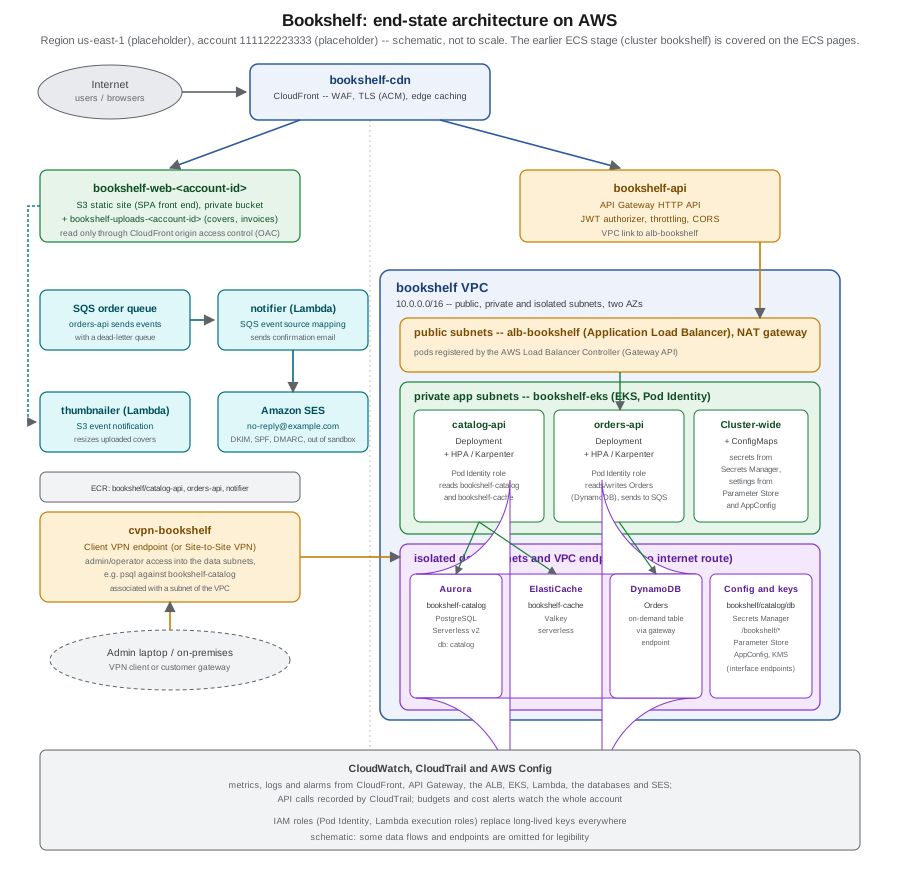
Bookshelf starts on ECS (the bookshelf cluster, covered in the Compute group below), where catalog-api is first
deployed with ECS Express Mode and then as a full Fargate service, and later moves its services onto an EKS cluster
(bookshelf-eks), covered in EKS Clusters and Deploying Microservices on EKS. The
figure below shows Bookshelf’s end state, once every group’s pages have been applied: CloudFront in front of a
private S3 bucket and an API Gateway HTTP API, the EKS-hosted services behind an Application Load Balancer, the
databases, secrets and configuration reached from private subnets, event-driven Lambda functions and SES for email,
an admin VPN path, and CloudWatch watching all of it. It is not the architecture a reader has running after just the
Compute pages — see Choosing a Compute Service and ECS and Fargate for the
earlier, ECS-only stage.
Reading path
Read this section foundations first — the cloud model, accounts, regions, organizations, identity and
infrastructure as code — then compute, where Bookshelf’s services first get deployed. From there, storage and CDN
put the static front end and its assets somewhere durable and fast to serve, and managed databases give catalog-api
and orders-api somewhere to persist data. Security and runtime configuration then centralize the secrets and
settings every earlier page referenced loosely, before networking, gateways and VPN lock the whole thing behind a
private network and a proper API front door. Email and integration wire notifier up to the outside world, and
operations, governance and beyond closes the loop: monitoring, cost, compliance, migration paths and the developer
tooling that ties CI/CD back to everything above. A reader who only needs one topic can jump straight to its page;
each page states which earlier pages it assumes.
What’s covered
Foundations
-
Cloud Concepts — cloud computing, IaaS/PaaS/SaaS, the shared responsibility model, the Well-Architected pillars and the vocabulary the rest of this section assumes.
-
Getting Started with AWS — creating an account, root-user hygiene, the Free Tier, the Console, CloudShell and installing and signing in with the AWS CLI v2.
-
AWS Global Infrastructure — regions, Availability Zones, Local Zones, edge locations and how they shape resiliency decisions.
-
Accounts and Organizations — AWS Organizations, OUs, service control policies, Control Tower, tags and a multi-account strategy.
-
Identity and Access — IAM users, roles and policies, IAM Identity Center, STS, the default credential chain and OIDC federation, the mechanisms every later page’s roles build on.
-
Infrastructure as Code — CloudFormation, the CDK and SAM for provisioning Bookshelf repeatably, instead of one-off CLI commands.
Compute
-
Choosing a Compute Service — a decision guide across EC2, ECS, ECS Express Mode, Lambda, EKS, App Runner and Elastic Beanstalk.
-
Amazon EC2 and Auto Scaling — instances, AMIs, security groups, purchasing options and Auto Scaling groups.
-
Container Registry — the three Bookshelf ECR repositories, pushing and pulling images, scanning and lifecycle policies.
-
ECS and Fargate — clusters, task definitions, services and ECS Express Mode, deploying
catalog-apiend to end. -
ECS Deployments, Scaling and Networking —
awsvpcnetworking, deployment strategies, Application Auto Scaling and Service Connect. -
AWS Lambda — functions, packaging, execution roles, concurrency, SnapStart and limits.
-
Lambda: Event-Driven and Serverless Apps — event source mappings, S3 triggers, SAM, and the
notifierandthumbnailerfunctions. -
EKS Clusters — creating
bookshelf-eks: Auto Mode, node groups, access entries, add-ons and upgrades. -
Deploying Microservices on EKS — moving the Bookshelf services onto that cluster with manifests, Helm, the AWS Load Balancer Controller and the Gateway API.
Storage and CDN
-
Block and File Storage on AWS — EBS, instance store, EFS and FSx, plus the transfer and hybrid storage services.
-
S3 Object Storage — buckets, storage classes, lifecycle, versioning and presigned URLs.
-
S3 Security and Static Hosting — Block Public Access, bucket policies, encryption and the private static site behind CloudFront.
-
CloudFront and CDN Delivery —
bookshelf-cdn, origin access control, cache policies, certificates and invalidation.
Managed databases
-
Managed Databases on AWS — a map from every engine this site documents to its AWS option.
-
Amazon RDS — engines, Multi-AZ, replicas, backups, RDS Proxy and Blue/Green deployments.
-
Amazon Aurora — Serverless v2,
bookshelf-catalogand wherecatalog-apipersists its catalog. -
Amazon DynamoDB — keys, capacity modes, indexes, streams and the
Orderstable. -
DocumentDB and MongoDB on AWS — Amazon DocumentDB, MongoDB Atlas and the MongoDB variant of
orders. -
OpenSearch and Search on AWS — OpenSearch Service domains and Serverless, Elastic Cloud and vector search.
-
Caching, Graph and Partner Databases — ElastiCache for Valkey, MemoryDB, Neptune and the partner-hosted databases.
Security and runtime configuration
-
Secrets Manager, Parameter Store and KMS — secrets, parameters and keys, and how ECS, Lambda and EKS consume them.
-
Runtime Configuration — AppConfig, feature flags, Parameter Store hierarchies and Kubernetes ConfigMaps as the EKS-side equivalent.
Networking, gateways and VPN
-
VPC Networking — subnets, route tables, NAT, security groups, endpoints and PrivateLink for the Bookshelf VPC.
-
Route 53, DNS and ACM Certificates — hosted zones, routing policies, health checks and certificates.
-
Load Balancers and Gateways — ALB, NLB, VPC Lattice and the Gateway API in front of
bookshelf-eks. -
API Gateway —
bookshelf-api, the HTTP API in front ofcatalog-apiandorders-api. -
VPN and Hybrid Connectivity — Client VPN, Site-to-Site VPN, Direct Connect and Verified Access, the admin path into the data subnets.
Email and integration
-
Sending Email with Amazon SES — identities, DKIM, leaving the sandbox, and how
notifiersends order-confirmation email. -
Messaging and Integration — SQS, SNS, EventBridge, Step Functions and streaming services, including the
notifierqueue.
Operations, governance and beyond
-
Monitoring and Observability — CloudWatch, CloudTrail, OpenTelemetry and managed Prometheus and Grafana.
-
Governance, Security and Compliance — Config, Security Hub, GuardDuty and the compliance tooling.
-
Cost Management and Support — Cost Explorer, Budgets, Savings Plans and support plans.
-
Architecture, Migration, Hybrid and Disaster Recovery — the Well-Architected Tool, migration strategies, hybrid options and backup.
-
AI, Data and Analytics Services Overview — a survey of the AWS services this section doesn’t otherwise cover.
-
Developer Tools and DevOps — CodeBuild, CodePipeline, GitHub Actions with OIDC and the CDK/SAM in CI.
Cheat Sheet — a single-page, printable summary of this section, with a downloadable PDF.
Media Optimization
The Media Optimization sub-section covers image processing, video transcoding, covers and streaming on AWS, with examples for the AWS CLI, Python, Node.js, Java and .NET:
-
MediaConvert: Video Transcoding — jobs, templates, QVBR, Automated ABR and EventBridge job events.
-
Frame Capture, Covers and BlurHash — cover frames and a BlurHash Lambda function.
-
Image Processing with S3, Lambda and CloudFront — the S3-triggered
thumbnailerand on-demand resizing. -
Streaming and Delivery — CloudFront signed cookies and MediaPackage.
-
Video on Demand Pipeline — Step Functions with MediaConvert.
-
Cheat Sheet (PDF) — a one-page summary.
Coming from Azure
Readers who know the Azure section can use the table below to find the AWS page that covers the closest counterpart. The mapping is a starting point, not an equivalence: the services differ in defaults, limits, pricing and identity model, and each AWS page says where.
| Azure | AWS | Notes |
|---|---|---|
Resource Organization (management groups, subscriptions, resource groups) |
AWS isolates workloads by account inside an organization; there is no resource group, so tags and CloudFormation stacks group resources. |
|
Identity and Access (Entra ID, RBAC, managed identities) |
IAM roles take the place of managed identities; IAM Identity Center is the workforce sign-in counterpart. |
|
Infrastructure as Code (Bicep, |
CloudFormation, the CDK and SAM. |
|
Regions and Availability Zones, plus Local Zones and edge locations. |
||
Same decision, different catalog. |
||
Azure Container Registry (ACR) |
Container Registry (ECR) |
Repositories are created per image name. |
Container Apps (Container Apps) |
ECS and Fargate (ECS on Fargate, ECS Express Mode) |
Express Mode is the closest match to the Container Apps experience. |
App Service and Azure Functions (Functions) |
Lambda functions with event source mappings; Elastic Beanstalk is the App Service-style option. |
|
AKS Clusters and Deploying Microservices on AKS (AKS) |
EKS Clusters and Deploying Microservices on EKS (EKS) |
EKS Auto Mode compares to AKS Automatic; Pod Identity compares to workload identity. |
Storage Accounts and Blob Storage (Blob Storage) |
S3 Object Storage (S3), Block and File Storage on AWS (EBS, EFS) |
There is no storage-account layer: buckets are the top-level container. |
Front Door and CDN (Front Door) |
CloudFront and CDN Delivery (CloudFront) |
Origin access control keeps the S3 origin private. |
Engine-by-engine map on both sides. |
||
RDS for managed engines, Aurora for the cloud-native PostgreSQL/MySQL option. |
||
Cosmos DB and Azure DocumentDB (Cosmos DB, Azure DocumentDB) |
DynamoDB for key-value/document at scale; DocumentDB for MongoDB compatibility. |
|
Redis and Partner Databases on Azure (Azure Managed Redis) |
Caching, Graph and Partner Databases (ElastiCache for Valkey, MemoryDB) |
Valkey is the default open-source engine. |
Key Vault and Secrets (Key Vault) |
Secrets Manager, Parameter Store and KMS (Secrets Manager and KMS) |
Secrets and keys are separate services on AWS. |
Runtime Configuration (App Configuration) |
Runtime Configuration (AppConfig, Parameter Store) |
ConfigMaps on EKS work as they do on AKS. |
Virtual Networks (virtual networks, NSGs) |
VPC Networking (VPC, security groups) |
Subnets are bound to one Availability Zone on AWS. |
Load Balancers and Gateways (ALB, NLB) |
ALB with the AWS Load Balancer Controller replaces Application Gateway. |
|
API Management (API Management) |
API Gateway (API Gateway) |
HTTP APIs are the lightweight, lower-cost option. |
VPN Gateway and Hybrid Connectivity (VPN Gateway) |
VPN and Hybrid Connectivity (Client VPN, Site-to-Site VPN) |
Verified Access is the VPN-less alternative. |
Email with Azure Communication Services (Communication Services Email) |
New accounts start in the SES sandbox. |
|
Messaging and Integration Services (Service Bus, Event Grid, Event Hubs) |
Messaging and Integration (SQS, SNS, EventBridge, Kinesis) |
Different splitting of queues, topics and event buses. |
Monitoring and Observability (Azure Monitor) |
Monitoring and Observability (CloudWatch, CloudTrail) |
Logs, metrics and alarms in CloudWatch. |
Governance and Compliance (Azure Policy) |
Governance, Security and Compliance (Config, Security Hub) |
Service control policies in Organizations are the closest guard rail. |
Cost Explorer and Budgets. |
||
Well-Architected Framework and Cloud Adoption Framework on both sides. |
||
GitHub Actions with OIDC works with both clouds. |
Where related material lives elsewhere on this site
Several pages in this section link back to material that already has its own home elsewhere on this site, rather than duplicating it here:
Related open issues cover adjacent ground this section doesn’t (yet): #171 tracks Terraform as an alternative to CloudFormation and the CDK for infrastructure as code, #184 tracks a closer look at API managers, secret managers, and gateways and scaling in the cloud more broadly, and #164 tracks a future Google Cloud section.
Bibliography
Requester-provided books, consulted for the practitioner’s angle and exam-style framing only — never the primary source for any command or code example on this section’s pages:
-
Wittig, A. and Wittig, M. Amazon Web Services in Action, 3rd ed. Manning Publications, 2023. https://www.manning.com/books/amazon-web-services-in-action-third-edition (companion code: https://github.com/AWSinAction/code3)
-
Taulli, T. AWS Certified Cloud Practitioner (CLF-C02) Study Guide. O’Reilly Media. https://www.oreilly.com/library/view/aws-certified-cloud/9798341640214/
-
Culkin, J. and Zazon, M. AWS Cookbook. O’Reilly Media. https://www.oreilly.com/library/view/aws-cookbook/9781492092599/ (companion code: https://github.com/AWSCookbook)
Official AWS documentation, grouped by the same section groups above:
General:
-
AWS documentation hub, the AWS service lifecycle page (the source for every retirement and availability change mentioned across the pages) and the AWS Decision Guides.
Foundations:
-
AWS CLI v2 installation, AWS CLI v2 User Guide, AWS CLI Command Reference and the AWS CLI v2 changelog, the
aws loginannouncement, Free Tier plans, support plan changes, the AWS Well-Architected Framework and the AWS Cloud Adoption Framework. -
Infrastructure as code: CloudFormation User Guide, AWS CDK v2 Developer Guide, AWS SAM documentation, eksctl documentation and the Copilot CLI end of support announcement.
Compute:
-
Amazon ECS Developer Guide with the ECS Express Mode announcement and the built-in blue/green deployments announcement, the App Runner availability change, AWS Lambda Developer Guide with its runtimes and quotas pages, Amazon EKS User Guide with EKS Auto Mode, Kubernetes versions, the AWS Load Balancer Controller, Gateway API general availability and EKS Capabilities.
Storage and CDN:
Databases:
Security and configuration:
-
Secrets Manager (including the secrets provider for EKS with Pod Identity), Parameter Store, AWS KMS, AppConfig with the AppConfig Agent.
Networking, gateways and VPN:
Email and integration:
-
Amazon SES, its SES v2 CLI reference and the Pinpoint migration guide.
Operations:
Partner and third-party documentation, where a page relies on a non-AWS managed service or open-source project:
Where this section’s prose and the official documentation disagree, the official documentation wins.