Hilla and React Views
|
This section documents the current Vaadin release line — Vaadin 24 LTS / 25.x, Java 17+, Spring Boot 3 / Jakarta EE 10 — as published at the official Vaadin documentation, which is the reference these pages are written and verified against. No specific patch version is pinned. Flow (server-side Java) is the authoring style used throughout, with Hilla / React shown where it differs; Vaadin 7 and the pre-Flow architecture appear only as migration contrast. This content was generated with the assistance of AI and should be verified against the official documentation before being relied on in production, since Vaadin ships major releases roughly twice a year and its ecosystem iterates. This section’s bibliography lists the reference material consulted while preparing these pages. |
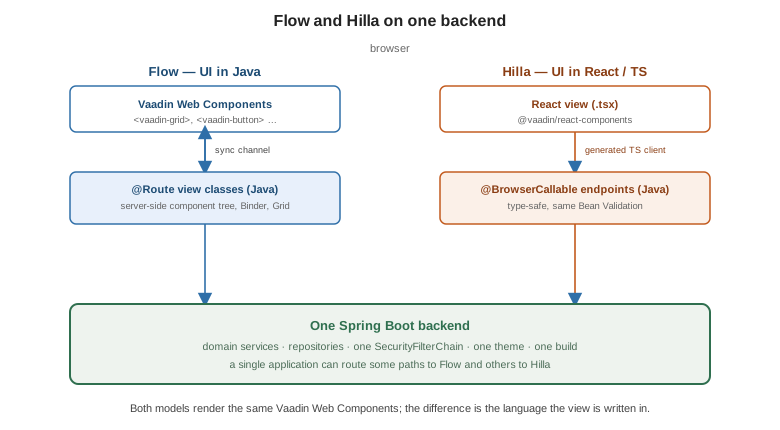
Hilla is the second programming model in Vaadin: the browser UI is written in React and TypeScript, and it calls type-safe endpoints generated from your Java services. The backend, build, theming and security are the same as Flow — one project, two ways to write views. This page follows the Hilla documentation and Add a React View. Hilla was previously called Fusion; the name changed in 2022, the model did not.
Endpoints
Annotate a Spring service with @BrowserCallable (an alias of @Endpoint) and it becomes callable from the
browser. Vaadin generates a TypeScript module with one typed function per public method:
@BrowserCallable
@AnonymousAllowed
public class PersonEndpoint {

    private final PersonRepository repository;

    public PersonEndpoint(PersonRepository repository) {
        this.repository = repository;
    }

    public List<Person> list() {
        return repository.findAll();
    }

    public Person save(@Valid Person person) {
        return repository.save(person);
    }
}
import { PersonEndpoint } from 'Frontend/generated/endpoints';
const people: Person[] = await PersonEndpoint.list();
await PersonEndpoint.save(edited); // Person is a generated TS typeBean Validation annotations on the parameters are enforced on the server and surfaced to the client. See Endpoints.
Views and routing
A .tsx file under src/main/frontend/views/ is a route; the path mirrors the folder structure
(views/people/list.tsx → /people/list). An exported config object sets the title and menu placement;
@vaadin/react-router handles navigation.
// src/main/frontend/views/people.tsx
import { ViewConfig } from '@vaadin/hilla-file-router/types.js';
import { Grid } from '@vaadin/react-components/Grid.js';
import { GridColumn } from '@vaadin/react-components/GridColumn.js';
import { useEffect, useState } from 'react';
import { PersonEndpoint } from 'Frontend/generated/endpoints';
import type Person from 'Frontend/generated/com/example/Person';

export const config: ViewConfig = { title: 'People', menu: { order: 1 } };

export default function PeopleView() {
  const [people, setPeople] = useState<Person[]>([]);
  useEffect(() => { PersonEndpoint.list().then(setPeople); }, []);
  return (
    <Grid items={people}>
      <GridColumn path="firstName" />
      <GridColumn path="lastName" />
    </Grid>
  );
}Forms
useForm binds a generated model to fields, runs the same validators as the server, and exposes submit:
import { useForm } from '@vaadin/hilla-react-form';
import PersonModel from 'Frontend/generated/com/example/PersonModel';
import { TextField } from '@vaadin/react-components/TextField.js';
import { Button } from '@vaadin/react-components/Button.js';

function PersonForm() {
  const { model, field, submit, invalid } = useForm(PersonModel, {
    onSubmit: async (person) => { await PersonEndpoint.save(person); },
  });
  return (
    <>
      <TextField label="First name" {...field(model.firstName)} />
      <TextField label="Last name" {...field(model.lastName)} />
      <Button theme="primary" disabled={invalid} onClick={submit}>Save</Button>
    </>
  );
}Security
Every endpoint is denied by default. Open it with a class- or method-level annotation, exactly as on the Flow side (Security):
@BrowserCallable
@RolesAllowed("ADMIN")
public class AdminEndpoint {
    @AnonymousAllowed
    public String publicPing() { return "ok"; }
}
On the client, useAuth() exposes the authenticated user, roles and login / logout, and route access is
checked from each view’s config.rolesAllowed. See
Security.
Reactive endpoints and signals
A method returning Flux<T> streams values to the client as an async iterable — for live prices, logs or
progress:
public Flux<Integer> counter() {
    return Flux.interval(Duration.ofSeconds(1)).map(Long::intValue);
}
for await (const n of CounterEndpoint.counter()) { setCount(n); }Full-stack signals go further: a NumberSignal / ValueSignal shared between the server and every
connected client stays in sync automatically, giving collaborative state with no manual wiring. See
Reactive Endpoints and
Full-Stack Signals.
Mixing Flow and Hilla, and choosing
One application can serve Flow routes and Hilla routes side by side — a Flow admin area and a Hilla customer portal, for instance — sharing the security config, the theme and the domain layer.
| Choose | When |
|---|---|
Flow |
The team is Java-first; the UI is forms-and-tables heavy; you want data binding and |
Hilla |
The team knows React; the UI is highly interactive or custom; you want the browser-side ecosystem (Styling and UI Libraries) with a type-safe Java backend instead of hand-written REST. |
See also
-
Getting Started — the shared project, and where each model fits.
-
Security — the security model both views share.
-
React Reference and TypeScript Reference — the languages a Hilla view is written in.
-
UI Component Libraries —
@vaadin/react-componentsand React UI libraries in Hilla. -
Hilla and Add a React View — the official references.