CSS, Classes, Attributes and Dimensions
|
This section documents jQuery 3.x (the current major line — no specific patch version is pinned). This content was generated with the assistance of AI and should be verified against the official jQuery API reference before being relied on in production, since API details and deprecations continue to change between releases. jQuery is legacy-leaning: modern browsers implement native equivalents for almost everything it does
( This section’s bibliography lists the reference material consulted while preparing these pages. |
These methods read and write the presentational state of matched elements: their classes, their inline styles, their attributes and DOM properties, and their measured size and position.
Classes
$('#box').addClass('active');
$('#box').addClass('active big');          // several at once, space-separated
$('#box').removeClass('active');
$('#box').removeClass();                   // remove ALL classes
$('#box').toggleClass('active');           // add if absent, remove if present
$('#box').toggleClass('active', isOn);     // force on/off from a boolean
$('#box').hasClass('active');              // boolean -- true if ANY matched element has it
Inline styles with .css()
$('#box').css('color');                        // GET one computed property (first element)
$('#box').css(['color', 'fontSize']);          // GET several -> plain object
$('#box').css('color', 'red');                 // SET one on every element
$('#box').css({ color: 'red', 'font-size': '14px' });  // SET several
$('#box').css('width', (i, cur) => parseFloat(cur) * 2);// functional setter
.css() writes to the element’s style attribute (an inline style, high specificity). Prefer toggling a class
so the styling stays in the stylesheet; reach for .css() for genuinely dynamic values (a drag position, a
computed height).
Attributes vs. properties
.attr() reads/writes the HTML attribute (the markup’s initial value); .prop() reads/writes the live DOM
property (the current state). For most things they agree, but for boolean form state they do not:
// <input type="checkbox" id="agree" checked>

$('#agree').attr('checked');   // "checked"  -- the attribute, i.e. the DEFAULT state
$('#agree').prop('checked');   // true/false -- whether it is ticked RIGHT NOW

// after the user unticks it:
$('#agree').attr('checked');   // still "checked"  (attribute unchanged)
$('#agree').prop('checked');   // false            (property tracks reality)
Rule of thumb: use .prop() for checked, selected, disabled, readOnly, value (current), and
.attr() for everything genuinely attribute-shaped (id, href, src, data-*, colspan, ARIA
attributes). .removeAttr('name') deletes an attribute; .removeProp() exists but is rarely correct.
Dimensions
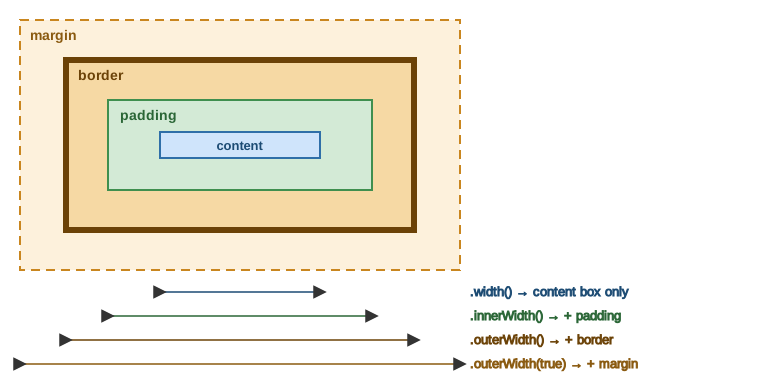
$('#box').width();              // content width only, in px, as a Number
$('#box').height();             // content height only
$('#box').innerWidth();         // content + padding
$('#box').outerWidth();         // content + padding + border
$('#box').outerWidth(true);     // content + padding + border + margin
$('#box').width(300);           // SET the content width (accepts Number px or a string)
Unlike CSS .css('width') (which returns a string like "300px"), .width() returns a unitless Number and is
unaffected by box-sizing — it always means the content box. The figure below shows which box each method
measures:
Position and scroll
$('#box').offset();             // { top, left } relative to the DOCUMENT
$('#box').position();           // { top, left } relative to the offset PARENT
$('#box').offset({ top: 100, left: 40 });   // move it (document coordinates)

$(window).scrollTop();          // current vertical scroll of the window
$('#pane').scrollTop(0);        // scroll an overflow container back to the top
$('#pane').scrollLeft(120);     // horizontal scroll position
.offset() is for "where is this on the page"; .position() is for "where is this inside its positioned
container", e.g. when placing an absolutely-positioned tooltip.
Modern equivalent
el.classList.add/remove/toggle/contains replaces the class methods. getComputedStyle(el) reads styles;
el.style.prop = value sets them. Use el.checked / el.disabled (properties) and
el.getAttribute/setAttribute/removeAttribute for attributes. el.getBoundingClientRect() gives
border-box size and viewport position in one call; el.offsetWidth/clientWidth/scrollTop cover the rest.
See Accessing CSS from JavaScript and
Document geometry & scrolling.