The Grid Component
|
This section documents the current Vaadin release line — Vaadin 24 LTS / 25.x, Java 17+, Spring Boot 3 / Jakarta EE 10 — as published at the official Vaadin documentation, which is the reference these pages are written and verified against. No specific patch version is pinned. Flow (server-side Java) is the authoring style used throughout, with Hilla / React shown where it differs; Vaadin 7 and the pre-Flow architecture appear only as migration contrast. This content was generated with the assistance of AI and should be verified against the official documentation before being relied on in production, since Vaadin ships major releases roughly twice a year and its ecosystem iterates. This section’s bibliography lists the reference material consulted while preparing these pages. |
Grid<T> is Vaadin’s table component: a typed, virtual-scrolling data grid that renders only the visible rows
and asks the server for more as the user scrolls. This page follows
the Grid documentation and
Add a Grid. In Vaadin 7 this role was filled by
Table and the Container data model; Grid and DataProvider replaced both.
Defining columns
A column maps a row object to a displayed value. The simplest form takes a ValueProvider — any
T → ? function — and a header:
Grid<Person> grid = new Grid<>();

grid.addColumn(Person::getFirstName).setHeader("First name");
grid.addColumn(Person::getLastName).setHeader("Last name");
grid.addColumn(person -> person.getFirstName() + " " + person.getLastName())
        .setHeader("Full name");
new Grid<>(Person.class) auto-generates one column per bean property; grid.setColumns("firstName", "email")
then narrows and orders them.
Give a column a key to look it up later, and a sort property so a click on the header sorts through the backend rather than in memory:
Grid.Column<Person> last = grid.addColumn(Person::getLastName)
        .setKey("lastName")
        .setHeader("Last name")
        .setSortProperty("lastName")
        .setAutoWidth(true)
        .setFlexGrow(0);

grid.getColumnByKey("lastName").setFrozen(true);
Renderers
A renderer controls the cell’s markup. NumberRenderer and LocalDateRenderer format primitives;
ComponentRenderer puts a live Vaadin component in the cell; LitRenderer builds the cell from a client-side
template string, which scales to far more rows because nothing is created server-side per row.
grid.addColumn(new NumberRenderer<>(Person::getSalary, NumberFormat.getCurrencyInstance()))
        .setHeader("Salary");

grid.addColumn(new LocalDateRenderer<>(Person::getHireDate, "yyyy-MM-dd"))
        .setHeader("Hired");

grid.addComponentColumn(person -> {
    Button edit = new Button("Edit", e -> openEditor(person));
    edit.addThemeVariants(ButtonVariant.LUMO_SMALL);
    return edit;
}).setHeader("Actions");

grid.addColumn(LitRenderer.<Person>of(
        "<span class=\"badge\">${item.status}</span>")
        .withProperty("status", Person::getStatus))
        .setHeader("Status");
See Grid renderers.
In-memory data
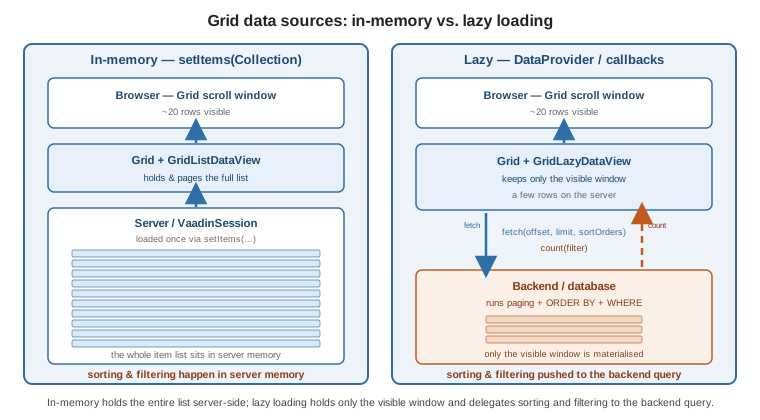
Pass a collection to setItems(…) and the whole list lives in server memory; the Grid pages, sorts and
filters it client-side. getListDataView() (a GridListDataView) then adds, removes, filters and iterates
items:
GridListDataView<Person> view = grid.setItems(personService.findAll());

view.addFilter(p -> p.getAge() >= 18);
view.setSortOrder(Person::getLastName, SortDirection.ASCENDING);

int rows = view.getItemCount();
This is the right choice up to a few thousand rows. Beyond that, load lazily.
Lazy loading
For large datasets, give the Grid two callbacks: a fetch callback that returns one page
(offset, limit, requested sort orders) and a count callback that returns the total. The Grid calls them
as the user scrolls, so only the visible window is ever materialised.
grid.setItems(
    query -> personService.fetch(
            query.getOffset(),
            query.getLimit(),
            VaadinSpringDataHelpers.toSpringDataSort(query)).stream(),
    query -> personService.count());
getLazyDataView() (a GridLazyDataView) exposes setItemCountEstimate(…) for unknown totals and
refreshAll() / refreshItem(item) after a write. For full control, implement DataProvider<T, F> (or extend
AbstractBackEndDataProvider) and pass it to setItems(dataProvider); a CallbackDataProvider wraps the same
two callbacks with an id mapper. Backend sorting and filtering are driven from the Query object’s
getSortOrders() and getFilter(). See
Data Providers.
Selection
Grid is single-select by default. Switch modes, or take a typed selection model:
grid.setSelectionMode(Grid.SelectionMode.MULTI);   // adds the checkbox column

grid.asSingleSelect().addValueChangeListener(e -> {
    Person selected = e.getValue();
    editor.setVisible(selected != null);
});

Set<Person> checked = grid.asMultiSelect().getValue();
Item details and styling
An item-details renderer shows an expandable panel under a row. Part-name generators attach CSS part names to
rows or cells so the theme can style them (vaadin-grid::part(overdue)), and a context menu adds per-row
actions:
grid.setItemDetailsRenderer(new ComponentRenderer<>(person -> {
    var layout = new VerticalLayout(new Span("Phone: " + person.getPhone()));
    layout.setPadding(false);
    return layout;
}));

grid.setPartNameGenerator(person ->
        person.getBalance().signum() < 0 ? "negative" : null);

GridContextMenu<Person> menu = grid.addContextMenu();
menu.addItem("Delete", e -> e.getItem().ifPresent(this::delete));
See Styling Grid and Theming and Styling.
Editing rows
The built-in Grid editor binds a row to inline fields through a Binder, opened on a double-click or a
button:
Binder<Person> binder = new Binder<>(Person.class);
Editor<Person> editor = grid.getEditor();
editor.setBinder(binder);
editor.setBuffered(true);

TextField firstNameField = new TextField();
binder.forField(firstNameField).bind("firstName");
firstNameColumn.setEditorComponent(firstNameField);

grid.addItemDoubleClickListener(e -> editor.editItem(e.getItem()));
Grid Pro (a commercial component — see
UI Component Libraries) adds spreadsheet-style inline editing that commits each cell on
blur, with EditColumn types for text, checkbox and select.
TreeGrid
TreeGrid<T> renders a hierarchy: one column is a hierarchy column, and a HierarchicalDataProvider (or
TreeData for in-memory trees) answers "children of this node" and "does this node have children".
TreeGrid<FileNode> tree = new TreeGrid<>();
tree.addHierarchyColumn(FileNode::getName).setHeader("Name");
tree.addColumn(FileNode::getSize).setHeader("Size");

tree.setItems(rootNodes, FileNode::getChildren);   // in-memory TreeData
See Tree Grid.
Exporting
The core Grid has no built-in export. The open-source GridExporter add-on (Flowing Code, Apache-2.0)
streams the current rows and columns to Excel, PDF, CSV or DOCX — see
UI Component Libraries. For a hand-rolled CSV, iterate the data view and write a
StreamResource behind an Anchor.
To build Word and Excel files yourself from the grid’s data, see Office Files (Word and Excel with Apache POI).
See also
-
Data Binding — the
Binderthe Grid editor and lazy sorting rely on. -
Forms, CRUD and Master-Detail — a Grid wired to an editor form.
-
Data Persistence — backing the lazy callbacks with Spring Data or jOOQ.
-
UI Component Libraries — Grid Pro and the export add-on.
-
Grid and Add a Grid — the official references.