Project Structure & Workspaces
|
This content was generated with the assistance of AI and should be verified against the official documentation before being relied on in production. The reference material consulted while preparing these pages is listed in the section bibliography. |
This page is written against NestJS 12.1 (@nestjs/core 12.1.2 on npm), Nest CLI 12.0.8, TypeScript 6 (6.0.x, what
the Nest 12 templates install), Vitest 4, Express 5 and Fastify 5, checked on 2026-10-02. Nest 12 applications run on
Node.js 20.19+ or 22.12+; the CLI generators (nest new, nest generate) need Node.js 22.22.3+, 24.15+ or 26+.
The commands and code listings below use a project generated by CLI 12.0.8 on Node.js 24 (ESM
template, Vitest); where the CommonJS template (Jest) differs, the text says so.
NestJS does not force a folder layout, but the CLI, the dependency injection container and the compiler all reward
a few conventions. This page covers three decisions in the order a project meets them: how to lay out one
application (feature modules and file names), when to move from a single application to a monorepo of several
applications and libraries, and how to layer the code inside one feature. It finishes with the layout the rest of
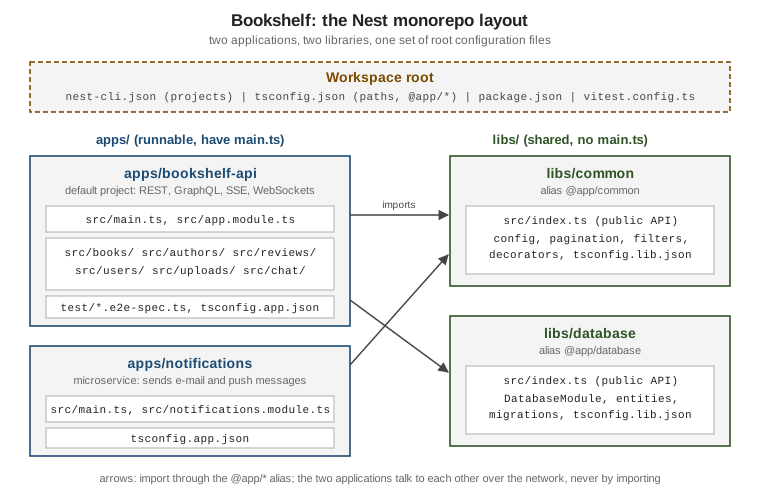
this section builds towards, the Bookshelf monorepo: a bookshelf-api application, a notifications
application and two shared libraries, common and database. The architectural reasoning behind such a split is
on the Backend Architecture pages; this page is only about how NestJS
expresses it.
Standard mode: one application, one folder per feature
nest new bookshelf-api creates a standard mode project: one application, one package.json, one src folder.
The generated tree (ESM template, CLI 12.0.8) is small:
bookshelf-api/
  src/
    app.controller.ts
    app.controller.spec.ts
    app.module.ts
    app.service.ts
    main.ts
  test/
    app.e2e-spec.ts
  nest-cli.json
  package.json
  tsconfig.json
  tsconfig.build.json
  vitest.config.ts
  vitest.config.e2e.ts
main.ts bootstraps the application with NestFactory.create(AppModule); AppModule is the root module. The
generated tree is a starting point, not a structure to keep: the first real feature should get its own folder.
Feature-module folders
Nest’s own documentation recommends grouping the code of one feature in one module, a feature module, which keeps
the boundaries explicit as the application and the team grow. In folder terms that means package by feature:
src/books/ holds everything about books — the module, controller, service, repository, DTOs and tests — instead
of splitting the project into top-level controllers/, services/ and repositories/ folders that mix every
feature together.
The CLI generates this shape directly. The resource schematic creates a folder with the module, controller and
service, and registers the module in AppModule:
nest generate resource books --type rest --crud=false --no-specCREATE src/books/books.controller.ts
CREATE src/books/books.module.ts
CREATE src/books/books.service.ts
UPDATE src/app.module.tsIndividual elements are generated with nest generate module|controller|service <name> (aliases mo, co, s);
each command creates a folder named after the element unless --flat is passed, and a .spec.ts file unless
--no-spec is passed or generateOptions.spec is set to false in nest-cli.json. The other schematic names are
listed by nest generate --help, and --type also accepts graphql-code-first, graphql-schema-first,
microservice and ws for the resource schematic.
File naming conventions
The CLI uses <name>.<element>.ts in kebab-case, and the convention is worth keeping even for hand-written files
because tooling (and humans) can find a file’s role from its name:
| File name | Contains |
|---|---|
|
|
|
|
|
|
|
|
|
the persisted shape of a book (a plain interface or an ORM entity) |
|
request payload types, validated with pipes (see Pipes & Validation) |
|
unit test, next to the file it tests |
|
end-to-end test, in the project’s |
The singular/plural split above is the CLI’s: the module, controller and service take the plural feature name, and
the entity and DTO files are named after the single thing they describe. Test files end in .spec.ts (unit) and
.e2e-spec.ts (end to end); the generated Vitest configurations select tests by exactly those suffixes
(/.spec.ts and /.e2e-spec.ts).
In the ESM template every relative import carries a .js extension (import { BooksService } from
'./books.service.js'), even though the file on disk is .ts, because module is nodenext. The CommonJS (Jest)
template omits the extension. Both forms appear in the listings on this page only in their ESM form.
Layers inside a feature module
Inside src/books/ the dependency direction is one way: the controller calls the service, the service calls the
repository, and nothing calls upward. Each layer has one job.
-
The controller translates HTTP into method calls and back: routing, reading
@Query(),@Param()and@Body()values, choosing status codes. It holds no business rules. -
The service holds the application logic and orchestrates the other layers. It never sees the request object.
-
The repository hides how books are stored. The service depends on its methods, not on an ORM or a database client, so the storage technology can change (and be replaced by a test double) without touching the service.
All three are ordinary providers wired by the module; Nest’s dependency injection resolves the constructor parameters from their types. The listing below is a complete, runnable slice of the Bookshelf books feature, with an in-memory repository standing in for the database that later pages introduce:
export interface Book {
id: number;
title: string;
}import { Injectable } from '@nestjs/common';
import type { Book } from './book.entity.js';
@Injectable()
export class BooksRepository {
private readonly books: Book[] = [
{ id: 1, title: 'Dune' },
{ id: 2, title: 'Emma' },
];
findAll(): Book[] {
return this.books;
}
}import { Injectable } from '@nestjs/common';
import { paginate, type Page } from '@app/common';
import type { Book } from './book.entity.js';
import { BooksRepository } from './books.repository.js';
@Injectable()
export class BooksService {
constructor(private readonly repository: BooksRepository) {}
list(offset?: number, limit?: number): Page<Book> {
return paginate(this.repository.findAll(), offset, limit);
}
}import { Controller, Get, Query } from '@nestjs/common';
import { BooksService } from './books.service.js';
@Controller('books')
export class BooksController {
constructor(private readonly booksService: BooksService) {}
@Get()
list(@Query('offset') offset?: string, @Query('limit') limit?: string) {
return this.booksService.list(
offset === undefined ? undefined : Number(offset),
limit === undefined ? undefined : Number(limit),
);
}
}import { Module } from '@nestjs/common';
import { BooksController } from './books.controller.js';
import { BooksRepository } from './books.repository.js';
import { BooksService } from './books.service.js';
@Module({
controllers: [BooksController],
providers: [BooksService, BooksRepository],
exports: [BooksService],
})
export class BooksModule {}exports: [BooksService] is the module’s public surface: another feature module (for example reviews) that
imports BooksModule can inject BooksService, but not BooksRepository. That encapsulation is the main reason to
keep one module per feature; the module rules are covered in detail on the
Modules page, and the controller’s validation of offset and limit (here plain
Number() conversions, with no validation) is replaced by pipes on the
Pipes & Validation page.
Requesting the endpoint returns the page produced by the shared paginate helper, which is defined in the common
library introduced in the next section:
curl 'http://localhost:3000/books?limit=1'{"items":[{"id":1,"title":"Dune"}],"total":2}The layering is the same idea as the transaction script and domain model trade-offs described in
Structuring a DDD Microservice’s Code, and
the question of how many layers a service needs is part of
Layering Backend and Frontend. A
three-layer module is a sensible default; a feature with real domain rules may justify a richer model, and a
CRUD-only feature may not need a repository at all. The Java-flavoured examples on those pages map directly:
@Injectable() classes play the role of Spring beans, and a Nest module is the package-by-feature boundary.
Standard mode versus monorepo mode
Nest’s CLI has two ways of organizing code, and the difference is only about how projects are built and shared:
-
Standard mode (the default): one application, its own
package.json, its ownnode_modules,nest buildcompiles it withtsc(or SWC, if configured). -
Monorepo mode: a workspace holding several projects — applications under
apps/and libraries underlibs/— with one sharedpackage.json, onenode_modules, shared lint and formatter configuration, and aprojectsmap innest-cli.jsonthat tells the CLI how to build each one.
| Feature | Standard mode | Monorepo mode |
|---|---|---|
Multiple projects |
separate file system structures |
one file system structure |
|
separate instances |
shared across the workspace |
Default compiler |
|
Rspack |
Compiler settings |
specified separately |
workspace defaults, overridable per project |
|
target the only project |
target the default project, or the project named |
Shared code |
npm packages |
libraries with |
All other Nest features — modules, DI, guards, microservices, GraphQL — work the same in both modes. You can switch
from standard to monorepo mode at any time, so the decision can wait until a second application or a shared library
is needed. Typical triggers are a second deployable (the Bookshelf notifications microservice), code used by
two applications (configuration, pagination helpers, database access) or a team that wants one lint and test setup
for everything. A monorepo is a build convenience, not a design: it does not make shared code well-factored, and the
trade-offs between one deployable and many are discussed on
Choosing Monolith or Microservices
and Migration Path: Monolith to Modular Monolith.
Source: https://docs.nestjs.com/cli/overview#project-structure and https://docs.nestjs.com/cli/monorepo
Converting to a monorepo with nest generate app
Adding a project to a standard mode structure converts it. From the root of the bookshelf-api project:
nest generate app notificationsDELETE src
DELETE test
CREATE apps/bookshelf-api/tsconfig.app.json
CREATE apps/bookshelf-api/src/app.controller.ts
CREATE apps/bookshelf-api/src/app.module.ts
CREATE apps/bookshelf-api/src/app.service.ts
CREATE apps/bookshelf-api/src/main.ts
CREATE apps/bookshelf-api/test/app.e2e-spec.ts
CREATE apps/notifications/tsconfig.app.json
CREATE apps/notifications/src/main.ts
CREATE apps/notifications/src/notifications.module.ts
CREATE apps/notifications/src/notifications.controller.ts
CREATE apps/notifications/src/notifications.service.ts
UPDATE tsconfig.json
UPDATE package.json
UPDATE nest-cli.json(The listing omits the generated .spec.ts lines.) The schematic *moved the original src and test folders into
apps/bookshelf-api, which became the workspace’s default project, and created apps/notifications beside it.
Each application gets a small tsconfig.app.json that extends the root tsconfig.json and sets the output
directory (dist/apps/<name>); applications have no package.json of their own. The conversion only works for
projects that follow the canonical Nest layout (a src and test folder at the root), because the schematic moves
those folders; a project with a custom layout must be restructured first.
The nest-cli.json now describes the workspace:
{
  "$schema": "https://json.schemastore.org/nest-cli",
  "collection": "@nestjs/schematics",
  "sourceRoot": "apps/bookshelf-api/src",
  "compilerOptions": {
    "deleteOutDir": true,
    "builder": "rspack",
    "tsConfigPath": "apps/bookshelf-api/tsconfig.app.json"
  },
  "monorepo": true,
  "root": "apps/bookshelf-api",
  "projects": {
    "bookshelf-api": {
      "type": "application",
      "root": "apps/bookshelf-api",
      "entryFile": "main",
      "sourceRoot": "apps/bookshelf-api/src",
      "compilerOptions": {
        "tsConfigPath": "apps/bookshelf-api/tsconfig.app.json"
      }
    },
    "notifications": {
      "type": "application",
      "root": "apps/notifications",
      "entryFile": "main",
      "sourceRoot": "apps/notifications/src",
      "compilerOptions": {
        "tsConfigPath": "apps/notifications/tsconfig.app.json"
      }
    }
  }
}
The top-level sourceRoot, root and compilerOptions.tsConfigPath point at the default project; "monorepo": true
marks the workspace; projects has one entry per project, with its type (application or library), its root,
its entryFile (main for applications) and its own compilerOptions. Nest keeps the file up to date as you add
projects, so manual edits are usually limited to compiler options and assets.
The CLI commands take the project name as an argument and fall back to the default project when none is given:
nest start                 # starts bookshelf-api, the default project
nest start notifications   # starts the notifications application
nest build bookshelf-api   # builds one project
nest build --all           # builds every project in the workspace
Elements are generated into a specific project with --project (alias -p), for example
nest generate resource books --project bookshelf-api --type rest --crud=false --no-spec; without it the default
project is used.
Libraries with nest generate library and the @app/* aliases
A library is a Nest project that cannot run on its own: it has no main.ts and is imported by applications. In
monorepo mode the library support is built into the CLI (a standard mode project achieves the same by publishing an
npm package). Create the two Bookshelf libraries:
nest generate library common
nest generate library database
The schematic prompts for a prefix (the alias): @app by default, or the value of defaultLibraryPrefix in
nest-cli.json if set. In a non-interactive shell the default is used silently. The
libraries are created under libs/:
libs/
  common/
    src/
      common.module.ts
      common.service.ts
      common.service.spec.ts
      index.ts
    tsconfig.lib.json
  database/
    src/
      database.module.ts
      database.service.ts
      database.service.spec.ts
      index.ts
    tsconfig.lib.json
Two differences from an application show up in nest-cli.json: the new projects entries have "type": "library"
and "entryFile": "index". The library’s public API is whatever src/index.ts re-exports, which is why the
generated index.ts re-exports the module and the service:
export * from './common.module.js';
export * from './common.service.js';
export * from './page.js';export interface Page<T> {
items: T[];
total: number;
}
export function paginate<T>(all: T[], offset = 0, limit = 20): Page<T> {
return { items: all.slice(offset, offset + limit), total: all.length };
}The schematic also updated the root tsconfig.json with path aliases (TypeScript paths), one pair per library:
"paths": {
  "@app/common": ["./libs/common/src/index.ts"],
  "@app/common/*": ["./libs/common/src/*"],
  "@app/database": ["./libs/database/src/index.ts"],
  "@app/database/*": ["./libs/database/src/*"]
}
Using a library is the same as using any Nest module: import its module and the code through the alias.
import { Module } from '@nestjs/common';
import { AppController } from './app.controller.js';
import { AppService } from './app.service.js';
import { CommonModule } from '@app/common';
import { BooksModule } from './books/books.module.js';

@Module({
  imports: [CommonModule, BooksModule],
  controllers: [AppController],
  providers: [AppService],
})
export class AppModule {}
BooksService in the previous section imports paginate and Page from @app/common the same way. Import from the
alias (the library’s public API), not from deep paths inside libs/common/src, so a library can reorganize
internally without breaking applications.
The build resolves the aliases. With the Rspack builder, nest build bundles the application and the library
code it imports into dist/apps/bookshelf-api/main.js (the start:prod script the CLI rewrites during conversion,
node dist/apps/bookshelf-api/main, runs that bundle). With the tsc builder the alias is rewritten to a relative
path in the emitted JavaScript, and the output keeps the source layout (see the pitfalls below). The paths
mapping is understood by the TypeScript compiler and the Nest build; test runners resolve modules on their own, so
they need a matching configuration (next).
Test runners and the aliases
The generated ESM template uses Vitest with the vite-tsconfig-paths plugin, which reads the root tsconfig.json
and so resolves @app/common in unit and end-to-end tests. With the CommonJS (Jest) template, the Nest
documentation states that every alias must be mirrored in Jest’s moduleNameMapper, otherwise imports through the
alias fail at test runtime even though the project compiles; for @app/common that mapping is
"^@app/common(|/.*)$": "<rootDir>/libs/common/src/$1" (adjust the path for the e2e configuration’s rootDir).
The end-to-end test of the books feature exercises the alias and the library together:
import { Test } from '@nestjs/testing';
import type { INestApplication } from '@nestjs/common';
import request from 'supertest';
import { AppModule } from '../src/app.module.js';

describe('books (e2e)', () => {
  let app: INestApplication;

  beforeAll(async () => {
    const moduleRef = await Test.createTestingModule({ imports: [AppModule] }).compile();
    app = moduleRef.createNestApplication();
    await app.init();
  });
  afterAll(() => app.close());

  it('GET /books?limit=1', async () => {
    const res = await request(app.getHttpServer()).get('/books?limit=1').expect(200);
    expect(res.body).toEqual({ items: [{ id: 1, title: 'Dune' }], total: 2 });
  });
});Building the workspace: --all, --parallel and builders
nest build accepts a project name; --all builds every project in the workspace, and --parallel runs those builds
concurrently:
nest build --all --parallel      # unlimited concurrency
nest build --all --parallel 2    # at most two builds at a time
--parallel only applies together with --all; a positive integer limits the concurrency, and omitting the value
means no limit. In the example workspace the command compiles the two applications and the two libraries and
produces:
dist/apps/bookshelf-api/main.js
dist/apps/notifications/main.js
dist/libs/common/index.js
dist/libs/database/index.js
The compiler is chosen by compilerOptions.builder (tsc, swc or rspack), set globally or per project. Monorepo
mode defaults to Rspack because bundling an application together with the libraries it imports into one file can cut
build times substantially; standard mode defaults to tsc. The CLI’s --webpack and --webpackPath flags are
deprecated: use --builder rspack (and --rspackPath for a configuration file). Rspack is not installed by default:
the first nest build --all in a new workspace stops with a message asking to install it, and the working
set is:
npm install --save-dev @rspack/core webpack-node-externals tsconfig-paths-webpack-pluginTo get one output file per source file instead of a bundle, set the builder to tsc or swc:
{
  "compilerOptions": {
    "deleteOutDir": true,
    "builder": "tsc"
  }
}Library assets with includeLibraryAssets
Non-TypeScript files — .graphql schemas, e-mail templates, JSON data — are copied to the output directory by the
assets option, and files must live under the project’s src folder to be copied. In monorepo mode a project’s
compilerOptions are not merged with the top-level ones: a project-level assets array replaces the top-level
one. A library’s assets are therefore not copied when an application is built, unless the application lists the
library in includeLibraryAssets (monorepo only):
{
  "projects": {
    "common": {
      "type": "library",
      "root": "libs/common",
      "entryFile": "index",
      "sourceRoot": "libs/common/src",
      "compilerOptions": {
        "tsConfigPath": "libs/common/tsconfig.lib.json",
        "assets": ["assets/**/*.txt"]
      }
    },
    "bookshelf-api": {
      "type": "application",
      "root": "apps/bookshelf-api",
      "entryFile": "main",
      "sourceRoot": "apps/bookshelf-api/src",
      "compilerOptions": {
        "tsConfigPath": "apps/bookshelf-api/tsconfig.app.json",
        "includeLibraryAssets": ["common"]
      }
    }
  }
}
With a file libs/common/src/assets/welcome.txt in place, nest build --all --parallel copied it to
dist/apps/bookshelf-api/assets/welcome.txt (next to the application’s bundle, which is where the application
looks for it at runtime) as well as to the library’s own output folder.
Other nest-cli.json settings that matter in a workspace
-
generateOptions(global, or per project) sets defaults fornest generate, such as{ "spec": false }to skip spec files or{ "flat": true }to avoid the per-element folder. Precedence is command line, then the project’sgenerateOptions, then the global ones. Whenspecis an object its keys are schematic names without aliases, so disabling service specs needs both"service": falseand"s": false. -
defaultLibraryPrefixreplaces@appas the default alias prefix for new libraries. -
deleteOutDirempties the output directory before each build. -
typeCheck,emitDeclarationsandwatchAssetsapply to the SWC builder and to asset watching; see the CLI reference for the full table.
Pitfalls when converting to a monorepo
The following were seen with CLI 12.0.8 and the ESM/Vitest template; each has a short fix.
-
Library specs fail to compile under Vitest. After
nest generate library, runningvitestreportedSyntaxError: Invalid or unexpected tokenfor the specs insidelibs/, while the applications' specs passed. The generated roottsconfig.jsonhas"files": []and areferencesarray that lists only the applications'tsconfig.app.jsonfiles, so the transform step (Vite, here) applies the rootexperimentalDecoratorsandemitDecoratorMetadatasettings to the applications but not to the libraries, and the@Injectable()decorators in the library fail to parse. Adding{ "path": "./libs/common/tsconfig.lib.json" }(and the same for each library) to the rootreferencesfixed it; all four unit tests and both end-to-end tests then passed. See Project References and Build for whatreferencesdoes. -
start:prodand thetscbuilder. The convertedpackage.jsonrunsnode dist/apps/bookshelf-api/main, which matches the Rspack bundle. With"builder": "tsc"the output keeps the source layout (heredist/apps/bookshelf-api/apps/bookshelf-api/src/main.js, becauserootDiris the workspace root), so that script must be changed to the nested path. Starting the nested file servedHello World!and the books endpoint above. -
Stale scripts after conversion. The
lintscript still pointed atsrc/ test/, which no longer exist; update it, for example tooxlint --type-aware apps/ libs/. Theformatscript was rewritten by the schematic. -
Port clash. The generated
main.tsof the second application readsprocess.env.port(lower case), while the first readsprocess.env.PORT. Both default to 3000, so run one with an explicit port or give both the same environment variable; the two applications cannot listen on the same port. -
Application test config.
nest generate appaddstest/jest-e2e.jsonto the new application even in the Vitest template; thevitest.config.e2e.tsat the root already matches every*.e2e-spec.tsin the workspace, so that JSON file can be deleted.
The Bookshelf layout
The rest of this section builds one scenario, Bookshelf, as a monorepo. The tree below is the layout the pages
converge on: the bookshelf-api application holds one folder per feature module, the notifications application
becomes a microservice, and the two libraries hold what both applications share.
bookshelf/
  apps/
    bookshelf-api/
      src/
        main.ts
        app.module.ts
        books/          # controller, service, repository, DTOs, entity
        authors/
        reviews/
        users/
        uploads/        # cover uploads
        chat/           # WebSocket gateway, one room per book
      test/
        books.e2e-spec.ts
      tsconfig.app.json
    notifications/
      src/
        main.ts
        notifications.module.ts
      tsconfig.app.json
  libs/
    common/             # @app/common: configuration, pagination, filters, decorators
      src/index.ts
      tsconfig.lib.json
    database/           # @app/database: DatabaseModule, entities, migrations
      src/index.ts
      tsconfig.lib.json
  nest-cli.json
  package.json
  tsconfig.json
  vitest.config.ts
  vitest.config.e2e.ts
The rules the layout follows:
-
One feature, one folder, one module; features talk through exported services, never through each other’s files.
-
Applications depend on libraries; libraries never depend on applications, and the two applications do not import each other.
bookshelf-apiandnotificationscommunicate over the network (the microservices pages) rather than through shared in-process state. -
A library earns its place by being used by more than one application, or by isolating a technology (
database). Code used by one application stays in that application’s feature folder. -
Libraries expose a narrow
index.ts; applications import only from@app/<library>.
The pages that follow add the pieces in this order: Modules formalizes the
module system used above, and the later pages add the database, security, WebSockets and the notifications
microservice to the same tree.
Where the book is outdated
The reference book for this section describes monorepo mode in the webpack era. Today the default builder for
monorepos is Rspack, the webpack flags are deprecated, generated files use .js import extensions in the
ESM template, nest new generates Vitest (ESM) or Jest (CommonJS) tests, and the lint setup is oxlint rather than
ESLint. The nest generate app and nest generate library commands, the @app/* aliases, and the projects
map are unchanged in spirit.
What changed recently
-
NestJS 12 (2026-08-27): monorepo mode builds with Rspack by default;
--webpackand--webpackPathare deprecated in favor of--builder rspackand--rspackPath.nest upgrademigrates the deprecatedwebpack/webpackConfigPathoptions innest-cli.jsonand the matchingpackage.jsonscripts. -
Nest CLI 12:
nest build --all --parallel [concurrency]builds workspace projects concurrently, and theincludeLibraryAssetsoption copies a library’s assets into an application’s output. -
Nest 12 templates: ESM with Vitest by default and CommonJS with Jest on request; both use oxlint.