JSF (JavaServer Faces)
|
This content was generated with the assistance of AI and should be verified against the official documentation before being relied on in production. The reference material consulted while preparing these pages is listed in the section bibliography. |
This section is written against Jakarta Faces 4.1 (Jakarta EE 11, API artifact jakarta.faces-api 4.1.2, Java SE 17
or later) and its two implementations, Eclipse Mojarra 4.1.17 and Apache MyFaces Core 4.1.4, with Java 21 for the
examples. Where a library or runtime is used, the pages target PrimeFaces 16.0.0, PrimeFaces Extensions 16.0.0,
OmniFaces 5.5.5, Apache Tomcat 11.0.26 with Weld 6.0.4, WildFly 41.0.1, GlassFish 8.0.5, Payara 7.2026.9, Open
Liberty 26.0.0.10, Apache TomEE 10.2.0, JoinFaces 6.1.1 on Spring Boot 4.1.1 and myfaces-quarkus 4.1.4. All versions
were verified on 2026-10-08 against Maven Central and the project sites. Jakarta Faces 4.0 (Jakarta EE 10) is still
widely deployed, so the pages say where it behaves differently. Jakarta Faces 5.0 (Jakarta EE 12) is under development;
its latest API milestone is 5.0.0-M9 (2026-09-18), and the pages describe it as upcoming, never as current behaviour.
Versions & Implementations has the full version matrix.
What Jakarta Faces is
Jakarta Faces, called JavaServer Faces (JSF) in the Java EE era and Jakarta Server Faces in its first Jakarta EE releases (2.3 and 3.0), is the component-based, server-side MVC web framework of Jakarta EE. Instead of writing request handlers that return HTML, you declare a page as a tree of UI components, and the framework keeps that tree on the server between requests:
-
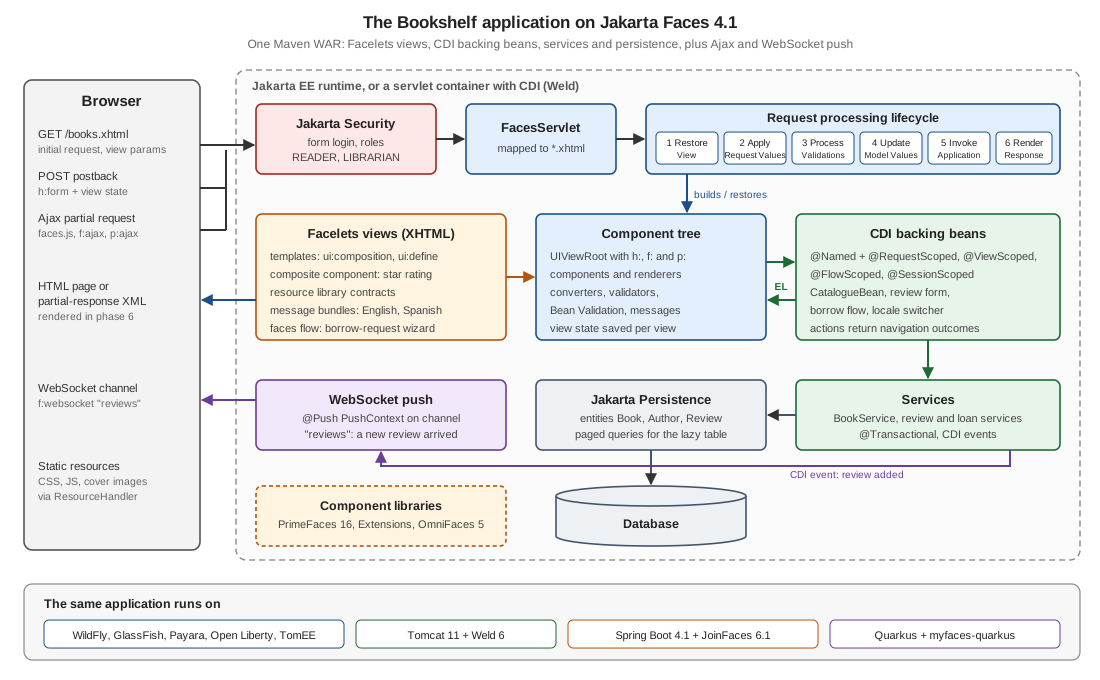
Facelets XHTML views declare the page. At run time they build a server-side component tree of inputs, outputs, tables and buttons, each with a renderer that writes its HTML.
-
A six-phase request processing lifecycle restores the tree on a postback, decodes the submitted values, converts and validates them, copies them into CDI backing beans through the Expression Language, calls the action method and renders the response.
-
On top of that the framework provides navigation, Ajax with partial rendering, view, flow and client-window scopes, state saving, resource handling, composite components, templating, internationalization and WebSocket push.
-
A rich ecosystem sits on top of the standard: PrimeFaces (more than a hundred components and themes), PrimeFaces Extensions, OmniFaces (utilities that fill gaps in the standard) and smaller libraries.
Faces runs on any Jakarta EE Web Profile server (GlassFish, WildFly, Payara, Open Liberty, TomEE), on a plain servlet container with a CDI implementation (Tomcat or Jetty with Weld), inside Spring Boot through JoinFaces and on Quarkus through the MyFaces extension. Its closest relative outside Java is ASP.NET Web Forms, which shares the component tree, the postback and the view state.
This section is for developers who:
-
maintain or extend an existing JSF or Jakarta Faces application, often one written for JSF 2.x with
javax.*, JSP or@ManagedBean, and need the current idioms and a migration path -
build component-rich internal or back-office applications on a Jakarta EE estate and want PrimeFaces or OmniFaces used well
-
learned JSF from the classic books (2004 to 2015) and need to know what still holds and what has been removed
-
are choosing between Faces, Vaadin, Thymeleaf with Spring MVC or a single-page application, and want the trade-offs
The Bookshelf scenario
Every example builds one small original application, Bookshelf, in the same domain as the
Django, Python FastAPI, NestJS and
Thymeleaf sections, so the stacks can be compared page by page. Here it is a Maven WAR
with packages org.example.bookshelf.model, service and web, and it grows page by page into:
-
a public catalogue of books and authors with Facelets templates, search, sorting and a lazy-loaded data table
-
book details reached by bookmarkable URLs with
f:viewParamandf:viewAction -
a review form with converters, validators and Bean Validation, submitted with Ajax
-
a multi-step "borrow request" wizard implemented as a Faces Flow
-
cover-image uploads with
h:inputFile -
English and Spanish message bundles with a locale switcher
-
a "new review" live feed with
f:websocketand@Push -
a reusable "star rating" composite component and a small custom component
-
form-based login with Jakarta Security and role-based views
-
a PrimeFaces variant of the catalogue (data table, dialog framework, export) and OmniFaces utilities
-
the same WAR running on WildFly or GlassFish, on Tomcat with Weld, on Spring Boot through JoinFaces and on Quarkus
The final project layout (src/main/java/.../bookshelf/{model,service,web}, WEB-INF/templates/, resources/,
contracts/, faces-config.xml, web.xml and beans.xml) is assembled on
Project Setup.
Reading path
The pages are ordered so that each one builds on the previous ones. Read them in this order the first time, then use them as a reference. Before starting, be comfortable with the language underneath: the Java Reference covers Java, Maven and JUnit, which these pages do not re-explain.
-
Foundations: what Faces is, versions, the architecture, the lifecycle, a project and a first application. Read Request Processing Lifecycle carefully: almost every later page refers to its phases.
-
Facelets and views: XHTML views, templating, the Expression Language, HTML5 markup, JSTL and views built in Java.
-
Standard components, conversion and validation: the
h:andf:tags, data tables, files, converters, validators, Bean Validation and messages. -
Events, navigation, beans and scopes: listeners, outcomes and redirects, bookmarkable pages, CDI beans, scopes, the flash and Faces Flows.
-
Ajax, push and components:
f:ajax, search expressions, WebSocket push, composite and custom components, tag files and client behaviours. -
Resources, configuration, advanced topics and security: resources and contracts, context parameters and project stages, state saving, exceptions, extension points, multiple windows, performance and security.
-
Component libraries: PrimeFaces, PrimeFaces Extensions, OmniFaces and the other libraries.
-
Runtimes, testing and production: application servers, Tomcat with Weld, Spring Boot, Quarkus, persistence, testing, deployment, migration from JSF 1.x and 2.x, and the best-practices checklist.
Readers coming from an existing JSF 2.x code base can start with Migrating to Jakarta Faces and the practices to avoid, then come back to the pages those link.
What’s covered
Each page builds on the Bookshelf scenario, follows every example with a link to the official page it derives from, says what changed between versions and where the older books are outdated, and ends with the sources it uses.
Foundations
-
Introduction & History: component-based MVC, the JSR and Jakarta history, the design patterns behind Faces, when to choose it and a framework comparison
-
Versions & Implementations: specification versus implementation, Mojarra versus MyFaces, profiles, the version matrix and what changed from 2.0 to 5.0
-
Architecture & Component Model:
FacesServlet,FacesContext, the component tree, renderers and render kits, andbinding -
Request Processing Lifecycle: the six phases,
immediate,renderResponse()andresponseComplete(), phase listeners and the partial lifecycle -
Project Setup: the Maven WAR,
web.xmland the servlet mapping,beans.xml,faces-config.xml,@FacesConfigand hot reload -
Getting Started: a first page and bean, run on WildFly or GlassFish and on Tomcat with Weld
Facelets and views
-
Facelets & XHTML Views: the view declaration language, XHTML rules, namespaces and escaping
-
Facelets Templating:
ui:composition,ui:define,ui:insert,ui:include,ui:decorateand the otherui:tags -
Expression Language: value and method expressions, operators, implicit objects, lambdas and collections
-
HTML5-Friendly Markup: pass-through attributes and elements
-
JSTL and Build Time vs Render Time: when
c:ifandc:forEachrun and when to userenderedandui:repeatinstead -
Programmatic Facelets: views written in Java with
@View
Standard components
-
Standard HTML Components: every
h:component -
Core Tags (f:): the
f:tag library -
Data Tables and Iteration:
h:dataTable,ui:repeat,DataModeland paging -
File Upload and Download:
h:inputFile, multipart limits, safe storage and streamed downloads
Conversion and validation
-
Converters: standard and custom converters,
java.timeand CDI-managed converters -
Validators: standard and custom validators, cross-field validation and empty values
-
Bean Validation in Jakarta Faces: constraints on the model,
f:validateBeanandf:validateWholeBean -
Messages and Internationalization:
FacesMessage, message bundles, locales and an English and Spanish Bookshelf
Events and navigation
-
Events and Listeners: action, value-change, phase and system events
-
Navigation: implicit and rule-based navigation, redirects and conditional cases
-
View Parameters and View Actions: bookmarkable pages with
f:viewParamandf:viewAction
Beans, scopes and CDI
-
Backing Beans and CDI:
@Namedbeans, injection of Faces objects and the end of@ManagedBean -
Scopes: request, view, session, application, conversation, client-window, flow and dependent scopes
-
Flash Scope and Post-Redirect-Get: the flash and messages that survive a redirect
-
Faces Flows:
@FlowScopedbeans, flow nodes and parameters, and the borrow-request wizard
Ajax and push
-
Ajax:
f:ajax, the partial lifecycle, the request queue and thefaces.ajaxJavaScript API -
Search Expressions: client ids, naming containers and the
@keywords -
WebSocket Push with f:websocket: channels, scopes,
PushContextand the live review feed
Composite and custom components
-
Composite Components:
cc:interface,cc:implementation, retargeting and the star-rating component -
Tag Files and Tag Libraries: tag files, taglib descriptors and custom tag handlers
-
Custom Components and Renderers:
UIComponentsubclasses, renderers and state -
Client Behaviors: reusable client-side behaviours attached to component events
Resources and configuration
-
Resource Handling: resources, libraries, versions and the resource handler
-
Resource Library Contracts: swappable themes for the whole application
-
Configuration and Project Stages: the context parameters, project stages and
faces-config.xml
Advanced topics
-
State Saving and Stateless Views: the view state, server and client saving, and stateless views
-
Exception Handling and Error Pages:
ExceptionHandler, error pages,ViewExpiredExceptionand Ajax errors -
Extending Faces: Wrappers, Factories and Listeners: the decorator pattern and the extension points
-
Multi-Window Support:
ClientWindow, window modes and@ClientWindowScoped -
Performance: production settings, tree size, getters, scopes, state and Ajax scoping
Security
-
Security: Authentication, Authorization, CSRF, XSS and CSP: Jakarta Security with a Faces login form, roles, CSRF, escaping and Content Security Policy
Component libraries
-
PrimeFaces: Getting Started, Configuration and Themes: setup, context parameters and themes
-
PrimeFaces: Ajax, Forms and Validation:
p:ajax,processandupdate, inputs and client-side validation -
PrimeFaces Data Components:
p:dataTable,LazyDataModel, trees, data views and export -
PrimeFaces Panels, Menus and Dialogs: layout, menus, dialogs and the dialog framework
-
PrimeFaces: Files, Media, Charts and Drag and Drop: uploads, downloads, images, charts and drag and drop
-
PrimeFaces Extensions: the community components that sit on top of PrimeFaces
-
OmniFaces: the utility library for standard Faces
-
Other Component Libraries: BootsFaces, Tobago, AdminFaces and the libraries that ended
Integration and runtimes
-
Jakarta EE Servers: GlassFish, WildFly, Payara, Open Liberty and TomEE
-
Tomcat and Weld: Faces on a plain servlet container with Weld
-
Jakarta Faces on Spring Boot with JoinFaces: starters, properties and scopes
-
Jakarta Faces on Quarkus:
myfaces-quarkus,quarkus-primefacesandquarkus-omnifaces -
Persistence and Services: JPA, transactions and lazy loading behind backing beans
Testing
-
Testing Jakarta Faces Applications: unit tests, MyFaces Test, Arquillian, Selenium, Playwright and HtmlUnit
Production and migration
-
Deployment and Clustering: packaging, containers, reverse proxies, sessions and clusters
-
Migrating to Jakarta Faces: from JSF 1.x and 2.x to Faces 4.1, and every outdated book statement in one place
-
Jakarta Faces Best Practices Checklist: the practices that still hold, and the errata of older material
-
Cheat Sheet: a one-page summary with a downloadable PDF
Where related material lives elsewhere on this site
The Faces pages link to existing material instead of repeating it, and cover only what Faces adds.
| Topic | Where it lives | How the JSF section relates |
|---|---|---|
The Java language, Maven, JUnit 5 and Mockito |
The pages use records, |
|
Spring Boot and the choice between server-side UI frameworks |
SpringBoot Reference, including Server-Side Web UI Frameworks and Spring Security |
The JoinFaces page links here for Spring Boot itself and for the Thymeleaf, Vaadin and JSF decision table. |
The other Java server-side UI frameworks |
Vaadin Reference, including Jakarta EE and CDI and Spring Boot Integration, and Thymeleaf |
The introduction compares Faces with both. |
The same ideas in ASP.NET Web Forms |
ASP.NET Web Forms, including Page Life Cycle and Postback, ViewState and Control State and Server Controls |
The lifecycle, state-saving and component pages include a short comparison and link these pages. |
The same application in other stacks |
Django, PHP and Laravel, Python FastAPI, NestJS and React Reference |
The introduction’s comparison table points to these sections. |
Persistence and pagination |
Hibernate Reference, SQL Reference and Pagination: Offset vs. Keyset |
The persistence page and the lazy data-table examples show only the Faces side. |
Security, OAuth 2.0 and cross-origin requests |
The security page links here for OpenID Connect and the CORS theory. |
|
Markup, accessibility and browser testing |
HTML & CSS Reference, Web Accessibility and E2E Testing in Real Browsers |
The HTML5 markup, component and testing pages add only the Faces-specific parts. |
CDI on Quarkus |
Quarkus Reference, including CDI and the Programming Model (ArC) |
The Quarkus page links here for ArC and the Quarkus programming model. |
Load testing |
The performance page links here for the JMeter theory and adds the view-state correlation Faces needs. |
|
Containers, orchestration and cloud |
Docker, Kubernetes and Cloud |
The deployment page shows only the Faces-specific parts. |
Architecture decisions |
The introduction links it for when a server-rendered component framework is the right choice. |
Struts and JSP are documented in the JSP & Struts section. Some related topics are tracked as separate issues and are only mentioned here: a comparison of backend and web frameworks (#263), Playwright, Cypress and Selenium (#258) and JMeter (#260). GWT has its own GWT (Google Web Toolkit) section.
Bibliography
Every source used to prepare this section is listed here, each linked to its official site. Individual pages list the
subset they derive from under their own == References heading.
Books
The eight books below were consulted for concept coverage, narrative and structure only. All of them target JSF 1.0 to
2.2 or PrimeFaces 4 and 5 (2004 to 2015), so JSP views, @ManagedBean, the javax.faces namespace and most of the
third-party libraries they use have since been removed or abandoned. No text, code listing, figure or sample project is
taken from them: every example in this section is written against the current official documentation, and
Migrating to Jakarta Faces collects where they are outdated.
-
Burns, E., Schalk, C. with Griffin, N. JavaServer Faces 2.0: The Complete Reference. 1st edition. McGraw-Hill, 2010. ISBN 978-0-07-162509-8 (print), 978-0-07-162510-4 (eBook). McGraw-Hill Education page and the McGraw-Hill Professional page; the code downloads were offered through the publisher, and no public companion repository exists.
-
Çalışkan, M., Varaksin, O. PrimeFaces Cookbook. 2nd edition. Packt Publishing, 2015 (the 1st edition appeared in 2013). ISBN 978-1-78439-342-7 (print), 978-1-78439-683-1 (eBook). Packt page; companion code: ova2/primefaces-cookbook (second-edition branch) on GitHub.
-
Aranda, B., Wadia, Z. Facelets Essentials: Guide to JavaServer Faces View Definition Framework. Apress (firstPress), 2008. ISBN 978-1-4302-1049-8 (paperback), 978-1-4302-1050-4 (eBook). Springer (Apress) page; no companion code.
-
Jonna, S. Learning PrimeFaces Extensions Development. 1st edition. Packt Publishing, 2014. ISBN 978-1-78398-324-7 (print), 978-1-78398-325-4 (eBook). Packt page; companion code: sudheerj/Learning-Primefaces-Extension-Development on GitHub.
-
Leonard, A. JSF 2.0 Cookbook. 1st edition. Packt Publishing, 2010. ISBN 978-1-847199-52-2 (print), 978-1-84719-953-9 (eBook). Packt page; the code bundle is available only from the publisher.
-
Mann, K. D. JavaServer Faces in Action. 1st edition, foreword by Ed Burns. Manning Publications, 2004 (©2005). ISBN 978-1-932394-12-2 (1-932394-11-7). Manning page (out of print); the source code was published by Manning with the book.
-
Dudney, B., Lehr, J., Willis, B., Mattingly, L. Mastering JavaServer Faces. 1st edition. Wiley, 2004. ISBN 978-0-471-46207-1 (0-471-46207-1). Wiley page (out of print); the companion download is no longer online.
-
Jacobi, J., Fallows, J. R. Pro JSF and Ajax: Building Rich Internet Components. 1st edition. Apress, 2006. ISBN 978-1-59059-580-0 (print), 978-1-4302-0128-1 (eBook). Springer (Apress) page; no companion code was found.
Packt pages block automated requests and could only be checked in a browser.
Official Jakarta Faces documentation
-
Jakarta Faces specification pages: 4.1, 4.0, 3.0, 2.3, 5.0 (in development) and the list of all versions
-
The 4.1 documents: specification (HTML) and PDF, API Javadoc, VDL (tag) documentation, JavaScript documentation and standard HTML render kit documentation
-
The JCP pages of the JavaServer Faces specifications: JSR 127 (1.0 and 1.1), JSR 252 (1.2), JSR 314 (2.0 and 2.1), JSR 344 (2.2) and JSR 372 (2.3)
-
The Jakarta EE Tutorial, its Faces chapters (Jakarta Faces Technology, Introduction to Facelets, Jakarta Expression Language, Using Jakarta Faces Technology in Web Pages, Using Converters, Listeners, and Validators, Developing with Jakarta Faces Technology, Using Ajax with Jakarta Faces Technology, Composite Components: Advanced Topics and an Example, Creating Custom UI Components and Other Custom Objects, Configuring Jakarta Faces Applications and Using WebSockets with Jakarta Faces Technology) and its Introduction to Jakarta Contexts and Dependency Injection, Introduction to Jakarta Bean Validation, Jakarta Security and Jakarta WebSocket chapters
-
The Jakarta Faces project: Eclipse project page and jakartaee/faces on GitHub
-
Eclipse Mojarra: project site, eclipse-ee4j/mojarra on GitHub, its README and CONTEXT-PARAMS.md
-
Apache MyFaces Core: project site, including the Core 4.1 and core concepts pages, and apache/myfaces on GitHub
-
The articles by the specification co-lead on BalusC’s blog: What’s new in Faces 4.0? and What’s new in Faces 4.1?
Related Jakarta EE specifications
-
Jakarta EE 11, with the Platform, Web Profile and Core Profile specifications, and the list of compatible products
-
Jakarta Expression Language 6.0, Jakarta CDI 4.1, Jakarta Bean Validation 3.1, Jakarta Security 4.0, Jakarta Servlet 6.1, Jakarta WebSocket 2.2, Jakarta Persistence 3.2, Jakarta Transactions 2.0, Jakarta Enterprise Beans 4.0 and Jakarta Data 1.0
Official documentation of ecosystem projects
-
Component libraries: PrimeFaces 16 documentation and showcase (which blocks automated requests), PrimeFaces migration guides, PrimeFaces Extensions, OmniFaces and its showcase, BootsFaces, Apache MyFaces Tobago and AdminFaces
-
Runtimes: Eclipse GlassFish, WildFly documentation, Payara documentation, Open Liberty documentation, Apache TomEE, Apache Tomcat, Eclipse Jetty 12.1 and Weld
-
Integration: JoinFaces 6.1.1 reference and joinfaces/joinfaces on GitHub, Spring Boot, Quarkus with the MyFaces, PrimeFaces and OmniFaces extensions, Hibernate ORM and Hibernate Validator
-
Testing: Arquillian, Selenium, Playwright for Java, PrimeFaces Selenium, HtmlUnit, JUnit and Mockito
-
Build and migration: Apache Maven, Eclipse Transformer and OpenRewrite
Specifications, standards and security sources
-
HTML Living Standard (WHATWG), RFC 6455: The WebSocket Protocol, RFC 9110: HTTP Semantics, RFC 6265: HTTP State Management Mechanism and its 6265bis draft (cookies and
SameSite), and Content Security Policy Level 3 (W3C) -
OWASP Top 10 and the OWASP Cheat Sheet Series
The books are consulted references for concept coverage, narrative and structure; they are not reproduced here. The official documentation linked above is authoritative, and where the two differ, the documentation of the version you run prevails.