Declaration Files
|
This section documents the current TypeScript release line as published at the official TypeScript documentation, which is the reference these pages are written and verified against. No specific patch version is pinned. This content was generated with the assistance of AI and should be verified against the official documentation before being relied on in production, since TypeScript iterates quickly. This section’s bibliography lists the reference material consulted while preparing these pages. |
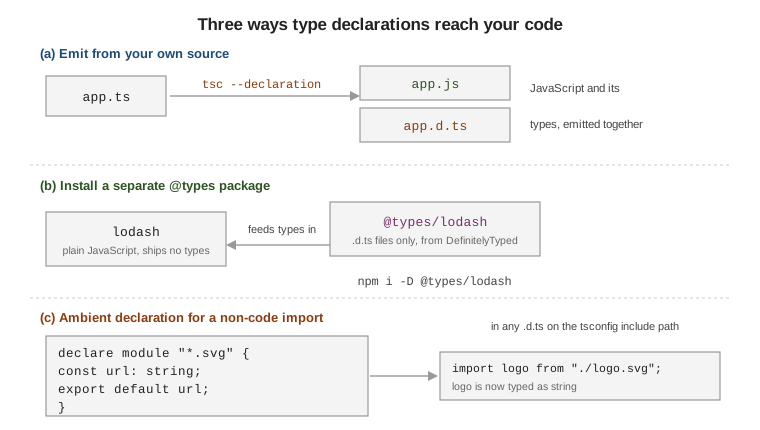
A declaration file (.d.ts) contains types with no implementations and emits no JavaScript. It is how the
compiler learns the shape of code it cannot see: your own compiled output, a plain-JavaScript dependency, or
a non-code import. The four handbook pages this summarises are
Introduction,
By Example,
Publishing, and
Deep Dive.
.d.ts files and declare
declare introduces a name that exists at runtime but whose definition lives elsewhere — no body is
allowed. It works for a variable, a function, a class, a namespace, or a whole module.
// ambient.d.ts -- no top-level import/export, so this file is a SCRIPT
declare const BUILD_ID: string;
declare function reportError(message: string): void;

declare class Logger {
  log(line: string): void;   // signature only
}

declare namespace App {
  interface Config { debug: boolean; }
}

// describe an external module by its import specifier
declare module "legacy-widget" {
  export function render(el: HTMLElement): void;
}
Ambient vs. module declarations. A file with no top-level import/export is a script, and its
declare statements are ambient — merged straight into the global scope, visible everywhere with no
import. Add an export \{} (or any real import/export) and the file becomes a module: its declarations are
local and must be imported. declare module "name" describes a specific external module regardless of which
shape the file has. The script-vs-module distinction is the same one covered in
Modules.
Emit options (see tsconfig.json and Compiler Options for the full set):
{
  "compilerOptions": {
    "declaration": true,          // emit a .d.ts next to each .js
    "declarationMap": true,       // emit .d.ts.map so "Go to definition" lands in the .ts source
    "emitDeclarationOnly": true,  // types only, no .js (a bundler produces the JavaScript)
    "isolatedDeclarations": true  // 5.5: force explicit types on every export; enables fast, parallel .d.ts emit
  }
}
--isolatedDeclarations requires an explicit type on every exported declaration so a tool can generate the
.d.ts from a single file without type-checking the whole program.
tsc --declaration --emitDeclarationOnly --outDir dist/types src/index.tsConsuming types: bundled vs. @types/*
Modern packages bundle their declarations and point at them with the "types" field (or a "types"
condition inside "exports"). Plain-JavaScript or older packages instead have a companion @types/*
package published from the DefinitelyTyped repository.
// package.json of a library that ships its own types
{
  "name": "my-lib",
  "types": "./dist/index.d.ts",
  "exports": {
    ".": { "types": "./dist/index.d.ts", "import": "./dist/index.js" }
  }
}
npm i lodash # runtime dependency, no types inside
npm i -D @types/lodash # its types, as a separate package
npm i -D typescriptKeep typescript and every @types/* in devDependencies: they are build-time only and must not be
imposed on your consumers.
The three-versions problem. The runtime library, its type declarations, and the TypeScript compiler each
version independently. @types/lodash can lag lodash; a .d.ts that uses TypeScript 5.5 syntax breaks
under TypeScript 4.9. @types packages encode a minimum compiler version (via typesVersions and
version-tagged releases), so pin all three deliberately and bump them together. The
Publishing page covers
choosing and testing against those versions.
Writing declarations for an untyped JS dependency
Match the library’s runtime shape. The By Example page has a template for each; the essentials:
// GLOBAL script (attaches to window, no import)
declare global {
  interface Window {
    analytics: { track(event: string): void };
  }
}
export {};   // needed so `declare global` is allowed

// ES2015 module
declare module "es-widget" {
  export function greet(name: string): string;
  export default class Client {
    constructor(token: string);
  }
}

// CommonJS -- module.exports = fn
declare module "cjs-make" {
  function make(opts?: { verbose: boolean }): string;
  export = make;             // pairs with `import make = require("cjs-make")`
}

// UMD -- usable as a global OR an import
declare module "umd-parse" {
  export function parse(input: string): unknown;
}
export as namespace UmdParse;  // this line is what makes the global form type-check
Module augmentation adds to an existing module’s types; global augmentation adds to the global scope.
Both rely on declaration merging — your interface block joins the original, it does not replace it — and
the file must be a module.
// MODULE AUGMENTATION: extend a third-party module
import "axios";
declare module "axios" {
  interface AxiosRequestConfig {
    retry?: number;   // a field your interceptor adds and reads
  }
}

// GLOBAL AUGMENTATION
declare global {
  interface Array<T> {
    last(): T | undefined;
  }
  namespace NodeJS {
    interface ProcessEnv {
      API_URL: string;
    }
  }
}
export {};
Augmenting a package’s types, and typing require/module.exports boundaries, is continued in
JavaScript Interop and Migration.
Publishing types with your package
-
Turn on
declaration(oremitDeclarationOnlywhen a bundler emits the JavaScript), point"types"and the"exports""types"condition at the generated.d.ts, and list it in"files". -
Export every type reachable from your public API. If a returned shape is not exported, callers cannot name it.
// BAD: Result is reachable through run() but not exported
interface Result { id: string; ok: boolean; }
export function run(): Result { /* ... */ return { id: "1", ok: true }; }

// GOOD
export interface Result { id: string; ok: boolean; }
export function run(): Result { /* ... */ return { id: "1", ok: true }; }-
TSDoc (
/** … */with@param,@returns,@remarks,@example) is the comment format that editors and doc generators (TypeDoc, API Extractor) read straight from your.d.ts.
/**
 * Fetch a user by id.
 *
 * @param id - the numeric user id
 * @returns the user record, or `undefined` when no user matches
 * @example
 * const u = await getUser(1);
 */
export declare function getUser(id: number): Promise<User | undefined>;-
Mirror types to sever a dependency. When only a small shape leaks from a dependency into your public API, copy that minimal shape into your own declarations instead of re-exporting the dependency’s type, so installing your package does not drag in the dependency (and its own
@types).
// Instead of: import type { Request } from "express";
// mirror only the surface you actually expose:
export interface MinimalRequest {
  headers: Record<string, string | undefined>;
  url: string;
}
export function middleware(req: MinimalRequest): void;
Bundler configuration, the "exports" map, and the npm publish flow are covered in
Bundling & npm Publishing.
See also
-
Declaration Files: Introduction — the map of the whole guide.
-
Declaration Files: By Example — a recipe per library shape.
-
Declaration Files: Publishing — shipping and versioning your
.d.ts. -
Declaration Files: Deep Dive — how the compiler resolves and merges declarations.
-
Modules — script vs. module scope,
import type, resolution. -
JavaScript Interop and Migration — consuming untyped JavaScript and
allowJs/checkJs. -
tsconfig.json and Compiler Options —
declaration,declarationMap, and friends. -
Bundling & npm Publishing — bundling and publishing a package.