B2B
|
This content was generated with the assistance of AI and should be verified against the official documentation of each platform before being relied on in production. This section’s bibliography lists the reference material consulted while preparing these pages. |
Shopify B2B lets a merchant sell to other businesses from the same store that sells to consumers: a buyer logs in as a
contact of a company, picks one of the company’s locations, and then sees the products, prices, quantity limits and
payment terms that the merchant agreed for that location. This page was written against the Admin GraphQL API and the
Storefront API 2026-10, the Customer Account API schema 2026-04 (the newest schema that could be downloaded without
a store, shipped in @shopify/hydrogen-react 2026.4.4) and Shopify CLI 5.0.0, and every fact was checked on
2026-10-27. B2B features depend on the plan, and the plan rules changed with the Winter '26 and Spring '26 Editions, so
the section Plans, availability and limits lists what is known and where it comes from.
The page covers the four building blocks and the places where they surface: the data model (companies, locations, contacts and roles), catalogs with their price lists, publications and quantity rules, payment terms and deposits, and draft orders with imported orders; then the storefront side (Liquid in themes, and the Customer Account and Storefront APIs for headless), checkout customization with Shopify Functions, events, and a list of the mistakes that cost the most time. It builds on the Admin GraphQL API page (versioning, cost-based throttling, pagination), on Authentication and Access Scopes for the tokens that sign the requests, and on Markets and Internationalization, because a company location is also a market condition and catalogs are shared between Markets and B2B. The running example is Pocket Coffee, a small specialty-coffee shop that opens a wholesale channel: the invented company Cafe Brasa SL (a cafe with a Madrid and a Berlin location) buys 1 kg bags of single-origin beans at a negotiated price, in multiples of two bags, on 30-day terms with a 20 percent deposit.
Every Admin GraphQL, Storefront and Customer Account document on the page was validated against the downloaded schema,
and every set of variables was checked against the variable definitions of its operation. The Liquid snippets passed
shopify theme check and were rendered with a stand-in engine. The Shopify Function was built and run offline with the
CLI’s Function runner. Nothing on this page was executed against a Shopify store: B2B resources need a shop on a plan that
supports them and an access token, and no account or credential was created for this page. The section
What was run and what was not lists exactly what each check covered.
B2B on Shopify at a glance
Shopify B2B is not a separate product line with its own API. It is a set of objects and settings that sit on top of the ordinary store model, and each layer has its own entry point:
| Layer | What it does | Where you reach it |
|---|---|---|
Companies, locations, contacts |
Identify the business customer, its branches and the people who buy for it. A contact is a customer record linked to a company. |
Admin GraphQL: |
Catalogs, price lists, publications |
Decide which products a location sees and what it pays, including fixed prices, volume breaks and quantity rules. |
Admin GraphQL: |
Payment terms and deposits |
Decide when the company pays: at once, within a number of days, on a date or on fulfillment, with an optional deposit. |
Admin GraphQL: |
Orders and draft orders |
A merchant or an app quotes and invoices a purchase, or imports history; the order records the purchasing company. |
Admin GraphQL: |
Storefront |
Show the buyer’s location, prices and rules in a theme or a headless storefront. |
Liquid objects |
Checkout |
Apply the location’s terms, review rules and validation to the B2B checkout. |
Shopify Functions and checkout UI extensions |
Source: Apps and B2B
The developer guide describes a typical lifecycle in four steps. A merchant creates a company with its contacts and locations, and may create draft orders for a contact to review. A contact logs in with an account attached to the company, selects products, reviews draft orders and completes checkout. Shopify creates the transaction and the order. An app then uses the Admin API for the integrations around it: order management interfaces, B2B fulfillment, loyalty, or CRM synchronization.
A store can serve consumers and companies together or only companies. The developer guides use the names "blended" and "dedicated" for the two setups; in code the difference is whether the storefront hides prices, the cart and the order buttons from visitors who are not logged in as a B2B buyer. Both setups use the same objects, and the section on Themes shows the Liquid that implements a dedicated store.
Plans, availability and limits
Which B2B capabilities a shop has depends on its plan. The facts below come from the Shopify pricing page, the Shopify Plus Help Center page, the Winter '26 and Spring '26 Editions pages and the 2026-10 API reference. Statements that appear only in the Help Center pages for B2B are not relied on beyond what the developer documentation and the Plus page repeat.
| Capability | Plans | Source and notes |
|---|---|---|
Company profiles, volume pricing and up to three B2B catalogs |
Basic, Grow and Advanced (as of the Spring '26 Edition); Plus |
Spring '26 Edition item "B2B features on more plans" (company profiles, volume pricing, up to three B2B catalogs and more, at no extra cost). The pricing page lists Shopify B2B with up to 3 catalogs on the lower plans. |
Unlimited B2B catalogs |
Plus |
Pricing page (Plus lists unlimited B2B catalogs) and Plus Help Center page. |
Direct assignment of catalogs to companies and company locations |
Plus |
Plus Help Center page. The API reports it with the catalog error |
Deposits, partial payments, payment requests per fulfillment |
Plus |
Plus Help Center page. |
Dynamic payment terms and deposits set by a Shopify Function |
Plus |
Winter '26 Edition; the Functions schema marks |
ACH bank payments at checkout with Shopify Payments, and charging saved accounts from the admin |
Plus, United States only |
Winter '26 Edition. |
Order review rules (checkout submitted as a draft for merchant review) set by a Function |
Plus |
Winter '26 Edition; Functions schema ( |
Source: Shopify Editions, Spring '26; Shopify Editions, Winter '26; Shopify pricing; Shopify Plus plan
Two things in the documentation do not line up, and a project should resolve them with a development store of the target plan before promising a feature to a merchant. First, the B2B overview guide still states that only development stores, Shopify Plus partners and Shopify affiliates can access the Admin API’s B2B resources, and that Plus partners need a development store created on the Plus plan; the Spring '26 Edition says the same capabilities are available on more plans. Second, the 2026-10 reference says a publication on a catalog is optional (without one, availability follows the sales channel), while the older catalog guide says a B2B catalog without a publication shows no products. The Catalogs section describes both and how to avoid depending on either.
| Limit | Value | Where it applies |
|---|---|---|
B2B catalogs per shop on plans below Plus |
3 active (error |
|
Fixed prices per |
250 |
Catalog guide |
Publishables per |
50 |
|
Deposit percentage |
1 to 99 inclusive |
|
Net terms offered by the payment-terms Function |
7, 15, 30, 45, 60 or 90 days |
Functions schema |
Percentage increase of a price list |
At most 1000 percent |
|
|
Capped at 10,000 by default; the count queries take a |
2026-10 schema |
Source: PriceList object reference (limits read from the 2026-10 introspection)
B2B does not support purchase options. The overview guide lists subscriptions, pre-orders and try before you buy as
unsupported for B2B, and the Storefront API reports a cart line that violates this with the warning code
MERCHANDISE_SELLING_PLAN_NOT_APPLICABLE_ON_COMPANY_LOCATION, which was added on 2025-07-30.
Prerequisites
Access scopes
| Scope | What it unlocks for B2B |
|---|---|
|
|
|
Catalogs, price lists, quantity rules and publications. The catalog guide lists |
|
Publication fields and |
|
|
|
|
|
|
|
Customer Account API: the buyer’s |
|
Storefront API access for logged-in buyers, listed in the start-building tutorial. |
Source: Shopify API access scopes
Customer accounts
B2B only works with the new customer accounts. A store still on legacy customer accounts cannot give buyers a B2B session, and a headless storefront must replace its legacy login code with the Customer Account API authorization flow before it can contextualize requests. Legacy customer accounts are deprecated in favour of new customer accounts, as the Authentication and Access Scopes page explains.
A development store
Create a development store with shopify store create dev or from the Dev Dashboard, add products to it, and give the
app the scopes above in shopify.app.toml. The store has to be on a plan with B2B capabilities for the examples to work.
This page has no development store behind it, so the app configuration was only validated offline, in the section
Events and integrations.
The data model
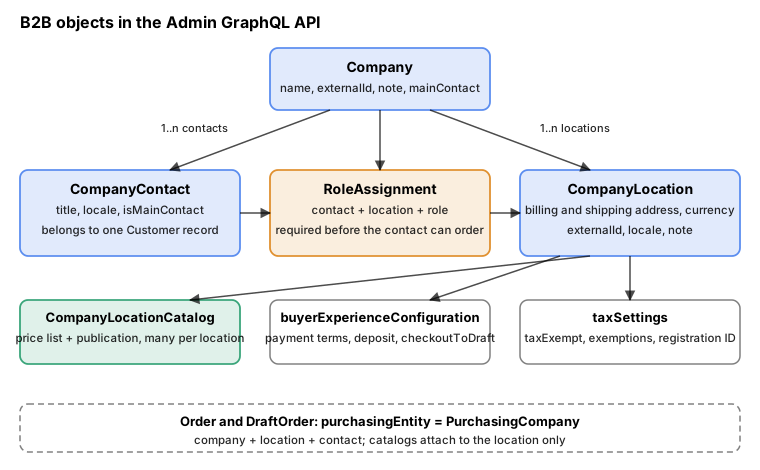
The B2B objects of the Admin API and how they hang together.
Three objects model the customer, and one more joins them:
| Object | Meaning |
|---|---|
|
The business that buys. Fields include |
|
A branch of the company, and the object that carries almost all commercial settings: |
|
A person who buys on behalf of the company: |
|
One row of "this contact has this role at this location". A contact can act only at locations where it holds a role, so creating a contact is not enough to let it order. |
|
A named role defined on the company ( |
Source: Company object reference (fields read from the 2026-10 introspection)
Orders and draft orders refer to all three through the PurchasingEntity union, which is either a Customer or a
PurchasingCompany (company, location and contact). A B2B order can be tied to the company, to one location or to one
contact. Catalogs, however, attach to a location only, which is why price differences between branches of the same
company are modelled with several locations, not several contacts.
Several fields of CompanyLocation are deprecated in 2026-10, and the Storefront API and Customer Account API have
smaller versions of the same types:
| Deprecated field or mutation | Replacement |
|---|---|
|
|
|
|
|
|
|
None: "will be removed in a future version"; resolve markets with the Markets API |
|
|
|
|
On the storefront side the types are deliberately small. The Storefront API Company has id, name, externalId,
timestamps and metafields; CompanyLocation adds locale; CompanyContact has only title and locale; and
PurchasingCompany ties them to a cart. The Customer Account API exposes Customer.companyContacts, and from a contact
its company, locations, orders, draftOrders and status (DISABLED or ENABLED), and from a location its
addresses, tax identifier, buyerExperienceConfiguration, payment instruments and orders.
Companies, contacts and roles
Creating a company
companyCreate creates a company and, in the same call, its first location and first contact. The tutorial stresses that
a location must be added to attach information such as tax exemptions, and that a contact must exist before any order or
draft order can be created for the company. CompanyCreateInput has three parts: company (name, note,
externalId, customerSince), companyLocation (CompanyLocationInput, below) and companyContact
(firstName, lastName, email, title, locale, phone).
mutation CompanyCreate($input: CompanyCreateInput!) {
  companyCreate(input: $input) {
    company {
      id
      name
      externalId
      mainContact {
        id
        customer {
          email
        }
      }
      locations(first: 5) {
        nodes {
          id
          name
        }
      }
    }
    userErrors {
      field
      code
      message
    }
  }
}
Variables for Cafe Brasa SL, with the Madrid location as the first location and its purchasing manager as the first
contact. The reserved domain example.test stands in for a real address, and the tax ID is a placeholder.
{
  "input": {
    "company": {
      "name": "Cafe Brasa SL",
      "externalId": "ERP-CB-0001",
      "note": "Wholesale account opened after the Madrid tasting"
    },
    "companyLocation": {
      "name": "Cafe Brasa Madrid",
      "externalId": "ERP-CB-0001-MAD",
      "phone": "+34910000001",
      "locale": "es",
      "billingSameAsShipping": true,
      "shippingAddress": {
        "address1": "Calle de Ejemplo 1",
        "city": "Madrid",
        "zip": "28001",
        "countryCode": "ES",
        "recipient": "Goods in"
      },
      "taxRegistrationId": "ESB00000000"
    },
    "companyContact": {
      "firstName": "Marta",
      "lastName": "Ruiz",
      "email": "marta@brasa.example.test",
      "title": "Purchasing"
    }
  }
}userErrors on all company mutations are BusinessCustomerUserError objects with a code from
BusinessCustomerErrorCode: RESOURCE_NOT_FOUND, REQUIRED, NO_INPUT, INVALID_INPUT, INVALID, BLANK, TAKEN
(for example a duplicate contact email), TOO_LONG, LIMIT_REACHED, FAILED_TO_DELETE, UNEXPECTED_TYPE and
INTERNAL_ERROR. Always select code besides message, because message is meant for people and may be translated.
Mutations for companies, locations and contacts
| Mutation | Use |
|---|---|
|
Create, change ( |
|
Manage contacts with |
|
Make an existing customer a contact of a company. |
|
Remove a contact from the company. |
|
Choose or clear |
|
Send the welcome email to the contact (the mutation also takes an optional |
|
Give or take roles at locations, from the contact side. |
|
The same assignments from the location side ( |
|
Manage locations. |
|
Set or remove a billing or shipping address ( |
|
Tax exemptions and registration ID. |
|
Assign staff members to a location. |
Source: Admin GraphQL mutations (names read from the 2026-10 introspection)
Roles
A contact has no permission anywhere until it is assigned a role at a location. Read the available roles from the company, then assign one per location:
query CompanyContactRoles($companyId: ID!) {
  company(id: $companyId) {
    defaultRole {
      id
      name
    }
    contactRoles(first: 10) {
      nodes {
        id
        name
      }
    }
  }
}

mutation ContactAssignRoles($contactId: ID!, $rolesToAssign: [CompanyContactRoleAssign!]!) {
  companyContactAssignRoles(companyContactId: $contactId, rolesToAssign: $rolesToAssign) {
    roleAssignments {
      id
      role {
        name
      }
      companyLocation {
        name
      }
    }
    userErrors {
      field
      code
      message
    }
  }
}
The variables give Marta Ruiz the same role at both locations (the IDs are placeholders; read the real role ID from the first query):
{
  "contactId": "gid://shopify/CompanyContact/1000001",
  "rolesToAssign": [
    {
      "companyContactRoleId": "gid://shopify/CompanyContactRole/1000001",
      "companyLocationId": "gid://shopify/CompanyLocation/1000001"
    },
    {
      "companyContactRoleId": "gid://shopify/CompanyContactRole/1000001",
      "companyLocationId": "gid://shopify/CompanyLocation/1000002"
    }
  ]
}The schema describes role names such as admin or buyer; read the names and IDs from contactRoles instead of
hardcoding them. Importing B2B orders needs the same assignment: the customer must have a role at the location named in
the order, or the import returns an error.
Listing and maintaining companies
companies is a normal connection. Its query argument accepts the search syntax of the Admin API, and the sort keys
are CREATED_AT, ID, NAME, ORDER_COUNT, SINCE_DATE, TOTAL_SPENT and UPDATED_AT. Count fields return a
Count object, not an integer.
query CompaniesPage($after: String) {
  companies(first: 50, after: $after, sortKey: UPDATED_AT, reverse: true, query: "name:Cafe*") {
    pageInfo {
      hasNextPage
      endCursor
    }
    nodes {
      id
      name
      externalId
      ordersCount {
        count
      }
      totalSpent {
        amount
        currencyCode
      }
      locationsCount {
        count
      }
    }
  }
}

mutation CompanyUpdate($companyId: ID!, $input: CompanyInput!) {
  companyUpdate(companyId: $companyId, input: $input) {
    company {
      id
      note
    }
    userErrors {
      field
      code
      message
    }
  }
}

mutation ContactWelcome($contactId: ID!) {
  companyContactSendWelcomeEmail(companyContactId: $contactId) {
    companyContact {
      id
    }
    userErrors {
      field
      code
      message
    }
  }
}
Source: companies query
To export every company with its locations and payment terms, use a bulk query, which avoids paginating and throttling by hand; the Bulk Operations page covers the mechanics. The document below was validated, and it follows the restrictions of bulk queries (at most five connections, at most two levels of nesting):
mutation BulkCompanies {
  bulkOperationRunQuery(
    query: """
    {
      companies {
        edges {
          node {
            id
            name
            externalId
            locations {
              edges {
                node {
                  id
                  name
                  buyerExperienceConfiguration {
                    paymentTermsTemplate {
                      name
                    }
                  }
                }
              }
            }
          }
        }
      }
    }
    """
  ) {
    bulkOperation {
      id
      status
    }
    userErrors {
      field
      message
    }
  }
}Use externalId on companies and locations as the join key with the ERP or CRM, and keep it stable. A bulk company
importer is also a natural fit for an app: the Winter '26 Edition even shows Sidekick generating one from a CSV file
and creating companies from a prompt, which is a convenience for merchants, not an API.
Company locations
Adding a location
A company needs one location per place that buys on different terms. CompanyLocationInput takes name, phone,
locale, externalId, note, billingAddress and shippingAddress (CompanyAddressInput: address1, address2,
city, zip, zoneCode, countryCode, recipient, firstName, lastName, phone), billingSameAsShipping,
taxRegistrationId, taxExemptions, taxExempt and buyerExperienceConfiguration. The location’s currency follows
its shipping address; without one it follows the shop.
mutation LocationCreate($companyId: ID!, $input: CompanyLocationInput!) {
  companyLocationCreate(companyId: $companyId, input: $input) {
    companyLocation {
      id
      name
      currency
      billingAddress {
        formattedAddress
      }
      shippingAddress {
        formattedAddress
      }
    }
    userErrors {
      field
      code
      message
    }
  }
}
Variables: the Berlin branch ships to Berlin but is invoiced to the Madrid head office.
{
  "companyId": "gid://shopify/Company/1000001",
  "input": {
    "name": "Cafe Brasa Berlin",
    "externalId": "ERP-CB-0001-BER",
    "locale": "en",
    "shippingAddress": {
      "address1": "Beispielstrasse 2",
      "city": "Berlin",
      "zip": "10115",
      "countryCode": "DE"
    },
    "billingAddress": {
      "address1": "Calle de Ejemplo 1",
      "city": "Madrid",
      "zip": "28001",
      "countryCode": "ES"
    }
  }
}The addresses are not copied onto draft orders automatically. The start-building tutorial points out that billing and shipping information are not populated from the company location, so an app that creates draft orders should read the addresses from the location and pass them in.
Tax settings
Tax exemptions belong to the location, not the company, because two branches may be taxed differently (the guide’s
example is a company with branches that follow different billing and taxation rules). Set the exemption before the
location places its first order. The mutation takes the exemptions to add and remove and, since the 2025 tax_exempt
change, a taxExempt flag and a taxRegistrationId; TaxExemption has 74 values in 2026-10, mostly Canadian and US
provincial and state certificates such as CA_BC_RESELLER_EXEMPTION and CA_STATUS_CARD_EXEMPTION.
mutation LocationTax($locationId: ID!) {
  companyLocationTaxSettingsUpdate(companyLocationId: $locationId, taxRegistrationId: "ESB00000000", taxExempt: false) {
    companyLocation {
      id
      taxSettings {
        taxExempt
        taxRegistrationId
        taxExemptions
      }
    }
    userErrors {
      field
      code
      message
    }
  }
}The Spring '26 Edition adds that B2B taxes are calculated automatically for tax-inclusive pricing, and the tax summary webhook and calculation requests now include customer and company metafields (changelog entry of 2026-04-01), which lets a tax app use company data without extra queries.
Reading everything about a location
One query gathers the settings that decide how a location buys: its terms, its catalogs, who may act for it and its store credit. Store credit accounts can be owned by a company location since 2025-09-15, in the Admin and Customer APIs.
query LocationOverview($id: ID!) {
  companyLocation(id: $id) {
    id
    name
    externalId
    locale
    currency
    company {
      id
      name
    }
    taxSettings {
      taxExempt
      taxRegistrationId
      taxExemptions
    }
    catalogsCount {
      count
    }
    catalogs(first: 10) {
      nodes {
        id
        title
        status
        priceList {
          id
          name
          currency
        }
        publication {
          id
        }
      }
    }
    roleAssignments(first: 10) {
      nodes {
        companyContact {
          id
          customer {
            email
          }
        }
        role {
          name
        }
      }
    }
    storeCreditAccounts(first: 1) {
      nodes {
        id
        balance {
          amount
          currencyCode
        }
      }
    }
  }
}The location is also a market condition. A market can name specific company locations, or all of them in a region, and
Shopify resolves the most specific market first, with the company location ahead of the retail location and the region;
the Markets and Internationalization page explains the
precedence and lineage rules, and notes that CompanyLocation.market is deprecated.
Catalogs, price lists and publications
Three objects, one idea
A catalog answers two questions for a context: which products can the buyer see, and what do they cost. It does so by
pointing at two optional objects. A publication is the set of products and collections visible in the catalog. A
price list holds prices for variants: a percentage adjustment of the base price (parent), plus fixed prices for
individual variants, plus quantity rules and price breaks. Catalog is an interface with three implementations, chosen
by the context:
| Type | Context | Created with |
|---|---|---|
|
One or more company locations ( |
|
|
One or more markets ( |
Markets API ( |
|
An app or channel, such as the Online Store |
Created by Shopify |
Do not confuse these B2B catalogs with Shopify Catalog and the Catalog API, which are unrelated products for product discovery by AI agents. Their changelog entries appear in the same feed, but they have nothing to do with price lists.
CatalogContextInput accepts exactly one kind of context per call (MUST_PROVIDE_EXACTLY_ONE_CONTEXT_TYPE), and
catalogContextUpdate must match the existing kind (CONTEXT_DRIVER_MISMATCH). A location that is already in the
catalog cannot be added again (CONTEXT_ALREADY_ASSIGNED_TO_CATALOG). The catalog guide recommends managing B2B
catalogs through markets when the shop uses the Markets API, instead of linking them to individual company locations.
Step 1: create the catalog
catalogCreate needs a title, a status (ACTIVE, DRAFT or ARCHIVED; the field is required) and a context. The
priceListId and publicationId are optional and can be attached later. Pocket Coffee’s wholesale catalog serves both
Cafe Brasa locations:
mutation CatalogCreate($input: CatalogCreateInput!) {
  catalogCreate(input: $input) {
    catalog {
      id
      title
      status
      ... on CompanyLocationCatalog {
        companyLocationsCount {
          count
        }
      }
    }
    userErrors {
      field
      code
      message
    }
  }
}
{
"input": {
"title": "Wholesale beans 1 kg",
"status": "ACTIVE",
"context": {
"companyLocationIds": [
"gid://shopify/CompanyLocation/1000001",
"gid://shopify/CompanyLocation/1000002"
]
}
}
}A catalog is created without a price list and without a publication when you leave both out. The 2026-10 reference says a company location catalog that only needs custom pricing should be created with a price list and without a publication, and that without a publication availability is determined by the sales channel. The older catalog guide warns that customers logged in to a B2B account see no products for a location whose catalog has no publication. The two statements describe different generations of the same feature. For a catalog that must restrict products, create a publication explicitly and test with a buyer on the target plan; for a pricing-only catalog, check on a development store that the products you expect are visible before relying on the reference wording.
Step 2: the price list
A price list belongs to one catalog (error CATALOG_TAKEN otherwise) and has a currency. Its parent gives a
percentage adjustment of the prices it inherits, and settings.compareAtMode decides what happens to the compare-at
price: ADJUSTED applies the same adjustment, NULLIFY removes it. The adjustment type is PERCENTAGE_DECREASE or
PERCENTAGE_INCREASE; the schema notes that in PriceListAdjustment.value, positive numbers reduce prices and negative
numbers increase them, so read the type and the value together.
mutation PriceListCreate($input: PriceListCreateInput!) {
  priceListCreate(input: $input) {
    priceList {
      id
      name
      currency
      parent {
        adjustment {
          type
          value
        }
        settings {
          compareAtMode
        }
      }
    }
    userErrors {
      field
      code
      message
    }
  }
}
{
"input": {
"name": "Wholesale EUR",
"currency": "EUR",
"catalogId": "gid://shopify/CompanyLocationCatalog/1000001",
"parent": {
"adjustment": {
"type": "PERCENTAGE_DECREASE",
"value": 20
},
"settings": {
"compareAtMode": "NULLIFY"
}
}
}
}Source: Manage B2B catalogs, step 1
If a catalog has no price list, buyers get the initial variant prices converted to the market currency. To move an
existing price list to another catalog, use priceListUpdate with a new catalogId; the price list is detached from
its previous catalog, and if that catalog depended on it, it becomes a publishing-only catalog on store default prices,
so give the old catalog a new price list or accept the change. The PriceList.contextRule field was deprecated in API
version 2023-04 and is not in the 2026-10 schema (querying it is rejected, see the checks at the end of the page);
migrate any app that still uses it to catalogs.
Step 3: the publication
A publication decides the products. publicationCreate takes the catalogId, a defaultState (an empty publication or
one prepopulated with every product) and autoPublish (add new products automatically). publicationUpdate adds and
removes products in batches of at most 50.
mutation PublicationCreate($input: PublicationCreateInput!) {
  publicationCreate(input: $input) {
    publication {
      id
      catalog {
        id
        title
      }
    }
    userErrors {
      field
      code
      message
    }
  }
}

mutation PublicationUpdate($id: ID!, $input: PublicationUpdateInput!) {
  publicationUpdate(id: $id, input: $input) {
    publication {
      id
      products(first: 10) {
        nodes {
          id
          title
        }
      }
    }
    userErrors {
      field
      code
      message
    }
  }
}
{
"input": {
"catalogId": "gid://shopify/CompanyLocationCatalog/1000001",
"defaultState": "EMPTY"
}
}Source: Manage B2B catalogs, step 2
Changing the publication of a catalog with catalogUpdate leaves the previous publication in the system, orphaned,
unless the app deletes it. The guide’s recipe is to read the current publication ID, update the catalog with the new
publication, then call publicationDelete on the old one. catalogDelete has a deleteDependentResources argument
for removing the price list and publication with the catalog.
mutation CatalogRepublish($id: ID!, $input: CatalogUpdateInput!) {
  catalogUpdate(id: $id, input: $input) {
    catalog {
      id
      publication {
        id
      }
    }
    userErrors {
      field
      code
      message
    }
  }
}

mutation PublicationDelete($id: ID!) {
  publicationDelete(id: $id) {
    deletedId
    userErrors {
      field
      code
      message
    }
  }
}

mutation CatalogDelete($id: ID!) {
  catalogDelete(id: $id, deleteDependentResources: true) {
    deletedId
    userErrors {
      field
      code
      message
    }
  }
}Step 4: fixed prices
A variant published to the catalog without a fixed price gets the percentage adjustment of the price list. Set a fixed
price when the negotiated price is not a clean percentage. priceListFixedPricesAdd is an add-and-replace operation:
a variant that already has a fixed price on the list is overwritten, and a request holds at most 250 prices.
priceListFixedPricesDelete takes up to 250 variant IDs, after which the adjustment applies again. The list also has
priceListFixedPricesUpdate and priceListFixedPricesByProductUpdate for mixed changes.
mutation FixedPricesAdd($priceListId: ID!, $prices: [PriceListPriceInput!]!) {
  priceListFixedPricesAdd(priceListId: $priceListId, prices: $prices) {
    prices {
      variant {
        id
        sku
      }
      price {
        amount
        currencyCode
      }
      originType
    }
    userErrors {
      field
      code
      message
    }
  }
}
Pocket Coffee negotiates 22.00 EUR for the 1 kg Brazil bag (variant PC-BRA-WHL-1KG, list price 29.90 EUR):
{
  "priceListId": "gid://shopify/PriceList/1000001",
  "prices": [
    {
      "variantId": "gid://shopify/ProductVariant/1000101",
      "price": { "amount": "22.00", "currencyCode": "EUR" },
      "compareAtPrice": { "amount": "29.90", "currencyCode": "EUR" }
    }
  ]
}
Source: Manage B2B catalogs, step 3
Step 5: quantity rules and volume pricing
Wholesale usually comes with order-size rules. A QuantityRule has a minimum, an optional maximum and an
increment: only quantities divisible by the increment are valid, the minimum must be a multiple of the increment, and
the maximum too. A QuantityPriceBreak gives a lower price from a minimum quantity. quantityPricingByVariantUpdate
changes fixed prices, rules and breaks in one request, runs the deletions before the additions, and applies nothing if
any change fails. Quantity rules and breaks are accepted only for company location catalogs and for catalogs on
compatible markets (CATALOG_CONTEXT_DOES_NOT_SUPPORT_QUANTITY_RULES).
mutation QuantityPricing($priceListId: ID!, $input: QuantityPricingByVariantUpdateInput!) {
  quantityPricingByVariantUpdate(priceListId: $priceListId, input: $input) {
    productVariants {
      id
      sku
    }
    userErrors {
      field
      code
      message
    }
  }
}
Cafe Brasa buys the Colombia 1 kg bag (variant PC-COL-WHL-1KG) in multiples of two, at least four and at most a hundred,
at 21.50 EUR from ten bags and 20.00 EUR from twenty:
{
  "priceListId": "gid://shopify/PriceList/1000001",
  "input": {
    "pricesToAdd": [],
    "pricesToDeleteByVariantId": [],
    "quantityRulesToAdd": [
      { "variantId": "gid://shopify/ProductVariant/1000102", "minimum": 4, "increment": 2, "maximum": 100 }
    ],
    "quantityRulesToDeleteByVariantId": [],
    "quantityPriceBreaksToAdd": [
      { "variantId": "gid://shopify/ProductVariant/1000102", "minimumQuantity": 10, "price": { "amount": "21.50", "currencyCode": "EUR" } },
      { "variantId": "gid://shopify/ProductVariant/1000102", "minimumQuantity": 20, "price": { "amount": "20.00", "currencyCode": "EUR" } }
    ],
    "quantityPriceBreaksToDelete": []
  }
}
Source: quantityPricingByVariantUpdate
The schema’s own text for the maximum says it "must be lower than or equal to the minimum", which cannot be what is meant: the maximum is the upper bound and must be at least the minimum. Treat the rule as minimum less than or equal to maximum, both divisible by the increment, with the increment less than or equal to the minimum.
Read the result back to confirm what the price list holds. The originType field of a price tells a fixed price
(FIXED) from one computed from the adjustment (RELATIVE), and quantity rules report whether they were set
explicitly:
query PriceListPrices($id: ID!) {
  priceList(id: $id) {
    name
    fixedPricesCount
    prices(first: 20, originType: FIXED) {
      nodes {
        variant {
          sku
        }
        price {
          amount
          currencyCode
        }
        originType
        quantityPriceBreaks(first: 5) {
          nodes {
            minimumQuantity
            price {
              amount
            }
          }
        }
      }
    }
    quantityRules(first: 20) {
      nodes {
        productVariant {
          sku
        }
        minimum
        maximum
        increment
        originType
      }
    }
  }
}

query B2BCatalogs {
  catalogs(type: COMPANY_LOCATION, first: 25) {
    nodes {
      id
      title
      status
    }
  }
  catalogsCount(type: COMPANY_LOCATION) {
    count
    precision
  }
}
Source: PriceList object reference
Several catalogs on one location
A company location can be in several catalogs, and the rules for combining them are simple. A buyer sees the products that are published in at least one applicable catalog, and when several catalogs price the same variant, the lowest listed price applies. The developer docs build a scaling pattern on this: keep pricing-only catalogs (one per price list) and publication-only catalogs (one per assortment) and assign several to each location. A merchant with 50 pricing tiers and 10 assortments then manages 60 catalogs instead of 500 full ones. The pattern is shared with Markets, and on plans below Plus the limit of three B2B catalogs applies, so it matters most on Plus.
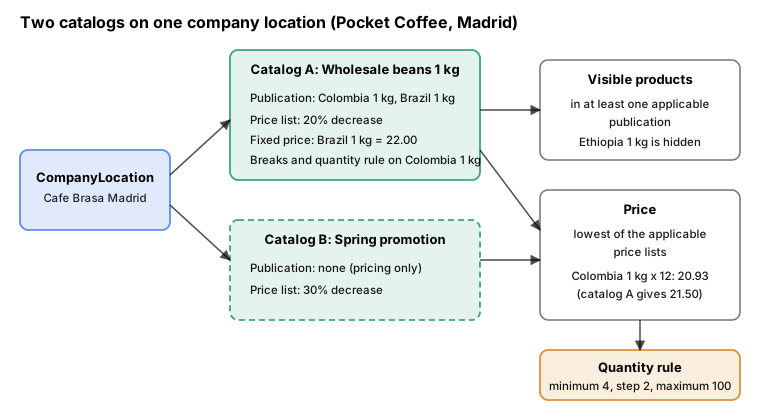
How visibility, price and quantity rule are resolved for a location with two catalogs.
The model below encodes only the documented rules, so a configuration can be reasoned about before it is sent to a shop. It is a local illustration, not Shopify’s engine: it does not know about rounding, exchange rules or market inheritance, and how price breaks of one catalog combine with the lower price of another is not documented, so it takes the lowest result.
const base = { 'PC-COL-WHL-1KG': 29.9, 'PC-BRA-WHL-1KG': 29.9, 'PC-ETH-WHL-1KG': 33.9 };

const catalogs = [
  {
    title: 'Wholesale beans 1 kg',
    locations: ['Madrid', 'Berlin'],
    publication: ['PC-COL-WHL-1KG', 'PC-BRA-WHL-1KG'],
    priceList: {
      decreasePercent: 20,
      fixed: { 'PC-BRA-WHL-1KG': 22.0 },
      breaks: { 'PC-COL-WHL-1KG': [{ min: 10, price: 21.5 }, { min: 20, price: 20.0 }] },
      rules: { 'PC-COL-WHL-1KG': { minimum: 4, increment: 2, maximum: 100 } },
    },
  },
  {
    title: 'Spring promotion (pricing only)',
    locations: ['Madrid'],
    publication: null,
    priceList: { decreasePercent: 30, fixed: {}, breaks: {}, rules: {} },
  },
];

const round2 = (n) => Math.round(n * 100) / 100;

export function resolve(location, sku, quantity) {
  const applicable = catalogs.filter((c) => c.locations.includes(location));
  const visible = applicable.some((c) => c.publication && c.publication.includes(sku));
  if (!visible) return { sku, location, visible: false };

  const rule = applicable.map((c) => c.priceList.rules[sku]).find(Boolean)
    ?? { minimum: 1, increment: 1, maximum: null };
  const quantityAllowed =
    quantity >= rule.minimum &&
    (rule.maximum === null || quantity <= rule.maximum) &&
    quantity % rule.increment === 0;

  const candidates = applicable.map((c) => {
    const pl = c.priceList;
    let unit = pl.fixed[sku] ?? round2(base[sku] * (1 - pl.decreasePercent / 100));
    for (const b of (pl.breaks[sku] ?? []).sort((x, y) => x.min - y.min)) if (quantity >= b.min) unit = b.price;
    return { catalog: c.title, unit };
  });
  const best = candidates.reduce((a, b) => (b.unit < a.unit ? b : a));
  return { sku, location, visible, quantity, quantityAllowed, candidates, unit: best.unit, from: best.catalog,
           line: round2(best.unit * quantity) };
}
Running it for six requests gave the following results (unit prices in EUR):
| Location | Variant | Qty | Allowed | Unit price | Price comes from |
|---|---|---|---|---|---|
Madrid |
PC-COL-WHL-1KG |
12 |
yes |
20.93 |
Spring promotion (catalog A offers 21.50) |
Madrid |
PC-BRA-WHL-1KG |
6 |
yes |
20.93 |
Spring promotion (catalog A fixed 22.00) |
Berlin |
PC-COL-WHL-1KG |
12 |
yes |
21.50 |
Wholesale beans 1 kg (break at 10) |
Berlin |
PC-COL-WHL-1KG |
20 |
yes |
20.00 |
Wholesale beans 1 kg (break at 20) |
Berlin |
PC-COL-WHL-1KG |
5 |
no (not a multiple of 2) |
23.92 |
Wholesale beans 1 kg (29.90 less 20 percent) |
Berlin |
PC-ETH-WHL-1KG |
6 |
not visible |
n/a |
Not in any publication |
Errors worth handling
| Code | Meaning (from the 2026-10 schema) |
|---|---|
|
The maximum number of B2B catalogs for the plan is reached. |
|
Catalogs assigned to company locations cannot be active on this plan; they can only be archived. |
|
The catalog limit for the context was reached. |
|
The context arguments are wrong for the catalog. |
|
Quantity rules and breaks only exist on company location catalogs and compatible market catalogs. |
|
Another change to the same object is in progress; retry later. |
|
The catalog already has a price list. |
|
A percentage increase above 1000. |
Source: CatalogUserError (codes read from the 2026-10 introspection)
Payment terms and deposits
Payment terms say when a company pays. Shopify models them in two places: a template chosen by the merchant and attached to a location as the default for its orders, and an instance of payment terms with payment schedules on an individual order or draft order.
Templates and their types
paymentTermsTemplates lists the templates of the shop, optionally filtered by PaymentTermsType. A template has an
id, a name, a translatedName, a description, a type and, for net terms, dueInDays. The template IDs are specific
to a shop, so read them instead of copying the ID from a tutorial.
PaymentTermsType |
Meaning | Schedule field required on the order |
|---|---|---|
|
Due on receipt |
None |
|
Due a number of days after issue |
|
|
Due on a given date |
|
|
Due when the order is fulfilled |
None |
|
Type not recognised |
n/a |
query PaymentTermsTemplates {
  paymentTermsTemplates {
    id
    name
    translatedName
    description
    paymentTermsType
    dueInDays
  }
}

query NetTemplates {
  paymentTermsTemplates(paymentTermsType: NET) {
    id
    name
    dueInDays
  }
}
Source: paymentTermsTemplates and PaymentTermsType
The default terms of a location
Set the terms through the location’s buyerExperienceConfiguration. Besides paymentTermsTemplateId it holds
checkoutToDraft, editableShippingAddress and deposit:
| Field | Effect |
|---|---|
|
The template applied to B2B orders from the location. With terms set, a buyer can pay later; without them the buyer pays at checkout. |
|
When true, the checkout creates a draft order for merchant review instead of an order. This is how a merchant puts a human approval step in front of fulfilment. |
|
Whether the buyer can use a different shipping address at checkout. |
|
A percentage ( |
|
Derived from the other two; do not write it. |
mutation LocationBuyerExperience($locationId: ID!, $input: CompanyLocationUpdateInput!) {
  companyLocationUpdate(companyLocationId: $locationId, input: $input) {
    companyLocation {
      id
      buyerExperienceConfiguration {
        checkoutToDraft
        editableShippingAddress
        paymentTermsTemplate {
          id
          name
          paymentTermsType
          dueInDays
        }
        deposit {
          ... on DepositPercentage {
            percentage
          }
        }
      }
    }
    userErrors {
      field
      code
      message
    }
  }
}
Variables: Madrid pays net 30 (the template ID comes from the query above) with a 20 percent deposit, and does not go through merchant review:
{
  "locationId": "gid://shopify/CompanyLocation/1000001",
  "input": {
    "buyerExperienceConfiguration": {
      "paymentTermsTemplateId": "gid://shopify/PaymentTermsTemplate/4",
      "checkoutToDraft": false,
      "editableShippingAddress": true,
      "deposit": {
        "percentage": 20
      }
    }
  }
}Terms on one order or draft order
A draft order can carry terms at creation (DraftOrderInput.paymentTerms and deposit), and paymentTermsCreate,
paymentTermsUpdate and paymentTermsDelete change terms on an existing order or draft order. paymentTermsCreate
takes the referenceId of the order or draft order and PaymentTermsCreateInput with the template ID and the
schedules. The result exposes due, overdue and the paymentSchedules with issuedAt, dueAt, totalBalance and
balanceDue, which are the fields to poll for accounts-receivable dashboards.
mutation PaymentTermsOnOrder($referenceId: ID!, $attributes: PaymentTermsCreateInput!) {
  paymentTermsCreate(referenceId: $referenceId, paymentTermsAttributes: $attributes) {
    paymentTerms {
      id
      paymentTermsName
      due
      overdue
      paymentSchedules(first: 5) {
        nodes {
          issuedAt
          dueAt
          totalBalance {
            amount
            currencyCode
          }
        }
      }
    }
    userErrors {
      field
      code
      message
    }
  }
}
{
"referenceId": "gid://shopify/DraftOrder/1000001",
"attributes": {
"paymentTermsTemplateId": "gid://shopify/PaymentTermsTemplate/4",
"paymentSchedules": [
{
"issuedAt": "2026-11-02T09:00:00Z"
}
]
}
}Source: paymentTermsCreate
PaymentTermsCreateUserErrorCode has a single value, PAYMENT_TERMS_CREATION_UNSUCCESSFUL, so the message is the
only clue; the usual causes are a template type whose required date is missing from the schedule, or a reference that
cannot take terms. The webhook topics payment_terms/create, payment_terms/update and payment_terms/delete fire
when terms change and need read_payment_terms.
Setting terms from a Shopify Function
A payment customization Function can set terms per checkout instead of per location, which is how rules such as "net 30
only above 500 EUR" are expressed. On 2025-06-18 the target cart.payment-methods.transform.run gained the
paymentTermsSet operation, which defines net, fixed or event-based terms for the order, with an optional deposit. The
operation is only available on Plus stores. The three term types have these inputs:
| Variant | Fields |
|---|---|
|
|
|
|
|
|
Returning no operation leaves the checkout alone, and returning paymentTermsSet with no paymentTerms removes terms.
The Function below requests net 30 with a 20 percent deposit for company orders of 500 EUR or more, and does nothing for
retail buyers or smaller company orders. It reads the buyer’s purchasingCompany from the cart.
query RunInput {
  cart {
    cost {
      subtotalAmount {
        amount
        currencyCode
      }
    }
    buyerIdentity {
      purchasingCompany {
        company {
          name
        }
        location {
          name
        }
      }
    }
  }
}
// @ts-check
const MINIMUM_SUBTOTAL = 500;
const NET_DAYS = 30;
const DEPOSIT_PERCENTAGE = 20;
/**
* @param {import("../generated/api").RunInput} input
* @returns {import("../generated/api").CartPaymentMethodsTransformRunResult}
*/
export function run(input) {
const company = input.cart.buyerIdentity?.purchasingCompany;
const subtotal = parseFloat(input.cart.cost.subtotalAmount.amount);
// Retail buyers and small company orders keep the default behaviour: pay now.
if (!company || subtotal < MINIMUM_SUBTOTAL) {
return { operations: [] };
}
return {
operations: [
{
paymentTermsSet: {
paymentTerms: {
net: {
dueInDays: NET_DAYS,
deposit: { percentage: DEPOSIT_PERCENTAGE },
},
},
},
},
],
};
}The extension file, with the target and the input query, is:
api_version = "2026-07"

[[extensions]]
name = "Pocket Coffee wholesale payment terms"
handle = "b2b-payment-terms"
type = "function"
description = "Net 30 with a 20 percent deposit for company orders of 500 EUR or more"

  [[extensions.targeting]]
  target = "cart.payment-methods.transform.run"
  input_query = "src/run.graphql"
  export = "run"

  [extensions.build]
  command = ""
  path = "dist/function.wasm"
Built with shopify app build --no-input (the JavaScript builder ran javy and produced a 1,762-byte function.wasm)
and run three times with shopify app function run. A company order of 1,196.00 EUR returned one operation with net 30
and a 20 percent deposit; the 119.60 EUR company order and a 29.90 EUR retail cart both returned an empty operations list.
The runner reported 173,711 instructions for the first run against the 11 million limit. A Function can be built and run
offline; deploying it, installing it and selecting it at a real checkout needs a store and was not done.
Two more payment features arrived in the Editions and are not described in the developer reference as API fields: a Flow
action that charges vaulted payment methods of B2B customers on fulfillment, due dates or invoicing (Spring '26), and ACH
payments with Shopify Payments for US Plus merchants (Winter '26). A changelog entry of 2026-09-15 also makes
family_name optional for B2B orders in Payments Apps API requests.
Draft orders, invoices and imported orders
Quote, invoice and convert
Draft orders are the B2B "quote": a merchant or an app prepares an order for a purchasing entity, checks the totals,
sends an invoice and, when the company agrees or pays, completes it into an order. The tutorial is a four-call sequence:
draftOrderCalculate, draftOrderCreate, draftOrderInvoiceSend and draftOrderComplete. The purchasing company goes
in purchasingEntity.purchasingCompany, which needs all three of companyId, companyLocationId and
companyContactId. The input also carries poNumber, paymentTerms and deposit, lineItems (by variantId and
quantity, or custom items), billingAddress and shippingAddress, tags, note, taxExempt and
reserveInventoryUntil.
The calculation previews taxes and totals without saving anything, so use it to show the quote to the merchant first:
mutation DraftCalculate($input: DraftOrderInput!) {
  draftOrderCalculate(input: $input) {
    calculatedDraftOrder {
      totalPriceSet {
        shopMoney {
          amount
          currencyCode
        }
      }
      totalTaxSet {
        shopMoney {
          amount
        }
      }
    }
    userErrors {
      field
      message
    }
  }
}

mutation DraftCreate($input: DraftOrderInput!) {
  draftOrderCreate(input: $input) {
    draftOrder {
      id
      name
      poNumber
      purchasingEntity {
        ... on PurchasingCompany {
          company {
            name
          }
          location {
            name
          }
        }
      }
      paymentTerms {
        paymentTermsName
        paymentTermsType
        dueInDays
      }
      totalPriceSet {
        shopMoney {
          amount
          currencyCode
        }
      }
    }
    userErrors {
      field
      message
    }
  }
}

mutation DraftInvoice($id: ID!) {
  draftOrderInvoiceSend(id: $id) {
    draftOrder {
      id
      status
    }
    userErrors {
      field
      message
    }
  }
}

mutation DraftComplete($id: ID!) {
  draftOrderComplete(id: $id) {
    draftOrder {
      id
      order {
        id
        name
      }
    }
    userErrors {
      field
      message
    }
  }
}
The first Cafe Brasa order, twelve bags of Colombia 1 kg, on the location’s terms (the same variables serve the calculation and the creation):
{
  "input": {
    "purchasingEntity": {
      "purchasingCompany": {
        "companyId": "gid://shopify/Company/1000001",
        "companyLocationId": "gid://shopify/CompanyLocation/1000001",
        "companyContactId": "gid://shopify/CompanyContact/1000001"
      }
    },
    "poNumber": "PO-2026-0412",
    "lineItems": [
      { "variantId": "gid://shopify/ProductVariant/1000102", "quantity": 12 }
    ],
    "paymentTerms": {
      "paymentTermsTemplateId": "gid://shopify/PaymentTermsTemplate/4"
    },
    "note": "First wholesale order",
    "tags": ["wholesale"]
  }
}The guide’s examples pass a price with originalUnitPriceWithCurrency and a title for a custom line. A line built from
variantId takes the price from the catalog of the purchasing location, so prefer it; pass an explicit price only for
custom lines. Sending an invoice and completing a B2B draft order work exactly as they do for consumer draft orders.
The draft order reference covers the remaining options, such as inventory reservation and payment status.
Importing B2B orders
A merchant moving from another system can import history so that buyers see their full order list in their account.
orderCreate accepts a B2B order when the input names both companyLocationId and a customer to associate. The
imports have strict prerequisites: the company, location, contact and products must already exist in Shopify, and the
customer must hold a role at that location; otherwise the call returns an error. Always send priceSet for each line:
when it is omitted the API fills it from the current variant price, which gives wrong history. The input has poNumber
for the original purchase order number, processedAt, financialStatus, currency, transactions, sourceName and
sourceIdentifier.
mutation ImportB2BOrder($order: OrderCreateOrderInput!) {
  orderCreate(order: $order) {
    order {
      id
      name
      poNumber
      purchasingEntity {
        ... on PurchasingCompany {
          company {
            id
          }
          location {
            id
          }
        }
      }
    }
    userErrors {
      field
      message
    }
  }
}
{
"order": {
"companyLocationId": "gid://shopify/CompanyLocation/1000001",
"customer": { "toAssociate": { "id": "gid://shopify/Customer/1000001" } },
"poNumber": "LEGACY-7781",
"processedAt": "2026-03-14T10:00:00Z",
"financialStatus": "PAID",
"currency": "EUR",
"lineItems": [
{
"variantId": "gid://shopify/ProductVariant/1000102",
"quantity": 10,
"priceSet": { "shopMoney": { "amount": "21.50", "currencyCode": "EUR" } }
}
]
}
}Source: Import B2B orders
Reading B2B orders back is done from the location (or the company or the contact), which avoids searching the order list by customer:
query B2BOrders($locationId: ID!) {
  companyLocation(id: $locationId) {
    orders(first: 20, reverse: true) {
      nodes {
        id
        name
        poNumber
        paymentTerms {
          paymentTermsName
          overdue
        }
        totalPriceSet {
          shopMoney {
            amount
            currencyCode
          }
        }
      }
    }
  }
}
Source: CompanyLocation object reference
Themes: Liquid objects for B2B
Liquid exposes the buyer’s company through three objects. customer.b2b? is true when the logged-in customer is acting
for a company; customer.current_company and customer.current_location are the company and the location the buyer
selected; customer.company_available_locations lists every location the buyer can switch to. A company has id,
name, external_id, available_locations, available_locations_count and metafields; a company_location has
id, name, external_id, current?, url_to_set_as_current, shipping_address, tax_registration_id, company,
metafields and store_credit_account.
The theme guide’s pattern is a location picker that appears only for B2B buyers and offers the other locations when there is more than one. The version below is split into two snippets, with a documented parameter block, so a section can reuse them:
{% doc %}
  Lets a B2B buyer see, and change, the company location they are buying for.

  @example
  {% render 'b2b-location-picker' %}
{% enddoc %}

{%- if customer.b2b? -%}
  <div class="b2b-location-picker">
    <p>
      {{ 'b2b.purchasing_for' | t: company: customer.current_company.name, location: customer.current_location.name }}
    </p>

    {%- if customer.company_available_locations.size > 1 -%}
      <ul>
        {%- for location in customer.company_available_locations -%}
          {%- unless location.current? -%}
            <li>
              <a href="{{ location.url_to_set_as_current }}">{{ location.name }}</a>
            </li>
          {%- endunless -%}
        {%- endfor -%}
      </ul>
    {%- endif -%}
  </div>
{%- endif -%}{% doc %}
Shows a price to verified B2B buyers only and a login prompt to everyone else.
@param {number} price - The price to show, in cents.
@example
{% render 'b2b-price', price: product.selected_or_first_available_variant.price %}
{% enddoc %}
{%- if customer.b2b? -%}
<span class="price">{{ price | money }}</span>
{%- else -%}
<a href="{{ routes.account_login_url }}">{{ 'b2b.log_in_to_see_price' | t }}</a>
{%- endif -%}The strings live in locales/en.default.json:
{
  "b2b": {
    "purchasing_for": "You are buying for {{ company }}, location {{ location }}.",
    "log_in_to_see_price": "Log in to see the price",
    "delivery_included": "Delivery included for your company."
  }
}A section can then branch on the company, as in the guide’s example of showing a message to one company only. The section also gives the snippets a place to be rendered, which keeps Theme Check from flagging them as orphaned:
<section class="b2b-wholesale">
  {% render 'b2b-location-picker' %}

  {% if customer.b2b? and customer.current_company.name == 'Cafe Brasa SL' %}
    <p>{{ 'b2b.delivery_included' | t }}</p>
  {% endif %}

  {% render 'b2b-price', price: 2990 %}
</section>

{% schema %}
{
  "name": "Wholesale",
  "settings": [],
  "presets": [{ "name": "Wholesale" }]
}
{% endschema %}
shopify theme check on the Skeleton theme with these three files added reported 42 files inspected with no offenses.
Shopify’s Liquid is not rendered offline, so the snippets were also rendered with LiquidJS, with a small stand-in for the
t and money filters and the B2B objects supplied as plain data. For a buyer of Cafe Brasa SL at Madrid with two
locations the picker printed "You are buying for Cafe Brasa SL, location Cafe Brasa Madrid." and a link to the Berlin
location; for a guest it printed nothing, and the price snippet printed the price for the buyer and the login link for the
guest. That proves the logic of the templates and not the behaviour of a real theme.
Source: Liquid customer object and Liquid company_location object
Two practical points follow from the guide. In a dedicated B2B store, hide prices, the cart icon, add-to-cart buttons and
other calls to action from visitors who are not B2B buyers, either with the theme editor’s store contextualization
settings or with customer.b2b?; in a blended store keep the default prices for consumers. And for a Theme Store theme
that must stay eligible for automatic upgrades, do not edit core theme files: hide the existing section or block and add
a Custom Liquid block that does the conditional, as the guide advises. Some areas, such as the cart icon in the header,
are not individual blocks, so a code change may be unavoidable there.
Pages that show B2B prices must not be cached and served to other buyers, so custom caches (CDN rules, Hydrogen loaders) must treat these responses as private.
Headless storefronts
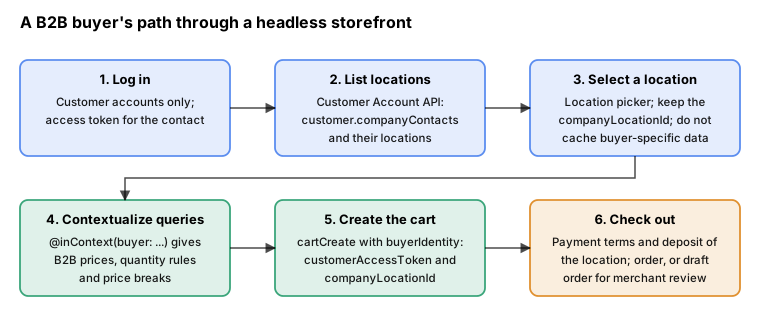
The buyer’s path from login to a B2B checkout in a headless storefront.
A headless B2B storefront has four jobs, taken from the developer guide: obtain the buyer’s access token, obtain a company location ID, contextualize product queries to get B2B prices, volume prices and quantity rules, and contextualize the cart so that checkout is a B2B checkout. Without contextualization the store’s base prices and publishing are used, and the buyer sees none of the catalogs, payment terms or other B2B setup.
Step 1 and 2: the token and the buyer’s locations
The Customer Account API authorization flow produces an access_token for the customer; this is the
customerAccessToken of the later steps. With that token, a Customer Account API query returns the company contacts of the
customer and the locations they can buy for. If the result has one location, keep its ID. If it has several, build a
location selector, store the chosen ID and redirect there after login. A location is shown with its address and the
payment terms it will use, so the buyer knows what the checkout will do.
query BuyerLocations {
  customer {
    id
    displayName
    companyContacts(first: 5) {
      nodes {
        id
        title
        company {
          id
          name
        }
        locations(first: 20) {
          nodes {
            id
            name
            shippingAddress {
              countryCode
              city
            }
            buyerExperienceConfiguration {
              paymentTermsTemplate {
                name
                dueInDays
              }
            }
          }
        }
      }
    }
  }
}
This query was validated against the Customer Account API schema 2026-04 from @shopify/hydrogen-react 2026.4.4, because
the schema for 2026-10 is not served for download; the fields it uses are in the 2026-10 reference pages as well.
Step 3: contextualized Storefront API queries
Pass a buyer to the @inContext directive to contextualize any query. BuyerInput has two fields,
customerAccessToken (required) and companyLocationId. A contextualized product query returns the price for the
buyer’s location, the quantityRule and the quantityPriceBreaks of each variant, which are the fields a quantity
selector and a volume table need.
query WholesaleBeans($buyer: BuyerInput) @inContext(buyer: $buyer, country: ES, language: ES) {
  products(first: 5, query: "tag:wholesale") {
    nodes {
      id
      title
      variants(first: 5) {
        nodes {
          id
          sku
          price {
            amount
            currencyCode
          }
          quantityRule {
            minimum
            maximum
            increment
          }
          quantityPriceBreaks(first: 5) {
            nodes {
              minimumQuantity
              price {
                amount
                currencyCode
              }
            }
          }
        }
      }
    }
  }
}
{
"buyer": {
"customerAccessToken": "${CUSTOMER_ACCOUNT_ACCESS_TOKEN}",
"companyLocationId": "gid://shopify/CompanyLocation/1000001"
}
}Source: Headless with B2B, step 3
The variable above shows an environment placeholder where a real request carries the buyer’s token. A B2B response
depends on the token and the location, so a server that caches responses by URL would serve one buyer’s prices to another;
the guide’s caution says to disable caching on routes that return buyer-specific data, and it links to the caching guide
of the legacy Hydrogen framework for how to do that. The @inContext directive has other arguments (country, language,
channelId, preferredLocationId, visitorConsent); in cart operations buyer and country are ignored, and only
language still applies.
Step 4: the buyer identity on the cart
Because a cart ignores @inContext(buyer:), set the buyer on the cart itself. CartBuyerIdentityInput has email,
phone, countryCode, customerAccessToken, companyLocationId and preferences. After the call, the cart’s
buyerIdentity.purchasingCompany shows the company, location and contact, and the checkoutUrl leads to a B2B
checkout.
mutation CreateB2BCart($buyerIdentity: CartBuyerIdentityInput!) {
  cartCreate(input: {buyerIdentity: $buyerIdentity, lines: [{merchandiseId: "gid://shopify/ProductVariant/1000102", quantity: 12}]}) {
    cart {
      id
      checkoutUrl
      buyerIdentity {
        purchasingCompany {
          company {
            name
          }
          location {
            name
          }
        }
      }
      cost {
        subtotalAmount {
          amount
          currencyCode
        }
      }
    }
    userErrors {
      field
      code
      message
    }
    warnings {
      code
      message
    }
  }
}

mutation SwitchLocation($cartId: ID!, $buyerIdentity: CartBuyerIdentityInput!) {
  cartBuyerIdentityUpdate(cartId: $cartId, buyerIdentity: $buyerIdentity) {
    cart {
      id
    }
    userErrors {
      field
      code
      message
    }
    warnings {
      code
      message
    }
  }
}
{
"buyerIdentity": {
"customerAccessToken": "${CUSTOMER_ACCOUNT_ACCESS_TOKEN}",
"companyLocationId": "gid://shopify/CompanyLocation/1000001"
}
}Source: Headless with B2B, step 4
Changing the buyer identity of a cart that already has lines can make it invalid. Products not published for the new
location are removed, and products that stay but fall under different quantity rules are left unchanged. Reading the
cart does not fail, but updating it may, and a buyer who goes to checkout with an invalid cart sees the problems as an
error. The codes to handle in userErrors and warnings:
| Code | Meaning |
|---|---|
|
The customer access token is required when a company location is set. |
|
The location was not found or is not allowed, or the buyer cannot purchase for it (the second code was added to
|
|
A cart line breaks the variant’s quantity rule. |
|
A line is not published for the buyer’s location. |
|
Only one-time purchase is available for B2B orders, so a subscription line is flagged. |
Source: cartBuyerIdentityUpdate (codes read from the 2026-10 Storefront schema) and New CartErrorCode: BUYER_CANNOT_PURCHASE_FOR_COMPANY_LOCATION
Headless also allows a gated store, where visitors can browse products but see no price and cannot order. Include the
price in the query, and render the add-to-cart button, only when there is a valid session with a stored company location
ID. The same principle as the Liquid customer.b2b? check applies, enforced in your own code. Hydrogen is a
framework-agnostic toolkit as of 2026-10; the Storefront
API and Headless page explains how it holds the Storefront and Customer Account clients that these queries run on.
Checkout and Functions
The B2B checkout is the standard Shopify checkout with the location’s settings applied: the terms and deposit from
buyerExperienceConfiguration, the quantity rules and catalog prices of the cart, tax exemptions of the location, and,
with checkoutToDraft, the creation of a draft order for merchant review in place of an order. Customization goes
through the same extension points as any checkout, with B2B hooks in each:
-
Functions receive
cart.buyerIdentity.purchasingCompanyin their input, as the payment terms Function above shows, so discounts, delivery customizations, payment customizations and validations can depend on the company or the location. -
Cart and Checkout Validation Functions can validate the billing address and the PO number since API version 2026-04 (changelog of 2026-04-01). They return errors on the field targets
$.cart.billingAddress.{field}and$.cart.poNumber, so a rule such as "company orders require a PO number" no longer needs client-side code. The inputs are null outside Cart and Checkout Validation. -
A Function can also impose a review requirement with the
orderReviewAddoperation; the checkout is then submitted as a draft that the merchant approves. The Winter '26 Edition presents this as rules on order value and products, for Plus. -
Checkout UI extensions can read metafields owned by the
COMPANYandCOMPANY_LOCATIONof a B2B checkout, besides those on the cart, customer, product and shop;owner_typeis optional in 2026-10 and becomes required in 2027-01. -
The Winter '26 Edition also lists checkout and customer account customization per market and for B2B buyers in the theme editor, and pickup in store as a delivery option for B2B.
Events and integrations
Company data changes through the admin, the API and apps, so an integration that mirrors it to an ERP listens to webhooks and reconciles with a bulk query. The topics are:
| Topic | Fires when |
|---|---|
|
A company is created, changed or deleted |
|
A location is created, changed or deleted (including its settings) |
|
A contact is created, changed or deleted |
|
A role is assigned to or revoked from a contact at a location |
|
Payment terms on an order or draft order change |
|
A draft order is created, changed or deleted |
The company topics need read_customers or read_companies; the payment terms topics need read_payment_terms; the
catalog objects have no webhook topics of their own in 2026-10, so poll catalogs or react to the Markets topics.
The app configuration for these subscriptions goes in shopify.app.toml. This one was validated with shopify app build
--no-input using a placeholder client ID and the reserved host example.invalid; the build printed
pocket-coffee-b2b-app built!. The offline validation does not check topic names, so a mistyped topic still builds, and
only a deploy against Shopify finds it.
client_id = "00000000000000000000000000000000"
name = "pocket-coffee-b2b-app"
application_url = "https://example.invalid"
embedded = true

[access_scopes]
scopes = "read_companies,write_companies,read_customers,read_products,write_products,read_publications,write_publications,read_draft_orders,write_draft_orders,read_orders,write_orders,read_payment_terms,write_payment_terms"

[auth]
redirect_urls = ["https://example.invalid/api/auth"]

[webhooks]
api_version = "2026-10"

  [[webhooks.subscriptions]]
  topics = [
    "companies/create",
    "companies/update",
    "company_locations/create",
    "company_locations/update",
    "company_contacts/create",
    "company_contact_roles/assign",
    "company_contact_roles/revoke",
    "payment_terms/create"
  ]
  uri = "/webhooks/b2b"

  [[webhooks.subscriptions]]
  topics = ["app/uninstalled"]
  uri = "/webhooks/app/uninstalled"

  [[webhooks.subscriptions]]
  uri = "/webhooks/customers/data_request"
  compliance_topics = ["customers/data_request"]

  [[webhooks.subscriptions]]
  uri = "/webhooks/customers/redact"
  compliance_topics = ["customers/redact"]

  [[webhooks.subscriptions]]
  uri = "/webhooks/shop/redact"
  compliance_topics = ["shop/redact"]
Source: Subscribe to webhooks and WebhookSubscriptionTopic
The same subscriptions can be created over the API, with the topic as an enum value (COMPANIES_CREATE for
companies/create):
mutation SubscribeCompanies($uri: String!) {
  webhookSubscriptionCreate(topic: COMPANIES_CREATE, webhookSubscription: {uri: $uri, format: JSON}) {
    webhookSubscription {
      id
      topic
    }
    userErrors {
      field
      message
    }
  }
}
Source: webhookSubscriptionCreate
The ecosystem around B2B is mostly apps. The Winter '26 Edition names eleven apps compatible with B2B for quote requests, custom buyer roles and shopping lists, and the Spring '26 Edition says QuickBooks syncs B2B orders, PO numbers and company details and Mailchimp can segment B2B customers. An app that adds those capabilities builds on the objects of this page.
A Pocket Coffee wholesale walkthrough
Putting the parts together for the example, an app or a script does the following, in this order, because each step needs an ID from the one before:
| Step | Call | Result |
|---|---|---|
1 |
|
Company, first location and main contact exist |
2 |
|
Second location with its own shipping address and the Madrid billing address |
3 |
|
Marta can act at both locations |
4 |
|
Both locations default to net 30 with a deposit |
5 |
|
Wholesale catalog with a price list and a publication |
6 |
|
Negotiated prices and order-size rules |
7 |
Optional: a second pricing-only catalog for a campaign on Madrid |
Madrid gets the lowest of two prices |
8 |
|
Order with |
9 |
Storefront: login, |
Cafe Brasa orders on its own from the shop |
Mistakes that cost the most time
-
Creating a contact and expecting it to order. Without a role assignment at a location there is no permission; the Storefront cart reports
BUYER_CANNOT_PURCHASE_FOR_COMPANY_LOCATION. -
Giving the app only
write_productsandwrite_draft_ordersand then wondering why company mutations fail. Company objects needread_companiesandwrite_companies, orread_customersandwrite_customers. -
Copying a payment terms template ID from a tutorial. IDs are specific to a shop, so read them with
paymentTermsTemplates. -
Skipping the publication on a catalog and finding that buyers see nothing (older guide) or whatever the sales channel makes available (2026-10 reference). Decide on purpose, and test with a real buyer on a development store of the target plan.
-
Using several catalogs on a location and assuming the first wins. The lowest listed price wins, and a campaign catalog that is cheaper than the negotiated one silently overrides the negotiation.
-
Sending
priceListFixedPricesAddwith more than 250 prices, or expecting it to merge: it replaces the fixed price of a variant that already has one. -
Changing a catalog’s price list or publication and leaving the previous object orphaned. Delete it, or use
deleteDependentResourceswhen deleting the catalog. -
Importing orders without
priceSet. The API fills the current variant price and the history is wrong. -
Rendering buyer-specific data from a shared cache.
-
Customer accounts: B2B does not work with legacy customer accounts. Headless login code must move to the Customer Account API.
-
Building a subscription or pre-order flow for B2B. It is not supported, and the cart returns a warning.
Version history
| Date | Change |
|---|---|
2023-04 |
|
2025-01-01 |
|
2025-05-10 |
Storefront API |
2025-06-18 |
|
2025-07-30 |
Storefront cart warning for subscriptions on company locations |
2025-09-15 |
Store credit accounts can belong to company locations |
2025-12-10 |
Winter '26 Edition: ACH for B2B, store credit and pickup for B2B, dynamic payment terms and deposits, order review rules |
2026-04-01 |
Billing address and PO number in Cart and Checkout Validation Functions; tax summary webhook includes company metafields |
2026-06-17 |
Spring '26 Edition: B2B features on more plans, B2B taxes for tax-inclusive pricing, vaulted payment methods charged through Flow |
2026-09-15 |
|
Source: Shopify developer changelog
What was run and what was not
| Item | Result | Notes |
|---|---|---|
All Admin GraphQL documents on this page (company, location, catalog, payment terms, draft order, import, webhook and bulk query) |
Validated against the Admin 2026-10 schema (introspection, |
Every document was valid. Deliberately wrong documents were rejected: |
Variables of all Admin mutations |
Coerced against the variable definitions of each operation: 14 sets, all valid |
Catches wrong enum values, missing required fields and wrong types; it does not check that IDs exist. |
Storefront documents (buyer-contextualized product query, |
Validated against the Storefront 2026-10 schema; the three variable sets are valid |
Tokens in the variables are environment placeholders. |
Customer Account document |
Validated against the Customer Account schema 2026-04 (from |
The 2026-10 schema could not be downloaded. |
Payment terms Function |
|
Offline with a placeholder app. Deployment, installation and a real checkout were not tested. |
|
|
Topic names and scopes are not validated offline. |
Liquid snippets and section |
|
Shows the template logic, not the behaviour of Shopify’s Liquid or of a theme with B2B data. |
Catalog resolution model |
Run with Node.js for six requests, output tabulated above |
A local illustration of documented rules, not Shopify’s pricing engine. |
Anything that needs a shop |
Not executed |
Real company, catalog, price list, publication and draft order calls, plan limits (the three-catalog limit, direct assignment, deposits), B2B checkout, invitation emails, webhooks and the Customer Account login. No account was created and no credential was used. |