Document Ingestion & Chunking
|
This content was generated with the assistance of AI and should be verified against the official documentation of each tool and framework before being relied on in production. This section’s bibliography lists the reference material consulted while preparing these pages. |
Examples on this page target Python 3.12, langchain-text-splitters 1.1, Ollama 0.34 (nomic-embed-text,
768 dims), PostgreSQL 17 with pgvector 0.8.6, Spring Boot 4.1 with Spring AI 2.0.1, and LangChain4j 1.20.1.
They turn the DocsAssistant sample corpus into rows in the documents / chunks / chunk_embeddings
schema introduced on the
pgvector page.
The sample corpus
Every example on this site’s vector-rag pages searches the same three small AsciiDoc files. They are reproduced here in full because they are the DocsAssistant scenario’s actual ingestion input, not just a description of it.
// docs/vector-rag/hnsw.adoc -- metadata: component = vector-rag
= HNSW indexes

== What HNSW is

Hierarchical Navigable Small World (HNSW) is a graph-based approximate nearest-neighbor index. Vectors
become nodes connected across several layers, with sparser, longer-range links at the top and denser,
short-range links at the bottom. A search starts at an entry point in the top layer and greedily walks
toward the query, descending a layer each time no closer neighbor remains, until it reaches layer zero.

== Tuning parameters

`M` bounds how many edges each node keeps per layer, trading memory for connectivity. `ef_construction`
controls the candidate list size while the graph is built, and a larger value produces a better-connected
graph at the cost of slower inserts. `ef_search` is the same idea applied at query time: a larger candidate
list improves recall at the cost of latency, and unlike `M` it can be changed per query without rebuilding
the index.

== When to prefer it

HNSW suits workloads that insert continuously and query for low latency, since it needs no training step
and tolerates incremental updates far better than a clustering-based index.
// docs/vector-rag/pgvector.adoc -- metadata: component = vector-rag
= pgvector basics
== Adding vector search to PostgreSQL
pgvector is a PostgreSQL extension, not a separate database. `CREATE EXTENSION vector` adds a `vector`
column type and a handful of distance operators, so embeddings live as ordinary rows next to the rest of
an application's schema and can be joined, filtered and transacted like any other column.
== Operators and indexes
`<->` computes Euclidean distance, `<#>` negative inner product, and `<=>` cosine distance; a query orders
by whichever operator matches the embedding model's intended metric. An HNSW or IVFFlat index on the vector
column turns that `ORDER BY ... LIMIT` into an approximate search instead of a full scan, at the usual
recall-versus-latency trade-off every ANN index makes.
== Picking a distance operator
Most sentence embedding models, including the ones this site's examples use, are trained and evaluated
with cosine similarity, so `<=>` is the default choice unless a specific model's documentation says
otherwise.// docs/spring-ai/rag.adoc -- metadata: component = spring-ai
= RAG with Spring AI
== The QuestionAnswerAdvisor
Spring AI's `QuestionAnswerAdvisor` wraps a `ChatClient` call: before the prompt reaches the model, it runs
a similarity search against a configured `VectorStore`, formats the results as context, and appends them to
the user's question. The application code calls `chatClient.prompt()` exactly as it would without
retrieval; the advisor does the rest.
== Wiring a VectorStore
Any `VectorStore` implementation -- `PgVectorStore`, a Redis or Elasticsearch store, or an in-memory one for
tests -- can back the advisor, since they all share the same `add` / `similaritySearch` interface. Swapping
the backing store is a configuration change, not a code change, as long as the embedding model stays the
same one the store was populated with.
== Filtering retrieved context
`SearchRequest.builder().filterExpression(...)` narrows retrieval to a subset of stored documents, for
example a single component of a larger corpus, before the advisor ever builds its prompt.Loading documents
A loader’s job is to turn a source file into plain text (and, ideally, some structural hints) before chunking ever runs. The three formats an ingestion pipeline meets most often need different handling:
-
Markdown and AsciiDoc are the easiest case: they are already plain text with explicit structure (
/#headings,=/==section markers), so a loader can keep both the text and the heading hierarchy with almost no work. The corpus above is AsciiDoc for exactly this reason. -
HTML needs its markup stripped without losing the content it wraps — navigation, footers and script tags should not become chunk text, but heading tags (
<h1>-<h3>) are worth preserving as structural hints, the same role AsciiDoc’s==plays. -
PDF is the hardest case, because a PDF encodes visual layout, not document structure: there is no reliable "this is a heading" or "this is a new paragraph" signal in the file format itself.
PDF pitfalls
Two PDF layouts routinely break naive text extraction:
-
Multi-column pages — a plain top-to-bottom, left-to-right text extractor reads across columns instead of down each one, interleaving unrelated sentences from the left and right column into nonsense chunks. Column-aware extraction has to first detect column boundaries from character coordinates before ordering text.
-
Equations and figures — formulas rendered as glyphs or images have no reliable plain-text representation, and captions can end up detached from the figure or table they describe.
Two specialized tools exist because general-purpose PDF text extraction gets both of these wrong on structured documents: Grobid parses scientific PDFs into structured XML (sections, references, figures, multi-column layout) using machine-learned layout models rather than raw coordinate heuristics, and Nougat is an OCR model trained specifically to transcribe academic PDFs — including LaTeX-style equations — into markup instead of plain, equation-mangled text. Neither is needed for the DocsAssistant corpus, which is plain AsciiDoc, but both are the standard answer once a corpus includes PDF papers or reports with equations or multi-column layout.
Cleaning and quality filtering
Whatever the source format, a loader’s raw output usually needs a cleaning pass before chunking: collapsing repeated whitespace, dropping boilerplate (headers, footers, page numbers repeated on every page), de-hyphenating words split across a line break, and normalizing Unicode. A quality filter then discards what cleaning cannot fix — documents that are mostly navigation links, near-duplicate pages, or extracted text so short or garbled (a common symptom of a scanned, non-OCR’d PDF) that no chunk built from it would be useful. Filtering before chunking is cheaper than filtering after: a bad document produces many bad chunks, and every wasted chunk still costs an embedding call.
A minimal version of both passes, run on each loaded document before it reaches a splitter:
import hashlib
import re
import unicodedata

_HYPHENATED_BREAK = re.compile(r"(\w)-\n(\w)")
_RUNS_OF_SPACES = re.compile(r"[ \t]+")
_EXTRA_BLANK_LINES = re.compile(r"\n{3,}")


def clean_text(text: str, boilerplate_lines: frozenset[str] = frozenset()) -> str:
    text = unicodedata.normalize("NFKC", text)        # e.g. ligatures and full-width forms -> plain characters
    text = _HYPHENATED_BREAK.sub(r"\1\2", text)       # "embed-\nding" -> "embedding"
    lines = [_RUNS_OF_SPACES.sub(" ", line).strip() for line in text.splitlines()]
    lines = [
        line for line in lines
        if line not in boilerplate_lines                # repeated headers / footers
        and not line.isdigit()                          # bare page numbers
    ]
    return _EXTRA_BLANK_LINES.sub("\n\n", "\n".join(lines)).strip()


def passes_quality_filter(text: str, seen_hashes: set[str],
                          min_words: int = 50, min_alpha_ratio: float = 0.6) -> bool:
    words = text.split()
    if len(words) < min_words:
        return False                                    # too short to yield a useful chunk
    if sum(ch.isalpha() for ch in text) / len(text) < min_alpha_ratio:
        return False                                    # mostly symbols/digits: garbled extraction or link lists
    fingerprint = hashlib.sha256(" ".join(words).lower().encode("utf-8")).hexdigest()
    if fingerprint in seen_hashes:
        return False                                    # duplicate of a document already accepted
    seen_hashes.add(fingerprint)
    return True
The fingerprint above only catches duplicates that are identical after whitespace and case normalization;
catching near-duplicates (the same page with a different footer or timestamp) needs a similarity sketch
such as MinHash instead of an exact hash. See
Python: unicodedata.normalize for
the normalization forms.
Chunking strategies
Chunking splits a loaded document into the units that actually get embedded, stored and retrieved. Every
strategy below is shown against the corpus’s hnsw.adoc text; chunk-size
guidance follows the strategies themselves.
Fixed word or token windows with overlap
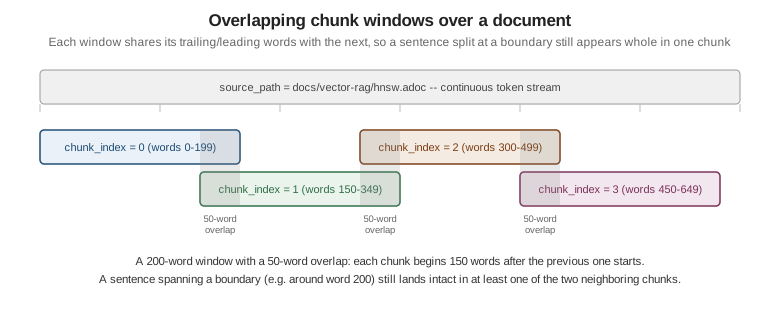
The simplest strategy: cut the text into windows of a fixed size, sliding forward by less than the window so consecutive chunks overlap. Overlap keeps a sentence that falls near a boundary intact in at least one chunk, at the cost of storing (and later embedding) some words twice — the figure below shows the same window/overlap shape as code.
def fixed_window_chunks(words: list[str], window: int = 200, overlap: int = 50) -> list[str]:
    step = window - overlap
    chunks = []
    for start in range(0, len(words), step):
        window_words = words[start:start + window]
        if not window_words:
            break
        chunks.append(" ".join(window_words))
        if start + window >= len(words):
            break
    return chunks
Sentence-aware chunking
Cutting mid-sentence is the fixed-window strategy’s main weakness. A sentence-aware splitter groups whole sentences into a chunk instead, stopping once the next sentence would push the chunk past a target size:
import re

_SENTENCE_BOUNDARY = re.compile(r"(?<=[.!?])\s+")

def sentence_aware_chunks(text: str, target_words: int = 200) -> list[str]:
    sentences = _SENTENCE_BOUNDARY.split(text.strip())
    chunks, current, current_len = [], [], 0
    for sentence in sentences:
        sentence_len = len(sentence.split())
        if current and current_len + sentence_len > target_words:
            chunks.append(" ".join(current))
            current, current_len = [], 0
        current.append(sentence)
        current_len += sentence_len
    if current:
        chunks.append(" ".join(current))
    return chunks
A production pipeline typically reaches for a proper sentence tokenizer (NLTK’s sent_tokenize, or the
sentence boundaries a library like spaCy detects) rather than the regular expression above, since a bare
regular expression on ./!/? mishandles abbreviations and decimal numbers.
Recursive character splitting
LangChain’s RecursiveCharacterTextSplitter generalizes sentence-aware splitting to arbitrary text: it
tries a list of separators from "most structural" to "least structural" (paragraph break, line break,
sentence-ending punctuation, then a bare space), recursively splitting a too-large piece with the next
separator down the list until every chunk fits the target size:
from langchain_text_splitters import RecursiveCharacterTextSplitter

splitter = RecursiveCharacterTextSplitter(
    chunk_size=1000,
    chunk_overlap=200,
    separators=["\n\n", "\n", ". ", " ", ""],
)
chunks = splitter.split_text(hnsw_adoc_text)Structure-aware chunking
When a document already carries explicit structure — Markdown headings or AsciiDoc == section markers,
exactly like the sample corpus — splitting along that structure keeps each chunk topically coherent
without any length heuristic at all. LangChain’s MarkdownHeaderTextSplitter splits on heading levels and
attaches the heading path as metadata on each resulting chunk:
from langchain_text_splitters import MarkdownHeaderTextSplitter

splitter = MarkdownHeaderTextSplitter(
    headers_to_split_on=[("#", "h1"), ("##", "h2")],
)
docs = splitter.split_text(markdown_text)
# each doc.metadata now carries {"h1": "...", "h2": "..."}
AsciiDoc has no ready-made equivalent in langchain-text-splitters, but its section markers are just as
regular, so a small custom splitter on `== ` (mirroring the corpus’s own `== ` sections above) does the
same job:
import re

_SECTION = re.compile(r"^== (.+)$", re.MULTILINE)

def split_asciidoc_sections(text: str) -> list[tuple[str, str]]:
    matches = list(_SECTION.finditer(text))
    sections = []
    for i, match in enumerate(matches):
        end = matches[i + 1].start() if i + 1 < len(matches) else len(text)
        sections.append((match.group(1), text[match.start():end].strip()))
    return sections
Applied to hnsw.adoc, this yields exactly the three (section_path, content) pairs — "What HNSW is",
"Tuning parameters", "When to prefer it" — that chunks.section_path stores for that document. See
LangChain:
Markdown header text splitter.
Semantic chunking
Instead of splitting on a fixed size or on markup, a semantic splitter embeds successive sentences (or small groups of them) and cuts wherever the similarity between neighboring sentences drops sharply — the same signal a human editor uses to notice a topic change:
import numpy as np

def semantic_boundaries(sentence_embeddings: list[list[float]], drop_threshold: float = 0.25) -> list[int]:
    boundaries = []
    for i in range(1, len(sentence_embeddings)):
        a, b = np.array(sentence_embeddings[i - 1]), np.array(sentence_embeddings[i])
        cosine = a.dot(b) / (np.linalg.norm(a) * np.linalg.norm(b))
        if cosine < 1 - drop_threshold:
            boundaries.append(i)
    return boundaries
Semantic chunking produces chunks that track meaning better than any fixed rule, at the cost of an embedding call per sentence during ingestion itself, before the chunk-level embeddings this page’s schema stores are even computed.
Parent-child (small-to-big) chunking
Small chunks retrieve precisely — their embedding is not diluted by unrelated surrounding text — but a small chunk alone can be too little context for the model to answer from. Parent-child chunking keeps both sizes: a small child chunk is embedded and searched, but the parent chunk (a larger surrounding span, or the whole section) is what actually gets sent to the model once its child chunk is retrieved:
def parent_child_chunks(section_text: str, parent_id: int) -> list[dict]:
    children = fixed_window_chunks(section_text.split(), window=100, overlap=20)
    return [
        {"content": child, "parent_id": parent_id, "parent_content": section_text}
        for child in children
    ]
chunks.section_path already gives DocsAssistant a natural parent unit (the section a chunk came from);
Retrieval Strategies covers expanding a hit back out to its parent at query
time in depth.
Late chunking
Ordinary chunking embeds each chunk in isolation, so a pronoun or an implicit reference near a chunk boundary ("it", "the index above") loses the context that would resolve it. Late chunking reverses the order: the whole document (or as much of it as the embedding model’s context window allows) is run through the model’s transformer layers first, producing token-level, context-aware representations, and only then is the token sequence split into chunks — each chunk’s embedding is a pooling of its tokens' already context-aware representations, so it still carries information from the rest of the document even though the chunk boundaries are the same ones a normal splitter would choose:
# illustrative -- requires an embedding model exposing token-level output
# (e.g. a long-context sentence-transformers model), not every model supports this
def late_chunk(token_embeddings: list[list[float]], chunk_token_spans: list[tuple[int, int]]) -> list[list[float]]:
    import numpy as np
    return [
        np.mean(token_embeddings[start:end], axis=0).tolist()
        for start, end in chunk_token_spans
    ]
See Late Chunking: Contextual Chunk Embeddings Using Long-Context Embedding Models for the technique in full, and Jina AI’s accompanying explanation for a more approachable walkthrough.
Contextual retrieval
A cheaper way to give a chunk back its missing context, without needing a long-context embedding model at all, is to have an LLM generate a short prefix describing where the chunk sits in the document, then embed the prefix together with the chunk:
CONTEXT_PROMPT = """Document: {document_title}
Chunk: {chunk_text}

Write a one-sentence context statement situating this chunk within the document,
to be prepended to the chunk before it is embedded. Answer with the sentence only."""

def add_context_prefix(chat, document_title: str, chunk_text: str) -> str:
    context = chat.invoke(CONTEXT_PROMPT.format(document_title=document_title, chunk_text=chunk_text))
    return f"{context.content.strip()}\n\n{chunk_text}"
For example, a chunk from "Tuning parameters" in hnsw.adoc might be prefixed with "This chunk explains the
M, ef_construction and ef_search parameters of the HNSW index described earlier in this document." — now the chunk is retrievable even by a query that never mentions HNSW by name. See Anthropic’s
Introducing Contextual Retrieval for the technique and
its accompanying evaluation.
Chunk-size guidance and tuning
Two rules of thumb cover most of this page’s strategies:
-
Word-based splitting (fixed windows, sentence-aware): around 200 words per chunk with a 50-word overlap — roughly a quarter of the window — is a reasonable starting point for prose documentation like the sample corpus.
-
Token-based splitting (recursive character, structure-aware, most framework splitters): 512-1,024 tokens per chunk with about 20% overlap, chosen to comfortably fit several chunks inside a retrieval budget while still leaving room for the prompt and the model’s answer.
Both are starting points, not fixed constants, and should be tuned against the actual corpus and retrieval task: shorter chunks (favoring precision) suit corpora with many short, distinct facts, such as an API reference, while longer chunks (favoring recall of surrounding context) suit narrative or tutorial content where an answer typically spans several sentences. The only reliable way to tune chunk size is to measure it: run the same golden questions against a few chunk-size/overlap combinations and compare retrieval quality, rather than picking a size by intuition alone.
Per-chunk metadata
Every chunk stored for DocsAssistant carries the same metadata keys, regardless of which chunking
strategy produced it: source_path, title, section (the AsciiDoc section_path), component, and
chunk_index, plus two ingestion-specific fields not part of the shared key list — content_hash (a hash
of the chunk’s own text, used below to detect unchanged content) and model (the embedding model name and
version, already required on chunk_embeddings.model by
the
golden rule). Framework
VectorStore metadata maps carry the same keys as free-form document metadata rather than dedicated
columns; Metadata Filtering covers filtering on them in depth.
Idempotent, incremental ingestion
Re-running ingestion over an unchanged corpus should not re-embed or re-write anything, and re-running it after editing one file should touch only that file’s chunks. Three pieces make this idempotent:
-
Content hashing —
documents.content_hashandchunks.content_hasheach store a hash (SHA-256 is enough) of the source text they were derived from. Before re-chunking or re-embedding anything, a run compares the freshly computed hash against the previously stored one and skips work whose hash has not changed. The comparison has to happen before the new hash is written — comparing against the row after the upsert has already overwritten it always reports "unchanged". -
UPSERT — inserting or updating a document/chunk uses
INSERT … ON CONFLICT … DO UPDATEon the natural key (source_pathfor documents,(document_id, chunk_index)for chunks), so re-running ingestion on an existing file updates its rows in place instead of duplicating them. AddingWHERE <table>.content_hash IS DISTINCT FROM EXCLUDED.content_hashto theDO UPDATEclause combines the two: a row whose hash is unchanged is left alone, andRETURNINGonly returns rows that were actually inserted or updated — so "a row came back" means "this is new or changed content that needs embedding". -
Deleting orphans in one transaction — if a document now produces fewer chunks than it did before (a section was deleted), the old, now-unmatched chunk rows have to be removed, or stale content stays searchable forever. Deleting
chunk_index >= new_chunk_countfor that document happens in the same transaction as the UPSERTs, so a failure partway through never leaves the corpus in a half-updated state.
A small ingest_queue table — the same one
introduced on the pgvector
page — tracks which source files still need (re-)processing, decoupling "a file changed" from "a worker
picked it up and finished re-ingesting it".
ingest.py
The full ingestion script below chunks each corpus file with the structure-aware AsciiDoc splitter above,
hashes and UPSERTs documents and chunks, embeds exactly the chunks that are new or whose content
changed, deletes orphaned chunks, and marks the queue entry done — all against the exact schema from
the pgvector page.
"""docsassistant/ingest.py -- idempotent, incremental ingestion into the DocsAssistant schema."""
import hashlib
import logging
import pathlib
import re

import ollama
import psycopg
from pgvector import Vector
from pgvector.psycopg import register_vector

DB_DSN = "host=localhost dbname=docsassistant user=docs password=docs"
EMBEDDING_MODEL = "nomic-embed-text"
_SECTION = re.compile(r"^== (.+)$", re.MULTILINE)
log = logging.getLogger("docsassistant.ingest")


def sha256(text: str) -> str:
    return hashlib.sha256(text.encode("utf-8")).hexdigest()


def split_asciidoc_sections(text: str) -> list[tuple[str, str]]:
    matches = list(_SECTION.finditer(text))
    sections = []
    for i, match in enumerate(matches):
        end = matches[i + 1].start() if i + 1 < len(matches) else len(text)
        sections.append((match.group(1), text[match.start():end].strip()))
    return sections


def embed(text: str) -> Vector:
    response = ollama.embed(model=EMBEDDING_MODEL, input=f"search_document: {text}")
    # wrap in Vector: psycopg would otherwise send a plain list as double precision[]
    return Vector(response["embeddings"][0])


def ingest_file(conn: psycopg.Connection, source_path: pathlib.Path, component: str) -> None:
    text = source_path.read_text(encoding="utf-8")
    title = text.splitlines()[0].lstrip("= ").strip()
    doc_hash = sha256(text)
    sections = split_asciidoc_sections(text)

    with conn.transaction():
        # The WHERE clause skips the update when neither the text nor the component changed,
        # and RETURNING only yields a row that was inserted or actually updated.
        document = conn.execute(
            """
            INSERT INTO documents (source_path, title, component, content_hash)
            VALUES (%s, %s, %s, %s)
            ON CONFLICT (source_path) DO UPDATE
                SET title = EXCLUDED.title,
                    component = EXCLUDED.component,
                    content_hash = EXCLUDED.content_hash,
                    updated_at = now()
                WHERE documents.content_hash IS DISTINCT FROM EXCLUDED.content_hash
                   OR documents.component IS DISTINCT FROM EXCLUDED.component
            RETURNING id
            """,
            (str(source_path), title, component, doc_hash),
        ).fetchone()
        if document is None:
            return  # whole file unchanged since the last run: nothing to re-chunk or re-embed
        document_id = document[0]

        for chunk_index, (section_path, content) in enumerate(sections):
            # Same pattern per chunk: a row comes back only for a new chunk or one whose text changed.
            changed_chunk = conn.execute(
                """
                INSERT INTO chunks (document_id, chunk_index, section_path, content, token_count, content_hash)
                VALUES (%s, %s, %s, %s, %s, %s)
                ON CONFLICT (document_id, chunk_index) DO UPDATE
                    SET section_path = EXCLUDED.section_path,
                        content = EXCLUDED.content,
                        token_count = EXCLUDED.token_count,
                        content_hash = EXCLUDED.content_hash
                    WHERE chunks.content_hash IS DISTINCT FROM EXCLUDED.content_hash
                RETURNING id
                """,
                (document_id, chunk_index, section_path, content, len(content.split()), sha256(content)),
            ).fetchone()
            if changed_chunk is None:
                continue  # identical text at this position: keep the existing embedding

            conn.execute(
                """
                INSERT INTO chunk_embeddings (chunk_id, model, embedding)
                VALUES (%s, %s, %s)
                ON CONFLICT (chunk_id) DO UPDATE
                    SET model = EXCLUDED.model, embedding = EXCLUDED.embedding
                """,
                (changed_chunk[0], EMBEDDING_MODEL, embed(content)),
            )

        # delete chunks (and, via ON DELETE CASCADE, their embeddings) that no
        # longer exist in the current version of the document
        conn.execute(
            "DELETE FROM chunks WHERE document_id = %s AND chunk_index >= %s",
            (document_id, len(sections)),
        )


def process_next(conn: psycopg.Connection) -> bool:
    """Claim, ingest and mark one queue row; return False when the queue is empty."""
    # The claim, the ingestion and the status update share one transaction, so the
    # FOR UPDATE row lock is held until the row is marked done/failed and no other
    # worker can claim the same row in the meantime.
    with conn.transaction():
        row = conn.execute(
            """
            SELECT id, source_path FROM ingest_queue
            WHERE status = 'pending'
            ORDER BY enqueued_at
            LIMIT 1
            FOR UPDATE SKIP LOCKED
            """
        ).fetchone()
        if row is None:
            return False
        queue_id, source_path = row
        path = pathlib.Path(source_path)
        component = "spring-ai" if "spring-ai" in path.parts else "vector-rag"
        try:
            # nested conn.transaction() inside ingest_file becomes a savepoint: on failure
            # only the ingestion is rolled back, the claimed row stays locked for the update below
            ingest_file(conn, path, component)
            status = "done"
        except Exception:
            log.exception("ingestion failed for %s", source_path)
            status = "failed"
        conn.execute(
            "UPDATE ingest_queue SET status = %s, processed_at = now() WHERE id = %s",
            (status, queue_id),
        )
    return True


def process_queue() -> None:
    with psycopg.connect(DB_DSN, autocommit=True) as conn:
        register_vector(conn)
        while process_next(conn):
            pass


if __name__ == "__main__":
    process_queue()
Three details make the change detection correct:
-
On a first ingest every
INSERTtakes the insert path, so every chunk returns itsidand is embedded. -
On a re-run over an edited file, the document upsert returns its row (the hash differs), and each chunk upsert returns a row only where that section’s text changed — untouched sections keep their existing
chunk_embeddingsrow. Inserting a section in the middle shifts every laterchunk_index, so those chunks count as changed too; that is the trade-off of a positional natural key. -
On a re-run over an unchanged file, the document upsert returns nothing and the function exits before touching
chunksat all.
Changing EMBEDDING_MODEL is deliberately not detected here: re-embedding unchanged text with a new model
is a migration, handled by
the
re-embedding and migration strategies, not by incremental ingestion.
Each chunk’s INSERT … ON CONFLICT (document_id, chunk_index) needs a unique constraint on that pair to
use as its conflict target — the chunks_document_chunk_key UNIQUE (document_id, chunk_index) constraint
declared in the pgvector page’s
schema exists for exactly this purpose. The connection runs in autocommit mode, so every
conn.transaction() block is a real transaction, and a conn.transaction() nested inside another one
becomes a savepoint. See PostgreSQL:
INSERT … ON CONFLICT for the DO UPDATE … WHERE and RETURNING semantics,
psycopg 3: Transactions for
conn.transaction() and savepoints, and
pgvector-python: psycopg 3 for register_vector and
Vector.
Framework ETL pipelines
The manual ingest.py above is one way to populate chunk_embeddings; every framework this site covers
also ships its own ingestion (or "ETL") building blocks that read, split and write documents into its own
VectorStore/EmbeddingStore instead.
Spring AI ETL
Spring AI models ingestion explicitly as Extract-Transform-Load: a DocumentReader extracts
Document objects, one or more DocumentTransformer`s (a splitter, then metadata enrichers) transform them,
and a `DocumentWriter — ordinarily a VectorStore itself — loads the result:
package com.example.docsassistant;

import java.util.List;
import org.springframework.ai.chat.model.ChatModel;
import org.springframework.ai.document.Document;
import org.springframework.ai.model.transformer.KeywordMetadataEnricher;
import org.springframework.ai.model.transformer.SummaryMetadataEnricher;
import org.springframework.ai.model.transformer.SummaryMetadataEnricher.SummaryType;
import org.springframework.ai.reader.markdown.MarkdownDocumentReader;
import org.springframework.ai.reader.tika.TikaDocumentReader;
import org.springframework.ai.transformer.splitter.TokenTextSplitter;
import org.springframework.ai.vectorstore.VectorStore;
import org.springframework.core.io.Resource;

public class DocumentIngestionEtl {

    private final VectorStore vectorStore;
    private final ChatModel chatModel;

    public DocumentIngestionEtl(VectorStore vectorStore, ChatModel chatModel) {
        this.vectorStore = vectorStore;
        this.chatModel = chatModel;
    }

    public void ingestPdfOrOffice(Resource resource, String component) {
        // TikaDocumentReader extracts text from PDF, Word, HTML and more via Apache Tika
        List<Document> extracted = new TikaDocumentReader(resource).get();
        loadWithMetadata(extracted, component);
    }

    public void ingestMarkdown(Resource resource, String component) {
        // MarkdownDocumentReader keeps heading structure as document metadata
        List<Document> extracted = new MarkdownDocumentReader(resource).get();
        loadWithMetadata(extracted, component);
    }

    private void loadWithMetadata(List<Document> extracted, String component) {
        TokenTextSplitter splitter = TokenTextSplitter.builder()
                .withChunkSize(800)             // target chunk size, in tokens
                .withMinChunkSizeChars(350)     // don't cut at punctuation before this many characters
                .withMinChunkLengthToEmbed(5)   // drop chunks shorter than this (in characters)
                .withMaxNumChunks(10000)        // upper bound on chunks produced per document
                .withKeepSeparator(true)        // keep line separators inside chunk text
                .build();
        List<Document> chunks = splitter.apply(extracted);
        chunks.forEach(chunk -> chunk.getMetadata().put("component", component));

        // LLM-based enrichers: adds "excerpt_keywords" ...
        KeywordMetadataEnricher keywords = KeywordMetadataEnricher.builder(chatModel)
                .keywordCount(5)
                .build();
        // ... and "section_summary" / "prev_section_summary" / "next_section_summary"
        SummaryMetadataEnricher summaries = new SummaryMetadataEnricher(chatModel,
                List.of(SummaryType.PREVIOUS, SummaryType.CURRENT, SummaryType.NEXT));

        vectorStore.add(summaries.apply(keywords.apply(chunks)));
    }
}
The builder names each of TokenTextSplitter’s settings, which the equivalent five-argument constructor
`(chunkSize, minChunkSizeChars, minChunkLengthToEmbed, maxNumChunks, keepSeparator) does not — the values
above are Spring AI’s defaults. chunkSize is the only one measured in tokens: the splitter encodes the text,
cuts it every chunkSize tokens, and then, if the decoded piece is longer than minChunkSizeChars
characters, pulls the cut back to the last sentence-ending punctuation mark or line break. It has no
overlap setting — consecutive chunks never share text — so it cannot reproduce the ~20% overlap
this page’s token-based guidance recommends; a splitter that needs overlap has to
be a custom TextSplitter (or the chunking done before the documents reach Spring AI).
KeywordMetadataEnricher and SummaryMetadataEnricher are Spring AI’s two built-in metadata enrichers.
Both ask the configured ChatModel about each chunk, so they add LLM calls to ingestion cost, in exchange
for extra per-chunk metadata (excerpt_keywords, section_summary and its previous/next neighbors) that
retrieval can filter on or show alongside a hit. vectorStore.add(…) is the writer step: whichever
VectorStore implementation is configured (PgVectorStore for DocsAssistant) embeds and persists every
chunk in one call. See Spring AI: ETL
pipeline for the full reader/transformer/writer catalog, including the enrichers' custom prompt templates
and additional readers (JSON, plain text).
LangChain: loaders, splitters and add_documents
The same three-stage shape — load, split, write — appears in LangChain as three separate calls rather than one pipeline object:
from langchain_community.document_loaders import PyPDFLoader, UnstructuredHTMLLoader
from langchain_text_splitters import RecursiveCharacterTextSplitter
from langchain_postgres import PGVector
from langchain_ollama import OllamaEmbeddings

pdf_docs = PyPDFLoader("whitepaper.pdf").load()
html_docs = UnstructuredHTMLLoader("page.html").load()

splitter = RecursiveCharacterTextSplitter(chunk_size=1000, chunk_overlap=200)
chunks = splitter.split_documents(pdf_docs + html_docs)
for chunk in chunks:
    chunk.metadata["component"] = "vector-rag"

vector_store = PGVector(
    embeddings=OllamaEmbeddings(model="nomic-embed-text"),
    collection_name="docsassistant",
    connection="postgresql+psycopg://docs:docs@localhost:5432/docsassistant",
)
vector_store.add_documents(chunks)
add_documents is the LangChain equivalent of Spring AI’s vectorStore.add(chunks): it embeds every
Document’s text with the store’s configured `Embeddings and writes it, along with its metadata, into the
store’s own tables. See
Integrating with LangChain:
splitters and
LangChain: Document loaders.
LangChain4j EmbeddingStoreIngestor
LangChain4j packages the same load/split/embed/write sequence as one configurable object,
EmbeddingStoreIngestor, so a call site supplies a document splitter and lets the ingestor drive embedding
and storage:
package com.example.docsassistant;

import dev.langchain4j.data.document.Document;
import dev.langchain4j.data.document.splitter.DocumentSplitters;
import dev.langchain4j.data.segment.TextSegment;
import dev.langchain4j.model.embedding.EmbeddingModel;
import dev.langchain4j.store.embedding.EmbeddingStore;
import dev.langchain4j.store.embedding.EmbeddingStoreIngestor;

public class LangChain4jIngestion {

    public void ingest(Document document, EmbeddingModel embeddingModel, EmbeddingStore<TextSegment> embeddingStore) {
        EmbeddingStoreIngestor ingestor = EmbeddingStoreIngestor.builder()
                .documentSplitter(DocumentSplitters.recursive(1000, 200))
                .embeddingModel(embeddingModel)
                .embeddingStore(embeddingStore)
                .build();
        ingestor.ingest(document);
    }
}
See Integrating with LangChain:
LangChain4j for EmbeddingStore and PgVectorEmbeddingStore setup, and
LangChain4j: RAG — ingestion for the full ingestor
API, including custom metadata enrichment.
In LangChain and Spring AI
LangChain
RecursiveCharacterTextSplitter, MarkdownHeaderTextSplitter and the loader ecosystem shown above are
LangChain’s abstraction for this page’s load-and-split stage; see
Integrating with LangChain:
splitters for the fuller splitter catalog and how a splitter feeds a VectorStore’s `add_documents.
Spring AI
TikaDocumentReader / MarkdownDocumentReader, TokenTextSplitter and the KeywordMetadataEnricher /
SummaryMetadataEnricher shown above are Spring AI’s ETL pipeline; see
Integrating with Spring AI: ETL
pipeline for the full reader/transformer/writer reference.
Parsing real PDFs, scans and tables with a parser ladder, and keeping the index fresh with idempotent jobs, CDC and deletes, is covered in RAG Systems in Production: Document Parsing and Ingestion Pipelines & Freshness.
Related pages
-
PostgreSQL & pgvector — the
documents/chunks/chunk_embeddingsschema and processing queue this page ingests into. -
Generating Embeddings in Practice — the embedding step
ingest.pyand every framework ETL pipeline above calls into, and the golden rule behind storingmodel. -
Metadata Filtering — filtering retrieval by the
componentmetadata key this page attaches to every chunk. -
RAG Fundamentals — where ingestion fits in the wider offline/online RAG pipeline.
-
Retrieval Strategies — expanding a retrieved chunk back out to its parent, and multilevel retrieval over the document/chunk hierarchy.