Figma
|
This content was generated with the assistance of AI and should be verified against the official Figma documentation before being relied on in production. This sub-section’s Figma bibliography lists the reference material consulted while preparing these pages. |
Figma is a browser-based, multiplayer design platform. This sub-section is a practical, heavily illustrated guide to learning Figma and using it across the whole UI / UX process: the interface and file organisation, design fundamentals, auto layout, components, styles and variables, design systems, prototyping and animation, the UX process, collaboration, handoff to developers, Figma’s AI products and the developer platform. It belongs to the UI / UX section. Every page was checked against the official documentation on 2026-10-30 and describes the UI3 interface.
Scope
-
In scope: every area of the official Figma documentation listed in the coverage map, explained with original schematic figures, numbered procedures on one running scenario and a link to the official article each procedure derives from.
-
Also in scope: the concepts taught by four published Figma books (see the bibliography). The books were used only to decide which concepts to cover and in what order. Every procedure is written against the current official documentation, and where a book is out of date the page says so in prose with dates, collected on What Changed Since Older Guides. No book text, figure or screenshot is reproduced.
-
Out of scope: prices (pages name plans and seats, never amounts), the unannounced "Content seat" (it appears on no current official page, so it is not documented), and any third-party tool beyond a short, labelled ecosystem mention.
-
Figures: all figures are original generic schematic drawings. They contain no Figma logo, icon or help-centre image.
Version baseline
Figma is continuously deployed software with no version numbers, so pages state the date the facts were checked and cite release notes by date. The table below was re-verified against the release notes on 2026-10-30 (the newest entries that day concern connectors for the agent and Make, versioning for generative plugins and Weave tools, and new Enterprise admin controls).
| Fact | Value on 2026-10-30 | Pages |
|---|---|---|
Interface |
UI3 is the only interface (announced 2024-06-26, retired the old UI 2025-04-30). The left navigation bar was redesigned on 2026-01-07. |
|
Products |
Figma Design (with Draw, Motion, Dev Mode and code layers), FigJam, Slides, Make, Sites (beta), Buzz (beta), Specs (open beta), Weave, the Figma agent and the Figma MCP server. |
|
Seats and plans |
Full, Dev, Collab and View seats (since 2025-03-11) on Starter, Professional, Organization and Enterprise plans plus Education and Government. AI credits are metered per seat and plan. |
|
Files |
Projects were renamed folders on 2026-08-03 (the REST API still says projects). |
|
Auto layout |
Horizontal, vertical and grid flows, wrap including vertical wrap, and the CSS-like layout version. |
|
Components and variables |
Variants, component properties and slots; variables generally available since 2024-04-16 with modes, aliasing, scoping, code syntax and extended collections on Enterprise. |
Components and Instances, Slots, Variables, Collections and Modes |
Animation |
Prototype animations (Smart Animate, springs, custom bezier) and Figma Motion, a keyframe timeline in open beta. |
|
Developer tools |
Dev Mode (paid seat since 2024-01-31), Code Connect, Figma for VS Code and the remote Figma MCP server. |
|
Developer platform |
Plugin and Widget APIs, REST API with granular OAuth scopes, Plan Access Tokens and Webhooks V2. |
|
Brand rules |
Figma’s marks must not be modified, combined or imitated, so this site draws its own generic figures. |
Each page repeats the facts it relies on with their own dates. If a page and this table seem to disagree, the official documentation linked from the page wins.
The running scenario: Bookshelf
Every example designs Bookshelf, a book catalogue and reading-list app. It is the same domain as the Express, Node.js, NestJS, FastAPI and Next.js sections of this site, so the design side meets the code side. Across the pages the scenario grows in this order:
-
A FigJam research board with goals, stickies, affinity clusters, a persona (Lena, a book-club organiser), a journey map and a user flow for "find a book and leave a review".
-
Low-fidelity wireframes of the mobile app and the web catalogue.
-
A Bookshelf Design System library: colour, spacing, radius and typography variables with light and dark modes, text and effect styles, and components (button, input, rating stars, book card with a slot, top bar, tab bar, dialog).
-
High-fidelity responsive screens (catalogue grid, book detail, review form) for mobile, tablet and desktop.
-
Prototypes: navigation flows, a filter overlay, a favourite toggle, a "rate this book" microinteraction and a reading-list cart driven by variables.
-
A Figma Motion loading animation exported as Lottie.
-
Dev Mode handoff with annotations, Code Connect to a React
Buttonand the MCP server driving a coding agent. -
A Make prototype, a Sites landing page, a Buzz social card and a small contrast-audit plugin.
Learning path
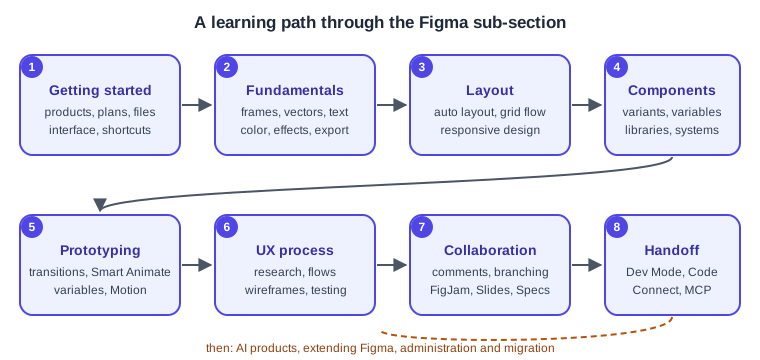
Read the pages roughly in the numbered order below. The UX process pages can be read in parallel with the design pages, and the last three groups (AI products, extending Figma, administration) can be read in any order once you know the basics.
Pages in this sub-section
The pages are listed in navigation order. The downloadable one-page summary is the Figma Cheat Sheet page.
Coverage map: official documentation
Every area of the official documentation that this sub-section covers is mapped below to the pages that explain it.
Coverage map: concepts from the books
The four books listed in the bibliography were consulted for which concepts a complete Figma course covers. Each concept below is mapped to the pages that teach it with current, official-documentation-based procedures. No book content is reproduced.
| Concept | Pages |
|---|---|
Figma’s model, web versus desktop app, fonts, moving from other design tools |
Introduction and the Figma Product Family, Desktop, Mobile and VS Code, Importing and Migrating |
Plans, teams, folders (formerly projects), drafts, sharing and permissions |
Plans, Seats and AI Credits, Files, Folders, Teams and Sharing |
FigJam brainstorming, moodboards, competitor analysis |
|
Personas, empathy and journey maps |
|
User flows and flowcharts |
|
Design environment: toolbar, layers, pages, panels, settings, shortcuts |
|
Frames versus groups |
|
Wireframing, mobile-first, fidelity levels, wireframe kits |
|
Shapes, boolean operations, pen tool, vector networks, SVG |
|
Grids, layout guides, guides |
|
Typography, type scale, font pairing |
|
Colour palettes, gradients, effects, blend modes, masking, images, video |
Color, Fills and Images, Strokes, Effects and Blend Modes, Masks, Constraints and Layout Guides |
Styles (colour, text, effect, grid) |
|
Auto layout, nesting, hug/fill/fixed, resizing versus constraints |
|
Responsive design and breakpoints |
|
Components, instances, overrides |
|
Variants and component properties |
|
Multiplayer, team libraries, publishing |
Libraries and Publishing, Comments and Real-Time Collaboration |
Version history and branching |
|
Design-system planning, documentation, governance |
|
Design tokens |
|
Variables, collections, modes, scoping, variables versus styles |
|
Prototype transitions, triggers, easing and springs |
|
Smart Animate and microinteractions |
|
Interactive components, hover and press states, accordions, carousels |
|
Overflow scrolling, overlays, side menus |
|
Conditional prototyping with variables and expressions |
|
Video controls, Lottie, animation handoff |
|
Presentation view, viewing on devices, embedding |
|
Feedback, comments, usability testing, iteration |
Usability Testing and Iteration, Comments and Real-Time Collaboration |
Export formats, bulk export, SVG optimisation, naming |
|
Inspect to Dev Mode, Ready for Dev, compare changes, Code Connect |
|
Handover process, file structure for developers, design QA |
|
Community, UI kits, design-system resources, templates |
|
Plugins: choosing, installing, building |
|
Widgets in Figma and FigJam |
|
Figma AI tools and AI ethics |
|
Figma Make and prompt-to-app tools |
|
Slides, design rationale, stakeholder reviews, design sprints |
|
UX process: design thinking, fidelity, lean UX and agile |
|
Accessibility: contrast, keyboard and focus, screen readers, annotations |
|
Designer and developer collaboration |
Bibliography
Every source used to generate this sub-section is listed below and linked to its official website. Individual pages list
the subset they derive from under their own == References heading. Figma publishes no version numbers and its
documentation changes often, so open an entry and confirm its content, plan names and limits before relying on it.
Where this bibliography and a page seem to disagree, the official documentation wins.
Books
The books are copyrighted works and are not attached or reproduced here; each entry links to the official publisher page. They were used only to select concepts and order topics. They predate several changes listed on What Changed Since Older Guides. The ISBNs and companion repositories were re-checked on 2026-10-30 against the public repository pages and a bookseller listing. The publisher sites (Packt and Springer) refuse or redirect automated requests, so open their pages in a browser.
-
Fabio Staiano, Designing and Prototyping Interfaces with Figma, 1st ed., Packt Publishing, 2022, ISBN 978-1-80056-418-3: Packt product page (colour images: PDF).
-
Fabio Staiano, Designing and Prototyping Interfaces with Figma, 3rd ed., Packt Publishing, 2026, ISBN 978-1-80580-589-2: Packt product page. Companion repository: PacktPublishing/Designing-and-Prototyping-Interfaces-with-Figma-Third-edition.
-
Šimon Jůn, Design Beyond Limits with Figma, 1st ed., Packt Publishing, 2025, ISBN 978-1-83620-771-9: Packt product page. Companion repository: PacktPublishing/Design-Beyond-Limits-with-Figma.
-
Tom Green and Kevin Brandon, UX Design with Figma: User-Centered Interface Design and Prototyping with Figma, Apress, 2024, ISBN 979-8-8688-0323-9, DOI 10.1007/979-8-8688-0324-6: Springer Nature product page. Companion repository: Apress/UX-Design-with-Figma.
Figma: official documentation and resources
-
Figma Learn and Help Center — user documentation for every product; each page cites the exact articles it uses.
-
Figma developer documentation — Plugin API, Widget API, REST API, webhooks, embeds, Code Connect and the Figma MCP server.
-
Figma release notes — dated product changes.
-
Figma blog — Config recaps and product introductions.
-
Figma resource library — UX and UI design articles and courses.
-
Figma pricing — plan and seat names (this site documents no prices).
-
Figma brand guidelines — rules for using Figma’s name and marks.
-
Figma on GitHub — the Simple Design System, Code Connect and plugin samples.
-
Figma on YouTube — cited only where a page names a specific video.
Specifications, standards and external references
-
Web Content Accessibility Guidelines (WCAG) 2.2 and its Understanding documents.
-
APCA contrast method — where perceptual contrast is discussed.
-
W3C Design Tokens Community Group — the design tokens format.
-
Nielsen Norman Group — usability heuristics and testing.
-
Design Council — the Double Diamond.
-
Lottie and dotLottie — animation formats exported by Figma Motion.
-
The official pages of every third-party plugin or tool a page mentions (for example Tokens Studio and Style Dictionary) are linked from that page’s
== References.
References
-
The full source list is in the bibliography above.