Activities and the Activity Lifecycle
|
This content was generated with the assistance of AI and should be verified against the official documentation of Android before being relied on in production. See the section bibliography for the reference material consulted while preparing these pages. |
An Activity is the system-managed container for one screen of user interface. Unlike a plain Kotlin object, an
activity’s constructor is not where it comes alive: the Android system creates the instance, then drives it
through a fixed sequence of lifecycle callbacks that reflect what is actually happening to the screen on
screen — becoming visible, gaining focus, being covered, being reclaimed for memory. Writing correct Android code
means writing code that reacts to those callbacks instead of assuming an activity behaves like an ordinary
long-lived object. This page covers the lifecycle in depth using TrailMate's MainActivity, and is a
prerequisite for Fragments and the Fragment Lifecycle,
ViewModel, Lifecycle-Aware Components, Coroutines and
Flow and Saving UI State: Views vs. Compose, which
covers the full Views-vs-Compose state-saving comparison this page only introduces. It builds on
App Components, the Manifest and Intents and targets
Android 17 (API level 37), with TrailMate’s own targetSdk = 36.
ComponentActivity vs. AppCompatActivity
Every activity in an Android app ultimately extends android.app.Activity, but almost nothing extends it
directly. TrailMate’s Compose MainActivity extends androidx.activity.ComponentActivity:
// app/src/main/kotlin/com/example/trailmate/MainActivity.kt
class MainActivity : ComponentActivity() {
    override fun onCreate(savedInstanceState: Bundle?) {
        super.onCreate(savedInstanceState)
        enableEdgeToEdge()
        setContent {
            TrailMateTheme {
                TrailMateApp()
            }
        }
    }
}ComponentActivity is the modern base class from the androidx.activity artifact: it adds Lifecycle and
ViewModelStore ownership, the Activity Result API, OnBackPressedDispatcher, and setContent { } for hosting a
Compose tree, without pulling in any of the View-based Material Design widgets. It is enough for an app whose UI
is entirely Compose.
The legacy Views build’s MainActivity instead extends androidx.appcompat.app.AppCompatActivity, which itself
extends FragmentActivity (adding FragmentManager support) which extends ComponentActivity:
// app/src/main/kotlin/com/example/trailmate/MainActivity.kt (legacy Views build)
class MainActivity : AppCompatActivity() {
    override fun onCreate(savedInstanceState: Bundle?) {
        super.onCreate(savedInstanceState)
        setContentView(R.layout.activity_main)
        val navHostFragment = supportFragmentManager
            .findFragmentById(R.id.nav_host_fragment) as NavHostFragment
        // navHostFragment.navController drives TrailListFragment / TrailDetailFragment
    }
}AppCompatActivity backports Material theming, the action bar, vector drawable tinting and day/night mode to
devices older than the Android version those features first shipped on, and is required by anything that uses
Fragments with the classic View toolkit (Fragments and the Fragment Lifecycle
and Navigation with Fragments). A Compose-only screen has no
need for its View-based theming layer, which is why ComponentActivity is the correct, lighter base class for
MainActivity in TrailMate’s Compose build. See
Android Developers — Introduction to
Activities and Android Developers — ComponentActivity.
The Lifecycle States and Callbacks
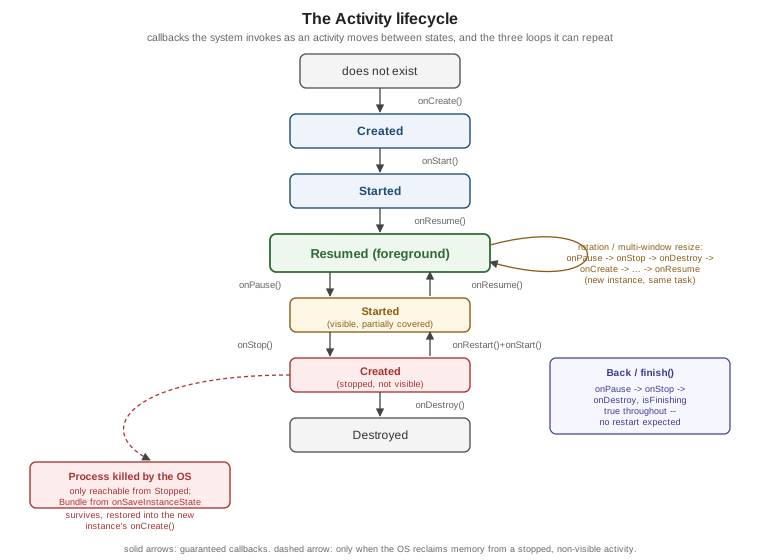
The system moves an activity through a small set of callbacks, each announcing a transition rather than a
one-time setup step. The five states an activity’s Lifecycle object reports — INITIALIZED, CREATED,
STARTED, RESUMED, DESTROYED — map directly onto these callbacks.
| Callback | What it means |
|---|---|
|
Called exactly once per instance. Inflate or set up the UI ( |
|
The activity is about to become visible. Paired with |
|
The activity is now in the foreground and has input focus. Paired with |
|
The activity is losing focus but may still be partially visible (a dialog opened on top of it, multi-window split). Must return quickly — release the camera, pause animations, but avoid heavy I/O here. |
|
The activity is no longer visible at all. A good place to unregister resource-heavy listeners and stop location updates that would otherwise drain the battery with nothing on screen. |
|
Called only when a stopped activity is coming back into view ( |
|
The final callback before the instance is discarded, either because the activity is finishing
( |
onCreate/onDestroy, onStart/onStop and onResume/onPause are the three lifecycle loops: the middle
two can repeat many times over one instance’s life, while onCreate and onDestroy each run exactly once. See
Android Developers — The Activity
Lifecycle.
What Rotation, Back, Home, Multi-Window and Process Death Each Do
The same five callbacks fire in different combinations depending on why the activity is losing the foreground, and that combination is what determines whether the instance survives or a new one gets created:
| Trigger | What happens |
|---|---|
Rotation, or any configuration change the activity has not opted out of (font scale, dark/light mode, folding) |
The current instance runs |
Pressing Back |
|
Pressing Home, or switching to another app |
Only |
Multi-window (split-screen or freeform) resize or entry/exit |
Handled like a configuration change: |
Process death by the system, to reclaim memory |
Only possible once the activity has reached the stopped state (past |
Rotation and process death are easy to confuse because both end in a fresh onCreate(), but they differ in scope
and in what testing tool catches them: rotation is visible on any emulator (rotate the toolbar button) and
recreates the instance while the process keeps running; process death additionally destroys everything held in
memory, and the most reliable way to reproduce it during development is
adb shell am kill com.example.trailmate (introduced on
Getting Started with Android) or Don’t keep activities under
Developer options, followed by pressing Home and returning to the app.
onSaveInstanceState() Basics
onSaveInstanceState(outState: Bundle) runs before an activity that might not survive — about to rotate, about
to be stopped and possibly killed — gets a chance to hand a small amount of transient UI state to the system,
which is guaranteed to hand that same Bundle back to onCreate(savedInstanceState: Bundle?) (and to
onRestoreInstanceState()) on the recreated instance:
// app/src/main/kotlin/com/example/trailmate/PhotoCaptureActivity.kt (legacy Views build)
private var pendingPhotoUri: Uri? = null

override fun onSaveInstanceState(outState: Bundle) {
    super.onSaveInstanceState(outState)
    outState.putParcelable(KEY_PENDING_PHOTO_URI, pendingPhotoUri)
}

override fun onCreate(savedInstanceState: Bundle?) {
    super.onCreate(savedInstanceState)
    pendingPhotoUri = savedInstanceState?.getParcelable(KEY_PENDING_PHOTO_URI)
}The Bundle is meant for small pieces of UI state — a pending URI, a scroll position, a selected tab — not for
an entire data model: it is serialized into the OS’s transaction buffer, which has a strict size limit that a
large payload (a list of Trail objects, a bitmap) can exceed and crash the app with a
TransactionTooLargeException. TrailMate’s real state-saving story — rememberSaveable in Compose, ViewModel
plus SavedStateHandle surviving process death, and a full comparison between the two toolkits — is covered on
Saving UI State: Views vs. Compose; this page only
introduces the mechanism the rest of that comparison builds on. See
Android Developers — Saving UI States.
The Activity Result API
Starting one activity to get a result back from it used to go through startActivityForResult() and an
overridden onActivityResult(requestCode, resultCode, data), matched by a manually chosen integer request code — a pattern that scaled badly once more than a couple of call sites needed a result, and that made request-code
collisions a real source of bugs. The Activity Result API, part of androidx.activity, replaces it with a
typed, composable contract registered once and invoked as a value:
// feature/trails/src/main/kotlin/com/example/trailmate/feature/trails/PhotoCaptureActivity.kt (legacy Views build)
class PhotoCaptureActivity : AppCompatActivity() {
    private val takePicture = registerForActivityResult(ActivityResultContracts.TakePicture()) { success ->
        if (success) {
            viewModel.onPhotoCaptured(pendingPhotoUri)
        }
    }

    private val requestCameraPermission = registerForActivityResult(
        ActivityResultContracts.RequestPermission(),
    ) { granted ->
        if (granted) {
            takePicture.launch(pendingPhotoUri)
        }
    }

    override fun onCreate(savedInstanceState: Bundle?) {
        super.onCreate(savedInstanceState)
        setContentView(R.layout.activity_photo_capture)
        findViewById<Button>(R.id.capture_button).setOnClickListener {
            requestCameraPermission.launch(Manifest.permission.CAMERA)
        }
    }
}registerForActivityResult() must be called unconditionally during initialization — as a property
initializer or in onCreate(), never inside a click listener or after the activity has already started — because
it registers the launcher with ActivityResultRegistry, which needs to exist before the underlying system
activity/permission-request launches. ActivityResultContracts ships ready-made contracts for the common cases
(StartActivityForResult, RequestPermission, RequestMultiplePermissions, TakePicture, PickVisualMedia,
OpenDocument), and a custom ActivityResultContract<Input, Output> covers anything else. The same API is used
from Compose through rememberLauncherForActivityResult(), covered on
Jetpack Compose Fundamentals. See
Android Developers — Get a Result from an
Activity.
Extras and finish()
Data passed into an activity travels as extras on the Intent that started it, and a result travels back the
same way through the Activity Result API’s Intent:
// feature/trails/src/main/kotlin/com/example/trailmate/feature/trails/TrailDetailActivity.kt (legacy Views build)
const val EXTRA_TRAIL_ID = "com.example.trailmate.EXTRA_TRAIL_ID"

// starting it
val intent = Intent(this, TrailDetailActivity::class.java).apply {
    putExtra(EXTRA_TRAIL_ID, trail.id)
}
startActivity(intent)

// reading it back inside TrailDetailActivity
val trailId = intent.getStringExtra(EXTRA_TRAIL_ID)
?: error("TrailDetailActivity started without $EXTRA_TRAIL_ID")finish() ends the current activity, running the onPause → onStop → onDestroy sequence with
isFinishing() true; calling setResult(resultCode, data) before finish() is how an activity started for a
result hands data back to whichever launcher started it. Extras are subject to the same Bundle size limits as
onSaveInstanceState(), so TrailMate passes a trail’s id and looks the rest up from TrailRepository rather
than serializing the whole Trail object across activities.
enableEdgeToEdge()
enableEdgeToEdge(), called once in onCreate() before setContent { } as shown in MainActivity above, draws
TrailMate’s UI behind the system status bar and navigation bar instead of letting the system reserve opaque space
for them. Since apps targeting Android 15 (API level 35) this is enforced by the platform regardless of whether
the app calls it, and since targeting Android 16 (API level 36) the old opt-out (enableEdgeToEdge(…) with
non-transparent bar colors, or a manifest flag) is ignored entirely — every app draws edge-to-edge. Because of
that, every screen that reaches the very top or bottom of the display needs to consume
WindowInsets explicitly (Modifier.safeDrawingPadding() in Compose, ViewCompat.setOnApplyWindowInsetsListener
in Views) or content ends up drawn underneath the status bar or the gesture nav bar. The full insets story for
both toolkits is covered on
Adaptive Layouts, Edge-to-Edge and Large
Screens. See Android Developers — Edge to
Edge and Android Developers — Android 15
Behavior Changes.
Predictive Back, OnBackPressedDispatcher and OnBackPressedCallback
Predictive back lets the user see a preview of where the Back gesture leads — the previous screen scaling in
behind the current one — before lifting their finger, instead of Back being an instantaneous, all-or-nothing
navigation. It is on by default for apps targeting Android 16 (API level 36) and later. Along with it, apps
targeting API 36 stop receiving onBackPressed() calls and the KEYCODE_BACK key event entirely: back handling
must go through OnBackPressedDispatcher.
ComponentActivity (and therefore every activity in TrailMate) owns an OnBackPressedDispatcher, reachable via
onBackPressedDispatcher. A component that needs to intercept Back — to confirm discarding an unsaved hike note,
for example — registers an OnBackPressedCallback instead of overriding a method:
// feature/trails/src/main/kotlin/com/example/trailmate/feature/trails/PhotoCaptureActivity.kt (legacy Views build)
private val discardDraftCallback = object : OnBackPressedCallback(enabled = false) {
    override fun handleOnBackPressed() {
        showDiscardDraftConfirmation { confirmed ->
            if (confirmed) {
                isEnabled = false
                onBackPressedDispatcher.onBackPressed()
            }
        }
    }
}

override fun onCreate(savedInstanceState: Bundle?) {
    super.onCreate(savedInstanceState)
    onBackPressedDispatcher.addCallback(this, discardDraftCallback)
    viewModel.hasUnsavedDraft
        .onEach { hasDraft -> discardDraftCallback.isEnabled = hasDraft }
        .launchIn(lifecycleScope)
}Registering the callback with this (a LifecycleOwner) as the first argument ties it to the activity’s own
lifecycle, so it is automatically removed once the activity is destroyed. isEnabled toggles whether the
callback intercepts Back at all — when disabled, the dispatcher falls through to the next registered callback,
or to the default system Back behavior (typically finishing the activity or popping the fragment/Compose back
stack) if none intercepts it. In Compose, the equivalent is the BackHandler composable, covered on
Navigation in Compose. See
Android Developers — Predictive Back Gesture and
Android Developers — OnBackPressedDispatcher.
The SplashScreen API
Since Android 12 (API level 31), the system itself shows a launch splash screen — built from the app icon, the
theme’s background color and, optionally, a branded animation — rather than every app hand-rolling its own
launch activity or delayed-content trick. The androidx.core:core-splashscreen library backports the same
behavior to minSdk devices below API 31, which is why TrailMate (minSdk = 26) depends on it instead of
relying on the platform API directly:
// app/src/main/kotlin/com/example/trailmate/MainActivity.kt
override fun onCreate(savedInstanceState: Bundle?) {
    val splashScreen = installSplashScreen()
    super.onCreate(savedInstanceState)
    splashScreen.setKeepOnScreenCondition { !viewModel.isReady.value }
    enableEdgeToEdge()
    setContent {
        TrailMateTheme {
            TrailMateApp()
        }
    }
}installSplashScreen() must be called before super.onCreate(). setKeepOnScreenCondition { } extends the
splash screen past its default duration until a condition — here, TrailMate’s initial trail list finishing its
first load — becomes true, which avoids a jarring blank frame between the splash screen disappearing and content
actually being ready. The visual style itself (icon, background color, exit animation) is themed through
windowSplashScreenBackground, windowSplashScreenAnimatedIcon and related attributes on a
Theme.SplashScreen-derived style, not through any code in the activity. See
Android Developers — Splash Screens.
Process Death and Restoration
The following sequence diagram traces the same process-death path from the table above end to end: a stopped
MainActivity, the state it wrote on the way out, the system reclaiming its process, and the fresh instance that
gets created when the user navigates back to TrailMate’s task.
The Bundle written by onSaveInstanceState() is the only thing that survives across the killed-process gap in
that diagram; a ViewModel's in-memory fields do not survive it on their own, which is exactly why
SavedStateHandle exists to bridge a ViewModel to the same saved-instance-state mechanism — covered in full on
ViewModel, Lifecycle-Aware Components, Coroutines and
Flow. See
Android Developers — Processes and
the Application Life Cycle.
Introducing LifecycleObserver
Wiring behavior to lifecycle callbacks by overriding onStart()/onStop() in every activity that needs it does
not scale once several unrelated pieces of code (a location listener, an analytics session, a connectivity
observer) all need to react to the same transitions. Lifecycle, owned by every ComponentActivity
(this.lifecycle), lets each of them observe it independently instead:
// feature/trails/src/main/kotlin/com/example/trailmate/feature/trails/HikeLocationObserver.kt
class HikeLocationObserver(
    private val locationClient: FusedLocationProviderClient,
    private val onLocationUpdate: (Location) -> Unit,
) : DefaultLifecycleObserver {
    override fun onStart(owner: LifecycleOwner) {
        locationClient.requestLocationUpdates(request, callback, Looper.getMainLooper())
    }

    override fun onStop(owner: LifecycleOwner) {
        locationClient.removeLocationUpdates(callback)
    }

    private val callback = object : LocationCallback() {
        override fun onLocationResult(result: LocationResult) {
            result.lastLocation?.let(onLocationUpdate)
        }
    }
}

// app/src/main/kotlin/com/example/trailmate/MainActivity.kt
override fun onCreate(savedInstanceState: Bundle?) {
    super.onCreate(savedInstanceState)
    lifecycle.addObserver(HikeLocationObserver(locationClient, viewModel::onLocationUpdate))
    // ...
}DefaultLifecycleObserver (interface methods with default no-op implementations, one per callback) is the usual
choice; LifecycleEventObserver is the lower-level alternative when a single method needs to branch on the
Lifecycle.Event itself. Either way, the observer starts and stops its own work in step with the owner’s
lifecycle without the activity having to know anything about location APIs, and without risking a leaked listener
if the developer forgets to call removeLocationUpdates() by hand in onStop(). ViewModels built the same way
around Lifecycle and viewModelScope are covered in full on
ViewModel, Lifecycle-Aware Components, Coroutines and
Flow. See
Android Developers — Handling Lifecycles
with Lifecycle-Aware Components.