Security
|
This content was generated with the assistance of AI and should be verified against the official documentation before being relied on in production; see the section bibliography for the reference material consulted while preparing these pages. |
Every earlier page in this section has treated Places as a client talking to a server it trusts; this page is
about the boundary between them — what a React Native app can safely hold on-device, how it proves who the user
is without ever seeing a password, and how it defends the small number of assets (tokens, mostly) that are
actually worth attacking. It builds directly on
Networking and Data Fetching's base apiClient.ts
fetch wrapper — this page adds the authFetch layer on top of it — and it is deliberately the only place in
this section that stores a token: Storage and Offline covers
AsyncStorage, MMKV, and SQLite for everything else Places persists, but a token never belongs in any of those.
Secrets Do Not Belong in the JS Bundle
Metro (covered earlier in this section) bundles
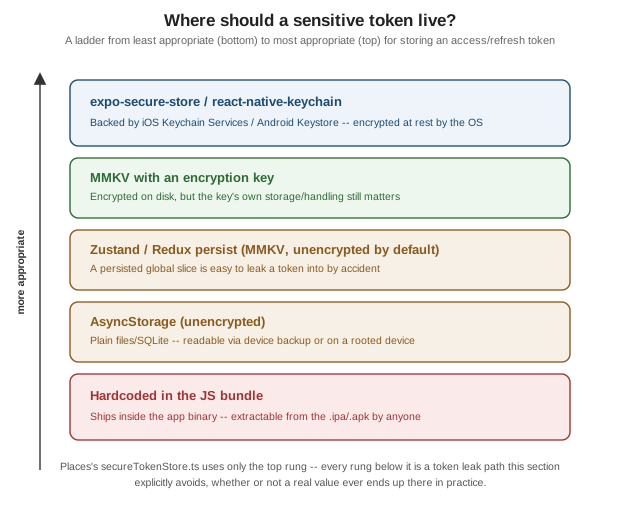
Places's JavaScript/TypeScript source into a single JS bundle, and that bundle ships inside the app binary — the .ipa and the .apk/.aab both embed it as an ordinary file. A JS bundle is not meaningfully obfuscated:
Hermes bytecode and even a minified plain-JS bundle are both straightforward to extract and inspect with widely
available tooling, so anything written into source as a string constant — an API key, a signing secret, a
third-party service credential — is, for practical purposes, published the moment the app is. This is true no
matter how the constant is spelled or where in the tree it lives; there is no "hide it well enough" version of
this problem, only "keep it off the device entirely".
The corollary is that a secret that must exist has exactly one safe home: a server Places calls, never a
value baked into the client. A backend endpoint that itself holds the real API key and proxies the third-party
call on the app’s behalf keeps the secret where extracting the .ipa/.apk cannot reach it at all.
This is also exactly why app.config.ts’s `EXPO_PUBLIC_* environment variables (Expo’s mechanism for baking a
build-time value into the bundle, introduced alongside the rest of Places's configuration on
Tooling: Metro and Project Structure) are for
non-secret public configuration only — an API base URL, a feature-flag default, an analytics project ID
that is not sensitive if read back out of the bundle. The EXPO_PUBLIC_ prefix is not a security boundary; it is
a naming convention that makes a value available to client code, and Expo’s own documentation is explicit that
anything given that prefix should be treated as public. A client ID for a public OAuth client (below) is a
reasonable EXPO_PUBLIC_* value precisely because a public client, by definition, has no secret to protect; an
API key that grants write access to a paid third-party service is not.
Secure Storage: expo-secure-store, react-native-keychain, and Why Not AsyncStorage
Once a value genuinely needs to live on the device — above all, the access and refresh tokens an OAuth sign-in produces — where it is stored matters as much as keeping it out of the bundle in the first place. (For Keychain Services, biometrics and passkeys used directly from Swift, see Security and Privacy in the Apple Platforms section.)
-
expo-secure-storewraps each platform’s own encrypted, OS-managed credential store — iOS Keychain Services and Android Keystore/EncryptedSharedPreferences — behind a small, promise-basedsetItemAsync/getItemAsync/deleteItemAsyncAPI. It is the default choice for Places and for most Expo projects: no native configuration beyond installing the package, and every value is encrypted at rest by the OS itself. -
react-native-keychaintalks to the same two platform stores directly, with a lower-level, more configurable API — access-control flags, biometric-gated entries, shared Keychain access groups across an app’s own extensions. It is the right choice when a project needs configurationexpo-secure-store’s simpler API does not expose; Places does not need that extra configurability, so it stays with `expo-secure-storethroughout this section. -
AsyncStorage(covered in full on Storage and Offline) is unencrypted — it persists to a plain SQLite database or flat files depending on platform, readable by anyone who can read the device’s private app storage: a rooted/jailbroken device gives an attacker direct filesystem access to it, and an unencrypted local/cloud device backup can expose it without the device ever being compromised at all. AsyncStorage is the right tool for a cached place list or a UI preference; it is never the right tool for a token.
Two accidental leak paths put a token into exactly the storage it should never reach, without anyone writing
AsyncStorage.setItem(token, …) directly:
-
A persisted global store. Zustand’s
persistmiddleware and Redux Persist both need a storage engine, and the engine plugged in for either one — State Management's own examples use AsyncStorage or MMKV for exactly this — is, by default, unencrypted. Putting an access token or refresh token into a slice of global state that apersistconfig also happens to serialize writes it straight to AsyncStorage/MMKV the next time that store persists, with no explicitAsyncStoragecall anywhere near the auth code to grep for. A token belongs insecureTokenStore.ts(below) and nowhere in a persisted Zustand or Redux slice. -
A crash report. A crash-reporting SDK (Sentry, Crashlytics) that logs a failed request’s headers as a breadcrumb — a common default for diagnosing a
401/403— will happily capture anAuthorization: Bearer <token>header verbatim into a report that is, by design, shipped off-device to a third-party dashboard. Redacting theAuthorizationheader (and any other credential-bearing header) from request/response breadcrumbs is a one-line SDK configuration change that is easy to skip and expensive to skip accidentally.
Deep-Link Hijacking and Universal/App Links
A React Native app that finishes OAuth sign-in by receiving app://auth?token=<…> on a custom URL scheme has a
structural problem: custom URL schemes are not exclusive. Any app installed on the same device can register
that same scheme, and when more than one app claims it, the OS’s choice of which one actually receives an
incoming link is not guaranteed to favor the legitimate one. A malicious app that registers app:// can, on a
compromised or simply unlucky device, receive the OAuth redirect instead of Places — including the
authorization code the redirect carries.
Universal Links (iOS) and Android App Links are the OS-verified alternative, following the same
https:// redirect approach Native and Mobile Apps documents at
the protocol level: the redirect URI is an ordinary https:// URL on a domain the app’s developer actually
controls, and the OS verifies that ownership before ever routing the link to an app —
-
iOS verifies it against an
apple-app-site-associationfile hosted at that domain’s well-known path. -
Android verifies it against an
assetlinks.jsonfile, the Digital Asset Links equivalent.
Because that verification happens against a domain, not a string an app merely declares, there is no
scheme-squatting equivalent: a malicious app cannot make the OS believe it owns places.example.com. This is why
Places's own OAuth redirect uses a claimed https universal/app link wherever the identity provider supports
it, falling back to a private-use scheme (with PKCE, below, as the mitigation) only where it does not.
OAuth 2.0 with PKCE in React Native
Native and Mobile Apps covers the protocol-level case in full — RFC 8252, why an embedded WebView is forbidden outright, and PKCE’s mechanics — so this section stays to the React Native-specific realization: which library actually drives the flow inside the app.
-
react-native-app-authwraps the native AppAuth SDKs (AppAuth-iOS/AppAuth-Android) that Native and Mobile Apps recommends as the reference implementation, driving the authorization request through the system browser’s in-app tab (SFSafariViewController/ASWebAuthenticationSessionon iOS, Custom Tabs on Android) rather than an embedded WebView. PKCE is generated and verified automatically by the underlying AppAuth SDK — the app supplies a config object, not acode_verifier/code_challengepair, asauthSession.tsbelow shows. -
expo-auth-sessionis Expo’s own JS-only implementation of the same flow, with no dependency on the native AppAuth SDKs — a reasonable alternative inside an Expo Go-compatible project that cannot yet add a development build’s native dependencies, at the cost of a less battle-tested implementation than AppAuth’s.
Places uses react-native-app-auth throughout this page, on the strength of AppAuth’s maturity and its direct
line back to the RFC 8252 reference implementation.
Network Security: HTTPS/ATS and Certificate Pinning
Networking and Data Fetching already covers HTTPS
enforcement, iOS App Transport Security (ATS), and Android’s cleartext-traffic restrictions in depth — every
request Places makes goes through that same enforced-HTTPS fetch wrapper, and this page does not repeat it.
Certificate pinning — hardcoding which certificate(s) or public key(s) a client will accept for a given host, rather than trusting any certificate a device’s OS-level trust store accepts — is a genuine trade-off, not a default to reach for on every project:
-
What it buys. Stronger protection against a man-in-the-middle attack that presents a certificate issued by a compromised or rogue Certificate Authority, or one installed by a corporate/malicious root certificate on the device itself — threats ordinary TLS validation, which trusts any CA in the OS’s trust store, does not catch.
-
What it costs. A pinned certificate that the backend rotates — routine certificate renewal, a CA migration, a CDN change — breaks every already-installed app version that pinned the old certificate or key, until an app-store release ships the new pin. That release cycle, not a server-side deployment, is the actual operational cost, and it lands on every installed copy of the app simultaneously if the rotation is not planned around the pins in advance.
Pin only when the threat model actually justifies it — a banking or health app handling especially sensitive data is a reasonable candidate; a typical consumer app relying on the OS trust store and enforced HTTPS/ATS alone is a reasonable default Places itself does not deviate from in this section.
Biometric Gating with expo-local-authentication
expo-local-authentication exposes Face ID, Touch ID, and Android’s biometric prompt behind one
authenticateAsync() call, used to gate access to a sensitive in-app action — in Places, viewing or
re-authorizing the stored session token from a settings screen — rather than to protect the token’s storage
itself:
import * as LocalAuthentication from 'expo-local-authentication';

async function requireBiometricApproval(): Promise<boolean> {
  const hasHardware = await LocalAuthentication.hasHardwareAsync();
  const isEnrolled = await LocalAuthentication.isEnrolledAsync();
  if (!hasHardware || !isEnrolled) {
    return false; // caller falls back to another gate (e.g. app passcode) or denies the action
  }

  const result = await LocalAuthentication.authenticateAsync({
    promptMessage: 'Confirm it’s you to view your session details',
  });
  return result.success;
}
This is a UX gate on an action, not a substitute for the token’s own encryption at rest — the token is
already protected by Keychain/Keystore via secureTokenStore.ts (below) regardless of whether a biometric
prompt ever runs; requireBiometricApproval() simply decides whether the user in front of the device right now
is allowed to trigger a particular screen or action.
Jailbreak/Root Detection and Screenshot Prevention
Two more layers are worth a single paragraph each, because both are real deterrents but neither is a security
boundary a determined attacker cannot cross. A library like jail-monkey can detect common signs of a
jailbroken iOS device or a rooted Android device (known jailbreak/root packages, an unusually permissive
filesystem, a debugger attached) and let Places respond — warn the user, or refuse to sign in at all.
Screenshot prevention — expo-screen-capture’s `preventScreenCaptureAsync(), or the equivalent native
flags (FLAG_SECURE on Android) — blanks a sensitive screen (a token or payment detail) out of the OS-level app
switcher preview and blocks an explicit screenshot. Both are deterrents against casual or opportunistic snooping,
not real security boundaries: a sufficiently motivated attacker on a rooted device controls the entire runtime
the app executes in, jailbreak-detection library included, and can patch around either check. Treat both as
defense-in-depth, never as a reason to relax the storage and transport protections above.
Checklist
-
Secrets (API keys, third-party credentials) live server-side only — never in the JS bundle, never behind an
EXPO_PUBLIC_*variable. -
Tokens live in secure storage only (
expo-secure-store/react-native-keychain), never in AsyncStorage. -
OAuth redirects use a claimed universal/app link, not a bare custom URL scheme, wherever the identity provider supports it.
-
PKCE is always on for the native OAuth flow — non-negotiable for a public client.
-
HTTPS/ATS is enforced end to end; cleartext traffic is disabled.
-
Certificate pinning is considered, and adopted only where the threat model justifies its rotation cost.
-
A biometric gate protects sensitive in-app actions, on top of — not instead of — encryption at rest.
-
No token ever ends up in a log line, a crash-report breadcrumb, or a persisted Zustand/Redux global store.
Places: authSession.ts, secureTokenStore.ts, and authFetch
Places's auth feature lives in src/features/auth/, alongside the SignInScreen.tsx that calls it:
src/
  lib/apiClient.ts
  features/
    auth/
      authSession.ts        # react-native-app-auth: authorize() / refresh()
      secureTokenStore.ts    # expo-secure-store: persist / read / clear the session
      SignInScreen.tsx
authSession.ts
authorize() drives the full PKCE authorization-code flow through the system browser’s in-app tab; AppAuth
generates and verifies the code_verifier/code_challenge pair internally; the app supplies only the
identity-provider configuration and gets back the token shape Places stores and refreshes throughout this page:
// src/features/auth/authSession.ts
import { authorize, refresh } from 'react-native-app-auth';
import type { AuthorizeResult, RefreshResult } from 'react-native-app-auth';

export interface Session {
  accessToken: string;
  refreshToken: string;
  expiresAt: number; // epoch milliseconds
}

const authConfig = {
  issuer: 'https://auth.example.com',
  clientId: '<client-id>',
  redirectUrl: 'com.irurueta.places://auth',
  scopes: ['openid', 'profile', 'offline_access', 'places.read', 'places.write'],
};

function toSession(result: AuthorizeResult | RefreshResult): Session {
  return {
    accessToken: result.accessToken,
    refreshToken: result.refreshToken,
    expiresAt: new Date(result.accessTokenExpirationDate).getTime(),
  };
}

export async function signIn(): Promise<Session> {
  const result = await authorize(authConfig); // opens the system browser's in-app tab; PKCE is automatic
  return toSession(result);
}

export async function refreshSession(refreshToken: string): Promise<Session> {
  const result = await refresh(authConfig, { refreshToken });
  return toSession(result);
}authConfig.issuer, clientId, and redirectUrl are the only identity-provider-specific values the app needs;
clientId above is a placeholder — Places's real OAuth client, being a public native client, has no secret to
protect in the first place, so the actual client ID is safe to ship in configuration but is never a value to
invent or hardcode as if it were sensitive.
secureTokenStore.ts
The exact Session shape authSession.ts returns is what gets persisted — through expo-secure-store only,
never through AsyncStorage:
// src/features/auth/secureTokenStore.ts
import * as SecureStore from 'expo-secure-store';
import type { Session } from './authSession';

const SESSION_KEY = 'places.session';

export async function saveSession(session: Session): Promise<void> {
  await SecureStore.setItemAsync(SESSION_KEY, JSON.stringify(session));
}

export async function loadSession(): Promise<Session | null> {
  const raw = await SecureStore.getItemAsync(SESSION_KEY);
  return raw === null ? null : (JSON.parse(raw) as Session);
}

export async function clearSession(): Promise<void> {
  await SecureStore.deleteItemAsync(SESSION_KEY);
}SecureStore.setItemAsync/getItemAsync/deleteItemAsync are the only three operations this module exposes — deliberately no AsyncStorage import anywhere in this file, so a grep for AsyncStorage in
src/features/auth/ should never return a match.
authFetch in apiClient.ts
apiClient.ts’s base `fetch wrapper (defined in full on
Networking and Data Fetching) handles the request
plumbing every call needs; authFetch adds exactly one more layer on top of it — attaching the current access
token and retrying once through refreshSession() on a 401:
// src/lib/apiClient.ts (excerpt -- authFetch, layered on top of the base fetch wrapper)
import { apiFetch } from './apiClient'; // the base wrapper from Networking and Data Fetching
import { loadSession, saveSession } from '../features/auth/secureTokenStore';
import { refreshSession } from '../features/auth/authSession';

async function withAuthHeader(init: RequestInit): Promise<RequestInit> {
  const session = await loadSession();
  if (session === null) {
    return init;
  }
  return {
    ...init,
    headers: { ...init.headers, Authorization: `Bearer ${session.accessToken}` },
  };
}

export async function authFetch(path: string, init: RequestInit = {}): Promise<Response> {
  const authedInit = await withAuthHeader(init);
  const response = await apiFetch(path, authedInit);

  if (response.status !== 401) {
    return response;
  }

  const session = await loadSession();
  if (session === null) {
    return response; // no session to refresh -- surface the 401 as-is
  }

  const refreshed = await refreshSession(session.refreshToken);
  await saveSession(refreshed);

  const retryInit = await withAuthHeader(init);
  return apiFetch(path, retryInit); // retried exactly once; a second 401 is returned to the caller
}
authFetch never logs authedInit.headers or the response of a failed request — the accidental-leak paths
above apply just as much to a debug console.log sprinkled into this wrapper as to a crash-report breadcrumb.