Middleware Fundamentals
|
This content was generated with the assistance of AI and should be verified against the official documentation before being relied on in production. The reference material consulted while preparing these pages is listed in the section bibliography. |
This page is written against Express 5.3 (npm express 5.3.0, published 2026-10-09) on Node.js 18 or later, the minimum
for Express 5, and it states where Express 4 (latest 4.22.3) behaves differently. Everything was checked against the
official documentation on 2026-10-29. Middleware is the single most important idea in Express: every other feature in
this section (routing, body parsing, sessions, error handling, security headers, static files) is a middleware function,
a way of registering one, or a rule about how a chain of them runs. The examples all belong to the Bookshelf API that
grows across the section, use ESM and the node: prefix for built-in modules, and contain placeholders only, never real
secrets.
What middleware is
An Express application is, in the official wording, a series of middleware function calls. A middleware function is an
ordinary JavaScript function that receives the request object (req), the response object (res) and a function
conventionally named next. Each function can do any combination of four things:
-
run arbitrary code (logging, timing, authentication, database access);
-
change the request and response objects (parse a body, set a header, attach the authenticated user);
-
end the request-response cycle by sending a response;
-
call
next()to hand the request to the next function in the chain.
Express keeps an ordered list of these functions, called the stack, and runs the request through the list from the
first entry to the last. The first function that sends a response ends the cycle; the functions after it never run for
that request. If a function neither responds nor calls next(), the request hangs until the client gives up, because
nothing else will ever touch it.
Since Express 5 the stack is managed by the standalone router package (the 2.x line, maintained by the pillarjs
organization), which Express depends on directly; in Express 4 the same code lived inside Express itself. Application
objects, express.Router() instances and route objects all use the same layer machinery, which is why the rules on this
page apply equally to all of them.
The (req, res, next) contract
The shape of a normal middleware function is fixed:
function middleware(req, res, next) {
  // read or change req and res, then either respond or call next()
}The arguments are the Node.js http.IncomingMessage and http.ServerResponse objects extended by Express with its own
properties and methods, plus next. Express never inspects what the function returns, with one exception described in
Async middleware in Express 5: if it returns a promise, Express waits on that promise only to catch a rejection.
What a function does at the end of its work decides what happens to the request:
| Call | Effect | Typical use |
|---|---|---|
|
Ends the cycle. No later layer runs for this request. |
A route handler, an authentication failure ( |
|
Passes control to the next layer in the stack that matches the request. |
Logging, parsing, adding headers, loading data, authentication that succeeded. |
|
Skips the remaining handlers of the current route and goes on to the next matching route. Only meaningful inside a
route handler registered with |
A guard that decides a different route should answer the same path. |
|
Leaves the current router instance entirely and continues in whatever follows it in the parent stack. |
A router-level guard that fails the whole router (for example "this router is for administrators only") without sending a response. |
|
Treats the value as an error: skips every normal layer and jumps to the next error-handling middleware. The default error handler answers if none is registered. |
Anything that went wrong and is not handled locally. |
Nothing |
The request hangs. |
Always a bug. |
The two strings 'route' and 'router' are special values, not errors. Any other argument other than a falsy one is an
error, including a string such as 'forbidden'. Do not pass strings to next() expecting a message; pass an Error.
The figure shows the four exits from a layer.
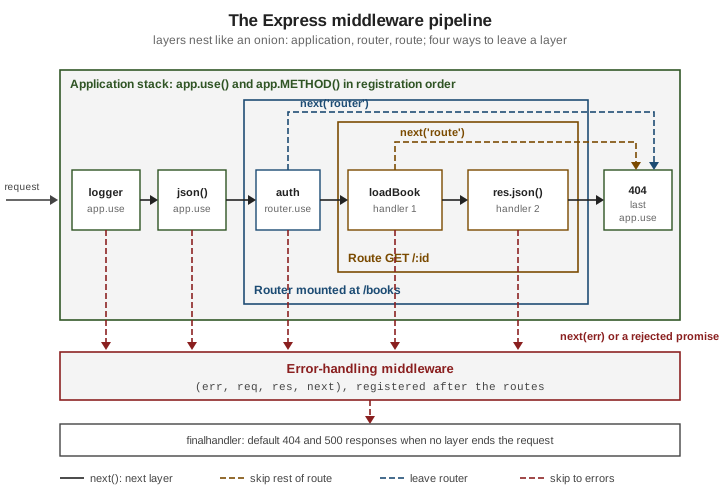
The word "onion" is a convenient picture of the nesting (application, then router, then route), not a promise that
control returns outward the way it does in Koa. In Express, next() returns undefined and a middleware does not get a
second turn when the downstream handlers finish. If you need to act after the response has been sent, listen for the
response’s finish event, as the first example below does.
A first complete pipeline
The following program wires a logger, a JSON body parser, a path-scoped middleware, a router with a two-step route, a
404 handler and an error handler. Run it with npm install express and node pipeline.mjs.
// pipeline.mjs
import { randomUUID } from 'node:crypto';
import express from 'express';

const app = express();
const books = new Map([['1', { id: '1', title: 'Dune' }]]);

// 1. Application-level middleware without a path: runs for every request.
app.use((req, res, next) => {
  const incoming = req.get('x-request-id');
  req.id = incoming && /^[\w-]{1,64}$/.test(incoming) ? incoming : randomUUID();
  res.set('X-Request-Id', req.id);
  const started = process.hrtime.bigint();
  // Work that must happen after the response is sent goes in an event listener,
  // because next() does not return when the downstream layers finish.
  res.on('finish', () => {
    const ms = Number(process.hrtime.bigint() - started) / 1e6;
    console.log(`${req.id} ${req.method} ${req.originalUrl} ${res.statusCode} ${ms.toFixed(1)}ms`);
  });
  next();
});

// 2. Built-in middleware. Without a parser, req.body is undefined in Express 5.
app.use(express.json({ limit: '100kb' }));

// 3. Path-scoped middleware: runs for /books and everything below it.
app.use('/books', (req, res, next) => {
  console.log(`books area: baseUrl=${req.baseUrl} url=${req.url}`);
  next();
});

// 4. A router with a route made of two handlers and a fallback route.
const router = express.Router();

router.get(
  '/:id',
  (req, res, next) => {
    const book = books.get(req.params.id);
    if (!book) {
      return next('route'); // skip the second handler, try the next matching route
    }
    res.locals.book = book;
    next();
  },
  (req, res) => {
    res.json(res.locals.book);
  },
);

router.get('/:id', (req, res) => {
  res.status(404).json({ title: 'Not Found', status: 404, detail: `No book with id ${req.params.id}` });
});

app.use('/books', router);

// 5. Last normal layer: nothing matched, so answer 404 ourselves.
app.use((req, res) => {
  res.status(404).json({ title: 'Not Found', status: 404 });
});

// 6. Error-handling middleware: four parameters, registered after everything else.
app.use((err, req, res, next) => {
  if (res.headersSent) {
    return next(err); // too late to change the response, let Express close the connection
  }
  console.error(req.id, err);
  res.status(err.status ?? 500).json({ title: 'Internal Server Error', status: err.status ?? 500 });
});

app.listen(3000, (error) => {
  if (error) {
    throw error; // Express 5 passes listen errors (such as EADDRINUSE) to the callback
  }
  console.log('Bookshelf listening on http://localhost:3000');
});Requesting /books/1 runs layers 1, 2, 3 and then the router; the first handler stores the book in res.locals, the
second sends it. Requesting /books/99 makes the first handler call next('route'), which skips the second handler and
lands in the fallback route. Requesting /shelves passes through layers 1 and 2, matches nothing else and reaches the 404
layer. Notice that the router is mounted on the same /books prefix as the path-scoped logger: mounting is just a layer
registered with a path, so the order in which app.use() calls appear is the order in which requests are processed.
Ordering is the program
Express has no priority numbers, phases or dependency declarations. The only rule is registration order: for each request, the router walks the stack from the first registered layer to the last and runs every layer whose path and method match, until one ends the cycle. Everything else follows from that rule.
A sound order for most applications is:
-
Cross-cutting layers that must see every request: request ID, logging, security headers (Helmet), CORS, compression.
-
Layers that make later layers possible: body parsers, cookie parser, session, then authentication that depends on the session. See Body Parsing and Cookies & Sessions.
-
Static files, when they should not pay for sessions or authentication.
-
Routes and routers, from the most specific to the most general.
-
A catch-all layer that answers
404for anything unmatched. -
Error-handling middleware, last of all.
Some consequences worth memorising:
-
A layer registered after a response was sent never runs for that request. A layer registered after the route that needs it is as good as absent: a JSON parser registered after the routes leaves
req.bodyundefined in the handlers. -
A
404layer must come after every route, an error handler after every layer that can fail. Registering an error handler first is a common mistake: errors raised later skip it, because Express only looks for error handlers after the layer that raised. -
Two routes with the same path and method are both candidates: the first is tried, and the second runs only if the first calls
next('route')ornext()past its last handler. This is how the example above implements a fallback. -
Express answers
HEADrequests with a matchingGETroute and answersOPTIONSautomatically for paths that have routes, unless a layer responds earlier. CORS preflights depend on the CORS layer being registered before the routes.
Kinds of middleware
The official guide groups middleware by where it is attached and who wrote it. The categories overlap, since a function is just a function; the category tells you how the stack treats it.
| Kind | Attached with | Notes |
|---|---|---|
Application-level |
|
Bound to the |
Router-level |
|
Works exactly like application-level middleware but belongs to an |
Error-handling |
|
Recognised by having exactly four declared parameters. Runs only after something called |
Built-in |
|
Shipped with Express. Since Express 4.16 the body parsers are re-exports of |
Third-party |
|
Any npm package that returns a middleware function. The Express team maintains a set of them, covered in Official Middleware Modules; everything else is a dependency you have to judge yourself. |
Two practical differences between application-level and router-level middleware matter in large applications. First,
router-level middleware sees req.url relative to the mount path while req.baseUrl holds the mount path and
req.originalUrl keeps the full URL, so a router can be mounted at several prefixes without changes. Second, a router
is itself a middleware function: app.use('/books', router) just registers it as a layer, which is why routers nest
inside routers.
Path-scoped middleware, sub-stacks and arrays
app.use() and router.use() accept an optional first argument that restricts the layer to requests whose path starts
with that mount path. The comparison is by whole path segments, not raw characters, and the mount path is removed from
req.url for the duration of the layer. With the path-to-regexp 8 syntax that Express 5 uses (through router 2), a
mount path may be a string, a path with named parameters such as /books/:id, a regular expression, or an array of any
of these. The wildcard * on its own is no longer a valid path in Express 5: use a path-less app.use(fn) to run for
everything, or a named wildcard such as /{*splat} where the wildcard value is needed. The full syntax is in
Route Paths & Parameters.
Every registration method accepts more than one function. All of these are equivalent ways of building a sub-stack:
// pipeline-forms.mjs
import express from 'express';

const app = express();

const logUrl = (req, res, next) => {
  console.log(`${req.method} ${req.originalUrl}`);
  next();
};
const logMethod = (req, res, next) => {
  console.log(`Method: ${req.method}`);
  next();
};
const sendOk = (req, res) => {
  res.json({ ok: true });
};

// Registered before the routes, because a route that responds ends the pipeline.
// One middleware for several mount paths.
app.use(['/a', '/b'], (req, res, next) => {
  res.set('X-Group', 'ab');
  next();
});

// A path-less layer runs for every request, whatever the method or path.
app.use((req, res, next) => {
  res.set('X-Powered-By', 'Bookshelf');
  next();
});

// Several functions, one after another.
app.get('/a', logUrl, logMethod, sendOk);

// An array of functions.
const subStack = [logUrl, logMethod];
app.get('/b', subStack, sendOk);

// Arrays and individual functions can be mixed.
app.get('/c', [logUrl], logMethod, sendOk);

app.listen(3000, (error) => {
  if (error) {
    throw error;
  }
});
Source: Express: Using middleware
Arrays make it easy to share a reusable guard stack between routes (for example [authenticate, requireRole('editor')])
without repeating it. Express flattens the arrays when the route is registered, so they have no run-time cost.
Configurable middleware factories
Most useful middleware needs configuration: which header carries the API key, which roles may pass, how long a response
may be cached. The convention, used by every Express middleware package, is a factory: an outer function that takes
options and returns the (req, res, next) function. express.json({ limit: '1mb' }), cors({ origin }) and
morgan('tiny') are all factories.
// factories.mjs
import { timingSafeEqual } from 'node:crypto';
import express from 'express';

/**
 * Accepts a request only when the configured header carries one of the configured keys.
 * Misconfiguration is detected once, when the factory runs, not on every request.
 */
export function requireApiKey({ header = 'x-api-key', keys } = {}) {
  if (!Array.isArray(keys) || keys.length === 0) {
    throw new TypeError('requireApiKey: "keys" must be a non-empty array');
  }
  const accepted = keys.map((key) => Buffer.from(key));

  return function requireApiKeyMiddleware(req, res, next) {
    const supplied = Buffer.from(req.get(header) ?? '');
    // timingSafeEqual needs buffers of the same length, so compare lengths first.
    const ok = accepted.some((key) => key.length === supplied.length && timingSafeEqual(key, supplied));
    if (!ok) {
      return res.status(401).json({ title: 'Unauthorized', status: 401 });
    }
    next();
  };
}

/** Allows the request only when req.user has one of the listed roles. */
export function requireRole(...roles) {
  if (roles.length === 0) {
    throw new TypeError('requireRole: at least one role is required');
  }
  const allowed = new Set(roles);

  return function requireRoleMiddleware(req, res, next) {
    if (!req.user) {
      return res.status(401).json({ title: 'Unauthorized', status: 401 });
    }
    if (!allowed.has(req.user.role)) {
      return res.status(403).json({ title: 'Forbidden', status: 403 });
    }
    next();
  };
}

/** Sets Cache-Control for the responses of the layers that follow. */
export function cacheFor(seconds, { shared = true } = {}) {
  const value = `${shared ? 'public' : 'private'}, max-age=${Math.trunc(seconds)}`;
  return (req, res, next) => {
    res.set('Cache-Control', value);
    next();
  };
}

// --- usage -----------------------------------------------------------------
const app = express();
app.use(express.json());

// Stand-in for real authentication, only so that the example runs on its own.
// A real application would verify a session or token here; see the authentication page.
app.use((req, res, next) => {
  req.user = { name: 'demo', role: req.get('x-demo-role') ?? 'reader' };
  next();
});

const books = [{ id: '1', title: 'Dune' }];

app.get('/books', cacheFor(60), (req, res) => {
  res.json(books);
});

app.post('/books', requireRole('editor', 'admin'), (req, res) => {
  const book = { id: String(books.length + 1), title: String(req.body?.title ?? '') };
  books.push(book);
  res.status(201).location(`/books/${book.id}`).json(book);
});

app.delete(
  '/books/:id',
  requireApiKey({ keys: [process.env.BOOKSHELF_ADMIN_KEY ?? 'replace-with-a-generated-key'] }),
  requireRole('admin'),
  (req, res) => {
    const index = books.findIndex((book) => book.id === req.params.id);
    if (index === -1) {
      return res.status(404).json({ title: 'Not Found', status: 404 });
    }
    books.splice(index, 1);
    res.sendStatus(204);
  },
);

app.listen(3000, (error) => {
  if (error) {
    throw error;
  }
});Design rules that make factories pleasant to use:
-
Validate the options when the factory runs, so a typo fails at startup instead of on the first request.
-
Do the expensive work (building a
Set, compiling a regular expression, creating a connection pool) in the outer function and keep the inner function cheap. -
Return a named function; stack traces and the
DEBUG=routeroutput (see Debugging & Logging) show the function’s name, and an anonymous layer is hard to find. -
Never store per-request state in the factory’s closure. All requests share that closure; per-request state belongs on
req,res.localsor a request-scoped store such asAsyncLocalStorage. -
Keep the factory decoupled from any particular application: accept options, not the
app.
Async middleware in Express 5
In Express 4, an async middleware function that threw or awaited a rejected promise produced an unhandled rejection:
Express never saw the failure, the request hung, and Node.js either logged a warning or, from Node.js 15 on, terminated
the process. The usual workarounds were a try/catch that called next(err) in every handler, a small wrapper around
each handler, or the express-async-errors package that patched the framework.
Express 5 fixes this at the source. When a layer’s function returns a promise (that is, when it is an async function or
returns any thenable), the router attaches a rejection handler, and a rejection is forwarded to next(err)
automatically. A thrown exception inside an async function is a rejection, so it reaches the error handlers too. If the
rejection reason is falsy, the router wraps it in an Error so that the error path still runs. This applies to route
handlers, to app.use() and router.use() layers, and to router.param() callbacks alike; it does not apply to
error-handling middleware itself being invoked, whose own failures are reported through the same mechanism.
// async-middleware.mjs
import { setTimeout as sleep } from 'node:timers/promises';
import express from 'express';

class HttpError extends Error {
  constructor(status, message) {
    super(message);
    this.name = 'HttpError';
    this.status = status;
  }
}

// A stand-in for a database call.
const repository = {
  async findById(id) {
    await sleep(10);
    if (id === 'boom') {
      throw new Error('database connection lost');
    }
    return id === '1' ? { id: '1', title: 'Dune', author: 'Frank Herbert' } : null;
  },
};

const app = express();

// An async middleware: no try/catch, no wrapper.
async function loadBook(req, res, next) {
  const book = await repository.findById(req.params.id); // a rejection becomes next(err)
  if (!book) {
    throw new HttpError(404, `Book ${req.params.id} not found`); // so does a throw
  }
  res.locals.book = book;
  next(); // do not forget it: returning from an async function is not the same as calling next()
}

app.get('/books/:id', loadBook, (req, res) => {
  res.json(res.locals.book);
});

app.use((err, req, res, next) => {
  if (res.headersSent) {
    return next(err);
  }
  const status = err instanceof HttpError ? err.status : 500;
  res.status(status).json({
    title: status === 500 ? 'Internal Server Error' : err.message,
    status,
  });
});

app.listen(3000, (error) => {
  if (error) {
    throw error;
  }
});
Source: Express: Error handling
The new behaviour has limits that the official guide spells out and that cause real bugs:
-
Only a returned promise is watched. Code that runs later and outside that promise (a callback passed to
setTimeout, an event listener, a callback-style library) is not covered: an exception thrown there is an uncaught exception and anext(err)call is the only way to report an error. Wrap callback APIs withutil.promisify()or the promise versions innode:fs/promisesandnode:timers/promises, so that the middleware canawaitthem. -
Resolving is not responding. An async middleware that finishes without sending a response and without calling
next()leaves the request hanging, exactly like a synchronous one. -
Calling
next()and then continuing toawaitother work means that work runs after the downstream handlers have started. If that later work fails, the error arrives when a response may already be on its way, and the error handler must cope withres.headersSent. -
Awaiting
next()gains nothing:next()returnsundefined, not a promise for the downstream layers. -
asyncfunctions passed toapp.use()under Express 4 are not protected. Code that has to run on both major lines needs the old wrapper until it is upgraded; see Migrating & What Changed.
Error handling in depth, including the default handler and Problem Details responses, is the subject of Error Handling.
Error-handling middleware
Error-handling middleware is defined like any other middleware but with four parameters, (err, req, res, next). Express
decides whether a function is an error handler by its declared length, so the fourth parameter must be present even if
the function never uses it. Two consequences follow:
-
An arrow function with default values or a rest parameter can report a different
lengthand silently stop being an error handler. Keep the signature plain. -
Express skips error handlers while processing normally and skips normal layers while processing an error. Calling
next(err)from an error handler passes the error to the next one; callingnext()with no argument resumes the normal stack, which is rarely what you want.
When no error handler takes the error, the built-in finalhandler answers: it uses err.status or err.statusCode when
they are between 400 and 599 (otherwise 500), copies err.headers and, outside production, includes the stack trace
in the HTML body. If headers were already sent, it closes the connection instead. Always define your own handler that
returns the format your clients expect, and set NODE_ENV=production in production so that stack traces stay out of
responses.
Sharing data between layers with res.locals
Middleware often produces a value that later layers or the view need: the authenticated user, the loaded book, the request ID, the current language. There are three places to put it:
| Place | Lifetime and scope | Use it for |
|---|---|---|
|
One request. Merged into the template variables of |
Data for the view or for later layers of the same request: loaded entities, flash messages, CSRF tokens, locale. |
|
One request. Not visible to templates unless copied. |
Properties that other middleware by convention expects on |
|
The whole application lifetime, shared by every request and every render. |
Constants for templates, such as a site name or helper functions. Never per-user data. |
res.locals is an object created per response, so values cannot leak between concurrent requests, unlike a variable
declared at module level. Prefer it to inventing properties on req when the data has no established name; plain
properties on req work but collide easily with the framework’s own (req.query, req.body, req.params, req.path)
and with other middleware. In TypeScript, res.locals has the type Record<string, any> & Locals, which can be
narrowed through the Locals interface or a generic parameter (see
TypeScript with Express).
The view-locals example: data for templates
The official view-locals example in the expressjs/express repository shows three ways of getting data into a view:
middleware that loads data and stores it for the route, a route that builds its locals itself, and values passed straight
to res.render(). The Bookshelf version below follows the same ideas and uses the EJS template engine
(npm install express ejs). Create the two files shown and run node view-locals.mjs.
// view-locals.mjs
import { fileURLToPath } from 'node:url';
import express from 'express';

const app = express();

app.set('view engine', 'ejs');
app.set('views', fileURLToPath(new URL('./views', import.meta.url)));

// app.locals: lives as long as the application and is visible in every template.
app.locals.siteName = 'Bookshelf';

// A stand-in for a database.
const library = {
  async countBooks() {
    return 2;
  },
  async listBooks() {
    return [
      { id: '1', title: 'Dune' },
      { id: '2', title: 'Neuromancer' },
    ];
  },
};

// Middleware that prepares per-request data for the view.
async function loadCount(req, res, next) {
  res.locals.count = await library.countBooks();
  next();
}

async function loadBooks(req, res, next) {
  res.locals.books = await library.listBooks();
  next();
}

// Approach 1: middleware fills res.locals, the route only chooses the template.
app.get('/', loadCount, loadBooks, (req, res) => {
  res.render('index', { title: 'All books' });
});

// Approach 2: the route computes its own values and passes them to render().
app.get('/favourites', async (req, res) => {
  const books = (await library.listBooks()).slice(0, 1);
  res.render('index', { title: 'Favourites', count: books.length, books });
});

app.use((err, req, res, next) => {
  if (res.headersSent) {
    return next(err);
  }
  res.status(500).type('text/plain').send('Something went wrong');
});

app.listen(3000, (error) => {
  if (error) {
    throw error;
  }
});<!-- views/index.ejs -->
<!doctype html>
<html lang="en">
<head>
<meta charset="utf-8">
<title><%= title %> | <%= siteName %></title>
</head>
<body>
<h1><%= title %></h1>
<p><%= count %> book(s)</p>
<ul>
<% books.forEach((book) => { %>
<li><%= book.title %></li>
<% }); %>
</ul>
</body>
</html>Source: Express: Using template engines
When res.render() builds the variable set it merges, from lowest to highest priority, app.locals, res.locals and the
object passed to render(); on a name clash the object passed to render() wins. Express 5 always renders
asynchronously (Express 4 could render synchronously with some engines, which caused subtle ordering bugs), and an error
during rendering is passed to next(err) when no callback is supplied. The <%= %> tag HTML-escapes its value; use the
unescaped tag only for markup you built yourself. Views and engines are covered in
Template Engines & Views.
What changed recently
| Version | Middleware-relevant change |
|---|---|
Express 5.0.0 (2024-09) |
Promises returned by handlers and middleware are forwarded to |
Express 5.1.0 (2025-03-31) |
First 5.x release tagged |
Express 5.2 (2025-12-01) and 5.3 (2026-10-09) |
Security and dependency updates (for example |
The migration guide lists every removed method and the codemods that rewrite them; this page covers only what affects how middleware is written. The Express team has not announced a version 6, so nothing here depends on one.
Common bugs and how to recognise them
| Symptom | Usual cause | Fix |
|---|---|---|
The request hangs, the browser spins until timeout. |
A layer neither responded nor called |
Make every code path end with a response, |
|
The layer responded and then called |
|
|
No body parser was registered, it was registered after the route, or the content type does not match the parser. |
Register |
|
Passport (or any code reading the session) was registered before the session middleware, or before |
Register in this order: cookie and session middleware, |
CORS errors only on preflight |
|
Register |
A custom error handler is never called |
It is registered before the failing layer, it declares three parameters, or the error happens in a callback outside any promise. |
Register it last with four parameters; forward callback errors with |
The 404 handler answers valid URLs |
The catch-all layer was registered before the routes. |
Register the 404 layer after every route and router. |
|
Middleware (a sanitiser, for instance) assigns to |
Write the sanitised copy to another property or |
Data from one user appears in another user’s response |
Per-request state was kept in a module-level variable or in a factory’s closure, which every request shares. |
Keep per-request state in |
|
An Express 4 catch-all such as |
Use a path-less |
The process crashes with an uncaught exception |
A throw inside a timer, an event listener or a callback, outside any returned promise. |
Catch it there and call |
Express 4: an async middleware that rejects leaves the request hanging |
Express 4 ignores the returned promise. |
Upgrade to Express 5, or wrap the handler so rejections reach |
A habit that prevents most of these: when adding a layer, write down which later layers depend on it and which earlier
layers it depends on, then place it accordingly. A short test that exercises the application with supertest and checks
req-dependent behaviour in the order the layers run catches ordering errors long before production; see
Testing.
Where the books are outdated
The four books consulted for this section target Express 4.0 to 4.18 and Node.js 0.10 to 20. Their middleware chapters remain a good picture of the concepts, but several practices have since changed:
| Older practice | Where it appears | Current behaviour |
|---|---|---|
Mounting the whole |
Monteiro 2014, chapter 3 |
The combined function was dropped when Express 4 stopped bundling Connect middleware. Use |
Installing the standalone |
All four books |
Still works, but redundant: the built-ins are the same code. In Express 5, |
Calling |
Sharma, chapter 2; Monteiro 2014 |
Returns |
A |
Bugl, chapters 3 and 6 |
Not needed in Express 5, where a rejection or throw in an |
|
Bugl, chapters 7 and 8; Sharma, chapter 6 |
Throws at startup in Express 5 because of path-to-regexp 8. Use a path-less |
Registering middleware before |
Monteiro 2014, chapter 4 |
Ordering rules are unchanged: layers run in registration order, so session middleware must come first. |
|
Sharma, chapter 2 |
Removed in Express 5. Chain |
Callback-based data loading inside middleware, nested several levels deep. |
Older tutorials in general |
|
References
-
Related pages: Routing, Error Handling, Body Parsing, Official Middleware Modules