BlurHash: The Algorithm
|
This content was generated with the assistance of AI and should be verified against the official documentation before being relied on in production. See the section bibliography for the reference material consulted while preparing these pages. |
Baseline date: 2026-10-07. This page follows the reference implementation in the
woltapp/blurhash repository: its
Algorithm.md and the
reference TypeScript code. The numbers in the worked
example were produced with the blurhash npm package (version 2.0.5) and cross-checked against a Python port.
A BlurHash is a short string, usually 20 to 30 characters, that describes a blurry version of an image. The backend stores it next to the image and returns it in the API response. The frontend decodes it to a few pixels in a few milliseconds, scales it up and shows it while the real image downloads, see BlurHash in the browser. Compared with a tiny JPEG or a solid colour, it is smaller than any image file, needs no extra request, and looks like the image.
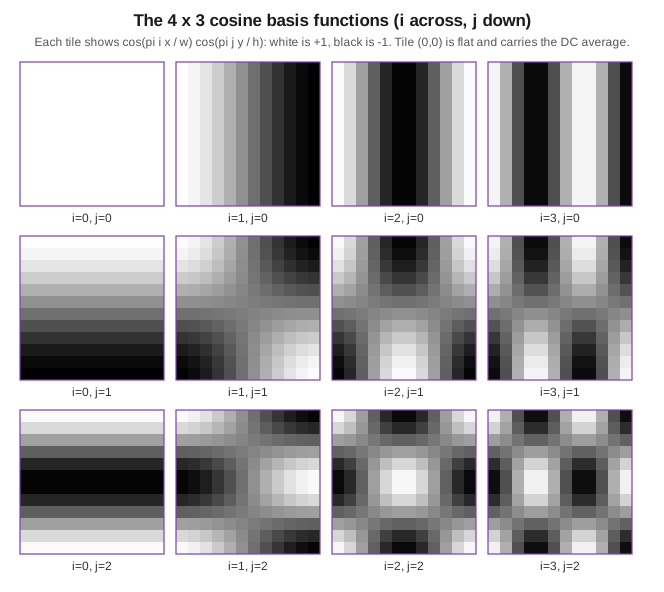
The string is the image’s lowest few frequencies. It is a coarse DCT (discrete cosine transform), the same idea as JPEG but with a handful of components for the whole image instead of 8 by 8 blocks.
Pipeline
Colour space
BlurHash averages colours, and averaging must be done in linear light, not in the gamma-encoded sRGB bytes. Each sRGB byte is converted to a linear value before encoding and back after decoding.
With , the linear value is
The inverse takes a linear value clamped to , and gives a byte
The reference code rounds by adding 0.5 and truncating.
Encoding
The encoder runs a DCT-like transform with components, where . 4 by 3 is the usual choice. For an image of width and height , with the linear value of one colour channel, each component is computed separately for the R, G and B channels:
is the average colour, the DC component. The other components are the AC components, which describe how the colour varies across the image. The normalisation factor is 1 for and 2 for every other component.
Quantisation and packing
The string is written in base 83 with this alphabet, in this order:
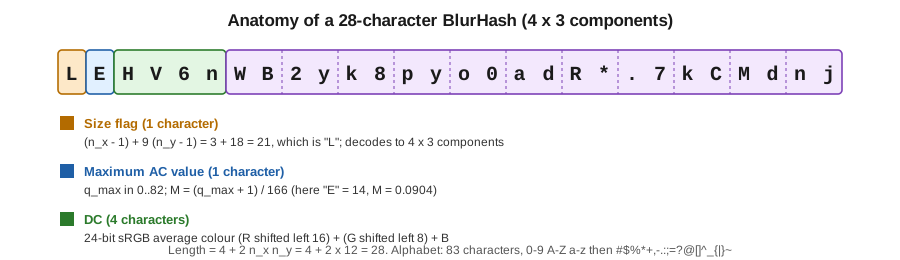
0123456789ABCDEFGHIJKLMNOPQRSTUVWXYZabcdefghijklmnopqrstuvwxyz#$%*+,-.:;=?@[]^_{|}~A value is written most significant digit first, with a fixed number of digits. The fields appear in this order:
-
Size flag, 1 character: .
-
Maximum AC value, 1 character: , where is the largest AC value. The decoder reads it back as . If there are no AC components, the reference writes 0 and uses .
-
DC, 4 characters: the 24-bit sRGB average colour, , after converting each linear channel back with .
-
Each AC component, 2 characters. Each channel is quantised to 19 levels, , where , and the three channels are packed as . This fits in two base 83 digits because .
The total length is , which gives 28 characters for 4 by 3.
A detail worth knowing: in the TypeScript reference the maximum is taken as the plain maximum of the AC values, not of their absolute values, and implementations differ on this detail. Both produce valid strings. Compare the output of two implementations by decoding, not by comparing strings.
Decoding
The decoder reads and from the size flag, from the second character, and the DC and AC values. Each AC channel value is
The DC value is converted from sRGB to linear. For an output of pixels, each pixel of each channel is
and is converted back to sRGB with . The output size does not have to match the original, which is why decoding at 32 pixels and scaling up with the UI works.
punch is a contrast knob. In the formula, values above 1 exaggerate the AC components (more contrast) and values
below 1 soften them. The reference TypeScript decoder, however, sets punch = punch | 1. That bitwise OR first
truncates the value to an integer and then sets its lowest bit, so 0.5 and 1.5 become 1, 2 becomes 3 and 4
becomes 5. With that decoder only odd integers (1, 3, 5, …) take effect as given, and nothing below 1 is possible. If
you need another punch in JavaScript, scale the AC values yourself, or use an implementation that does not apply the
OR. The cost of decoding is
, which is trivial at 32 by 32.
Worked example
Take a 2 by 2 image where the left column is red and the right column is blue , and encode it with , .
-
Linear values. and , so the left pixels are and the right pixels are .
-
DC, . All cosines are 1 and , so the DC is the average of the four pixels: .
-
AC, . , and is 1 for and 0 for . Only the left column contributes, with weight 2 for each of its two pixels, so the red channel is . Green is 0, and blue is zero up to floating point noise (about ). So .
-
Size flag. , the character
1. -
Maximum AC. , so , the character
~, and . -
DC. , so the colour is and the value is , which is
LjfLin four base 83 digits. -
AC. . , so , which is clamped to 18. For zero, . So and the packed value is , which is
|c.
The result is 1~LjfL|c: 8 characters, as expected from . Decoding it at 2 by 2 gives these pixels
in every row:
x=0: 255,0,188 x=1: 188,0,188At the AC term is added to the DC; at the cosine is zero, so only the DC shows. The decoded image is only a rough hint of the original, which is all two components can represent. This is also what you see on real photos: very few components give a smooth blob of the dominant colours.
Practical guidance
-
Components. 4 by 3 is the default and gives 28 characters. Adapt it to the aspect ratio: portrait covers do well with 3 by 4, banner images with 5 by 2. More components mean a longer string, a slower encode and a decode that looks closer to the image but costs more. Past 6 by 6 the benefit is small.
-
Encode from a downscaled image. The encoder is , so run it on a thumbnail of about 64 to 100 pixels wide, not on a 24-megapixel original. The result is practically the same.
-
Store and return the string. It is 20 to 30 characters. Keep it next to the image in the database and return it with the image in API JSON, see responsive images and thumbnails.
-
Decode small. Decode to about 20 to 32 pixels wide and let the UI scale it up with smooth interpolation (canvas CSS scaling or a blurred
<img>). Never decode to the full image size. -
Validate. A decoder should check that the length equals , as the reference does, before trusting user-supplied strings.
-
Cover images of videos. Run the same encode on the extracted frame, see video covers.
ThumbHash
ThumbHash by Evan Wallace is a similar placeholder format. It also encodes the alpha channel, keeps the aspect ratio of the image inside the hash, and stores colour in a different colour space (it uses a perceptual space and gives a slightly more detailed result in about 25 bytes). Its encoded form is binary, and is usually written as base64. Use it when you need transparency, or when the frontend library you use supports it, for example expo-image and unlazy. Use BlurHash when you need the widest set of implementations.
Implementations
| Platform | Implementation | Notes |
|---|---|---|
Java and Kotlin (JVM) |
Encoder, and also a decoder. Published to Maven Central as |
|
Kotlin Multiplatform |
Decoder and encoder for Android, iOS and the JVM. |
|
Python |
The woltapp package is on PyPI as |
|
Node.js and browser |
blurhash on npm |
The reference TypeScript implementation, encode and decode. |
Rust |
blurhash crate |
Encode and decode. |
.NET |
Pick the one that matches your imaging library, ImageSharp or System.Drawing and SkiaSharp. |
|
Swift and Kotlin (Android) |
Decoders (and an encoder for Swift) meant to be copied into the app. |
The README of the reference repository keeps the list of implementations at woltapp/blurhash, Implementations. The framework pages show them in use: Java, Python, Node.js and Rust and .NET.
The online encoder at blurha.sh is useful to try components and punch values by hand.