Styles
|
This content was generated with the assistance of AI and should be verified against the official Figma documentation before being relied on in production. This sub-section’s Figma bibliography lists the reference material consulted while preparing these pages. |
This page was written on 2026-10-30 against the UI3 interface of Figma Design. According to the help articles consulted, creating and editing styles is available on every plan and needs edit access to the file, which means a Full seat on a file that allows editing. Publishing styles to a team library needs a paid plan, according to the sharing article, and using a library style needs view access to the library file and the library enabled in the destination file. Styles are generally available; none of the articles consulted labelled them beta. Plan and seat names change over time, so confirm them on the official pages linked below.
The running example is the Bookshelf mobile app. The goal is to give the catalogue screen a small set of reusable looks: a primary brand colour, a book-title text style, a card shadow and a four-column layout guide. Text properties are explained in Text and Typography, and values that must change by theme or brand belong in Variables, Collections and Modes.
What a style is
A style is a named, reusable collection of properties that can be applied to layers so that the properties do not have to be set by hand each time. The official article lists these types: colors (fills, strokes, images, gradients, patterns and shader fills), text (font family, size, line height and spacing), effects (shadows, blurs, texture, noise and shader effects), layout guides (rows, columns and grids) and animations. Animation styles can only be created from layers while using Figma Motion, so they are not covered here.
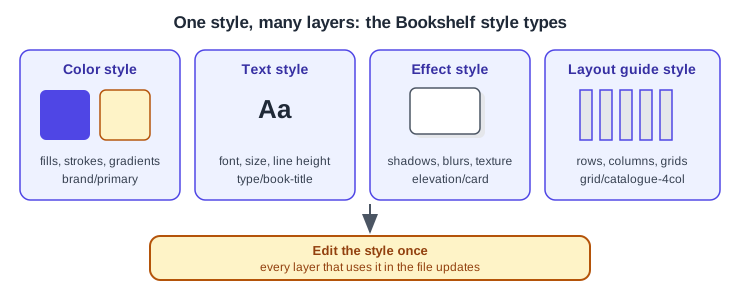
Where styles live in UI3
With nothing selected, the right sidebar shows a Local styles section, and its plus button creates a style. With a layer selected, the style picker is opened from the Apply styles or variables control next to the relevant property (for example the fill, the typography or the effects section). The picker lists local styles and styles from enabled libraries, and hovering over a style shows its description.
Creating styles
There are two routes, both described by the official article.
-
Deselect everything and click the plus next to Local styles in the right sidebar.
-
Choose a type (color, text, effect or layout guide), enter a name and optionally a description.
-
Configure the properties and click Create style.
The second route starts from a layer that already looks right, which is usually quicker.
-
Select the Bookshelf book-title text layer.
-
Click Apply styles or variables in the Typography section.
-
In the picker choose New style or variable, type a name such as
type/book-titleand confirm. -
Optionally click the minus next to a property to leave it out of the style.
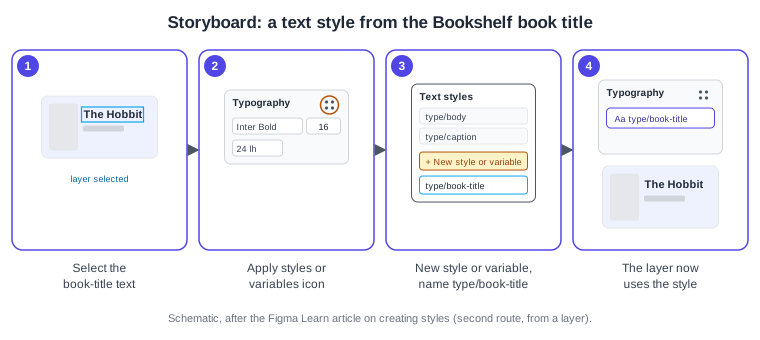
Applying and editing styles
Applying a style means choosing it in the picker for the selected layers; the layer then follows the style. Editing a style is done by hovering over it in the right sidebar and clicking the adjust icon, or by right-clicking it in the picker and choosing Edit style. The change reaches every layer in the file that uses the style. A style that comes from another file is edited in its original file, and the sidebar offers Go to style definition for that.
When a style is deleted, the layers that used it keep their current properties but are detached from it, according to the same article. Detaching a single layer without deleting the style is also possible from the style picker, but the articles consulted did not describe that control, so look for it in the picker rather than relying on this page.
Organising styles
Styles can be grouped in folders. Select the styles in the Local styles list, right-click and choose Add new folder, and the styles are renamed to match the folder path. A slash in a name does the same job: names that start with a shared prefix such as type/ appear under one heading. Styles can be reordered by dragging in the list, but only in the file where they were created. Range selection uses Shift-click and non-adjacent selection uses Cmd-click (macOS) or Ctrl-click (Windows).
| Action | macOS | Windows |
|---|---|---|
Select a range of styles |
Shift-click |
Shift-click |
Select non-adjacent styles |
Cmd-click |
Ctrl-click |
Copy or paste styles between files |
Cmd C, Cmd V |
Ctrl C, Ctrl V |
Cut styles when moving them between files |
Cmd X |
Ctrl X |
Open the library modal |
Option 3 |
Alt 3 |
Publishing styles
To share Bookshelf styles with other files, open the Assets panel, choose the Library icon, click Publish next to the file name, add a description and confirm. Styles can be published alone or together with components, and people who use the library are prompted to accept the update. Library mechanics are covered in Libraries and Publishing.
Styles or variables
Variables store single values (color, number, string or boolean) in collections that can have modes such as light and dark, so one design can switch theme. Styles bundle several properties under one name. The practical rule is: choose variables for values that must change by mode or brand, and choose styles for composite looks such as text, effects and layout guides.
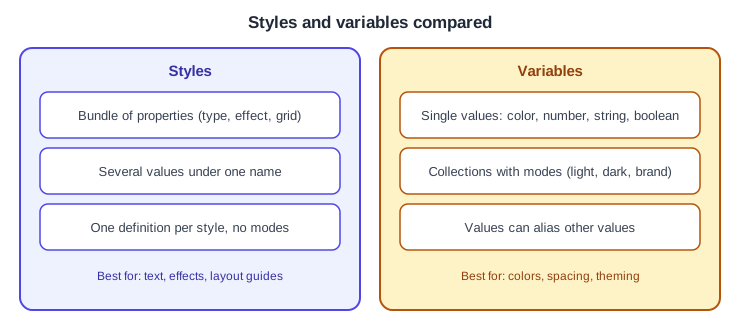
Whether a style can itself reference variables is stated in the issue brief for this section (styles can contain variables, but variables cannot contain styles) but was not confirmed by the style articles consulted for this page, so verify it in the current variables documentation before relying on it.
What older guides say
Older guides describe styles as the way to hold all colours, spacing and theming. Variables, generally available since 2024-04-16, now cover colour, spacing and theming, so a current design system normally uses variables for those values and keeps styles for text, effects and layout guides. Older guides also show the old interface (UI2); UI3 has been the only interface since 2025-04-30, and the "editor/viewer" seat names are replaced by the Full, Dev, Collab and View seats since 2025-03-11.