Page Life Cycle and Postback
|
This section documents ASP.NET Web Forms on .NET Framework 4.8.1, the last and permanent version of Web Forms — the page life cycle and postback model, ViewState and control state, server controls, validation controls, master pages and themes, data-bound controls, and the provider-based security model — as described by the official documentation at Microsoft Learn and the ASP.NET previous-versions archive, which are the reference these pages are written and verified against. Web Forms receives security fixes only and has no forward path onto modern .NET (.NET Framework 4.8.1 is Microsoft’s last version of .NET Framework; Web Forms itself never shipped on .NET Core/.NET 5+). It remains supported for existing applications running on Windows but is not recommended for new development — see Choosing an ASP.NET Framework and Migrating to Modern ASP.NET for what that means in practice. This content was generated with the assistance of AI and should be verified against the official documentation before being relied on in production. This section’s bibliography lists the reference material consulted while preparing these pages. |
The page life cycle is the single most load-bearing concept in Web Forms: almost every bug that looks like "my control’s value disappeared" or "my event handler ran before/after I expected" traces back to a misunderstanding of when, in this fixed sequence, a given piece of code actually executes.
Application life cycle vs. page life cycle
The application life cycle is process-wide and covers global.asax events — Application_Start,
Application_BeginRequest, Application_AuthenticateRequest, Application_EndRequest,
Application_End — fired once per application-domain lifetime or once per request, regardless of which page
is being served (see HTTP Pipeline,
Handlers, and Configuration). The page life cycle nests inside a single request, from the moment ASP.NET
resolves a .aspx URL to a Page object through to that object being discarded after rendering. This page
covers only the latter.
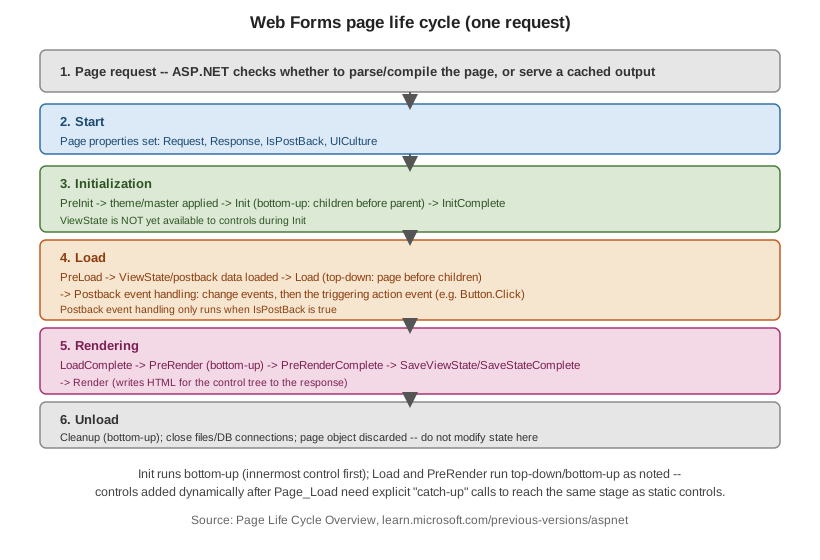
The six stages, in order
| Stage | What happens |
|---|---|
1. Page request |
ASP.NET decides whether to parse and compile the page (or use a cached compiled
output) before creating the |
2. Start |
|
3. Initialization |
|
4. Load |
|
5. Rendering |
|
6. Unload |
Cleanup, bottom-up; the page object is about to be discarded. Do not set control properties or attempt further ViewState changes here — there is no further rendering pass to pick them up. |
The order in full, as fired: PreInit, Init, InitComplete, PreLoad, Load, (postback control events),
LoadComplete, PreRender, PreRenderComplete, SaveStateComplete, Render, Unload. See
ASP.NET Page Life Cycle
Overview — the canonical reference this ordering is verified against — and
General
Page Life Cycle Stages.
public partial class OrderPage : System.Web.UI.Page
{
    protected override void OnPreInit(EventArgs e)
    {
        base.OnPreInit(e);
        // Dynamic master/theme selection must happen here -- too late anywhere after.
        MasterPageFile = Request.QueryString["compact"] == "1" ? "~/Compact.master" : "~/Site.master";
    }

    protected void Page_Init(object sender, EventArgs e)
    {
        // Controls exist, but ViewState/postback values are not loaded yet.
    }

    protected void Page_Load(object sender, EventArgs e)
    {
        if (!IsPostBack)
        {
            BindOrderGrid(); // first request only -- postbacks restore state from ViewState instead
        }
    }

    protected void SubmitButton_Click(object sender, EventArgs e)
    {
        // Runs during postback event handling, after Page_Load, only when this control caused the postback.
    }

    protected override void OnPreRender(EventArgs e)
    {
        base.OnPreRender(e);
        SubmitButton.Enabled = OrderTotal > 0; // last safe point to change control state before it renders
    }
}IsPostBack, IsCallback, and IsCrossPagePostBack
-
Page.IsPostBack—truewhen the request is a postback of this same page (the__EVENTTARGET/ViewState machinery round-tripping),falseon the first ("fresh") request. Almost everyPage_Loadguards expensive work — initial data binding, default values — withif (!IsPostBack). -
Page.IsCallback—trueinside anICallbackEventHandlerclient-callback request (see Server Controls); the full page life cycle still runs, but no full-page HTML is rendered. -
Page.IsCrossPagePostBack—trueon the target page when the postback originated from a different page via cross-page posting (below).
Bottom-up Init vs. top-down Load
This asymmetry is a frequent source of surprise: Init fires innermost control first, page last, while
Load (and postback event handling) fires page first, innermost control last. Practically: a naming
container or user control has finished its own Init before its parent’s Init runs, but the parent’s
Load has already run by the time a child control’s Load executes — so parent-set state in Load is
visible to child controls' own Load handlers, but not the reverse.
Catch-up events for dynamically added controls
Controls added to the tree at runtime (Controls.Add(new TextBox())) after their "natural" stage has already
passed for statically declared controls must go through catch-up processing so they still receive Init,
Load, and ViewState/postback-data application correctly. Practically this means: add dynamic controls as
early as possible — ideally in Page_Init or CreateChildControls — and always with a stable, explicit
ID on every request (postback or not), because ViewState and postback data are matched to controls by ID
and tree position; a control added with a different ID or in a different position across postbacks will not
recover its prior state.
protected override void OnInit(EventArgs e)
{
    base.OnInit(e);
    // Re-create the SAME control, with the SAME ID, on every postback -- including the first request.
    var dynamicBox = new TextBox { ID = "DynamicBox" };
    PlaceHolder1.Controls.Add(dynamicBox);
}
Data-binding events
Data-bound controls (Data Binding and Data
Controls) fire their own event sequence around each call to DataBind():
DataBinding → per-row RowCreated (GridView) / ItemCreated (Repeater/DataList) as each row’s
control tree is built → RowDataBound / ItemDataBound once the row is actually bound to its data item →
DataBound once for the whole control. RowDataBound/ItemDataBound is where per-row formatting logic
belongs (it has both the built control tree and the underlying data item); RowCreated/ItemCreated fires
even for rows with no data (e.g. pager or header rows) and does not yet have the data item.
Cross-page postback and PreviousPage
By default a postback always targets the same page (<form action> points at the current URL). Setting
PostBackUrl on a Button/LinkButton/ImageButton posts to a different page instead:
<%-- Checkout.aspx --%>
<asp:Button ID="ContinueButton" runat="server" Text="Continue"
    PostBackUrl="~/Confirm.aspx" />
// Confirm.aspx.cs
protected void Page_Load(object sender, EventArgs e)
{
if (PreviousPage != null && PreviousPage.IsCrossPagePostBack)
{
var sourceBox = (TextBox)PreviousPage.FindControl("CustomerNameBox");
WelcomeLabel.Text = "Thanks, " + sourceBox.Text;
}
}The originating page’s public/strongly typed members are reachable through PreviousPage, but only after
casting or exposing them via @PreviousPageType for compile-time-checked access; the source page runs its own
full life cycle through PreRender (but not Render) before control passes to the target page, so both
pages' Load handlers execute on a cross-page postback.
A single postback, end to end
doPostBack(eventTarget, eventArgument) is the hidden JavaScript function ASP.NET injects into every page
with a server <form>; controls that are not natively submit elements (a LinkButton, a GridView sort
header) call it to populate EVENTTARGET/EVENTARGUMENT and submit the form, simulating a native postback.
See ViewState and Control State for what travels
in VIEWSTATE and __EVENTVALIDATION on that round trip.