Linking & Navigation
|
This content was generated with the assistance of AI and should be verified against the official documentation before being relied on in production. The reference material consulted while preparing these pages is listed in the section bibliography. |
This page is written against Next.js 16.3.8 (the latest release on 2026-10-03, when the facts and examples below were
checked; the official documentation reports @doc-version 16.3.8), React 19.3.0, Node.js 20.9.0 or later and
TypeScript 5.1 or later. It covers the App Router in depth and the Pages Router (next/link, next/router) in a
comparison section, because both are supported and most of the older material you will meet uses the second. Wherever
caching changes the answer it says which model it means: the previous model (the default, where nothing is cached
unless you ask) or Cache Components (cacheComponents: true), which together with partialPrefetching: true is
still opt-in in 16.3 and is documented as the future default. The examples were built with Next.js 16.3.8 and run
(next build, next start, curl and a real browser) in a scratch copy of the Bookshelf — the catalogue of books
that the rest of this section grows. Examples that say they were run were built and exercised that way; the few I could
not run are marked, and each example is followed by the official page it derives from.
Navigation is where the App Router’s design shows: a link is a Client Component that prefetches the next route’s React Server Component (RSC) payload, a click renders it inside a React Transition below the layouts the two routes share, and everything the user perceives as "instant" is the product of prefetching, streaming and caching working together. This page follows that path: the links and hooks you write, the status codes and redirects the server can answer with, the prefetch and cache machinery underneath, and the 16.x features (Partial Prefetching, Instant Navigations, Activity-preserved routes, View Transitions) that change what "a navigation" costs. For the file system conventions that create the routes you link to, see Project Structure; for how a request turns into HTML and an RSC payload, see Introduction and Architecture.
What You Use and Where It Runs
All navigation APIs are Client Component APIs except the three that work by throwing during render. The table is the map for the rest of the page.
| API | Import | Runs in | Use it to |
|---|---|---|---|
|
|
Client (rendered on the server too) |
Navigate declaratively, prefetch, keep scroll and history under control |
|
|
Client Components only |
Navigate from an event handler, refresh, prefetch manually |
|
|
Client Components only |
Read the current URL (active links, filters, analytics) |
|
|
Client Components only |
Read which child route is active below a layout (tabs, breadcrumbs) |
|
|
Client, inside a |
Show a pending hint while a link’s navigation completes |
|
|
Server Components, Route Handlers, Server Functions; also a Client Component while rendering |
Send the user elsewhere (throws) |
|
|
Server Components, Route Handlers, Server Functions |
Render the nearest |
Source: Linking and Navigating, Link Component and the API reference pages named in the sections below
The reason usePathname and useSearchParams are Client-only is deliberate: layouts are not re-rendered when only
a child route changes, so a Server Component layout that read the URL would show stale values. The Client hook
re-renders on the client with the latest URL, and the layout stays preserved across navigations.
How a Navigation Works
A navigation to a server-rendered route has four ingredients, and each exists to hide the server round trip:
-
Server rendering. The RSC payload for a route is produced either ahead of time (prerendering at build time or during revalidation) or at request time (dynamic rendering). HTML is generated as well, but only for the initial visit; later navigations fetch just the payload.
-
Prefetching. The router loads a route in the background before the user clicks, so the data is already on the client. It runs in production only.
-
Streaming. The server sends parts of a dynamic route as they become ready; a
loading.jsfile or a<Suspense>boundary supplies the fallback shown meanwhile. See the Next.js streaming guide for the details; this page only uses its consequences for status codes. -
Client-side transitions. A
<Link>click does not reload the document. The router keeps the shared layouts, swaps in the prefetched page or its loading state, updates the URL and history, and handles scrolling.
You can see the two response kinds with curl. The same URL answers with HTML for a browser document request and with
the RSC payload when the RSC request header is sent; Next.js redirects once to add its cache-busting _rsc query
parameter, so follow redirects with -L.
# static (SSG) route: payload cached for 300 s on the client
curl -sL -D - -o /dev/null -H "RSC: 1" http://localhost:3304/books/2 | grep -i -E "^HTTP|content-type|x-nextjs-stale|^cache-control"
# HTTP/1.1 307 Temporary Redirect          (adds ?_rsc=...)
# HTTP/1.1 200 OK
# x-nextjs-stale-time: 300
# Cache-Control: s-maxage=31536000
# Content-Type: text/x-component

# dynamic route (await connection()): nothing to cache
curl -sL -D - -o /dev/null -H "RSC: 1" http://localhost:3304/slow | grep -i -E "^HTTP|content-type|x-nextjs-stale|^cache-control"
# HTTP/1.1 200 OK
# Cache-Control: private, no-cache, no-store, max-age=0, must-revalidate
# Content-Type: text/x-component
The RSC header and the _rsc parameter are internal to the router and not a public API: use the output to understand
the model, never to build a client on it. The x-nextjs-stale-time header is the documented carrier of the client
cache lifetime (see The Client Router Cache and staleTimes).
The Link Component
<Link> extends the HTML <a> element with prefetching and client-side navigation. It is a Client Component that
renders an ordinary <a href>, so it works with a middle click, a copy of the address and a crawler, and it needs to
be hydrated before it can prefetch. An <a> that you write yourself triggers a full page load and no prefetching.
| Prop | Type | Behaviour |
|---|---|---|
|
string or object |
The path or URL. The object form |
|
boolean, default |
Replace the current history entry instead of pushing a new one. |
|
boolean, default |
Keep the scroll position if the new page is still in the viewport, otherwise scroll to the top of the first page element. |
|
|
See The prefetch modes. Production only. |
|
|
Called during client-side navigation with an event whose |
|
|
Passed to React’s |
any |
|
Passed to the underlying |
Source: Link Component: reference
The App Router props table does not list as, shallow, locale or passHref: those belong to the Pages Router
<Link> (see The Pages Router: next/link and next/router). The shipped TypeScript types still accept legacyBehavior (which renders the old
<Link><a> form with a child <a>) but mark it @deprecated … will be removed in a future version, so treat it as
a migration aid only.
Basic usage, object hrefs and hash links
import Link from 'next/link'

export default function Page() {
  return (
    <ul>
      <li><Link href="/books/1">Dune</Link></li>
      {/* object form: navigates to /books/3?from=home */}
      <li>
        <Link href={{ pathname: '/books/3', query: { from: 'home' } }}>Solaris</Link>
      </li>
      {/* hash: scrolls to the element with id="reviews" */}
      <li><Link href="/books/3#reviews">Solaris reviews</Link></li>
    </ul>
  )
}
Source: Link: href and Link: scrolling to an id
The prefetch modes
prefetch takes four values. What each one fetches depends on whether the route is static or dynamic and on the
caching model; the table is the whole decision.
| Value | Previous model (and Cache Components without partialPrefetching) |
With partialPrefetching: true |
|---|---|---|
|
Static route: the full route including its data. Dynamic route: the partial route down to the nearest |
The per-route App Shell (the route’s static and cached content), one fetch shared by all links to that route. |
|
The full route for static and dynamic routes. |
The App Shell plus cached content that depends on the link’s own URL data ( |
|
Never prefetch, neither in the viewport nor on hover. |
Unchanged: never prefetch. |
Prefetching is only enabled in production, so measure it with next build and next start, never in next dev. To
prefetch on intent instead of on visibility, flip the prop on hover; this is the documented pattern for long lists of
links:
'use client'

import Link from 'next/link'
import { useState } from 'react'

export function HoverPrefetchLink({ href, children }: { href: string; children: React.ReactNode }) {
  const [active, setActive] = useState(false)
  return (
    <Link href={href} prefetch={active ? null : false} onMouseEnter={() => setActive(true)}>
      {children}
    </Link>
  )
}replace and scroll
{/* keeps the history stack short: Back skips this navigation */}
<Link href="/books/1" replace>Dune</Link>

{/* do not touch the scroll position (a filter link, a tab inside a long page) */}
<Link href="/#hashid" scroll={false}>Stay where you are</Link>
Source: Link: replace and Link: disable scrolling to the top
Because Next.js skips sticky and fixed elements when it looks for the scroll target, content can end up behind a sticky
header after a navigation or a #hash link. The fix is plain CSS, applied wherever scrollIntoView() is used:
html {
  scroll-padding-top: 64px; /* the height of the sticky header */
}onNavigate: running code or cancelling a client navigation
onNavigate runs only for same-origin client-side navigations, which is the difference from onClick: a click with a
modifier key (opening a new tab), a link to an external URL and a link with the download attribute run onClick but
never onNavigate. Calling preventDefault() on its event cancels the navigation, which makes it the right hook for
an unsaved-changes guard:
'use client'

import Link from 'next/link'
import { createContext, useContext, useState } from 'react'

const Blocker = createContext({ dirty: false, setDirty: (_: boolean) => {} })

export function BlockerProvider({ children }: { children: React.ReactNode }) {
  const [dirty, setDirty] = useState(false)
  return <Blocker value={{ dirty, setDirty }}>{children}</Blocker>
}

export function DraftBox() {
  const { setDirty } = useContext(Blocker)
  return <textarea aria-label="Draft review" onChange={(e) => setDirty(e.target.value.length > 0)} />
}

export function GuardedLink(props: React.ComponentProps<typeof Link>) {
  const { dirty } = useContext(Blocker)
  return (
    <Link
      {...props}
      onNavigate={(e) => {
        if (dirty && !window.confirm('Discard your draft review?')) e.preventDefault()
      }}
    />
  )
}
Run in the scratch app (next build, next start, browser): with text typed in the draft and window.confirm
answering "cancel", a click on the guarded link left the URL at /books/1; answering "OK" navigated to /. Note that
onNavigate guards links only; it cannot catch the back button, a reload or router.push, for which the browser’s
beforeunload event is the (limited) tool.
Source: Link: onNavigate and Link: blocking navigation
Links to routes that Proxy rewrites
When Proxy (or a rewrites entry) serves one URL from different routes, the prefetcher cannot see the rewrite. The
official example tells Next.js both the URL to show and the URL to prefetch, using the as prop with the target route
in href:
'use client'

import Link from 'next/link'
import useIsAuthed from './hooks/useIsAuthed' // your own auth hook

export default function Page() {
  const isAuthed = useIsAuthed()
  const path = isAuthed ? '/auth/dashboard' : '/public/dashboard'
  return (
    <Link as="/dashboard" href={path}>
      Dashboard
    </Link>
  )
}
I did not run this one: it depends on your Proxy rewrite, and the App Router props table does not document as,
although this official example uses it.
Source: Link: prefetching links in Proxy
Reading the Current URL: usePathname, useSearchParams and the Segment Hooks
usePathname
usePathname() returns the pathname of the current URL without the query string (/dashboard?v=2 gives
/dashboard). An active-link component is the classic use:
'use client'

import Link from 'next/link'
import { usePathname } from 'next/navigation'

export function Links() {
  const pathname = usePathname()
  return (
    <nav>
      <Link className={`link ${pathname === '/' ? 'active' : ''}`} href="/">Home</Link>
      <Link className={`link ${pathname === '/about' ? 'active' : ''}`} href="/about">About</Link>
    </nav>
  )
}
Source: usePathname
Three behaviours to know. First, a prerendered page reached through a rewrite (Proxy or next.config) can see a
different pathname on the client than in the HTML, which causes a hydration mismatch; render a stable server fallback
and set the real value after mount in a small isolated component. Second, with Cache Components usePathname suspends
for routes whose dynamic params are not covered by generateStaticParams, so the component (or a parent) needs a
<Suspense> boundary or the build fails with the "URL data in a Client Component outside of Suspense" error. Third,
if the project also has a pages/ directory the hook can return null while the Pages Router is not ready (a
fallback route, automatic static optimisation), and Next.js adjusts the return type to include it.
useSearchParams
useSearchParams() returns a read-only URLSearchParams for the query string (get, getAll, has, toString
and so on). In a Server Component page, read the searchParams prop instead; layouts do not receive it, precisely
because a preserved layout would show stale values.
'use client'

import { useSearchParams } from 'next/navigation'

export default function SearchBar() {
  const searchParams = useSearchParams()
  const search = searchParams.get('search') // /dashboard?search=my-project -> 'my-project'
  return <>Search: {search}</>
}
Source: useSearchParams
In a statically prerendered route the hook forces the Client Component tree up to the nearest <Suspense> boundary to
render on the client. Without a boundary the production build fails; I reproduced it by removing the boundary around a
component that calls useSearchParams on the Bookshelf home page:
⨯ useSearchParams() should be wrapped in a suspense boundary at page "/". Read more: https://nextjs.org/docs/messages/missing-suspense-with-csr-bailoutWrap the smallest subtree that calls the hook in <Suspense>, or make the route dynamic with await connection() in a
Server Component. In next dev routes render on demand, so the error appears only at build time.
import { Suspense } from 'react'
import { SortButtons } from './_components/sort-buttons'

export default function Home() {
  return (
    <Suspense fallback={null}>
      <SortButtons />
    </Suspense>
  )
}If the project also contains a pages/ directory, useSearchParams returns ReadonlyURLSearchParams | null (the
null is for the Pages Router, where search params are unknown while prerendering), and usePathname and the segment
hooks are typed the same way. I met this while building: with a pages/ folder present, searchParams.toString()
failed type checking with TS18047: 'searchParams' is possibly 'null', and I wrote searchParams?.toString() ?? "".
In an App-Router-only project the value is never null.
useSelectedLayoutSegment and useSelectedLayoutSegments
Both are called from a Client Component that a layout renders and read the active route below that layout:
useSelectedLayoutSegment() returns the one child segment (a string, or null), useSelectedLayoutSegments() returns
all of them (an array). Both optionally take a parallel route key to read inside a @slot. Catch-all segments come
back as one joined string ('a/b/c'), and route groups are included in the array, so filter out the ones that start
with a bracket if you do not want them.
| Called from | Visited URL | useSelectedLayoutSegment() |
useSelectedLayoutSegments() |
|---|---|---|---|
|
|
|
|
|
|
|
|
|
|
|
|
|
|
|
|
Source: useSelectedLayoutSegment and useSelectedLayoutSegments
I ran both in the Bookshelf. The root layout’s navigation rendered data-segment="none" at /, "books" at
/books/1 and "slow" at /slow; and a breadcrumb component rendered by app/books/layout.tsx produced
data-segments="["2"]" at /books/2:
'use client'

import Link from 'next/link'
import { useSelectedLayoutSegments } from 'next/navigation'

export function Breadcrumbs() {
  // called from app/books/layout.tsx: "/books/2" gives ["2"]
  const segments = useSelectedLayoutSegments() ?? [] // null only if a pages/ directory also exists
  return (
    <ol aria-label="Breadcrumb">
      <li><Link href="/">Catalogue</Link></li>
      <li><Link href="/books/1">Books</Link></li>
      {segments.map((segment) => (
        <li key={segment}>{segment}</li>
      ))}
    </ol>
  )
}Like the other URL hooks, with Cache Components they suspend for fallback params and then need a <Suspense> boundary.
useRouter
useRouter() from next/navigation gives a Client Component the imperative router. The official recommendation is to
use <Link> unless you have a specific requirement (a navigation after an async operation, a programmatic
prefetch).
| Member | Behaviour |
|---|---|
|
Client-side navigation that adds a history entry. |
|
The same without adding a history entry. |
|
Re-requests the current route from the server and re-renders Server Components, merging the payload without losing client state ( |
|
Prefetches a route. The optional |
|
Move through the browser history. |
|
An opaque string scoped to the current route segment. It changes when the surrounding segment is freshly created by a push or replace navigation and stays the same for back and forward navigations, |
Source: useRouter
'use client'

import { useRouter } from 'next/navigation'

export default function Page() {
  const router = useRouter()
  return (
    <>
      <button type="button" onClick={() => router.push('/dashboard')}>Dashboard</button>
      <button type="button" onClick={() => router.push('/dashboard', { scroll: false })}>Keep scroll</button>
      <button type="button" onClick={() => router.refresh()}>Refresh</button>
    </>
  )
}
Source: useRouter and useRouter: disabling scroll to top
Differences from next/router that the migration guide lists: the hook comes from next/navigation; there is no
pathname (use usePathname()), no query (use useSearchParams() and useParams()), no basePath and no route
(use usePathname() or useSelectedLayoutSegments()); and router.events is gone. Using next/router inside app/
throws the "`NextRouter` was not mounted" error.
Replacing router.events
The Pages Router router.events has no direct App Router counterpart. The official replacement composes the two URL
hooks, and useSearchParams makes the component need a <Suspense> boundary in the layout. This is the component I
ran in the Bookshelf root layout; after a Link click, a history.back() and a pushState the console showed
[nav] /books/2, [nav] /, [nav] /?sort=desc, [nav] /books/1:
'use client'

import { useEffect } from 'react'
import { usePathname, useSearchParams } from 'next/navigation'

export function NavigationEvents() {
  const pathname = usePathname()
  const searchParams = useSearchParams()
  useEffect(() => {
    const query = searchParams?.toString() ?? ''
    console.log('[nav]', query ? `${pathname}?${query}` : pathname)
  }, [pathname, searchParams])
  return null
}
import { Suspense } from 'react'
import { NavigationEvents } from './_components/navigation-events'
export default function RootLayout({ children }: LayoutProps<'/'>) {
return (
<html lang="en">
<body>
{children}
<Suspense fallback={null}>
<NavigationEvents />
</Suspense>
</body>
</html>
)
}Source: useRouter: router events
useLinkStatus: Feedback While a Link Is Pending
useLinkStatus() from next/link returns { pending }, true from the click until the history is updated. It must
be called from a descendant of a <Link>; if the destination was prefetched the pending state is skipped, and when
several links are clicked in quick succession only the last one shows pending. In the Pages Router it always returns
{ pending: false }. It is a patch for a slow transition (prefetching disabled or still running, a dynamic route
without loading.js): the root-cause fixes are prefetching and a loading.js fallback. To avoid a flash on fast
navigations, start the hint invisible and delay its animation.
'use client'

import { useLinkStatus } from 'next/link'

export function PendingHint() {
  const { pending } = useLinkStatus()
  return <span aria-hidden className={`link-hint ${pending ? 'is-pending' : ''}`} />
}
.link-hint {
display: inline-block;
width: 0.6em;
height: 0.6em;
margin-left: 0.25rem;
border-radius: 9999px;
background: currentColor;
opacity: 0;
visibility: hidden; /* reserve the space without showing the hint */
}
.link-hint.is-pending {
visibility: visible;
animation-name: fadeIn, pulse;
animation-duration: 200ms, 1s;
animation-delay: 100ms, 100ms; /* appears only if the navigation takes time */
animation-timing-function: ease, ease-in-out;
animation-iteration-count: 1, infinite;
animation-fill-mode: forwards, none;
}
@keyframes fadeIn { to { opacity: 0.35; } }
@keyframes pulse { 50% { opacity: 0.15; } }In the scratch app a link to a route that sleeps 1.5 s (prefetch={false}) rendered link-hint before the click,
link-hint is-pending 400 ms after it, and the destination heading after about 1.6 s.
Source: useLinkStatus
redirect, permanentRedirect and notFound
These three functions work by throwing. redirect() and permanentRedirect() throw a NEXT_REDIRECT error;
notFound() throws NEXT_HTTP_ERROR_FALLBACK;404 and Next.js adds <meta name="robots" content="noindex" />. They
terminate rendering of the segment in which they are called, and TypeScript knows they return never, so you do not
write return redirect(…) and a checked value stays narrowed afterwards.
import { redirect } from 'next/navigation'
import { notFound } from 'next/navigation'

export default async function Profile({ params }: PageProps<'/teams/[id]'>) {
  const { id } = await params
  const team = await fetchTeam(id)
  if (!team) notFound()          // renders the nearest not-found UI
  if (!team.active) redirect('/teams') // 307 by default
  // ...
}
Source: redirect, notFound and permanentRedirect
redirect(path, type) |
permanentRedirect(path, type) |
notFound() |
|
|---|---|---|---|
HTTP status (not streaming) |
307 temporary |
308 permanent |
404 |
Request method |
Preserved (that is why 307, not 302) |
Preserved (308, not 301) |
Not applicable |
Inside a Server Action |
Client-side navigation when JavaScript is available; 303 for a progressive-enhancement form post; otherwise 307 |
The same, with 308 instead of 307 |
Renders the not-found UI |
History |
|
Same |
Not applicable |
Where it can be called |
Server Components, Route Handlers, Server Functions; a Client Component while rendering, not in an event handler (use |
Same |
Server Components, Route Handlers, Server Functions |
Source: redirect and permanentRedirect
Because they throw, they must be called outside a try block. A try/catch around the call swallows the control
flow exception: for redirect nothing happens, and for notFound the not-found UI never renders. If you must catch
errors near the call, let the interrupt through first with unstable_rethrow. notFound() also has to be called on
the render path: in a component or in a function a component awaits, never in an un-awaited promise.
import { redirect } from 'next/navigation'

export async function createAndGo(data: FormData) {
  let id: string
  try {
    id = await createBook(data) // may throw a real error
  } catch (error) {
    return { error: 'Could not create the book' }
  }
  redirect(`/books/${id}`) // outside the try block
}
Source: redirect: behavior and unstable_rethrow
Status codes versus streaming
The status line is sent before the body. Once a route starts streaming (a loading.js fallback or a Suspense
fallback has been written), the status is already 200 and cannot change, so a later redirect() or notFound() can
only be communicated inside the stream: a <meta http-equiv="refresh"> tag for redirects and the not-found UI plus a
noindex meta tag for notFound(). Search engines may label such a page a "soft 404" but the noindex keeps it out
of the index. If you need a real 404 status, check that the resource exists before the response streams: before any
Suspense boundary and before an await that can suspend, or in Proxy, which can rewrite a missing slug to a
not-found route or produce a response.
I measured each case on a production build of the scratch app (curl -s -o /dev/null -D -):
| Route | What it does | Previous model | Cache Components |
|---|---|---|---|
|
|
307, |
307, |
|
|
308, |
not run (needs a Suspense boundary there) |
|
|
404 |
not run (needs a Suspense boundary there) |
|
|
200, |
200 |
|
|
200, |
200 |
|
|
200, |
not run |
Two consequences follow. A loading.js file turns every notFound() and redirect() in the page below it into a
"200 plus markup" response, so a route with loading.js that must return real 404s needs the existence check in
Proxy or in a layout above the boundary. And under Cache Components even a plain dynamic route streams its static shell
first, so the Proxy check is the only way to a real 404 there; the not-found page in the docs says so explicitly. The
"not run" cells are not failures: those files had to be restructured for Cache Components, because reading params
outside a <Suspense> boundary of a route without generateStaticParams fails the build there.
The History API and Scroll Restoration
Next.js lets you call the native window.history.pushState and replaceState and integrates them into the router, so
usePathname() and useSearchParams() follow the change without a navigation or a server request. This is the right
tool for state that lives in the URL but needs no new server render: a sort order, a client-side filter, a locale
switch.
'use client'

import { useSearchParams } from 'next/navigation'

export default function SortProducts() {
  const searchParams = useSearchParams()

  function updateSorting(sortOrder: string) {
    const params = new URLSearchParams(searchParams.toString())
    params.set('sort', sortOrder)
    window.history.pushState(null, '', `?${params.toString()}`) // adds a history entry
  }

  return (
    <>
      <button onClick={() => updateSorting('asc')}>Sort Ascending</button>
      <button onClick={() => updateSorting('desc')}>Sort Descending</button>
    </>
  )
}
replaceState is the same call without a new history entry (the official example switches the locale). In the
Bookshelf, clicking such a button changed the address to ?sort=desc, updated a useSearchParams readout to desc
and logged [nav] /?sort=desc in the events component above, with no network request. A <Link replace> click, by
contrast, left the history length unchanged, while a normal link click increased it by one.
Scroll behaviour has three layers. A client navigation through <Link> or router.push keeps the scroll position if
the new page’s first element is still visible and otherwise scrolls to the top of that element; scroll={false} (or
{ scroll: false }) turns this off. A #hash scrolls to the element. Back and forward navigations restore the position
like the browser does, which is also why the client cache is not applied to them (The Client Router Cache and staleTimes). Since 16, Next.js
no longer overrides CSS scroll-behavior: smooth unless the root element has data-scroll-behavior="smooth".
Source: Link: scroll and Upgrading to version 16
Prefetching Internals
Next.js splits the application into per-route JavaScript chunks and prefetches in the background so that, by the click, both the code and the data are on the client. The details below are the documented behaviour; the request and cache protocols themselves are internal and change between minor versions.
Triggers. In production a <Link> prefetches when it enters the viewport (initially or by scrolling) and again if the
prefetched data expired by the time the user hovers it. router.prefetch() prefetches on demand. Prefetching never runs
in next dev and never for prefetch={false}.
The scheduler. Next.js keeps a small task queue so that a page full of links does not flood the network. It
prioritises, in order: links in the viewport; links showing user intent (hover or touch); newer links replace older
ones; links scrolled off screen are discarded. I saw this on a production build: the Bookshelf home page, with three
book links, one object-href link and a catalogue link, issued one _rsc request per link as the page loaded, and each
<Link> hover or visibility change could queue another.
Layout deduplication and incremental prefetching (16.0). The routing and navigation overhaul in 16 made two changes that need no code: when several URLs sharing a layout are prefetched, the layout is downloaded once, and the router prefetches only the parts that are not already cached instead of whole pages. The upgrade guide warns that you may see more individual prefetch requests with much smaller total transfer, and calls that the right trade-off.
Inlining (16.2, default since 16.3). The router can bundle small segment responses into one response along a path
instead of requesting each separately, which cuts the request count at the price of duplicating some shared segment
data. experimental.prefetchInlining was added in 16.2 and enabled by default in 16.3; you only touch it to disable it
or tune the thresholds while debugging. Both thresholds count gzip-compressed bytes:
| Value or option | Default | Meaning |
|---|---|---|
|
default |
Inline with the default thresholds. |
|
- |
Prefetch each segment as its own request. |
|
2048 and 10240 |
Largest single segment still eligible for inlining, and largest total inlined into one bundled response. |
import type { NextConfig } from 'next'

const nextConfig: NextConfig = {
  experimental: {
    prefetchInlining: { maxSize: 2048, maxBundleSize: 10240 }, // or false to disable
  },
}

export default nextConfig
What is prefetched. The decisive facts are in The prefetch modes: static routes are prefetched in full and cached for
five minutes, dynamic routes only down to the nearest loading.js boundary and not cached by default
(staleTimes.dynamic is 0).
Manual prefetching and invalidation. router.prefetch(href, { onInvalidate }) warms a route outside the viewport.
When you build your own link (for example to use ForesightJS-style cursor prediction) you take over keeping the prefetch
fresh, which the documentation shows with onInvalidate:
'use client'

import Link from 'next/link'
import { useRouter } from 'next/navigation'
import { useEffect } from 'react'

function ManualPrefetchLink({ href, children }: { href: string; children: React.ReactNode }) {
  const router = useRouter()

  useEffect(() => {
    let cancelled = false
    const poll = () => {
      if (!cancelled) router.prefetch(href, { onInvalidate: poll })
    }
    poll()
    return () => {
      cancelled = true
    }
  }, [href, router])

  return (
    <Link
      href={href}
      onClick={(event) => {
        event.preventDefault()
        router.push(href)
      }}
    >
      {children}
    </Link>
  )
}Side effects during prefetch. Because a prefetch renders the route, a layout or page that is not pure runs its side
effects at prefetch time, not when the user visits. The official example is analytics: trackPageView() in a layout
fires for every prefetched link. Move such code to a useEffect in a small Client Component, or to a Server Action
triggered from the client. For the same reason a state-changing operation must never be reachable by a plain link: a
"log out" or "delete" page that acts on render would be triggered by prefetching. Use a form that posts to a Server
Action.
// before: runs during prefetch
export default function Layout({ children }: { children: React.ReactNode }) {
  trackPageView()
  return <div>{children}</div>
}
// after: runs only when the user really sees the page
'use client'
import { useEffect } from 'react'
export function AnalyticsTracker() {
useEffect(() => {
trackPageView()
}, [])
return null
}The Client Router Cache and staleTimes
The client cache is an in-memory cache in the browser tab that stores the RSC payload of visited and prefetched routes,
keyed by route segment. When you move between sibling routes (/dashboard/settings to /dashboard/analytics) the
router reuses the parent layout and fetches only the changed leaf. The cache is cleared on a page refresh. It is not a
persistent or shared cache: it has nothing to do with the server-side Data Cache or the CDN.
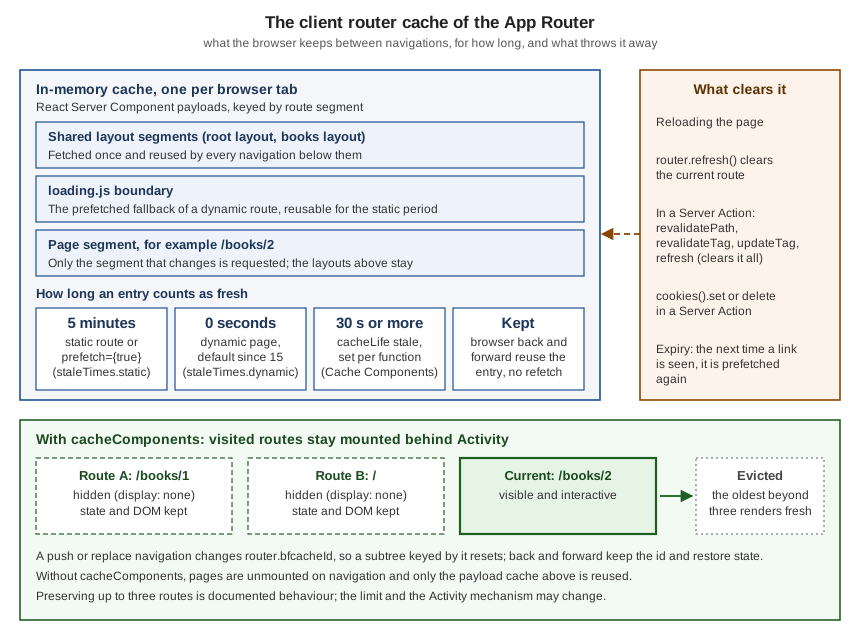
| Entry | Lifetime | Where it is set |
|---|---|---|
Static page, or any link with |
5 minutes |
|
Dynamic page (neither static nor fully prefetched) |
0 seconds (not cached); the default was 30 s in 14.x and became 0 in 15.0 |
|
|
Reusable for the |
|
Function or route with |
The |
|
Browser back and forward |
Not subject to the TTL: pages are reused to avoid layout shift and keep the scroll position |
Not configurable |
staleTimes is still documented as experimental ("subject to change, not recommended for production") and lives
under experimental; shared layouts are not refetched on every navigation whatever its value, because partial
rendering is a separate mechanism.
import type { NextConfig } from 'next'

const nextConfig: NextConfig = {
  experimental: {
    staleTimes: {
      dynamic: 30, // seconds; default 0
      static: 180, // seconds; default 300
    },
  },
}

export default nextConfig
I measured the effect on a production build with a dynamic route that takes 1.5 s to render (await connection() plus a
timer): with the defaults, the first visit and a second visit after going home both took about 1.6 s; with
staleTimes.dynamic: 30 the first visit took 1.5 s and the second one 53 ms, served from the client cache.
Invalidation. The client cache is cleared by a page refresh; by router.refresh() for the current route; by
revalidatePath, revalidateTag, updateTag or refresh called from a Server Action, which clear the entire client
cache immediately and bypass the stale time; and by (await cookies()).set or (await cookies()).delete in a Server Action. When an
entry expires, the next time its link is seen the route is prefetched again. This is the reason a Server Action that
mutates data and then calls revalidatePath makes the list page fresh on the next navigation without any client code.
Activity-Preserved Routes and bfcacheId
With Cache Components enabled, the App Router no longer unmounts a page when you navigate away: it hides the page with
React’s <Activity>, which keeps the DOM in the document with display: none. Both React state and DOM state survive:
form drafts, scroll positions, expanded <details>, video progress. Next.js preserves up to three routes; beyond that
the oldest is evicted and renders fresh the next time. Hidden content has display: none yet is still in the document,
which matters for end-to-end tests (selectors can match hidden elements, interactions with them time out).
That is a behaviour change you must design for: a dropdown left open reappears open, a success message reappears, a
dialog does not run its focus Effect again. The official guide gives per-pattern resets: close transient UI in a
useLayoutEffect cleanup (it runs when Activity hides the component), reset form state in the submit handler, or derive
state such as "dialog open" from a search parameter instead of component state. For migrations there is a blunt tool,
useRouter().bfcacheId: use it as a React key, and a subtree resets on every fresh push or replace navigation
(including <Link> clicks) while browser back and forward still restore it. The documentation says to prefer explicit
resets in new code and to treat bfcacheId as a last resort.
'use client'

import { useRouter } from 'next/navigation'

export function BfcacheForm() {
  const { bfcacheId } = useRouter()
  return (
    <form key={bfcacheId}>
      <input aria-label="Draft" defaultValue="" />
    </form>
  )
}
I tested this on a Cache Components production build of the Bookshelf, with an uncontrolled textarea outside the keyed form and an input inside it:
| Action | Input inside key={bfcacheId} |
Textarea (unkeyed) |
|---|---|---|
On |
reset (empty) |
kept ( |
On |
kept ( |
not typed in this run |
The unkeyed textarea keeps its content across the fresh push because Activity preserves the hidden route, which is the
"state left over" surprise; the keyed input is reset on a fresh navigation and restored on Back. Pressing Back across two
pushes to the same URL does not bring the older value back (I got an empty input where the first visit had abc): a key change destroys the old subtree, and only one keyed
subtree exists at a time. Do not rely on the three-route limit in your own logic; it is documented but not a contract.
Without Cache Components none of this applies: pages are unmounted on navigation, and only the RSC payload cache (The Client Router Cache and staleTimes) is reused.
Source: Preserving UI state, useRouter: bfcacheId and React: Activity
Instant Navigations and Partial Prefetching (16.3)
16.3 adds a model in which most navigations are instant by construction. It needs both opt-ins, which are still off by default and documented as becoming the default in a future major version:
import type { NextConfig } from 'next'

const nextConfig: NextConfig = {
  cacheComponents: true,
  partialPrefetching: true, // requires cacheComponents
}

export default nextConfig
partialPrefetching without cacheComponents stops next dev and next build at config validation; I confirmed:
Error: partialPrefetching requires cacheComponents to be enabled. Please update your next.config.ts accordingly.
What "instant" means. A navigation is instant when the browser can start rendering the new page the moment the user
clicks, with static, cached and fallback content showing at once while the server streams the rest into its
fallbacks (assuming warm caches). A direct visit and a client navigation to the same route can differ: a direct visit
receives the static shell as HTML, but a client navigation re-renders only below the layout the two routes share, so a
<Suspense> boundary above that layout cannot supply a fallback. A route is instant when the boundaries and caching
below the shared layout allow it.
The App Shell. With Partial Prefetching a <Link> prefetches one reusable App Shell per route: the route’s static
output and its cached content that does not depend on the link’s URL, plus session-specific output for routes that read
cookies() or headers() (cached per session on the client). Many links to the same route share one shell, so a page
with many links makes far fewer prefetch requests. URL data (params, searchParams) cannot be part of the shared
shell and streams in after the click by default.
Per-link prefetching. <Link prefetch={true}> opts a link into resolving its own URL data and the cached content
behind it before the click, at the cost of a server invocation per prefetchable link. Use it where part of the tree
depends on URL data, that part has a known cache lifetime ('use cache' or 'use cache: private'), and the traffic
justifies the cost; prefer hover-triggered prefetching for grids of cards. The documentation’s example:
// the link opts in to resolving ?q=react at prefetch time
<Link href="/search?q=react" prefetch={true}>React</Link>

// the destination reads the URL data behind Suspense and caches the lookup
async function Results({ searchParams }: { searchParams: PageProps<'/search'>['searchParams'] }) {
  const { q } = await searchParams
  return <ResultList items={await search(q)} />
}

async function search(q: string) {
  'use cache'
  return db.search(q)
}
Source: Optimizing prefetching
The prefetch segment config. A route segment can override the app-level default by exporting prefetch. The
export works only with cacheComponents and not in a Client Component. 'partial' opts the destination into Partial
Prefetching without the global flag (incremental adoption: set it on routes, then turn the flag on and delete the
exports); 'force-disabled' never prefetches the segment’s data, for example for pages behind authentication that are
rarely visited; 'auto' is the default and should not be written. Set it on the destination, never on the link;
<Link prefetch={false}> always wins at the link level.
The instant segment config. export const instant = true asks Next.js to validate that navigations into the
segment produce instant UI and to surface, in the dev overlay, any code that would block it. The usual fix is to cache
the data with use cache or to wrap it in <Suspense>. false opts a segment out (for example a shared layout that
cannot be instant while the pages below it must be); an object accepts level ('warning' is the only level
available). By default every Page and Default segment is validated in development; setting
experimental.instantInsights.validationLevel to 'manual-warning' limits validation to segments that export
instant. Validation is development-only and never blocks the build.
| Export | Values | Effect |
|---|---|---|
|
|
Caps what any link pulling this destination may prefetch. |
|
|
Turns on, or off, dev-time validation that navigations into the segment render instantly. |
I confirmed two failure modes: export const prefetch = "partial" without cacheComponents stops the build with
Route "/slow/page" cannot use `export const prefetch = … without enabling cacheComponents., and a Cache
Components build with `partialPrefetching: true, export const instant = true, export const prefetch = "force-disabled"
and prefetch links completed and kept the ◐ Partial Prerender route table. I could not measure the runtime request
counts of the App Shell (my test browser stopped prefetching in that run), so the request reduction above is the
documented behaviour.
Tools. The Navigation Inspector in the Next.js DevTools (available with Cache Components) freezes a page load at the
static shell and a click at the prefetched destination, so you can check the loading states; its "Pause on navigations"
toggle holds until you resume. For CI, the @next/playwright package exports an instant() helper that scopes
assertions to the UI available immediately on navigation, so a regression that adds a blocking read fails a test.
import { test, expect } from '@playwright/test'
import { instant } from '@next/playwright'

test('book page is instant on a client navigation', async ({ page }) => {
  await page.goto('/')
  await instant(page, async () => {
    await page.getByRole('link', { name: 'Dune' }).click()
    await expect(page.locator('h1')).toContainText('Dune')
  })
})
I did not run this test: it needs Playwright and a production server, so check it against the guide before relying on it.
View Transitions
React’s <ViewTransition> component integrates with the browser View Transitions API declaratively: you name the
elements that should persist and the browser animates between their old and new positions. In the App Router it works
without configuration, because the router uses a React canary that contains it. In Next.js route navigations are
React Transitions, so <ViewTransition> animations activate automatically during navigation (plain setState does not
trigger them; Transitions, <Suspense> and useDeferredValue do). Browsers without support simply skip the animation.
Four patterns cover the common cases: a shared element morph (wrap the same name on the thumbnail and the hero),
a Suspense reveal (an exit animation on the fallback and an enter animation on the content), directional
slides driven by transitionTypes, and a same-route crossfade with key on the <ViewTransition>. The link-level
piece is transitionTypes on <Link> (and router.push/router.replace): you decide which links are "forward" or
"back", and the enter and exit props map those types to animations. Put the wrapper in each page.tsx, not in the
layout, because layouts persist and never fire enter or exit. Browser back and forward do not carry a transition type,
so directional animations do not run for them.
import { ViewTransition } from 'react'
import Link from 'next/link'

export function BookTitle({ id, title }: { id: string; title: string }) {
  return (
    <ViewTransition name={`book-${id}`} share="morph" default="none">
      <h1>{title}</h1>
    </ViewTransition>
  )
}

export function Catalogue({ books }: { books: { id: string; title: string }[] }) {
  return (
    <ul>
      {books.map((b) => (
        <li key={b.id}>
          <Link href={`/books/${b.id}`} transitionTypes={['nav-forward']}>{b.title}</Link>
        </li>
      ))}
    </ul>
  )
}

// elsewhere, in each page: map the types to CSS classes
// <ViewTransition enter={{ 'nav-forward': 'nav-forward', 'nav-back': 'nav-back', default: 'none' }}
//                 exit={{ 'nav-forward': 'nav-forward', 'nav-back': 'nav-back', default: 'none' }}
//                 default="none">
Both snippets compile and prerender in the scratch app (ViewTransition imported from react, transitionTypes on
<Link> and router.push); I did not record the animations, which depend on the browser. Add share="morph"
together with default="none" when you customise the morph: with default="none" and no share, a named pair stops
morphing. During a transition the overlay captures pointer events, so set ::view-transition { pointer-events: none; }
to keep the page interactive, and disable the animation durations inside @media (prefers-reduced-motion: reduce).
The Pages Router: next/link and next/router
In the Pages Router the navigation APIs live in different modules and the router object is richer, because there is no
server component tree: the page is a component with props from getServerSideProps or getStaticProps. Both routers
can coexist during a migration.
| App Router | Pages Router | |
|---|---|---|
Link |
|
|
Router hook |
|
|
Current URL |
|
|
Navigation events |
Compose |
|
Updating the URL without rerunning data code |
|
Shallow routing: |
Pending feedback |
|
|
Prefetch data |
The RSC payload |
JSON from |
Redirect and 404 |
|
Return |
The comparison below is a Pages Router page that I built and ran next to the App Router routes, in the same
Next.js 16.3.8 project (a pages/ directory next to app/):
import Link from 'next/link'
import { useRouter } from 'next/router'
import { useEffect } from 'react'
import type { GetServerSideProps } from 'next'

export const getServerSideProps: GetServerSideProps = async ({ params }) => ({
  props: { slug: String(params?.slug ?? '') },
})

export default function PagesDemo({ slug }: { slug: string }) {
  const router = useRouter()
  useEffect(() => {
    const onStart = (url: string, { shallow }: { shallow: boolean }) =>
      console.log('[pages]', url, shallow ? 'shallow' : 'full')
    router.events.on('routeChangeStart', onStart)
    return () => router.events.off('routeChangeStart', onStart)
  }, [router])
  return (
    <main>
      <h1>Pages Router: {slug}</h1>
      <p data-testid="query">{JSON.stringify(router.query)}</p>
      <Link href={{ pathname: '/pages-demo/[slug]', query: { slug: 'other' } }}>Other (href object)</Link>
      <button onClick={() => router.push('/pages-demo/x?tab=2', undefined, { shallow: true })}>Shallow</button>
      <button onClick={() => router.replace('/pages-demo/y')}>Replace</button>
    </main>
  )
}
In the browser, starting on /pages-demo/first: the shallow push changed the URL to /pages-demo/x?tab=2 and
router.query to { tab: "2", slug: "x" } while the heading still said first (the props from
getServerSideProps were not recomputed) and no /_next/data/ request was made; the console logged
[pages] /pages-demo/x?tab=2 shallow. The following router.replace re-ran the server data function (one
/_next/data/ request), rendered y and logged [pages] /pages-demo/y full.
Shallow routing only works for URL changes on the current page: pushing another page with shallow: true still unloads
the page and waits for its data. Importing useRouter from next/router inside app/ throws "`NextRouter` was not
mounted"; to share a component between both routers, next/compat/router exports the same hook typed NextRouter | null
so it does not throw, and you can read useSearchParams() as well. The migration path from next/router to the App
Router hooks is in the Next.js migration guide.
Worked Example: the Bookshelf Navigation Shell
This ties the pieces together in the Bookshelf App Router. The files below were built (next build, previous model, plus
a Cache Components build of the routes that are valid there) and run.
app/
  layout.tsx                       root layout: sticky header, <MainNav>, <NavigationEvents>
  _components/main-nav.tsx         usePathname + useSelectedLayoutSegment + Link prefetch + PendingHint
  _components/pending-hint.tsx     useLinkStatus
  _components/navigation-events.tsx
  _components/sort-buttons.tsx     history.pushState + router.push({ scroll: false }) + router.refresh()
  _components/unsaved-link.tsx     GuardedLink with onNavigate
  _components/bfcache-form.tsx     key={bfcacheId}
  _components/safe-navigate.tsx    allow-listed router.push
  page.tsx                         catalogue with Link (replace, scroll, transitionTypes, object href, hash)
  books/layout.tsx                 breadcrumbs with useSelectedLayoutSegments
  books/[id]/page.tsx              generateStaticParams, notFound(), BookTitle (ViewTransition)
  books/[id]/loading.tsx
  old-shelf/page.tsx               redirect('/')
  legacy/[id]/page.tsx             permanentRedirect(`/books/${id}`)
  slow/page.tsx                    dynamic route (1.5 s) to feel useLinkStatus and staleTimes
  status/...                       the notFound and redirect status-code experiments
pages/pages-demo/                  the Pages Router comparison
The header navigation is a Client Component in the root layout: it highlights the active link with usePathname,
exposes the active top-level segment with useSelectedLayoutSegment, turns off automatic prefetching on a link that
should wait for intent, and shows a pending hint.
'use client'

import Link from 'next/link'
import { usePathname, useSelectedLayoutSegment } from 'next/navigation'
import { PendingHint } from './pending-hint'

const links = [
  { href: '/', label: 'Catalogue' },
  { href: '/books/1', label: 'Dune', prefetch: false as const },
  { href: '/slow', label: 'Slow', prefetch: false as const },
]

export function MainNav() {
  const pathname = usePathname()
  const segment = useSelectedLayoutSegment()
  return (
    <nav aria-label="Main" data-segment={segment ?? 'none'}>
      {links.map((l) => (
        <Link
          key={l.href}
          href={l.href}
          prefetch={l.prefetch}
          className={pathname === l.href ? 'active' : undefined}
          aria-current={pathname === l.href ? 'page' : undefined}
        >
          {l.label}
          <PendingHint />
        </Link>
      ))}
    </nav>
  )
}
The root layout renders it inside <Suspense>, because the hooks need one under Cache Components for routes with
fallback params. In the same layout, the catalogue page links to every book, once as a plain link and once with
replace, scroll={false} and transitionTypes, and a book page renders notFound() for unknown ids. The route
table of the production build (previous model):
Route (app)
┌ ○ /
├ ○ /_not-found
├   /books/[id]
│ ├ ● /books/1
│ ├ ● /books/2
│ └ ● /books/3
├ ƒ /go
├ ƒ /legacy/[id]
├ ○ /old-shelf
├ ƒ /slow
├ ƒ /status/early/[id]
├ ○ /status/stream-redirect
└ ƒ /status/stream/[id]

Route (pages)
┌ ○ /pages-demo
└ ƒ /pages-demo/[slug]

○  (Static)   prerendered as static content
●  (SSG)      prerendered as static HTML (uses generateStaticParams)
ƒ  (Dynamic)  server-rendered on demand
Under Cache Components the ƒ routes that read params or connection() outside a boundary had to be wrapped in
<Suspense>, after which the build listed ◐ /slow and ◐ /status/stream/[id] (Partial Prerender) and /books/1..3
as ○ static. What I observed in the browser:
-
a click on a catalogue link updated the URL and
usePathname, logged[nav] …, and left the document alive (no full reload); -
the "Dune" link, which has
prefetch={false}, issued no prefetch request and navigated on click; -
prefetch requests appeared on the production build (
/books/1?_rsc=…, one per link); -
the guarded link blocked navigation while a draft was unsaved and
window.confirmsaid "cancel"; -
a
Slowclick showedlink-hint is-pendingfor the 1.5 s the route took.
Source: Linking and Navigating, Link, usePathname and useLinkStatus
Pitfalls
| Mistake | Symptom | Fix |
|---|---|---|
An |
Full page load, no prefetching, state lost |
Use |
|
"`NextRouter` was not mounted" error |
Import from |
Calling |
Nothing happens, or the not-found UI never renders |
Call them outside the |
|
It is a render-time function and does not work as intended in a handler |
Use |
Expecting |
Status 200 with a |
Check before the response streams, or in Proxy, as in Status codes versus streaming. |
|
Build error |
Wrap the smallest subtree in |
Reading |
Build error: uncached or runtime data during prerendering |
Read them in a child component under |
Treating |
|
Handle |
Passing an untrusted string to |
Open redirect, or script execution via a |
Allow-list or normalise the target to a same-origin path (Untrusted URLs and |
Side effects in a layout or page that is prefetched |
Analytics or writes happen on prefetch, not on visit |
Move them to |
Judging prefetching in |
No prefetching and slower-looking navigation |
Measure with |
Many |
One server invocation per visible link |
Keep the default App Shell, or prefetch on hover. |
Content hidden behind a sticky header after a |
The target element is under the header |
|
|
|
Render it in a descendant of the |
|
The handler also runs for new-tab and download clicks |
Use |
Reading the URL in a Server Component layout |
Not possible, by design |
Read |
Assuming a dropdown, dialog or success message resets on navigation under Cache Components |
Stale UI when you come back to a route |
Reset on hide ( |
Untrusted URLs and javascript:
The official useRouter documentation says plainly: do not send untrusted or unsanitised URLs to router.push or
router.replace, because a javascript: URL is then executed in the context of your page, which is a cross-site
scripting vulnerability. The classic trigger is a ?next= or ?returnTo= parameter. I tested this on 16.3.8 with
/go?next=javascript:void(document.title='pwned') and a button that calls router.push(target) with the raw value:
the call threw Uncaught Error: Next.js has blocked a javascript: URL as a security precaution. and nothing ran. The
installed router checks the argument in push, replace and prefetch (and the Pages Router in push and replace);
that is a recent hardening and the official page still describes the old behaviour, so treat the guard as defence in
depth and not as the control. A javascript: filter does not stop an open redirect to another site either. Reduce
the target to a same-origin path before navigating:
'use client'

import { useRouter } from 'next/navigation'

// Only same-origin paths may reach router.push.
function toSafePath(raw: string | null): string {
  if (!raw) return '/'
  try {
    const url = new URL(raw, window.location.origin)
    if (url.origin !== window.location.origin) return '/'
    return url.pathname + url.search + url.hash
  } catch {
    return '/'
  }
}

export function SafeNavigate({ target }: { target: string | null }) {
  const router = useRouter()
  return <button onClick={() => router.push(toSafePath(target))}>Continue</button>
}
Run in the browser: with next=javascript:… the safe button navigated to /; new URL('javascript:…',
origin).origin is the string "null", which differs from the page origin, so anything that is not an http(s) URL of
the same origin falls back to /. Server-side, prefer a server redirect() with a path you built yourself, and
validate with an allow-list of known destinations when the target is a route name rather than a URL.
Source: useRouter: good to know and OWASP: cross-site scripting
What Changed Since Next.js 13 and 14
| Version | Change |
|---|---|
13.0 |
|
14.2 |
Experimental |
15.0 |
|
15.3 |
|
15.4 |
|
16.0 |
Routing and navigation overhaul: layout deduplication and incremental prefetching; |
16.2 |
|
16.3 |
|
16.3 (patch releases) |
16.3.8 (2026-09-30) is a security release; keep to the latest patch of your line. Its router throws on |
Two points deserve a warning. The issue that requested this page says legacyBehavior was removed in 16; in the
installed 16.3.8 types it still exists and is marked deprecated, and the official Pages Router <Link> page now lists
only the props in The Pages Router: next/link and next/router. Remove it rather than depend on either behaviour. And the prefetch and instant
version rows in the reference pages read only v16.x.x: the documentation does not say which 16.x introduced them, so
this page does not either.
Where the Books Are Outdated
The requester’s books were written for the Pages Router and the Next.js 12 and 13 era, and their navigation material needs the following corrections today (version where it changed in brackets):
-
Links with a child anchor.
<Link href="/x" passHref><a>…</a></Link>andlegacyBehavior:<Link>renders its own<a>since 13.0 and a codemod removes the child;legacyBehavioris deprecated. -
next/routereverywhere.router.pathname,router.query,router.asPath,router.isReadyandrouter.eventsare Pages Router APIs. In the App Router useusePathname,useSearchParams,useParamsand the composed "navigation events" component fromnext/navigation(13.0). -
Data functions drive navigation.
getServerSidePropsandgetStaticPropsre-run on navigation and are what shallow routing avoids. In the App Router the server renders the RSC payload; the equivalent of shallow routing is the native History API. -
router.push(url, as). Theasdecorator for dynamic routes was needed before Next.js 9.5.3 and is unnecessary since 10.0, and the App Routerrouter.pushhas no secondasargument. -
Prefetching. The books describe
next/linkprefetching as a visible-in-viewport optimisation of Pages Router JSON; the App Router prefetches RSC payloads, layouts once, withprefetchmodes, a scheduler (16.0), Partial Prefetching and App Shells (16.3). -
Caching defaults. Anything that assumes a 30-second dynamic router cache describes 14.x; the default is 0 since 15.0, and
staleTimesis still experimental. -
Middleware. Redirect and rewrite examples built on
middleware.tsnow useproxy.tson the Node.js runtime (16). -
No pending state, no view transitions.
useLinkStatus(15.3) and<ViewTransition>withtransitionTypes(16.2) did not exist. -
Security. A
?next=redirect built withrouter.push(query.next)has no allow-list: see Untrusted URLs andjavascript:.