Namespaces and Class Folders
|
This content was generated with the assistance of AI and should be verified against the official documentation before being relied on in production. The reference material consulted while preparing these pages is listed in the section bibliography. |
Written against MATLAB R2026b. Namespaces were called packages until R2024a, so older books, forum answers and many pages of the documentation archive use the old word. The functions namespaceFunctions, namespaceClasses and innerNamespaces need R2026a. The Octave 11.3.0 session below runs a reduced copy of the heatflow layout; it shows that namespace folders and class folders work there and that import and private folders inside a class folder do not. Everything else is checked line by line against the R2026b documentation and is labelled "not run here".
A real project has dozens of classes and functions, and sooner or later two of them want the same name (Plate, step, plot, clamp). MATLAB gives you three folder conventions that solve different problems: a plain folder on the path, a +namespace folder that puts a prefix on every name inside it, and an @ClassName folder that lets one class span several files. This page explains each one, how names are resolved between them, and how the heatflow project from The heatflow scenario is laid out. The class syntax itself is on classdef Basics; the general rules for which function wins a call are on Function Precedence and Name Resolution, and the path is on The Search Path, Startup and Files.
Terminology: packages became namespaces
| Term | Meaning today | Release |
|---|---|---|
Namespace |
A folder whose name starts with |
Renamed from "package" in R2024a |
Package |
A collection of code bundled for distribution and installed by the MATLAB Package Manager. As of R2026b this also covers what used to be called a toolbox ( |
R2024b, widened in R2026b |
Class folder |
A folder whose name starts with |
Unchanged |
The trap is that the same word meant two different things in different years. A book that says "put your code in a package" almost always means a +folder; a 2025 blog post that says "install the package" means a package managed by mpminstall. The distribution side is on Packages and the MATLAB Package Manager; this page only covers namespaces as a naming mechanism. Octave still calls the +folder feature a package.
The four kinds of folder
| Folder | Rule | Use it when |
|---|---|---|
Path folder (no |
On the MATLAB path. Several classes and functions can live here, but each class definition, with all its methods, must be in one file named after the class. |
You have a few related, loosely coupled files. |
Namespace folder ( |
Its parent folder is on the path, not the folder itself. Its folder name becomes part of the full name of the class or function inside. |
You need names that cannot collide with other code, which is every shared library. |
Class folder ( |
Not on the path, but its parent is. Holds the class definition file plus separate method files. One class per class folder. |
One class has so many methods that a single file is unwieldy, or you need private helper files shared by its methods. |
Private folder ( |
Contents are visible only to code in the folder immediately above it. Inside a class folder, only methods of that class see them. Class definitions cannot go in a private folder. |
Helper functions that must not become part of any public name. |
Namespace folders
Define a namespace by starting a folder name with +. The documentation’s example is a namespace mynamesp that holds a class, an enumeration class, a function, an inner namespace, and a class folder inside the inner namespace:
+mynamesp
+mynamesp/MyClass.m
+mynamesp/WeekdaysEnum.m
+mynamesp/myFunction.m
+mynamesp/+innernamesp/@MySecondClass/MySecondClass.m
The rules that follow from the documentation:
-
Path. The parent folder of the top-level namespace folder must be on the path. Adding the namespace folder itself to the path causes an error, and the members are not found when the namespace folder is merely the current folder, if its parent is not on the path.
-
Definitions do not repeat the namespace. The file
+mynamesp/myFunction.mstartsfunction z = myFunction(x)and the file+mynamesp/MyClass.mstartsclassdef MyClass. The folder supplies the prefix. -
References use dots.
obj = mynamesp.MyClass(arg1,arg2)constructs the class. The name must be fully qualified even from inside the same namespace: a property validator that lives in the namespace is writtenmynamesp.myFunctionin thepropertiesblock ofMyClass. -
Class folders do not add to the name. A class in
+mynamesp/+innernamesp/@MySecondClass/ismynamesp.innernamesp.MySecondClass; the@folder is invisible. -
Instances are already scoped. You can call a non-static method (
obj.myMethod(arg)ormyMethod(obj,arg)) and read public properties of an object without the namespace. A static method, a constant property read without an instance, and an enumeration member need the full name:mynamesp.MyClass.stMethod(arg),mynamesp.MyClass.ConstPropandmynamesp.WeekdaysEnum.Monday. -
Unique inside, reusable outside. Names must be unique within one namespace; the same name can be reused in another.
-
Reserved name. MathWorks reserves namespaces called
internal. Code in them is not supported, may change from release to release, and may be removed without notice. Do not call it and do not name your own namespaceinternal.
The heatflow layout
The heatflow project puts everything public in one top-level namespace, keeps the simulation class in a class folder because it has helper code, and keeps the tests outside the namespace so that they are not shipped with it.
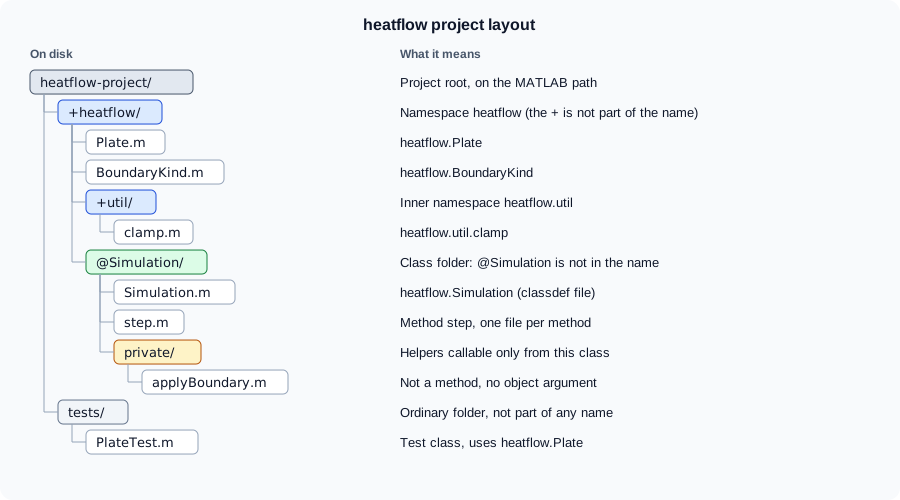
The file for the value class looks like this. Nothing in it mentions heatflow; the folder name supplies the prefix.
classdef Plate
    % heatflow.Plate  Rectangular plate and its temperature field.
    properties
        Nx (1,1) double {mustBePositive, mustBeInteger} = 4
        Ny (1,1) double {mustBePositive, mustBeInteger} = 3
        Dx (1,1) double {mustBePositive} = 0.1
        Alpha (1,1) double {mustBePositive} = 1e-4
        T double = []
    end
    methods
        function obj = Plate(nx,ny,dx,alpha)
            if nargin > 0
                obj.Nx = nx;
                obj.Ny = ny;
                obj.Dx = dx;
                obj.Alpha = alpha;
                obj.T = 20*ones(ny,nx);
            end
        end

        function m = maxTemperature(obj)
            m = max(obj.T,[],"all");
        end
    end
end
This file is not run here: Octave 11.3.0 does not support size, class and validation specifications on classdef properties, and with them it stops with a syntax error. The class syntax and property validation are covered on Properties and Methods.
Call sites then use the dotted names. The session below ran in Octave 11.3.0 against a reduced copy of the layout: Plate.m without the validators and max(obj.T(:)) instead of the "all" option, +util/clamp.m (y = min(max(x,lo),hi)), and a small handle class Counter in a class folder +heatflow/@Counter/ whose Count property is increased by the method file increment.m.
p = heatflow.Plate(5,4,0.1,1e-4);
disp(class(p))
disp(heatflow.util.clamp(25,0,20))
disp(p.maxTemperature())
c = heatflow.Counter();
c.increment();          % dot syntax
increment(c);           % function syntax, same method file
disp(c.Count)
try
    Plate(2,2,1,1);     % no namespace and no import
catch err
    disp(err.message)
end
Octave 11.3.0 output (MATLAB wording of the last error differs):
heatflow.Plate
20
20
2
'Plate' undefined near line 10, column 5
The class name carries the namespace (heatflow.Plate), an inner-namespace function is called by its full dotted name, a method defined in a separate file inside an @ folder is found by both call syntaxes, and the unqualified Plate does not exist. In MATLAB the last message is a MATLAB:UndefinedFunction error whose text names the unrecognized function or variable Plate; the wording varies by release (not run here).
Importing names
Typing heatflow.util.clamp everywhere is tedious, so import shortens names.
| Syntax | Effect |
|---|---|
|
Add one class; use |
|
Add one namespace function. |
|
Add one static method. |
|
Add everything in the namespace. The documentation says to avoid it, because an unspecified set of names comes into scope and can conflict with others. |
|
Display the current import list. |
|
Return the current import list. |
A function that uses the heatflow namespace imports exactly what it needs:
function stepWithLimit(sim,n)
    import heatflow.util.clamp
    sim.step(n);
    sim.Plate.T = clamp(sim.Plate.T,0,100);
end
This is not run here (Octave 11.3.0 stops at import with "the import function is not yet implemented in Octave"). On names, the documentation also shows that a partial import, such as import matlab.io.hdf4.* and then calling sd.close(sdID), shortens a long name while keeping the last identifier as a prefix so that close is not shadowed.
Rules for the import list, all from the import reference page:
-
Function scope. The scope is the whole function, including nested and local functions, and including code that comes before the
importline. The list of a function persists across calls and is cleared only when the function is cleared. Do not callclear importinside a function or a script. -
Script scope. The scope is the script body. Imports in a script are not visible to whoever called the script, so running a script that imports at the command prompt does not make the names available in the Command Window.
-
Base workspace. An
importtyped at the prompt applies to code typed at the prompt;clear importclears that list. -
Same-named members. If a namespace function and a class method have the same name and you import the whole namespace, calling
timedata(myobj)in function syntax runs the imported namespace function, because it is found first. Dot syntax (myobj.timedata) still calls the method.
Class folders and private folders
A class folder starts with @ and holds the class definition and one file per method:
+heatflow/@Simulation/Simulation.m     % classdef file; declares the methods
+heatflow/@Simulation/step.m           % method step(obj,n)
+heatflow/@Simulation/private/applyBoundary.m
The rules, from the documentation:
-
The folder name is
@plus the class name, it must be inside a path folder or a namespace, and it holds one class. -
The definition file is named after the class; any other function file in the folder is treated as a method. The files can be
.m,.mlx, MEX files or P-code (.p). -
Class folders are the one place where methods can live outside the
classdeffile. Which methods must also be declared in themethodsblock, and which attributes can be set for them, is on Properties and Methods. -
A
privatefolder inside a class folder holds helper functions that only the class’s methods can call. They are not methods: they take no object, and can be called only in function notation. They can read private members. Subclasses cannot use them; if a subclass needs the helper, make it a protected method instead. -
With both a method in the classdef file and a private function of the same name, dot notation
obj.namepicks the method and function notationname(obj)picks the private function.
Octave 11.3.0 result: a method in a separate file inside an @ folder is found (the session above), but a private folder inside the class folder is not searched. A method calling helper(obj.Count), with helper.m in @Counter/private/, stops with 'helper' undefined. The same layout is standard in MATLAB, so a package that must also run on Octave should put such helpers in the classdef file as local functions or static methods.
Why use a class folder at all
A single file with the whole classdef is simpler and is what most code uses; MATLAB places no limit on its length. The class folder helps when one person needs to edit a method without touching a huge file, when a method is written in a different file type, or when helpers must be hidden. The cost is that signatures are repeated in two places and that tools which list a class’s contents have to scan a folder. The heatflow project uses a class folder for Simulation only because it is the one class with private helpers.
Name precedence and the path
-
Path order. Several classes with the same name: the one in the folder that comes first on the path wins. A function with the same name as a class beats the class if the function is earlier on the path. As of R2025b, the position on the path is the only criterion; before that, a class in an
@folder beat a function of the same name regardless of position. -
Current folder. The current folder is searched first, so changing it counts as a path change, and definitions there take precedence.
-
Same namespace in two folders. If two path folders each have a
+heatflowfolder, MATLAB treats them as one namespace. If both define the same function name, only one is found. -
Namespace function and static method. When a namespace function and a static method have the same full name, for example
fldrA/+foo/bar.mandfldrB/@foo/bar.m, the namespace function wins, whatever the path order;which foo.barshows which is found. -
Updating a class after a path change. MATLAB keeps a single current definition of a class. If a class is removed from the path it is cleared unless instances exist; if a new definition takes precedence, existing instances are updated at their next use. If the path changes in the middle of a script or function, no class is updated or cleared until it finishes. Before R2024b, a changed definition in an
@folder was picked up immediately while one in a path folder required clearing the old definition first.
Introspection of namespaces (R2026a)
Three functions return what a namespace contains. Each returns only items visible in the current context.
| Syntax | Returns |
|---|---|
|
An array of |
|
An array of |
|
A string array of the inner namespaces. |
The argument is a string or character vector. Applied to the heatflow project, with its parent folder on the path, the calls would be:
classes = namespaceClasses("heatflow");
names   = string({classes.Name})       % "heatflow.BoundaryKind", "heatflow.Plate", "heatflow.Simulation"
inner   = innerNamespaces("heatflow")  % "heatflow.util"
funs    = namespaceFunctions("heatflow.util");
The commented results are what the layout above implies; the calls are not run here. The order of the elements is not documented, so sort before comparing. The R2026a release notes say that the older matlab.metadata.Namespace.fromName and matlab.metadata.Namespace.getAllNamespaces methods are no longer recommended. The metadata classes themselves are on Object Arrays, Customization and Introspection.
Common problems
| Symptom | Cause and fix |
|---|---|
|
The parent of |
A class file inside the namespace starts |
Do not repeat the namespace in the definition. Use |
A call to a namespace function from another file of the same namespace fails |
Calls to namespace code must include the namespace name, even from inside the same namespace, or use an import. |
|
A wildcard import brings an unspecified set of names. Import individual names or a longer partial namespace. |
An import works in one function and not in the next |
The list is per function (or script, or the base workspace). Repeat the import where it is needed. |
The |
A class-folder private folder serves only that class. Make the helper a protected method. |
A class definition inside a |
Class definitions cannot go in private folders. |
A project started on MATLAB before R2025b behaves differently on R2026b when an |
From R2025b the path position decides; the |
Where older books differ
Books written before R2024a (the object-oriented chapters of the standard MATLAB programming texts) call the +folder mechanism a "package", say "package function" and "package directory", and use "directory" for "folder". The mechanism is the same; the word was changed to namespace in R2024a to free "package" for the MATLAB Package Manager. Those books also discuss the old function-syntax classes with a @ folder holding class(s,'name') and a constructor file; that is a different thing from @ class folders for classdef, and the documentation announced in R2026a that function-syntax classes will be removed in a future release. They have nothing on namespaceFunctions, namespaceClasses or innerNamespaces, on the R2024b rules for updating classes after a path change, or on the R2025b rule that path position, and not the @ folder, decides between a class and a function of the same name.