ViewModel, Lifecycle-Aware Components, Coroutines and Flow
|
This content was generated with the assistance of AI and should be verified against the official documentation of Android before being relied on in production. See the section bibliography for the reference material consulted while preparing these pages. |
A ViewModel and the lifecycle-aware machinery around it exist to answer one recurring problem: a screen’s UI
state needs a home that outlives the short-lived Activity, Fragment or NavBackStackEntry object that
currently displays it, without outliving the process the app runs in. This page covers that home in depth — how a ViewModel is scoped and created, exactly what it survives and what it does not, how coroutines and
Flow are collected safely against a UI lifecycle, and how StateFlow, SharedFlow and Channel divide up the
job that LiveData and RxJava used to do alone. It targets lifecycle 2.11.0, kotlinx-coroutines (the
version TrailMate’s version catalog pins), androidx.hilt 1.4.0 and Android 17 (API level 37), building on
Activities and the Activity Lifecycle and
Fragments and the Fragment Lifecycle, which introduced viewModels() and
activityViewModels() at the point each toolkit first needed them.
Recommended App Architecture (UI, Domain and Data Layers) already
introduced TrailListViewModel, TrailListUiState and stateIn(WhileSubscribed(5_000)) as the shape a
production screen should take; this page explains why each of those pieces exists and how the framework
underneath them works, rather than re-deriving the architecture from scratch.
Kotlin’s coroutine and Flow language features themselves — suspend functions, builders, structured
concurrency, cancellation, Flow operators — are covered on
Coroutines Basics,
Coroutine Context,
Cancellation and Exceptions and Flows, and are not repeated here.
This page is about the Android-specific scaffolding built on top of them: the scopes that tie a coroutine’s
lifetime to a UI component, and the lifecycle-aware collectors that stop that coroutine from doing work no view
is around to see.
ViewModel Scopes: Activity, Fragment and Navigation Entry
A ViewModel is never new-ed up directly in production code. It is requested from a ViewModelProvider, keyed
by both a class and a scope — an object implementing ViewModelStoreOwner that holds a ViewModelStore, a
simple map from class to instance. The scope decides two things: how many callers share the same instance, and
how long that instance lives. TrailMate uses three different scopes for three different needs:
| Scope | ViewModelStoreOwner |
When TrailMate uses it |
|---|---|---|
Activity-scoped |
The hosting |
A |
Fragment/screen-scoped |
The individual |
A |
Navigation-entry-scoped |
A |
A |
Two ViewModel requests that resolve to the same ViewModelStoreOwner instance always get the same
ViewModel instance back, which is what makes activity scoping a sharing mechanism rather than just a longer
lifetime: TrailListFragment and TrailDetailFragment, hosted by the same MainActivity, both requesting
TrailSelectionViewModel by activityViewModels(), get one shared object. See
Android Developers — ViewModel Overview.
Creating ViewModels
Every creation function below ultimately calls through to a ViewModelProvider; they differ in which scope they
resolve against and which toolkit they are written for.
viewModels() and activityViewModels() (Views, Fragment/ComponentActivity)
by viewModels() is a Kotlin property delegate that scopes a ViewModel to the Fragment or
ComponentActivity it is called from; by activityViewModels() scopes it to the hosting activity instead, as
shown on Fragments and the Fragment Lifecycle:
// feature/trails/src/main/kotlin/com/example/trailmate/feature/trails/TrailListFragment.kt
class TrailListFragment : Fragment(R.layout.fragment_trail_list) {
    private val viewModel: TrailListViewModel by viewModels()
    private val sharedViewModel: TrailSelectionViewModel by activityViewModels()
}Both delegates are lazy: the ViewModel is not actually created until the property is first read, and the
resulting instance is cached in the owner’s ViewModelStore for every later read and for every recreation of
the view that does not also recreate the owner. With Hilt, @HiltViewModel-annotated classes use the exact
same viewModels()/activityViewModels() call sites — Hilt supplies the factory transparently through
@AndroidEntryPoint, so nothing about the call site changes; see
Dependency Injection with Hilt, Dagger and Koin. See
Android
Developers — Fragment.viewModels().
viewModel() and hiltViewModel() (Compose)
In Compose, viewModel() from androidx.lifecycle:lifecycle-viewmodel-compose resolves against the nearest
ViewModelStoreOwner found through LocalViewModelStoreOwner — normally the hosting ComponentActivity, or a
NavBackStackEntry when called inside a Navigation Compose destination:
// feature/trails/src/main/kotlin/com/example/trailmate/feature/trails/TrailListScreen.kt
@Composable
fun TrailListRoute(
    viewModel: TrailListViewModel = viewModel(),
) {
    val uiState by viewModel.uiState.collectAsStateWithLifecycle()
    TrailListScreen(uiState = uiState, onTrailClick = viewModel::onTrailClicked)
}hiltViewModel(), from androidx.hilt:hilt-lifecycle-viewmodel-compose (the package
androidx.hilt.lifecycle.viewmodel.compose as of androidx.hilt 1.4.0; earlier releases shipped it under
hilt-navigation-compose), is the Hilt-aware equivalent and is what TrailMate actually calls, since every
TrailMate ViewModel is @HiltViewModel-annotated:
// feature/trails/src/main/kotlin/com/example/trailmate/feature/trails/TrailDetailScreen.kt
@Composable
fun TrailDetailRoute(
    viewModel: TrailDetailViewModel = hiltViewModel(),
) {
    val uiState by viewModel.uiState.collectAsStateWithLifecycle()
    TrailDetailScreen(uiState = uiState, onFavoriteToggle = viewModel::onFavoriteToggled)
}Passing an explicit NavBackStackEntry as hiltViewModel(backStackEntry) (Navigation Compose) or a route entry
key (Navigation 3, via androidx.lifecycle:lifecycle-viewmodel-navigation3) is how a multi-destination flow gets
a ViewModel scoped to that flow instead of to a single screen — the navigation-entry scope from the table
above. See Android
Developers — viewModel().
viewModelFactory { } and CreationExtras
A ViewModel with constructor parameters needs a ViewModelProvider.Factory to build it, since a
ViewModelProvider never calls a constructor with arguments directly. The Kotlin DSL viewModelFactory { }
builds one without a hand-written class, and CreationExtras is how it reaches the very state a plain
constructor call could not have supplied — most importantly, the SavedStateHandle (covered in full on
Saving UI State: Views vs. Compose) and, from a
Compose viewModel()/hiltViewModel() call, an Application instance:
// feature/trails/src/main/kotlin/com/example/trailmate/feature/trails/TrailDetailViewModel.kt
class TrailDetailViewModel(
    savedStateHandle: SavedStateHandle,
    private val repository: TrailRepository,
) : ViewModel() {
    // Navigation Compose writes the route's arguments into this handle; Navigation 3 does not.
    private val trailId: String = savedStateHandle.toRoute<TrailDetail>().trailId
    // ...

    companion object {
        fun factory(repository: TrailRepository): ViewModelProvider.Factory = viewModelFactory {
            initializer {
                TrailDetailViewModel(
                    savedStateHandle = createSavedStateHandle(),
                    repository = repository,
                )
            }
        }
    }
}createSavedStateHandle() is an extension available inside an initializer { } block precisely because that
block runs with a CreationExtras in scope, and CreationExtras is what carries the SAVED_STATE_REGISTRY_OWNER_KEY
and VIEW_MODEL_STORE_OWNER_KEY entries a plain factory interface has no way to receive. In a Hilt-based app like
TrailMate, @HiltViewModel plus @Inject constructor generates an equivalent factory automatically — hiltViewModel()
wires it in without any of this being written by hand — so viewModelFactory { } shows up mainly for a
non-Hilt module, a library ViewModel, or a test that wants a factory without dragging in the DI graph.
savedStateHandle.toRoute<TrailDetail>() above assumes Navigation Compose, which populates the
SavedStateHandle from the destination’s route; Navigation 3 does not, so a Navigation 3 app passes the
NavKey’s `trailId into the factory (or into a Hilt assisted factory) instead, as shown on
Saving UI State: Views vs. Compose. See
Android
Developers — viewModelFactory() and
Android Developers — Saved State module for ViewModel.
The ViewModel Lifecycle: Survives Configuration Changes, Not Process Death
A ViewModel instance is retained by its ViewModelStore, and that store itself is retained across a
configuration change through a mechanism entirely separate from onSaveInstanceState(): the framework holds
the same ViewModelStore object alive in memory and hands it to the new Activity/Fragment instance the
system creates after the old one is destroyed. Because of that, a rotation destroys and recreates MainActivity
itself, but every ViewModel it (or a fragment it hosts) requested keeps running in the background the entire
time — an in-flight coroutine in viewModelScope is never cancelled by a rotation.
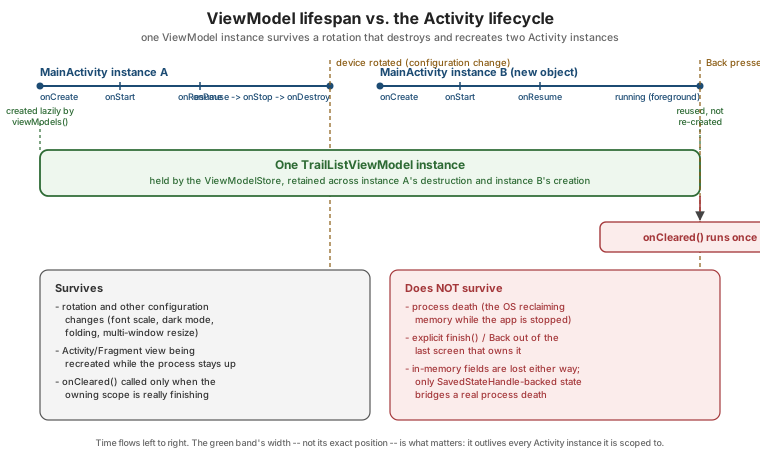
That retention has a hard boundary: it only spans the life of the process. If the system kills the app’s
process to reclaim memory while it is stopped (see
Activities and the Activity Lifecycle), every ViewModelStore
and every ViewModel inside it disappears along with the rest of the process’s heap — there is no callback that
runs in the dying process to save anything from a ViewModel’s ordinary fields. When the user navigates back
to that task, the system starts a fresh process, and every `ViewModel involved is created again from nothing,
just as if the app had never run. A ViewModel’s `SavedStateHandle is the one thing that bridges this gap,
because it is backed by the same platform Bundle mechanism onSaveInstanceState() uses, not by the
ViewModel instance itself — Saving UI State: Views
vs. Compose covers SavedStateHandle in full.
| Event | What happens to a ViewModel |
|---|---|
Rotation, dark/light mode toggle, font-scale change, fold/unfold, multi-window resize |
The instance, its coroutines and all its ordinary fields survive untouched; only the recreated
|
Pressing Back out of the screen that owns it, or |
|
System-initiated process death while stopped |
The whole process disappears; a brand-new |
onCleared() and addCloseable()
onCleared() is the one lifecycle callback a ViewModel gets, called exactly once, right before the instance is
discarded for good (never for a configuration change). It is the place to release anything a ViewModel opened
that nothing else will close on its behalf:
// feature/trails/src/main/kotlin/com/example/trailmate/feature/trails/RecordHikeViewModel.kt
class RecordHikeViewModel(
    private val locationClient: FusedLocationProviderClient,
) : ViewModel() {
    private val locationCallback = object : LocationCallback() {
        override fun onLocationResult(result: LocationResult) { /* ... */ }
    }

    init {
        locationClient.requestLocationUpdates(request, locationCallback, Looper.getMainLooper())
    }

    override fun onCleared() {
        locationClient.removeLocationUpdates(locationCallback)
    }
}viewModelScope (below) is cancelled automatically before onCleared() runs, so a coroutine launched in it never
needs manual cancellation; onCleared() is only needed for resources viewModelScope does not already manage,
such as the location callback above, or a Closeable resource. addCloseable(closeable) registers exactly that
second case declaratively — the ViewModel base class calls close() on every registered Closeable
automatically when it is cleared, without an onCleared() override at all:
// feature/trails/src/main/kotlin/com/example/trailmate/feature/trails/TrailDetailViewModel.kt
class TrailDetailViewModel(
    private val photoCache: TrailPhotoCache, // : Closeable
) : ViewModel() {
    init {
        addCloseable(photoCache)
    }
}Lifecycle, DefaultLifecycleObserver and ProcessLifecycleOwner
Lifecycle is the observable state machine underneath every LifecycleOwner — an Activity, a Fragment
(and separately its viewLifecycleOwner), a NavBackStackEntry. Its states (INITIALIZED, CREATED,
STARTED, RESUMED, DESTROYED) and how an Activity moves through them are covered in depth on
Activities and the Activity Lifecycle. DefaultLifecycleObserver
lets any object react to those transitions without inheriting from a lifecycle-owning class itself, as shown
there with HikeLocationObserver.
ProcessLifecycleOwner applies the same idea one level up: a single Lifecycle for the whole application
process, moving to STARTED/RESUMED when the first activity in the process comes to the foreground and to
STOPPED only once every activity has gone to the background — unlike any individual activity’s own lifecycle,
it is not affected by rotation or by navigating between TrailMate’s own screens:
// app/src/main/kotlin/com/example/trailmate/TrailMateApplication.kt
@HiltAndroidApp
class TrailMateApplication : Application(), DefaultLifecycleObserver {
    @Inject lateinit var analytics: AnalyticsClient

    override fun onCreate() {
        super<Application>.onCreate()
        ProcessLifecycleOwner.get().lifecycle.addObserver(this)
    }

    override fun onStart(owner: LifecycleOwner) = analytics.startSession()
    override fun onStop(owner: LifecycleOwner) = analytics.endSession()
}This is the standard way to detect "the app moved to the foreground/background" as a single event — for an
analytics session, or for pausing TrailSyncWorker’s foreground work — instead of trying to infer it by
comparing `onStop/onStart calls across every activity the app might have. See
Android Developers — Handling Lifecycles
with Lifecycle-Aware Components and
Android Developers — ProcessLifecycleOwner.
viewModelScope and lifecycleScope
Both are CoroutineScope properties that come pre-wired to cancel their coroutines automatically, so that
launching a coroutine from a ViewModel or a LifecycleOwner never has to be paired with manual cancellation:
| Scope | Cancelled when | Typical use |
|---|---|---|
|
|
Loading data, calling a repository, anything that should keep running across a rotation |
|
The owning |
One-off UI-only work genuinely tied to this view instance, not to the screen’s data |
// feature/trails/src/main/kotlin/com/example/trailmate/feature/trails/TrailListViewModel.kt
class TrailListViewModel(private val repository: TrailRepository) : ViewModel() {
    fun refresh() {
        viewModelScope.launch {
            repository.refresh()
        }
    }
}Because viewModelScope survives a rotation and lifecycleScope on an activity does not, data-loading work
belongs in the ViewModel, launched in viewModelScope, almost always — launching the same call directly from
an Activity’s `lifecycleScope would restart it from scratch on every rotation. See
Android Developers — Coroutines and
Lifecycle-Aware Components and
Android
Developers — LifecycleOwner.lifecycleScope.
repeatOnLifecycle and flowWithLifecycle
A coroutine launched in lifecycleScope runs for the whole lifetime of the owner, which is too broad for
collecting a Flow that drives the UI: collecting while the screen is stopped wastes work (and, for a Flow
backed by a SharedFlow, can silently drop values a paused collector never asked to receive). repeatOnLifecycle
solves this by restarting a coroutine block every time the lifecycle enters at least the given state, and
cancelling it every time it drops below that state:
// feature/trails/src/main/kotlin/com/example/trailmate/feature/trails/TrailListFragment.kt
override fun onViewCreated(view: View, savedInstanceState: Bundle?) {
    super.onViewCreated(view, savedInstanceState)
    viewLifecycleOwner.lifecycleScope.launch {
        viewLifecycleOwner.repeatOnLifecycle(Lifecycle.State.STARTED) {
            viewModel.uiState.collect { state -> adapter.submitList(state.trails) }
        }
    }
}flowWithLifecycle(lifecycle, state) is the operator form of the same idea, useful when the collection needs to
be chained with other Flow operators before a terminal collect:
viewModel.uiState
    .flowWithLifecycle(viewLifecycleOwner.lifecycle, Lifecycle.State.STARTED)
    .onEach { state -> adapter.submitList(state.trails) }
.launchIn(viewLifecycleOwner.lifecycleScope)Both stop collecting once the view (or activity) drops below STARTED — invisible, in the background — and
resume from the beginning of the block when it comes back, which is exactly why STARTED (not RESUMED) is the
state almost every UI collector should use: it keeps collecting while a dialog or another activity briefly
covers the screen (RESUMED would stop there too, wastefully restarting collection on every partial cover).
Lifecycle.State.RESUMED is reserved for work that genuinely must not run while anything else has focus, such as
a camera preview. See
Android Developers — Restarting a
coroutine when the lifecycle is STARTED.
collectAsStateWithLifecycle
Compose’s own collectAsState() collects a Flow for as long as the composable is in the composition, with no
regard for whether the screen is actually visible — a background composable (behind a NavHost entry that is
merely paused, not disposed) keeps collecting regardless. collectAsStateWithLifecycle(), from
androidx.lifecycle:lifecycle-runtime-compose, adds exactly the repeatOnLifecycle(STARTED) behavior above to a
Compose collector, and is the version TrailMate uses everywhere a ViewModel’s `StateFlow reaches a composable:
// feature/trails/src/main/kotlin/com/example/trailmate/feature/trails/TrailListScreen.kt
@Composable
fun TrailListRoute(viewModel: TrailListViewModel = hiltViewModel()) {
    val uiState by viewModel.uiState.collectAsStateWithLifecycle()
    TrailListScreen(uiState = uiState, onTrailClick = viewModel::onTrailClicked)
}There is essentially no reason to reach for plain collectAsState() on a ViewModel’s exposed `Flow in an app
target; collectAsStateWithLifecycle() is the same one call and is always lifecycle-safe. See
Android
Developers — Lifecycle-aware Flow collection and
State, Recomposition and Side Effects in Compose for the
State/recomposition mechanics collectAsStateWithLifecycle() builds on.
Dispatchers and Main-Safety
Every coroutine launched in viewModelScope or lifecycleScope starts on Dispatchers.Main.immediate by
default — deliberately, because it makes updating UI state the common case that needs no explicit dispatcher at
all. A function is main-safe when it can be called from the main thread without blocking it, which for
TrailMate’s TrailRepository means every suspend function switches internally to a background dispatcher for
its own I/O rather than asking every caller to remember to:
// core/data/src/main/kotlin/com/example/trailmate/core/data/OfflineFirstTrailRepository.kt
class OfflineFirstTrailRepository(
    private val trailDao: TrailDao,
    private val trailApi: TrailApi,
    private val ioDispatcher: CoroutineDispatcher = Dispatchers.IO,
) : TrailRepository {
    override suspend fun refresh() = withContext(ioDispatcher) {
        val dtos = trailApi.getTrails()
        trailDao.upsertAll(dtos.map { it.toEntity() })
    }
}Dispatchers.IO is for blocking I/O (network calls through Retrofit/OkHttp, Room’s own internally-dispatched
queries, file access); Dispatchers.Default is for CPU-bound work (sorting or filtering a large list); plain
Dispatchers.Main is for touching Views or other main-thread-only APIs directly, which a ViewModel almost
never needs since its own scope is already on Main. Injecting the dispatcher as a constructor parameter, as
above, rather than hardcoding Dispatchers.IO inline, is what lets a test substitute a deterministic test
dispatcher — covered together with Dispatchers.setMain on
Unit Testing with JUnit, Mockito, MockK and
Robolectric. See Kotlin Documentation — Coroutines basics
and Kotlin Documentation — Coroutines best
practices for the dispatcher-injection convention in general.
StateFlow vs. SharedFlow vs. Channel
TrailMate’s `ViewModel`s expose state and events through three different Kotlin coroutines types, each suited to a different shape of data:
| Type | Has a current value? | Replays to new collectors | TrailMate use |
|---|---|---|---|
|
Yes — always holds exactly one value, read synchronously via |
The current value, always (conflated: only the latest survives if no one is collecting) |
|
|
No |
Nothing to a collector that starts after emission; a slow collector can miss values that arrive faster than it consumes them, unless buffered |
Broadcasting an event to more than one collector, such as a global "session expired" signal |
|
No |
Nothing — and, unlike |
A one-off UI event meant to be handled exactly once, such as "navigate to trail detail" or "show a snackbar" |
One-Off Events: Why Not Just Put Them in StateFlow?
Storing a one-off event (a snackbar message, a navigation request) directly as a field of a StateFlow-backed UI
state seems simplest, but a StateFlow’s conflated, always-has-a-value nature works against it: the event
replays to every new collector — including the very same collector reattaching after a configuration change — so a snackbar can reappear on rotation unless the `ViewModel remembers to clear the field back to null right
after showing it, which is easy to forget and easy to race. TrailMate exposes one-off events through a
Channel, consumed as a Flow via receiveAsFlow(), which delivers each event exactly once and never replays
an already-consumed one:
// feature/trails/src/main/kotlin/com/example/trailmate/feature/trails/TrailDetailViewModel.kt
private val _events = Channel<TrailDetailEvent>(Channel.BUFFERED)
val events: Flow<TrailDetailEvent> = _events.receiveAsFlow()

sealed interface TrailDetailEvent {
    data object TrailDeleted : TrailDetailEvent
    data class ShowError(val message: String) : TrailDetailEvent
}

fun onDeleteConfirmed() {
    viewModelScope.launch {
        repository.delete(trailId)
        _events.send(TrailDetailEvent.TrailDeleted)
    }
}// feature/trails/src/main/kotlin/com/example/trailmate/feature/trails/TrailDetailFragment.kt
viewLifecycleOwner.lifecycleScope.launch {
viewLifecycleOwner.repeatOnLifecycle(Lifecycle.State.STARTED) {
viewModel.events.collect { event ->
when (event) {
TrailDetailEvent.TrailDeleted -> findNavController().popBackStack()
is TrailDetailEvent.ShowError -> showSnackbar(event.message)
}
}
}
}A SharedFlow with replay = 0 reaches for the same goal and is a legitimate alternative when more than one
collector genuinely needs the same event (broadcasting to two independent parts of the UI); a Channel is the
narrower, simpler tool when exactly one collector should ever see each event, which is the far more common case.
See Android Developers — StateFlow and
SharedFlow and Kotlin Documentation — Asynchronous Flow.
stateIn and shareIn
stateIn/shareIn convert a cold Flow (one that starts its work fresh for every collector, such as
trailDao.observeTrails(), a Room Flow query) into a hot StateFlow/SharedFlow that all collectors share
and that keeps running according to a chosen SharingStarted policy even between collectors:
// feature/trails/src/main/kotlin/com/example/trailmate/feature/trails/TrailListViewModel.kt
val uiState: StateFlow<TrailListUiState> = repository.observeTrails()
    .map { trails -> TrailListUiState(trails = trails, isLoading = false) }
    .stateIn(
        scope = viewModelScope,
        started = SharingStarted.WhileSubscribed(5_000),
        initialValue = TrailListUiState(isLoading = true),
)SharingStarted.WhileSubscribed(5_000) — the policy Recommended App
Architecture (UI, Domain and Data Layers) already introduced — keeps the underlying Flow (and, transitively,
the Room query or repository call behind it) running for five seconds after the last collector disappears before
actually cancelling it, which absorbs the brief gap between onStop and the next onStart during a
configuration change without restarting the whole query from scratch. SharingStarted.Eagerly starts collecting
immediately and never stops on its own, appropriate for something that should always be warm regardless of
collectors; SharingStarted.Lazily starts on the first collector and then never stops either, keeping the last
value cached but not restarting eagerly. shareIn is the SharedFlow counterpart, used the same way when the
converted flow should not conflate to a single "current value" the way stateIn does. See
Android Developers — Use StateFlow in a ViewModel and
Android
Developers — Lifecycle-aware Flow collection.
LiveData as Legacy, with Interop
LiveData<T> predates StateFlow by several years and solves almost the same problem — an observable,
lifecycle-aware holder of a current value — but as a purpose-built Android type rather than a general-purpose
coroutines/Flow construct: it has no suspend-function equivalent, no operators beyond a handful
(Transformations.map, .switchMap), and no way to express a SharedFlow-style event stream without the same
replay problem StateFlow has. TrailMate’s Google-recommended architecture is fully Flow-based, and LiveData
appears only where existing Views-era code has not migrated yet:
// feature/trails/src/main/kotlin/com/example/trailmate/feature/trails/legacy/LegacyTrailListViewModel.kt
class LegacyTrailListViewModel(repository: TrailRepository) : ViewModel() {
    val trails: LiveData<List<Trail>> = repository.observeTrails().asLiveData()
}Flow.asLiveData() and LiveData<T>.asFlow(), both from androidx.lifecycle:lifecycle-livedata-ktx, convert in
either direction, which is what lets a ViewModel be migrated to StateFlow internally while an
not-yet-migrated Fragment keeps observing a LiveData at the call site, or vice versa, one layer at a time.
LiveData is only ever observed with observe(viewLifecycleOwner, observer) — never observeForever outside a
narrow, manually-managed case — for exactly the same lifecycle-safety reason repeatOnLifecycle exists for
Flow. See Android Developers — LiveData
Overview.
RxJava as Legacy, with a Migration Table
RxJava (Observable, Single, Flowable, Disposable) was, for years before Kotlin coroutines matured, the
standard way to write asynchronous, composable Android code, and a large amount of production and open-source
code — along with the books this section’s disclaimer refers to — still uses it. TrailMate’s own code is
coroutines/Flow throughout; the table below exists to translate an RxJava-era codebase rather than to recommend
adopting RxJava:
| RxJava | Coroutines / Flow equivalent |
|---|---|
|
|
|
|
|
|
|
|
|
|
|
|
|
|
|
|
|
|
|
Structured concurrency: a |
The last row is the deepest difference: RxJava’s Disposable/CompositeDisposable pattern is a manual,
opt-in discipline that a forgotten .addTo(compositeDisposable) silently defeats, while viewModelScope and
`lifecycleScope’s structured concurrency cancels everything automatically by construction. RxJava remains a
reasonable choice for a codebase already built on it, or for operators Flow’s standard library does not (yet)
provide a direct equivalent for, but a new TrailMate feature is written in coroutines/Flow, not RxJava. See
Kotlin Documentation — Asynchronous Flow and
Android Developers — Kotlin coroutines on Android.
A Short History: AsyncTask and Loaders
Two older Android APIs solved a narrower version of the same "don’t block the main thread" problem that
ViewModel plus coroutines now solves comprehensively, and both are deprecated:
-
AsyncTask(deprecated since API 30) ran a background computation and delivered its result on the main thread throughonPostExecute(). It had no lifecycle awareness at all — a runningAsyncTaskthat outlived its activity (a common bug, since it held an implicit reference to it) leaked the activity and could crash trying to update destroyed views; asuspendfunction launched fromviewModelScopeavoids both problems by construction. -
Loader/LoaderManager(from the original Support Library, deprecated since Fragment 1.1.0 in favor ofViewModelplusLiveData) managed a background query’s lifecycle in step with anActivity/Fragment, reloading it automatically on a configuration change instead of restarting from scratch — the exact jobstateIn(WhileSubscribed(…))on aViewModel-scopedFlownow does far more flexibly.
Neither appears anywhere in current TrailMate code; they are mentioned here only because a reader coming from an
older book or an existing legacy codebase will run into both, and the migration path from either one is the same
ViewModel plus coroutines/Flow shape this page describes throughout.