Graphics: Canvas, OpenGL ES and GLTextureView
|
This content was generated with the assistance of AI and should be verified against the official documentation of Android before being relied on in production. See the section bibliography for the reference material consulted while preparing these pages. |
Every screen covered so far is built from widgets or composables that already know how to draw themselves.
Occasionally an app needs to draw pixels directly — a custom chart, a live camera-derived overlay, or a fully
custom 3D view — and Android offers that at three increasingly low levels: the Canvas API used throughout the
View system and Compose, GPU shader effects (AGSL/RuntimeShader, RenderEffect), and raw OpenGL ES for when
even shaders aren’t enough. This page stays brief, matching the depth of
Canvas, WebGL & Three.js: it introduces each
level and links out rather than teaching 3D graphics programming in full. It targets this section’s baseline — Android 17 (API 37) — and the real
com.irurueta:irurueta-android-glutils:1.1.11
library for the GLTextureView example.
2D Drawing: Canvas, DrawScope, Shaders and RenderEffect
Canvas in Views vs. DrawScope in Compose
ElevationProfileView already draws with a Canvas
and Paint inside View.onDraw(canvas: Canvas) — an imperative, mutable drawing surface: drawPath,
drawRect, drawText, drawBitmap, each call taking a Paint that carries color, stroke width and shader
state. Compose exposes the same underlying capability through Modifier.drawBehind { } / Canvas(modifier) { }
composables, whose lambda receives a DrawScope instead of a raw android.graphics.Canvas:
// feature/trails/src/main/kotlin/com/example/trailmate/feature/trails/DifficultyBadge.kt
Canvas(modifier = Modifier.size(24.dp)) {
    drawCircle(color = difficultyColor, radius = size.minDimension / 2f)
    drawArc(
        color = Color.White,
        startAngle = -90f,
        sweepAngle = 270f,
        useCenter = false,
        style = Stroke(width = 2.dp.toPx()),
    )
}DrawScope is declarative-flavored but still immediate-mode under the hood: every draw call happens once per
recomposition/frame, there is no retained scene graph, and units are density-independent (size, .toPx())
rather than raw pixels. It offers the same primitives as Canvas (drawRect, drawPath, drawImage,
drawText) plus first-class Brush support. See
Android Developers — Graphics overview and
Android Developers — Draw a background
in Compose.
Brush, AGSL and RuntimeShader
A Brush (SolidColor, Brush.linearGradient, Brush.radialGradient, Brush.sweepGradient) fills or strokes a
shape with something more than a flat color, the Compose equivalent of a Shader assigned to a Paint. Since
API 33, Android also runs small GPU programs written in AGSL (Android Graphics Shading Language, a
GLSL-like dialect) through android.graphics.RuntimeShader, wrapped into a Brush via ShaderBrush:
// feature/trails/src/main/kotlin/com/example/trailmate/feature/trails/ShimmerPlaceholder.kt
private const val SHIMMER_SHADER = """
    uniform float2 resolution;
    uniform float progress;
    half4 main(float2 coord) {
        float x = coord.x / resolution.x + progress;
        float shade = 0.5 + 0.5 * sin(x * 6.2831853);
        return half4(shade, shade, shade, 1.0);
    }
"""

val shimmerBrush = remember(progress) {
    val shader = RuntimeShader(SHIMMER_SHADER)
    shader.setFloatUniform("progress", progress)
    ShaderBrush(shader)
}
Box(modifier = Modifier.fillMaxWidth().height(80.dp).background(shimmerBrush))RuntimeShader needs the resolution uniform set from onSizeChanged/DrawScope.size since AGSL has no
built-in notion of the surface it draws into. AGSL fills the same niche GLSL fragment shaders fill on the web
(gradients, noise, distortion), without opening a full OpenGL ES context. See
Android Developers — AGSL.
RenderEffect
android.graphics.RenderEffect (API 31+) applies GPU post-processing — blur, color filters, chained shader
effects — to an entire View or Compose layer without touching its drawing code, via
View.setRenderEffect(…) or Modifier.graphicsLayer { renderEffect = … }:
Box(
    modifier = Modifier.graphicsLayer {
        renderEffect = RenderEffect
            .createBlurEffect(24f, 24f, Shader.TileMode.CLAMP)
            .asComposeRenderEffect()
    }
)This replaces the older, CPU-bound RenderScript blur/filter APIs described below. See
Android Developers — Hardware
acceleration.
OpenGL ES
Supported Versions
Android supports OpenGL ES 2.0 (API 8+), 3.0 (API 18+), 3.1 (API 21+) and 3.2 (API 24+); OpenGL ES 1.x is
deprecated. TrailMate’s minSdk = 26 comfortably supports ES 3.2 on essentially every device it targets. See
Android Developers — OpenGL ES.
What OpenGL ES Is, and Why It’s Verbose
OpenGL ES is a low-level, cross-platform binding to the GPU: rendering means creating an EGL rendering context
tied to a native window, compiling small GPU programs (shaders) written in GLSL, uploading vertex data into GPU
buffers, describing that buffer’s layout to the shader, and issuing a draw call — with no ready-made shapes,
scene graph or camera, exactly as raw WebGL is on the web (see
Canvas, WebGL & Three.js). Android adds one more
layer beneath that: EGL configuration and context/surface lifecycle have to be managed by hand, matched to the
Activity/View lifecycle, or handed off to GLSurfaceView.
GLSurfaceView and GLSurfaceView.Renderer
android.opengl.GLSurfaceView is the standard helper: it owns an EGL context, runs a dedicated GL thread, and
calls back into an application-supplied GLSurfaceView.Renderer at the right moments:
// feature/trails/src/main/kotlin/com/example/trailmate/feature/trails/TrailPreviewRenderer.kt
class TrailPreviewRenderer : GLSurfaceView.Renderer {

    override fun onSurfaceCreated(gl: GL10?, config: EGLConfig?) {
        GLES20.glClearColor(0.05f, 0.05f, 0.08f, 1f)
        // compile/link the vertex + fragment shader program here
    }

    override fun onSurfaceChanged(gl: GL10?, width: Int, height: Int) {
        GLES20.glViewport(0, 0, width, height)
    }

    override fun onDrawFrame(gl: GL10?) {
        GLES20.glClear(GLES20.GL_COLOR_BUFFER_BIT)
        // bind the vertex buffer, glUseProgram, glDrawArrays(GL_TRIANGLES, 0, 3)
    }
}

class TrailPreviewGLView(context: Context) : GLSurfaceView(context) {
    init {
        setEGLContextClientVersion(2)
        setRenderer(TrailPreviewRenderer())
        renderMode = RENDERMODE_WHEN_DIRTY
    }
}setEGLContextClientVersion(2) selects an OpenGL ES 2.0+ context (the number that matters is the major version;
GLES20/GLES30/GLES31/GLES32 are chosen by which package the code imports and which extensions it probes
for). renderMode is either RENDERMODE_CONTINUOUSLY (redraw every vsync, for animation) or
RENDERMODE_WHEN_DIRTY (redraw only after requestRender(), for a static or rarely-changing scene). The
onSurfaceCreated/onSurfaceChanged/onDrawFrame triangle is the entire contract a renderer implements. See
Android Developers — GLSurfaceView.
GLSurfaceView vs. TextureView
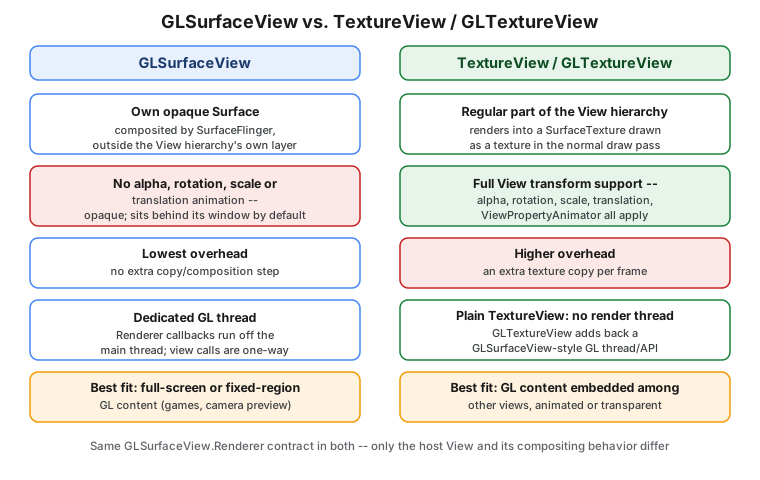
GLSurfaceView renders into its own opaque Surface, composited by SurfaceFlinger outside the normal View
drawing pass — cheapest to render, but it cannot be rotated, scaled, faded or animated like a regular View,
and its layering is fixed rather than following the view tree. By default the surface is Z-ordered behind the
window that holds the SurfaceView, which punches a transparent hole in that window so the surface shows through;
sibling views drawn over that area still appear on top of it. setZOrderMediaOverlay(true) places the surface
above another, default-ordered SurfaceView in the same window but still behind the window itself, and
setZOrderOnTop(true) places it above the window, covering every view in it. See
Android Developers — SurfaceView.
android.view.TextureView instead renders into a SurfaceTexture that is drawn as a texture during the normal
View draw pass, so it participates fully in transforms, alpha and ViewPropertyAnimator — at the cost of an
extra per-frame texture copy, and it owns no render thread of its own: a plain TextureView only manages a
SurfaceTexture and leaves rendering entirely to application code.
GLTextureView (irurueta-android-glutils)
Because a plain TextureView has no GL thread, EGL setup or render-mode handling, using OpenGL ES inside one
normally means reimplementing everything GLSurfaceView already provides. The
irurueta-android-glutils library’s GLTextureView
closes that gap: it is a TextureView subclass that ports GLSurfaceView’s EGL/thread management onto a
`SurfaceTexture, exposing essentially the same API so a renderer written against one works against the other
almost unchanged:
// feature/trails/src/main/kotlin/com/example/trailmate/feature/trails/TrailPreviewGLTextureView.kt
class TrailPreviewGLTextureView @JvmOverloads constructor(
    context: Context,
    attrs: AttributeSet? = null,
) : GLTextureView(context, attrs) {
    init {
        setEGLContextClientVersion(2)
        setEGLConfigChooser(needDepth = true)
        setRenderer(TrailPreviewRenderer())
        renderMode = GLTextureView.RENDER_MODE_WHEN_DIRTY
        preserveEGLContextOnPause = true
    }
}The dependency:
// feature/trails/build.gradle.kts
dependencies {
    implementation("com.irurueta:irurueta-android-glutils:1.1.11")
}setEGLConfigChooser picks the EGL frame buffer configuration (an overload takes a boolean for whether a depth
buffer is needed; another takes explicit red/green/blue/alpha/depth/stencil bit sizes; a third takes a custom
GLTextureView.EGLConfigChooser). requestRender() schedules one frame under RENDER_MODE_WHEN_DIRTY;
queueEvent(Runnable) posts work onto the GL thread from any other thread (the same pattern GLSurfaceView uses
to let, say, a ViewModel push updated vertex data before the next frame renders); onPause()/onResume()
must be forwarded from the hosting Activity/Fragment lifecycle exactly like GLSurfaceView’s, to release and
recreate the EGL surface around backgrounding. `preserveEGLContextOnPause = true keeps the GL context (but not
the surface) alive across a pause, avoiding a full shader/texture reload when the view briefly disappears — useful for a TrailDetailScreen preview that scrolls off and back on screen. Because it is a real View,
embedding it in Compose is the ordinary AndroidView interop covered on
Migrating from Views to Compose:
AndroidView(
    factory = { context -> TrailPreviewGLTextureView(context) },
    modifier = Modifier.fillMaxWidth().height(220.dp).graphicsLayer { alpha = previewAlpha },
)That last alpha is exactly the capability GLSurfaceView cannot offer directly — a GLTextureView fades in
and out like any other composable.
The same library also ships pinhole-camera helpers, CameraToOpenGlHelper and OpenGlToCameraHelper, which
convert between a device camera’s intrinsic/pose parameters and the projection/view matrices an OpenGL ES
renderer expects — useful for overlaying GL content (e.g. an AR-style trail marker) aligned with a live
CameraX preview, described on
Camera, Location, Sensors, Media and
Connectivity.
Vulkan and ANGLE
For new low-level graphics work, Google’s stated direction is Vulkan, a lower-overhead, more explicit API than OpenGL ES that gives an application more direct control over GPU work submission and synchronization; it is the recommended target for anything performance-sensitive being written today rather than ported from an existing GL codebase. See Android Developers — Vulkan on Android. Separately, since Android 15 devices can optionally run the OpenGL ES driver on top of ANGLE (a Vulkan-backed implementation of GLES, OpenGL ES and WebGL originally built for Chromium); this is an OEM/device option rather than something an app can universally rely on being present, so treat "GLES via ANGLE" as an implementation detail of some devices' driver stack rather than a portable API surface to target directly.
The NDK
Performance-critical GL/Vulkan code, or code shared with iOS/desktop, is often written in C/C++ against the
NDK and called from Kotlin via JNI, rather than through android.opengl/AGSL directly. This page does not
cover native development; see Android Developers — NDK and
Android Developers — Graphics (NDK). One current migration
concern for any app shipping native code: devices are moving to a 16 KB memory page size, and apps with native
libraries built for the older 4 KB assumption need rebuilding (AGP 8.5.1+/NDK r28+) before that becomes a Play
Store requirement — see Publishing on Google Play.
RenderScript (Deprecated)
RenderScript, Android’s earlier framework for GPU/CPU-portable parallel compute and image-processing kernels,
is deprecated. Its use cases are covered by narrower, still-maintained replacements: RenderEffect (blur, color
filters) and AGSL/RuntimeShader (custom shader effects) above for graphics, and the NDK, Vulkan compute, or
libraries such as RenderScript Intrinsics Replacement Toolkit for general parallel compute.
Further Reading
This page intentionally does not turn into a 3D graphics guide — textures, lighting models, particle systems, skyboxes and full scene management are all out of scope here and may get a dedicated guide of their own later. Starting points for that deeper material:
-
The Khronos OpenGL ES registry — the authoritative specifications for every ES version and extension.
-
The Android GPU Inspector (AGI) — a frame-by-frame GPU profiler for OpenGL ES and Vulkan workloads on device, useful once a
GLSurfaceView/GLTextureViewscene needs performance tuning rather than just correctness. -
OpenGL ES for Android by Kevin Brothaler covers exactly this next layer — textures, lighting, particle systems, skyboxes and terrain — in depth; see the section bibliography linked in the disclaimer above rather than this page for further detail.
-
The author’s own irurueta-android-gl-cube and irurueta-android-gl-curl repositories are worked examples built on
GLTextureView— a rotating textured cube and a page-curl effect, respectively.