Server Controls
|
This section documents ASP.NET Web Forms on .NET Framework 4.8.1, the last and permanent version of Web Forms — the page life cycle and postback model, ViewState and control state, server controls, validation controls, master pages and themes, data-bound controls, and the provider-based security model — as described by the official documentation at Microsoft Learn and the ASP.NET previous-versions archive, which are the reference these pages are written and verified against. Web Forms receives security fixes only and has no forward path onto modern .NET (.NET Framework 4.8.1 is Microsoft’s last version of .NET Framework; Web Forms itself never shipped on .NET Core/.NET 5+). It remains supported for existing applications running on Windows but is not recommended for new development — see Choosing an ASP.NET Framework and Migrating to Modern ASP.NET for what that means in practice. This content was generated with the assistance of AI and should be verified against the official documentation before being relied on in production. This section’s bibliography lists the reference material consulted while preparing these pages. |
Every visible or logical element on a Web Forms page that the server needs to inspect, modify, or re-render is
a server control — an object in a tree rooted at the Page, each node implementing
System.Web.UI.Control and participating fully in the
page life cycle.
runat="server" and the control tree
Adding runat="server" to an HTML element (or using an <asp:…> tag, which is always server-side) tells
the ASP.NET page parser to create a corresponding server-side object instead of emitting the tag verbatim:
<div id="MessagePanel" runat="server" class="alert">
    <span id="MessageText" runat="server">Default text</span>
</div>
MessagePanel.Visible = true;
MessageText.InnerText = "Saved.";Every server control the parser creates becomes a child of its containing control (the page, a master page
content area, a user control, another control acting as a naming container), forming the control tree that
Init/Load/PreRender/Render walk.
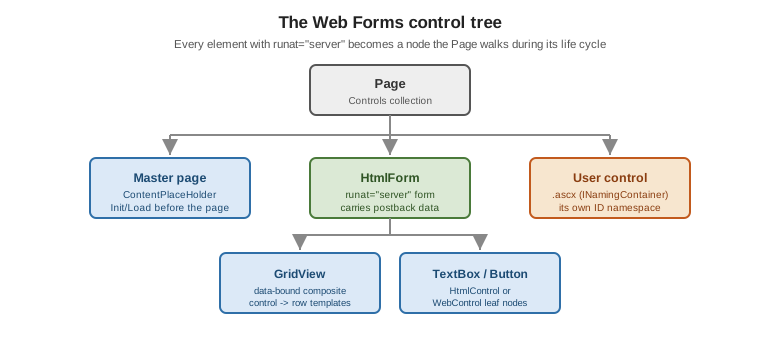
See ASP.NET Page Life Cycle Overview for how the tree relates to the life cycle, and the ASP.NET Web Forms documentation index for the control reference.
HTML server controls
HTML server controls map almost 1:1 to an HTML tag and expose it as an object without changing its rendered markup shape — useful when close control over the exact HTML is needed while still wanting server-side access:
| Base class | Purpose |
|---|---|
|
Abstract base for all HTML server controls; exposes |
|
HTML elements with a closing tag and inner content ( |
|
Any element with no dedicated wrapper class ( |
HtmlGenericControl div = (HtmlGenericControl)MessagePanel; // typed as HtmlGenericControl
div.Attributes["data-status"] = "saved";
Web server controls
The System.Web.UI.WebControls namespace is the much larger, richer family used for the majority of Web
Forms UI, rendered from WebControl and offering a consistent property set (CssClass, Font, BackColor,
Enabled, Visible, TabIndex) regardless of the underlying HTML.
| Category | Controls |
|---|---|
Basic input/output |
|
Selection |
|
Layout/grouping |
|
<asp:Label ID="TotalLabel" runat="server" Text="Total:" CssClass="form-label" />
<asp:TextBox ID="QuantityBox" runat="server" TextMode="Number" CssClass="form-control" />
<asp:DropDownList ID="CountryList" runat="server" AppendDataBoundItems="true">
    <asp:ListItem Text="-- choose --" Value="" />
</asp:DropDownList>
<asp:Button ID="AddButton" runat="server" Text="Add" OnClick="AddButton_Click" CssClass="btn btn-primary" />
Rich controls
Beyond basic input, Web Forms ships several purpose-built rich controls:
| Control | Purpose |
|---|---|
|
A full month-view date picker, |
|
Rotates banner ads driven by an XML advertisement file or a data source. |
|
Multiple mutually exclusive content panels, switched via |
|
A built-in multi-step form flow with navigation, |
|
A file |
|
Programmatically buildable |
Common properties and styling
CssClass (not class, which ASP.NET does not special-case on Web controls), Style (an IDictionary of
inline CSS, Style["display"] = "none"), Enabled, Visible (suppresses rendering entirely — an invisible
control emits no markup at all, unlike CSS display:none), and the Font/ForeColor/BackColor
presentation properties that render as inline styles unless a theme/skin (see
Master Pages, Themes, and Localization)
overrides them.
Registering client script from the server
Page.ClientScript (ClientScriptManager) is the standard way for server-side code to inject JavaScript into
the rendered page without hand-writing <script> blocks in markup:
protected void SaveButton_Click(object sender, EventArgs e)
{
    // A one-time <script> block emitted once, wherever RegisterClientScriptBlock outputs it (top of form).
    ClientScript.RegisterClientScriptBlock(GetType(), "confirmSave",
        "function confirmSave(){ return confirm('Save changes?'); }", true);

    // A statement that runs once the page has finished loading in the browser (near the closing </form>).
    ClientScript.RegisterStartupScript(GetType(), "focusFirstField",
        "document.getElementById('" + FirstNameBox.ClientID + "').focus();", true);

    // A reference to an external .js file, de-duplicated by key even if called from multiple controls.
    ClientScript.RegisterClientScriptInclude("validation-lib", ResolveUrl("~/Scripts/validation.js"));
}
RegisterClientScriptBlock and RegisterStartupScript differ only in where in the rendered HTML the block
is placed (top vs. bottom of the form); both de-duplicate by their key argument, so calling the same
registration twice in one request (e.g. from a control used more than once) emits the script only once.
Client callbacks vs. postback
ICallbackEventHandler lets a control make an asynchronous round trip to the server that runs the page life
cycle but skips full-page rendering — a lighter-weight precursor to UpdatePanel
(AJAX and Client-Side Integration):
public partial class Lookup : System.Web.UI.Page, ICallbackEventHandler
{
    private string _result;

    protected void Page_Load(object sender, EventArgs e)
    {
        string reference = ClientScript.GetCallbackEventReference(
            this, "arg", "onLookupComplete", null);
        ClientScript.RegisterClientScriptBlock(GetType(), "callback",
            "function doLookup(arg){ " + reference + "; }", true);
    }

    public string GetCallbackResult() => _result;

    public void RaiseCallbackEvent(string eventArgument)
    {
        _result = LookupService.Find(eventArgument); // runs server-side, full life cycle, no full render
    }
}
A callback still executes PreInit through PreRender (so Page_Load runs on every callback exactly as on a
postback) but produces only the string returned by GetCallbackResult, not a rendered page — useful for
type-ahead search boxes and similar small server round trips that predate any AJAX framework.