Configuration and Environment
|
This content was generated with the assistance of AI and should be verified against the official documentation before being relied on in production. The reference material consulted while preparing these pages is listed in the section bibliography. |
This page is written against Vapor 4.122.2 (the latest 4.x release, 2026-09-17) on Swift 6.4 in the Swift 6 language
mode, with vapor/template as the reference layout (swift-tools-version:6.3), checked on 2026-10-17. Vapor 5 is at
5.0.0-beta.4 and not yet released; where it changes configuration, that is marked upcoming in
Vapor 2, Vapor 3 and Vapor 5. The official Environment page documents --env and the .env files but still shows
the older Application(env) entrypoint and does not mention VAPOR_ENV or Environment.secret; on those points the
Vapor 4.122.2 source was used. Every Swift example below was compiled in a scratch package in the Swift 6 language mode,
and the commands and output were run for real.
Bookshelf runs on a laptop, in CI, in staging and in production, with different public URLs, page-size limits and secrets. The approach used on this page is the same twelve-factor one as in the Axum section: the build artefact is identical everywhere, only the environment differs; values are read once at start-up into a typed value and validated; secrets never live in the image or the repository.
Three separate questions
Vapor’s configuration story answers three questions that are easy to mix up:
-
Which environment is this?
development,testing,productionor a name of your own such asstaging. It is a single value,app.environment, chosen before the application exists. -
Where does each value come from? Process environment variables, optionally filled from
.envfiles, and files holding secrets. -
What does the code see? A typed, validated struct that handlers read, instead of strings scattered around the code.
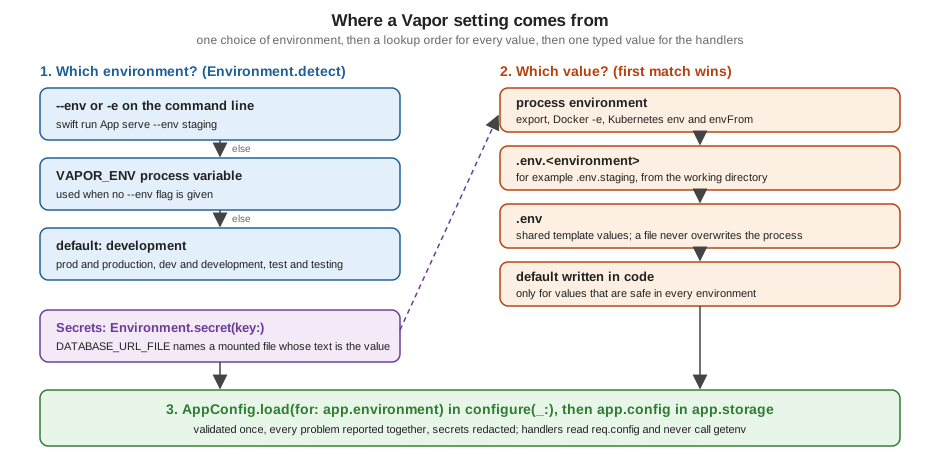
Vapor deliberately stops at the first two. It ships Environment, the dotenv loader and the secret-file reader, but no
typed configuration layer and no JSON or YAML files: the third question is answered by your own AppConfig, shown in
A typed and validated AppConfig.
Choosing the environment
Environment and app.environment
Environment is a Sendable struct with a name, the arguments of the process and a computed commandInput. The
application holds one, app.environment, which is read and written under a lock, so reading it from any isolation
domain is safe. It is normally decided once in the entrypoint (see
Application Lifecycle and the Entrypoint for the whole
sequence):
var env = try Environment.detect()          // 1. choose the environment
try LoggingSystem.bootstrap(from: &env)     // 2. logging, consumes --log
let app = try await Application.make(env) // 3. make() also loads the .env filesEnvironment.detect() resolves the name in this order, as in the Vapor 4.122.2 source:
| Input | Resulting environment |
|---|---|
|
|
|
|
|
|
any other |
|
no flag, but the process variable |
the same mapping applied to its value |
neither |
|
The flag always beats VAPOR_ENV. VAPOR_ENV is what lets a container choose its environment without changing the
start command, and it is in the source but not on the official page. Because detect() consumes the flag, it must run
before the console parses the rest of the command line, which is why it comes first in main.
The presets and isRelease
Environment.production, .development and .testing are plain values compared by name: Environment.production ==
Environment(name: "production"). Two behaviours are attached to the names:
-
.testingstrips the arguments that Xcode andswift testadd (the-NS...,-Apple...and-XCTestpairs), so that the console does not see them as unknown flags. A customEnvironment(name: "testing")does not do that. -
The official page notes that
productiondefaults to notice level logging and every other environment to info level, unless--logorLOG_LEVELsays otherwise (see Logging).
env.isRelease is not derived from the name. It is !_isDebugAssertConfiguration(), a compile-time property: true in
a -c release build, false in a debug build, whatever the name is. The source documents this on purpose, so that you
can run --env production in a debug build to try production behaviour while keeping debug information. The two runs
below use the AppConfig example of this page (its other variables are set in the shell or in .env), first with a
debug and then with a release build:
$ .build/debug/App serve --env prod -p 18083 &
$ curl -s localhost:18083/config
{"enableDocs":false,"publicBaseURL":"https:\/\/books.example.com","isRelease":false,"maxPageSize":20,"environment":"production"}

$ .build/release/App serve --env prod -p 18084 &
$ curl -s localhost:18084/config
{"maxPageSize":20,"environment":"production","isRelease":true,"publicBaseURL":"https:\/\/books.example.com","enableDocs":false}
Use app.environment to decide behaviour (which database, which log sink) and isRelease only for debug-only safety
nets.
Custom environments
An environment is a name; define the ones you need next to the presets and match on them like the presets:
import Vapor

extension Environment {
    /// A custom environment. Select it with `--env staging` or `VAPOR_ENV=staging`.
    static var staging: Environment { .custom(name: "staging") }
}switch app.environment {
case .production, .staging:
app.logger.notice("Running with production-like settings", metadata: ["env": "\(app.environment.name)"])
case .testing:
break
default:
app.logger.debug("Development defaults")
}Source: Vapor docs: Environment
switch works on the struct because Environment is Equatable and the static properties are matched with ~=.
The default case is required: a name you did not list, such as a typo like --env prodution, silently becomes a new
custom environment with the development-like behaviour of your default branch. Prefer to treat default as the
safe branch, and see the validation in A typed and validated AppConfig, where unknown or production-like
environments require more values.
Process variables
Environment.get and Environment.process
Two APIs read the process environment (ProcessInfo.processInfo.environment):
-
Environment.get(_:)returnsString?. -
Environment.processis an@dynamicMemberLookupwrapper:Environment.process.DATABASE_PORT. It is generic over anyLosslessStringConvertibletype, so the type annotation chooses the conversion, and it has a setter, which callssetenvorunsetenv.
let maxPageSize: Int = Environment.process.BOOKSHELF_MAX_PAGE_SIZE ?? 50
let enableDocs: Bool = Environment.process.BOOKSHELF_ENABLE_DOCS ?? (environment != .production)
let url = Environment.get("BOOKSHELF_PUBLIC_URL") // String?Source: Vapor docs: Environment, process variables and vapor/vapor 4.122.2: Environment+Process.swift
Things the conversion does, observed by running it:
| Variable value | Environment.process.X as … |
|---|---|
|
|
|
|
empty ( |
|
not set |
|
Two consequences. First, ?? default hides a malformed value: BOOKSHELF_MAX_PAGE_SIZE=fifty falls back to the default
instead of failing. A typed config that must fail fast reads the string with Environment.get, and throws when the
string is present but does not convert. Second, with no annotation the compiler cannot choose a type and reports an
ambiguous or unresolved subscript; write let port: Int? = ....
The setter is real global mutable state (setenv) that the Swift 6 compiler cannot check. It is convenient in tests
(below); in application code, set values before the application starts serving, or not at all.
Dotenv files
What is loaded, from where
Application.make(_:) (and the deprecated Application(_:)) calls DotEnvFile.load(for:fileio:logger:), which reads
two files from the current working directory, in this order:
-
.env.<environment name>, for example.env.productionor.env.staging; -
.env.
Each value is loaded with overwrite: false, so:
-
a variable that already exists in the process environment is never replaced by a file;
-
the first file to define a key wins, therefore
.env.<environment>beats.env; -
a missing file is not an error. At debug level the log shows
Could not load .env.development file: Not found; run with--log debugwhen a file seems to be ignored.
The resulting precedence, highest first, is the one in the figure: process environment, .env.<environment>, .env,
then defaults in your code. The official page recommends committing a .env template with default values and ignoring
the environment specific files; the vapor/template repository goes one step further and ignores both:
.env
.env.*
!.env.exampleSource: vapor/template: .gitignore
The working directory is the lookup root, not the executable’s directory. swift run uses the package directory; a
service manager or a container may start elsewhere (set WorkingDirectory= in a systemd unit, WORKDIR in a
Dockerfile), and Xcode uses a DerivedData directory unless the scheme’s custom working directory is set. A wrong working
directory silently loads nothing.
The file format
The parser is deliberately tiny (Utilities/DotEnv.swift in the source). The file below exercises every case; the
output is what DotEnvFile.read returned when run:
# a comment
PLAIN=value
SPACED_VALUE=two words
DOUBLE="line one\nline two"
SINGLE='literal \n text'
INLINE=value # not a comment
EMPTY=
URL=postgres://u:p@h/db?x=1&y=2
export EXPORTED=yes
INTERPOLATED=$PLAIN/path| Line | Value Vapor stores |
|---|---|
|
|
|
|
|
two lines: in double quotes |
|
|
|
|
|
the empty string |
|
unchanged; everything after the first |
|
key |
|
|
Pitfalls that follow from the parser, each checked by running it:
-
A line without
=is not skipped. The parser looks for the next=even across a newline, sothis line has no equals signfollowed bySECOND=2produced one entry whose key is the text of both lines, andSECONDwas never set. A stray line in a.envfile loses the setting below it, silently. -
Trailing spaces and carriage returns are part of the value, so a file saved with Windows line endings gives values ending in
\r. -
Only the two characters at both ends decide quoting: a value that merely starts with a quote is taken as is.
Reading and loading a file by hand
DotEnvFile is public, which is useful for a file that is not named .env (for example one mounted by a platform) or
in tests. read(path:fileio:) returns the parsed lines without touching the process; load(path:fileio:overwrite:)
applies them with setenv:
import Vapor
/// `path` points to a file that contains the single line `DOTENV_DEMO_KEY=from-file`.
func demonstrateOverwrite(app: Application, path: String) async throws {
// The process already has a value.
Environment.process.DOTENV_DEMO_KEY = "from-process"
// By default a file never overwrites the process.
try await DotEnvFile.load(path: path, fileio: app.fileio, overwrite: false)
print(Environment.get("DOTENV_DEMO_KEY") ?? "nil") // from-process
// Read without loading, then apply on purpose.
let file = try await DotEnvFile.read(path: path, fileio: app.fileio)
for line in file.lines { print("\(line.key)=\(line.value)") }
file.load(overwrite: true)
print(Environment.get("DOTENV_DEMO_KEY") ?? "nil") // from-file
}Source: Vapor API docs and vapor/vapor 4.122.2: DotEnv.swift
load(path:fileio:overwrite:) and load(path:fileio:logger:) overlap when you pass neither overwrite nor logger:
write overwrite: false explicitly, or the call is ambiguous. The EventLoopFuture based load, read and
load(for:on:fileio:logger:) variants and the synchronous Application(_:) are deprecated (the first of them is also
noasync); use the async ones.
Secrets
Secrets belong in the process environment or in files that the platform mounts, never in .env files that are
committed, in Package.swift or in the image. Vapor reads file based secrets with Environment.secret:
| API | Behaviour |
|---|---|
|
reads the variable, treats its value as a path and returns the file content |
|
reads that path directly |
Both return String?: the content with leading and trailing whitespace and newlines removed (so a mounted file ending
in a newline works), or nil if the variable is unset or reading failed for any reason, with no error details; files
over 32 MB are also reported as nil. Treat nil as "not configured", not as "file is absent": a permission problem
looks the same. The EventLoopFuture forms are deprecated.
The <NAME>_FILE convention comes from the Docker official images (POSTGRES_PASSWORD_FILE), which makes the same
variable work on a laptop (DATABASE_URL=... in .env) and in a container (DATABASE_URL_FILE=/run/secrets/db). The
example in the next section accepts both forms.
The values below are placeholders. If an example shows PLACEHOLDER or change-me, replace it from your secret
manager.
A typed and validated AppConfig
Reading Environment.get in twenty places spreads names, defaults and parsing around the code, and a missing value
shows up as a failure on the first request that needs it. Instead read everything once in configure(_:), validate it,
store it on the application and let handlers use the typed value.
import Vapor
/// A secret that never prints its value.
struct Secret: Sendable, CustomStringConvertible, CustomDebugStringConvertible {
let reveal: String
var description: String { "<redacted>" }
var debugDescription: String { "<redacted>" }
}
/// Everything the Bookshelf service reads from its environment, validated once at start-up.
struct AppConfig: Sendable, CustomStringConvertible {
let publicBaseURL: String
let maxPageSize: Int
let enableDocs: Bool
let databaseURL: Secret
let jwtSecret: Secret
/// One error that lists every problem, so a deployment is fixed in one round trip.
struct Invalid: Error, CustomStringConvertible {
let problems: [String]
var description: String { "Invalid configuration: " + problems.joined(separator: "; ") }
}
static func load(for environment: Environment) async throws -> AppConfig {
var problems: [String] = []
// Plain values with defaults that are safe in every environment.
let maxPageSize: Int = Environment.process.BOOKSHELF_MAX_PAGE_SIZE ?? 50
let enableDocs: Bool = Environment.process.BOOKSHELF_ENABLE_DOCS ?? (environment != .production)
// Values with a development default but required everywhere else.
let publicBaseURL: String
if let value = Environment.get("BOOKSHELF_PUBLIC_URL") {
publicBaseURL = value
} else if environment == .production || environment == .staging {
problems.append("BOOKSHELF_PUBLIC_URL is required in \(environment.name)")
publicBaseURL = ""
} else {
publicBaseURL = "http://localhost:8080"
}
// Secrets: a value in the variable itself, or a file named by <KEY>_FILE.
let databaseURL = try await secret("DATABASE_URL", problems: &problems)
let jwtSecret = try await secret("JWT_SECRET", problems: &problems)
guard problems.isEmpty else { throw Invalid(problems: problems) }
return AppConfig(
publicBaseURL: publicBaseURL, maxPageSize: maxPageSize, enableDocs: enableDocs,
databaseURL: databaseURL, jwtSecret: jwtSecret)
}
private static func secret(_ key: String, problems: inout [String]) async throws -> Secret {
if let value = Environment.get(key), !value.isEmpty { return Secret(reveal: value) }
if let value = try await Environment.secret(key: "\(key)_FILE"), !value.isEmpty {
return Secret(reveal: value)
}
problems.append("\(key) or \(key)_FILE is required")
return Secret(reveal: "")
}
var description: String {
"AppConfig(publicBaseURL: \(publicBaseURL), maxPageSize: \(maxPageSize), "
+ "enableDocs: \(enableDocs), databaseURL: \(databaseURL), jwtSecret: \(jwtSecret))"
}
}
// MARK: - Storage on the application, accessor on the request
extension Application {
private struct AppConfigKey: StorageKey {
typealias Value = AppConfig
}
var config: AppConfig {
get {
guard let config = self.storage[AppConfigKey.self] else {
fatalError("AppConfig is not set. Call app.config = ... in configure(_:) first.")
}
return config
}
set { self.storage[AppConfigKey.self] = newValue }
}
}
extension Request {
var config: AppConfig { self.application.config }
}Source: Vapor docs: Services, storage and Vapor docs: Environment
Points worth noting in the code:
-
One error for all problems.
Invalidlists every missing value, so a broken deployment is fixed in one attempt. Throwing fromconfigure(_:)stops the process before it listens; the entrypoint’scatchlogs it, shuts down and rethrows, which gives a non-zero exit status that orchestrators see as a failed start. -
Defaults depend on the environment.
BOOKSHELF_PUBLIC_URLhas a development default and is required inproductionandstaging. An unknown environment name takes the lenient branch, so list production-like names explicitly (or invert the check) according to what is safer for you. -
Secrets are a distinct type.
Secretprints as<redacted>, so logging the wholeAppConfig(done below on purpose) or aMirror-style dump cannot leak them; the value is reachable only throughreveal.AppConfigis a plain struct ofSendablevalues, so it satisfies the requirement thatStorageKey.ValueisSendableand can be read from any request. -
Storage.
app.storage[Key.self]is the extension point ofApplication; theprivatekey type prevents anybody else from replacing the value, and the computed propertyapp.configis the typed accessor.req.configforwards to it. The pattern, the lock behindapp.storageandSendableconstraints are covered on the Services, Storage and Dependency Injection page.
The configure(_:) that uses it:
import Vapor
func configure(_ app: Application) async throws {
// 1. Read and validate every setting before anything else starts.
app.config = try await AppConfig.load(for: app.environment)
app.logger.info("Configuration loaded", metadata: ["config": "\(app.config)"])
// 2. Environment-specific wiring.
switch app.environment {
case .production, .staging:
    app.logger.notice("Running with production-like settings", metadata: ["env": "\(app.environment.name)"])
case .testing:
    break
default:
    app.logger.debug("Development defaults")
}
try routes(app)
}Source: vapor/template: configure.swift
and a handler that reads it through the request:
import Vapor

struct ConfigSummary: Content {
    let environment: String
    let isRelease: Bool
    let publicBaseURL: String
    let maxPageSize: Int
    let enableDocs: Bool
}

func routes(_ app: Application) throws {
    app.get { req async in "It works!" }
    app.get("hello") { req async -> String in "Hello, world!" }
    app.get("config") { req async -> ConfigSummary in
        let config = req.config
        return ConfigSummary(
            environment: req.application.environment.name, isRelease: req.application.environment.isRelease,
            publicBaseURL: config.publicBaseURL, maxPageSize: config.maxPageSize, enableDocs: config.enableDocs)
    }
}
Source: Vapor docs: Routing
Only the non-secret fields are returned; the route exists to make the examples below observable and should not be in a real service. Running it:
$ swift build
$ .build/debug/App routes
[ WARNING ] Invalid configuration: DATABASE_URL or DATABASE_URL_FILE is required; JWT_SECRET or JWT_SECRET_FILE is required

$ DATABASE_URL=postgres://user:PLACEHOLDER@localhost/bookshelf JWT_SECRET=change-me .build/debug/App serve --log debug
[ DEBUG ] Could not load .env.development file: Not found: Unable to open or create file at path '.env.development' ...
[ DEBUG ] Could not load .env file: Not found: Unable to open or create file at path '.env' ...
[ INFO ] Configuration loaded [config: AppConfig(publicBaseURL: http://localhost:8080, maxPageSize: 50, enableDocs: true, databaseURL: <redacted>, jwtSecret: <redacted>)]

$ .build/debug/App routes --env production
[ WARNING ] Invalid configuration: BOOKSHELF_PUBLIC_URL is required in production; DATABASE_URL or DATABASE_URL_FILE is required; JWT_SECRET or JWT_SECRET_FILE is required
Layering the three sources
With these files in the working directory:
# .env  (template, committed)
BOOKSHELF_MAX_PAGE_SIZE=20
BOOKSHELF_PUBLIC_URL=http://from-dotenv.example
DATABASE_URL=postgres://user:PLACEHOLDER@localhost/bookshelf

# .env.staging  (not committed)
BOOKSHELF_PUBLIC_URL=https://staging.example.com
BOOKSHELF_MAX_PAGE_SIZE=75

# a mounted secret file; the trailing newline is trimmed
$ printf 'jwt-placeholder-secret\n' > jwt_secret.txt
the staging run takes the URL from .env.staging, the database from .env (see Fluent Overview and Database Drivers), the page size from the process and the JWT
secret (see JSON Web Tokens (JWT)) from the file:
$ JWT_SECRET_FILE=$PWD/jwt_secret.txt BOOKSHELF_MAX_PAGE_SIZE=5 .build/debug/App serve --env staging -p 18080 &
$ curl -s localhost:18080/config
{"isRelease":false,"maxPageSize":5,"environment":"staging","enableDocs":true,"publicBaseURL":"https:\/\/staging.example.com"}
maxPageSize is 5, although both files define it: the process environment wins. (The key order of the JSON object is
not stable.)
Per-environment behaviour and tests
Branching on app.environment in configure(_:) is enough for small differences (the switch above). For larger ones
prefer values in AppConfig, so that the difference is data, not code, and tests can set it.
In tests (see Testing) withApp (VaporTesting) makes the application with Environment.testing, so .env.testing is loaded from the
working directory and app.environment is .testing. Tests that need particular values set process variables around
the call and restore them afterwards. Environment(name:arguments:) builds an environment without touching the real
command line, which is the officially documented way to simulate flags:
import VaporTesting
import Testing
import Foundation
@testable import App

@Suite(.serialized) struct ConfigTests {
    /// Sets process variables for the duration of `body` and restores them afterwards.
    func withProcessVariables(_ values: [String: String], _ body: () async throws -> Void) async throws {
        let previous = values.keys.map { ($0, Environment.get($0)) }
        for (key, value) in values { Environment.process[dynamicMember: key] = value }
        defer { for (key, old) in previous { Environment.process[dynamicMember: key] = old } }
        try await body()
    }

    @Test func configRouteReportsValidatedSettings() async throws {
        try await withProcessVariables([
            "DATABASE_URL": "postgres://user:PLACEHOLDER@localhost/bookshelf",
            "JWT_SECRET": "test-placeholder-secret",
            "BOOKSHELF_MAX_PAGE_SIZE": "7",
        ]) {
            try await withApp(configure: configure) { app in
                try await app.testing().test(.GET, "config") { res async in
                    #expect(res.status == .ok)
                    #expect(res.body.string.contains("\"maxPageSize\":7"))
                    #expect(res.body.string.contains("\"environment\":\"testing\""))
                }
            }
        }
    }

    @Test func missingSecretsAreReportedTogether() async throws {
        try await withProcessVariables(["DATABASE_URL": "", "JWT_SECRET": ""]) {
            do {
                try await withApp(configure: configure) { _ in }
                Issue.record("configure should have thrown")
            } catch let error as AppConfig.Invalid {
                #expect(error.problems.count == 2)
            }
        }
    }

    @Test func customEnvironmentWithoutCommandLine() async throws {
        let env = Environment(name: "staging", arguments: ["vapor"])
        #expect(env == .staging)
        #expect(env.arguments == ["vapor"])
    }

    @Test func detectReadsEnvFlag() throws {
        #expect(try Environment.detect(arguments: ["App", "serve", "--env", "prod"]) == .production)
        #expect(try Environment.detect(arguments: ["App", "-e", "staging"]) == .staging)
    }
}The suite is .serialized: the process environment is shared by every test in the process, so tests that change it must
not run in parallel with ones that read the same keys. The more robust design when it hurts is to make AppConfig.load
take a lookup closure instead of reading Environment directly; the process variables then never have to change.
Containers and Kubernetes
The vapor/template Dockerfile starts the service with the environment fixed on the command line, listening on all
interfaces (the --hostname and --port flags are described on Server Configuration; the
image itself is built on Deployment with Docker and the platforms that run it are compared on Deployment Targets):
ENTRYPOINT ["./App"]
CMD ["serve", "--env", "production", "--hostname", "0.0.0.0", "--port", "8080"]
Source: vapor/template: Dockerfile
Because --env is in CMD, one image runs everywhere: override the arguments (serve --env staging ...) or leave the
command and set VAPOR_ENV for images that do not fix it. Values come from the platform, not from files in the image;
.env files are best left out of the image (add them to .dockerignore). A Compose service:
services:
  app:
    image: bookshelf:latest
    command: ["serve", "--env", "staging", "--hostname", "0.0.0.0", "--port", "8080"]
    environment:
      LOG_LEVEL: info
      BOOKSHELF_PUBLIC_URL: https://staging.example.com
      DATABASE_URL_FILE: /run/secrets/database_url
      JWT_SECRET_FILE: /run/secrets/jwt_secret
    secrets:
      - database_url
      - jwt_secret

secrets:
  database_url:
    file: ./secrets/database_url.txt     # placeholder, keep out of version control
  jwt_secret:
    file: ./secrets/jwt_secret.txt
Source: Docker docs: Secrets in Compose
The same idea in Kubernetes: non-secret settings from a ConfigMap or env, secrets mounted as files so that
Environment.secret can read them (a mounted Secret is tmpfs backed and refreshed on change, unlike an injected
variable, which never changes without a restart):
apiVersion: apps/v1
kind: Deployment
metadata:
  name: bookshelf
spec:
  replicas: 2
  selector:
    matchLabels:
      app: bookshelf
  template:
    metadata:
      labels:
        app: bookshelf
    spec:
      containers:
        - name: bookshelf
          image: registry.example.com/bookshelf:1.0.0
          args: ["serve", "--env", "production", "--hostname", "0.0.0.0", "--port", "8080"]
          env:
            - name: BOOKSHELF_PUBLIC_URL
              value: https://books.example.com
            - name: DATABASE_URL_FILE
              value: /etc/secrets/bookshelf/database-url
            - name: JWT_SECRET_FILE
              value: /etc/secrets/bookshelf/jwt-secret
          volumeMounts:
            - name: secrets
              mountPath: /etc/secrets/bookshelf
              readOnly: true
      volumes:
        - name: secrets
          secret:
secretName: bookshelf-secrets # created outside Git, values are placeholders hereThe Secret object, encryption at rest, RBAC and external secret stores are covered in
Kubernetes Secrets. Since AppConfig is read once at start-up, a rotated secret
takes effect only after a restart, even though the mounted file changes; re-read Environment.secret at the point of
use if you need rotation without a restart. The standard OTEL_* variables of the tracing exporters are described on Tracing, Metrics & OpenTelemetry.
Vapor 2, Vapor 3 and Vapor 5
-
Vapor 2 (Patel, chapters 3 and 8) configured the application from a
Config/folder of JSON files:app.json,server.json, per-environment subfolders such asConfig/production/, and a git-ignoredConfig/secrets/folder. In Vapor 2’s documentation, a string starting with$, written"$PORT:8080", read the environment variablePORTand fell back to8080. Nothing of this exists in Vapor 4: there is noConfigtype, nodrop.config, and no JSON file loading; the same effect isEnvironment.process.PORT ?? 8080and a typed struct, and per-environment files are.env.<environment>. -
Vapor 3 used a
configure(_ config: inout Config, _ env: inout Environment, _ services: inout Services)function andEnvironment.getfor variables, and registered everything through the services container. NeitherConfignorServicesexist in Vapor 4. -
Vapor 5 (
5.0.0-beta.4, not released) moves toapple/swift-configuration. In the5.0.0-beta.4source,Environment.detect(from:)takes aConfigReaderand reads the keyvapor.env;Applicationtakes aconfigReaderwhose default providers are the command line arguments and the process environment variables; and the filesDotEnv.swift,Environment+Process.swiftandEnvironment+Secret.swiftdo not exist at the paths used in 4.122.2, nor doesEnvironmentthere haveget,processorarguments. How.envfiles,Environment.secretand--envare replaced was not verified for this page (see What’s New, Upgrading and Vapor 5). Plan the move accordingly: keep configuration behind your ownAppConfig, which is the only code that would need to change.
Common errors and pitfalls
| Symptom | Cause and fix |
|---|---|
|
The working directory is not the project directory (Xcode, systemd, a different |
An environment variable’s value in |
It is already set in the process; files never overwrite. Unset it or change the process value. |
Setting below a stray line is |
A line without |
|
Only |
Value ends with |
Windows line endings or trailing spaces in the file; the parser does not trim. |
Typo in |
Unknown names are valid custom environments. Validate the name, or require the
production values for anything that is not |
|
It reflects the build configuration, not the name. |
|
Unset variable, missing file, no permission, or a file over 32 MB; there is no error to inspect. |
|
Pass |
Secrets visible in logs |
Log through a redacting type such as |
Version notes and where the books are outdated
-
Environment.secret(key:)and theasyncDotEnvFileAPI are the current forms; theEventLoopFutureversions and the synchronousApplication(_:)that loads.envwithDotEnvFile.load(for:on:fileio:logger:)are deprecated in 4.122.2. -
The official page still shows the pre-
Application.makeentrypoint (Application(env)withdefer { app.shutdown() }). The template’s@main enum Entrypointwithtry await Application.make(env)shown above is the current form. -
VAPOR_ENV,Environment.secretand the single-quote and\nrules of the parser are documented only in the source. -
The consulted books are older than the current source. Patel covers the Vapor 2
Config/folders and$VAR:default(see above); Condon reads database credentials withEnvironment.get, which still works. None of them covers.env.<environment>precedence,VAPOR_ENV,Environment.secretor the dotenv syntax limits above. The concepts that survive are the same ones as on this page: one environment name, variables from the process, files for development only, secrets outside the repository. -
Swift 6 language mode:
EnvironmentandAppConfigareSendable;StorageKey.Valuemust beSendable, so a configuration type that holds a reference type needs an actor, a lock or an immutableSendablecopy. -
Vapor 5 (
5.0.0-beta.4): see Vapor 2, Vapor 3 and Vapor 5.