RabbitMQ Operations, Monitoring and Security
|
This content was generated with the assistance of AI and should be verified against the official documentation before being relied on in production; see the section bibliography for the reference material consulted while preparing these pages. |
Every earlier RabbitMQ page assumed a single, unsecured, hand-run broker — Getting Started with Messaging's single-node docker run example
with no credentials worth mentioning. This page is where that assumption is retired: how an operator actually
watches, administers, and upgrades a running broker or cluster, and how a shared broker is locked down so one
tenant or client can’t see or touch another’s traffic.
The management UI and HTTP API
The management plugin (rabbitmq_management, bundled with RabbitMQ and enabled with
rabbitmq-plugins enable rabbitmq_management) exposes a browser-based management UI and the HTTP API
it is itself built on, both listening on port 15672 by default. Everything the UI can do — inspecting
connections, channels, exchanges, queues and their message rates, declaring or deleting topology, managing users,
vhosts and permissions, and viewing cluster-wide overview metrics — is available as a plain HTTP+JSON endpoint
under the same port, which is what makes it scriptable: GET /api/queues/%2f/orders returns the same queue
detail the UI renders, and PUT /api/queues/%2f/orders can declare a queue exactly as channel.queueDeclare
does from client code.
The CLI toolbox: rabbitmqctl, rabbitmqadmin, rabbitmq-diagnostics
Three command-line tools cover most day-to-day administration, each with a different scope:
| Tool | Purpose |
|---|---|
|
The primary administration tool — manages users, vhosts, permissions, policies and parameters, and exposes cluster-management operations (joining/removing a node, listing queues/connections/channels) that do not go through the HTTP API at all. |
|
A command-line client for the HTTP API itself — current (v2) |
|
Read-only diagnostics and health checks — cluster status, listener status, memory/alarm state, and the health-check endpoints a load balancer or orchestrator (see RabbitMQ Clustering, Federation and Shovel) should query, rather than a bare TCP check. |
# rabbitmqctl: grant a user full access to a vhost (configure/write/read, below)
rabbitmqctl set_permissions -p payments order-service "^orders\." "^orders\." "^orders\."

# rabbitmqadmin (v2): declare a queue over the HTTP API
rabbitmqadmin declare queue --vhost=payments name=orders durable=true

# rabbitmq-diagnostics: the same health check a load balancer should poll
rabbitmq-diagnostics check_port_connectivity
Definitions export and import
RabbitMQ’s cluster-wide metadata — users, vhosts, permissions, exchanges, queues, bindings, policies and
parameters — can be exported as a single JSON definitions document (rabbitmqctl export_definitions, the
GET /api/definitions HTTP API endpoint, or the management UI’s overview pane) and re-imported into another
cluster (rabbitmqctl import_definitions, the equivalent POST, or a boot-time import from a local file or an
HTTPS endpoint). This is the standard way to seed a new environment’s topology from a known-good baseline, back
up broker configuration ahead of a change, or migrate topology between clusters — and, because an export can
include user records with their password hashes, an exported definitions file should be handled as sensitive,
the same as any other credential material.
Policies and operator policies
RabbitMQ Reliability, Dead-Lettering and
TTL and RabbitMQ Queue Types both introduced queue arguments
(x-message-ttl, x-dead-letter-exchange, x-max-length, and so on) as something a client sets when declaring
a queue. A policy is the operational alternative to hard-coding those in client code: a name, a pattern
(matched against queue/exchange names within a vhost), a definition (the same argument keys and values a client
could otherwise pass), and an optional priority when more than one policy matches the same resource — applied
cluster-wide, at runtime, without touching a single client. An operator policy layers on top of ordinary
policies with a narrower, enforced set of arguments an operator controls regardless of what a regular policy (or
a client’s own declaration) requests; where both a policy and an operator policy set the same argument, RabbitMQ
resolves the conflict by choosing the more conservative of the two values, so an operator policy acts as a
guardrail rather than something a regular policy can simply override.
# every queue/exchange matching "^orders\." gets a one-hour TTL and a DLX, via policy rather than client code
rabbitmqctl set_policy orders-ttl "^orders\." \
    '{"message-ttl":3600000,"dead-letter-exchange":"orders.dlx"}' \
    --priority 1 --apply-to queues

# operator policy: cap every queue's length at 100,000 regardless of what any regular policy requests
rabbitmqctl set_operator_policy max-length-guard "^.*" \
    '{"max-length":100000}' --apply-to queues
Because policies apply retroactively to every matching queue or exchange — including ones declared long before the policy existed — they are the preferred way to change an argument like TTL or a length limit across an entire fleet of queues sharing a naming convention, instead of redeploying every producer/consumer that declares one.
Prometheus/Grafana monitoring, and memory/disk alarms
RabbitMQ’s Prometheus plugin (rabbitmq_prometheus, bundled) exposes broker and per-object metrics on port
15692 in Prometheus’s native scrape format, and RabbitMQ ships ready-made Grafana dashboards built on those
same metrics — the combination is the officially recommended monitoring stack, ahead of polling the HTTP
API/management UI on a timer for metrics purposes (the HTTP API remains the right tool for administrative
actions and one-off inspection, just not for continuous scraping). A production scrape interval of roughly 15
seconds, paired with collect_statistics_interval set to about 10 seconds on the broker side, is RabbitMQ’s own
starting-point recommendation.
Two alarms are worth calling out specifically because of what they do when triggered: a memory alarm
(mem_alarm in node status, tripped once a node’s memory use crosses its configured high watermark) and a
disk alarm (disk_free_alarm, tripped once free disk space on the node’s data directory drops below its
configured limit) each cause the affected node to block publishers cluster-wide — not just on that node — until the alarm clears, since a node that has exhausted memory or disk cannot safely keep accepting new
messages. Consuming is unaffected by either alarm, which is deliberate: draining a backlog is exactly what
relieves the underlying pressure. Both watermarks and limits are configurable, and both metrics are exported
through the Prometheus plugin above, which is what makes them alertable before they actually trip.
Production checklist and upgrade strategy
RabbitMQ’s own production checklist is a single reference gathering the operational prerequisites easy to miss when moving from a local/dev setup to production: kernel file-descriptor limits, NTP-synchronized clocks across every node, an odd number of cluster nodes for clean majority arithmetic (see RabbitMQ Clustering, Federation and Shovel's node-loss discussion), sizing memory and disk watermarks ahead of the alarms above, and firewall rules for every port a deployment actually uses (AMQP, the management/Prometheus HTTP ports, and inter-node Erlang distribution).
Upgrading a running cluster’s RabbitMQ version follows a rolling upgrade: nodes are upgraded one at a time — each stopped, upgraded, and restarted to rejoin the cluster — so the cluster as a whole stays available throughout, provided the specific version jump is supported (rolling upgrades do not support skipping minor/major versions, only patch releases) and any newly available feature flags are enabled only once every node has been upgraded.
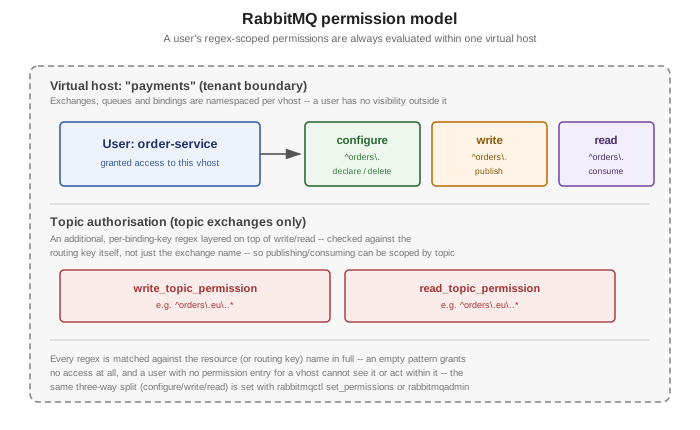
Security: virtual hosts as tenant boundaries
A virtual host (vhost) is RabbitMQ’s unit of namespacing and isolation: exchanges, queues and bindings all
live inside exactly one vhost, a user is granted access per vhost rather than cluster-wide by default, and a
user with no permission entry for a given vhost cannot see or act on anything inside it — not even enough to
know it exists. This is what makes a single cluster usable by multiple independent applications or teams at
once without one being able to observe or interfere with another’s topology, and it is the natural place to draw
the boundary between, for example, a payments and a notifications domain sharing the same broker.
Users and permissions
Within a vhost, a user’s permissions are exactly three independent regular expressions, each matched in full
against a resource’s name: configure (declaring or deleting exchanges/queues), write (publishing to an
exchange, or binding into a queue), and read (consuming from a queue, or binding a queue to an exchange for
reading). All three are set together with rabbitmqctl set_permissions (or the equivalent HTTP API call/UI
form) — an empty pattern for any of the three denies that kind of access entirely, so a user can, for instance,
be granted write/read on everything matching ^orders\. while being denied configure altogether, letting
it publish and consume without being able to declare or delete topology.
Topic authorisation
Topic authorisation adds a fourth, narrower layer on top of write/read, scoped specifically to topic
exchanges: write_topic_permission and read_topic_permission, each a regular expression matched against the
routing key itself rather than just the exchange’s name. Where ordinary write/read permissions decide
whether a user may touch a given exchange or queue at all, topic authorisation decides which routing keys within
that exchange a user may publish to or consume from — letting a user hold broad access to a shared topic
exchange while being restricted to, say, only the orders.eu.* slice of it.
TLS
Any listener — AMQP, the management/HTTP API port, or the MQTT/STOMP plugin ports below — can be configured
for TLS: the broker presents a certificate from a configured certificate/key pair, and a client validates it
against a trusted CA the same way any other TLS service works. Client-certificate authentication (mutual TLS)
is also supported: configuring the broker to require and validate a client certificate lets the certificate’s
distinguished name become the client’s authenticated identity, without a separate username/password exchange — the same mTLS shape Kafka Security describes for Kafka’s SSL
listener.
OAuth 2.0 / OIDC
The OAuth 2.0 authentication backend plugin (rabbitmq_auth_backend_oauth2) lets a client authenticate with
a JWT-encoded OAuth 2.0 access token instead of a RabbitMQ-local username and password — the broker validates
the token’s signature against a configured OIDC provider (issuer, JWKS endpoint) and maps token claims (scopes)
to RabbitMQ permissions, so authorization decisions are driven by the same identity provider already issuing
tokens for the rest of a system rather than a broker-local user database. See
Client Credentials and Client
Authentication for how a service typically obtains the token this plugin then validates.
LDAP
The LDAP authentication/authorization backend plugin (rabbitmq_auth_backend_ldap) validates a user’s
credentials, and can answer four separate authorization queries, against an existing LDAP directory: whether a
user may log in at all, whether a user may access a given vhost, whether a user may act on a given resource
(exchange/queue), and what user tags a user should be granted — letting an organization that already manages
identity in LDAP extend the same directory to RabbitMQ rather than maintaining a separate broker-local user
store.
MQTT, STOMP and WebSocket plugins
Three bundled plugins let non-AMQP clients speak to RabbitMQ directly, all layered on top of the same exchange, queue, binding and virtual-host model this page and RabbitMQ Architecture and the AMQP Model already describe, rather than being a separate broker feature:
| Plugin | Notes |
|---|---|
|
Speaks MQTT (3.1.1 and 5.0) on port 1883 (8883 for TLS) — each MQTT client is represented internally as an AMQP 0-9-1 connection with its own queue, and MQTT topics map onto RabbitMQ’s own topic-exchange routing, so an AMQP consumer can subscribe to messages an MQTT device publishes and vice versa. |
|
Speaks STOMP (1.0 through 1.2) on port 61613 (61614 for TLS) — a simple, text-based protocol whose destinations map onto RabbitMQ exchanges, queues and topics, commonly used for lightweight or browser-adjacent clients that do not want a full AMQP client library. |
|
Expose MQTT or STOMP, respectively, over a WebSocket connection instead of a raw TCP socket — what lets a browser-based client speak either protocol directly, since browsers cannot open the raw TCP connection either plugin would otherwise need. |
Every one of these plugins is still subject to the same vhost, user-permission and topic-authorisation model covered above — an MQTT or STOMP client authenticates and is authorized exactly as an AMQP client would be, just through a different wire protocol.